
Technical SEO vs Content SEO: How to Decide Where to Start
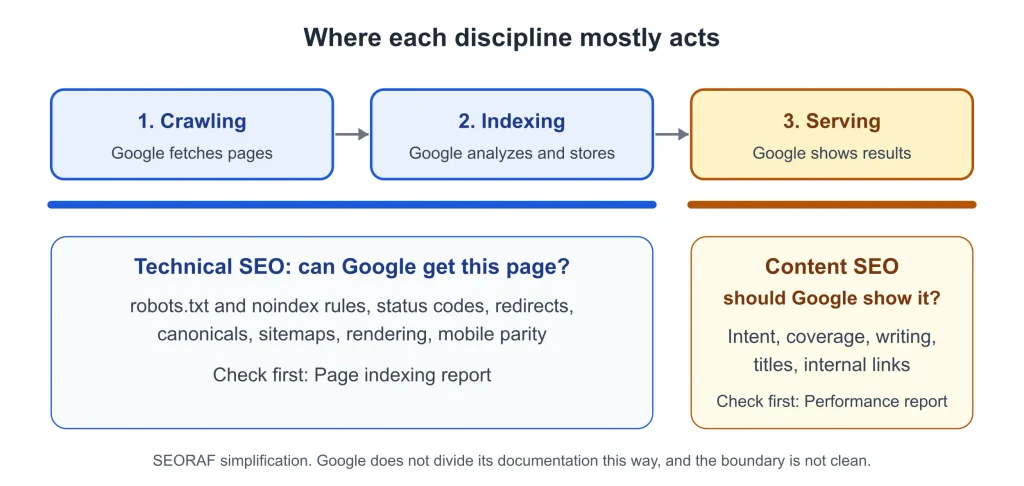
Technical SEO makes sure Google can crawl, process and index your pages. Content SEO makes those pages helpful and relevant enough to be shown for a search. One asks can Google get this page? The other asks should Google show it?
The two fail in different ways, so fixing the wrong one wastes effort. A page Google cannot index never gets to compete, however well it is written. An indexed page that does not satisfy search intent may struggle to earn relevant impressions, clicks, and conversions.
This guide compares the two side by side, shows where they overlap, and gives you a Search Console check for deciding what to fix first. Factual claims link to relevant Google documentation where available; practitioner opinions are attributed in context, and SEORAF recommendations are editorial guidance rather than tested findings.
The short answer
- Technical SEO decides whether Google can reach, process and index a page. Content SEO decides whether the page deserves to be shown for a search.
- Technical SEO and Content SEO solve different problems. Improving one cannot automatically compensate for serious weaknesses in the other.
- Do not guess which one you need. Check the Page indexing report first and the Performance report second.
- After a sudden traffic drop, work through Google’s checklist of causes before assigning the work to either discipline.
Technical SEO vs content SEO at a glance
| Question | Technical SEO | Content SEO |
|---|---|---|
| Core question | Can Google crawl, render and index this page? | Does this page deserve to be shown for this search? |
| Where it acts in Google’s process (SEORAF simplification) | Mostly crawling and indexing | Mostly serving results, where relevance is judged |
| Typical work | robots.txt and noindex rules, status codes and redirects, canonicals, sitemaps, site structure, rendering, mobile parity, page experience, structured data | Search intent, topic coverage, writing, titles and snippets, internal links, updates, pruning |
| Example of a typical fix | Remove a leftover noindex rule from a template | Rebuild a page around the question searchers are actually asking |
| Typical symptom when weak | Pages missing from the index, errors in Search Console | Pages indexed but with few impressions, or impressions without clicks |
| First place to check | Page indexing report, URL Inspection | Performance report: queries, pages, click-through rate |
| Who usually does it | A developer or technical SEO | A writer, editor or SEO strategist |
| Rhythm | Fixes and monitoring, with spikes at launches and migrations | Continuous planning, publishing and refreshing |
| Risk of neglecting it | Good pages never reach the index | Indexed pages that nobody needs |
The split is a working model, not a law, and the “where it acts” row is a simplification. Google says that even a page meeting every requirement and best practice may not be crawled, indexed or served (Search Essentials), so the line between “can Google get it?” and “should Google show it?” is not clean.
Some tasks sit on the border, and the overlap section below sorts them out. For how individual page elements divide between technical and on-page work, see SEORAF’s Technical SEO vs On-Page SEO. This article looks one level up, at the whole SEO program.
What is technical SEO?
In this article, technical SEO means the set of changes that make it possible for search engines to crawl, render and index a site, and for people to use it without friction. It is about access and clarity, not about wording.
Search works in three stages, and not all pages make it through each stage: crawling (downloading pages it has found), indexing (analyzing and storing what it learns), and serving results. Technical SEO is mostly concerned with the first two. Google does not divide its own documentation this way.
The minimum Google asks for
Google’s technical requirements list three conditions for a page to be eligible for indexing:
- Googlebot is not blocked. Googlebot generally cannot access content that requires authentication.
- The page works, meaning Google receives an HTTP 200 status code.
- The page has indexable content, in a supported file type and without violating Google’s spam policies.
Meeting all three makes a page eligible. It does not guarantee indexing. Google says that meeting its requirements and best practices “doesn’t mean that Google will crawl, index, or serve its content” (Search Essentials).
What technical SEO usually covers
- Crawl access: robots.txt rules, login walls and internal links. robots.txt tells crawlers which URLs they can access, and it is not a mechanism for keeping a page out of Google. Google says it primarily finds pages through links from pages it has already crawled (SEO Starter Guide), and recommends that every page you care about has a link from at least one other page on your site, built as an anchor element with an href attribute (crawlable links).
- Indexing controls: noindex directives, canonical signals and duplicate pages. For noindex to work, the page must not be blocked by robots.txt. If crawlers cannot fetch the page, they never see the rule, and the page can still appear in results (block indexing). Google describes redirects and rel=”canonical” as strong signals and sitemap inclusion as a weak signal for choosing the canonical URL, and says it identifies the best version itself when none is given (consolidate duplicate URLs). Not every page should be indexed, so the goal is control, not maximum count.
- Status codes and redirects: what your server tells crawlers about moved, missing or broken pages.
- Site structure and URLs: logical organization and descriptive URLs that show how pages relate.
- Rendering: When Google crawls a page, it should ideally see the page the way an average user does, which requires access to the same resources as the user’s browser. If important components are hidden from Google, it might not understand the page (SEO Starter Guide).
- Mobile parity: Google uses the mobile version of a site’s content, crawled with the smartphone agent, for indexing and ranking, and only content shown on the mobile site is used for indexing (mobile-first indexing). Content missing on mobile is a technical problem with content consequences.
- Page experience and structured data: Core Web Vitals are used by Google’s ranking systems, there is no single page experience signal, and good scores do not guarantee top rankings. Google says other aspects, such as HTTPS and mobile display, do not directly help a site rank higher, though they are still worth pursuing for users (page experience). Structured data labels what a page contains. Google requires it to be a true representation of the page content and does not guarantee a rich result (structured data policies). SEORAF’s Technical SEO Basics guide explains each topic for beginners.
What technical SEO does not do
It does not make a weak page useful. The SEO Starter Guide says: “There are no secrets here that’ll automatically rank your site first in Google.” Technical work removes obstacles and keeps signals consistent. It does not supply a reason for anyone to choose your page.
Example: a leftover noindex rule (hypothetical)
A team relaunches a service page. The copy is excellent, but a noindex tag from the staging site is still in the template. Search Console’s Page indexing report lists “URL marked ‘noindex'” as a reason a page is not indexed. No rewrite will help until the tag is removed. That is a technical problem with a technical fix.
For a fuller definition, see What Is Technical SEO?
What is content SEO?
In this article, content SEO means planning, creating, organizing and maintaining pages so that they match what searchers want and are useful enough to be shown. Google’s SEO Starter Guide describes SEO as helping search engines understand your content and helping users find your site and decide whether to visit it. Content SEO carries most of that second half.
What content SEO usually covers
- Search intent: working out what the person behind a query is trying to do, then building the page around that. SEORAF’s search intent guide covers the types and how to read a results page.
- Topic coverage: deciding which questions a site answers and how its pages connect. A topical authority map is one way to plan it.
- Writing and organization: The SEO Starter Guide says content should be easy to read and well organized, unique, and up to date.
- Titles and snippets: The starter guide says a good title is “unique to the page, clear and concise, and accurately describes the contents of the page.” Google’s title link documentation says title links are generated automatically from several sources, including the title element, headings, other on-page text and anchor text. Google’s snippet documentation says snippets are created automatically from page content, and that it only sometimes uses the meta description when that gives a more accurate description of the page. A well-written title element and meta description are therefore worth having, but they do not control what is displayed.
- Internal links as context: “Good anchor text is descriptive, reasonably concise, and relevant to the page that it’s on” (crawlable links).
- Updating and pruning: improving pages that already exist and merging, redirecting or removing those that no longer earn their place. Decide by usefulness and purpose, not by age or traffic alone. See SEORAF’s content pruning guide.
Why “people-first” and E-E-A-T belong here
Google’s guidance on helpful, reliable, people-first content says its automated ranking systems are designed to prioritize helpful, reliable information. It describes E-E-A-T as experience, expertise, authoritativeness and trustworthiness, says that trust is the most important of the four, and says that E-E-A-T itself isn’t a specific ranking factor.
The same page asks three questions about your content:
- Who created it? Google strongly encourages accurate authorship information, such as bylines, where readers might expect it.
- How was it created? Google says AI or automation disclosures are useful for content where readers might wonder how it was made, and suggests adding them when reasonably expected.
- Why was it created? Google calls this perhaps the most important question: the answer should be that the content is made primarily to help people, not primarily to attract search engine visits.
The same page lists warning signs of search-engine-first content. Two of them are changing the date of pages to make them seem fresh when the content has not substantially changed, and writing to a particular word count because of a belief that Google has a preferred one. Google’s answer to the second is that it does not. Both are common habits in SEO writing, and neither helps readers.
What content SEO does not do
It cannot rescue a page Google cannot crawl or index. A page blocked by robots.txt cannot have its content crawled, although the URL can still appear in results, for example if other pages link to it (block indexing). No edit to the copy changes that.
Example: the right page, the wrong question (hypothetical)
A site publishes a guide to choosing accounting software. It is indexed and appears in results, but it only lists features, while the queries driving impressions ask which option suits a freelancer. Nothing is broken technically. The page answers a different question from the one being asked, so the work is intent and coverage: restructure around the decision, and add the comparison readers expect.
For the full workflow, see SEORAF’s Content SEO Guide.
Where technical and content SEO overlap
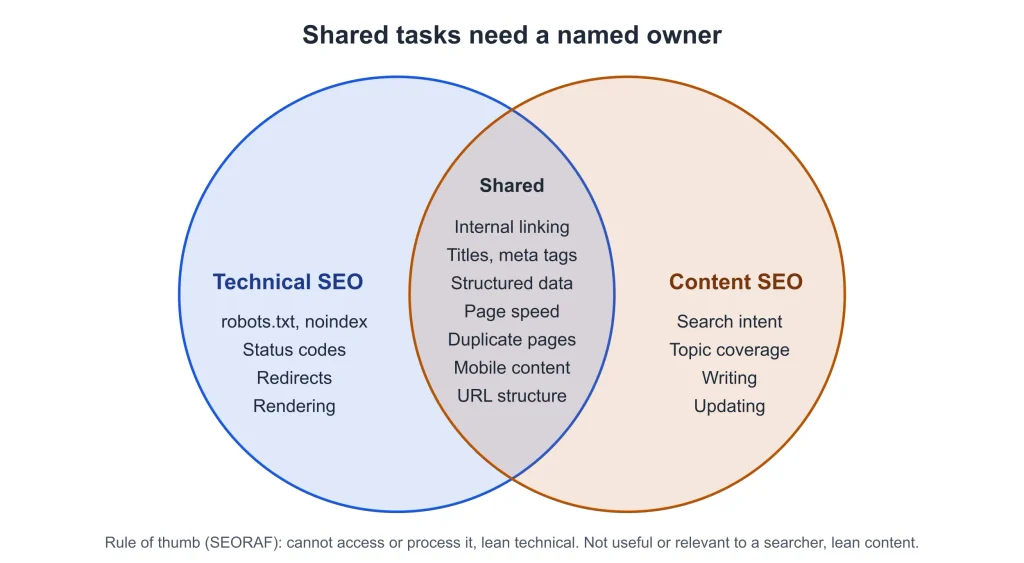
Some tasks do not belong cleanly to either side. Arguing over the label matters less than making sure someone owns the task. A useful rule: if the problem is that Google cannot access or process something, it leans technical; if the problem is that a searcher would not find it useful or relevant, it leans content. Google-documented details for each shared task are marked below.
| Shared task | Technical side | Content side |
|---|---|---|
| Internal linking | Navigation and templates built as crawlable links (an anchor element with an href), so every page you care about is linked from another page. | Contextual links with descriptive, concise anchor text, chosen by whoever knows the topic. |
| Titles and meta descriptions | Templates, duplicates at scale, missing tags. Google generates title links automatically from several sources. | Unique, accurate wording for each page. Google only sometimes uses the meta description in snippets. |
| Structured data | Valid, correctly implemented markup | Deciding what to label. Google requires markup to be a true representation of the page content. |
| Page speed | Server, scripts, caching. Core Web Vitals are used by Google’s ranking systems. | Image weight and embeds that authors choose. |
| Duplicate or similar pages | Redirects, canonicals and sitemaps as signals for choosing the canonical URL. | Deciding whether to merge pages or differentiate them (see keyword cannibalization). |
| URLs and site structure | URL patterns, directories | The topic hierarchy the structure should reflect. |
| Mobile content | Google crawls the mobile version and uses it for indexing. | Making sure content shown on desktop also appears on mobile. |
The pattern is that technical people build the system and content people decide what goes through it. Problems appear when each side assumes the other owns the gray area. Write down who handles titles, internal links and markup, and the overlap stops being a source of dropped balls.
How to tell whether technical or content SEO is holding your site back
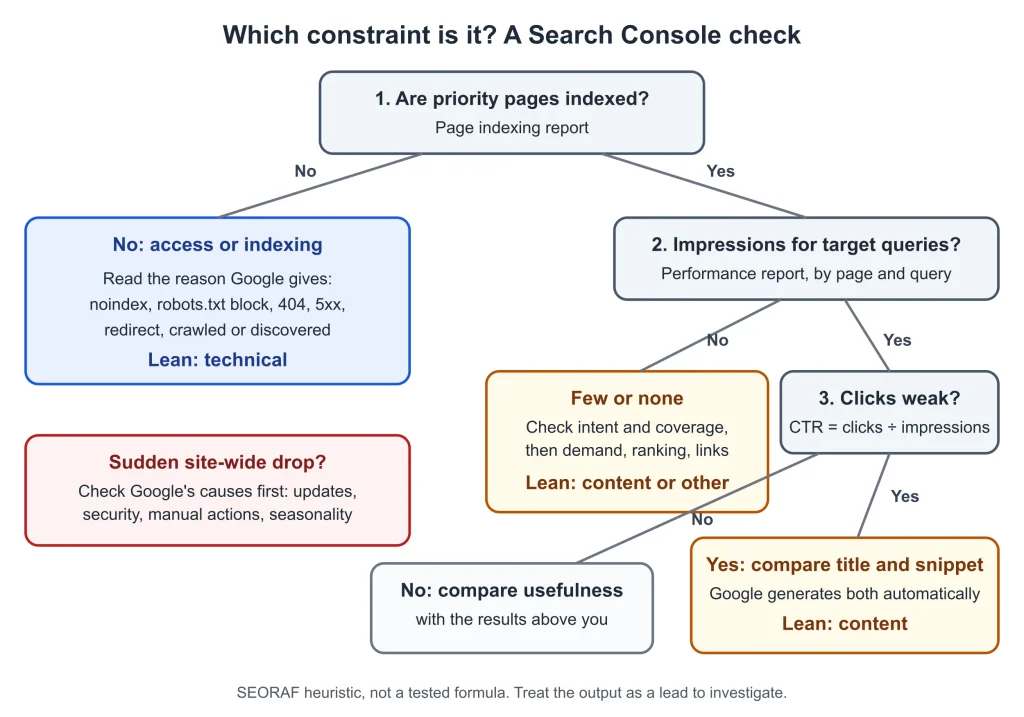
The fastest way to stop arguing about priorities is to let your own data pick. The sequence below uses two Search Console reports and one manual comparison. It is SEORAF’s working framework, a heuristic rather than a tested formula, so treat the output as a lead to investigate.
Google’s guide to debugging drops in Search traffic follows similar logic: for a site-wide pattern, check the Page indexing report, and for a group of pages or one important page, use URL Inspection on a few affected pages. The framework covers two of the three levers. Links and authority from other sites are the third, and they sit outside this article. SEORAF’s Google Search Console guide covers setup and the reports in more depth.
| Step | Question | Where to look | How to read it | Evidence |
|---|---|---|---|---|
| 1 | Are your priority pages indexed? | Page indexing report; URL Inspection for single pages | Priority pages that are not indexed point first to an access or indexing cause. Google notes that not every non-indexed URL is a problem, so check only the pages that should be there. | Google (report), SEORAF (reading) |
| 2 | What reason does Google give? | “Why pages aren’t indexed” table | Server error (5xx), redirect error, URL blocked by robots.txt, URL marked ‘noindex’ and Not found (404) are access or indexing causes, so look for the rule or template behind them. A robots.txt block stops crawlers from reading a noindex rule on the same page. | Google (reasons, noindex), SEORAF (reading) |
| 3 | Is it “crawled” or “discovered” but not indexed? | Same table | Google’s report says a “Crawled – currently not indexed” page may or may not be indexed in the future, and a “Discovered – currently not indexed” URL has been found but not yet crawled. The report gives no cause, so check how the page is linked and whether it adds anything unique. | Google (definitions), SEORAF (checks) |
| 4 | Indexed, but few impressions for the queries you care about? | Performance report, filtered by page and query | An impression means a user saw, or potentially saw, a link to your site. Low impressions can mean the page misses the topic or answers a different intent. They can also reflect low search demand, a low ranking, or weak links and authority. Check query-level data before calling it a content problem. | Google (definition), SEORAF (reading) |
| 5 | Impressions, but weak click-through? | Performance report; click-through rate is clicks divided by impressions | Google’s traffic-drop guide says that when impressions hold but clicks fall, the title and snippet may be less compelling, or competitors may have a more appealing result. Google generates title links and snippets automatically, so review the title element, headings and on-page text together. | Google, SEORAF |
| 6 | Is the page as useful as the results above it? | Manual side-by-side comparison | Built In’s guide suggests that if your content is better than competitors’ but you rank lower, something beyond the content may be at play, and if it is worse, content comes first. Its text refers to 2021 trends, so treat it as an older opinion. | Practitioner |
Reading the pattern
If many page types fail in the same way, suspect a shared template, rule or system. If one page fails while its siblings do fine, look at that page. This is a rule of thumb, not a guarantee.
Search Console defines average position as the topmost position your link held, averaged across all the queries where you appeared, and Google’s traffic-drop guide advises against focusing too heavily on absolute position, since clicks and impressions are the main measures of success. Because the figure is averaged across queries, read position query by query rather than as one number.
End with one sentence you can act on, such as “our key service pages are indexed but get no impressions for the main topic.” That sentence tells you whether the next sprint belongs to a developer or to an editor.
Technical SEO or content SEO first? What to do by site stage
Several agency guides suggest similar sequencing for new sites, including Loganix and WooRank. They are opinion, not research. The recommendation below rests on the access-then-relevance logic above:
- New site, redesign or migration: technical first. Confirm that priority pages return the right status codes, are not blocked, and are indexable before investing in volume. A migration is also a good time to check redirects and canonicals, since URLs are changing.
- Established site, healthy index, weak visibility for key topics: content first. The pages are reachable, so look at relevance, coverage and usefulness, and rule out demand and authority.
- Many pages missing from the index: technical triage first, then content.
- Sudden drop in traffic: do not assume a technical cause. Google’s guide to debugging traffic drops lists several possible causes: a data or reporting issue, an algorithmic update (check the ranking updates list on the Search Status Dashboard), technical issues, security issues, spam or manual actions, seasonality or changing interests, and site moves. Work through them with Search Console, including the Page indexing, Crawl stats, Security issues and Manual actions reports, before choosing between technical and content work.
- Small team with limited time: split effort by bottleneck rather than switching entirely. Search Engine Watch frames the choice as ratios and weighting, not an either/or battle. Its excerpt also notes that one person is rarely equally strong in both, so decide who owns each side.
Hypothetical scenarios
These are illustrations of how the diagnostic reads, not case studies.
| Scenario | What the reports would show | First move |
|---|---|---|
| A site goes live from a staging copy | Many pages listed as “URL marked ‘noindex'” | Technical: remove the directive from the template, then re-check |
| A site moves to new URLs | Old URLs listed as “Page with redirect” or “Not found (404)” | Technical: map redirects and confirm the new URLs are indexed |
| A service page that already ranks | Healthy impressions, low click-through | Content and on-page: compare the title and snippet with the query. Google generates both automatically, so the displayed text may differ. |
| Traffic falls on one date across the whole site | Impressions and clicks both drop at once | Neither yet: check the ranking updates list, Security issues and Manual actions before assigning the work |
In each row the reports give a first lead, not a verdict. That is the value of a diagnostic: it replaces “which one do we like?” with “which one is the likely constraint right now?”
Worked example: one site, one afternoon (hypothetical)
A small consultancy site has 30 pages, and ten matter: the homepage, six service pages and three guides. Here is how the diagnostic would read.
- Page indexing report. Nine of the ten priority pages are indexed. One service page sits under “Crawled – currently not indexed.”
- Reading the exception. Nothing blocks the page and nothing returns an error. It is a near-copy of another service page, so it adds little that is unique. The decision is a content and overlap call: merge the two pages, or differentiate them. A canonical or redirect follows from that decision, not before it.
- Performance report on the nine indexed pages. Four service pages have almost no impressions for their main topic, so check intent and coverage against the results that do appear, and confirm there is search demand for the topic. Two guides have impressions but weak click-through, so review titles, headings and descriptions. The homepage is fine.
- One-sentence result. “Access is fine. Four pages miss their topic, two have weak snippets, and one is a near-duplicate.”
The outcome is a content sprint with one overlap decision and no developer ticket. A different set of reports would have sent the same team to the developer first.
A repeatable workflow for technical and content SEO
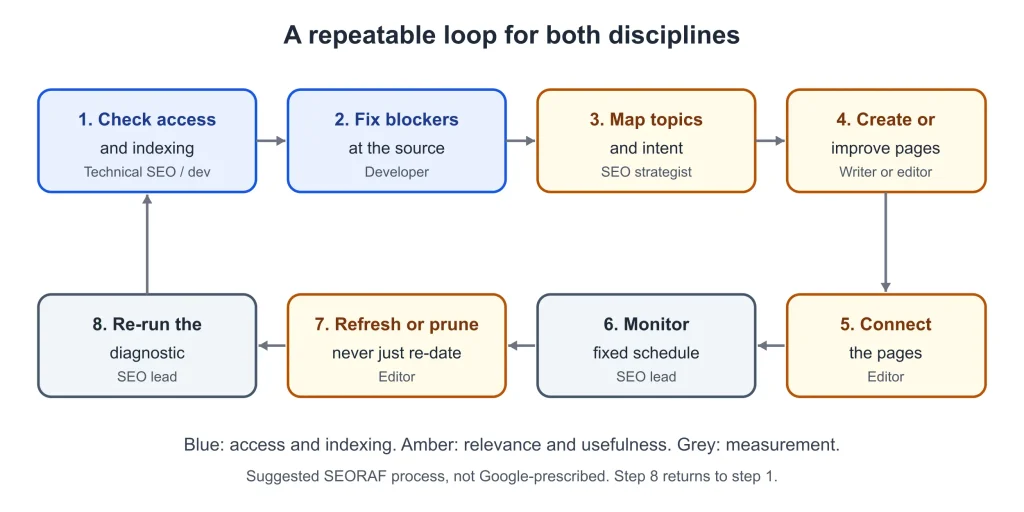
Once you know the constraint, a simple loop keeps both disciplines moving without competing for attention. This is a suggested process, not a Google-prescribed one.
| # | Step | Owner | Done when |
|---|---|---|---|
| 1 | Check access and indexing for priority URLs | Technical SEO or developer | Each priority URL is indexed, or has a deliberate reason not to be |
| 2 | Fix blockers at the source | Developer | The template, rule or setting behind each error is corrected and the report re-checked |
| 3 | Map topics and intent | SEO strategist | Each target question has one owning page |
| 4 | Create or improve the pages | Writer or editor | The page answers the target question and answers Who, How and Why |
| 5 | Connect the pages | Editor | Related pages link to each other with descriptive anchor text |
| 6 | Monitor | SEO lead | Page indexing and Performance reports are reviewed on a fixed schedule |
| 7 | Refresh or prune | Editor | Pages are changed substantively, merged or removed, never just re-dated |
| 8 | Re-run the diagnostic | SEO lead | The current constraint is named in one sentence |
A technical audit can speed up step 1 on a larger site. SEORAF’s technical SEO audit guide walks through one.
How to measure each side
Search Console already separates the two kinds of evidence.
| Side | Where to measure | What it shows |
|---|---|---|
| Technical: access and indexing | Page indexing report | Which URLs are indexed, and the reasons others are not |
| Technical: page experience | Core Web Vitals report | How your pages perform, based on real-world usage data |
| Technical: crawling | Crawl stats report, which Google’s traffic-drop guide points to for technical checks | Crawling activity on your site |
| Content: visibility | Performance report | Clicks, impressions, click-through rate (clicks divided by impressions) and average position, by query and page |
Google’s traffic-drop guide treats clicks and impressions as the main measures of success. One agency guide (a LinkedIn article by Macrohype) also suggests watching time on page, bounce rate and conversion rate for content work. Those are engagement metrics, not measures Google describes using for ranking, and that guide is old (its excerpt dates to roughly two years ago), so use them to understand visitors rather than to judge rankings. A simple scoreboard is one number per side: the share of priority pages that are indexed, and impressions for the queries each page is meant to answer.
Technical SEO and content SEO in AI search
Google’s page on AI features and your website says that to be shown as a supporting link in AI Overviews or AI Mode, a page must be indexed and eligible to be shown in Google Search with a snippet. It says there are no additional requirements, no special optimizations needed and no special schema.org structured data to add. It also says these appearances are reported in the Performance report under the Web search type.
In practice that gives each discipline a clear job:
- Technical SEO is the eligibility gate. Google lists nosnippet, data-nosnippet, max-snippet and noindex among the controls for limiting what is shown, so review any such rules in your templates before assuming a page is eligible.
- Content SEO is the reason to be chosen. The same page says foundational SEO best practices apply to AI features as to Search overall, including people-first content. Because Google says no extra requirements exist, SEORAF treats helpful, well-structured content as the lever, and does not claim a separate AI-only checklist.
Be cautious with confident statistics about AI search traffic that do not link to a primary source. If a figure matters to a decision, trace it to the original study before relying on it. This article cites none.
Common mistakes
- Publishing at volume into a site that cannot be indexed. New pages add nothing if they carry a noindex rule, sit behind a block, or return errors. Check indexing for a few new URLs before scaling.
- Polishing technical scores while topics are missing. Good Core Web Vitals scores do not guarantee top rankings. A fast, crawlable site with no page answering the audience’s real questions has nothing to rank.
- Blocking a page in robots.txt to remove it from Google. robots.txt is not a mechanism for keeping a page out of Google. Use noindex, and do not block the page, because crawlers cannot see a noindex rule on a page they cannot fetch.
- Assuming every traffic drop is technical. The causes to rule out first are listed in the site-stage section above.
- Treating every non-indexed URL as an error. Google’s report names duplicates and deliberate blocks such as robots.txt as legitimate reasons for a URL to stay out of the index.
- Padding and re-dating. Update a page substantively, cover the question completely, then stop. Google’s warning signs for both habits are covered in the E-E-A-T section above.
- Letting the gray area go unowned. Titles, internal links and structured data fall between disciplines. If nobody owns them, they drift.
- Confusing content SEO with on-page SEO. They overlap, but content SEO is a program of topics, intent and upkeep, while on-page SEO is how a single page is set up. See Technical SEO vs On-Page SEO for that distinction.
Frequently asked questions
Is technical SEO or content SEO more important?
Neither wins in general. Each answers a different question, and the one that matters more is whichever is currently your constraint. A page that cannot be indexed needs technical work first; an indexed page nobody finds useful needs content work. The diagnostic above shows which applies, and the site-stage section covers which to do first.
Can good content rank without technical SEO?
Only if the minimum technical conditions are already met. Google requires that a page is not blocked, returns a 200 status and has indexable content to be eligible for indexing, and even then indexing is not guaranteed. Once those conditions are met, the limiting factor is usually elsewhere, such as intent, coverage or usefulness.
Does technical SEO directly improve rankings?
Sometimes, but not as a general rule. Core Web Vitals are used by Google’s ranking systems, there is no single page experience signal, and good scores do not guarantee top rankings. Google also says other page experience aspects, such as HTTPS and mobile display, do not directly help a site rank higher, though they serve users. Most other technical work, such as removing a stray noindex rule, decides whether a page can appear at all rather than where it ranks.
Is content SEO the same as on-page SEO?
They overlap but are not identical. On-page SEO is about how an individual page is set up, including its content, titles and headings. Content SEO also covers strategy: topics, intent, coverage, and keeping pages current. SEORAF’s Technical SEO vs On-Page SEO covers the page-level split in detail.
Is content SEO the same as content marketing?
Content SEO is the part of content work aimed at being found and chosen in search. Content marketing can also cover distribution and goals beyond search.
Do I need coding skills for technical SEO?
Some fixes are changes to settings or templates that a non-developer can make, and others need developer help, particularly rendering and server-level issues. Content SEO does not require code, though understanding how pages are built helps you brief developers well.
Do AI Overviews need extra technical optimization?
No. Google says a page must be indexed and eligible to be shown with a snippet, with no additional requirements or special markup. See the AI search section above.
How long do technical and content changes take to show results?
There is no fixed timeline. In its traffic-drop guide, Google says that after a large algorithmic drop, improvements to make a site more helpful can take weeks to months to show effects, and that after a site move a medium-sized site may take a few weeks to recover. Treat any promise of a specific number of days as a guess.
Can one person do both?
Small sites often start that way. Search Engine Watch’s excerpt says it is rare to find one person equally strong in both content and technical work. Write down who is responsible for each side, and bring in a developer for fixes you cannot make yourself.
Where do backlinks and authority fit?
They are a third lever, outside this article. Technical and content work make a page eligible and useful. Links from other sites are a separate discipline: see the link building guide.
Next steps
- Run the six-step check on your ten most important pages, and write down the one-sentence result.
- If indexing is the problem, start with Technical SEO Basics and the technical SEO audit guide.
- If visibility is the problem, work through the Content SEO Guide, the search intent guide and the topical authority map guide.
- For the reports used in the diagnostic, see the Google Search Console guide.
- New to all of this? Start with SEO basics, or visit the Technical SEO hub for the wider cluster.
If you would like a second opinion on what your reports show, you can ask about SEORAF’s SEO audit service. It is SEORAF’s own service, it does not promise rankings or traffic, and the free steps above work without it.
Terminology. “Technical SEO” and “content SEO” are industry labels, not Google’s. Google’s Search Essentials uses neither term. It describes three components: technical requirements (what a page needs to be shown in Search), spam policies, and key best practices. In this article, technical SEO means meeting the technical requirements and keeping crawling and indexing healthy. Content SEO means making pages helpful and relevant to the people searching. A third area, links and authority from other sites, is outside the scope of this article.
How this article was made
Who: written for SEORAF by Mousume Akter, founder of SEORAF.
How: drafted with AI assistance, then checked claim by claim against the Google pages listed below on 10 October 2026. SEORAF’s editorial policy states that AI output is not treated as proof of a claim and that human editors remain accountable for what is published.
Why: to help site owners decide where to start, in the order the evidence suggests.
This article reports no tests, client results or traffic figures, and its example scenarios are hypothetical. Google-documented claims are linked to relevant source pages, practitioner opinions are attributed in context, and SEORAF recommendations are editorial guidance. No published research is cited.
Sources
Google documentation, fetched and checked for the specific statements cited:
- Search Central: Search Essentials
- Search Central: Search technical requirements
- Search Central: How Google Search works
- Search Central: SEO Starter Guide
- Search Central: Creating helpful, reliable, people-first content
- Search Central: AI features and your website
- Search Central: Debugging drops in Search traffic
- Search Central: Page experience
- Search Central: Title links
- Search Central: Snippets and meta descriptions
- Search Central: Introduction to robots.txt
- Search Central: Block indexing with noindex
- Search Central: Consolidate duplicate URLs
- Search Central: Making links crawlable
- Search Central: Mobile-first indexing
- Search Central: Structured data policies
- Search Console Help: Page indexing report
- Search Console Help: Performance report
- Search Console Help: Core Web Vitals report
Other guides, read as search excerpts only: