
Technical SEO vs On-Page SEO: What’s the Difference?
A page that search engines cannot index and a page that is indexed but does not match what people are searching for are different problems with different fixes. Technical SEO and On-Page SEO are the two disciplines that address them, and beginners often lump both into one checklist. This guide separates them by what each one affects, shows where the line blurs, and gives a practical way to decide what to work on first.
A Simple Model: Access First, Relevance Second
Most confusion between these two disciplines disappears once you picture what a search engine has to do before a page can appear for a query. In simplified form, it must find the page, process it, store it, and then decide whether it fits a particular search.
- Discover and crawl: the search engine’s crawler (Googlebot, in Google’s case) finds the URL and requests it.
- Render and process: it reads the HTML and, where needed, runs the page’s code, such as JavaScript, to see content that only appears after scripts execute.
- Index: it analyzes the page and decides whether to store it in its searchable index.
- Rank: when someone searches, it chooses which indexed pages to show and in what order.
Technical SEO mostly concerns getting a page fetched, processed, and stored (steps one to three). On-Page SEO shapes the content Google analyzes when it indexes a page, including elements such as the title element and image alt attributes, and matches to a query when it serves results (steps three and four). The boundary is not strict: Google says its ranking systems use Core Web Vitals, so a technical factor can also matter at the ranking step. This is a teaching model, not a full account of how search works. Google’s guide to how Search works describes three stages: crawling, indexing, and serving results.
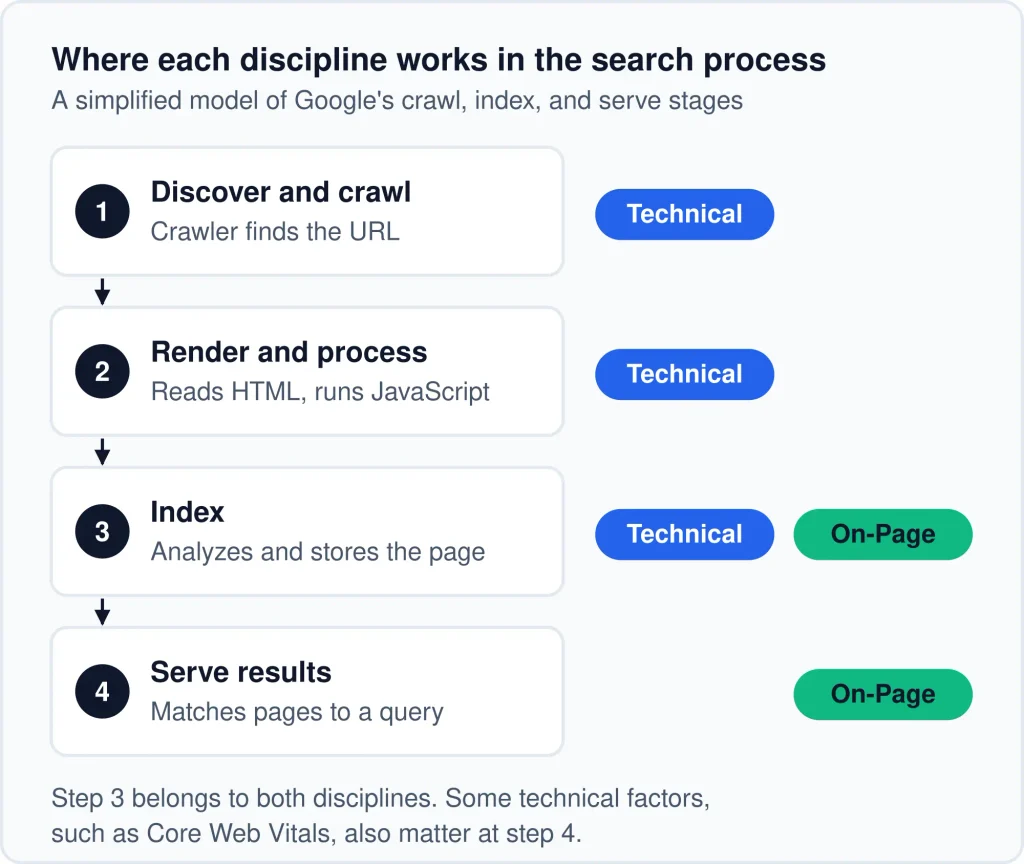
Step 3 belongs to both. Some technical factors, such as Core Web Vitals, also matter at step 4.
Technical SEO mostly covers steps one to three; On-Page SEO mostly covers steps three and four. The boundary is not strict.
Two terms are worth keeping apart. Crawlability is whether a crawler can fetch a page. Indexability is whether a fetched page is eligible to be stored in the index. A page can be crawlable but not indexable, for example when it carries a noindex directive. Being indexable makes a page eligible to appear in results, but it does not guarantee that the page is indexed or shown
What Does Technical SEO Include?
Technical SEO includes the site-level work that lets search engines reach, process, and index pages: crawl access, index control, site architecture and URLs, performance and mobile experience, security and server responses, and structured data implementation. Its main purpose is eligibility: removing barriers that could stop a good page from being found or processed. Some technical factors, such as Core Web Vitals, are also used by Google’s ranking systems.
Technical SEO is often called the “back end” of SEO. That is a loose shorthand, because some technical work, such as mobile layout and page stability, is directly visible to visitors.
- Crawl access: whether crawlers can reach your pages, influenced by robots.txt rules, server responses, internal links, and, optionally, XML sitemaps that help discovery.
- Index control: which URLs should be indexed and which should not, managed through directives such as
noindex, canonical tags, and redirects. When several URLs show the same or very similar content, Google groups them and chooses one representative URL, the canonical. That selection is called canonicalization, and canonical tags and redirects are signals you can give it. - Site architecture and URLs: how pages are organized and linked, so important pages are easy to reach and URL patterns stay consistent.
- Performance and mobile experience: how quickly and stably pages load and behave on real devices. Core Web Vitals are Google’s measurements for loading (Largest Contentful Paint), responsiveness (Interaction to Next Paint), and visual stability (Cumulative Layout Shift).
- Security and server responses: serving pages over HTTPS and returning correct status codes.
- Structured data implementation: adding valid, machine-readable markup to pages.
What Does On-Page SEO Include?
On-Page SEO includes the page-level work that makes a page clearly relevant and useful for a specific search intent: content, title tags and headings, meta descriptions, contextual internal links, images, and URL slugs. Its purpose is relevance. Given a page that search engines can already access, it asks whether the page satisfies the need behind the query.
- Content and search intent match: whether the page answers what searchers actually want, at the right depth and in the right format.
- Title tags and headings: how clearly the page states and organizes its topic. Google says it uses several sources to determine the title link shown in results, so the title tag is a strong suggestion rather than a guaranteed display.
- Meta descriptions: a summary of the page. Google may build the snippet from the meta description, the page content, or markup, so treat the meta description as a suggestion.
- Contextual internal links: links within the body text that point readers to related pages, using descriptive wording.
- Images: descriptive alt text, sensible file names, and images that support the content. Alt text also serves people using screen readers, one place where accessibility and search visibility point the same way.
- URL slugs: short, readable page addresses that reflect the topic.
For what “useful” means in practice, Google’s guidance on helpful, people-first content is the most direct reference. It describes principles to evaluate your content against, not a checklist to complete.
Key Differences Between Technical and On-Page SEO
Technical SEO compared with On-Page SEO
| Dimension | Technical SEO | On-Page SEO |
|---|---|---|
| Primary goal | Make pages accessible, processable, and indexable | Make pages relevant, clear, and useful for a target query |
| Question it answers | “Can search engines reach, process, and index this page?” | “Does this page clearly and usefully match what a searcher wants?” |
| Scope | Usually site-wide or template-wide (a template is the shared layout many pages use) | Usually page by page |
| Typical work | Index control, redirects, site architecture, speed, structured data code, security | Content, search intent alignment, title tags, headings, meta descriptions, in-text links, images |
| Example of a fix | Removing an accidental noindex directive from an important page | Rewriting a page so its format and depth match the search intent |
| Usually handled by | Developer, technical SEO specialist, or a site owner comfortable with settings and code | Writer, editor, content strategist, or site owner |
| Common tool types | Site crawlers, Google Search Console, page speed testing tools (for example, Google’s PageSpeed Insights), server logs | Keyword and SERP research tools, content editors, Search Console query data |
| Typical failure symptom | Pages not indexed, wrong URL versions indexed, slow or unstable pages | Pages indexed but not appearing for target queries, or appearing with weak clicks |
| Attention rhythm | After site changes, plus periodic checks | Every time content is published, and when performance or intent shifts |
Reading the Table in Practice
Scope changes how you fix things. A technical fix often changes one setting or template and affects hundreds of URLs. An on-page fix usually means editing a single page, and the result applies to that page and the query it targets. Scope describes typical reach, not a rule: a stray noindex on one page is a technical problem with page-level reach, and a weak title template applied across a site is an on-page problem with site-wide reach.
The failure symptoms point in different directions. If a page is not in the index, find out why before choosing a fix. A blocking directive, an error, or a canonical pointing elsewhere is a technical cause, and editing the copy will not help. If nothing is blocking the page and it is still not indexed, review whether it duplicates other pages or adds little that is distinct. Google’s guide says indexing depends on a page’s content and metadata, and it lists low content quality among common indexing problems. If a page is indexed and still gets little visibility, the first suspect is usually relevance, search intent match, or quality. Learning to tell these cases apart is the most useful diagnostic skill a beginner can build.
Ownership matters. Technical problems often need someone with access to the server, theme, or CMS settings. On-page problems can usually be handled by whoever owns the content. A mismatch between where the problem sits and who can fix it is a common reason SEO work stalls.
Which Tasks Belong to Which
Tasks That Are Clearly Technical
- Access: allowing crawlers to reach important pages, and keeping them away from low-value URLs where appropriate.
- Index control: deciding which URLs should be indexed, consolidating duplicates, and handling moved or removed pages with the correct redirects and status codes.
- Performance: improving server response, code efficiency, and page stability across devices.
- Site architecture: keeping the site organized so important pages are reachable and URL patterns are consistent.
- Security and server responses: serving pages over HTTPS and returning correct status codes.
Tasks That Are Clearly On-Page
- Relevance: matching the page to the intent behind its target query, including the format and depth searchers expect.
- Content: covering the topic accurately and completely, with original insight and clear sourcing where claims need support.
- Presentation: writing descriptive title tags, logical headings, scannable formatting, and useful summaries.
- In-page linking and media: adding contextual links, descriptive image alt text, and supporting visuals.
Tasks in the Gray Zone
Some tasks have a technical half and an on-page half. The table below shows how to split them.
Overlapping tasks and how to classify them
| Task | Technical side | On-page side | Practical classification |
|---|---|---|---|
| Structured data | Valid code, correct implementation, template-level deployment | Choosing the right type and making sure markup matches visible content | Implementation is technical; content accuracy is on-page |
| Internal linking | Ensuring links are standard HTML links (<a> elements with an href) that crawlers can follow, per Google’s link best practices, and that important pages are reachable | Choosing relevant anchor text and placing links where they help readers | Site-wide pathways are technical; contextual links are on-page |
| Page speed | Server, caching, code, and rendering behavior | Image sizes, embeds, and how heavy the page’s content is | Infrastructure is technical; content weight is on-page |
| URL structure | Site-wide URL patterns, redirects, and consistency | The readable slug for an individual page | Patterns are technical; individual slugs are on-page |
| Canonical tags and meta robots | Determining which URLs should be indexed and how duplicates consolidate | Deciding which page is the definitive version of a topic | Mainly technical, with a content decision behind it |
| Mobile experience and mobile-first indexing | Responsive templates and viewport settings. Google uses the mobile version of a site’s content for indexing and ranking (mobile-first indexing), so the mobile version should include the same primary content and structured data as desktop | Readable text, tappable elements, and content that is not reduced or removed on small screens | Template and content parity are technical; formatting and completeness are on-page |
| JavaScript-rendered content | Whether scripts render content in a way search engines can process | Deciding which text, links, and headings must be visible in the rendered page | Rendering is technical; what must be present is on-page |
Classification varies between sources. The next section explains the rule used here.
Where Technical and On-Page SEO Overlap
The boundary blurs because some elements live inside a page’s HTML but control behavior that affects the whole site. A canonical tag is written on one page, yet it affects how a group of URLs is treated. Structured data is placed in a page, yet its correct deployment usually depends on templates and code.
Is Technical SEO Part of On-Page SEO?
No. Technical SEO and On-Page SEO are normally treated as separate categories.
Technical SEO concerns how search engines access and index a site. On-Page SEO concerns how well individual pages match what searchers want.
Together with Off-Page SEO, which covers signals from outside the site such as links from other websites, they are the three categories commonly used to organize SEO work.
Some sources file canonical tags, meta robots directives, and structured data under On-Page SEO because they sit in a page’s HTML.
The term “on-site SEO” is used inconsistently. Some sources treat it as another name for On-Page SEO, while others use it for everything done on your own site, including technical work.
The three-way split is an industry convention, and where the line falls varies by source.
A Rule of Thumb for Classifying Overlapping Tasks
Ask what the task changes:
- Whether the page can be reached, rendered, indexed, or consolidated with others: treat it as technical.
- What the page says, how clearly it says it, or how well it fits the query: treat it as on-page.
- How the page loads and behaves for visitors, such as speed, stability, and mobile layout: usually technical when the cause is the template, server, or code, and on-page when the cause is the page’s own content, such as oversized images or heavy embeds.
If a task does more than one of these, split it and assign each half separately, as in the gray-zone table.
Why Coverage Matters More Than Labels
Arguing about which category a task belongs to is rarely productive. What matters is that both halves get done. A correctly implemented structured data block that describes content the page does not contain is a technical success and an on-page failure. A page that is well written but placed behind broken links is the opposite. The label is a planning tool, not a goal.
How Do Technical SEO and On-Page SEO Work Together?
Technical SEO makes a page reachable, processable, and indexable. On-Page SEO gives that page relevant, useful content to be evaluated on. A page needs both: without the first, it cannot be properly used in search results, and without the second, it has little reason to be chosen for a query.
Why Neither Works Alone
Think of a shop. Technical SEO is the street address, the unlocked door, and the sign that lets people find it. On-Page SEO is what is on the shelves and how clearly it is labeled. A well-stocked shop behind a locked door serves no one, and an open shop with empty shelves gives visitors no reason to stay.
Can a Website Rank With Good On-Page SEO but Poor Technical SEO?
It depends on what “poor” means. If technical problems keep a page from being indexed, such as a noindex directive, Google drops the page from results once it recrawls it. A robots.txt rule that blocks crawling stops Google from reading the page, so its content cannot be evaluated, although the bare URL can still appear if other pages link to it. If the technical weaknesses do not block crawling or indexing, such as slower load times or an untidy site architecture, the page can still be indexed and shown. How well it performs then depends on relevance, competition, and many other factors that no single setting controls.
In practice, rule out the blocking problems first. Content improvements only count once a page is eligible to appear.
An Illustrative Example: One Page, Both Disciplines
The following is a hypothetical scenario, not a case study. Imagine a small business publishes a guide to choosing a bicycle helmet.
- Technical contribution: the page loads over HTTPS, returns a normal status code, is linked from other pages on the site (and may be listed in a sitemap, which helps discovery but is optional), has no accidental
noindex, has one canonical URL, and displays properly on a phone. Search engines can reach and process it without obstacles. - On-page contribution: the title and headings state the topic clearly. The content addresses what searchers usually want to know, such as fit, safety standards, and use cases. Images have descriptive alt text, and links point readers to related guides.
Remove either contribution and the outcome changes. Without the technical layer, the guide may never be indexed. Without the on-page layer, it may be indexed but offer little reason to be chosen over other results. Neither contribution guarantees a particular ranking, because competition, searcher behavior, and search engine decisions are outside the site owner’s control.
Practical Examples: Symptom, Likely Category, First Place to Look
These scenarios show how to diagnose a problem before deciding what to fix.
Which Should You Work on First?
Check indexing first. If your key pages are not indexed, diagnose why before editing anything. If they are indexed, look for evidence of on-page underperformance, such as pages with many impressions but few clicks at a competitive position.
A Simple Decision Path
This sequence is SEORAF’s editorial framework, not a process Google publishes. Work through the questions in order. When one reveals a problem, fix it, then continue.
- Are your most important pages indexed? If not, find out why; the first practical example above shows where to look. Blocks, errors, or wrong canonicals point to technical work, and pages that are crawlable but still not indexed need a duplication and content review.
- Are there site-wide problems, such as widespread errors, duplicate URL versions, or pages that fail to load properly on mobile? If yes, handle these next, since they affect many pages at once.
- Are indexed pages underperforming for their target queries? If yes, shift to on-page work: search intent match, content quality, title tags, and headings.
- Is the site new, with few pages? Confirm a basic technical foundation quickly, then put most of your effort into useful, well-targeted content.
- Are both areas in reasonable shape? Improve whichever shows the clearest evidence of a gap, and re-check after changes.
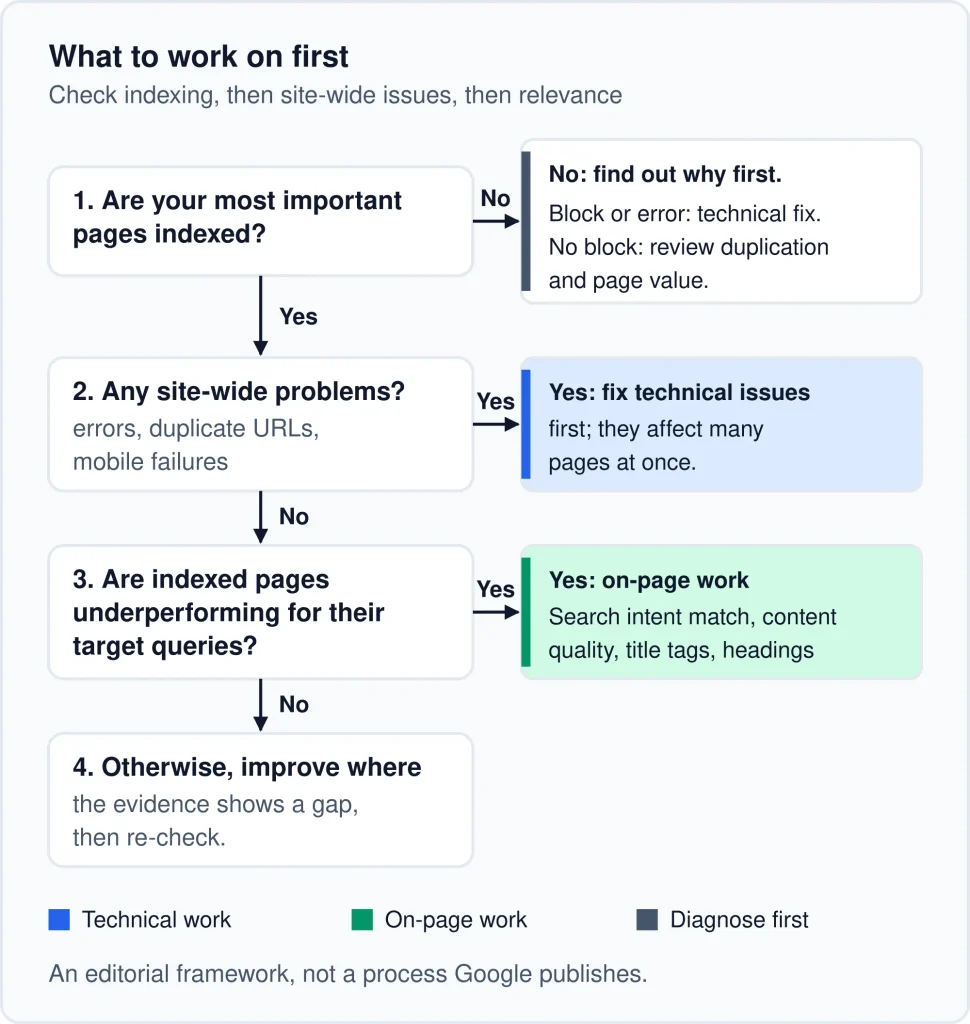
The decision path: check indexing first, then site-wide problems, then page-level relevance. It is an editorial framework, not a Google process.
Signals in Search Console That Point to Each Side
- Pointing toward technical work: pages listed as not indexed for reasons you did not intend, unexpected exclusions, crawl or server errors, and issues shown in the Core Web Vitals and HTTPS reports. Check mobile behavior by opening key pages on a phone.
- Pointing toward on-page work: pages that receive impressions but few clicks, queries where the page appears but the wording of the title tag or snippet does not match the search, and important queries with no dedicated page.
Report names and layouts change over time, so verify current labels in your own account. These signals are starting points for investigation, not verdicts.
Priorities by Situation
Suggested starting emphasis by site situation
| Situation | Start with | Reason |
|---|---|---|
| New site | A quick technical baseline, then content | Pages must be indexable, but a new site mainly needs pages worth indexing |
| Established site with a traffic decline | Confirm the decline in Search Console, then check indexing and access before content | Declines have many possible causes, including demand shifts, competition, and changes in results. Ruling out indexing and access problems first is a sequencing choice, because they are the fastest to test. |
| Small business site with few pages | Confirm key pages are indexed, then on-page work on those pages | The indexing check takes minutes, and with few pages it is practical to review each one’s content and search intent match |
| Large content-heavy blog | Technical review of site architecture and duplicates, then a content consolidation review | Scale tends to produce duplicate URLs and overlapping pages, which make the site harder to manage |
| Site after a redesign or migration | Technical verification | Changes to URLs, templates, and settings can introduce indexing problems |
Who Usually Handles Each Side
On larger teams, developers typically own server settings, templates, and performance code. Content writers and editors own the page content, and an SEO lead coordinates priorities and checks the outcome. Solo site owners handle all three roles.
If you run a site on a common CMS, you can often handle many technical tasks yourself through settings and plugins, such as controlling indexing for specific pages or generating a sitemap. Bring in a developer when a fix requires changing theme code, server configuration, or redirect logic at scale, or when you are unsure of the risk. A misconfigured site-wide setting can affect every page at once.
Common Misconceptions
“One is more important than the other.”
They solve different problems at different stages, so importance depends on the current bottleneck. Technical soundness makes a site eligible but does not give a search engine a reason to prefer your page, and strong content cannot help a page that cannot be indexed.
“Technical SEO is only for developers.”
Developers are essential for some fixes, but many technical checks, such as reviewing index status and spotting accidental noindex settings, require only Search Console and careful reading.
“On-Page SEO is just keywords and meta tags.”
Keywords and meta tags are a small part of it. The larger work is matching search intent, covering a topic accurately and completely, and presenting it clearly. Repeating a phrase more often does not make a page more relevant.
“Fix technical issues once and you’re done.”
Sites change. New plugins, redesigns, content additions, and platform updates can introduce fresh issues. Technical health is something you monitor, not a project you finish.
A Simple First-Week Plan for Beginners
This is an orientation, not an audit. Its purpose is to reveal which side of your site needs attention first.
- Verify your site in Google Search Console if you have not already, so you can see how Google reports on your pages.
- List your ten most important pages and use the URL Inspection tool to confirm each one is indexed.
- If your site has hundreds of pages or more, review the page indexing report for unexpected exclusions or errors. Smaller sites can usually confirm indexing with the URL Inspection tool or a
site:search for the exact URL. - Open each key page on a phone and check that it loads, reads clearly, and is usable without zooming.
- Read the title tag and opening of each key page and ask whether it clearly matches what a searcher for that topic would want.
- Check the Performance report for pages with many impressions but few clicks. Compare each page with others at a similar average position before judging it, because pages lower in the results naturally earn fewer clicks. Note the pages that still look low as on-page candidates.
At the end of the week you should have a short list of suspected technical issues and a short list of pages to improve. If any key page is not indexed, diagnose that first, then move to the page list. For the full process, see SEORAF’s technical SEO audit guide, and for a task-by-task list, the technical SEO checklist.
Frequently Asked Questions
Conclusion
Technical SEO decides whether search engines can reach, process, and index your pages. On-Page SEO decides how relevant and useful those pages are for the queries you care about. They overlap in areas such as structured data, internal linking, speed, and URLs, and the simplest way to classify a shared task is to ask what it changes: whether a page can be processed, what it communicates, or how it performs for visitors.
When deciding where to start, check whether your key pages are indexed, and if any are not, find out why. If they are indexed, look for evidence of underperformance and improve relevance from there. Use the first-week plan above to see which side needs attention on your own site, and let the evidence, not a general rule, set your priorities.