
How search works: crawling, indexing and serving
Google Search works in three stages: it crawls pages it has discovered, indexes what it learns from them, and serves results that are relevant to a search. Not every page makes it through every stage. Documented
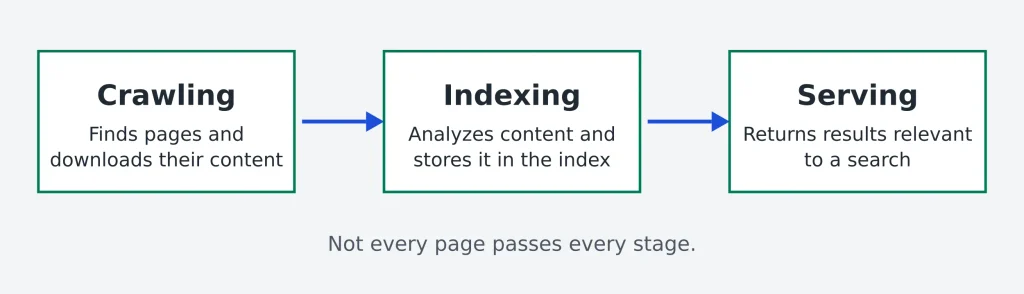
| Stage | What happens | Read more in Google’s guide |
|---|---|---|
| Crawling | Google finds URLs through links from known pages or a sitemap you submit. Its crawlers may then visit a page and download its text, images and video. | Crawling in Google’s guide |
| Indexing | Google analyzes the text, images and video on a page and stores that information in the Google index, a large database. | Indexing in Google’s guide |
| Serving | When someone searches, Google returns information relevant to that query. Results can vary with factors such as location and device. | Serving in Google’s guide |
Google says it does not accept payment for crawling, indexing or ranking, and cannot guarantee that a page will be crawled, indexed or served. Meeting every requirement does not change that. Documented Being crawled, being indexed and ranking well are three separate outcomes. SEORAF view
Read Google’s own explanation in How Google Search works.
Why SEO matters
- It is the route to unpaid discovery. Appearing in Google Search results costs nothing.
- Useful pages can keep attracting visitors. A page that meets a real need may continue to be found without paying per click, but results are neither guaranteed nor predictable.
- It rewards clarity. Making a site easy to crawl and understand tends to help visitors too.
SEORAF does not quote a timeline for results. How quickly pages are found and how well they perform depends on the site, the topic and the competition. SEORAF view
The main areas of SEO
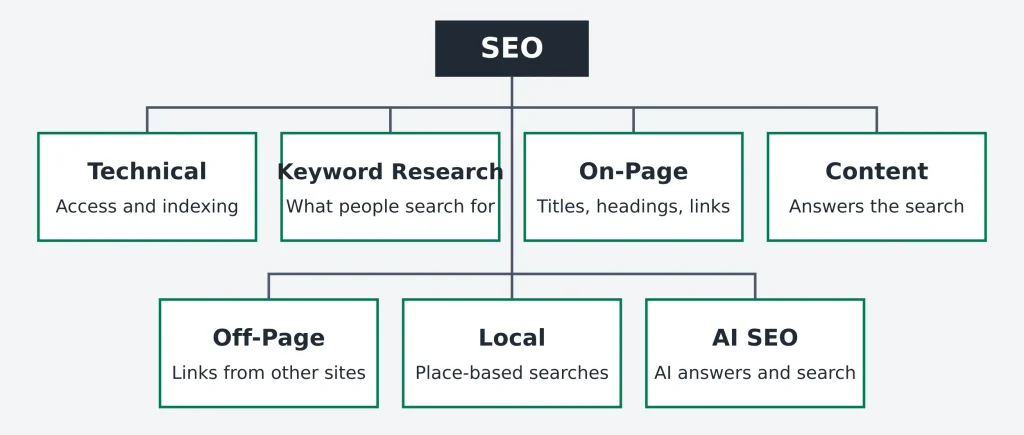
Think of SEO as connected areas of work. Each area is summarized briefly here so this page stays a map.
Search intent
Search intent is the goal behind a query: what the person wants to get done. Matching intent is usually the first question to ask before writing or judging any page. SEORAF view
Four common intent types
- Informational: the person wants to learn something, such as “what is a sitemap”.
- Navigational: the person wants a specific site or page.
- Transactional: the person is ready to act, such as sign up or buy.
- Commercial investigation: the person is comparing options before deciding.
This four-way split is a common industry framework, not a Google rule. Real queries often blend types, so read the current results for a query to see what kind of page people are being shown. To turn intent into a target list, use the keyword research checklist.
A basic SEO workflow
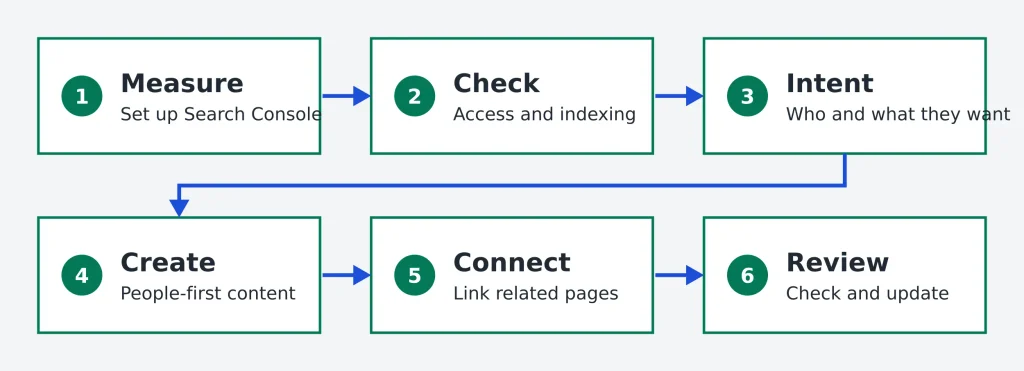
This is SEORAF’s simple sequence for a new site or page. SEORAF view
- Set up measurement. Connect Search Console so you can see how your site appears in Google.
- Check access. Confirm important pages can be crawled and indexed.
- Choose a topic and its intent. Decide who the page is for and what they want.
- Create people-first content. Answer the need clearly, with real experience or sources.
- Connect the page. Link it from related pages with descriptive anchor text.
- Review and improve. Check impressions and clicks over time, then update what is out of date.
Essential concepts
SEO and AI search
What Google documents
Google says AI Overviews and AI Mode surface relevant links to help people find information and explore content. Both may use “query fan-out”, meaning several related searches across subtopics, and AI Overviews are shown only when Google’s systems judge them additive to classic Search. To be eligible as a supporting link, a page must be indexed and eligible to appear in Search with a snippet, and Google lists no additional technical requirements. Documented Details are on Google’s AI features and your website page.
SEORAF’s interpretation
Clear, accurate, well-sourced pages serve readers and are easy for any system to summarize. SEORAF view Covering related subtopics on a hub, as this page does, is consistent with how Google describes fan-out. That is SEORAF’s reading, not a promise of inclusion.
What is unsettled
SEORAF does not claim a formula for being included, and cannot verify how other AI products choose and cite sources. Unsettled
Common beginner mistakes
- Expecting guarantees. Google says it cannot guarantee that a page will be crawled, indexed or served. Anyone promising a ranking position is guessing.
- Writing for search engines first. Google’s key best practices center on helpful, reliable, people-first content.
- Assuming a page is indexed. Check it instead of assuming.
- Reading average position as a fixed rank. It is an approximate average across impressions and can hide large differences between queries.
- Skipping measurement. Search Console shows how your site appears in Google, and without it you have less to go on.
- Chasing rules of thumb. Check claims against Google’s documentation before acting on them.
Beginner learning path
- Learn how search works. Read the section above and Google’s how Search works guide.
- Learn the rules of the road. Read Search Essentials and Google’s SEO Starter Guide.
- Get measurement in place. Learn what impressions, position and clicks mean.
- Study one area at a time. Start with technical SEO, then keyword research and content SEO.
- Practice on a real site. Apply what you learn and check the results in Search Console.
- Follow AI search carefully. Return to Google’s AI features page as the topic evolves.
Frequently asked questions
Sources
These are the primary sources behind statements marked Documented. Google’s documentation changes, so re-check a page before relying on a detail. Last checked 28 September 2026.
- How Google Search works. Used for: the three stages, and that Google cannot guarantee crawling, indexing or serving.
- Google Search Essentials. Used for: technical requirements, spam policies, key best practices, and that appearing in results is free.
- Spam policies for Google web search. Used for: link spam and the effect of policy violations.
- SEO Starter Guide. Used for: Google’s beginner guide, including that no site is guaranteed a place in the index and that following Search Essentials makes appearing more likely.
- AI features and your website. Used for: AI Overviews, AI Mode, query fan-out and eligibility for AI features.
- Search Console Help: impressions, position and clicks. Used for: metric definitions.
- Search Console Help: Performance report. Used for: reading position alongside impressions and clicks.
- web.dev: Core Web Vitals thresholds. Used for: what Core Web Vitals measure and the current “good” thresholds.