
Screaming Frog Free vs Paid Features: The Comprehensive Deep Dive
Don’t leave revenue on the table. We dissect every limitation, capability, and ROI metric of the Screaming Frog SEO Spider to determine if the free version suffices or if the paid license is non-negotiable for your growth.
In the high-stakes arena of digital marketing, technical SEO is the foundation upon which all visibility is built. If search engines cannot efficiently crawl, render, and index your content, your content strategy—no matter how brilliant—will fail to gain traction. As we navigate through 2026, the complexity of web architecture has increased exponentially, with JavaScript frameworks, dynamic rendering, and massive e-commerce catalogs becoming the norm.
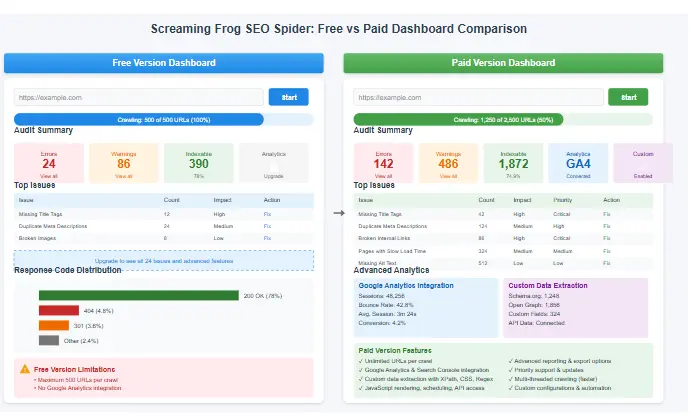
Enter the Screaming Frog SEO Spider. It is more than just a tool; it is the Swiss Army knife for SEO professionals. However, a common dilemma plagues both beginners and seasoned experts: is the free version sufficient, or is the investment in the paid license a necessary business expense? When analyzing Screaming Frog Free vs Paid features, the differences are not merely cosmetic; they fundamentally alter the scope and depth of your audit capabilities.
This comprehensive guide serves as your definitive resource. We will move beyond surface-level marketing copy and dive into the granular details of the Screaming Frog feature comparison. We will explore how each version impacts website building guide best practices, how it integrates with your broader marketing stack including email marketing automation strategies, and why understanding this distinction is critical for your technical success.
Why This Comparison Matters for Your Bottom Line
Technical debt is silent but expensive. Relying on a tool that cannot render JavaScript or cannot save your crawl data means you are flying blind. A thorough analysis of Screaming Frog Free vs Paid features reveals that the cost of the license is often negligible compared to the revenue lost from undetected crawl errors. Whether you are conducting a solo Technical SEO Audit or managing a complex Website Migration Checklist, the right tool determines the quality of your diagnosis.
Defining the SEO Spider Tool
Screaming Frog SEO Spider is a flexible and powerful website crawler that allows you to crawl websites’ URLs and fetch key elements to analyze and audit technical and onsite SEO. Downloaded by over a million users, it is the industry standard for a reason. Unlike cloud-based SaaS platforms that limit you based on monthly credits or page counts, Screaming Frog runs locally on your machine (Windows, Mac, or Linux).
This local architecture is a double-edged sword. It means the speed and depth of your crawl are limited only by your hardware’s RAM and processor power, rather than a subscription tier. However, it also means you cannot simply “log in” from anywhere; you must install the software.
The tool simulates a search engine bot, traversing your website’s internal link structure, following redirects, and recording the server response for every URL it encounters. It creates a massive, flat database of your site that you can slice, dice, and filter to find virtually any technical issue imaginable. When we compare Screaming Frog Free vs Paid features, we are essentially comparing a robust scalpel (Free) to a fully equipped robotic surgery suite (Paid).
Local Data Processing
Your data never leaves your machine unless you export it. This is crucial for enterprise clients with strict data privacy policies. It allows for incredibly fast crawls on powerful machines.
Custom Extraction Capabilities
Unlike basic crawlers, you can use CSS Path, XPath, or Regex to extract specific data points—like product prices or schema markup types—from any page.
Analyzing the Free Version Capabilities
The free version of Screaming Frog is arguably the most generous “freemium” product in the SEO industry. It is not a time-limited trial; it is a perpetually free tool with a hard constraint on scale. Understanding these constraints is the first step in mastering the Screaming Frog feature comparison debate.
The 500 URL Crawl Limit: Barrier or Feature?
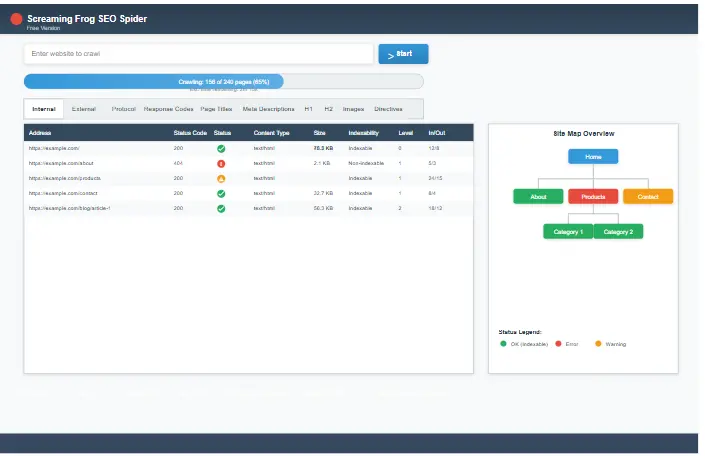
The defining characteristic of the free version is the 500 URL limit. Once the crawler discovers 500 unique URIs, it halts immediately. For large enterprises, this is a non-starter. However, for a specific subset of users, this limit encourages discipline:
- Staging Environment Audits: Before pushing a new site live, you can crawl the staging server to ensure there are no broken loops or missing resources.
- Competitor Landing Page Analysis: Instead of crawling a competitor’s entire site, you can input their top 20 blog posts to analyze their heading structure and word count. This is a great preliminary step before running a full competitor analysis guide.
- Segmented Audits: You can configure the crawler to ignore images, CSS, and JS, effectively reserving your 500 URL budget strictly for HTML content pages.
Core Unlocked Features
Despite the limit, the Free version grants access to the “Internal” tab and most “Bulk” exports. You can still:
Pro Tip: You can “trick” the limit for specific audits. If you are auditing a large site’s blog but only care about the last year’s posts, upload a list of just those URLs (via List Mode) to the free version. As long as the list is under 500, it will crawl them regardless of the total site size.
Unlocking Paid Version Power
Upgrading to the paid license (approximately £149/year) is not just about removing the 500 URL cap; it is about unlocking workflow automation and data integration. In the debate of Screaming Frog pricing comparison, the paid version is clearly designed for the professional SEO consultant, in-house team, or agency.
1. Unlimited Crawls & Storage
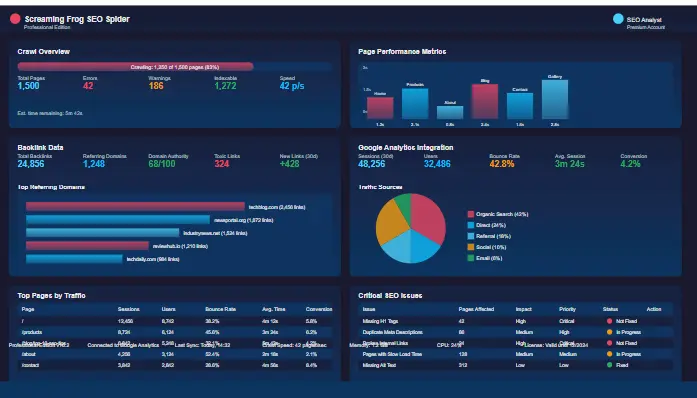
The most immediate benefit is the removal of the ceiling. You can crawl e-commerce sites with 100,000+ products or news sites with millions of archived pages. More importantly, the Paid version allows you to Save and Reload Crawls. This is critical for consultants. You can crawl a site today, save the file, and re-open it in three months to compare progress without re-crawling.
2. JavaScript Rendering (The “Must-Have” for 2026)
We live in a JavaScript-driven web. Sites built on React, Angular, Vue, and Next.js often load content dynamically. A standard crawler (and the Free version of Screaming Frog) only sees the initial raw HTML—often a blank shell or a loading spinner.
The Paid version integrates a headless Chrome browser. It renders the JavaScript, executes the scripts, and then crawls the *final* DOM. This means you can audit meta tags, content, and links that only exist after the page loads. If you manage a modern web application, this single feature in the Screaming Frog Free vs Paid features comparison justifies the entire cost of the license.
3. Integration: Google Analytics 4 & Search Console
Data without context is just noise. The Paid version allows you to connect to your GA4 and GSC accounts. This overlays user behavior data directly onto your crawl rows. You can filter your crawl to show only “404 pages with impressions in GSC” or “Pages with high bounce rate.” This allows you to prioritize fixes based on actual traffic impact, a crucial step when validating your keyword research checklist.
4. Scheduling & API Access
For agencies, time is money. The paid version allows you to schedule crawls to run automatically at set intervals (e.g., every Sunday night). It can save the data to a database and even email you a report. The Large License also unlocks an API and Command Line Interface (CLI), allowing developers to integrate crawl data into custom dashboards.
Direct Comparison: Screaming Frog Free vs Paid
To summarize the technical divergence, here is the comprehensive feature matrix. When evaluating the Free vs premium SEO crawler debate, refer to this table to see which specific capabilities you might be missing.
| Feature | Free Version | Paid Version |
|---|---|---|
| Crawl Limit | 500 URLs | Unlimited URLs |
| Save & Load Crawls | Not Allowed | Full Support |
| JavaScript Rendering | No | Yes (Headless Chrome) |
| Google Analytics 4 Integration | No | Yes |
| Search Console Integration | No | Yes |
| Scheduling & Automation | Manual Only | Yes (Database Storage) |
| Custom Extraction (Regex/XPath) | Basic | Advanced |
| Database Storage | RAM Only | SQL Database |
| Licensing | Free (Personal use only) | Commercial License required |
*Note: Commercial use of the free version is a violation of the license agreement. If you are an agency or consultant, you are legally required to purchase a license.
Pricing, Licensing, and ROI
Understanding the Screaming Frog license differences requires a look at the financial commitment. Screaming Frog offers a straightforward pricing model that is significantly cheaper than most enterprise SaaS alternatives.
Free License
Forever Free
- Up to 500 URLs
- All standard technical audits
- Commercial use prohibited
- No saving crawls
Annual License
Per Year
- Unlimited URLs
- JS Rendering & Scheduling
- All Integrations (GA/GSC)
- Commercial License
Large License
Per Year
- All Annual Features
- Multi-User Access
- API & CLI Access
- Priority Support
The ROI on the £149 license is almost immediate for professionals. If the software saves you just 2 hours of manual audit time per month, it has paid for itself. When considering the SEO crawler comparison, the paid license is an investment in efficiency.
Real-World Technical SEO Workflows
Tools are useless without strategy. Let’s look at how the differences in Screaming Frog Free vs Paid features apply to actual client scenarios. These workflows demonstrate the practical application of the tool.
Workflow 1: The Broken Link Recovery Campaign
A client notices a drop in organic traffic. Using the Paid version, you crawl the entire domain. You filter the “Response Codes” tab for 404 errors. Then, you click the “Inlinks” tab for one of the 404s and see it has 50 internal links pointing to it from high-authority blog posts.
The Paid Advantage: You can save this crawl and send the saved file to the developer. They can open it on their machine without needing to crawl again. You fix the links. Traffic recovers. You then use the recovered traffic data to feed into your email marketing automation strategies, nurturing the users who landed on the previously broken pages.
*With the Free version, you would have hit the 500 limit before finding the error, or you wouldn’t be able to save the audit to share with the developer.
Workflow 2: International SEO & Hreflang
You are managing a site targeting the US, UK, and Australia. You need to ensure that users in the UK see the /uk/ version of the site, not the /us/ version. This requires checking hreflang tags.
The Paid Advantage: While the Free version shows hreflang tags, the Paid version has a dedicated “Hreflang” report that visually chains the languages together. It instantly highlights “Return Tags” missing or errors where the UK page points to the US page, but the US page doesn’t point back to the UK page. This level of detail is vital for preventing duplicate content issues across regions.
Workflow 3: Content Gap & Optimization
You want to identify “thin content” on your blog. You crawl the site and look at the “Word Count” column. You filter for pages under 300 words.
The Paid Advantage: You connect to Google Analytics via the Paid version. You discover that one of your thin content pages actually has 5,000 visits a month. This is a massive opportunity. You expand the content. To ensure you target the right terms, you cross-reference your findings with a keyword research checklist to ensure the expanded content covers high-intent long-tail keywords.
Workflow 4: Website Migration
You are moving a site from HTTP to HTTPS or changing the CMS. This is a high-risk activity.
The Paid Advantage: You crawl the old site and save the file (Export All). You launch the new site. You crawl the new site. You compare the two Excel files to ensure every URL from the old site has a corresponding 301 redirect on the new site. This is impossible to do reliably with the Free version due to the URL limit and inability to save/compare datasets. This workflow is a core part of any comprehensive Website Migration Checklist.
Recommended SEO Tool Stack
Maximize your ROI with these professional-grade tools that complement your audit workflow.
Screaming Frog Alternatives & The Tool Ecosystem
While the technical audit tool comparison often leads to the conclusion that the paid version is superior, it is not the only fish in the sea. Depending on your specific needs—specifically if you prefer cloud-based collaboration over desktop software—you might look elsewhere. We recommend checking our detailed SEO tools comparison for a broader market view.
SE Ranking
Best Cloud Alternative
SE Ranking is an all-in-one SEO platform. Its Website Audit tool is cloud-based, meaning you can set it and forget it. It checks your site weekly and emails you changes. It lacks the deep custom extraction of Screaming Frog but wins on usability and reporting for teams.
Moz Pro
Best for Domain Authority
Moz’s Site Crawl is less configurable but ties directly into their Domain Authority metrics. If your primary goal is tracking your DA and spotting high-level issues, Moz is a strong contender. However, for granular technical fixes, Screaming Frog remains king.
Outranking
Best for AI Content Strategy
Outranking excels at blending SEO data with AI writing assistance. It helps you create content briefs that are optimized for search intent, making it a great companion to the technical data you get from a crawler.
SEO PowerSuite
Best for Lifetime License
If you hate annual subscriptions, SEO PowerSuite offers a similar desktop crawler (WebSite Auditor) for a one-time fee. It is a viable alternative to the Screaming Frog Free vs Paid features debate if you prefer CapEx over OpEx.
Integrating with Content Tools
Technical SEO fixes the plumbing, but you still need water. Once you have used Screaming Frog to identify pages that need content optimization, tools like Frase, NeuronWriter, or Rytr can help you write the content that ranks. And for WordPress users, pairing the crawler with Rank Math PRO ensures your on-page optimization is perfect before you even hit publish.
Expert FAQ: Screaming Frog
Final Verdict on Screaming Frog Free vs Paid Features
The debate is settled not by price, but by intent. If your intent is to learn the basics of technical SEO or to audit a small personal portfolio, the Free version is a masterpiece of software engineering. It provides the core functionality needed to understand how search engines view the web.
However, if your intent is commercial—to drive traffic, generate leads, and secure revenue for a business—the Paid version is non-negotiable. The limitations of the free version (no saving, no JS rendering, no data integration) will eventually become bottlenecks that stunt your growth.
When you weigh the cost of the license (£149/year) against the cost of lost organic traffic due to undetected technical errors, the decision becomes clear. The Screaming Frog Free vs Paid features comparison ultimately shows that the paid version is an essential tool for any serious SEO professional in 2026.