
Free SEO Audit Tools: Choose One, Run It, and Fix What Matters
By Mousume Akter · Independent SEO resource · Vendor limits checked October 25, 2026
A free SEO audit tool can help you identify missing page elements, inconsistent signals, and technical issues worth investigating. But an audit report does not tell you exactly how Google will rank a page. The useful part is what you do next: choose the right checker, verify its findings, and fix the issues that matter most.
This guide compares free SEO audit options, explains how to use SEORAF’s single-page checker, and gives you a practical workflow for interpreting results. You do not need to fix every warning or chase a perfect audit score to make a useful improvement.
If you already know which page you want to review, start with the checker. If you need information about indexing, site-wide crawling, or performance, choose the tool that answers that specific question.
Which free SEO audit tool should you use?
The best starting point depends on the question you need to answer. A single-page checker, a site crawler, Google Search Console, and a performance testing tool examine different things. Choosing the right one can save time and prevent you from treating an unrelated warning as a priority.
Choose a tool according to the question you need to answer.
| Your question | Tool to consider | What it helps you investigate |
|---|---|---|
| Has Google indexed this URL? | Google Search Console | Google’s reported indexing information for a site you can access, including URL Inspection. |
| What page-level elements are present or missing? | SEORAF’s page checker | A first-pass review of the page elements listed by the checker. |
| What issues occur across many URLs? | Screaming Frog SEO Spider or Ahrefs Webmaster Tools | Crawling and reviewing multiple pages on a website, subject to access and tool limits. |
| What performance issues affect a URL? | PageSpeed Insights | Page performance diagnostics, Lighthouse results, and available real-user performance data. |
| What broader SEO issues should I investigate? | Semrush SEO Checker | A website audit snapshot with reported issues and recommendations, subject to the current free offering. |
Important distinction: a tool can detect an issue without proving that it is responsible for a ranking or traffic problem. Check the underlying evidence and the page’s purpose before changing anything.
Free SEO audit tools: features and limitations
Free tools differ in scope, access requirements, and usage limits. The following comparison summarizes the main differences. Limits and features can change, so use the linked vendor documentation as the final reference before making a decision.
Scope and important restrictions to consider when choosing a free SEO tool.
| Tool | Scope | Free access or stated limit | Important consideration |
|---|---|---|---|
| Google Search Console | Google Search reporting for a property you can access | Free | It is not a general-purpose crawler or a substitute for inspecting every page manually. |
| SEORAF page checker | One public page at a time, according to the tool description | Consult the live tool page for its current availability and limits. | Confirm which checks the current report actually performs. |
| Screaming Frog SEO Spider | Desktop website crawler | The free version allows up to 500 URLs per crawl. | Saving and reopening crawls, configuration options, JavaScript rendering, and some advanced features require a licence. See the official FAQ. |
| Ahrefs Webmaster Tools | Site Audit and other tools for verified websites | 5,000 Site Audit crawl credits per verified project per month, according to Ahrefs’ published limits. | Ownership verification is required for website-specific access. Review the official usage limits. |
| Semrush SEO Checker | Website SEO snapshot and recommendations | The official page describes a free checker and one check per day. | Confirm the current terms and distinguish the free checker from the paid Site Audit product. |
| PageSpeed Insights | Page performance diagnostics | Free | It focuses on performance, not a complete site-wide SEO audit. |
These are tool-selection guidelines, not a hands-on test or a guarantee that one product is better than another. The right choice is the one that answers your question with evidence you can verify.
Google’s guidance on third-party SEO tools and advice is especially relevant: third-party tools do not have access to Google’s internal ranking data. Review recommendations critically and compare important claims with official documentation before making significant changes.
How to run SEORAF’s free SEO page checker
SEORAF’s checker is intended as a quick review of an individual public URL. It is useful as a starting point when you want to inspect on-page elements before deciding whether a deeper audit is needed.
Open the SEORAF free page checker and follow the instructions shown on the live tool page.
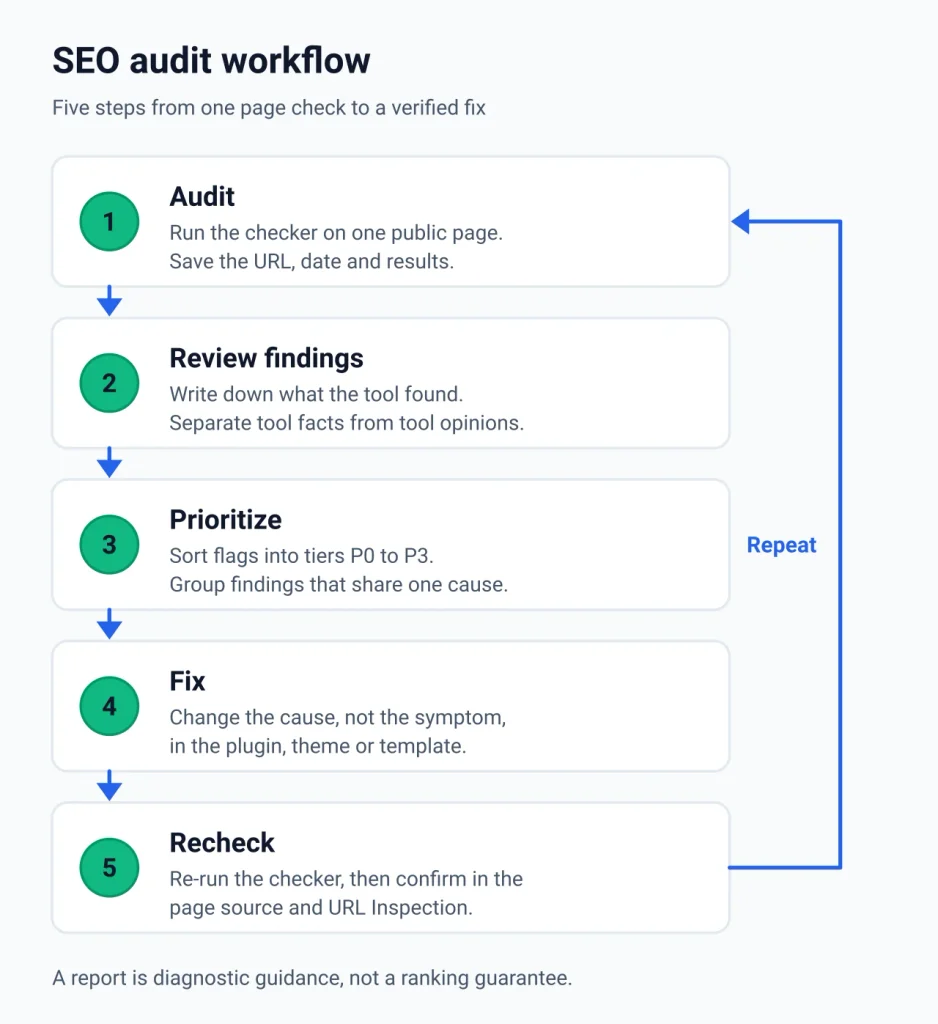
Step 1: Choose the right page
Start with one page that has a clear purpose. This might be an important guide, a service page, a resource, or an article you want people to discover through search.
Choose a page you can edit or investigate. If you are reviewing someone else’s website, limit your work to publicly accessible information and do not assume you have access to its private Search Console data.
Step 2: Enter the full URL
Copy the complete URL, including the protocol, and submit it using the checker. Make sure you are reviewing the intended page rather than a redirect, an outdated URL, or a different version of the same content.
Step 3: Record the findings
Save the URL, date, and relevant findings before making changes. Separate what the tool directly detected from its recommendations about what you should do.
Step 4: Verify important findings
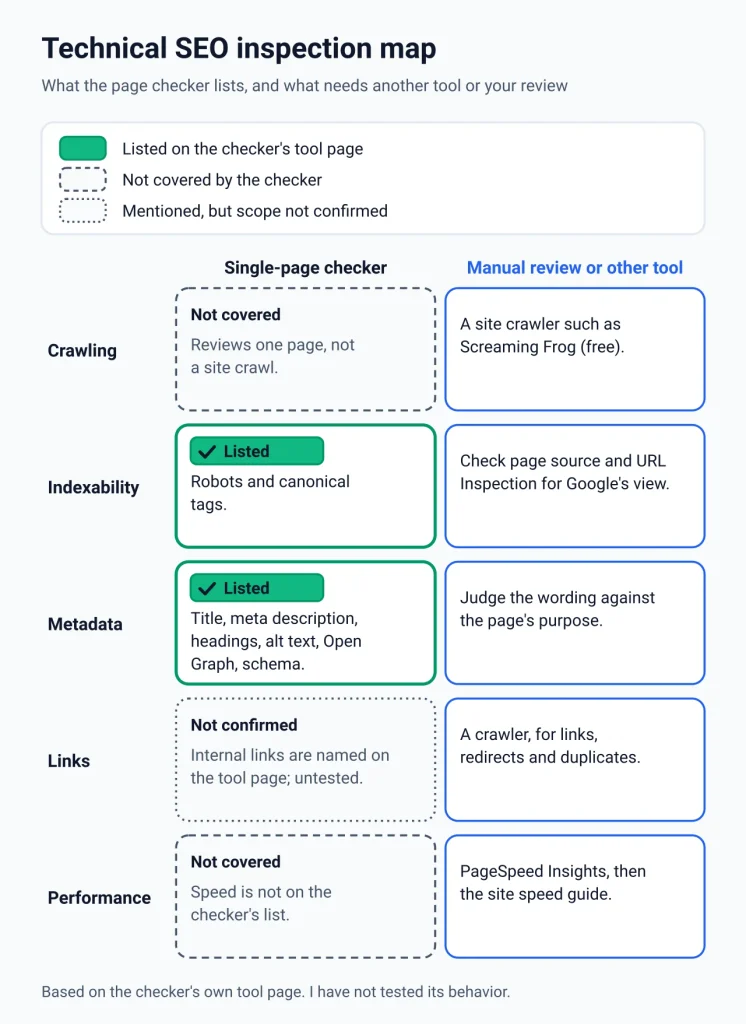
Use the page source, browser inspection, relevant Google documentation, and Search Console when appropriate. Do not assume a single-page checker has examined server configuration, every redirect, JavaScript-rendered content, site-wide links, or Google’s index.
What does a single-page SEO checker examine?
According to the SEORAF tool description supplied for this page, its checks include the following elements. Confirm that each item is available in the live checker before relying on it.
- Title tag: whether a title is present and how its length or wording is assessed.
- Meta description: whether a description exists and whether the tool provides a clarity or length assessment.
- Headings: the presence of an H1 and the page’s heading structure.
- Content: word count and other content-depth indicators, where provided.
- Images: whether image alt attributes are present.
- Canonical and robots directives: relevant page-level metadata detected by the tool.
- Structured data and Open Graph: the presence of supported markup and social metadata.
This list describes the intended scope, not independently verified test coverage. I have not tested how the checker handles redirects, blocked URLs, authentication, JavaScript-generated content, or unusual server responses. Verify these cases separately if they matter to your page.
What a single-page checker does not replace
| Question | Where to investigate |
|---|---|
| Has Google indexed the URL? | Search Console URL Inspection |
| What title or description might appear in search? | SEORAF Title & Meta Analyzer and Google’s snippet documentation |
| Does the page have performance issues? | PageSpeed Insights and the SEORAF site speed guide |
| Are there broken links, redirects, or duplicate URLs across a site? | A site crawler, such as Screaming Frog SEO Spider, or a relevant verified-project audit tool. |
| How should pages and links be organized? | SEORAF’s site architecture guide |
| How do I plan a broader technical review? | SEORAF’s technical SEO audit guide |
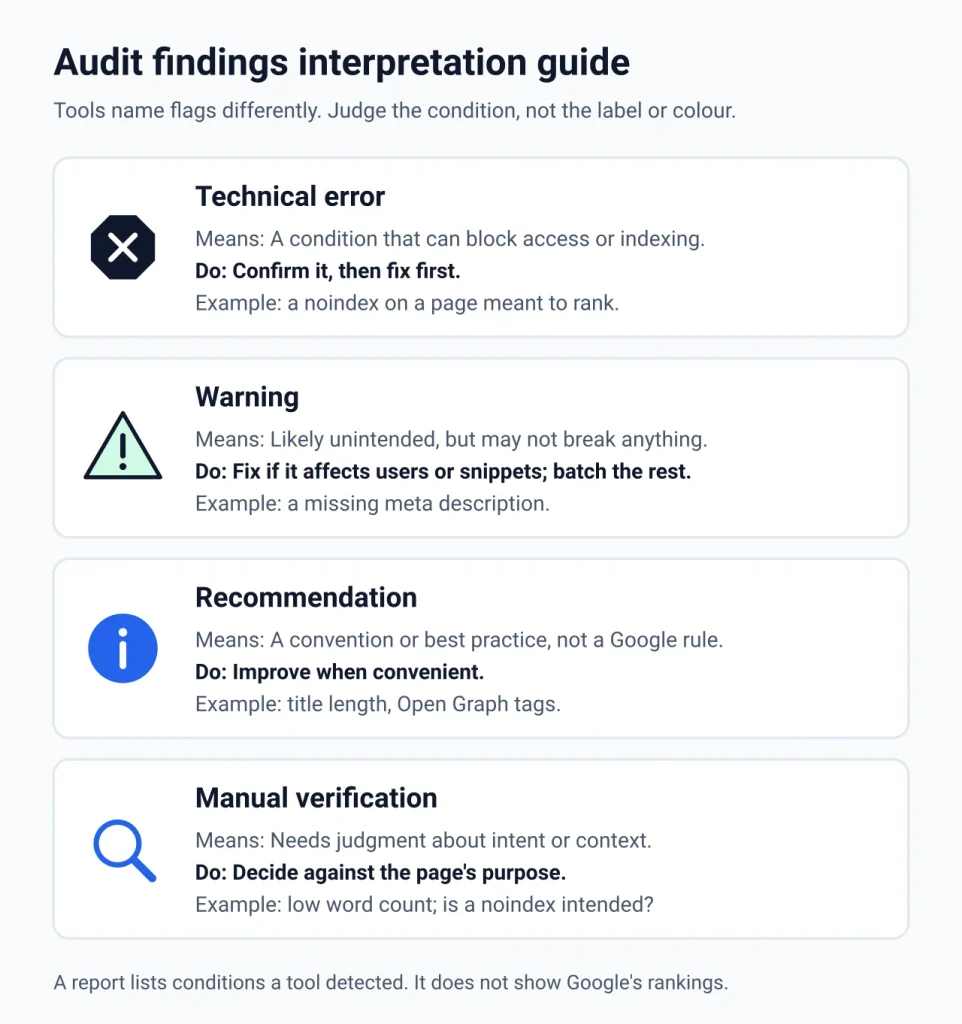
How to interpret SEO audit errors, warnings, and recommendations
Different tools use different labels and scoring systems. A red warning is not automatically a critical SEO problem, and a green result does not prove that a page is optimized. Look at the underlying condition and decide whether it matters for the page’s purpose.
Choose a separate resource when the question goes beyond the checker.
| Label | What it may mean | Example | What to do |
|---|---|---|---|
| Error | A detected condition that may conflict with the page’s intended behavior. | An unintended noindex directive on a page intended to appear in search. | Confirm the condition and its effect, then fix the cause if necessary. |
| Warning | A condition that deserves investigation but may not require immediate action. | A missing meta description or an image without an alt attribute. | Assess the page, users, and context before prioritizing it. |
| Recommendation | A suggested improvement based on a tool’s rules or interpretation. | A suggested title length or additional social metadata. | Check the rationale and apply it when it serves a genuine purpose. |
| Manual review | A decision that requires human judgment. | Whether a short page answers the visitor’s question adequately. | Review intent, content, technical evidence, and user needs. |
A perfect audit score is not the goal
An audit score is a tool-specific measurement. It is not Google’s ranking score, and there is no universal score that guarantees better rankings. A short, useful page can be appropriate for its purpose, while a page with a high technical score can still fail to answer the user’s question.
Use audit scores to help organize your work, not to replace judgment. Correct genuine technical problems, improve unclear content, and leave intentional settings alone.
A five-step workflow for turning an audit into improvements
The following workflow helps you move from a list of findings to changes you can explain and verify.
1. Run the audit and record a baseline
Save the page URL, audit date, and relevant findings. If you are using several tools, record which tool reported each issue. That makes differences easier to investigate later.
2. Separate evidence from interpretation
Consider these two statements:
- Observation: the HTML title contains 74 characters.
- Interpretation: the title is too long and must be shortened.
The first is measurable. The second depends on context. Google does not specify a fixed character limit for the HTML title element; title links can be truncated to fit the device or display context. Review the official title-link guidance before changing a title solely to satisfy a tool’s length rule.
3. Prioritize issues by their likely impact
Start with problems that prevent access or indexing when indexing is intended, then investigate conflicting URL signals and issues that affect users. Cosmetic recommendations can wait when more important work remains.
For a page-level example of the priority system, see the P0–P3 framework below. It is a SEORAF editorial heuristic, not a Google classification.
4. Fix the cause, not just the symptom
If a problem appears on multiple WordPress pages, investigate whether it comes from a shared theme setting, template, plugin, or content pattern. Correcting the source can be more useful than editing every page individually.
- Titles and descriptions: review the SEO plugin or page settings that control the metadata.
- Canonical tags: confirm which URL should represent the content and whether duplicate or alternate URLs are intentional.
- Robots directives: check the page-level setting, SEO plugin, and relevant site configuration before removing a directive.
- Images: add descriptive alt text when an image conveys information; use empty alt text for decorative images.
- Content: improve missing explanations or unclear sections instead of adding words merely to meet a word-count target.
5. Recheck and document the result
After making a change, inspect the live page and rerun the relevant check. Use Search Console when you need Google’s reported indexing information or want to request recrawling where appropriate.
Changes are not reflected in search immediately. Google must recrawl and process the updated page, and the timing varies. A recrawl request is not a guarantee of indexing, ranking changes, or increased traffic.
How to prioritize SEO audit findings
The P0–P3 framework below is my own practical method for organizing findings. It is not an official Google severity scale, and the right priority depends on the page’s purpose and the evidence available.
| Tier | Meaning | Example | Next action |
|---|---|---|---|
| P0 | Potentially blocks access or intended indexing. | An unintended noindex directive on an important landing page. | Verify the live condition and correct it if it conflicts with the page’s purpose. |
| P1 | Conflicting URL signals or other significant technical problems. | A canonical points to a different URL when the current page should be canonical. | Confirm the intended URL and resolve the inconsistency. |
| P2 | Improvements to clarity, presentation, or user experience. | An unclear title, missing useful alt text, or a description that does not summarize the page. | Improve the element when the evidence and user benefit justify the change. |
| P3 | Lower-priority recommendations or tool-specific heuristics. | A word-count warning on a page that already answers the visitor’s question. | Review manually; no change may be necessary. |
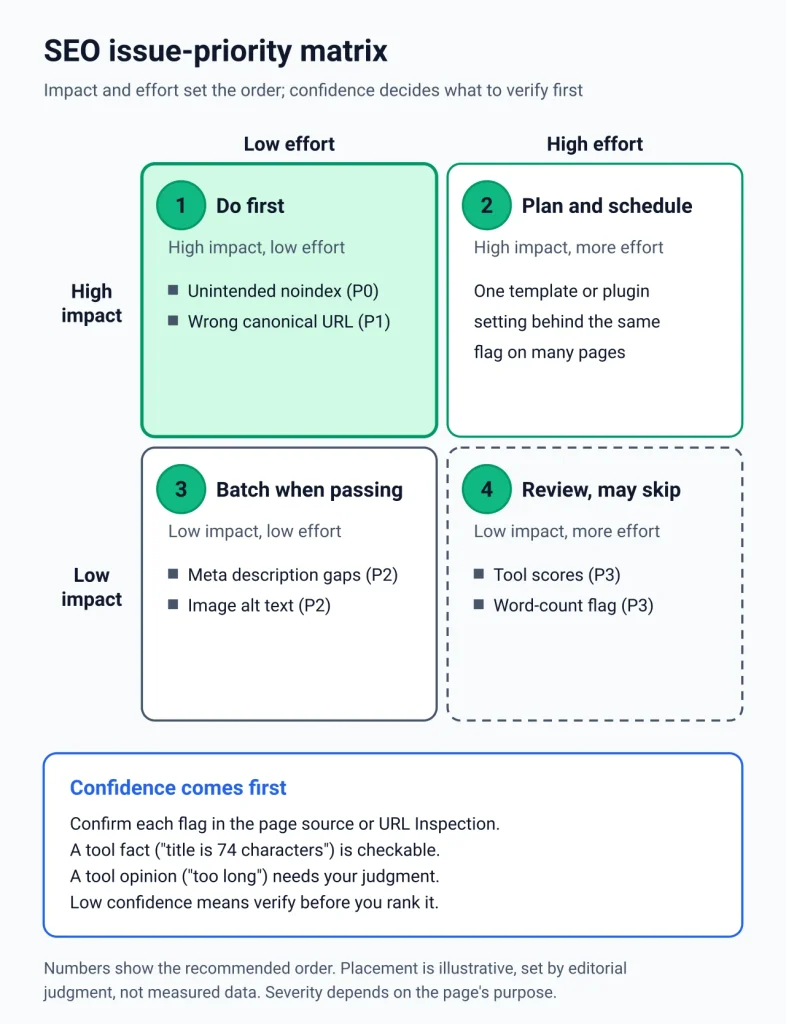
Context matters. A noindex directive is appropriate for some pages, such as a private or confirmation page that should not appear in search. The same directive can be a serious problem on a public landing page intended to rank. Never remove it without confirming the intended behavior.
Similarly, Google treats a canonical annotation as a signal rather than an absolute command. Review the official canonicalization guidance before changing a canonical on a page with duplicates or alternate URLs.
Five practical SEO audit examples
These are hypothetical examples for learning. They are not results from a live website or claims that the checker detected these issues.
Example 1: A missing meta description
Finding: the page source contains no meta description.
Check: inspect the rendered or delivered HTML and confirm that the description is genuinely absent.
Action: if a description would help summarize the page, write a concise, accurate one. Google may generate a search snippet from page content instead of using the supplied description.
Verify: inspect the live HTML after publishing. Do not promise that the exact description will appear in search.
Example 2: An unintended noindex directive
Finding: an important public service page contains a robots meta directive with noindex.
Check: inspect the page source, relevant response headers, and Search Console URL Inspection where available. Confirm that the page is intended to appear in search.
Action: identify the setting or configuration that added the directive. Change it only after confirming that indexing is intended.
Verify: recheck the live response. Google must be able to crawl the page to see a noindex directive; a robots.txt block can prevent Google from seeing it. Read the official noindex guidance.
Example 3: A canonical points to another URL
Finding: a page declares another URL as its canonical.
Check: determine whether the page is a duplicate, an alternate version, or a unique page that should stand on its own.
Action: preserve an intentional canonical. Correct it if it contradicts the intended URL and the evidence supports a change.
Verify: check the canonical in the live HTML and inspect Google’s reported canonical information where available.
Example 4: An informative image has no alt text
Finding: a useful diagram has an empty or missing alt attribute.
Check: determine whether the image conveys information that is not already available in the surrounding text.
Action: provide a concise, meaningful description when needed. Decorative images can use an empty alt attribute.
Verify: check the image’s purpose and whether the alternative text makes sense in context. Do not stuff keywords into alt text.
Example 5: A short page receives a thin-content warning
Finding: a tool flags a page because it contains relatively few words.
Check: determine whether the page fully answers its intended question and provides the information visitors need.
Action: improve missing information if the page is incomplete. If the short page serves its purpose, adding unnecessary paragraphs may make it worse.
Verify: review the page against its intent and user needs, rather than treating a word-count threshold as a universal ranking requirement.
Free SEO audit checklist
Use this checklist to keep your audit focused. These are manual review steps, not a claim that the page checker automatically tests every item.Tick each item as you complete it. Your selections are not saved after leaving or reloading this page.
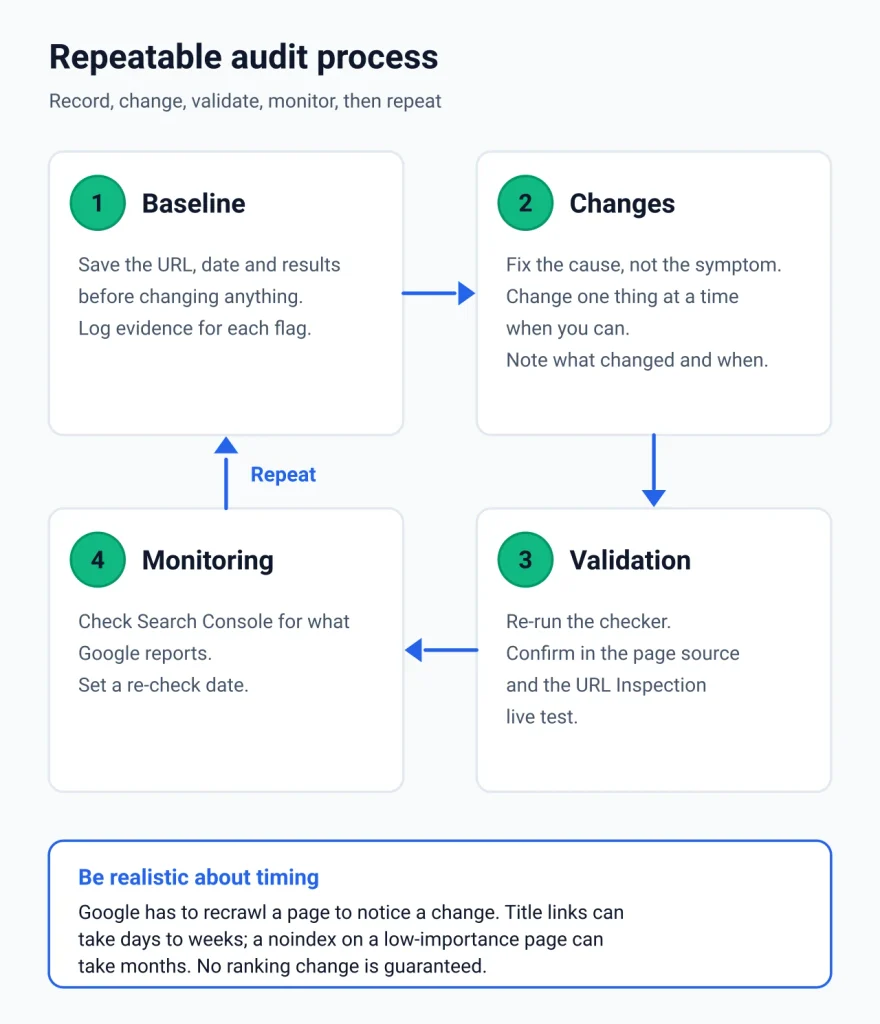
- I chose one important public page and copied its full URL.
- I recorded the date, URL, and relevant audit findings.
- I checked the title and meta description in the live page source.
- I reviewed the H1 and heading structure for clarity.
- I checked canonical and robots directives against the page’s intended purpose.
- I confirmed important indexing issues with Search Console where available.
- I reviewed useful image alt text and page links.
- I separated verified problems from tool recommendations.
- I prioritized fixes according to impact and evidence.
- I rechecked the live page after making changes.
- I recorded what changed and when to review the result again.
When a free SEO audit is not enough
A one-page check is a useful starting point, but some questions require broader evidence or a more detailed review. Consider another tool or a manual audit when:
- Organic traffic has dropped: review Search Console and use Google’s guide to debugging search traffic drops.
- You are planning a migration or redesign: map important URLs, redirects, canonicals, and indexing requirements before launch.
- The same issue appears across many pages: investigate shared templates, CMS settings, and site-wide technical patterns with an appropriate crawler.
- Performance is the main concern: use PageSpeed Insights and review its field and lab data where available.
- You need backlink or keyword research: use a tool designed for that purpose rather than expecting a page checker to provide a complete backlink or keyword database.
- You cannot verify a finding: consult official documentation or seek qualified help before making a high-impact technical change.
For a broader review, continue with the SEORAF technical SEO audit guide and the manual SEO audit checklist. These resources address questions that a single-page checker cannot settle on its own.
Frequently asked questions about free SEO audit tools
Does an SEO audit score affect Google rankings?
An audit score is generated by the tool that calculates it. It is not Google’s internal ranking score. Use it to identify areas to investigate, then verify the underlying conditions against reliable evidence.
Why do different SEO audit tools show different results?
Tools can examine different URLs, use different crawl settings, check different page elements, and apply different rules. Compare the actual findings and their scope instead of comparing scores alone.
Can a free SEO audit replace Google Search Console?
No. A page checker can inspect elements present in a page, while Search Console provides Google’s reporting about your verified property, including available indexing and search-performance information. The tools serve different purposes.
Do I need to fix every audit warning?
No. Verify each warning and prioritize it according to its impact, context, and evidence. Some recommendations are useful improvements, while others are optional or inappropriate for a particular page.
How long does Google take to reflect an SEO fix?
There is no universal timeline. Google must recrawl and process the updated page, and the time required varies. A recrawl request does not guarantee indexing, a ranking change, or additional traffic.
Can a short page rank in Google?
Word count alone does not establish whether a page satisfies a searcher’s needs. A short page may be appropriate when it provides the necessary answer. Add content when it improves completeness, accuracy, or usefulness rather than to reach an arbitrary word-count target.
Does a missing meta description mean a page cannot rank?
No. A missing meta description does not by itself mean a page cannot appear in search. Google can generate snippets from page content. A useful description may still help summarize the page for searchers, but Google does not guarantee that it will display the exact text supplied.
What should I check first in an SEO audit?
Start with issues that prevent access or intended indexing, then investigate conflicting URL signals and problems that affect users. Review lower-priority recommendations after you have confirmed the more consequential findings.
About this guide and its sources
I’m Mousume Akter, founder and editor of SEORAF, an independent SEO knowledge resource. This guide is intended to help site owners understand audit findings and make informed decisions without relying on ranking guarantees or unsupported tool scores.
Sources and verification approach
The technical explanations in this guide draw on Google’s public Search documentation and the official documentation of the tools mentioned. Vendor features and usage limits can change, so review the original pages before relying on a specific limit.
- Google guidance on third-party SEO tools and advice.
- Google title-link documentation.
- Google search-snippet documentation.
- Google canonicalization guidance.
- Google guidance on blocking indexing.
- Google image SEO guidance.
- Screaming Frog SEO Spider FAQ.
- Ahrefs published usage limits.
- Semrush SEO Checker.
What this guide does not claim
- I have not independently tested the competitor tools for this comparison.
- The description of SEORAF’s checker is based on its stated scope and must be checked against the current live tool.
- The examples are hypothetical and do not represent measured client outcomes.
- The P0–P3 prioritization framework is an editorial recommendation, not a Google standard.
- This guide does not promise first-place rankings, increased traffic, or a particular business result.
Review the official documentation and the current tool pages before making significant technical changes. The purpose of an SEO audit is to help you find and verify meaningful issues—not to chase a perfect score.