
Free SEO Tools: What They Do, Where They Stop, and How to Choose
By Mousume Akter · Last reviewed 2 October 2026
Free SEO tools are software, web apps, browser features or plugins that help you research, analyze or monitor a website’s search performance without payment. They help you find problems and opportunities. They do not improve rankings on their own.
Short answer: Most new sites can start with a small free stack: Google Search Console for search performance and indexing, an analytics tool for visitor behavior, a page speed tester, a crawler for site checks and one or two keyword tools. A paid platform is worth considering only when a specific free limit starts blocking real work.
Start here: If you do only one thing, set up Google Search Console. Google explains what it does in About Search Console. If you are new to the fundamentals, read technical SEO basics first.
About this page: Details about Google’s tools and about the vendors named in the paid-tool section come from Google’s documentation and each vendor’s own pages, reviewed on 2 October 2026. Free plans and limits change, so confirm them on the official page before relying on them. Other tools are named without detailed claims. Opinions are labeled as SEORAF’s editorial view. This page contains no affiliate links. SEORAF is an independent SEO knowledge resource, not an agency.
Key terms
SEO
Improving a site so search engines can crawl, understand and show it, and so visitors find what they need.
Crawling
A search engine bot visiting pages and following links. See the crawling guide.
Indexing
A search engine storing a page so it can appear in results. See the indexing guide.
Sitemap
A file listing URLs you want search engines to find.
robots.txt
A file telling crawlers which paths they may crawl.
First-party data
Data a search engine or analytics platform records about your own site.
Estimated data
Numbers a vendor models, such as keyword volume or difficulty.
Google’s measures of loading, responsiveness and visual stability. The set of metrics can change over time.
Backlink
A link from another site to yours.
Rank tracking
Recording a page’s position for chosen keywords over time.
Which free SEO tool do I need for each job?
Answer: Pick by job. Start with the search engines’ own tools, then add one tool for each extra job.
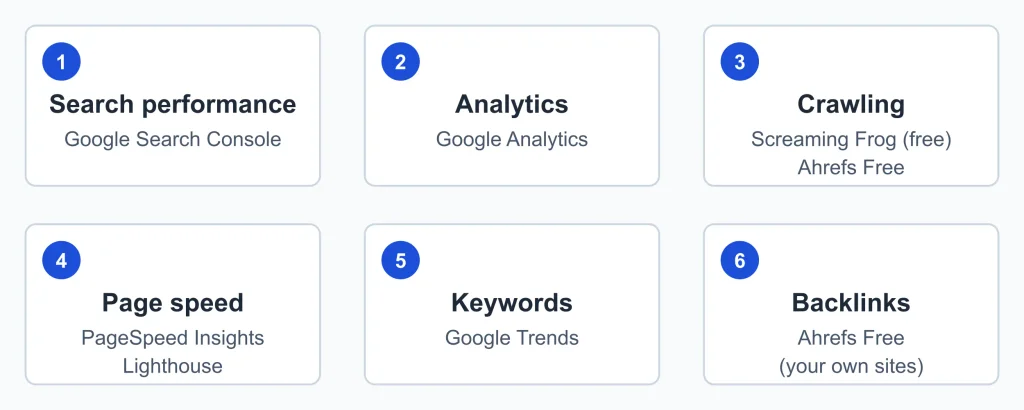
Free SEO tools by job
| Job | Starting point | What to check about the free access |
|---|---|---|
| Check indexing and search performance | Google Search Console, Bing Webmaster Tools | Site verification |
| Understand visitor behavior | Google Analytics | Setup and data volume |
| Test page speed | PageSpeed Insights, Lighthouse, GTmetrix | Usually one URL at a time |
| Crawl your site | Screaming Frog (free version), Seobility, Ahrefs Free | URL or credit caps; verification for some |
| Find keyword and topic ideas | Google Trends, Google Keyword Planner, AnswerThePublic, Ahrefs Keyword Difficulty Checker, Ubersuggest | Query limits; an account may be required |
| Review backlinks | Ahrefs Backlink Checker, Ahrefs Free, Moz Link Explorer | Limited results, or your own verified site only |
| Manage on-page SEO in WordPress | Yoast SEO (free version) | Some features are paid |
How do these tools fit together?
Answer: Each category answers a different question and uses a different kind of data. Search Console tells you what Google sees. Analytics tells you what visitors do. Crawlers show how your site is built. Keyword and backlink tools estimate things from outside.
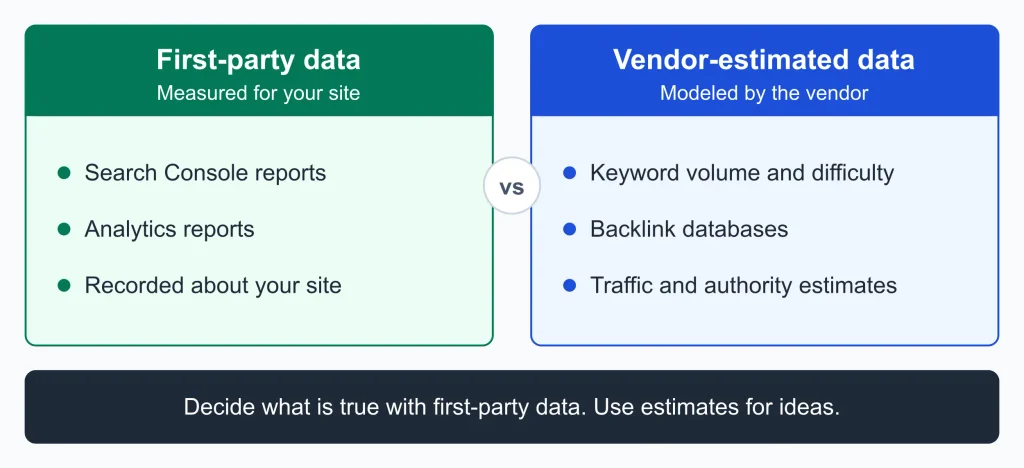
Tool types, data sources and data reliability
| Question | Tool type | Data source | Measured or estimated? |
|---|---|---|---|
| Is Google indexing my pages? Which queries show my site? | Search Console | The search engine | Measured for your site |
| What do visitors do after arriving? | Analytics | Your site’s tracking | Measured for your site |
| What is broken or missing across my pages? | Crawler | The tool’s own crawl | Measured at crawl time |
| How fast do pages load? | Speed tester | A test run | Varies between runs |
| What might people search for? | Keyword tool | Vendor datasets | Estimated |
| Who links to me and to competitors? | Backlink tool | Vendor crawler | Partial and vendor-specific |
Use first-party tools to decide what is true about your site, and estimate-based tools to generate ideas.
What types of “free” exist?
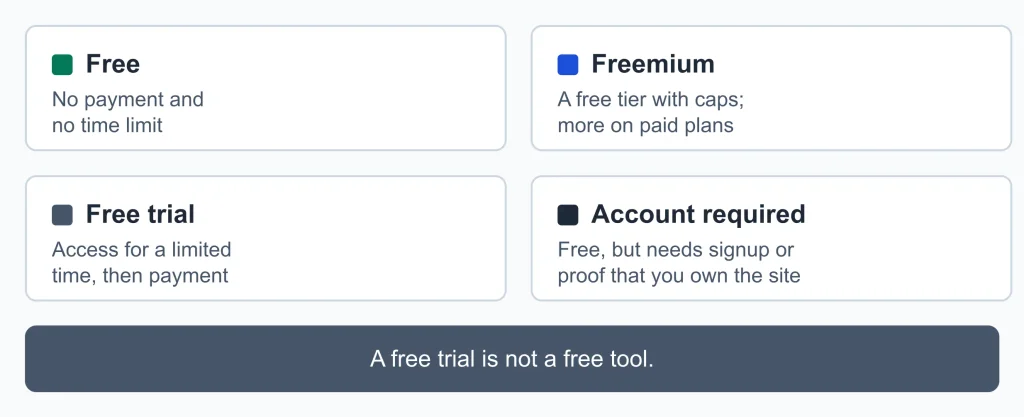
Four meanings of free” for SEO tools
| Label | What it means |
|---|---|
| Free | No payment and no time limit (for example, search engine webmaster tools) |
| Freemium | A free tier with caps; more on paid plans |
| Free trial | Access for a limited time, then payment |
| Account required | Free, but needs signup or proof that you own the site |
A free trial is not a free tool. Check the label before building a workflow around it.
Are free SEO tools enough?
Answer: For a new or small site and for basic tasks, often yes. They fall short when you manage many sites, run a large site, need regular rank tracking, or need deeper competitor and backlink analysis. For a wider look at categories beyond free options, see this overview of SEO tools.
Free tools do well at: showing how your site performs in search, finding technical problems, giving you starting points for keyword research and letting you learn before you pay.
They usually fall short on:
- Usage limits on queries, pages crawled, projects or exports.
- Estimated numbers. Use them to compare, not to forecast.
- Inconsistent results. Different tools report different values for the same site.
- Separate tools. Free tools often work on their own, so you gather and compare results yourself.
- Tool-defined scores. An “SEO score” is the tool’s own rating, and search engines do not publish a matching one.
- Lead generation. Some free tools mainly introduce a paid product.
Common mistakes: comparing numbers across tools instead of tracking trends within one, collecting tools instead of using them, skipping first-party data, fixing everything a crawler flags instead of what affects crawling, indexing and user experience, and assuming a free trial is free.
What are the main free SEO tools in each category?
Each tool is described once, under its main job. Each section ends with where free access tends to run out.
Which free tools show search performance and indexing?
Google Search Console helps you monitor your site’s presence in Google Search. According to Google, it shows how often your site appears in search, which queries show it, how often people click, which sites link to you, and alerts you to indexing, spam and other issues. Bing Webmaster Tools is Bing’s equivalent for Bing Search.
Where it runs out: they report on your own site, with no competitor data.
Which free tools can crawl my site?
A crawler visits your pages the way a search engine bot does and reports what it finds, such as broken links, missing titles and duplicate content signals.
- Screaming Frog SEO Spider (free version) is a desktop crawler. Its own page says the free version crawls up to 500 URLs.
- Ahrefs Free (previously Ahrefs Webmaster Tools) offers a site audit plus search performance and backlink data for websites you verify as your own.
- Seobility and Siteliner offer site checks. Confirm their current free limits on their own sites.
Treat issue lists as prompts to investigate, not a checklist that must reach zero. For next steps, see the technical SEO overview.
Where it runs out: URL or credit caps on larger sites.
Which free tools test page speed?
PageSpeed Insights analyzes the URL you enter and reports on its performance, with suggestions for improving it. Lighthouse runs in Chrome’s developer tools, from the command line or as a Node module, and can audit pages that require authentication. GTmetrix also tests a URL you enter. Results vary between runs, so compare repeated tests.
Where it runs out: one page at a time, with no automatic monitoring across a whole site.
Which free tools help with keyword research?
Google Trends shows relative interest over time, not absolute search volume. Google Keyword Planner is part of Google Ads, so check its access requirements. AnswerThePublic suggests question-style and phrase-style ideas from a seed topic. Ahrefs Keyword Difficulty Checker gives a difficulty estimate from one vendor’s model. Ubersuggest offers keyword ideas with limited free use. Pair these with the queries your own site already appears for in Search Console.
Where it runs out: query limits, estimated data, and no way to organize large keyword lists.
Which free tools show backlinks?
Ahrefs Backlink Checker shows a site’s backlinks with limited output. Ahrefs Free gives backlink data for sites you own and verify. Moz Link Explorer offers link data; check its current free terms. Each vendor builds its own database, so compare patterns, not exact counts.
Where it runs out: limited results, and in-depth research on other people’s sites.
Which free tools check sitemaps, robots.txt and structured data?
Many CMS platforms and SEO plugins generate sitemaps and robots.txt files, so check what yours does first. A mistake in robots.txt can block crawling, so test changes carefully. To test structured data, Google’s Rich Results Test and the Schema Markup Validator check a URL or a code snippet.
Which free plugin helps with WordPress SEO?
Yoast SEO (free version) helps manage titles, descriptions and sitemaps inside WordPress, and some features require a paid plan. Its checks are guidance, not guarantees.
How do I choose and vet a free SEO tool?
Answer: Start with the job, then compare data source, free limit and signup requirement.
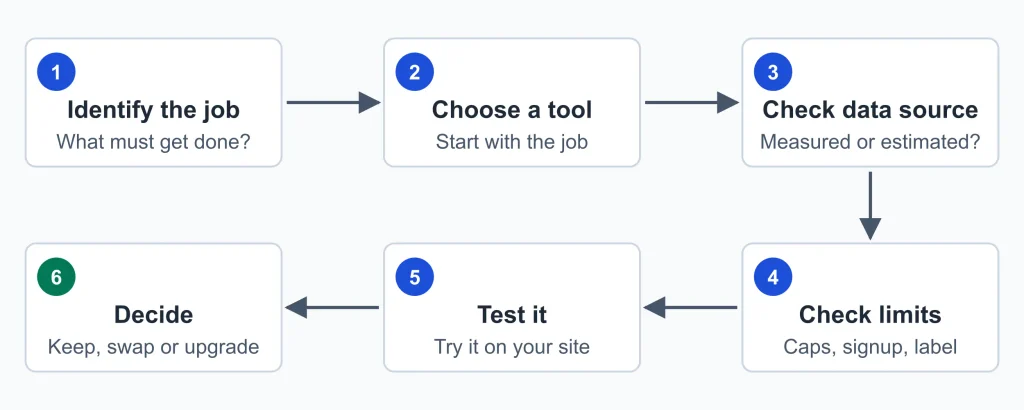
Choosing a free tool by goal
| If your goal is… | Use… | Because… |
|---|---|---|
| To know whether Google can find and index your pages | Search Console | It uses the search engine’s own data |
| To understand what visitors do | Analytics | It records behavior on your site |
| To find broken links and missing titles | A free crawler | It checks your pages directly |
| To check loading and stability | A speed tester | It reports performance per URL |
| To generate topic ideas | A keyword or trends tool | It estimates demand outside your site |
| To get a first look at links | A backlink tool | It shows a vendor’s link data |
Before relying on a tool, check its data source, how it calculates metrics, whether limits are stated up front, whether repeat runs agree, what it asks of you, and whether it is actively updated.
How accurate are free SEO tools?
Answer: Measured data from the search engine and your own analytics is the most reliable for your site. Vendor estimates, such as volume, difficulty, traffic and authority-style metrics, are modeled and differ between tools. To sanity-check one, compare its estimate for a page or period with what Search Console and analytics show. The numbers will not match; check whether the ranking of your pages and the direction of change agree. If they do not, treat that tool’s numbers with caution.
Red flags: guaranteed rankings or traffic, scores presented as official, limits hidden until you have done the work, requests for access you would not normally give, and “free” claims that turn into a paywall mid-task.
What is a good free SEO setup for my site type?
Start small and add tools only when a job needs one.
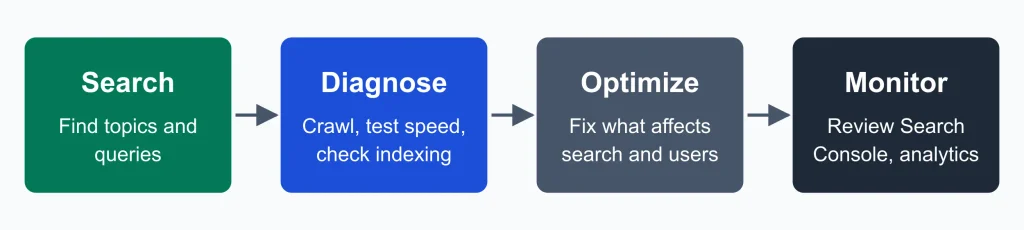
- New blog or content site: Search Console, analytics, Google Trends and AnswerThePublic for ideas, and PageSpeed Insights on key pages.
- WordPress site: Search Console and Bing Webmaster Tools, an SEO plugin for sitemaps and titles, a free crawler for broken links, and speed checks on your main templates.
- Small business site: Search Console to confirm service pages are indexed, PageSpeed Insights on the homepage and service pages, and analytics to see which pages bring visitors.
A light monthly routine: review Search Console for new issues, re-crawl after structural changes, re-test changed pages and note what you changed and when. A technical SEO checklist can help after a crawl.
What advanced needs do free tools struggle to meet?
Answer: Scale, history, automation and in-depth research on other sites. If none of these describe a current problem, you likely do not need to pay.
Advanced needs, free workarounds and where paid tools may help
| If this is happening | The underlying need | Free workaround to try first | Where a paid tool may help |
|---|---|---|---|
| My site is bigger than a free crawler’s cap | Full-site crawling | Crawl by section or folder | A crawler without the URL cap |
| I run several sites or client sites | Multiple projects in one place | Separate free accounts per site | Platforms built for multiple projects |
| I need to track many keywords over time | Rank tracking with history | Search Console’s average position data | Platforms with rank tracking |
| I want to study competitors’ links and content in depth | Competitor and backlink research | Limited free backlink checkers | Platforms with larger link and keyword databases |
| I repeat the same manual reports | Reporting and scheduling | Manual exports and a spreadsheet | Platforms with scheduled reports |
| A team needs shared access | Collaboration | Shared spreadsheets | Platforms with multiple seats |
Do I need a paid SEO platform?
Answer: Only when a specific free limit is blocking real work, and a free workaround costs more time than the tool would.
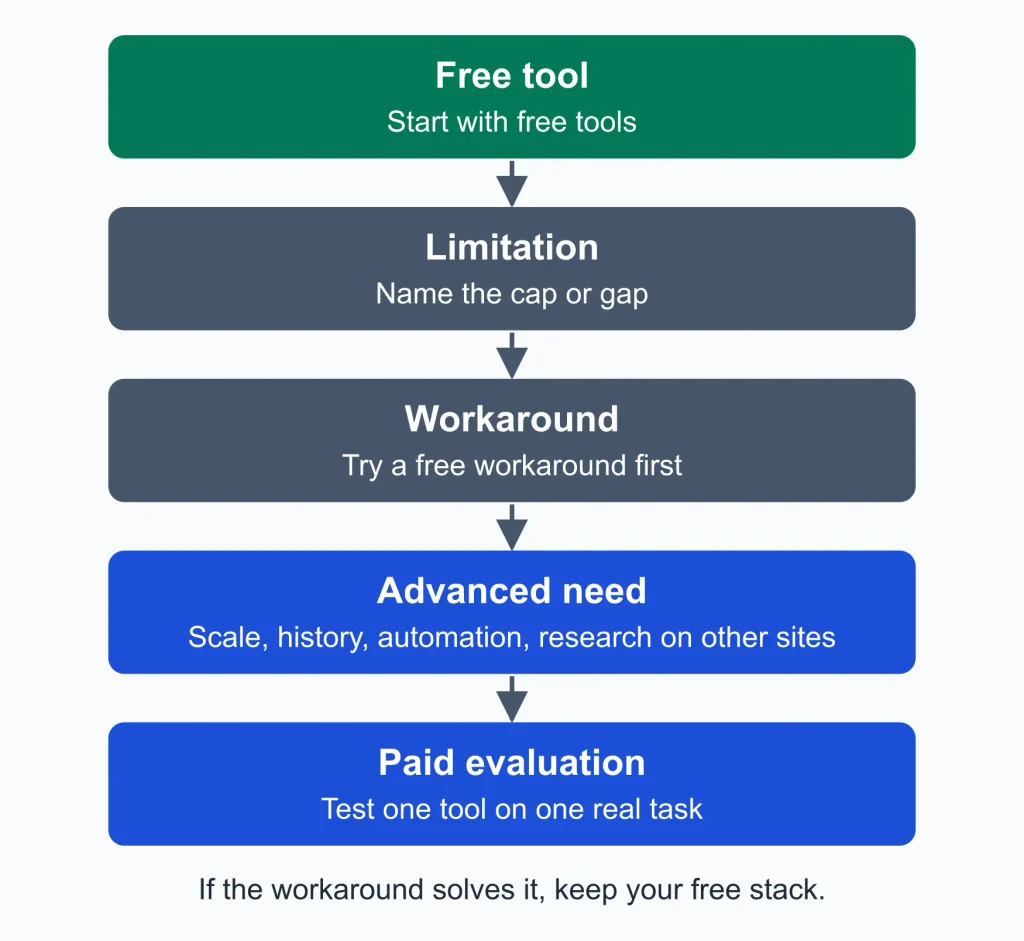
- Name the limit. Which cap, missing feature or data gap is blocking you?
- Try the free workaround for a month, such as crawling by section or exporting manually.
- Estimate what the workaround costs in time and missed information.
- Test a paid tool on one real task, using a trial if one is offered.
- Compare the output with your first-party data. If a tool’s numbers contradict Search Console and analytics, understand why before trusting it.
- Decide on one tool, not several.
If you stop at step 1 or 2, keep your free stack. For paid software, see the SEO software overview.
Which paid SEO tools are worth evaluating?
These are short orientations, not full reviews. Each separates what the vendor documents from SEORAF’s editorial view. No prices are listed because they change; check the vendor’s own page.
Ahrefs
What the vendor documents:
- Ahrefs Free gives a site audit plus search performance and backlink data for websites you verify as your own, and the vendor says it can be used on an unlimited number of verified websites.
- The vendor says the free tools and data are the same as in its paid plans, and that its Starter plan offers extended access to Site Explorer, Site Audit, Keywords Explorer and more.
- Free access uses credit-based limits.
SEORAF’s editorial view:
- Problem it addresses: research on sites you do not own, such as competitors’ backlinks and keywords, and larger-scale keyword research.
- When you need it: when you repeatedly hit the free limits, or competitor research is central to your work.
- What free tools cannot reasonably provide: deep, repeatable research on other people’s sites.
- Limitations: a paid subscription, vendor-modeled estimates and a learning curve.
- May benefit: people who research competitors regularly, content teams planning at scale and anyone managing several sites.
- May not need it: a single small site covered by Search Console and Ahrefs Free.
Semrush
What the vendor documents: Semrush offers a free account with limits. Its own pages, reviewed on 2 October 2026, describe 10 requests per day across reports, tracking for up to 10 keywords and a site audit crawl of up to 100 pages. It also offers trials of paid plans; check Semrush’s own page for current terms, since other sites may advertise different ones.
SEORAF’s editorial view:
- Problem it addresses: keyword research, competitor analysis, rank tracking and site audits in one platform, beyond free daily caps.
- When you need it: when daily limits interrupt your research, you need to track more than a handful of keywords, or you manage several projects.
- What free tools cannot reasonably provide: sustained keyword tracking and research at volume across several sites.
- Limitations: a paid subscription, and a large toolset can be more than a small site needs.
- May benefit: marketers and small teams doing ongoing keyword and competitor work.
- May not need it: hobby sites or people who only check occasionally.
Semrush free account overview (vendor page) · Semrush plan limits (vendor page)
Screaming Frog SEO Spider (paid licence)
What the vendor documents:
- The free version crawls up to 500 URLs. A paid licence removes that limit, although the practical maximum depends on your computer’s memory and storage.
- Its pricing page lists features such as scheduling, JavaScript rendering, crawl comparison and integrations with Google tools. Check which of them are paid-only.
- Licences last one year and then need renewing. It is a desktop application.
SEORAF’s editorial view:
- Problem it addresses: crawling sites larger than the free cap and getting more detailed technical data.
- When you need it: when your site is bigger than 500 URLs, or you need scheduled or repeated crawls.
- What free tools cannot reasonably provide: full-site crawls beyond the cap.
- Limitations: it audits your site’s structure only; it is not a keyword or backlink tool. Large crawls need memory, and it takes some technical comfort.
- May benefit: owners of larger sites and technical SEO practitioners.
- May not need it: sites under the cap.
Screaming Frog pricing and features (vendor page)
SE Ranking
What the vendor documents: Its own free tools page describes a set of free web tools and access to its fuller toolset through a free trial. Check the current terms there.
SEORAF’s editorial view: It is another all-in-one platform to consider when comparing options. This page does not evaluate its paid features, so use the trial method below.
How should I test a paid tool before buying?
- Define one real task, such as “find pages competitors rank for that I do not cover.”
- Run it on your own site during the trial, not on a demo.
- Compare against Search Console and analytics for direction.
- Check exports and limits. Can you get your data out?
- Read the renewal and cancellation terms before entering payment details, and note the renewal date.
- Decide before the trial ends. If you could not complete the task, do not pay.
Common questions about free SEO tools
Is Google Search Console enough?
It covers search performance and indexing for Google, but not visitor behavior, site-wide crawling or backlink research. Most sites add analytics and a crawler. Google lists what each report does in Reports at a glance.
Do I need Google Analytics?
Not to be indexed, but it shows what visitors do after they arrive, which Search Console does not.
What is the best free keyword research tool?
No single tool is best for every case. Use Search Console for queries you already appear for and a keyword tool for ideas, then compare the results.
Can free tools track rankings?
Search Console reports average position for the queries your site appears for. Dedicated rank tracking with history and many keywords usually needs a paid plan, though plans vary.
Are paid SEO tools worth it?
It depends on whether a specific free limit is blocking work you need to do. If not, probably not yet.
Can free tools show how my site appears in AI search results?
This area is changing quickly, and tool coverage varies. For what Google reports, see Google’s Search documentation.
Do free SEO tools improve rankings?
No tool does that on its own. Tools help you find and prioritize issues and opportunities. Results depend on what you do and on factors outside your control.
Key takeaways
- Start with first-party tools: Search Console and analytics.
- Choose by job, then by limits.
- Treat estimated metrics as direction, not fact.
- Pay only when a named limit blocks real work and a free workaround is not enough.
- Test any paid tool on your own site before committing.
SEORAF is an independent SEO knowledge resource, not an agency. Tool descriptions reflect what each tool is designed to do. Free limits and plans change, so verify them on each tool’s official page.