
SEO Resources: A Curated Library of Guides, Templates, Checklists, Tools and Official Documentation
By Mousume Akter, Founder & Editor, SEORAF. Last reviewed 20 October 2026.
If you want the short version, start with Google’s own documentation for the fundamentals, use Search Console to see how your site performs, and use the SEORAF resources below to plan, check, and document your work.
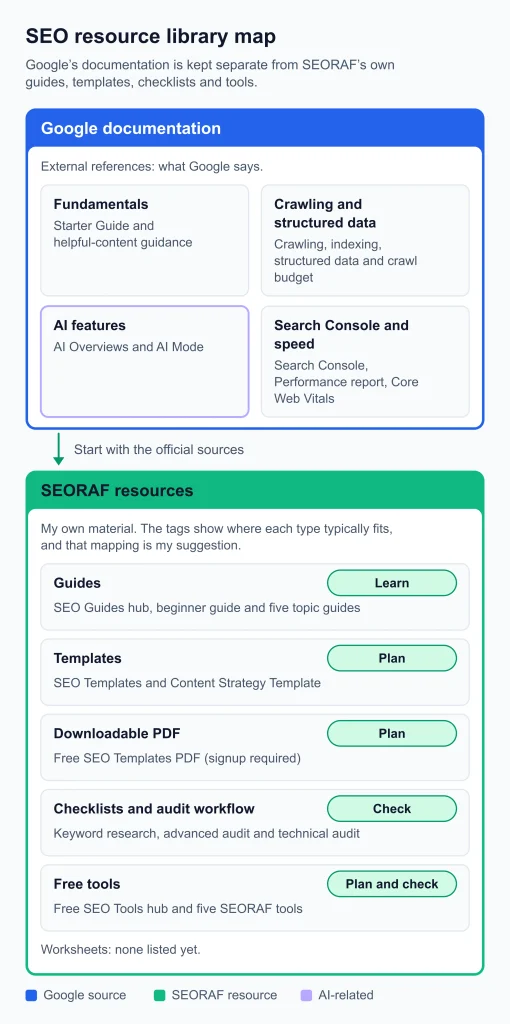
This page is a directory, not a tutorial. SEORAF is an independent SEO knowledge resource, not an agency. I have organized the hub by what you need to do and how much experience you have, and I have labeled each resource by type, cost, and source. Google’s documentation is kept separate from SEORAF’s own material and from my editorial recommendations.
Who this hub is for
- Beginners and site owners who want a reliable starting point instead of dozens of competing lists.
- Bloggers, affiliate publishers, and small local businesses who need a repeatable way to plan, publish, and review pages.
- Experienced site owners who want a short list of references and checklists they can return to.
It is not for anyone looking for guaranteed rankings or a done-for-you service. No resource on this page can promise either.
How I label and choose resources
Every entry below carries a type and a source, and a cost label wherever the destination makes the cost clear.
| Label | Meaning |
|---|---|
| Guide | Explains a topic in depth |
| Template | A reusable structure you copy and fill in |
| Checklist | A list of checks to run through before or after a task |
| Worksheet | A document you fill in over time. I am not listing any yet; I would rather leave the category empty than relabel a template |
| Free tool | A utility you run on a page, query, or site |
| External reference | Documentation or content published by someone other than SEORAF |
Resource types used on this page
Cost labels. “Free” means no payment. “Free, signup required” means the resource is free but asks for details such as an email address. I name any signup requirement so it is never a surprise.
Source tiers. “Google-documented” means Google says it. “SEORAF” means my own framework or tool. Anything described as my recommendation is editorial judgment, not a documented rule.
What I include and leave out. I include resources I can point to, that fit a clear job, and that suit a stated audience. I leave out very long tool lists, outdated roundups, and anything I cannot verify.
Start here: choose by goal
| If you want to… | Start with | Then use |
|---|---|---|
| Understand how SEO works | Google’s SEO Starter Guide | SEO for Beginners, SEO Guides |
| Decide what to write | Keyword Intent Tool | Keyword Research Checklist |
| Plan a page | Content Outline Generator | SEO Templates |
| Check a page before publishing | Google’s helpful-content guidance | Title & Meta Analyzer |
| Audit an existing site | Search Console | Technical SEO Guide, Advanced SEO Audit Checklist |
| Measure results | Search Console Performance report documentation | The reporting template in the SEO Templates entry below |
| Compare paid platforms | When free is enough | See that section for a link to the paid-software comparison |
Where to start, by goal
Official sources to start with
These are all external references from Google, and all free. I put them first because they are the primary source for how Google Search describes its own behavior.
SEO Starter Guide (Google Search Central)
Type: External reference. Cost: Free.
- Purpose: Google’s SEO Starter Guide describes SEO as helping search engines understand your content and helping users find your site. It walks through common improvements, and it says plainly that there are no secrets that will automatically rank a site first.
- Best for: Beginners and anyone who wants the baseline.
- Suggested use: Read it once from start to finish, then return to individual sections when a specific question comes up.
Creating helpful, reliable, people-first content
Type: External reference. Cost: Free.
- Purpose: In Google’s helpful-content guidance, Google says its automated ranking systems are designed to prioritize helpful, reliable information created to benefit people, not to manipulate rankings. The page also gives questions for self-assessing content, including whether it is clear to visitors who wrote it.
- Best for: Anyone publishing or reviewing content.
- Suggested use: Run a draft through the self-assessment questions before you publish.
Search Console and its Performance report
Type: External reference and free tool. Cost: Free.
- Purpose: Google describes Search Console as a tool that helps site owners understand how their site performs in Google Search. Google’s help page on verifying your site covers setup, and its Performance report documentation explains the search performance report.
- Best for: Anyone with a site they can verify.
- Suggested use: Set it up before any other tool. My recommendation is to compare the same page over comparable periods instead of reacting to single-day changes.
Crawling and indexing documentation
Type: External reference. Cost: Free.
- Purpose: Google’s reference for how pages are discovered, crawled, and indexed. Browse the crawling and indexing documentation.
- Best for: Site owners diagnosing why a page is not showing up.
- Suggested use: Look up the specific issue instead of reading it all.
Introduction to structured data
Type: External reference. Cost: Free.
- Purpose: Background on what structured data is and how Google uses it. Read how structured data works.
- Best for: Site owners considering markup.
- Suggested use: Read it before adding markup so you know what markup can and cannot do.
AI features and your website
Type: External reference. Cost: Free.
- Purpose: In AI features and your website, Google explains that a page must be indexed and eligible to be shown in Search with a snippet to appear as a supporting link in AI Overviews or AI Mode. It also says there are no additional requirements and no special optimization is necessary, so the existing SEO fundamentals still apply.
- Best for: Anyone unsure whether “AI SEO” needs a separate toolkit.
- Suggested use: Treat it as the baseline against which to judge AI-related advice.
Core Web Vitals (Google Search Central)
Type: External reference. Cost: Free.
- Purpose: Google’s Search Central page on Core Web Vitals, listed with its page experience documentation. Read about Core Web Vitals in Search.
- Best for: Site owners looking at speed and usability.
- Suggested use: Use it to understand what the metrics are for before acting on a tool’s score.
Crawl budget guide (advanced)
Type: External reference. Cost: Free.
- Purpose: Google says its crawl budget guide is intended mainly for very large sites, such as those with a million or more pages, or ten thousand or more pages that change daily, or sites with many URLs reported as discovered but not indexed.
- Best for: Large or fast-changing sites only.
- Suggested use: If your site is smaller, you can usually skip it.
Guides for learning the fundamentals
These are SEORAF guides. They explain; this page only points you to them.
SEO Guides hub
Type: Guide hub. Cost: Free. The SEO Guides hub is organized into ten categories, from fundamentals to advanced and AI search, so you can pick an entry point by goal. It suits anyone who wants a learning order rather than a single article.
SEO for Beginners
Type: Guide. Cost: Free. SEO for Beginners is the beginner entry point. Start there if you have never worked on a site’s search presence.
Topic guides
Type: Guides. Cost: Free. Read the one that matches your current problem:
- Keyword Research Guide
- Content SEO Guide
- Technical SEO Guide
- Semantic SEO Guide
- Technical SEO Basics
Templates and downloadable assets
SEO Templates
Type: Template library. Cost: Free; copy and paste from the page.
- Purpose: SEO Templates is a set of reusable structures for keyword research, content briefs, on-page checks, internal linking, audits, reporting, snippet targets, trust blocks, and a refresh plan.
- Best for: Beginners and solo publishers who want a consistent process.
- Suggested use: Pick the one template that matches the stage you are at, not all nine.
Free SEO Templates PDF
Type: Downloadable PDF. Cost: Free, signup required (name, email, and role).
- Purpose: The Free SEO Templates PDF bundles five assets: a keyword research sheet, a content brief, an on-page checklist, an internal linking map, and a 14-day refresh plan.
- Best for: Readers who prefer one file over copying from a page.
- Suggested use: Download it only if you want the bundle.
Content Strategy Template
Type: Template. Cost: Free. The Content Strategy Template is a repeatable framework for deciding what to publish and why. It suits readers planning a set of pages instead of one.
Checklists
Keyword Research Checklist
Type: Checklist. Cost: Free. The Keyword Research Checklist is a repeatable workflow to run before planning a content cluster. It suits beginners and publishers.
Advanced SEO Audit Checklist
Type: Checklist. Cost: Free. The Advanced SEO Audit Checklist is a deeper framework for mature sites. It suits experienced site owners.
Free tools
Free SEO Tools guide
Type: Guide. Cost: Free. SEORAF’s Free SEO Tools guide explains what free SEO tools do, where they stop, and how to choose between them, covering tools from search engines and other vendors. It suits readers deciding which free tools to set up first.
Keyword Intent Tool
Type: Free tool. Cost: Free.
- Purpose: The Keyword Intent Tool classifies pasted keywords by likely search intent (the page says up to 100 lines at once) and suggests a page type. The page advises confirming the result against the live Google results.
- Best for: Bloggers, marketers, local businesses, and content teams choosing what kind of page to build.
- Suggested use: Run it before you outline a page, then check the live results for mixed signals.
Content Outline Generator
Type: Free tool. Cost: Free (listed in SEORAF’s Free SEO Tools menu).
- Purpose: The Content Outline Generator takes a topic, content type, goal, audience, and tone, and produces an H1 to H3 outline with FAQ ideas, internal link suggestions, and writing tips.
- Best for: Bloggers, small businesses, and marketers planning a page before drafting.
- Suggested use: Treat the output as a starting structure and edit it against your own research.
Title & Meta Analyzer
Type: Free tool. Cost: Free.
- Purpose: The Title & Meta Analyzer checks a pasted title tag and meta description for length, keyword placement, and click-through signals, and shows a search-result style preview.
- Best for: Anyone about to publish or update a page.
- Suggested use: Use the result as a prompt to review wording, not as a score to chase.
Other SEORAF tool pages
SEORAF’s navigation also lists an SEO Audit Tool and an Image Alt Generator.
Search Console
Google’s Search Console is also a free tool, and it is covered in the official sources above.
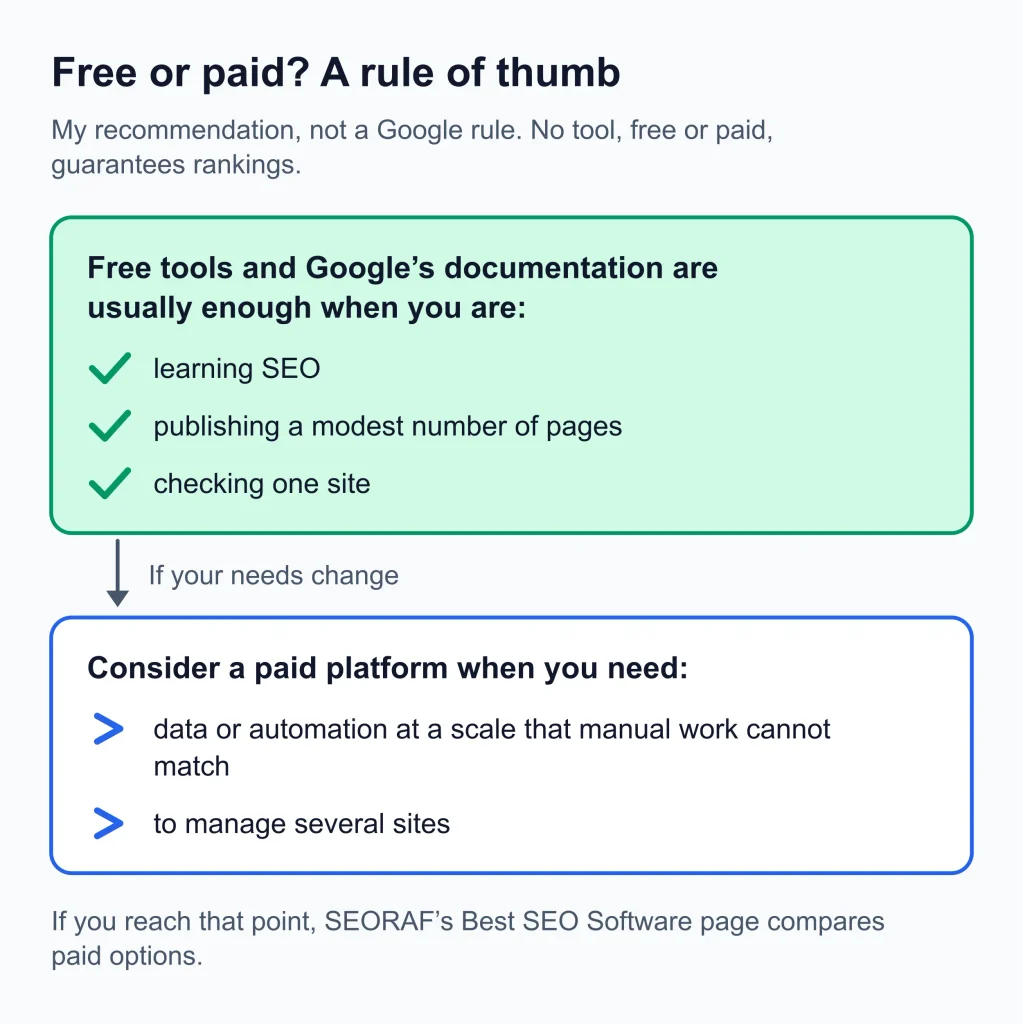
When free is enough
This is my recommendation, not a Google rule. Free tools and Google’s documentation are usually enough while you are learning, publishing a modest number of pages, or checking one site. A paid platform becomes worth considering when you need data or automation at a scale that manual work cannot match, or when you manage several sites. SEORAF’s Free SEO Tools guide walks through this decision in more detail. If you reach that point, Best SEO Software compares paid options.
Two workflows that combine these resources
These workflows are my suggestions. Google does not prescribe them.
Workflow 1: plan and publish one page
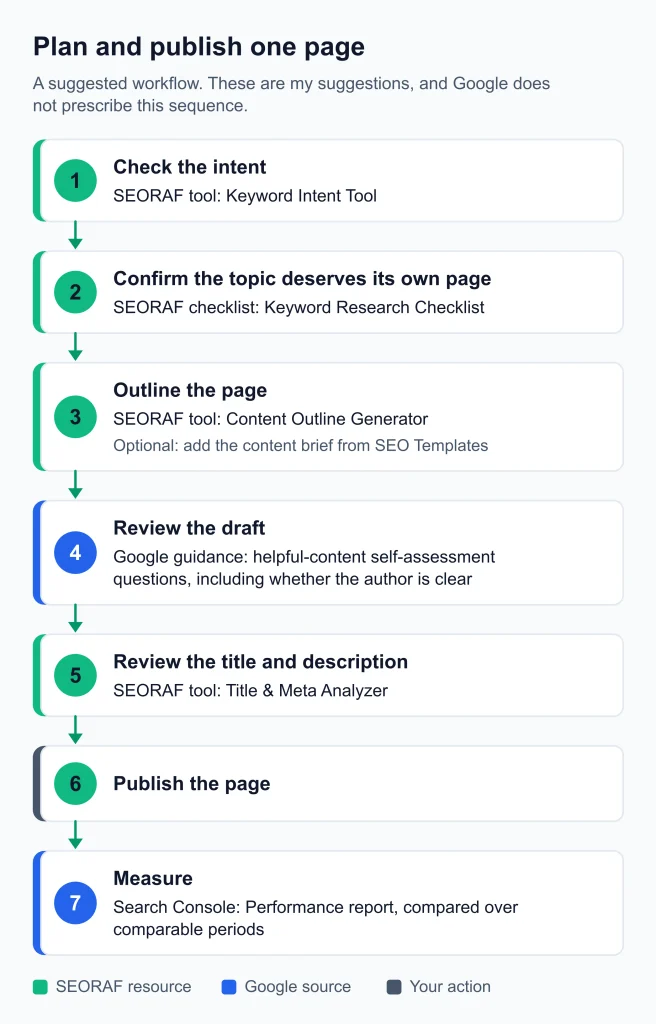
- Use the Keyword Intent Tool to check what kind of page the query calls for, then confirm it against the live search results.
- Run the Keyword Research Checklist to confirm the topic deserves its own page.
- Draft a structure with the Content Outline Generator, using the content brief from SEO Templates if you want more detail.
- Self-assess the draft against Google’s helpful-content questions, including whether the author is clear.
- Check the title and description with the Title & Meta Analyzer.
- Publish, then review the page in the Performance report over comparable periods.
Workflow 2: audit an existing site
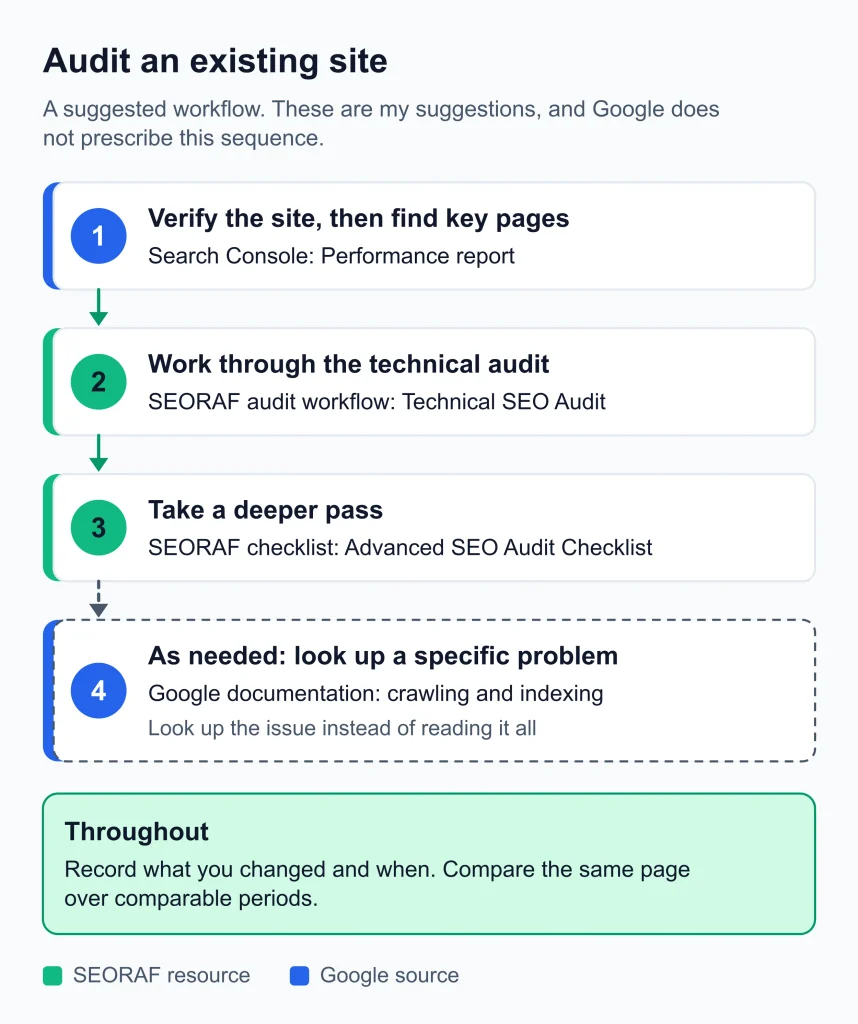
- Verify the site in Search Console and look at the Performance report to see which pages matter most.
- Review the technical basics with the Technical SEO Guide.
- Use the Advanced SEO Audit Checklist for a deeper pass.
- For a specific problem, look it up in Google’s crawling and indexing documentation instead of reading it all.
Illustrative example (hypothetical, not a case study): a small local business with five service pages could skip the plan-and-publish steps for new pages and begin with Workflow 2 on its existing pages, because its first question is what is already underperforming, not what to write next.
Measuring results
Search Console is the primary source for how your pages perform in Google. Google’s AI features documentation says traffic from AI features is included in your overall search traffic in Search Console, reported in the Performance report under the Web search type. Google’s SEO Starter Guide says some changes take effect within hours while others can take several months, and it suggests waiting a few weeks before judging whether your work had an effect. My editorial advice is to avoid drawing conclusions from a few days of data and to record what you changed and when.
Limitations and common resource traps
No resource guarantees rankings
Templates and checklists can make work more consistent. They do not decide where a page ranks. Google’s own SEO Starter Guide says there are no secrets that will automatically rank a site first.
Advice ages
Rich-result eligibility is a good example. Google’s documentation updates page records that FAQ rich results stopped appearing in Google Search on May 7, 2026, and that the feature’s documentation was later removed. A guide that still recommends FAQ markup to earn rich results is out of date. Check the date and the source before acting on any markup advice.
AI-specific shortcuts
Google’s AI features documentation says there is no special schema.org markup you need to add for AI features, and that you do not need to create new machine-readable files or AI text files to appear in them. Be cautious of resources that sell one.
Advanced guides are not for everyone
The crawl budget guide above is an example of documentation written for a narrow audience.
Gated downloads have a trade-off
A signup gives you a convenient file in exchange for your details. If you only need a template, the copy-paste versions on the SEO Templates page avoid that exchange.
How I judge any SEO resource
The first question below reflects the authorship question in Google’s helpful-content guidance. The rest are my own checks.
- Is it clear who wrote it and who it is for?
- Is it dated, and does it show when it was last reviewed?
- Does it cite a primary source for factual claims?
- Can I tell facts from opinions?
- Does it avoid promising outcomes?
How this hub is maintained
When I update this page, I check that each link works, that each type and cost label is still accurate, and that nothing has been added that I cannot support. I record changes in the log below. SEORAF’s editorial policy is published separately. If you find a broken link or an outdated entry, please contact me.
| Date | Change |
|---|---|
| 20 October 2026 | Hub reviewed ahead of publication: Google documentation links and statements checked, the FAQ rich results statement updated, and tool links pointed to the working tool pages |
Update log
Where to go next
- New to SEO: start with the guides for learning the fundamentals.
- Have a site and a problem: start with the audit checklists.
- Planning content: start with the templates.
If you would rather have a person review your site, I offer an SEO audit service.