
Advanced SEO Audit Checklist: Checks, Validation Steps and Fix Priorities
This is an advanced SEO audit checklist for checking how Google can crawl, render and index a website, and for documenting and prioritizing what you find. Each check says what to inspect, what evidence to keep, how to read the result, what to do if the issue is real, and how to confirm the fix.
It is written for SEO practitioners, consultants, in-house marketers and technically capable site owners who can use Google Search Console and a site crawler. If you want a first pass over titles, headings and obvious errors, start with SEORAF’s SEO for beginners guide instead.
It can’t guarantee rankings, traffic or recovery. Fixing a technical problem can remove a barrier, but Google decides what to crawl, index and rank. Where a point comes from Google’s documentation, the check says so. Where it’s a SEORAF recommendation, it says that instead.
Advanced SEO Audit Checklist PDF
Advanced SEO Audit Checklist PDF
Enter your name and email to access this PDF.
Is this the right checklist?
| Beginner SEO checklist | This advanced checklist | SEO audit service | |
|---|---|---|---|
| Typical question | “What should I check?” | “How do I verify it, how serious is it, and how do I show the fix worked?” | “Can someone else run the audit for me?” |
| What you get | A list of things to review | Evidence-backed findings, a priority order and a fix plan that you write yourself | A deliverable produced by the provider (scope varies by provider) |
| Depth | Titles, headings, obvious errors | Crawl, index, render, redirect and markup checks, with notes on when each applies | Varies |
| What you need | Basic site access | Search Console, a crawler, and often developer help | Access you share with the provider |
The audit at a glance
| Phase | Question it answers | Main evidence source | Check IDs |
|---|---|---|---|
| Measurement | Can I trust my data? | Search Console, analytics, release history | ME |
| Crawlability | Can search engines reach the URLs that matter? | robots.txt, crawl, status codes, logs | CR |
| Indexability | Are the right URLs eligible to be indexed? | Directives, canonicals, Page indexing report | IX |
| Redirects and sitemaps | Do URL signals agree? | Crawl, sitemap files | RD, SM |
| Rendering | Does the content exist in what Google processes? | Raw vs rendered HTML | JS |
| Structure | Can pages be discovered and understood? | Crawl, internal links | AR |
| Markup and content | Is it accurate, unique and useful? | Validators, Search Console queries | SD, CQ |
| Experience and trust | Is it fast, stable and secure? | Field data, Search Console | PX, SE |
| International | Do locale versions point to each other? | Crawl, hreflang reports | IN |
Quick-start workflow
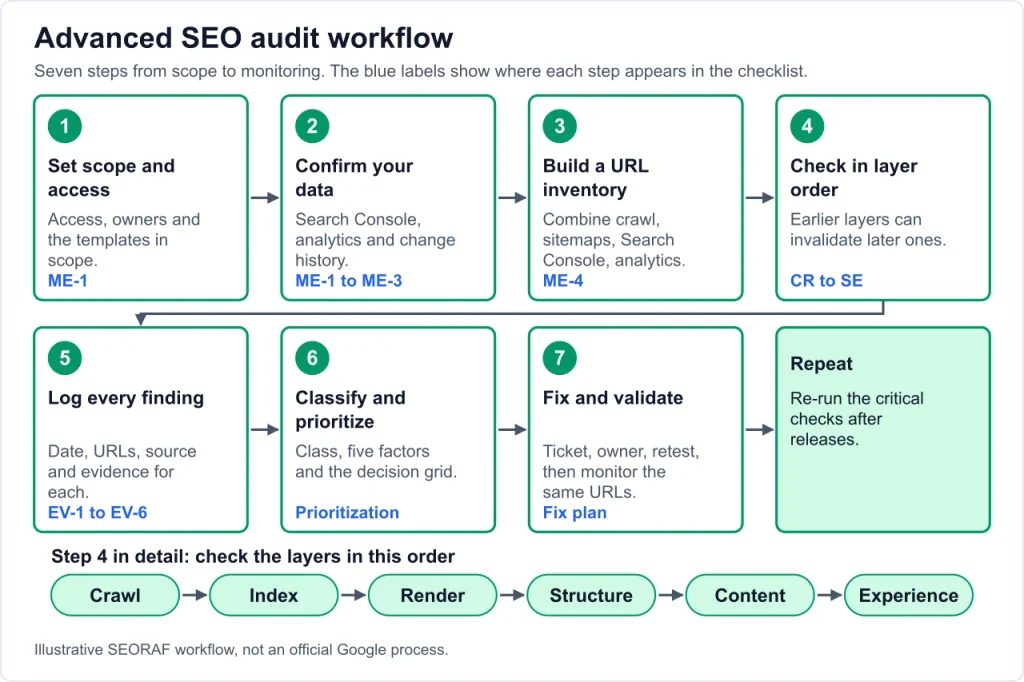
- Set scope and access (see “Before you start”).
- Confirm your data. Check Search Console, analytics and the change history.
- Build a URL inventory from a crawl, sitemaps, Search Console and analytics, then group URLs by template.
- Work in order: crawl, index, render, structure, content, experience. Earlier layers can invalidate later ones.
- Log every finding with evidence as you go.
- Classify and prioritize using the framework below.
- Turn findings into tickets, fix, validate and monitor.
What makes an SEO audit “advanced”
An advanced audit is not longer. Each finding is verified on live URLs, scoped by template and URL count, and prioritized by impact. A tool warning is a lead, not a finding. Google’s guidance on third-party SEO tools says they don’t have access to Google’s internal ranking data. It recommends Search Console as the first-party source and advises checking any claim about “what Google says” against Google’s own documentation.
Crawling, indexing and ranking are different stages
| Stage | What happens | Common audit question |
|---|---|---|
| Crawling | The crawler requests a URL | Can it fetch the URL and the resources it needs? |
| Indexing | The system processes the content and decides whether to store it | Is the URL eligible, and does Google consider it worth indexing? |
| Ranking | Indexed pages are ordered for a query | Does the page satisfy the query better than alternatives? |
A page can be crawled but not indexed, or indexed but not ranking. Fixing the wrong stage wastes effort.
When a basic checklist is enough
For a small, standard site where you only need a first review, a beginner list is a better starting point (see the table above). Use this page when you need to validate findings, diagnose why URLs aren’t indexed, or hand a defensible list to a developer.
Before you start: scope, access and measurement
Access to request: Search Console, analytics, CMS and theme or plugin access (or a developer contact), server or CDN logs if available, and a release and change history.
ME-1: Search Console property coverage
- Action: Confirm you have access to the property or properties that cover every protocol and host variant that serves content.
- Inspect: Search Console settings and the property list. Note which variants each property covers.
- Evidence: A screenshot or list of properties, owners and verification methods.
- Interpret: Missing variants mean missing data, and you may blame the wrong cause.
- If confirmed: Add or request access to the missing properties.
- Validate: Data appears for the added variants.
- Class: Warning
- Basis: SEORAF recommendation. Google recommends Search Console as the first-party source (third-party tools guidance).
ME-2: Analytics integrity
- Action: Confirm tracking fires on key templates, without duplicate tags, and that filters and channel groupings aren’t hiding organic traffic.
- Inspect: Tag debugging in your browser, tag manager preview, and a comparison of organic landing pages in analytics against Search Console clicks for the same period.
- Evidence: Tag audit notes and the comparison export.
- Interpret: The two sources won’t match exactly. Look for entire sections missing or large unexplained differences.
- If confirmed: Fix tagging before using the data in any decision.
- Validate: Re-run the comparison after the fix.
- Class: Warning (Critical if tracking is missing on key templates)
- Basis: General practice. Further reading: Google on combining Search Console and Analytics data.
ME-3: Baseline and change history
- Action: List launches, migrations, redesigns, plugin and CMS updates, and robots or redirect changes, with dates.
- Inspect: Release notes, version control, hosting changelogs, and a Search Console Performance export for a comparison period.
- Evidence: A dated change log next to the performance chart.
- Interpret: A change close in time to a drop is a lead, not proof of cause.
- If confirmed: Prioritize checks on the affected templates first.
- Validate: Check whether reverting or fixing the specific change resolves the specific symptom.
- Class: Context-dependent
- Basis: SEORAF recommendation. Further reading: Google’s guide to debugging traffic drops.
ME-4: URL inventory and templates
- Action: Combine URLs from a crawl, sitemaps, Search Console and analytics, group them by template, and pick sample URLs for each template.
- Inspect: Crawler export, sitemap files, Search Console exports and an analytics landing-page export.
- Evidence: The inventory file name and date, and the template list.
- Interpret: URLs present in one source and missing from the others are leads for the orphan-page and indexing checks below.
- If confirmed: Use the inventory as the base for every later check.
- Validate: Re-run the inventory after major fixes.
- Class: Warning
- Basis: SEORAF recommendation.
How to classify and prioritize findings
The labels below are an editorial framework from SEORAF. They are not Google metrics.
Four finding types
| Type | Meaning |
|---|---|
| Critical technical error | Confirmed, and it blocks or breaks crawling, indexing, rendering or serving of important URLs or entire templates. Also serious security or trust problems. |
| Warning | Probably suboptimal or inefficient, but harm isn’t established. Investigate and schedule. |
| Context-dependent | Applies only to some sites, such as large sites, multilingual sites or JavaScript apps. |
| Optional improvement | Low-risk enhancement with no evidence of current harm. |
Five prioritization factors
Rate each Low, Medium or High.
| Factor | Question |
|---|---|
| Impact | If real, how badly does it affect crawling, indexing, rendering or users? |
| Affected scope | One URL, a template, a section, or the whole site? |
| Evidence | Confirmed on live URLs? Ideally by two independent sources (for example Search Console plus a crawl), or by a first-party Google report such as a manual action. |
| Effort | How hard and risky is the fix, and who must be involved? |
| Business relevance | Do the affected pages carry revenue, leads or core user needs? Is the area already being changed? |
Priority matrix
| Class | Evidence expected | Typical scope | Business impact | Effort | Validation |
|---|---|---|---|---|---|
| Critical | Two sources agree on live URLs, or a first-party Google report | Template or site-wide, or key pages | High | Any (fix first) | Live URL test, re-crawl, Search Console status |
| Warning | One strong source plus a manual check | Section or template | Medium | Low to medium | Re-crawl of the same URL set |
| Context-dependent | Applicability confirmed first | Varies | Varies | Varies | Depends on the site type |
| Optional | Observation only | Small | Low | Low | Spot check |
Decision grid
- Fix now: high impact, broad scope, strong evidence, regardless of effort.
- Quick win: modest impact, low effort, strong evidence.
- Plan: high impact, high effort. Schedule it and assign an owner.
- Monitor or park: weak evidence or low business relevance.
A numeric 1 to 3 score in your own spreadsheet can help you sort, but it is a sorting aid and not a Google metric or formula.
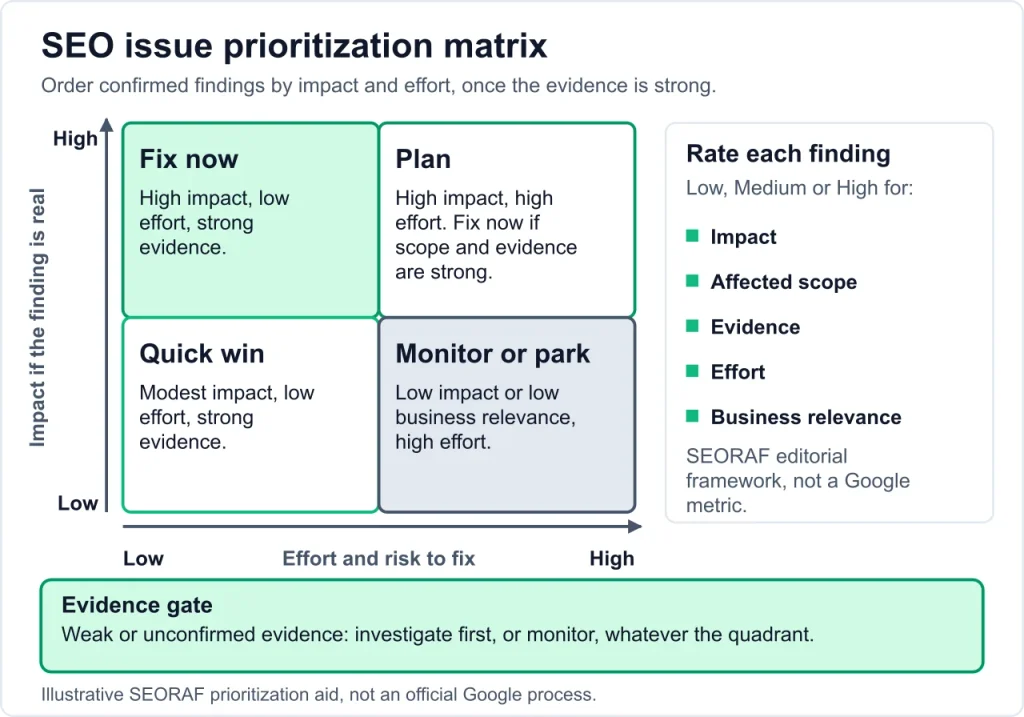
Example (illustrative, not a real case): a crawl shows a noindex directive on a category template, and Search Console reports the same URLs as excluded by noindex. Two sources agree, the scope is a template, and the pages carry revenue. That is a critical finding: fix now.
Keep an evidence log
For every finding, record the date, URL or URL set, source, what you observed, a screenshot or export reference, class and factor ratings, the fix, and the validation result.
Crawlability checks
For background on how crawling works, see SEORAF’s Crawling in SEO guide.
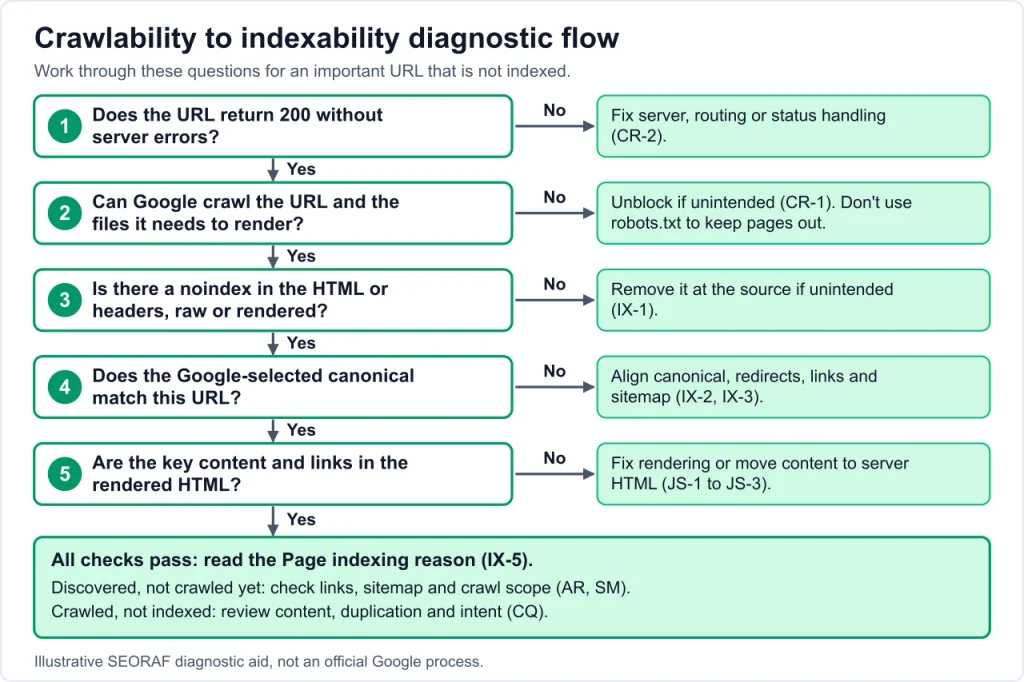
CR-1: robots.txt
Robots.txt tells crawlers which URLs they may request. A mistake can hide whole sections or block files needed to render pages.
- Applies to: all sites.
- Action: Fetch the live robots.txt for every host and protocol that serves content, and compare every rule against your URL inventory. Also check that CDN or hosting rules aren’t blocking crawlers.
- Inspect: Open /robots.txt in a browser, check its HTTP status, check how Google fetched it in Search Console (the robots.txt report, where available, and URL Inspection), and run URL Inspection on a sample URL per template.
- Evidence: A dated copy of the file, the blocked patterns with the sections they affect, and URL Inspection screenshots.
- Interpret: Google describes robots.txt mainly as a way to manage crawler traffic, not a way to keep a page out of Google. A page disallowed in robots.txt can still be indexed if other pages link to it, usually without a description. Google says blocking resource files is an option when pages won’t be significantly affected by their loss, and Google Search won’t render JavaScript from blocked files or on blocked pages. Intentional blocks (admin, internal search) are normal.
- If confirmed: Remove rules that block important content or render-critical resources, and keep changes in version control. Don’t use Disallow as a substitute for noindex (see IX-1).
- Validate: Re-fetch the file, live-test the sample URLs, and re-crawl with the same settings.
- Class: Critical if key sections or render resources are blocked, otherwise Warning.
- Basis: Google-documented: robots.txt introduction, JavaScript SEO basics, AI features (CDN and hosting point).
Example (illustrative):
User-agent: *
Disallow: /internal-search/
Sitemap: https://www.example.com/sitemap.xml
This blocks crawling of an internal search path. Whether a rule like that is appropriate depends on the site.
CR-2: HTTP status codes and server errors
- Applies to: all sites.
- Action: Collect a status code for every URL in your inventory. Look for 4xx or 5xx on URLs that should work, and persistent server errors on key templates.
- Inspect: Crawler status report, Search Console Page indexing, the Crawl Stats report, logs if you have them, and URL Inspection for individual URLs.
- Evidence: URL list with status code, where it is linked from, template and date.
- Interpret: Google removes from its index URLs that persistently return a server error. Network timeouts, connection resets and DNS errors are treated much like 5xx errors. Separate a one-off spike from a persistent failure, and look for patterns by template, host and time. A 404 for deliberately removed content is normal. A 404 behind an internal link is a link problem.
- If confirmed: Fix 5xx at the server, hosting, CDN or routing layer. Update or remove internal links to dead URLs.
- Validate: Re-crawl, and watch the same report and logs over time.
- Class: Critical if persistent on key templates. Warning for broken internal links.
- Basis: Google-documented: HTTP status codes and network errors.
CR-3: Server log analysis
- Applies to: large or complex sites, suspected crawl waste, JavaScript-heavy sites, migrations. Skip small, stable sites and log it as not applicable.
- Action: Segment Googlebot requests by status code, template and parameter.
- Inspect: Raw access logs from the origin or CDN. Verify that requests really come from Google using Google’s documented method.
- Evidence: A segmented table and the date range.
- Interpret: Compare crawl attention with page importance. Logs show requests only, not indexing or ranking.
- If confirmed: Reduce the generation of low-value URLs, fix internal links and status codes.
- Validate: Compare the same segments over a later period.
- Class: Context-dependent
- Basis: General practice.
CR-4: Crawl budget
- Applies to: large sites with 1 million+ unique pages that change weekly, sites with 10,000+ unique pages that change daily, or sites with a large share of URLs in “Discovered – currently not indexed”. Otherwise skip this check and log it as not applicable. Google says that if a site doesn’t have many rapidly changing pages, or its pages are crawled the same day they’re published, keeping the sitemap current and checking index coverage is adequate.
- Action: Identify where crawling is spent on URLs that don’t matter.
- Inspect: Crawl Stats, log segments and the URL patterns that generate large numbers of URLs.
- Evidence: Share of crawl requests by URL type.
- Interpret: If Google spends too much time crawling URLs it shouldn’t, its crawlers might not explore the rest of the site. Soft 404 pages continue to be crawled and waste budget.
- If confirmed: Manage the URL inventory (see CR-5), fix soft 404s, improve server response.
- Validate: Compare Crawl Stats and log segments after changes.
- Class: Context-dependent
- Basis: Google-documented: crawl budget guide.
CR-5: Crawl traps and parameter URLs
- Applies to: sites with internal search, filters, calendars, session IDs or sorting.
- Action: Identify URL patterns that can generate large numbers of low-value or near-duplicate URLs.
- Inspect: A crawl with parameter and depth views, inlink sources for the pattern, and a sample of indexed URLs in Search Console.
- Evidence: A pattern list with URL counts, where they’re linked from, and their index status.
- Interpret: A pattern is a problem when it’s crawlable, linked at scale, and adds no unique value. Some facets are valuable pages. Google’s faceted navigation guidance has moved to its separate crawling documentation site. Google also advises not using robots.txt for canonicalization, because Google may still index disallowed URLs without their content.
- If confirmed: Stop linking to junk URLs. Choose one consistent handling per pattern (canonical, noindex, or robots rule) and understand the trade-offs.
- Validate: Re-crawl, then watch Search Console and logs.
- Class: Warning (Context-dependent for faceted sites)
- Basis: Google-documented in part (canonicalization methods). The handling choice is a SEORAF recommendation.
Don’t block crawling to fix an indexing problem. A robots.txt block stops Google reading a page, including any noindex on it. If a page is blocked by robots.txt, the crawler never sees the noindex directive. First work out whether the issue is crawling, indexing or duplication, then pick the matching control.
Indexability and canonicalization checks
IX-1: Robots meta and X-Robots-Tag
- Applies to: all sites.
- Action: Find noindex and other directives in HTML and in HTTP headers, including PDFs and other non-HTML files.
- Inspect: A crawl that extracts both sources, comparing raw HTML with rendered HTML, and URL Inspection on sample URLs.
- Evidence: URL list with the directive, where it appears and the template.
- Interpret: An accidental noindex after a release can remove pages from search. For noindex to work, the page must be crawlable (see CR-1 and the callout above). When Google sees noindex, it may skip rendering and JavaScript execution, so JavaScript that removes noindex may not work. Don’t put noindex in the original code of a page you want indexed.
- If confirmed: Remove the stray directive at the source (template, plugin, header rule).
- Validate: Live-test the URL, then watch the Page indexing status for the same URL set.
- Class: Critical on key pages or templates.
- Basis: Google-documented: JavaScript SEO basics. Further reading: robots meta tag specifications.
IX-2: Canonical signals
- Applies to: all sites.
- Action: Compare the declared canonical, Google’s selected canonical, the sitemap URL, redirects and internal links for the same page.
- Inspect: Crawl canonical data, then URL Inspection, which shows the Google-selected canonical for a URL.
- Evidence: A table of URL, declared canonical, Google-selected canonical and mismatch type.
- Interpret: Google ranks the methods by strength: redirects and rel=”canonical” are strong signals, and sitemap inclusion is a weak one. None of them is required, and if you don’t specify a canonical, Google identifies the version it considers best. Don’t specify different canonical URLs for the same page through different methods, such as one URL in a sitemap and another in rel=”canonical”. Other points from the same page: include a self-referential rel=”canonical” on the canonical page, choose either the HTML element or the HTTP header rather than both, use absolute URLs, and place the element in the head of the HTML. Link internally to the canonical URL rather than a duplicate. If Google selected the URL you wanted, nothing needs fixing.
- If confirmed: Align the signals around one preferred URL. Fix canonicals that point to redirected, blocked, noindexed or error URLs.
- Validate: Re-inspect the same URLs and compare declared vs Google-selected canonicals.
- Class: Critical if canonicals point to wrong or non-indexable URLs at scale, otherwise Warning.
- Basis: Google-documented: canonicalization methods.
Example (illustrative):
<link rel="canonical" href="https://www.example.com/guides/audit-checklist/" />IX-3: Duplicate URL variants
- Applies to: all sites.
- Action: Test whether the same content is reachable under more than one URL (http/https, www/non-www, trailing slash, case, parameters, print or tracking variants).
- Inspect: Request each variant and record status and final URL, then use a crawl to cluster near-duplicates.
- Evidence: A variant matrix for key pages and counts of duplicate clusters by template.
- Interpret: Duplicate URLs split signals and spend crawling on copies. Permanent redirects tell Google a redirected URL is a worse version, and should be used only when deprecating a duplicate page. Use a canonical when the duplicate must stay live. Google doesn’t recommend using noindex to prevent canonical selection within a site, because it blocks the page from Search completely.
- If confirmed: Redirect retired variants, canonicalize live variants, and fix internal links to point at the preferred URL.
- Validate: Re-crawl, then recheck each variant’s response and the Google-selected canonical.
- Class: Warning
- Basis: Google-documented: canonicalization methods.
IX-4: Soft 404s and error pages
- Applies to: all sites, especially JavaScript apps and sites with search or filter pages.
- Action: Find pages that look like errors or empty pages but return a success status.
- Inspect: Search Console soft 404 reports, a crawl that flags empty or error-like content, and URL Inspection for the returned code and rendered content.
- Evidence: URL list with status code, content summary and template.
- Interpret: A soft 404 is a URL that shows a “not found” style page and returns a 200 status. It can also be a page with no main content. Custom 404 pages should return a real 404 so they aren’t indexed. If a healthy page is flagged, check for blocked resources or rendering failures.
- If confirmed: Return the correct status, redirect to a relevant replacement if one exists, or restore the content.
- Validate: Re-fetch the URLs and confirm the report clears over time.
- Class: Warning (Critical if mass-generated)
- Basis: Google-documented: HTTP status codes and network errors.
IX-5: Reading the Page indexing report
- Applies to: all sites.
- Action: Review non-indexed URLs by reason, filtered to the URL sets that matter.
- Inspect: Search Console’s Page indexing report and URL Inspection on samples.
- Evidence: Counts by reason for important URL sets, with sample URLs and dates.
- Interpret: Many non-indexed reasons are expected, such as alternate pages with proper canonicals or intentional noindex. Focus on important URLs. “Discovered – currently not indexed” generally means Google knows about the URL but hasn’t crawled it yet. “Crawled – currently not indexed” generally means Google fetched the page but didn’t index it. “Indexed, though blocked by robots.txt” means a blocked URL was indexed anyway, which can mean a mistaken block or the wrong tool for keeping it out of results.
- If confirmed: Treat each reason differently: fix access problems, improve or consolidate content, or confirm the status is intended.
- Validate: Track the same URL set over time, and don’t expect instant changes.
- Class: Context-dependent
- Basis: Partly Google-documented (the robots.txt point). The status descriptions are general interpretation, so check them against Search Console Help.
Redirect and URL-change checks
RD-1: Redirect type, chains and loops
- Applies to: all sites.
- Action: Map redirects for internal links, canonical URLs and sitemap entries. Find chains, loops, and temporary redirects used for permanent moves.
- Inspect: Crawler redirect reports, URL Inspection for the redirect Google followed, and a header check on samples.
- Evidence: A redirect list with source, hops, status codes and final destination.
- Interpret: With a permanent redirect, the indexing pipeline uses the redirect as a signal that the target should be canonical, and the new target is shown in results. With a temporary redirect, Googlebot follows it but the pipeline doesn’t use it as a canonical signal, so the source page is shown, though the target might still be indexed if other signals are present. A server-side redirect has the highest chance of being interpreted correctly. An instant meta refresh is read as permanent, and a delayed one as temporary. Use JavaScript redirects only if server-side or meta refresh redirects aren’t possible, because Google might never see them if rendering fails. Prioritizing chains on heavily linked URLs is a SEORAF recommendation. Loops are always broken.
- If confirmed: Point each old URL straight to its final destination, and update internal links to use the final URL.
- Validate: Re-crawl and confirm single-hop redirects.
- Class: Warning (loops are Critical for the affected URLs)
- Basis: Google-documented: Redirects and Google Search.
Example (illustrative): /old redirects to /older, which redirects to /new. Fix: redirect both /old and /older straight to /new.
RD-2: Migrations and URL changes
- Applies to: only after a domain, protocol, structure or CMS change.
- Action: Sample the redirect map by template. Compare status, canonical, sitemap and internal links for old and new URLs.
- Inspect: Old-URL list from before the change, a crawl of both versions, and Search Console.
- Evidence: Sample table by template with pass or fail.
- Interpret: Missing, partial or chained redirects are common causes of visibility loss, but confirm the cause before assuming.
- If confirmed: Correct the map and redeploy.
- Validate: Re-crawl old URLs and check Search Console over time.
- Class: Context-dependent
- Basis: SEORAF recommendation. Further reading: Google’s site move guidance.
XML sitemap checks
SM-1: Sitemap contents
- Applies to: sites that use sitemaps (most do).
- Action: Parse the sitemap and compare it with a crawl.
- Inspect: The sitemap files, the Search Console Sitemaps report, and status codes for listed URLs.
- Evidence: Counts of listed URLs by status, canonical status and indexability.
- Interpret: List only canonical URLs in sitemaps. A sitemap full of redirects, errors, noindexed or non-canonical URLs sends mixed signals. A single sitemap is limited to 50MB uncompressed or 50,000 URLs, and Google ignores priority and changefreq values. Google uses lastmod if it is consistently and verifiably accurate.
- If confirmed: Regenerate from clean rules and keep lastmod tied to real content changes.
- Validate: Re-parse, resubmit and review the Sitemaps report.
- Class: Warning
- Basis: Google-documented: build and submit a sitemap.
Example (illustrative):
<url>
  <loc>https://www.example.com/guides/audit-checklist/</loc>
  <lastmod>2025-01-15</lastmod>
</url>
SM-2: Discovery and submission
- Action: Confirm the sitemap is reachable, referenced in robots.txt and submitted in Search Console.
- Inspect: Robots.txt, the Sitemaps report, and the HTTP status of each sitemap file.
- Evidence: Report screenshot and file status.
- Interpret: Alert Google only when a sitemap is new or updated, and don’t resubmit unchanged sitemaps. A sitemap helps discovery and doesn’t guarantee indexing.
- If confirmed: Fix location, status or references.
- Validate: Check the report again.
- Class: Optional (Warning if a large site’s sitemap is unreachable)
- Basis: Google-documented (see SM-1). The severity rating is a SEORAF recommendation.
JavaScript rendering checks
Applies to: sites where content, links, titles or directives are produced or changed by JavaScript. Static sites can usually skip JS-1 to JS-4.
JS-1: Raw vs rendered HTML
- Action: Compare the HTML the server sends with the rendered DOM, for content, links, titles, canonicals and structured data.
- Inspect: View source against the rendered DOM in browser developer tools, the URL Inspection tool live test, and a crawler with JavaScript rendering enabled.
- Evidence: Side-by-side comparison for each template.
- Interpret: Google processes JavaScript web apps in three phases: crawling, rendering and indexing. Anything that exists only after rendering depends on that step succeeding. Google says server-side or pre-rendering is still a good idea, because it makes the site faster for users and crawlers and not all bots can run JavaScript. For Google’s troubleshooting steps, see its JavaScript troubleshooting guide.
- If confirmed: Move critical content, links and directives into server-rendered HTML, or fix the rendering failure.
- Validate: Re-run the live test and the rendered crawl.
- Class: Critical if key content or links are missing from the raw and the rendered output.
- Basis: Google-documented: JavaScript SEO basics.
JS-2: Status codes and directives in JavaScript apps
- Action: Check what the server returns for error, removed and not-found routes, and compare the robots meta tag and canonical in raw and rendered HTML.
- Inspect: Header check, raw source, and URL Inspection.
- Evidence: URL, returned status, and directive or canonical before and after rendering.
- Interpret: Googlebot queues all pages with a 200 status for rendering unless a robots meta tag or header says not to index the page, and rendering might be skipped for non-200 pages such as 404s. For client-side apps where real status codes are impractical, Google gives two strategies for avoiding soft 404s: use a JavaScript redirect to a URL that returns a real 404, or add a noindex meta tag to error pages with JavaScript. If you set the canonical with JavaScript, don’t change it to something different from the canonical in the original HTML, and make sure there is only one canonical tag.
- If confirmed: Return real status codes where possible, keep critical directives and canonicals in the server HTML, and apply one of Google’s soft-404 strategies for error routes.
- Validate: Fetch affected URLs and check the Page indexing status over time.
- Class: Critical for noindex-then-JavaScript patterns on pages that should be indexed.
- Basis: Google-documented: JavaScript SEO basics.
JS-3: Links and content discovery
- Action: Check that internal links in the rendered output are real anchor elements with href attributes, and that content loaded on scroll or click is reachable.
- Inspect: Rendered DOM and a rendered crawl, comparing discovered URLs against raw HTML.
- Evidence: URLs discovered only in the rendered crawl.
- Interpret: It’s fine to inject links with JavaScript if they follow Google’s crawlable-link best practices, and Google can only discover links that are <a> elements with an href attribute. Don’t use URL fragments to load different content. Use the History API for routing.
- If confirmed: Replace script-only or fragment-based navigation with standard links.
- Validate: Re-crawl and compare discovered URL sets.
- Class: Warning (Critical if key sections are undiscoverable)
- Basis: Google-documented: JavaScript SEO basics.
JS-4: Dynamic rendering
- Action: Check whether bots are served different, pre-rendered output.
- Inspect: Server configuration and a test with a crawler user agent.
- Evidence: The configuration and outputs for both audiences.
- Interpret: Google’s documentation updates log says it clarified that dynamic rendering is a deprecated workaround. See also Dynamic rendering as a workaround.
- If confirmed: Plan a move to server-side rendering or pre-rendering.
- Validate: Compare outputs after migration.
- Class: Context-dependent
- Basis: Google-documented (documentation updates).
Site architecture and internal linking checks
Basis for AR-1 to AR-4: SEORAF recommendation and general practice, unless noted.
AR-1: Orphan pages and discovery
- Action: Find pages that no internal link points to.
- Inspect: Compare URL sets from a crawl, the sitemaps, Search Console and analytics.
- Evidence: A list of URLs present in other sources but missing from the crawl graph.
- Interpret: Intentional orphans (campaign pages, thank-you pages) are fine. Important orphans are the issue.
- If confirmed: Add contextual links from relevant pages, or retire the URL.
- Validate: Re-crawl and confirm the page is reached through links.
- Class: Warning
AR-2: Internal link health and anchors
- Action: Find broken internal links, links to redirected URLs, and generic anchors on important pages.
- Inspect: Crawler inlinks and link-status reports. See also Google’s links guidance.
- Evidence: A link list with source, target, status and anchor text.
- Interpret: Anchor text should describe the destination. Fix links to redirected or dead URLs first.
- If confirmed: Update links to the final URLs, and add links from relevant pages to priority pages.
- Validate: Re-crawl.
- Class: Warning / Optional
AR-3: Navigation and depth
- Action: Walk the paths from the homepage to priority pages.
- Inspect: Crawl-depth and path views.
- Evidence: Path map for the most important pages.
- Interpret: Don’t apply a fixed click-depth rule. Judge by whether important pages are easy to reach and clearly linked.
- If confirmed: Improve navigation, hubs and contextual links. For site structure, see SEORAF’s site architecture guide.
- Validate: Re-crawl and re-walk the path.
- Class: Optional / Warning
AR-4: Pagination and faceted navigation
- Applies to: listing pages, archives and filters.
- Action: Confirm paginated pages are crawlable via real links and that deeper items can be reached.
- Inspect: Crawl paginated series, and check canonicals and directives on each page. See also Google’s pagination guidance for ecommerce.
- Evidence: Series table with status, canonical and index status.
- Interpret: Canonicalizing every page to page one can hide items that are reachable only through deeper pages. That is a SEORAF recommendation, not a Google rule. Check items are linked from elsewhere too.
- If confirmed: Adjust canonicals and add alternative paths to items.
- Validate: Re-crawl and check item indexing.
- Class: Context-dependent
Structured data checks
SD-1: Validity and match with the page
- Applies to: pages that use structured data.
- Action: Validate syntax and required properties, and confirm the markup matches the visible page.
- Inspect: The Rich Results Test, URL Inspection, and Search Console enhancement reports.
- Evidence: Test results per template.
- Interpret: Don’t mark up content that isn’t visible to readers of the page. A structured data manual action removes eligibility for rich results and doesn’t affect how the page ranks in web search. Google doesn’t guarantee that features using structured data will show in results. Google also says structured data should match the visible text on the page.
- If confirmed: Fix errors at the template and correct markup that doesn’t reflect the page.
- Validate: Re-test and review the report after recrawling.
- Class: Warning
- Basis: Google-documented: general structured data guidelines, AI features.
SD-2: Feature eligibility and retired features
- Action: Check each markup type against Google’s current structured data documentation and its documentation updates log.
- Inspect: Google’s structured data documentation and the documentation updates page.
- Evidence: A markup inventory with current feature status and the date you checked.
- Interpret: Google’s documentation updates log records that FAQ rich results stopped appearing in Google Search starting May 7, 2026, and that the FAQ rich result documentation was later removed. The log also records removing documentation for several other structured data types that are no longer shown in Search, including course info, estimated salary, learning video, special announcement and vehicle listing. Don’t recommend markup to “win rich snippets” without checking the current feature status. For AI Overviews and AI Mode, Google says there are no additional requirements and no special schema.org markup to add.
- If confirmed: Retire KPIs tied to removed features. Keep markup only where it accurately describes useful visible content.
- Validate: Re-check Google’s documentation and the updates log before publishing or reporting.
- Class: Optional
- Basis: Google-documented (documentation updates, AI features).
Site-level content quality checks
CQ-1: Search intent and cannibalization
- Action: Find queries where several of your URLs compete, and check whether they serve different intents.
- Inspect: Search Console query-to-page data, then a manual look at the search results for the query.
- Evidence: A query and URL table with the intent of each page.
- Interpret: Overlap isn’t automatically a problem. It matters when two pages answer the same intent and neither is clearly better.
- If confirmed: Merge, redirect, differentiate or link the pages, depending on intent.
- Validate: Watch the same queries in Search Console over time.
- Class: Warning
- Basis: SEORAF recommendation. For content planning, see SEORAF’s Content SEO guide.
CQ-2: Thin, duplicate and outdated content
- Action: Build a content inventory with traffic, links and conversions, then flag pages that are empty, duplicated or out of date.
- Inspect: A crawl, Search Console, analytics and manual review.
- Evidence: A page list with a decision per page (improve, merge, redirect, noindex, remove).
- Interpret: Google says its automated ranking systems are designed to prioritize helpful, reliable information created to benefit people, not content created to manipulate rankings. Low traffic doesn’t mean low quality, and this checklist uses no word-count threshold to define “thin”.
- If confirmed: Improve or consolidate. Use noindex or removal with care and check status codes.
- Validate: Re-crawl, then review performance over a long enough window.
- Class: Warning / Optional
- Basis: Google-documented principle: people-first content. The process is a SEORAF recommendation.
CQ-3: Trust and authorship signals
- Applies to: sites where accuracy and trust matter.
- Action: Check that authors, sourcing, editorial policy and contact details are visible and accurate. For SEORAF’s own approach, see its editorial policy.
- Inspect: Manual review of key templates.
- Evidence: Notes and screenshots.
- Interpret: These are quality and trust practices, not a switch that boosts rankings.
- If confirmed: Add or correct the information. Don’t add credentials, reviews or “tested” claims you can’t support.
- Validate: Manual re-review.
- Class: Context-dependent
- Basis: SEORAF recommendation.
Core Web Vitals and mobile checks
PX-1: Core Web Vitals field data
- Action: Find URL groups that don’t meet Google’s “good” thresholds for each Core Web Vital in real-user (field) data.
- Inspect: Search Console’s Core Web Vitals report and PageSpeed Insights field data. Use lab tests for diagnosis. Use Google’s Core Web Vitals documentation and web.dev for the current definitions and thresholds. This article doesn’t restate the numbers, so it can’t go stale.
- Evidence: Field values per metric and group, plus lab traces for the worst templates.
- Interpret: Google’s documentation lists INP as a Core Web Vital. Field data shows real users and lab data helps you find causes, and they can disagree.
- If confirmed: Fix by metric cause. As general practice: for LCP look at server response, render-blocking resources and the largest element. For INP look at long JavaScript tasks. For CLS reserve space for images, embeds and ads.
- Validate: Field data updates slowly, so retest in the lab, then wait and recheck field data.
- Class: Warning / Context-dependent
- Basis: INP status is Google-documented (documentation updates). The fix suggestions are general practice.
PX-2: Mobile parity and responsive behavior
- Action: Compare content, links, structured data and metadata on mobile and desktop, and check that the page is usable on small screens.
- Inspect: Mobile device or emulator, URL Inspection, and a crawl with a mobile user agent. See Google’s mobile-first indexing documentation.
- Evidence: Side-by-side captures for key templates.
- Interpret: Content missing on mobile is the most important gap. Intrusive overlays and blocked resources are common causes.
- If confirmed: Align templates and fix blocked resources.
- Validate: Re-test and re-inspect.
- Class: Warning (Critical if key content is missing on mobile)
- Basis: General practice.
International SEO checks (only if they apply)
Applies to: sites with multiple languages or regions. Single-language sites can skip this section.
IN-1: hreflang annotations
- Action: Check that each language version lists itself and the others, with fully qualified URLs and valid codes.
- Inspect: A crawl with hreflang reports, and the HTML head, HTTP headers or sitemap, depending on your method.
- Evidence: A matrix of URLs, annotations and return links.
- Interpret: Each language version must list itself and all other language versions, and Google doesn’t use hreflang or the HTML lang attribute to detect page language. There are three methods, and using all three brings no benefit in Search. If a complete set of links is hard to maintain, some languages can be omitted on some pages, and Google still processes those that point to each other. Localized versions count as duplicates only if the main content remains untranslated. With hreflang, specify a canonical page in the same language.
- If confirmed: Fix errors with one method as the source of truth, and align hreflang URLs with canonicals.
- Validate: Re-crawl and re-check return links.
- Class: Context-dependent
- Basis: Google-documented: localized versions, canonicalization methods.
Example (illustrative):
<link rel="alternate" hreflang="en" href="https://www.example.com/en/page/" />
<link rel="alternate" hreflang="de" href="https://www.example.com/de/page/" />
<link rel="alternate" hreflang="x-default" href="https://www.example.com/" />
IN-2: Locale selection and redirects
- Action: Check how users and crawlers reach each locale, including any automatic redirects based on location or language.
- Inspect: Requests with different languages and locations, and the final URL for each.
- Evidence: Request and response table.
- Interpret: Google suggests a fallback page for unmatched languages, especially on selectors or auto-redirecting home pages. Checking whether automatic redirects stop crawlers reaching some versions is a SEORAF recommendation.
- If confirmed: Offer a selector or fallback and keep every version reachable via links.
- Validate: Re-test the paths.
- Class: Context-dependent
- Basis: Google-documented (fallback page, localized versions). The redirect check is a SEORAF recommendation.
Security, trust and link-related checks
SE-1: HTTPS and mixed content
- Action: Confirm that HTTP redirects to HTTPS, the certificate is valid for every host, and pages load without insecure dependencies.
- Inspect: A crawl, browser developer tools and a header check.
- Evidence: Redirect and certificate results, and a mixed-content list.
- Interpret: Google prefers HTTPS pages as canonical, except when there are issues such as an invalid SSL certificate, insecure dependencies other than images, HTTPS redirecting through HTTP, or a canonical pointing to the HTTP page. Bad certificates and HTTPS-to-HTTP redirects make Google prefer HTTP very strongly, and HSTS can’t override that.
- If confirmed: Fix the certificate, update hard-coded HTTP resources, and keep HTTP URLs out of sitemaps and hreflang.
- Validate: Re-crawl and re-test.
- Class: Critical if certificates fail or HTTP doesn’t resolve.
- Basis: Google-documented: canonicalization methods.
SE-2: Security issues and manual actions
- Action: Review Search Console’s Security issues and Manual actions reports.
- Inspect: The two reports, and your own scans for hacked or injected content.
- Evidence: Report screenshots and dates.
- Interpret: An active issue overrides other priorities.
- If confirmed: Follow Google’s documented review and cleanup process for the issue type.
- Validate: Confirm the status in the report.
- Class: Critical if present.
- Basis: Search Console is Google’s first-party source.
SE-3: Link profile (limited scope)
- Action: Look for signs of link schemes or paid links that break Google’s spam policies.
- Inspect: The Search Console Links report and a backlink tool export.
- Evidence: The suspect links with the reason each was flagged.
- Interpret: Treat vendor “toxic” scores as leads only, since third-party tools don’t have Google’s internal data. Google says that in most cases it can assess which links to trust without additional guidance, so most sites will not need the disavow tool. It calls disavow an advanced feature that should only be used with caution. For SEORAF’s own guide, see link building.
- If confirmed: Act only on confirmed schemes. Disavow only where Google’s conditions apply.
- Validate: Check manual action status where relevant.
- Class: Context-dependent
- Basis: Google-documented: disavow links, third-party tools guidance.
Turning findings into a fix plan
Documentation checks (EV-1 to EV-6)
- EV-1: Every finding records the date, URL or URL set, data source, observation, and a screenshot or export reference.
- EV-2: Every Critical finding is confirmed on live URLs by two independent sources, or by a first-party Google report.
- EV-3: Every finding has a class and Low, Medium or High ratings for impact, scope, evidence, effort and business relevance. Tool labels are inputs, not verdicts.
- EV-4: The scope is recorded: URLs, templates, date ranges, tools, and what you couldn’t verify and why.
- EV-5: Exports and screenshots live in one shared location with a consistent file-name pattern (date, check ID, short description).
- EV-6: Every confirmed issue has a ticket.
Ticket format
Each confirmed finding becomes one ticket:
- Finding: one sentence
- Evidence: sources, dates, links to exports
- Scope: number of URLs and templates
- Class and factor ratings
- Fix: what to change, where
- Owner
- Validation: how it will be confirmed, and by whom
- Status and date
Example ticket (illustrative):
- Finding: Category template outputs noindex.
- Evidence: Crawl export from the audit date; Search Console reports the same URLs as excluded by noindex.
- Scope: One template, all category URLs.
- Class: Critical.
- Fix: Remove the directive from the template and release.
- Validation: Live test five sample URLs, then re-crawl the template.
Reporting to non-SEO stakeholders
Lead with the decision grid. Group by Fix now, Quick win, Plan and Monitor. Show evidence in one line per item. Say what you couldn’t verify, and why.
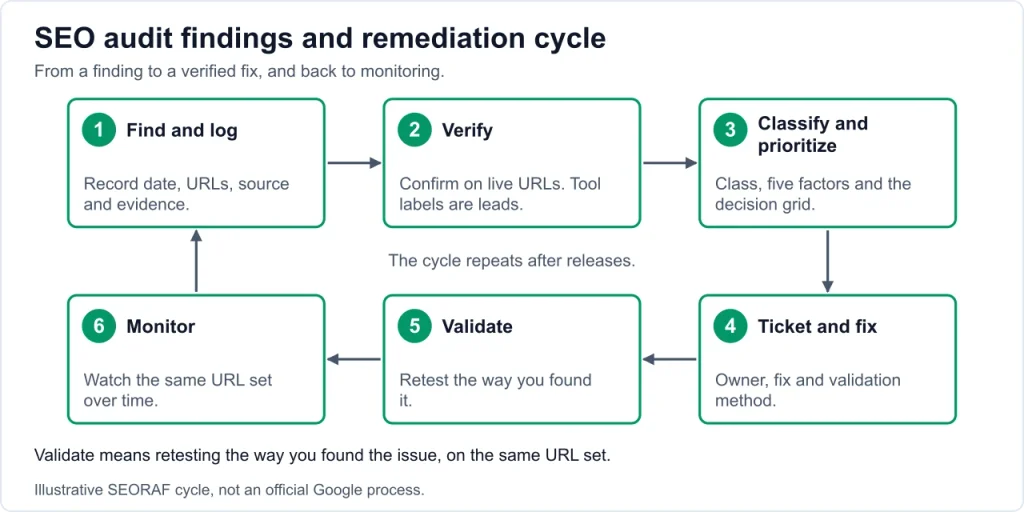
Validate and monitor after fixes
- Retest the way you found it. If a crawl found it, re-crawl. If URL Inspection showed it, inspect again.
- Watch the same URL set in the same report over time. Search Console changes lag behind fixes.
- Don’t claim causes. Record what changed and when. If performance moves, note it as an observation, not proof.
- Keep a changelog and re-run the critical checks after releases.
- Check Google’s changelogs periodically. Google moved its crawling documentation to a separate developer site, so old links and bookmarks may need updating.
- AI features and reporting: Sites appearing in AI features such as AI Overviews and AI Mode are included in overall Search Console traffic, reported in the Performance report under the “Web” search type.
Common false positives and over-fixes
Tool warnings are prompts for investigation. Verify before acting.
| Warning | Why it may be harmless | What to verify |
|---|---|---|
| “Missing priority or changefreq” in sitemap | Google ignores these values. | Nothing to do for Google. |
| “Blocked by robots.txt” in Search Console | Often intentional for admin, search or private paths. | Is the URL supposed to be crawlable? |
| “Alternate page with proper canonical” | Expected for duplicates that point to a preferred URL. | Does the canonical match your intent? |
| hreflang return-link warning | Some languages can be omitted on some pages. | Is the omission intentional? |
| Orphan page flagged | May be a campaign or utility page. | Is it supposed to rank or be found? |
| Redirect (3xx) in crawl | Normal. | Is it a chain, a loop, or the wrong type? |
| Duplicate titles on paginated or filtered URLs | Often expected. | Is the URL meant to be indexed? |
| Low word count | Word count alone is not a reliable measure of quality. | Does the page satisfy its purpose? |
| Low lab score but good field data | Lab and field measure different things. | Check field data first. |
| “Toxic link” or composite “SEO score” | Vendor-defined, and not data from Google. | Is there a manual action or a confirmed scheme? |
Over-fixes to avoid:
- Blocking crawling to remove indexed URLs.
- Noindexing pages that earn value.
- Redirecting everything to the homepage.
- Chasing every Lighthouse recommendation without checking field data.
- Disavowing links without a documented reason.
Limitations of this checklist
- It is based on Google’s public documentation and general technical SEO practice, not on private ranking data.
- It is Google-focused. Other search engines may behave differently.
- Google’s documentation changes. Several items above (redirects, JavaScript handling, structured data features, crawling documentation) changed recently, so recheck before acting.
- Tools differ in what they detect and how they label issues. This article doesn’t rate or compare tools.
- A fix doesn’t guarantee improved rankings, traffic or conversions.
- The severity framework is an editorial aid, not a standard.
- Some checks need access you may not have. Record what you couldn’t verify.
If you’d rather have someone else run the audit, see SEORAF’s SEO audit service.
FAQ
How often should I run an audit?
It depends on how often the site changes, not on a fixed schedule. Run a full review after migrations, redesigns, CMS or plugin changes and unexplained drops. Between full audits, keep light monitoring on indexing, status codes and sitemaps.
Can I run this without paid tools?
Partly. Search Console, analytics, browser developer tools, the Rich Results Test and PageSpeed Insights cover many checks. Large-scale crawling, log analysis and historical comparisons are easier with a crawler or log tool. Free tool limits change, so check them yourself.
How do I audit a site I can’t edit?
Use read-only access where possible and write each finding as an evidence-backed ticket for the owner. Mark what you couldn’t verify, such as server logs or templates.
How long does an audit take?
It depends on site size, number of templates, access and scope. Fix the scope first, and treat any time estimate that ignores those as a guess.
Conclusion and next step
An advanced audit is a repeatable process: verify the data, check each layer in order, record evidence, prioritize by impact and confirm every fix. Start with measurement, crawlability and indexability, because problems there can make later work irrelevant.
Put this into practice. Copy the ticket format and evidence-log fields from this page into your own spreadsheet, then work through the quick-start workflow in order.
Related guides: Technical SEO guide · Crawling in SEO · Site architecture · Content SEO guide · SEO resources
Sources
The Google pages below are the sources for the statements marked Google-documented. Google changes its documentation, so check the current page before you rely on a point.
- Google: JavaScript SEO basics
- Google: How to specify a canonical URL (canonicalization methods)
- Google: Redirects and Google Search
- Google: Guidance on third-party SEO tools
- Google: AI features and your website
- Google: Introduction to robots.txt
- Google: HTTP status codes, network and DNS errors
- Google: Build and submit a sitemap
- Google: Localized versions (hreflang)
- Google: Crawl budget guide
- Google: General structured data guidelines
- Google: Latest documentation updates
- Google: Crawling documentation changelog
- Google: Creating helpful, reliable, people-first content
- Google: Disavow links to your site