
Technical SEO Guide
Crawling in SEO: The Complete Guide
Learn how search engines and AI crawlers discover, request, fetch, and process URLs—from crawling and rendering to indexing, crawl budget, robots.txt, XML sitemaps, and crawler governance.
Founder, SEORAF
Mousume Akter is the founder of SEORAF, focused on technical SEO, entity SEO, and SEO tooling.
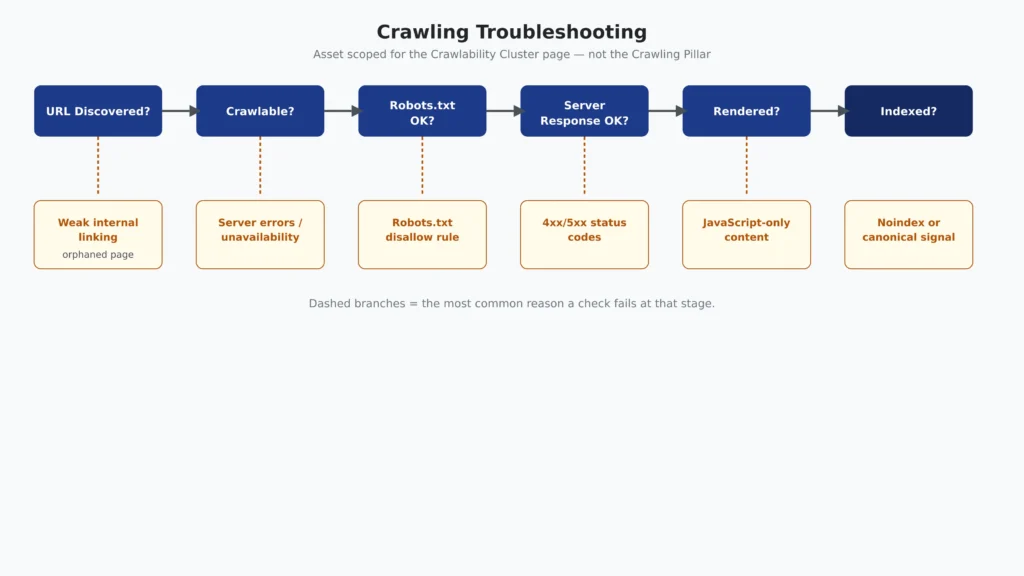
Google Search Console illustrates this distinction with indexing statuses such as “Discovered – currently not indexed.” This status means Google knows about the URL but has not yet crawled it. In other words, discovery has occurred, but crawling has not necessarily followed.
That distinction matters because discovery and crawling are not the same event. A URL can be discovered through internal links, external links, an XML sitemap, or other sources and still wait before Google decides to request it. Likewise, successfully crawling a URL does not mean Google will automatically index it.
For a broader explanation of how these stages connect, see SEORAF’s Crawling in SEO guide. If the issue is whether a specific URL can be reached and crawled, continue to the Crawlability guide. For what happens after crawling when Google decides whether a page belongs in its index, see the Indexability guide.
Crawling vs. Crawlability
Crawling is a process: the action of a crawler requesting and fetching a URL. Crawlability is a property: whether a URL or site can be successfully discovered and accessed by a crawler under its current technical conditions and directives.
Those conditions can include server availability, internal linking, robots.txt rules, HTTP responses, and other technical factors that determine whether a crawler can reach and retrieve a URL.
Put simply, crawling is what the crawler does; crawlability is whether the site allows and enables that process to happen successfully. For example, Googlebot requesting a specific URL is crawling. A URL being reachable, discoverable, and not unintentionally blocked is part of its crawlability.
| Aspect | Crawling | Crawlability |
|---|---|---|
| What it is | A crawler requesting and fetching a URL. | The ability of a URL or site to be discovered and accessed by a crawler. |
| Type | A process or action. | A technical property or condition. |
| Example | Googlebot sends a request for a URL and receives its response. | The URL has a reachable server, a valid link path, and no unintended crawl restriction. |
| Common factors | Crawl scheduling, fetching, response handling, and resource processing. | Internal links, robots.txt, server availability, HTTP responses, and site architecture. |
| Main question | “Did the crawler request and fetch this URL?” | “Can the crawler successfully reach and access this URL?” |
This distinction is important because a URL can be technically crawlable without being crawled immediately. Conversely, a crawler may attempt to access a URL but encounter a technical problem that prevents successful fetching.
This guide focuses on how crawling works and where it fits within the broader search lifecycle. Detailed diagnosis of crawlability problems—such as auditing blocked paths, analyzing crawl activity in server logs, identifying orphaned pages, and testing crawl restrictions—is covered in SEORAF’s dedicated Crawlability guide.
The Crawling Lifecycle
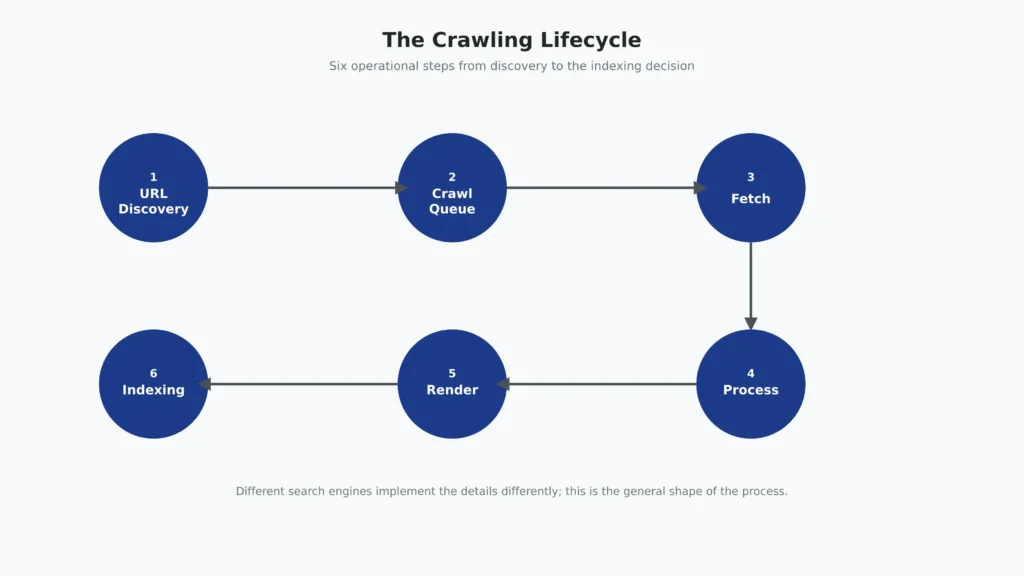
Search engines implement crawling in different ways, but the overall process follows a similar pattern: a URL is discovered, considered for crawling, fetched, and processed. Where JavaScript is involved, the page may then go through a separate rendering stage before the search engine makes an independent decision about indexing.
URL Discovery → Crawl Scheduling → Fetching → Processing → Rendering (when needed) → Indexing → Ranking
URL Discovery
Before a URL can be crawled, a crawler must first learn that the URL exists. Google identifies links found on pages it has already crawled as an important source of URL discovery, while XML sitemaps provide another way for site owners to communicate URLs they want search engines to know about.
Links from other websites can also surface URLs to search engines. A page with no useful internal links, no external links pointing to it, and no sitemap entry may be difficult for a crawler to discover. Such a page is commonly called an orphaned page.
Discovery is therefore closely connected to a site’s link structure. How deeply a page sits within the site’s architecture, how internal links connect related content, and how efficiently important URLs can be reached all influence how easily crawlers can discover them. For the broader principles of URL hierarchy and internal linking, see SEORAF’s Site Architecture guide.
Crawl Scheduling and Prioritization
Once a URL is discovered, it may enter a crawl queue. The search engine then determines when to request it and, later, when to revisit it. Crawlers do not necessarily fetch every discovered URL immediately or at the same frequency.
Scheduling can be influenced by factors such as the search engine’s available crawl capacity, the site’s ability to respond to requests, the perceived importance of URLs, and signals indicating that content may have changed. This is where crawl budget becomes particularly relevant for large or frequently changing websites.
Most small and medium-sized websites do not need to manage crawl budget as a dedicated optimization project. For sites where crawl capacity and crawl demand become significant concerns, see SEORAF’s Crawl Budget guide.
Fetching, Processing, and Further Discovery
When a crawler requests a URL, it sends an HTTP request and receives a server response. That response can contain HTML as well as references to resources such as CSS, JavaScript, images, fonts, and other files required to process the page.
Google documents specific fetching and processing limits for Googlebot. For example, Google currently documents a limit of approximately 15 MB for the HTML of a page, while different limits apply to other supported content types. Google notes that these figures can change, so they should be treated as current documented behavior rather than permanent technical limits.
Googlebot also supports HTTP/1.1 and HTTP/2 and can use HTTP caching mechanisms such as ETag and If-None-Match. These mechanisms can allow a crawler to avoid unnecessarily downloading a resource again when it has not changed.
Fetching and rendering are related but distinct. The initial crawl retrieves the server-delivered HTML before client-side JavaScript has executed. If important content, links, or metadata depend on JavaScript, that information may not be available in the initial HTML response and may require a separate rendering process.
This means a page can be successfully crawled without being fully represented in its rendered form. The HTTP request can succeed while important content or links remain unavailable until the necessary JavaScript and other resources are processed.
Rendering can therefore affect what a search engine can see and understand, but successful rendering does not guarantee indexing. The implementation and troubleshooting of JavaScript-dependent content are covered in SEORAF’s JavaScript SEO guide and Rendering guide.
Crawling and rendering can also expose additional URLs through links and other discoverable resources. Those URLs can enter the discovery process, allowing the crawl cycle to continue.
Indexing and Ranking
After a URL has been crawled—and rendered where relevant—a separate process determines whether its content should be included in the search index. Being reachable and successfully fetched is therefore not enough to guarantee indexing.
Indexing decisions can involve factors such as content quality, duplication, canonicalization, and indexing directives. For example, a page can be successfully crawled but excluded from the index because of a noindex directive or other indexing signals. The distinction between crawling and index eligibility is covered in greater depth in SEORAF’s Indexability guide.
Indexing is also separate from ranking. When a page enters a search index, it becomes eligible to be considered for relevant searches; it does not guarantee that the page will appear for a particular query or achieve a specific position.
Ranking happens when the search system evaluates eligible content against a user’s query and determines which results to show and in what order. Relevance, content quality, context, competition, and many other signals can influence that outcome.
The key point is that discovery, crawling, rendering, indexing, and ranking are separate stages. A problem at one stage does not automatically mean there is a problem at every other stage. Identifying the exact stage where a URL is blocked, delayed, or excluded is the first step toward diagnosing the underlying SEO issue.
Crawler Taxonomy: Search Engines, AI Systems, and Audit Tools
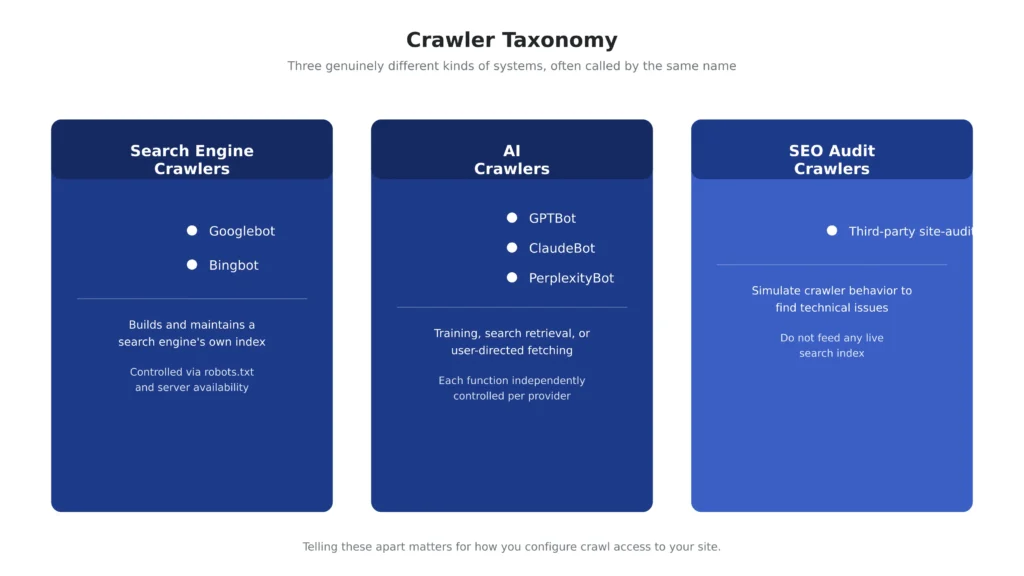
The term crawler can refer to several different types of automated systems. They may all request web pages, but they do so for different purposes and operate under different control models. Distinguishing them matters when deciding which crawlers should have access to your site.
| Crawler category | Primary purpose | Examples | Who controls access |
|---|---|---|---|
| Search engine crawler | Discovers, fetches, and processes pages to build and maintain a search engine’s index. | Googlebot, Bingbot | The search engine operates the crawler. Site owners can influence access through robots.txt, server configuration, and related technical controls. |
| AI crawler | Collects or retrieves web content for purposes such as AI training, search indexing, or user-requested retrieval. | ClaudeBot, GPTBot, OAI-SearchBot, PerplexityBot, and other provider-specific agents | The AI provider operates the crawler. Site owners can generally manage access through crawler-specific robots.txt directives and server controls. |
| SEO audit crawler | Simulates crawler activity to help site owners and SEO professionals identify technical issues, broken links, redirects, metadata problems, and other site-level issues. | Third-party SEO audit crawlers | The site owner, SEO professional, or agency running the audit controls the crawl. These crawlers do not maintain a search engine’s live index. |
The most important distinction is purpose. Search engine crawlers are part of a search engine’s indexing system. AI crawlers may serve different functions within an AI provider’s ecosystem, including training, search, or user-directed retrieval. SEO audit crawlers are diagnostic tools used by site owners and do not determine whether a page appears in Google or another search engine’s index.
Access should therefore be managed according to the crawler’s specific role rather than treating every bot as equivalent. A site’s robots.txt policy may allow one crawler while restricting another, depending on the site’s search, AI, privacy, licensing, or content-distribution requirements.
The next sections look more closely at major search and AI crawlers, including how their functions differ and what their access controls mean for SEO.
Googlebot
Googlebot is the crawler Google uses to discover, fetch, and process web content for Google Search. It should not be treated as interchangeable with Google’s other automated crawlers, because different Google crawlers can serve different purposes.
For example, Google documents GoogleOther as a general-purpose crawler used for product research and development, while Google-Extended is a product token that controls whether a site’s content may be used to improve Google’s generative AI models and services such as Gemini and Vertex AI. Google-Extended is separate from Googlebot and does not control whether a page is crawled, indexed, or ranked in Google Search.
For site owners, this distinction is important when creating robots.txt policies. Allowing or restricting Google-Extended does not automatically allow or block Google Search crawling. Googlebot’s access should therefore be considered separately from Google’s AI-related crawler controls.
Bingbot
Bingbot is Microsoft’s crawler for Bing. Like other search engine crawlers, it discovers URLs through links and sitemaps, requests pages, processes responses, and uses its own scheduling systems to determine when URLs should be crawled and revisited.
One documented difference between Bingbot and Googlebot is support for the non-standard robots.txt Crawl-delay directive. Microsoft documents support for Crawl-delay, while Google states that Googlebot does not support that directive.
Bing also supports IndexNow, an open protocol that allows participating search engines to be notified when URLs are added, updated, or removed. IndexNow can help communicate changes sooner than waiting for a crawler to discover them through its normal scheduling and discovery processes, but it does not guarantee that a URL will be crawled, indexed, or ranked.
For current Bingbot behavior, robots.txt support, and webmaster guidance, refer to Microsoft’s Bing Webmaster Guidelines. For the IndexNow protocol and implementation details, see Microsoft’s IndexNow documentation.
AI Crawlers: Training, Search, and User-Directed Access
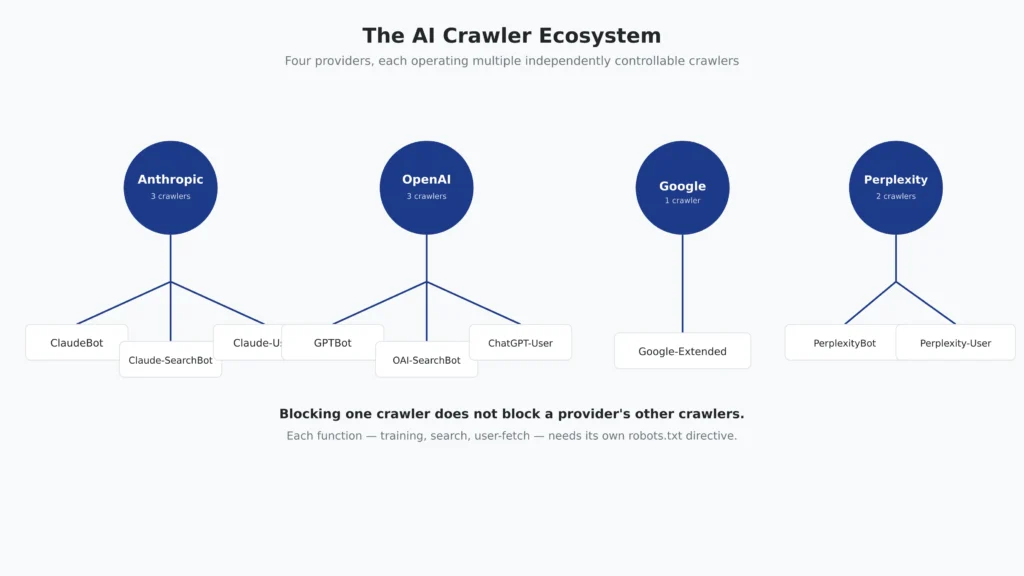
Major AI providers operate multiple crawlers with different purposes. A useful way to understand them is by function rather than by bot name: some crawlers support AI training, some support search and retrieval, and others fetch pages in response to a specific user’s request.
These functions are not interchangeable. Blocking one crawler does not necessarily block the provider’s other crawlers, so robots.txt policies should be written for the specific crawler and purpose you intend to control.
| Provider | Crawler | Primary function | What blocking it affects |
|---|---|---|---|
| Anthropic | ClaudeBot | Collects web content that may contribute to AI model training. | Prevents future crawls from contributing content to training data. |
| Claude-SearchBot | Indexes web content to improve Claude’s search functionality. | Prevents the content from being included in Claude’s search results. | |
| Claude-User | Fetches a specific page when a user asks Claude about that page or its content. | Prevents that page from being retrieved for the user-directed request. | |
| OpenAI | GPTBot | Crawls content that may be used to train OpenAI’s generative AI models. | Prevents the content from being included in future training crawls. |
| OAI-SearchBot | Crawls and surfaces sites for ChatGPT’s search features. | Prevents the site from being used as a source in ChatGPT Search, while the site may still appear as a navigational link. | |
| ChatGPT-User | Fetches a page in response to a user-directed request, including certain Custom GPT or GPT Action requests. | Controls access for that user-initiated retrieval context; it is separate from OAI-SearchBot’s role in ChatGPT Search. | |
| Google-Extended | Controls whether content can be used to improve Google’s generative AI products and services such as Gemini and Vertex AI. | Does not control Google Search crawling, indexing, or ranking. | |
| Perplexity | PerplexityBot | Crawls and indexes web content for Perplexity’s search and answer engine. | Blocks the use of the page’s full or partial text for Perplexity’s search index; some basic information may still appear. |
| Perplexity-User | Fetches a page live when a user asks Perplexity about it. | Controls user-directed retrieval of the page. |
Anthropic documents separate roles for ClaudeBot, Claude-SearchBot, and Claude-User and states that its crawlers respect standard robots.txt directives as well as the non-standard Crawl-delay extension. Anthropic also states that its crawlers do not attempt to bypass CAPTCHAs. For the current crawler names, roles, and access behavior, see Anthropic’s crawler documentation.
OpenAI likewise separates GPTBot from OAI-SearchBot. A site can allow OAI-SearchBot for ChatGPT Search visibility while disallowing GPTBot for training purposes. OpenAI also documents ChatGPT-User as a separate user-directed agent and explains that its behavior should not be treated as equivalent to OAI-SearchBot. For the current bot names, functions, and robots.txt guidance, see OpenAI’s bot documentation.
Perplexity documents PerplexityBot as its search crawler and states that it respects robots.txt. Perplexity also explains that blocked content is not used to train its foundation models. For the current access rules and crawler behavior, see Perplexity’s robots.txt guidance.
The practical takeaway is simple: blocking one AI crawler does not automatically block every crawler operated by the same provider. If you want to control training access, search visibility, and user-directed retrieval separately, you need to evaluate the relevant crawler for each function.
These access controls operate within the broader framework of the Robots Exclusion Protocol (RFC 9309). For the fundamentals of robots.txt syntax, user-agent rules, and crawl-access management, see SEORAF’s Robots.txt guide.
Managing Crawl Access: Robots.txt and XML Sitemaps
Robots.txt and XML sitemaps serve different purposes in technical SEO. Robots.txt communicates which crawler requests a site is willing to allow or disallow, while an XML sitemap helps search engines discover URLs that the site owner considers important.
Robots.txt
Robots.txt is a plain-text file normally placed at the root of a website, such as /robots.txt. It uses crawler-specific rules, including User-agent, Disallow, and Allow, to communicate crawl preferences to compliant crawlers.
The Robots Exclusion Protocol (RFC 9309) makes an important distinction: robots.txt is not an access-control or authorization mechanism. It tells compliant crawlers which URLs they should or should not request, but it does not protect private information or prevent a technically non-compliant client from requesting a URL.
For that reason, robots.txt should never be used as a security mechanism. Sensitive or private resources require proper authentication and authorization controls. Robots.txt is primarily a crawler-management mechanism.
XML Sitemaps
An XML sitemap is a structured list of URLs that a site owner wants search engines to discover. Sitemaps are particularly useful for helping search engines find important URLs that may be harder to discover through normal internal links, including newly published pages and URLs within large websites.
A sitemap is a discovery signal, not a crawling command. Submitting a URL in a sitemap does not guarantee that a search engine will crawl, index, or rank that URL. Search engines still make their own decisions about whether and when to crawl the URL and whether the content should be included in their index.
Robots.txt and XML sitemaps therefore work together but should not be treated as substitutes. A sitemap can tell search engines which URLs you want them to know about, while robots.txt can communicate which areas crawlers should avoid requesting.
For complete directive syntax, user-agent rules, testing, common configuration mistakes, and advanced crawl-access controls, see SEORAF’s Robots.txt guide. For sitemap structure, URL selection, submission, and troubleshooting, see the XML Sitemap guide.
Crawl Budget: Who Actually Needs to Worry About It
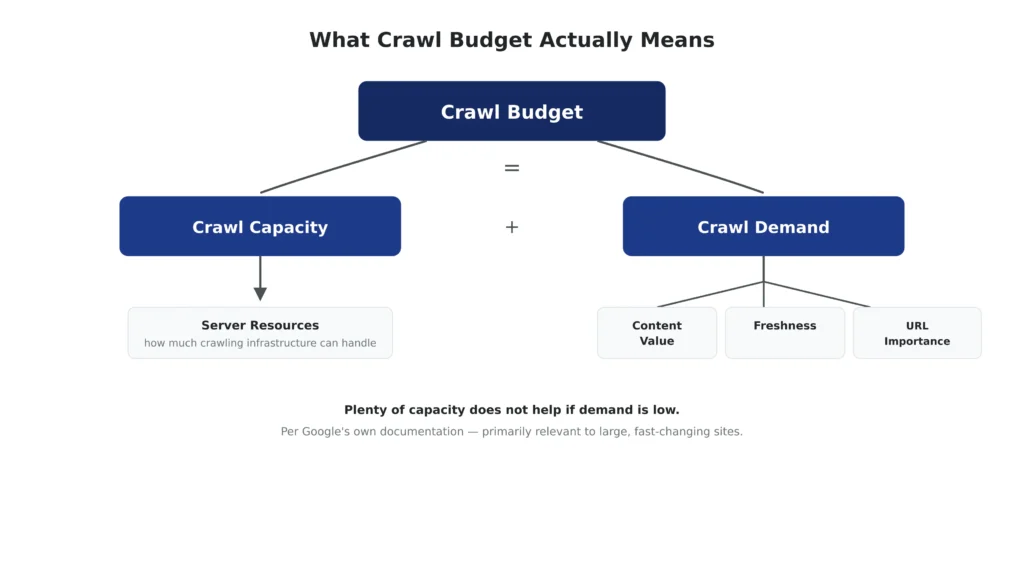
Google defines crawl budget as the combination of two related concepts: crawl capacity, which reflects how much crawling a site can support without affecting its servers, and crawl demand, which reflects how much crawling Google considers useful for the site. A website can have plenty of available server capacity and still be crawled relatively infrequently if Google’s demand for additional crawling is low.
This distinction matters because crawl budget is often treated as a problem every website needs to solve. In reality, Google recommends paying particular attention to crawl budget on much larger or rapidly changing sites rather than treating it as a routine optimization task for every domain.
Who Needs to Pay Attention to Crawl Budget?
Google’s crawl budget documentation gives rough guidance for the types of sites where dedicated crawl-budget management can become relevant. These include:
- Large websites with approximately 1 million or more unique pages that change moderately often, such as weekly.
- Medium-to-large websites with approximately 10,000 or more unique pages that change very rapidly, such as daily.
These are not hard SEO thresholds. Google describes them as rough estimates to help site owners determine whether crawl-budget considerations are likely to matter. Site behavior, server capacity, content changes, and actual crawling patterns are more useful than applying a page-count threshold mechanically.
For many smaller websites, crawl budget is therefore not the primary problem. If important pages are discovered, crawled and updated without significant delays, maintaining a current XML sitemap and monitoring the Page Indexing report in Google Search Console may be sufficient.
Crawl Capacity vs. Crawl Demand
Understanding the two sides of Google’s definition helps prevent a common misconception: having more server capacity does not automatically make Google crawl a site more often.
Crawl capacity is primarily concerned with how much crawling a site’s infrastructure can handle. Server errors, slow responses, or infrastructure limitations can reduce the amount of crawling a site can comfortably support.
Crawl demand is about how much crawling Google considers worthwhile. Factors such as the size of the site, content freshness, and the perceived value of URLs can influence how much Google wants to revisit the site.
A technically strong server can therefore have unused crawl capacity while Google still crawls relatively little because there is limited demand for additional crawling. Conversely, a site experiencing heavy crawling activity needs enough infrastructure capacity to handle those requests efficiently.
What Actually Increases Crawl Budget?
Google’s documentation points to two fundamental levers: improving the site’s ability to serve crawl requests and increasing the value of the content so that additional crawling is useful.
Improving infrastructure can help a site handle crawler requests efficiently. Improving content value and keeping important content fresh can increase the reasons for search engines to revisit URLs. There is no reliable shortcut that simply forces Google to allocate unlimited crawling to a site.
This is why crawl-budget optimization should begin with evidence rather than assumptions. Before changing crawl directives or attempting to manipulate crawler behavior, determine whether the site actually has a crawling problem and whether that problem is related to capacity, demand, discovery, or another stage of the search lifecycle.
For detailed crawl-budget diagnostics, server considerations, URL-management strategies, and optimization methods for large websites, see SEORAF’s Crawl Budget guide.
Common Crawling Problems
When a page is not appearing in search, it is tempting to assume that a technical crawling problem is responsible. However, Google notes that a page may simply be new or may not yet have enough links pointing to it. That makes discovery and crawl status important checks before assuming that something is technically broken.
The table below maps common crawling and related URL-access problems to the most useful place to investigate them.
| Problem | Why it matters | Where to investigate |
|---|---|---|
| New or weakly linked URL | Limited discovery paths can make a URL harder for crawlers to find and may delay crawling. | Internal links, XML sitemap inclusion, and external discovery signals |
| Robots.txt restriction | An unintended Disallow rule can prevent a crawler from accessing an entire URL path. | Robots.txt directives for the relevant user-agent |
| Server errors or slow responses | Repeated server failures or inefficient responses can make crawling less efficient and affect how much crawling a site can support. | Server logs, HTTP response codes, response times, and hosting infrastructure |
| Orphaned URL | A URL without a useful internal link path may be difficult for crawlers to discover through normal site navigation. | Internal link audit, XML sitemap, and site architecture |
| JavaScript-dependent content | Important content or links that appear only after JavaScript execution may differ from what is available in the initial HTML response. | Raw HTML vs. rendered HTML, JavaScript execution, and rendered-page testing |
| Noindex or canonicalization signals | A page can be crawled successfully but still be excluded from the index because of indexing directives or canonicalization signals. | noindex meta tags or HTTP headers, canonical tags, and URL Inspection |
How to Diagnose the Problem
The correct diagnosis depends on identifying which stage of the URL lifecycle failed. A new URL may have a discovery problem, while a blocked URL may have a crawl-access problem. A successfully crawled page with a noindex directive has an indexing issue rather than a crawling failure.
A practical investigation can therefore include checking the URL in Google Search Console, reviewing relevant server logs, testing robots.txt rules, checking internal link paths, and comparing the raw HTML with the rendered page when JavaScript is involved.
For a complete diagnostic workflow covering crawlability testing, blocked paths, server-log analysis, orphaned URLs, robots.txt testing, and related technical checks, see SEORAF’s dedicated Crawlability guide.
Common Crawling Problems
When a page is not appearing in search, it is tempting to assume that a technical crawling problem is responsible. However, Google notes that a page may simply be new or may not yet have enough links pointing to it. That makes discovery and crawl status important checks before assuming that something is technically broken.
The table below maps common crawling and related URL-access problems to the most useful place to investigate them.
| Problem | Why it matters | Where to investigate |
|---|---|---|
| New or weakly linked URL | Limited discovery paths can make a URL harder for crawlers to find and may delay crawling. | Internal links, XML sitemap inclusion, and external discovery signals |
| Robots.txt restriction | An unintended Disallow rule can prevent a crawler from accessing an entire URL path. | Robots.txt directives for the relevant user-agent |
| Server errors or slow responses | Repeated server failures or inefficient responses can make crawling less efficient and affect how much crawling a site can support. | Server logs, HTTP response codes, response times, and hosting infrastructure |
| Orphaned URL | A URL without a useful internal link path may be difficult for crawlers to discover through normal site navigation. | Internal link audit, XML sitemap, and site architecture |
| JavaScript-dependent content | Important content or links that appear only after JavaScript execution may differ from what is available in the initial HTML response. | Raw HTML vs. rendered HTML, JavaScript execution, and rendered-page testing |
| Noindex or canonicalization signals | A page can be crawled successfully but still be excluded from the index because of indexing directives or canonicalization signals. | noindex meta tags or HTTP headers, canonical tags, and URL Inspection |
How to Diagnose the Problem
The correct diagnosis depends on identifying which stage of the URL lifecycle failed. A new URL may have a discovery problem, while a blocked URL may have a crawl-access problem. A successfully crawled page with a noindex directive has an indexing issue rather than a crawling failure.
A practical investigation can therefore include checking the URL in Google Search Console, reviewing relevant server logs, testing robots.txt rules, checking internal link paths, and comparing the raw HTML with the rendered page when JavaScript is involved.
For a complete diagnostic workflow covering crawlability testing, blocked paths, server-log analysis, orphaned URLs, robots.txt testing, and related technical checks, see SEORAF’s dedicated Crawlability guide.