
Technical SEO Audit: Prioritized Workflow + Free Template
A technical SEO audit checks whether search engines can crawl your important pages, render them as users see them, and index the right version of each URL. It then ranks what you find by impact, so developers fix the right things first.
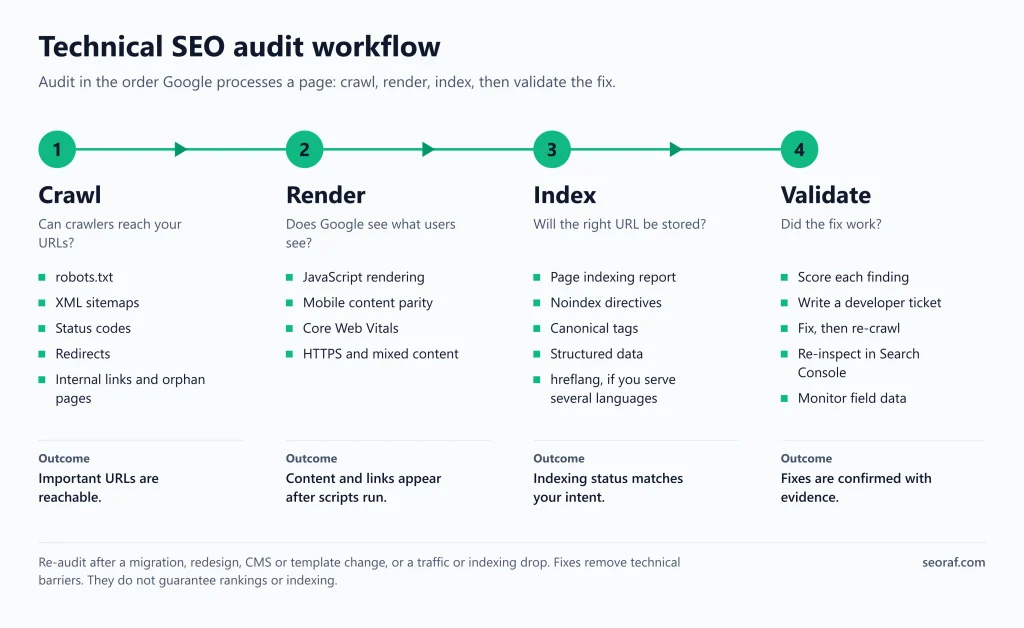
The workflow in four phases:
- Crawl: can crawlers reach your URLs? Check robots.txt, XML sitemaps, status codes, redirects, internal links and orphan pages.
- Render: does each page work after scripts run, on mobile, at acceptable speed and over HTTPS?
- Index: will the right URL be stored? Check the Page indexing report, noindex, canonicals, structured data and international signals.
- Validate: score each finding, write a ticket, fix it, then re-test.
Audit tools often report many warnings. Whether a given warning matters depends on whether it affects crawling, indexing, rendering or user experience on pages you care about. This guide shows how to tell the difference.
How to read this guide: statements marked [Official] come from Google documentation. Statements marked [Recommended] are practitioner guidance, not Google rules.
What a technical SEO audit covers (and what it doesn’t)
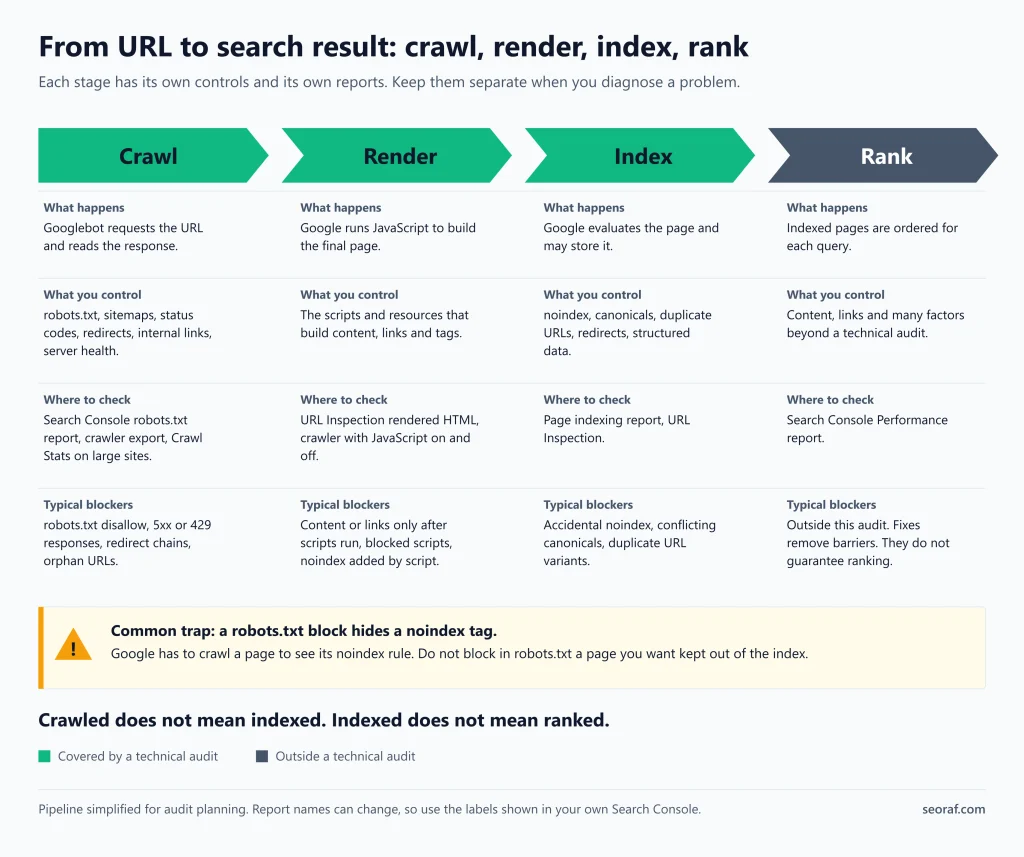
Crawling, rendering, indexing and ranking are different stages. Mixing them up leads to wrong fixes.
| Term | What it means | Where you check it | Common mix-up |
|---|---|---|---|
| Crawling | Googlebot requests a URL and reads the response. robots.txt, status codes and server health shape it. | Crawler exports, Search Console robots.txt report, server logs | “Crawled” does not mean “indexed” |
| Rendering | Google runs JavaScript in a headless Chromium to see the final page. | URL Inspection rendered HTML, crawler with JS rendering on | Raw HTML and rendered HTML can differ |
| Indexability (SEO shorthand) | Whether a URL is eligible to be indexed: it generally returns 200, has no noindex directive, is crawlable enough for Google to see its directives, and does not signal a different canonical URL. | Crawler directive and canonical reports | Eligible does not mean indexed |
| Indexing | Google finds (crawls) the page, processes its content and puts it into the index, where it may be eligible to appear in results [Official]. Not every crawled page is indexed [Official]. | Search Console Page indexing report | “Not indexed” is often normal |
| Ranking | Ordering of indexed pages for a query | Search Console Performance report | Technical health is a precondition for ranking, not a guarantee of it |
Crawling, rendering, indexability, indexing and ranking compared
A technical audit covers the first four rows. Content quality, backlinks and keyword targeting belong to a broader SEO audit.
When to run an audit
Run one at these moments, not on an arbitrary schedule:
- A site migration, redesign, theme or CMS change, URL-structure change, or host or protocol change.
- A drop in traffic or indexed pages. Google’s guide to debugging drops in Search traffic is the right companion.
- A major template or JavaScript framework change.
- A new section or a large batch of new URLs.
Between audits, a light monthly look at Search Console (indexing, Core Web Vitals, crawl stats) catches regressions. [Recommended] The Google documentation reviewed for this article does not state an audit frequency.
Set up before you audit
Define scope and baseline
Before crawling, write down:
- Every hostname and protocol variant you serve (http, https, www, non-www, subdomains).
- Your key templates and your most valuable pages.
- Platform constraints. Hosted CMS platforms may limit robots.txt, headers and redirects.
- Your technology: JavaScript framework, CDN, caching layer.
- Who can change what: server, CMS settings, templates, tag manager.
- Exports of Search Console Page indexing, Core Web Vitals, Performance and Sitemaps data, as your “before” snapshot.
Choose your audit depth
Not every check applies to every site. Google’s crawl-budget guide is aimed at sites with about 1 million or more unique pages that change roughly weekly, 10,000 or more pages that change daily, or a large share of URLs reported as “Discovered – currently not indexed”. Google calls these rough estimates, not exact thresholds. [Official] For other sites, Google says keeping your sitemap up to date and checking the Page indexing report regularly is adequate. [Official] See Google’s crawl-budget guide.
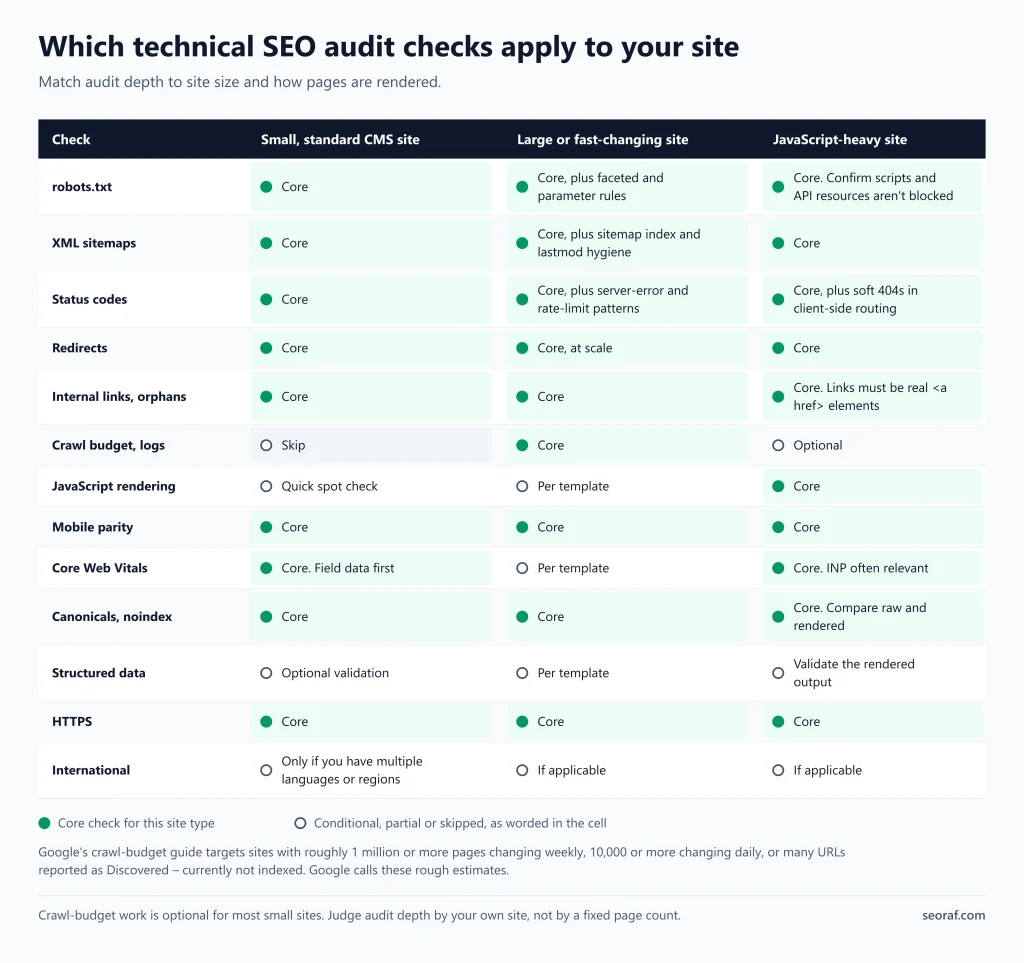
| Check | Small, standard CMS site | Large or fast-changing site | JavaScript-heavy site |
|---|---|---|---|
| robots.txt | Core | Core, plus faceted and parameter rules | Core, and confirm scripts and API resources aren’t blocked |
| XML sitemaps | Core | Core, plus sitemap index and lastmod hygiene | Core |
| Status codes | Core | Core, plus server-error and rate-limit patterns | Core, plus soft 404s in client-side routing |
| Redirects | Core | Core, at scale | Core |
| Internal links, orphans | Core | Core | Core: links must be real <a href> elements |
| Crawl budget, logs | Skip | Core | Optional |
| JavaScript rendering | Quick spot check | Per template | Core |
| Mobile parity | Core | Core | Core |
| Core Web Vitals | Core: field data first | Per template | Core: INP often relevant |
| Canonicals, noindex | Core | Core | Core: compare raw and rendered |
| Structured data | Optional validation | Per template | Validate the rendered output |
| HTTPS | Core | Core | Core |
| International | Only if you have multiple languages or regions | If applicable | If applicable |
Which audit checks apply to small, large and JavaScript-heavy sites
Tools
| Purpose | Free option | Paid option | Notes |
|---|---|---|---|
| Indexing, sitemaps, robots.txt, Core Web Vitals, URL-level checks | Google Search Console | None | The primary source for what Google sees |
| Site crawling | Free crawler tiers (limits vary) | Desktop and cloud crawlers | Confirm current limits and features in vendor documentation. See Screaming Frog free vs paid, Sitebulb, ContentKing and Semrush Site Audit. |
| Performance | Lighthouse, PageSpeed Insights | Monitoring tools | Lab and field data differ. See the Core Web Vitals section |
| Structured data | Rich Results Test, Schema Markup Validator | Crawler extraction | Rich Results Test is Google’s tool for its supported features |
| Rendering and headers | Browser DevTools, URL Inspection | Crawler rendering mode | Compare “view source” with the rendered DOM |
| Large-site crawling behavior | Search Console Crawl Stats | Log analysis tools | Skip for small sites |
Free and paid tools by audit purpose
Free versus paid: for a small site, the free stack is usually enough. [Recommended] Depending on the tool, paid options may add scheduled crawls, change tracking, higher crawl limits or cloud-based crawling. Check each vendor’s current documentation. SEORAF’s tool pages follow its review methodology and editorial policy. SEORAF also offers a free SEO audit tool for quick checks.
Configure your crawl before you trust the results
- Start with robots.txt obeyed. If you manage the site and need to diagnose blocked URLs, you can run a controlled comparison that ignores robots.txt, provided you have authorization and keep the crawl rate safe. Do not treat this as the default crawl.
- Run one crawl with JavaScript rendering off and one with it on, and compare. [Recommended]
- Add your sitemap URLs so potential orphan pages can be investigated.
- Limit crawl speed so you don’t strain the server.
- Treat a crawler’s results as an approximation of Googlebot. Confirm important findings with URL Inspection. [Recommended]
Phase 1: Crawl (can search engines reach your pages?)
robots.txt
Inspect: open /robots.txt on every hostname and protocol you serve. Rules apply only to the protocol, host and port where the file is posted. [Official] Review the Search Console robots.txt report where available.
Healthy result:
- If robots.txt exists, it is served correctly and contains the intended rules. A 404 response when no robots.txt file exists is not, by itself, an error; Google treats it as having no crawl restrictions. [Official]
- No important page or rendering resource is disallowed. By default everything is crawlable unless a rule blocks it. [Official]
- Sitemap lines use fully qualified URLs. [Official]
If robots.txt itself fails: per Google’s robots.txt specification, the status of the robots.txt response affects how Google uses it. A 5xx response can cause Google to temporarily treat crawling as restricted. A 404 is treated as no restrictions. [Official; check the specification for timing rules] If your CDN or server returns 5xx for robots.txt during incidents, crawling can pause.
If a rule is wrong: edit it, retest, and submit the updated file. Google documents how to submit an updated robots.txt.
What to know:
- robots.txt controls crawling, not indexing. A blocked URL can still be indexed without its content, for example when other pages link to it. [Official]
- Google ignores robots.txt fields it doesn’t list as supported, and noindex in robots.txt is not supported. [Official]
- Rules are case-sensitive. [Official]
- Google won’t render JavaScript from blocked files or on blocked pages. [Official]
- If you use a hosting service such as Wix or Blogger, you may not be able to edit robots.txt directly. Use the platform’s search-visibility settings. [Official]
False positives: crawlers flag intentionally blocked URLs such as internal search results.
Illustrative example (hypothetical): a rule disallows /assets/, which holds the scripts that build the page content. The HTML is crawlable, but Google can’t render the scripted content.
Small vs large: large sites should review Google’s guidance on faceted navigation URLs. Google says not to use robots.txt to temporarily shift crawl budget to other pages. [Official]
XML sitemaps
Inspect: the Search Console Sitemaps report and the sitemap files themselves.
Healthy result: the sitemap lists URLs you want crawled and is kept current. [Official] Google recommends lastmod for updated content. [Official] Listing a URL in a sitemap is only a weak signal that it should be the canonical, so don’t list non-canonical URLs. [Official]
How to check: compare sitemap URLs with a crawl. URLs in the sitemap that redirect, return 4xx, carry noindex or canonicalize elsewhere are noise. [Recommended]
What to know: sitemaps tell Google what you want crawled. They don’t force crawling or indexing. For size limits and extensions, see Google’s sitemap documentation.
False positives: parameter or pagination URLs excluded from the sitemap on purpose.
Status codes
Inspect: the crawler’s response-code report and the Page indexing report.
What Google says [Official, see Google’s status code documentation]:
- Google ignores content from URLs that return 4xx. Newly encountered 404 pages aren’t processed, and crawl frequency gradually decreases.
- Returning 404 or 410 for permanently removed pages is a strong signal not to crawl them again.
- 5xx and 429 responses make Google’s crawlers slow down.
- Soft 404s may continue to be crawled and can waste crawl resources.
- Pages with non-200 status codes may not be rendered.
Soft 404 defined: a page that tells users the content is missing, or looks like an error page, but returns a 200 status. [Recommended wording]
Do next:
- Restore pages that should exist.
- Redirect removed pages only to a genuinely equivalent page. [Recommended]
- Leave 404 or 410 in place for content that is gone for good.
- For specific 404 cleanup, see how to fix 404 errors.
False positives:
- External links returning 4xx are not your errors.
- Bot-protection rules can return 403 or 429 to your crawler but not to Google.
- Intentional 410s are not defects.
Redirects
Inspect: the crawler’s redirect report, and header checks on a sample of old URLs.
What Google says [Official, see Google’s redirects documentation]:
- A permanent redirect is a strong signal that the target should become the canonical URL. A temporary redirect is a weaker canonical signal and does not guarantee that the source URL will remain shown.
- Server-side redirects are the most reliably interpreted, and Google recommends a permanent server-side redirect whenever possible.
- An instant meta refresh is read as permanent and a delayed meta refresh as temporary.
- Avoid long redirect chains because they can slow crawling and make signals harder to consolidate.
Healthy result: ideally a single hop to the final URL, with internal links pointing straight to it. [Recommended]
Also check: HTTP to HTTPS, and www versus non-www, resolve to one host in a single hop.
Illustrative example (hypothetical): /old redirects to /interim, which redirects to /new. Fix by pointing /old straight to /new and updating internal links.
False positives: legacy redirects that are intentional. Prioritize chains and loops, not every 301.
Internal links and orphan pages
Inspect: how important pages are linked, how deep they sit, and which URLs have no internal links.
What Google says [Official]:
- Google discovers links in
<a href>elements. - Links injected by JavaScript are fine if they follow crawlable-link practices.
- URL fragments for routing are unreliable.
- When linking within your site, link to the canonical URL rather than a duplicate.
Orphan detection method [Recommended, not an official procedure]: take three URL lists (sitemap, crawl, and Search Console or analytics URLs). URLs present in the sitemap or Search Console but absent from the crawl are potential orphans, not confirmed ones. Check crawl settings, JavaScript rendering and internal-link discovery before deciding that a URL has no crawlable internal path.
Do next: link orphans that deserve to exist from relevant pages. For architecture questions, see site architecture. Noindex or remove the rest when that is appropriate for the page’s purpose.
False positives: thank-you pages, campaign landing pages and utility pages that are intentionally unlinked. Depth targets are heuristics, not Google rules.
Large sites with separate mobile HTML: Google notes that new-page discovery can be slower if the mobile version lacks links present on desktop. [Official]
Server health and crawl stats (large sites only)
Inspect: Search Console Crawl Stats, and server logs if you have them.
Look for: availability problems and rising response times, which can lower crawl capacity. [Official] Skip this step for small sites. See crawling basics and crawl rate.
Phase 2: Render (does Google see the page users see?)
JavaScript rendering
How Google processes it [Official, see JavaScript SEO basics]: crawling, then rendering, then indexing. Pages with a 200 status are queued for rendering, unless a robots meta tag or header says not to index. The render queue may take longer than a few seconds.
Inspect:
- Compare raw HTML (“view source”) with the rendered DOM.
- Use URL Inspection to see the HTML Googlebot received and the rendered output.
- Compare a crawl with JavaScript rendering off and on. [Recommended]
Check these in the rendered HTML:
- Main content.
- Internal links as real
<a href>elements. - Title, meta description and canonical.
- Robots meta tags.
- Structured data.
- Lazy-loaded content. Confirm it appears in the rendered HTML and follow Google’s lazy-loading guidance.
Rules from Google [Official]:
- If you set the canonical with JavaScript, it must match the canonical in the original HTML, and there should be only one canonical tag.
- If a page has noindex in the original code, Google may skip rendering, so removing it with JavaScript may not work. Don’t ship noindex in the original code if the page may later be indexed.
- Client-side apps should avoid soft 404s by redirecting to a URL that returns a real 404, or by adding a noindex robots meta tag on error pages with JavaScript.
- Dynamic rendering is a deprecated workaround. Google still describes server-side or pre-rendering as a great idea, because it makes sites faster for users and crawlers and not all bots run JavaScript.
False positives: differences caused by third-party widgets or a crawler’s own rendering engine.
Small vs JS-heavy: a standard CMS site needs a quick spot check. A JavaScript-heavy site needs this per template. [Recommended]
Mobile experience
Google removed the Mobile Usability report and the Mobile-Friendly Test, so advice that relies on them is outdated. [Official]
What Google says: Google announced in 2016 that its systems would primarily use the mobile version of a site’s content to rank pages, understand structured data and show snippets, and advised serving equivalent structured markup on both versions and keeping the mobile version accessible to Googlebot. [Official, see Google’s announcement; check the current mobile-first indexing documentation for any updates]
Inspect:
- Compare mobile and desktop content, links, metadata and structured data.
- Use Lighthouse for usability checks.
- Check the mobile tab of the Core Web Vitals report.
False positives: a poor lab score is not a mobile-friendliness verdict by itself.
Core Web Vitals
Current metrics and targets [Official, see Google’s Core Web Vitals page]:
| Metric | Measures | Target |
|---|---|---|
| LCP | Loading | Within 2.5 seconds |
| INP | Responsiveness | Under 200 milliseconds |
| CLS | Visual stability | Under 0.1 |
Core Web Vitals metrics and Google’s targets
INP replaced FID as a Core Web Vital on March 12, 2024. [Official]
Inspect: start with field data in the Search Console Core Web Vitals report and PageSpeed Insights field results. Use Lighthouse lab data to diagnose, not to score. [Recommended]
What Google says: Google highly recommends good Core Web Vitals and says they align with what its core ranking systems seek to reward. [Official] That is not a promise of ranking gains.
False positives: lab and field disagree. Field data may be unavailable for low-traffic URLs.
Do next: diagnose here, fix elsewhere. See site speed optimization.
HTTPS
Inspect:
- Every HTTP and alternate-host URL resolves in one hop to a single canonical HTTPS host.
- The certificate is valid.
- No mixed content on key pages (check the browser console and crawler).
- Internal links, canonicals and sitemaps use HTTPS.
HTTPS protects users and keeps your signals consistent. Google’s canonicalization guidance says to prefer HTTPS over HTTP for canonical URLs. [Official]
False positives: mixed-content warnings from third-party embeds you don’t control.
Phase 3: Index (will the right pages be stored?)
Read the Page indexing report
What Google says [Official]: the Page indexing report shows the indexing status of URLs Google knows about in your property. After crawling, pages are evaluated, consolidated and assessed, so crawled does not mean indexed. The report also shows pages where Googlebot found a noindex rule.
Method [Recommended]:
- Group “Not indexed” URLs by reason.
- Compare them with your sitemap and your list of important pages.
- Decide for each group whether it is intended (redirects, alternates, noindex) or a problem (an important page excluded).
Interpretation: “Not indexed” is not an error by itself. For statuses such as “Crawled – currently not indexed” and “Discovered – currently not indexed”, there is no single fix. Review page value, duplication and internal links rather than chasing tricks. [Recommended] Report labels can change, so use the labels shown in your own report.
Noindex directives
What Google says [Official, see Google’s noindex documentation]:
- Noindex works as a meta tag or an
X-Robots-Tagheader (use the header for PDFs and images). - The page must not be blocked by robots.txt. If Google can’t crawl the page, it never sees the noindex.
- Google has to crawl a page to see the rule, and low-importance pages may take months to be revisited.
- Use URL Inspection to confirm what Googlebot received.
Inspect:
- Crawler directive reports.
- Response headers on non-HTML files.
- Carry-overs from staging or CMS-level “discourage search engines” settings.
- Noindex combined with robots.txt blocks.
- Noindex URLs listed in the sitemap.
Illustrative example (hypothetical): a CMS setting left on after launch adds noindex site-wide. Pages crawl normally but drop out of the index.
Large sites: Google advises against using noindex as a crawl-budget tool, because Google still requests the page. [Official]
False positives: noindex on internal search, thank-you pages and utility pages is usually correct.
Canonical tags and duplicates
What Google says [Official, see Google’s canonicalization documentation]:
- Redirects and
rel="canonical"are strong canonical signals. Sitemap inclusion is a weak one. - Don’t specify different canonicals for the same page using different methods.
- Link to the canonical URL internally.
- Don’t use a URL fragment as a canonical.
- Prefer HTTPS for canonical URLs.
- Google can choose a different canonical than the one you declare.
Inspect:
- Crawler canonical reports.
- URL Inspection, comparing the canonical information it shows with what you declared.
Checks [Recommended]:
- Each indexable page has one canonical.
- It points to a 200, indexable URL.
- It agrees with redirects, sitemap entries and internal links.
- HTTP, HTTPS, www and non-www variants are consolidated.
For troubleshooting and expectations about canonical re-evaluation time, see Google’s canonicalization troubleshooting guide. [Official]
False positives: intentional canonicals on filtered or paginated pages, and syndication.
Structured data
What changed [Official, see Google’s documentation updates]:
- FAQ rich results stopped appearing in Google Search on May 7, 2026, and Google removed its FAQ documentation on June 15, 2026.
- Google removed its HowTo documentation in 2023 because that rich result no longer appears.
Inspect:
- Validate syntax with Rich Results Test and Schema Markup Validator.
- Confirm markup matches visible content.
- Check Google’s search gallery for features it supports.
- Google recommends JSON-LD as generally the easiest format, and JavaScript-generated markup is supported. [Official]
Interpretation: valid markup does not guarantee a rich result. Don’t add FAQPage or HowTo markup to chase rich results. A visible FAQ section is still useful to readers. The changelog describes the FAQ feature as no longer shown. Check Google’s current notice before removing existing markup.
False positives: warnings on optional properties; types valid in schema.org but unsupported by Google Search.
International SEO (only if you serve multiple languages or regions)
Skip this section if your site targets one language and one market. Missing hreflang is not an error there.
If applicable, inspect [Official, see Google’s localized versions documentation]:
- Each language version must list itself and all other language versions, using link elements in the head, an HTTP header or an XML sitemap.
- Localized versions are only treated as duplicates if the main content stays untranslated.
- Alternate-version
<link>tags must not be combined in a single tag.
Also check [Recommended]: language and region codes are valid, and canonicals agree with the language versions.
Phase 4: Validate and prioritize
Prioritize findings
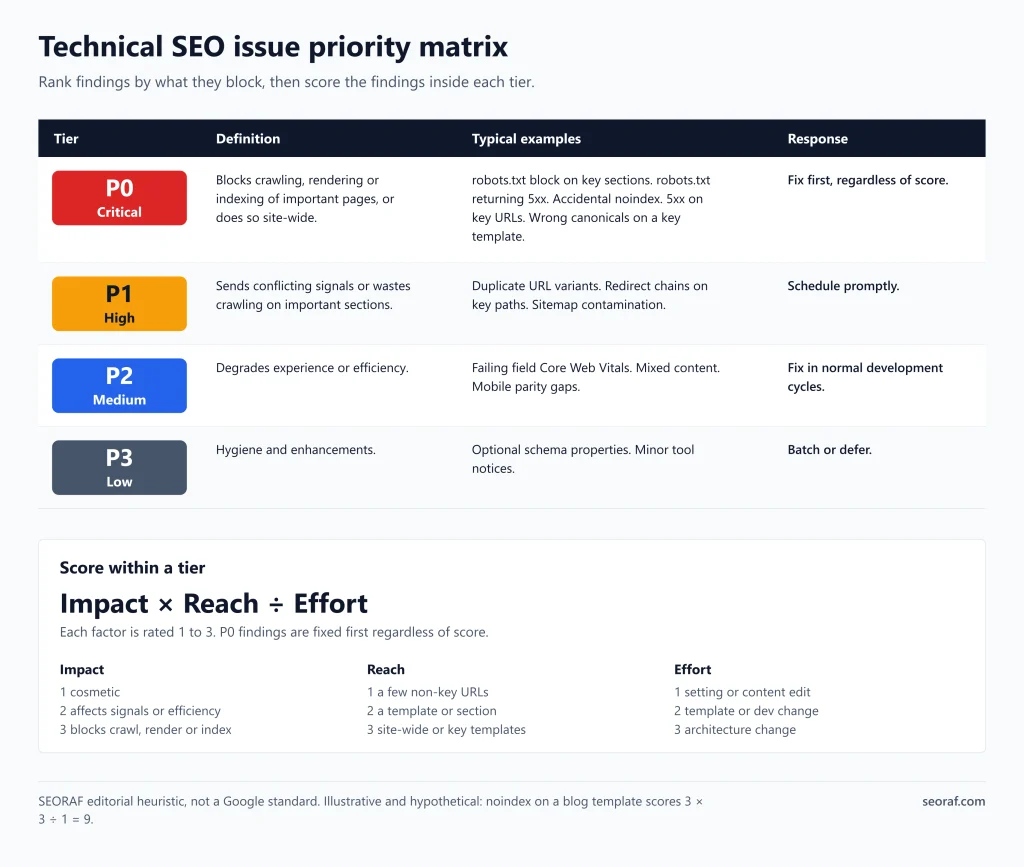
Tiers [Recommended: SEORAF editorial heuristic, not a Google standard]:
| Tier | Definition | Typical examples | Response |
|---|---|---|---|
| P0 Critical | Blocks crawling, rendering or indexing of important pages, or does so site-wide | robots.txt block on key sections, robots.txt returning 5xx, accidental noindex, 5xx on key URLs, wrong canonicals on a key template | Fix first, regardless of score |
| P1 High | Sends conflicting signals or wastes crawling on important sections | Duplicate URL variants, redirect chains on key paths, sitemap contamination | Schedule promptly |
| P2 Medium | Degrades experience or efficiency | Failing field Core Web Vitals, mixed content, mobile parity gaps | Fix in normal development cycles |
| P3 Low | Hygiene and enhancements | Optional schema properties, minor tool notices | Batch or defer |
Issue priority tiers for technical SEO findings
Score within a tier: Impact × Reach ÷ Effort, each rated 1 to 3.
- Impact: 1 cosmetic, 2 affects signals or efficiency, 3 blocks crawl, render or index.
- Reach: 1 a few non-key URLs, 2 a template or section, 3 site-wide or key templates.
- Effort: 1 setting or content edit, 2 template or dev change, 3 architecture change.
Illustrative scoring (hypothetical data):
| Finding | Impact | Reach | Effort | Score |
|---|---|---|---|---|
| Noindex on the blog template | 3 | 3 | 1 | 9 |
| Redirect chains on old URLs | 2 | 2 | 1 | 4 |
| Failing INP on one landing template | 2 | 2 | 3 | about 1.3 |
| Missing optional schema property | 1 | 1 | 1 | 1 |
Illustrative priority scores using hypothetical data
Evidence rule: before raising a P0 or P1 ticket, confirm the finding with Google-side evidence (Search Console or URL Inspection) and crawler evidence where both are available. Use a second source for lower tiers when practical. [Recommended]
What not to fix (common false positives)
| Warning | Why it’s often not a problem |
|---|---|
| “Blocked by robots.txt” or “noindex” on utility pages | Usually intentional |
| Missing llms.txt | Google says llms.txt is not needed for Search and has no positive or negative effect on visibility. It may still be useful for other systems. [Official] |
| FAQ markup errors | The FAQ rich result no longer appears. [Official] |
| External-link 4xx | Not your errors |
| “Orphan” flags caused by missing data sources | Check the underlying URL lists first |
| Red lab score with good field data | Field data reflects real users first |
| Missing hreflang on a single-market site | Not required |
| Advice to run the Mobile-Friendly Test | The tool is retired. Use Lighthouse and the Core Web Vitals report. [Official] |
Common audit warnings that are often not real problems
A crawler’s health score is the vendor’s own metric, not a Google measure. [Recommended]
Developer-ready audit report template
Use one row per finding.
| Field | What to write |
|---|---|
| ID | AUD-001 |
| Phase | Crawl / Render / Index / Validate |
| Issue | One-line description |
| URL or pattern | Representative URL and the pattern affected |
| Count | Number of URLs affected |
| Evidence | Tool, export, screenshot or header output |
| Expected behavior | What should happen |
| Observed behavior | What does happen |
| Impact area | Crawl / Render / Index / Experience |
| Severity | P0–P3 |
| Score | Impact × Reach ÷ Effort |
| Owner | Dev / Content / SEO / Hosting |
| Fix instruction | Specific change |
| Acceptance criteria | Testable pass condition |
| Verification method | Tool and report to re-check |
| Status, retest date | Open / In progress / Done / Verified |
Audit report template fields, one row per finding
Illustrative filled row (hypothetical):
- ID: AUD-001. Phase: Index.
- Issue: the blog template outputs
<meta name="robots" content="noindex">. - URL or pattern:
/blog/*. - Evidence: crawler directive report, URL Inspection HTML.
- Expected: indexable.
- Severity: P0.
- Fix: remove noindex from the template.
- Acceptance: URL Inspection live test shows no noindex.
- Verification: re-crawl, then re-inspect sample URLs.
Ticket text model:
Title: [AUD-001] Remove noindex from blog template
Problem: Blog posts output noindex, so they cannot be indexed.
Where: /blog/* (template: [name])
Evidence: [attach crawl export + URL Inspection screenshot]
Fix: Remove the robots meta noindex from the template.
Done when: URL Inspection live test on 3 sample URLs shows no noindex.
Verify: SEO re-crawls and re-inspects after release.
Re-crawl, re-inspect, monitor
| Issue type | How to verify | Caution |
|---|---|---|
| robots.txt change | robots.txt report, URL Inspection live test | Cached copies refresh over time |
| Noindex removal | URL Inspection live test | Re-crawl time varies. Google says it can take months for low-importance pages. [Official] |
| Redirects, status codes | Re-crawl, header check | Update internal links too |
| Canonicals | URL Inspection, compare declared and Google-treated canonical | Re-evaluation takes time (see Google’s troubleshooting guide) |
| Core Web Vitals | Field data over time | Field data lags. Check web.dev for how it is collected |
| Structured data | Rich Results Test | Valid is not the same as displayed |
How to verify each type of fix and what to watch for
[Recommended] Re-audit after major changes, and review Search Console monthly.
Phase-by-phase checklist
For other downloads see free SEO templates.
This is a roll-up of the sections above, not a substitute for them.
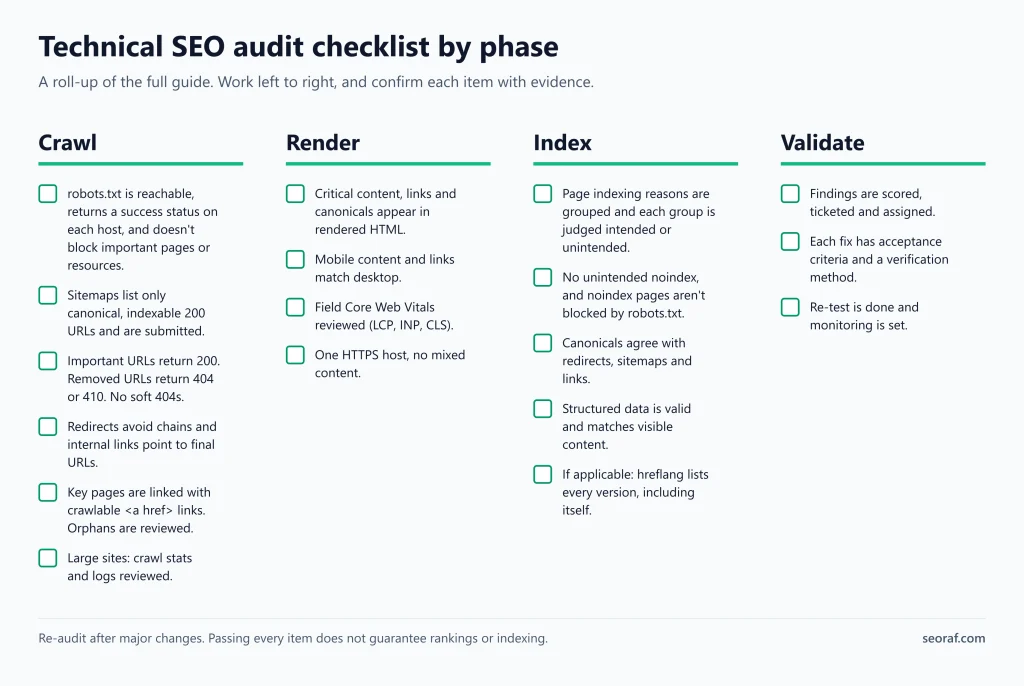
Crawl checklist
- robots.txt is served correctly if present; an absent file returning 404 is not automatically a problem. Important pages and resources aren’t unintentionally blocked.
- Sitemaps list canonical, indexable 200 URLs and are kept current; submit them in Search Console where appropriate.
- Important URLs return 200. Removed URLs return 404 or 410. No unintended soft 404s.
- Redirects avoid unnecessary chains and internal links point to final URLs.
- Key pages are linked with crawlable
<a href>; potential orphans are reviewed and confirmed. - Large sites: crawl stats and logs reviewed.
Render checklist
- Critical content, links and canonicals appear in rendered HTML.
- Mobile content and links match desktop.
- Field Core Web Vitals reviewed (LCP, INP, CLS).
- One HTTPS host, no mixed content.
Index checklist
- Page indexing reasons are grouped and each group is judged intended or unintended.
- No unintended noindex, and noindex pages aren’t blocked by robots.txt.
- Canonicals agree with redirects, sitemaps and links.
- Structured data is valid and matches visible content.
- If applicable: hreflang lists every version, including itself.
Validate checklist
- Findings are scored, ticketed and assigned.
- Each fix has acceptance criteria and a verification method.
- Re-test is done and monitoring is set.
Frequently asked questions
When should I run a technical SEO audit?
Run one around changes (migration, redesign, CMS or template change, URL changes) and when traffic or indexing drops. Between audits, review Search Console regularly. The Google documentation reviewed for this article doesn’t prescribe a schedule.
Can I do a technical SEO audit myself, and when do I need a developer?
For a small site, the free stack (Search Console, a crawler’s free tier, PageSpeed Insights, browser DevTools) covers most checks. You’ll typically need a developer for template changes, server or redirect rules, JavaScript rendering problems and performance work. CMS settings and content edits are often fixable without one.
What’s the difference between a technical SEO audit and an SEO audit?
A technical audit covers crawling, rendering, indexing and the signals around them. A general SEO audit also covers content, keyword targeting and links.
Does my small site need to worry about crawl budget?
Usually not. Google says its crawl-budget guide targets very large or rapidly changing sites. For most sites, keeping the sitemap current and checking the Page indexing report is adequate. [Official]
Will fixing technical issues improve my rankings?
Fixes remove barriers to crawling, rendering and indexing, and can improve user experience. They don’t guarantee ranking or traffic changes. Google says good Core Web Vitals align with what its ranking systems seek to reward, but rankings depend on many factors. [Official]
Conclusion: a realistic next-step workflow
- Scope. Decide your depth (small, large or JavaScript-heavy) and list hostnames and key templates.
- Baseline. Export Page indexing, Core Web Vitals and sitemap data from Search Console.
- Crawl. Run the crawler with and without JavaScript rendering.
- Triage. Group findings by phase, confirm each with the right evidence, and score them.
- Ticket. Write P0 and P1 items using the template with acceptance criteria.
- Validate. Re-crawl, re-inspect and watch field data over time.
- Repeat on triggers. Re-audit after major changes, with a light monthly Search Console review in between.