
Ultimate SEO Content Pruning Guide: Cut Junk, Rank Higher
Is your website a digital hoarder? You might be publishing fresh content weekly, investing hours into research and writing, yet your organic traffic is flatlining—or worse, declining. It is a frustrating paradox that baffles even seasoned marketers. The knee-jerk reaction is often to publish more, assuming that volume is the key to success. But in 2024 and beyond, the answer isn’t creating more content; it’s about having the guts to delete the bad stuff.
Welcome to the world of SEO content pruning. Just like a master gardener prunes a rose bush to encourage healthy blooms, you must cut away the dead weight to let your best pages shine. If you ignore low-quality pages, they dilute your site authority, waste your crawl budget, and confuse Google about what your site is actually about. An effective SEO content pruning strategy is often the difference between a stagnant site and a traffic powerhouse.
In this comprehensive SEO content pruning guide, I’m going to walk you through exactly how to identify, analyze, and remove content that is holding you back. We aren’t just talking about hitting the delete button on old blog posts. We’re talking about a strategic surgical strike to improve your overall site health, fix content decay, and boost your rankings. Let’s dive in.
Quick Summary: What You Need to Know
- What is it? SEO content pruning is the systematic process of removing or consolidating low-quality, outdated, or underperforming webpages.
- Why it matters: Google prioritizes site quality. Junk pages waste crawl budget and dilute your site’s topical authority.
- Biggest Benefit: Fixes keyword cannibalization and consolidates link equity to boost rankings for your “money” pages.
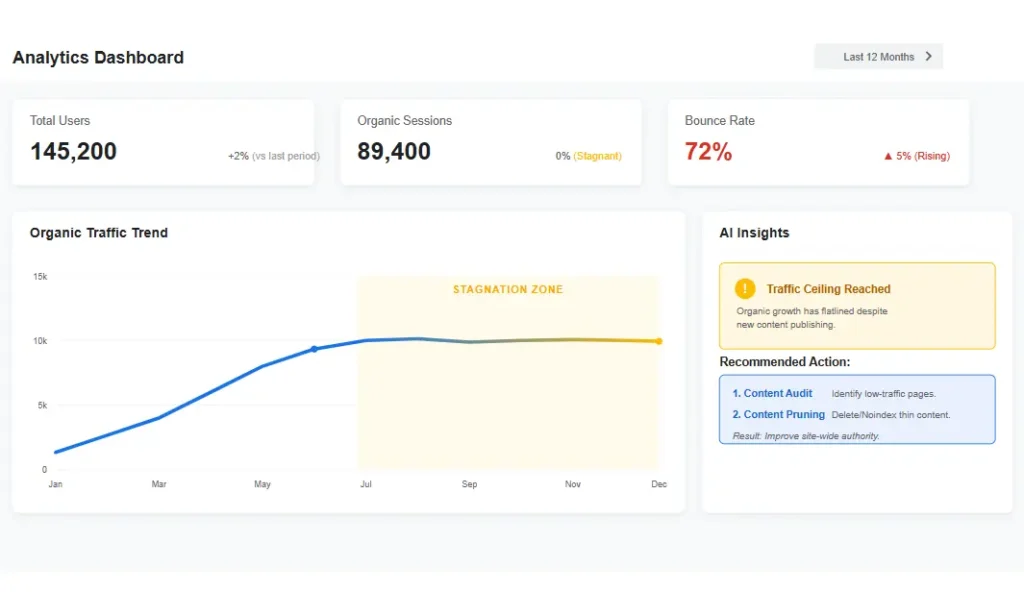
- When to use it: When organic traffic stagnates despite publishing new content, or when you have “index bloat.”
- Fastest Win: Deleting pages with 0 traffic and 0 backlinks immediately improves your site’s quality score.
🔑 Key Insights
- Quality over Quantity: Google prefers 100 great pages over 1,000 mediocre ones.
- Crawl Budget: Removing junk pages forces Google to crawl your money pages more often.
- Consolidation is King: Merging weak pages fixes keyword cannibalization and boosts authority.
- Don’t Blindly Delete: Always check for backlinks before removing a URL.
What Is SEO Content Pruning?
Think of your website as a library. If a library is filled with trashy pamphlets, duplicate books, and outdated encyclopedias from 1995, people stop visiting. Google acts like the head librarian. If it crawls your “shelves” and sees they are cluttered with junk, it assumes the rest of the books (your good content) aren’t worth reading either.
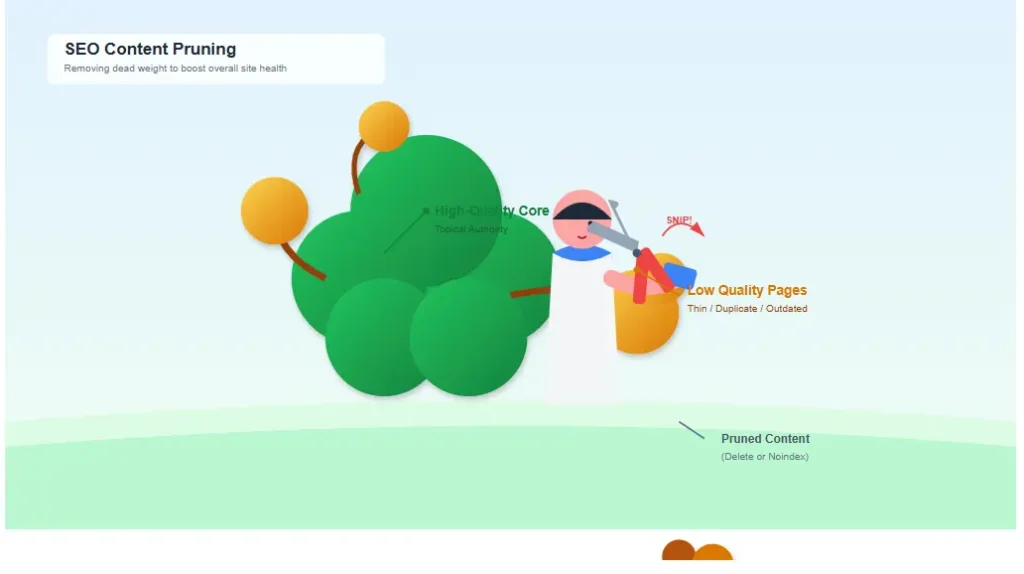
When you perform SEO content pruning, you are effectively curating your site. You are telling Google, “Hey, only the best information lives here.” This signals trust, authority, and relevance. It is a critical component of a broader Content SEO strategy that focuses on quality over quantity.
Why Google Rewards SEO Content Pruning
Google’s core mission is to serve the most helpful, reliable, and relevant information to users. This is where EEAT (Experience, Expertise, Authoritativeness, and Trustworthiness) comes into play. A site bloated with 500-word “fluff” articles written five years ago simply signals low authority.
According to Google’s documentation on the Helpful Content System, content that doesn’t demonstrate a first-hand perspective or add value is less likely to perform well. When you commit to this SEO content pruning plan, you achieve three things that Google loves:
- Higher Average Quality: Removing the bottom 10-20% of your content raises the “mean quality” of your entire site. If you have 100 posts and 50 are bad, your site is 50% bad. Delete the 50 bad ones, and your site is suddenly 100% good.
- Better User Experience: Users don’t land on dead ends, 404 errors, or outdated articles. They find answers fast. High engagement metrics (like dwell time) tell Google your site is valuable.
- Clearer Site Architecture: Google has an easier time understanding your site structure and technical SEO profile when there isn’t “noise” in the URL path.
Signs Your Content Needs Pruning
How do you know if your site is suffering from content bloat? You can’t just guess. You need to look for specific red flags in your data. If you see these signs, it might be time to run an advanced SEO audit immediately. Here are the definitive signs that you need to SEO content pruning immediately:
- Organic Traffic Stagnation: Despite publishing new content regularly, your total organic traffic remains flat or declines.
- Index Bloat: You have a massive number of pages indexed (e.g., 5,000), but only a small fraction (e.g., 500) actually get any clicks or impressions.
- Content Decay: High-performing pages from previous years are suddenly losing rankings, often replaced by fresher, more comprehensive competitors.
- Keyword Cannibalization: Multiple pages on your site are competing for the exact same search query, causing none of them to rank on Page 1.
- Indexing Issues: Google Search Console is full of “Crawled – currently not indexed” errors for your content pages.
Thin Content vs. Valuable Content
Before you start swinging the axe, you need to know the difference between a sapling that needs care and a weed that needs pulling. Not all short content is bad, and not all long content is good. Thin content isn’t defined by word count alone, but by value.
| Feature | Thin Content (Prune Candidate) | Valuable Content (Keep/Boost) |
|---|---|---|
| Depth | <300 words, surface-level, no actionable advice. | Comprehensive, covers the topic in full, answers follow-up questions. |
| Originality | Scraped, spun, or duplicate content found elsewhere. | Unique insights, proprietary data, or distinct expert opinion. |
| Engagement | High bounce rate (90%+), zero time on page, no scroll depth. | Low bounce rate, scroll depth > 50%, return visitors. |
| Value Add | Says nothing new; generic filler content. | Solves a specific problem effectively; saves the user time. |
How to Find Low-Quality Pages
You cannot prune based on gut feeling alone. You need data to back up your decisions. Here is the exact workflow I use to improve indexing and find the junk hiding in the shadows of your server.
1. The Google Search Console (GSC) Audit
Navigate to Pages > Inspect. Look for pages with 0 impressions over the last 6 months. If a page hasn’t been seen in half a year, it’s a prime candidate for SEO content pruning. Also, check the “Coverage” report for pages marked as “Crawled – currently not indexed.” These are often pages Google deemed unworthy of the index.
2. Analytics Traffic Sort
Export your page data from Google Analytics (or GA4). Sort pages by organic traffic sessions from lowest to highest. Identify the bottom 10-20% of pages. Do these pages have a purpose? If they aren’t driving traffic and don’t assist in conversions, add them to the “chopping block.”
3. Backlink Profile Check
This is crucial. Use a tool like Ahrefs, Semrush, or Moz. Check if the low-traffic page has backlinks. If a page has 0 traffic but 10 high-quality backlinks, do not delete it. Instead, update it or 301 redirect it to a stronger, relevant page to preserve that link equity.
Step-by-Step SEO Content Pruning Process
Ready to clean house? Follow this SEO content pruning workflow to ensure you don’t accidentally hurt your rankings. This process ensures that your content audit efforts yield positive results.
Phase 1: Crawl and Collect
Run a full crawl of your site using technical SEO tools like Screaming Frog or a similar crawler. Export the list of all URLs. Combine this list with your GSC data and Analytics data into one master spreadsheet. You need a “Single Source of Truth” to make decisions.
Phase 2: The Filtering
Filter your spreadsheet to isolate pages that meet specific “failure” criteria:
- Zero organic sessions in the last 12 months.
- Less than 300 words.
- Standalone “category” or “tag” pages with no unique description.
- Duplicate meta descriptions or title tags.
- High bounce rate (above 90%) combined with low time on page.
Phase 3: Manual Review
This is the most important step. A human (you) must look at the URLs. Algorithms miss context. Ask: “Does this help the user?” Sometimes a page has no traffic but is essential for navigation (like “Terms of Service” or “Privacy Policy”). Don’t prune utility pages. Look for content that is outdated, factually incorrect, or simply off-topic.
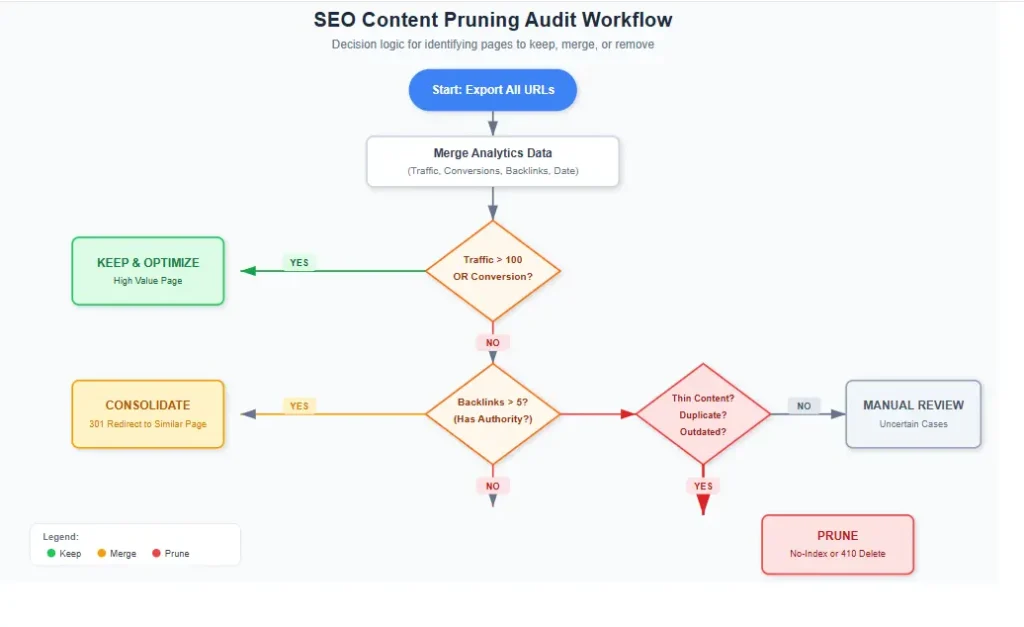
Phase 4: The Decision Matrix
Categorize each URL into one of three buckets: Delete, Merge, or Update. See the table below for the logic. This decision matrix is the heart of any SEO content pruning project.
| Action | When to Use | Technical Implementation |
|---|---|---|
| Delete | No traffic, no backlinks, outdated, low quality, no user value. | Return 410 (Gone) status code or let it 404. Ensure no internal links point to it. |
| Merge | Content is thin but covers a topic similar to a strong page. (e.g., “SEO Tips” and “SEO Tricks”). | 301 Redirect the weak URL to the stronger, comprehensive URL. Combine content. |
| Update | Decent traffic but declining. Content is good but old or stale. | Refresh the date, add new info, improve formatting, fix broken links. |
Pages You Should Delete
Be ruthless. These pages are anchors dragging your site down. In the context of SEO content pruning, deletion is often necessary for “digital hygiene.”
- Outdated News/Events: Blog posts about “Web 2.0 conferences” from 2012 or holiday sales from 2018.
- Low-Quality User Generated Content: Spammy forum comments, empty user profiles, or low-quality guest posts.
- Empty Product Pages: E-commerce pages for out-of-stock items that will never return.
- Failed Experiments: Landing pages for old ad campaigns that converted at 0%.
- Duplicate Content: If you have five pages saying the exact same thing (often due to CMS issues), keep the best one and delete the rest.
Pages You Should Merge
Merging is powerful. It combines the authority of two pages into one. This is the primary fix for keyword cannibalization. If you have three articles all targeting “Best Running Shoes,” Google doesn’t know which one to rank. By merging them into one “Ultimate Guide,” you create a “content powerhouse” that is much more likely to rank.
As noted by industry leaders like Ahrefs on cannibalization, splitting your authority across multiple pages weakens your overall ranking potential. For a deeper dive into fixing this specific issue, check out our guide on how to fix keyword cannibalization. Merging is a sophisticated form of SEO content pruning that preserves link equity while clearing up clutter.
Pages You Should Update Instead
Don’t throw the baby out with the bathwater. If a page has historical backlinks or used to rank well, it has “latent equity.” Instead of deleting, perform a content refresh:
- Add a new intro paragraph reflecting current trends.
- Replace screenshots that look outdated.
- Expand sections that are thin to add more depth.
- Fix broken external links (which hurts your EEAT score).
How Pruning Improves Crawl Budget
Google crawl budget is the number of pages Googlebot is willing and able to crawl on your site within a specific timeframe. For small sites (under 1,000 pages), this isn’t usually an issue. But for large e-commerce or news sites (50k+ pages), crawl budget is gold.
According to Google’s documentation on managing crawl budget, wasting crawl time on low-value pages prevents Google from discovering your important updates. Every time Google crawls a junk page, it wastes time that could have been spent crawling your new, awesome product page. By removing low-quality pages, you force Google to focus its crawling resources on the pages that actually make money. Crawl budget optimization is a technical benefit that directly results from SEO content pruning.

Crawl Optimization Tips:
- Clean up your XML sitemap. It should only contain “indexable” and “valuable” pages.
- Use the
Remove URLtool in GSC for urgent removals of sensitive or harmful content. - Implement
noindexsparingly. It’s usually better to 301 redirect or delete (410) so Google stops trying to crawl it eventually. Noindexed pages still consume crawl budget because Google has to fetch them to see the tag.
Content Pruning and Keyword Cannibalization
Cannibalization occurs when you have multiple pages ranking for the same keyword. This causes your own pages to compete against each other, often resulting in none of them ranking on Page 1. It splits your link equity and confuses the search engine.
SEO content pruning solves this by eliminating the competition. Instead of 10 weak pages fighting for scraps, you have one strong page dominating the SERP.
Example: You have Page A (Rank 7) and Page B (Rank 12) for “blue widgets.”
- Identify which page has better UX and more backlinks (Page A).
- Take the unique content from Page B and add it to Page A.
- 301 Redirect Page B to Page A.
- Result: Page A often jumps from Rank 7 to Rank 3 or 1 because it now has the combined authority and relevance.
Internal Linking After Content Pruning
Once you delete or redirect pages, you create “orphaned links” throughout your site. If your homepage links to a page you just deleted, users hit a 404 error. That’s bad for SEO and UX. It breaks the flow of link equity.
Use an internal linking template or tool to find all internal links pointing to the removed URLs. You must update these links to point to the new destination (the URL you redirected to) or remove the link entirely. This is a vital step in SEO content pruning that many people forget.
SEO Content Audit Checklist
Use this checklist before, during, and after your content audit to ensure nothing is missed.
- Pre-Audit: Backup your site. Export all URLs from GSC, Analytics, and Screaming Frog.
- Analysis: Check traffic, backlinks, and impressions for every page. Identify “zombie” pages.
- Tagging: Label pages as Keep, Delete, Merge, or Update in your spreadsheet.
- Execution: Apply 301 redirects or delete pages (410 status).
- Cleanup: Update internal links pointing to old URLs. Fix broken navigation.
- Sitemap: Remove deleted URLs from your XML sitemap.
- Monitor: Watch GSC for 404 errors in the weeks following the prune.
Common Content Pruning Mistakes
I’ve seen site owners tank their traffic by SEO content pruning incorrectly. SEO content pruning is powerful, but it has risks if done blindly. Avoid these pitfalls:
- Deleting Mass Pages Without 301s: If you have 1000 product pages and you delete them without redirecting, you lose the long-tail traffic associated with them. Always redirect if there’s a relevant alternative.
- Pruning Too Aggressively: Just because a page has low traffic doesn’t mean it’s bad. It might be a niche “long-tail” page that converts at 20%. Always check conversion rates before pruning.
- Using Noindex instead of Deletion: If content is truly bad, get rid of it. Noindexing it leaves it on your server, confusing your site structure and wasting crawl budget.
- Ignoring Date Sensitivity: Deleting an old event page is fine, but 301 redirecting it to the “Current Events” page is smarter to capture historical traffic.
Real SEO Case Study: The 83% Traffic Recovery
Case Study: E-Commerce Index Bloat Rescue
The Challenge: A mid-sized fashion retailer approached us with stagnant organic traffic despite tripling their blog output. They had 80,000 URLs indexed, but only 15,000 were active products. The rest were outdated color variations, deleted product pages returning soft 404s, and thin blog posts from 2016.
The Audit: We found that 60% of their crawl budget was being wasted on these junk pages, meaning new products weren’t getting indexed for weeks after launch.
The Strategy (SEO Content Pruning):
- Deletion: 410-statused 35,000 obsolete product URLs.
- Consolidation: Merged 150 thin “style guide” articles into 10 comprehensive “Ultimate Guides.”
- Redirects: 301 redirected high-authority deleted posts to relevant category pages.
The Result: Within 90 days, organic traffic grew by 83%. More importantly, their “New Arrivals” category started ranking on Page 1 for competitive terms because Google was finally able to crawl and index those pages efficiently.
When NOT to Prune Content
SEO content pruning is not a magic wand, and it isn’t always the right move. Do not prune if:
- Your site is less than a year old. You need to give Google time to find and index your content.
- You have very few pages (less than 50). You need more content, not less.
- The traffic dip is due to a seasonal trend, not content quality.
- The page has historical significance or high conversion rates, regardless of traffic volume.
Why Trust This SEO Content Pruning Guide?
In an industry full of “hacks,” experience matters. This guide isn’t just theory; it is based on real-world audits and technical SEO execution. We have helped dozens of websites recover from algorithmic penalties and traffic plateaus by simply cleaning up their digital footprint. We focus on sustainable, white-hat strategies that align with Google’s long-term goals of serving high-quality information.
We understand the nuances of page indexing and topical authority. Whether you are running a small blog or a massive e-commerce platform, the principles of quality over quantity remain the same. If you are overwhelmed by the data, we are here to help.
Frequently Asked Questions
What is content pruning in SEO?
Content pruning is the strategic removal or consolidation of low-quality, outdated, or underperforming webpages to improve a site’s overall quality score and authority.
Does deleting pages hurt SEO?
Deleting pages can hurt SEO if done incorrectly (e.g., creating 404 errors for pages with backlinks). However, if you redirect the equity properly or remove truly harmful content, it will significantly help SEO by improving site quality.
How often should you prune content?
You should perform a content audit and prune at least once a year. Large sites publishing daily may benefit from quarterly pruning to stay on top of content decay.
Should I noindex thin content?
Generally, no. Noindexing thin content tells Google not to index it, but Google still has to crawl it to see the noindex tag. This wastes crawl budget. It is usually better to delete the page (410) or improve it. SEO content pruning favors removal over hiding.
How do I identify low-quality pages?
Use Google Analytics and Search Console to find pages with zero traffic, zero impressions, and low engagement. Combine this with a crawl tool to find very short word counts or duplicate content.
Can content pruning improve rankings?
Yes. By removing “content pollution,” you help Google focus on your best pages. This consolidates authority, fixes cannibalization, and can lead to significant ranking improvements for your remaining pages. This is the primary benefit of SEO content pruning.
Final Thoughts
SEO content pruning is painful. It takes work to delete pages you spent hours creating. But in the modern SEO landscape, quality beats quantity every single time. Google is getting smarter at detecting “content farms” and low-effort pages.
If your site is struggling to rank, take a hard look in the mirror. Are you hoarding digital dust? It’s time to clean up. By following this SEO content pruning guide, you aren’t just removing low-quality pages; you are paving the way for your best content to finally get the spotlight it deserves.
Ready to dive deeper into technical optimization? Check out our Advanced SEO Audit Checklist or read our Content SEO Guide for more strategies on how to increase organic traffic.