
How to Fix Crawl Errors: The Definitive Technical SEO Guide
A comprehensive masterclass on diagnosing, resolving, and preventing crawl errors to maximize your organic traffic potential in 2026.

Imagine throwing the party of the year. You have the best music, the finest food, and the most interesting guests. But you forgot to send the invitations. Or worse, you locked the front door.
This is exactly what happens when your website suffers from how to fix crawl errors issues. You might have spent thousands of dollars on content strategy, design, and link building, but if Googlebot—your most important guest—shows up at your digital doorstep, rattles the handle, and finds nothing but a 500 Server Error or a confusing 404 page, the party goes on without you. The lights are on, but nobody is home.
In 2026, technical SEO isn’t just about “clean code.” It’s about accessibility, efficiency, and psychology. If you want to rank in the Top 3, you cannot afford to have Google waste its precious crawl budget on broken URLs. This guide is designed for SEO professionals, site owners, and developers who demand more than surface-level advice. We are going to dive deep into the mechanics of crawling and provide a robust framework to how to fix crawl errors once and for all.
Learning how to fix crawl errors is not just a maintenance task; it is a foundational pillar of your growth strategy. Every broken link is a missed opportunity. Every server timeout is a vote of no confidence from the algorithm. Let’s dismantle these errors together. For those starting out, check out our comprehensive technical SEO guide and indexing issues deep dives.
Anatomy of a Crawl Error
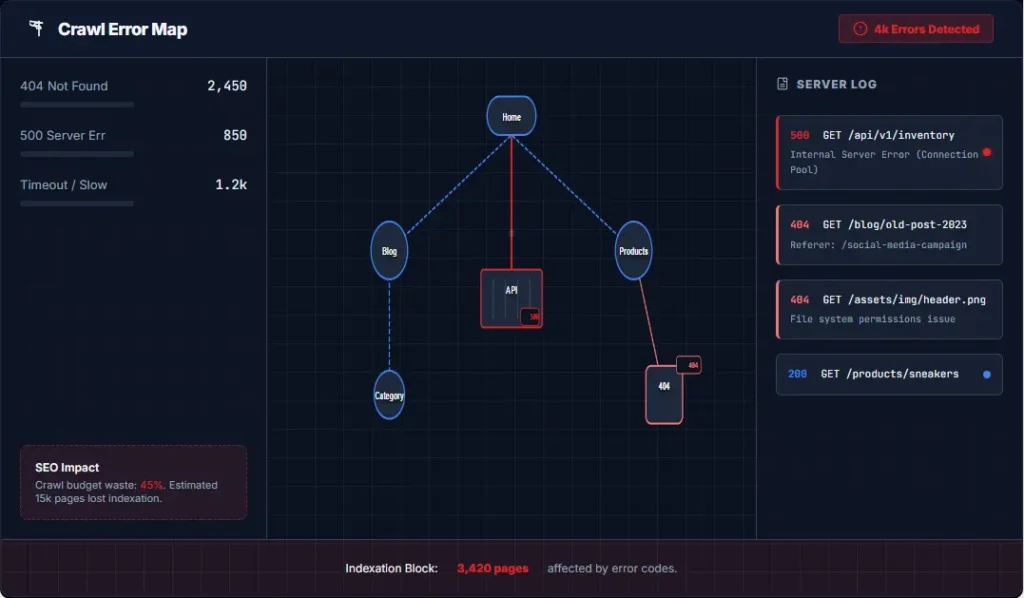
Before we swing the hammer, let’s identify the nail. A crawl error occurs when a search engine bot attempts to reach a page on your website but fails to receive a successful response. It is the digital equivalent of a “Dead End” sign. However, simply knowing how to fix crawl errors requires understanding the nuance between different types of failures.
The HTTP Handshake
The internet runs on HTTP (HyperText Transfer Protocol). When Googlebot wants to crawl your site, it sends a request to your server. Your server responds with a “Status Code.” You want a 200 OK. Any other code indicates a problem. If you want to master how to fix crawl errors, you must speak the language of these codes.
These errors are typically categorized into two main buckets in Google Search Console (GSC): Site Errors (which prevent access to the entire site, like DNS failures or connectivity issues) and URL Errors (which affect specific pages, like 404s). To understand the deeper mechanics of how Google handles discovery, refer to our guide on crawl budget optimization.
Understanding the nuance between crawling and indexing is also vital when learning how to fix crawl errors:
- Crawling: The process of Googlebot fetching a page. It’s the “knocking on the door.”
- Indexing: The process of Google processing, analyzing, and storing the page in its massive database. It’s the “walking into the room.”
If the crawl fails, the index never happens. You don’t exist in the eyes of the algorithm. This is why the quest to how to fix crawl errors is the first step in any SEO audit. It’s a fundamental aspect of any technical site audit checklist.
The Economics of Crawl Errors
Why should you care about a few broken links? Why dedicate hours to understanding how to fix crawl errors? Because in the economy of SEO, trust is currency. Here is how these errors kill your performance and ROI:
1. The Crawl Budget Bleed
Google allocates a specific “crawl budget” to your site based on your size, authority, and server health. If Googlebot is spending 40% of its time hitting 404s or 500 errors on old, irrelevant pages, it has less time to discover your new, high-value content. This creates a lag between when you publish and when you rank. If you want to rank fast, you must learn how to fix crawl errors to clean up the path.
2. Link Equity Evaporation
Let’s say a high-authority site like Google Developers links to a page on your site. If that page returns a 404 error, the “link juice”—the authority passed from Google—hits a wall and evaporates. By fixing that error with a 301 redirect, you can recapture that authority and funnel it to a relevant page, boosting your rankings instantly. This is the most lucrative aspect of how to fix crawl errors.
3. Negative User Experience (UX)
Google uses Core Web Vitals as a ranking factor. If a user clicks a link in the SERPs and lands on a 404 page, they will immediately hit Back. This increases your bounce rate and signals to Google that your site is unreliable. How to fix crawl errors is therefore also a UX question.
These three numbers represent the enemies you face when you dive into how to fix crawl errors. The 404 is the client saying “I messed up,” the 500 is the server saying “I messed up,” and the 60 seconds is the time you have to respond to Googlebot before it leaves your site impatiently.
The Pro Diagnostic Toolkit
You cannot fix what you cannot see. While Google Search Console (GSC) is the source of truth, elite SEOs use a layered approach to diagnosis. Relying solely on GSC is like driving a car while only looking in the rearview mirror. To truly master how to fix crawl errors, you need a surveillance system.
1. Google Search Console (The Foundation)
Navigate to Indexing > Pages. Filter by “Error”. Here is where you see the URL errors Google has explicitly encountered. Pay close attention to the “Referrer Page” column—it tells you exactly which internal page is linking to the broken URL, making the process of how to fix crawl errors incredibly easy.
2. Server Log Analysis (The 1% Tactic)
This is where consultants earn their retainer. Most SEOs skip this. Analyzing your raw server logs tells you exactly when and how often Googlebot hits your server.
?utm_source=facebook) or duplicate filter pages, that is money left on the table. Server logs reveal this waste long before it becomes a critical issue in how to fix crawl errors.
3. Third-Party Crawlers (Screaming Frog)
Tools like Screaming Frog, Ahrefs Site Audit, or SEMrush simulate a search engine crawl on your own terms. Run a crawl and compare their “Response Codes” report against GSC. You will often find errors on Screaming Frog weeks before Google flags them in GSC, allowing you to be proactive rather than reactive in your mission to how to fix crawl errors.
Solving 5XX Server Errors

These are scary. 500, 502, 503, 504. These mean your server failed. They are high-priority issues that can get your entire site temporarily de-indexed. If you are struggling with how to fix crawl errors, start here. If Google cannot reach your server, nothing else matters.
| Error Code | Meaning | Immediate Fix Strategy |
|---|---|---|
| 500 Internal Server Error | Generic server failure. Script crashed or timeout. | Check .htaccess syntax, PHP memory limits, or plugin conflicts. |
| 502 Bad Gateway | Server received invalid response from upstream. | Check if server is overloaded or if a CDN like Cloudflare is blocked. |
| 503 Service Unavailable | Server is down for maintenance or overloaded. | Ensure maintenance mode returns a 503, not a 404. Upgrade hosting ASAP. |
| 504 Gateway Timeout | Server took too long to respond. | Optimize database queries, use caching, or increase script timeouts. |
Technical Fixes for 500 Errors
When solving how to fix crawl errors like the 500, you often have to look at your hosting environment. If you are on WordPress, a corrupted plugin or theme file is often the culprit.
- Disable Plugins: Rename your plugins folder temporarily. If the error goes away, re-enable them one by one.
- PHP Memory Limit: Edit your
wp-config.phpfile. Increase the limit to 256M or 512M. - Database Corruption: Run a repair on your MySQL database tables.
If you are seeing frequent 5XX errors, it is time to audit your hosting infrastructure. In 2026, slow, shared hosting is a liability. Consider upgrading to Cloudflare or a managed WordPress host to handle high bot loads. The physical act of how to fix crawl errors in this category is often just paying for better hardware.
Mastering 4XX Client Errors
The 4XX family of errors means the request was “bad” in some way. The most common is the 404, but there are others.

The 404 Not Found
The 404 Not Found error is the most common culprit. It means the link exists (someone clicked it or linked to it), but the destination is gone. When strategizing on how to fix crawl errors, 404s are usually the bulk of the work.
The Strategic Framework for 404s
Do not just redirect every 404 to your homepage. That is lazy SEO. Instead, use this decision tree when determining how to fix crawl errors:
- Does the URL have backlinks? Check Ahrefs or Moz. If yes, you MUST fix it.
- Is there a relevant replacement page? If the deleted blog post has a newer version, 301 redirect it.
- Is it junk? If it’s a random typo or a spam bot attempt, leave it as a 404 or return a 410 “Gone” status.
The Soft 404 Trap
A Soft 404 happens when a missing page returns a “200 OK” status code, but the content says “Page not found”. Google thinks you are being deceitful or your site is broken. This is a subtle but critical aspect of how to fix crawl errors.
// DON'T DO THIS when figuring out how to fix crawl errors:
HTTP/1.1 200 OK
Content: "Sorry, this product does not exist."

// DO THIS INSTEAD:
HTTP/1.1 404 Not Found
Content: "Sorry, this product does not exist."
Ensuring your server returns the correct header is 90% of the battle in how to fix crawl errors related to Soft 404s. If you are unsure how to configure this for your specific 404 page SEO, consult your developer.
The 403 Forbidden
This happens when Googlebot is blocked. You might have accidentally blocked Googlebot in your .htaccess file or a security plugin like Wordfence has been too aggressive.
Fix: Check your User-Agent blocking rules. Whitelist Googlebot’s IP ranges.
Redirect Chains & Loops

Sometimes, the page loads, but the crawl is messy. How to fix crawl errors also involves cleaning up the plumbing of your site. A redirect chain is when Page A redirects to Page B, which redirects to Page C.
Googlebot follows redirects, but you lose link equity at every hop. A 301 redirect passes roughly 90-99% of authority. If you chain three redirects, you are down to roughly 80% authority. You just threw away 20% of your SEO value.
For a deeper dive into proper redirects, read our guide on 301 redirect best practices.
JavaScript & Rendering
Modern web is JavaScript-heavy. But Googlebot has limits. If your content is hidden behind complex JavaScript that takes 10 seconds to load, Google might give up and leave.
When diagnosing how to fix crawl errors in modern apps, look at the “Page Fetching” vs “Rendering” times in GSC. If rendering is significantly slower, you have a problem.
Fixing JS Crawl Issues
- Dynamic Rendering: Use a service like Prerender.io or Buddy Cloud to serve static HTML to Googlebot.
- Hydration: Ensure your framework (React, Vue) properly hydrates content.
- Critical CSS: Ensure the layout doesn’t shift (CLS) while the JS loads.
Ignoring JS SEO is a common mistake in 2026 strategies for how to fix crawl errors. If Google cannot see the links, it cannot follow them.
WordPress Specific Fixes
WordPress powers 40% of the web. If you are on WP, how to fix crawl errors often comes down to plugin management.
1. Check .htaccess
A bad rewrite rule here can kill your site. Use the “Reset Permalinks” trick in Settings > Permalinks to flush the rules.
2. Plugin Conflicts
Security plugins (like iThemes Security) can block Googlebot if “System Tweaks” are too strict. Check the “Banned User Agents” list.
3. Database Overload
Optimize your database. Use a plugin like WP-Optimize to clear transients and revisions. A slow database causes timeouts.
Advanced Crawl Budget Optimization
For large sites (10k+ pages), how to fix crawl errors includes managing your budget. You want Googlebot spending time on your money pages (product pages, landing pages), not your tag archives.
The Paradox of Choice
If you have an e-commerce site with 50,000 product variations created by filters (e.g., ?color=red&size=large&sort=price), you are confusing Googlebot. It spends days crawling pages that no one will ever visit.
robots.txt file. Disallow filter parameters and internal search result pages. Apply noindex to low-value paginated archives. This forces Googlebot to focus its energy on your highest-value URLs. This is the advanced tier of how to fix crawl errors.

Real-World Mini Case Study: The SaaS Recovery
Client: B2B Project Management Tool
Problem: After a site migration, organic traffic dropped 45% in 30 days. Rankings for high-volume keywords like “project management software” vanished. The client was desperate to learn how to fix crawl errors.
Audit Findings:
- 15,000 Soft 404s: Caused by a faulty pagination template that returned 200 OK status codes with “No products found” text.
- Redirect Chains: Old blog posts were redirecting through 3 hops (Page A -> Page B -> Page C) before reaching the destination, bleeding authority.
- 5XX Errors: Server timeout (504) on heavy resource pages during Googlebot peak hours because the server wasn’t caching dynamic content.
The Fix (How to fix crawl errors in this scenario):
- Fixed the pagination templates to return proper 404s.
- Updated internal links to point directly to final URLs, cutting redirect chains.
- Implemented server-side caching via Varnish to handle bot loads.
The Result: Indexing coverage increased by 200% in 60 days. Traffic recovered to 115% of pre-migration levels within 3 months. This proves that mastering how to fix crawl errors pays off. For more on migrations, read our SEO migration guide.
Prevention & Maintenance

The best way to how to fix crawl errors is to prevent them.
- Before Unpublishing: Always set up redirects BEFORE you delete a page. Don’t wait until the damage is done.
- Monitor Weekly: Set up alerts in GSC or a tool like Ahrefs. Catching an error early is better than catching it 3 months later.
- Test URLs: Use the URL Inspection tool whenever you make a structural change to the site.
By following a workflow, you stop the cycle of reacting to how to fix crawl errors and start building a resilient site.
Expert FAQ
How long does it take for Google to re-crawl after a fix?
It varies based on your site’s authority. Using the “Validate Fix” tool in Google Search Console is the fastest way to prompt Google to re-check the URL, typically taking 24-48 hours. Without validation, it can take weeks. This is the last step in the process of how to fix crawl errors.
Should I fix every single 404 error?
No. Prioritize. If a 404 has zero backlinks and zero traffic, it is not a priority. Focus your effort on 404s that have backlinks (to save link equity) or internal traffic (to save UX). Efficient how to fix crawl errors means prioritizing high-impact fixes.
What is a “Crawl Anomaly” in GSC?
This is a vague error that means Google accessed the site but didn’t get a clear response or the response was unexpected. It’s often a transient network issue or a slow server response time (high TTFB). It requires investigation when solving how to fix crawl errors.
Does a clean crawl budget directly help rankings?
Indirectly, yes. By preventing Google from wasting time on junk pages, you ensure your new content gets discovered and indexed faster, giving you a ranking advantage over competitors who publish and wait.
Can WordPress plugins cause crawl errors?
Yes. Conflicting plugins or poorly coded caching plugins can inadvertently block Googlebot (returning 403 Forbidden) or cause server timeouts. Always audit plugin logs when diagnosing 5XX errors in your journey to how to fix crawl errors.
How do I know if Googlebot is blocked?
Check your server logs for user-agent strings containing “Googlebot”. If you see many 403 errors for this agent, your security settings are too tight. Adjusting this is a key step in how to fix crawl errors.
Stop Leaving Money on the Table
Crawl errors are the silent killer of organic growth. Every broken link is a missed opportunity. Fix them today to secure your rankings.
Start Your Free Technical Audit