
Crawl Budget Optimization Guide for Large Websites: A Technical Guide
Reviewed November 2026 against Google’s published crawling documentation. Sources are listed at the end of the article.
Most websites never need to manage crawl budget. Google’s own guide says that if your site doesn’t have a large number of rapidly changing pages, and new pages are crawled the same day they’re published, keeping your sitemap up to date and checking the Page Indexing report regularly is enough. For a smaller group of sites, though, crawling becomes a genuine engineering constraint: very large catalogs, publishers with constant content changes, marketplaces, and platforms that generate millions of URL combinations from filters, parameters and user activity. On those sites, Googlebot’s crawling resources are finite, and a meaningful share of crawling activity can be spent on URLs that were never intended to matter.
This guide covers crawl budget optimization for large websites in practical terms: how Google describes crawl budget, how to distinguish a crawling problem from an indexing-quality problem, how to find and reduce crawl waste, and how to measure the results of technical changes. It does not promise rankings, faster indexing or a bigger crawl allowance. Crawl budget optimization improves how efficiently Google can discover and access the URLs you care about. Whether those URLs are indexed, and where they rank, is decided by other systems.
Key Takeaways
- Crawl budget matters mainly for very large or fast-changing sites. Google’s thresholds are rough estimates, not pass-or-fail rules.
- Crawl capacity limit and crawl demand are separate mechanisms with different causes and potential solutions.
- Crawling is not indexing, and crawl rate is not a direct ranking factor.
- The URL inventory Google discovers is one of the most important areas site owners can influence. Reducing unnecessary URL variations can improve crawling efficiency.
- Robots.txt controls crawling. It is not a reliable deindexing directive or a general URL-removal tool.
- Diagnose first using URL inventories, Crawl Stats and verified server logs. Change one URL pattern at a time and evaluate crawling and indexing outcomes separately.
How to Read This Guide
SEORAF is an independent SEO research and education resource. This article is based on Google’s published documentation and relevant practitioner references. It contains no client case studies, private test results or performance claims. Examples marked as illustrative are teaching examples, not measured data.
- [Google-confirmed] means the statement is supported by Google’s published documentation.
- [Practitioner view] means a recommendation or interpretation that Google has not formally endorsed as a ranking or crawling rule.
- [Illustrative] means a hypothetical example used to explain a concept.
Where I add editorial judgment, I identify it clearly.
Who This Guide Is For
This guide is written for technical SEOs, SEO managers, developers and owners of large or ecommerce websites. If your site is small and new pages are crawled quickly, you can skim the first two sections and the FAQ before moving on. If you’re earlier in your learning, start with our technical SEO guide and return to this article when you’re ready to explore crawling in more depth.
What Crawl Budget Means
Google’s Definition
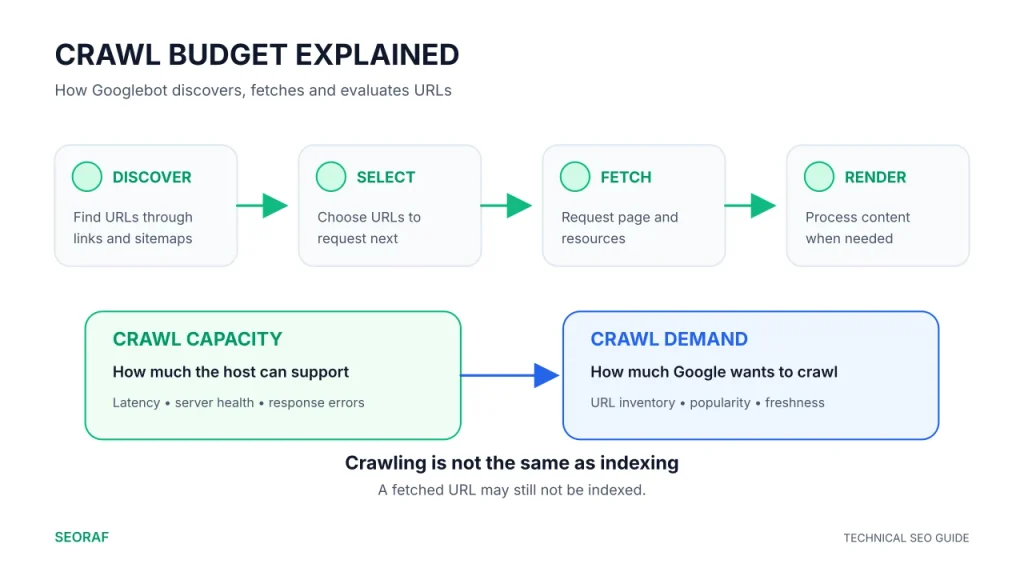
[Google-confirmed] Google describes crawl budget as the set of URLs it can and wants to crawl on a site. The “can” component depends on how much crawling the server can handle. The “wants” component depends on Google’s demand for the site’s URLs. These two components are discussed separately below. Google also explains that the web is much larger than its crawling resources can explore completely, so the resources devoted to any individual site are limited.
Crawl Budget Applies Per Hostname
[Google-confirmed] In Google’s crawling infrastructure, a site is defined by a unique hostname. For example, www.example.com and code.example.com are treated as separate sites with separate crawl budgets.
For large organizations, this has a practical consequence: a storefront, an image host, a regional hostname and an API hostname may need separate crawling assessments. Do not assume that all subdomains share one identical crawl budget or that every hostname needs the same optimization strategy.
Crawling, Indexing and Ranking Are Different Stages
Not every crawled URL is indexed. After crawling, Google processes the page, evaluates its content, consolidates duplicate URLs and decides whether it is suitable for the index. Google also explains that crawling more frequently does not automatically improve search rankings.
That distinction runs through this entire guide. “Google didn’t fetch the URL” and “Google fetched it but did not index it” describe different situations with different potential causes and solutions. For the indexing side, see our overview of indexing in technical SEO.
Terminology You’ll See
| Term | Meaning | Note |
|---|---|---|
| Crawl budget | The set of URLs Google can and wants to crawl | Google’s umbrella term |
| Crawl capacity limit | How much crawling the host can sustain | Current Google terminology |
| Crawl rate limit | Older terminology commonly used for the capacity side | Still appears in practitioner articles |
| Crawl demand | How much Google wants to crawl a site’s URLs | Influenced by several factors |
| Perceived inventory | URLs Google knows about and may consider crawling | An important optimization area |
How Googlebot Crawling Works
This is a short working model, not a complete crawling tutorial. For fundamentals, see our guide to crawling in SEO.
Discovery
Google discovers URLs from multiple sources. These include links on pages it already knows about, XML sitemaps and other discovery signals. [Google-confirmed] Googlebot primarily discovers new URLs through links embedded in previously crawled pages.
[Practitioner view] RSS feeds, canonical declarations and other URL references may contribute to how URLs are surfaced or understood in different workflows, but they should not be treated as equivalent to crawlable links or as guaranteed crawling instructions. Search Console URL Inspection requests are not a substitute for a strong internal linking structure.
The practical implication is that every URL your templates expose, including accidental parameter combinations, can become a candidate for discovery and crawling.
Fetching and Scheduling
[Google-confirmed] For Googlebot, crawl demand varies with a site’s size, update frequency, page quality and relevance compared with other sites. Google determines which URLs to fetch and when. There is no universal fixed recrawl schedule for every URL.
[Practitioner view] URLs that repeatedly remain unchanged may be revisited less frequently than pages with meaningful updates or stronger demand. Treat this as an observed possibility, not a guaranteed schedule or a rule that can be controlled through arbitrary date changes.
Rendering and Resource Requests
[Google-confirmed] Google Search processes JavaScript-powered pages through crawling, rendering and indexing stages. During rendering, Google may need to fetch resources such as JavaScript and CSS files. Embedded resources and alternate URLs can therefore contribute to crawling activity.
However, do not interpret rendering time as a simple one-to-one URL request count. Google does not provide a universal public formula that converts rendering time into a fixed number of crawl-budget units. The practical task is to make essential page content and links accessible without unnecessary resource dependencies.
One Crawling Platform, Many Clients
[Google-confirmed] Googlebot is not a single program operating independently of every other Google crawler. Google’s crawling infrastructure serves different clients, including Googlebot and other specialized crawlers. The crawl capacity limit is shared across crawlers, while each crawler can have its own demand.
This means high demand from one crawler can affect the capacity available to others. When investigating server load, distinguish the crawler type rather than assuming every Google request belongs to Google Search.
Fetch Size Limits
[Google-confirmed] Google documents limits on the size of resources its crawlers fetch. These limits can depend on the crawler and may change. Consult the current documentation rather than relying on an old byte-size figure copied from a practitioner article.
[Practitioner view] Keep important content, navigation and internal links accessible in reasonably efficient HTML. Avoid unnecessarily large responses and excessive dependencies that make essential information harder to retrieve or render.
Crawl Capacity Limit vs Crawl Demand
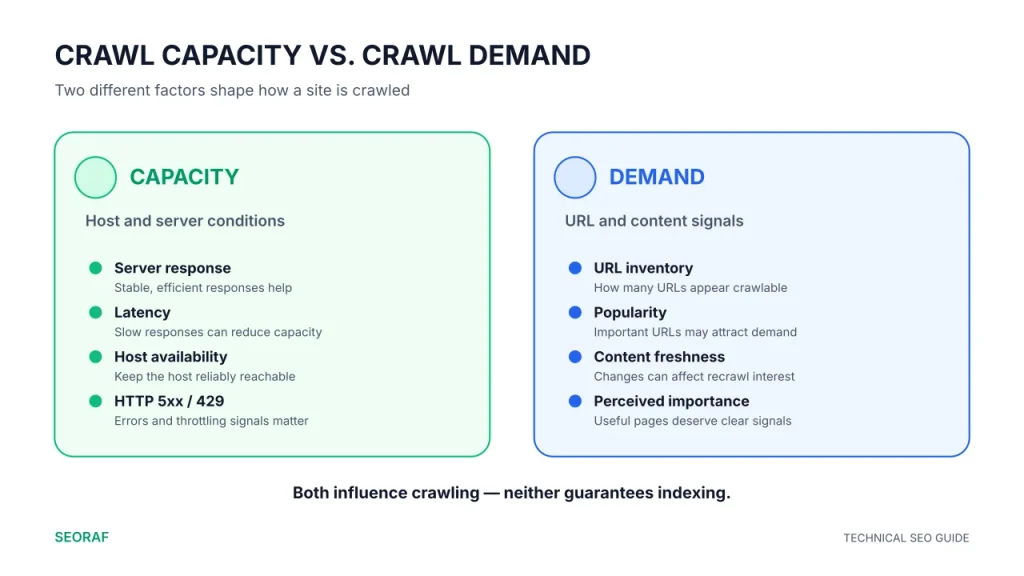
These two mechanisms are often blurred together. They are not the same thing, and optimizing the wrong one wastes effort.
Crawl Capacity Limit: How Much Your Host Can Take
[Google-confirmed] Google’s crawling infrastructure uses a crawl capacity limit, also called hostload, to avoid overwhelming a site’s servers.
- Sites begin with a conservative default crawl capacity limit.
- If there is demand to crawl more and the site remains healthy, Google’s systems can adjust the limit upward.
- Consistent responses and stable or improving latency, including time to first byte, can support a higher limit.
- Slower responses, server errors (5xx) and rate-limiting responses such as HTTP 429 can cause the limit to decrease.
- Google’s own crawling resources are also finite.
- The capacity limit is shared across Google’s crawling clients.
A “Hostload exceeded” message in URL Inspection can indicate a host-capacity problem.
What to do: Investigate origin response times, application errors, server capacity and rate limiting. Google identifies additional serving resources as a possible solution when server capacity on your end is the limiting factor. If your server is healthy and you are not reaching a capacity limit, buying more infrastructure will not automatically increase crawl demand.
Crawl Demand: How Much Google Wants to Crawl
[Google-confirmed] Crawl demand is influenced by several factors. Important considerations include:
- Perceived inventory: Google may attempt to crawl many of the URLs it knows about. Duplicate, removed or unnecessary URLs can consume crawling resources without providing useful value.
- Popularity: URLs that are more popular on the internet tend to be crawled more often to keep Google’s information fresh.
- Staleness: Google’s systems aim to recrawl documents often enough to identify meaningful changes.
- Site-wide events: Events such as site migrations can temporarily increase crawling demand.
- Product-specific demand: Different Google crawlers can have different demand based on the Google product they serve.
What to do: Reduce unnecessary URL variations, improve the usefulness and uniqueness of important pages, and avoid artificial freshness signals. Changing publication dates without meaningful content updates is not a reliable crawling strategy.
How to Tell Which Side You’re On
| Observation | Likely issue | First place to look | Typical response |
|---|---|---|---|
| Hostload exceeded, rising 5xx or 429 responses, rising latency | Capacity | Crawl Stats host status and server logs | Investigate origin performance, caching and errors |
| Healthy server, but new URLs wait a long time; many URLs are Discovered – currently not indexed | Demand or inventory | Log share by URL pattern and URL inventory | Review low-value URLs, links and sitemap coverage |
| URLs crawled promptly but not indexed | Index evaluation | Page Indexing report and canonical inspection | Review duplication, content usefulness and canonical signals |
| Crawling drops after a deployment | Configuration or availability | Crawl Stats, robots.txt and deployment history | Review recent configuration and response changes |
Editorial note: A faster server does not automatically make Google want more pages. Google’s crawl-budget documentation distinguishes server capacity from crawl demand. Improving server performance can help when capacity is constrained, but it is not a substitute for useful content and a clean URL inventory.
When Crawl Budget Actually Matters
Google’s Three Qualification Criteria
[Google-confirmed] Google’s advanced crawl-budget guide is intended primarily for:
- Large sites with 1 million or more unique pages whose content changes moderately often, approximately weekly.
- Medium or larger sites with 10,000 or more unique pages and very rapidly changing content, approximately daily.
- Sites with a large share of their URLs classified in Search Console as “Discovered – currently not indexed”.
Google describes these numbers as rough estimates, not exact thresholds. If your pages appear to be crawled on the same day they are published, Google says you generally do not need an advanced crawl-budget program.
Symptoms That Justify Investigation
[Practitioner view] The following observations can justify a closer investigation:
- Server logs show Googlebot spending a substantial share of its requests on parameters, internal search, cart URLs or other unnecessary pages.
- New or updated products and articles take longer than expected to be discovered.
- Crawl Stats shows rising latency, 5xx responses or 429 responses.
- Important pages are reachable only through interaction patterns that do not expose ordinary crawlable links.
- URL inventories reveal a large number of duplicate or low-value combinations.
A Diagnostic Flow
| Observation | What it can mean | What to check |
|---|---|---|
| New URLs are not discovered | Weak discovery signals, missing links or low demand | Internal links, sitemap coverage and logs |
| Many URLs are Discovered – currently not indexed | Google knows the URLs but has not crawled them; this is not proof of a capacity problem | Crawl share by pattern, host status and URL quality |
| URLs are Crawled – currently not indexed | Google fetched the URLs but did not select them for indexing | Duplication, canonical selection and content value |
| Logs show heavy Googlebot activity on parameter URLs | Potential URL inventory problem | Pattern inventory and parameter handling |
| Rising 5xx, 429 or latency | Potential capacity or application problem | Host status, origin and cache performance |
When Crawl Budget Optimization Is Unnecessary
If your site is small or mid-sized, publishes at a modest pace and sees new pages crawled quickly, a dedicated crawl-budget program may produce work without meaningful benefit.
[Editorial view] Even smaller sites benefit from preventing unlimited URL generators, unnecessary tracking parameters and broken navigation patterns. A one-time technical review can be worthwhile without turning crawl budget into an ongoing optimization project.
Crawl Budget Problems on Large Websites
Scale turns small template decisions into very large URL sets. A single filter component, a calendar widget or a tracking parameter appended to internal links can multiply the number of URLs Google discovers.
| Site type | Typical URL generators | Typical symptom | Relevant sections |
|---|---|---|---|
| Ecommerce | Filters, sort orders, sessions, internal search, duplicate product paths and discontinued products | Crawling concentrated on filter URLs or delayed product discovery | Faceted navigation and ecommerce optimization |
| Publisher or news site | Tag archives, author archives, date archives, alternate versions and parameters | New articles compete with unnecessary archive variations for crawling attention | Duplicates, sitemaps and internal linking |
| SaaS, community or UGC | Profiles, thin user pages, support tickets and search pages | Important documentation sits alongside large numbers of low-value URLs | Crawl waste identification and URL controls |
| Marketplaces and directories | Listing combinations, expired listings and near-duplicate templates | Large discovered URL inventories and repeated requests to expired pages | Response codes, sitemaps and duplication |
| Multi-hostname and international sites | Regional hostnames, alternate versions and separate resource hosts | Different hostnames have different crawling or availability patterns | Hostname scoping and capacity |
The point of this table is recognition. The fixes come later, with a dedicated ecommerce section for common catalog and faceted-navigation problems.
How to Identify Crawl Waste
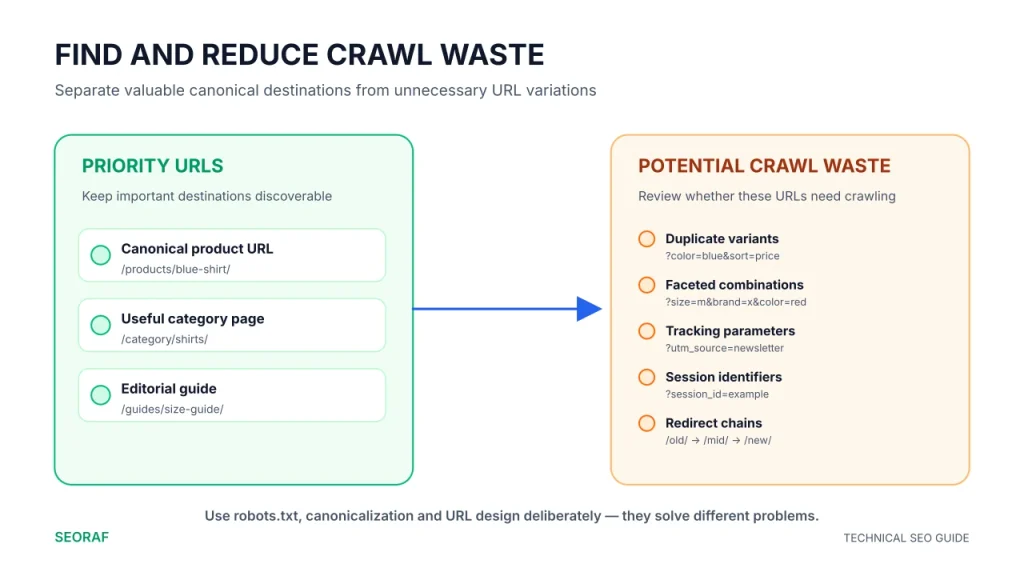
Crawl waste is crawling spent on URLs that do not deserve it: unnecessary duplicates, unlimited combinations, removed pages that still return successful responses and URLs you never intended Google to discover. Finding it is an inventory exercise, not simply a tool exercise.
Start With URL Patterns, Not Individual URLs
Group URLs by the mechanism that produces them. A pattern such as /category/?sort= is one decision to investigate; the thousands of URLs it creates are not thousands of unrelated problems.
Build the Inventory
- List patterns. Include product, category, pagination, filter, sort, search, session, tracking, cart, account, action and legacy or discontinued paths. Record both path and query-string shapes.
- Describe each pattern. Note the estimated URL count, response class, canonical target and when the content last meaningfully changed.
- Set the intended state. Mark each pattern as indexable and discoverable, crawlable but not intended for indexing, or not intended to be crawled. These are planning categories, not interchangeable technical directives.
- Add crawl data. Join verified Googlebot activity from server logs, segmented by hostname. Without this information, you cannot determine which patterns actually receive requests.
- Assign an owner. Give each URL-generation rule an accountable technical or content owner. Rules without owners can be reintroduced when templates change.
An Inventory Template
| Pattern | Example | URL count | Response | Canonical target | Intended state | Googlebot share | Owner |
|---|---|---|---|---|---|---|---|
| Category | /shoes/ | Measure | 200 | Self | Indexable and discoverable | Measure | Merchandising |
| Sort parameter | /shoes/?sort=price | Measure | 200 | Usually base category, if content is equivalent | Depends on strategy | Measure | Platform |
| Internal search | /search?q=boots | Measure | 200 | Usually none | Generally not intended for indexing | Measure | Platform |
| Discontinued product | /p/old-model-123 | Measure | 404 or 410 if permanently removed | None unless a genuine replacement exists | Removed | Measure | Catalog |
[Illustrative] The rows show the structure of an inventory, not actual site measurements. Replace the example counts and decisions with verified information from your own website.
Important: A canonical declaration does not stop crawling, and a robots.txt disallow rule can prevent Google from seeing a page’s canonical tag. Decide whether a URL should remain crawlable for canonical processing or should be excluded from crawling. Do not apply both approaches without understanding their interaction.
Where the Data Comes From
| Source | Shows | Does not show by itself |
|---|---|---|
| Site crawler | URLs discoverable by following links | What Googlebot actually fetched |
| XML sitemaps | URLs you declared for discovery | All URLs Google found elsewhere |
| Server logs | Requests, timestamps, responses and requesting clients | Indexing decisions |
| Crawl Stats | Aggregate Google crawling history | Complete URL-level crawl history |
| Page Indexing report | Indexing and discovery states | Every individual server request |
A crawler such as Screaming Frog is not Googlebot. It tells you what the crawler could discover under its configured rules, not what Google chose to fetch. Our SEO crawler guide covers the tool side.
Prioritize the Patterns
Rank URL patterns by the share of verified crawling they receive, the potential impact of changing them, and the effort required. In practice, stopping a template from generating endless unnecessary links can be more effective than repeatedly cleaning up the URLs it produces.
Using the Search Console Crawl Stats Report
The Crawl Stats report shows statistics about Google’s crawling history on your site: how many requests were made, when they occurred, what responses your server returned and whether Google encountered availability problems.
You can access it in Google Search Console under Settings > Crawl stats. The report is available for root-level Domain properties and root-level URL-prefix properties. It is primarily intended for advanced users; Google says sites with fewer than 1,000 pages generally do not need this level of crawling analysis.
What the Report Breaks Down
The report includes total crawl requests, total download size and average response time. It also groups requests by response, file type, crawl purpose (discovery or refresh) and Googlebot type, and provides host availability information.
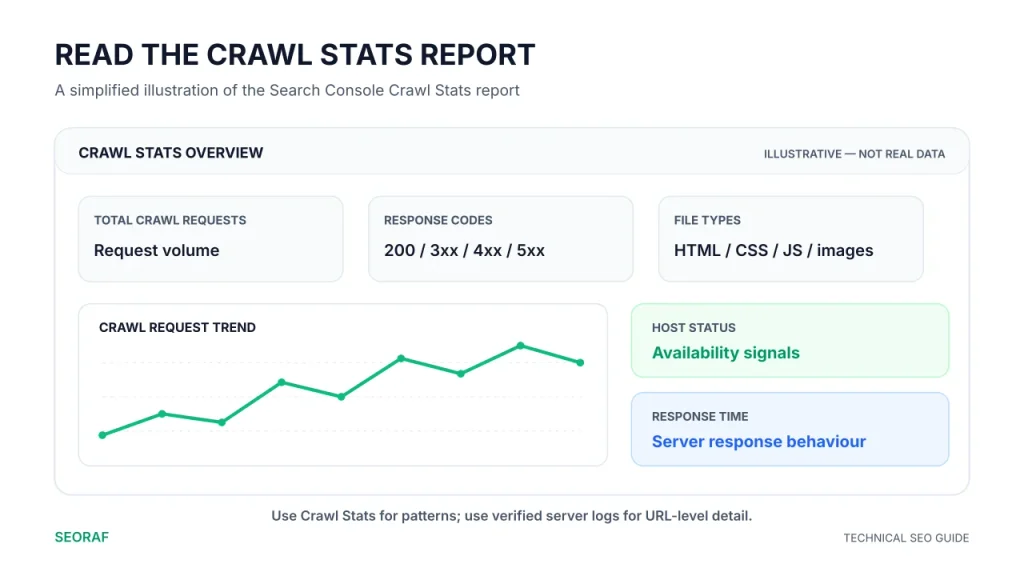
Use the report to understand aggregate patterns. Do not treat it as a complete URL-level history or assume that every request made by every Google crawler will appear in the same way.
Reading It: Symptom, Cause and Next Check
| Symptom | Possible cause | Next check |
|---|---|---|
| Requests drop suddenly | Robots.txt change, slower server, increased errors or lower crawl demand | Robots.txt history, host status and logs |
| Share of 5xx or 429 responses rises | Capacity pressure or application errors | Origin monitoring, cache performance and deployment history |
| Large share of non-200 responses | Redirects, removed URLs or error responses | Response breakdown by URL pattern in logs |
| Heavy file-type share from scripts or other resources | Resource requests associated with rendering | JavaScript and resource accessibility |
| Discovery activity changes substantially | Changes in URL discovery, site configuration or crawl demand | Internal links, sitemap coverage and logs |
Do not assume a single Crawl Stats pattern proves a specific cause. Compare the report with server logs, deployment records and URL-level inspection before making changes.
Limits of the Report
[Google-confirmed] Google’s documentation notes that the report covers most crawl requests but may not count every request. Differences between Search Console and server logs can therefore be normal.
[Practitioner view] Because the report is aggregate, URL-level or directory-level questions usually require server logs. Also remember that the report’s property scope matters: confirm that you are examining the correct root-level property and hostname coverage.
Server Log File Analysis
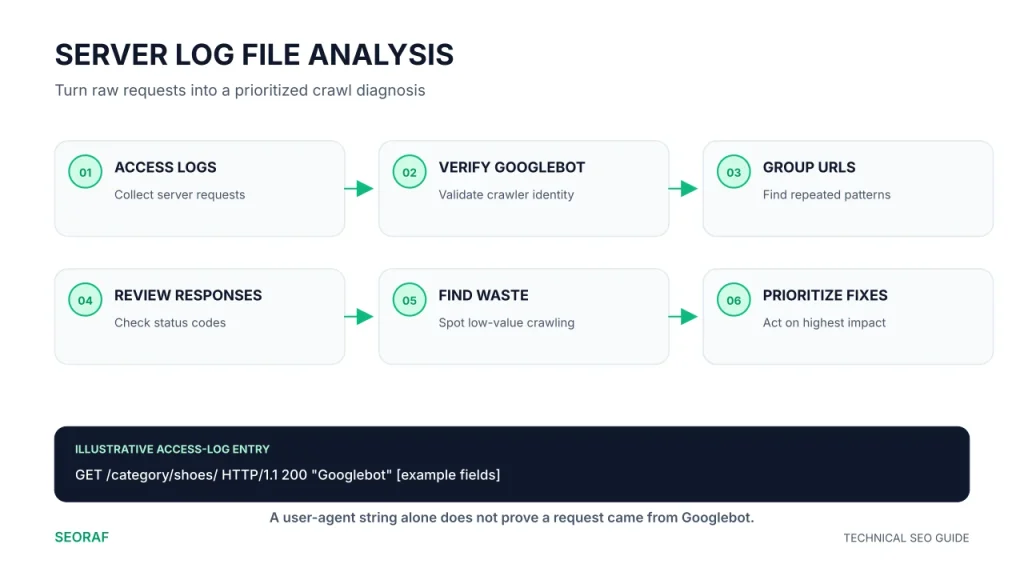
Server logs record requests that reach the logging layer. They can show which URLs were requested, when they were requested and what response the server returned. This makes logs valuable for questions that aggregate Search Console reports cannot answer directly.
Prepare the Data
- Collect: Obtain access logs from the relevant serving layers, such as the origin server, CDN and load balancer. Understand whether the same request appears in more than one log.
- Verify Googlebot: User-agent strings can be spoofed. Use Google’s documented reverse DNS verification process with forward confirmation, or compare source IPs with Google’s published crawler IP ranges.
- Normalize: Standardize hostnames, paths, query strings, timestamps and response codes.
- Protect privacy: Logs can contain IP addresses and other operational information. Apply appropriate access controls and retention practices before sharing or storing them.
Segment Before You Read
Split requests by hostname, template or directory, URL pattern, status code and response time. A single site-wide total can hide the exact URL group causing the problem.
Questions Worth Answering
- Which URL patterns receive the largest share of verified Googlebot requests, and are those the URLs you want crawled?
- Are priority templates being crawled at a cadence that reasonably matches how often their content changes?
- What share of requests return redirects, errors or soft-404-like responses?
- Are there URLs receiving repeated requests that do not belong in your intended URL inventory?
- Do response times or error rates increase during releases, promotions or high-traffic periods?
A First-Pass Example
[Illustrative] A combined-format access log line with a placeholder IP address might look like this:
203.0.113.10 - - [13/Nov/2026:08:14:22 +0000] "GET /shoes/?color=red&sort=price HTTP/1.1" 200 48211 "-" "Mozilla/5.0 (compatible; Googlebot/2.1; +http://www.google.com/bot.html)"The following shell commands provide a rough first look at request patterns. They filter by user-agent only, so the results are exploratory until the source IPs are verified. They also assume a common combined access-log format; adjust the field positions for your actual log configuration.
# Count requests by top-level directory
grep -i 'googlebot' access.log | awk '{print $7}' | cut -d'?' -f1 | cut -d'/' -f2 | sort | uniq -c | sort -rn | head -20

# Group query-string patterns
grep -i 'googlebot' access.log | awk '{print $7}' | grep '?' | sed 's/=[^&]*/=*/g' | sort | uniq -c | sort -rn | head -20

# Count responses by HTTP status code
grep -i 'googlebot' access.log | awk '{print $9}' | sort | uniq -c | sort -rn
The first command counts requests by the first directory segment, the second groups query-string patterns and the third counts status codes. These are basic exploratory commands, not a complete log-analysis system. Quoted request strings, custom log formats and encoded query parameters may require more careful parsing.
Reconcile Logs With Crawl Stats
Compare request totals, response mixes and time periods between server logs and Crawl Stats. Differences are normal because Google’s report may not count every request. Large unexplained gaps can also point to incomplete log collection, duplicated records, missing CDN layers or inconsistent date ranges.
Tools
Options range from desktop log analyzers to self-managed ELK or Splunk environments and commercial enterprise platforms. Vendor feature and pricing claims are not evaluated here. See our notes on Screaming Frog free vs paid features and our ContentKing review for relevant tool information.
URL Parameters and Duplicate URL Management
URL parameters are a common source of unnecessary URL variations on large websites. Sorting, tracking, session identifiers, filters and internal search can create many addresses that display substantially similar content.
Identify the Purpose of Each Parameter
Before changing parameter handling, classify each parameter by what it does:
| Parameter type | Example | Question to ask |
|---|---|---|
| Tracking | ?utm_source=newsletter | Does it change the page content? |
| Sorting | ?sort=price | Does the reordered result deserve a separate search landing page? |
| Filtering | ?color=blue | Does the filtered combination provide distinct search value? |
| Pagination | ?page=2 | Does it expose additional products or articles? |
| Session | ?session_id=123 | Can the same page be accessed without a session parameter? |
| Internal search | ?q=running+shoes | Should these generated results be discoverable in Search? |
Use Canonicals for Genuine Duplicate or Equivalent URLs
When parameterized URLs show substantially equivalent content, a canonical link element can help indicate the preferred URL. The canonical target should be accessible, relevant and representative of the duplicate content.
Canonicalization is a signal, not a guaranteed command. Google may select a different canonical URL. Also, canonical tags do not prevent Google from crawling the duplicate URLs in the first place.
Avoid Unnecessary Parameter Generation
Where possible, prevent templates from generating unnecessary parameter links. Keep tracking parameters out of internal navigation when they are not needed for page functionality. Avoid creating unlimited combinations of sorting, filtering and session parameters that provide no distinct search value.
Do not remove useful pagination or product-discovery links merely because they create additional URLs. Evaluate their function and content before changing how they are exposed to crawlers.
Faceted Navigation Optimization
Faceted navigation allows users to filter products, articles or listings by attributes such as color, size, brand, price and availability. It is useful for visitors, but URL-based filtering can generate an extremely large number of combinations.
[Google-confirmed] Google’s faceted-navigation guidance explains that unlimited combinations can create overcrawling and slow the discovery of useful URLs. The correct strategy depends on whether filtered pages have genuine search value.
Decide Which Facets Deserve Search Visibility
Not every filter combination needs to become an indexable landing page. A useful strategy distinguishes between combinations that satisfy a meaningful search intent and combinations that simply rearrange or narrow an existing catalog.
- Keep valuable category and product landing pages discoverable.
- Evaluate whether popular brand, category or product-type combinations deserve dedicated pages.
- Avoid creating indexable pages for every possible combination of filters.
- Review empty-result and nonsensical combinations.
- Use a consistent URL structure for filter combinations that are intentionally exposed.
Choose an Appropriate Crawling Strategy
If filtered URLs do not need to appear in Google Search, Google documents robots.txt disallow rules as one way to prevent their crawling. URL fragments can also be used for some filtering interfaces because Google Search generally does not crawl URL fragments as separate page URLs.
If filtered pages are valuable and should be discoverable, create a controlled URL structure and follow Google’s faceted-navigation guidance. Keep filter order consistent, avoid duplicate combinations and return a proper HTTP 404 response for combinations that do not exist or have no results.
Use canonical signals where appropriate, but remember that canonical tags do not prevent crawling. A robots.txt disallow rule can also prevent Google from seeing a canonical tag on the blocked page.
Example: An Ecommerce Filter System
| URL pattern | Potential purpose | Possible approach |
|---|---|---|
/shoes/ | Main category | Keep discoverable and evaluate for indexing |
/shoes/running/ | Distinct product category | Consider a dedicated landing page |
/shoes/?sort=price | Sorting variation | Usually avoid creating a separate indexable page |
/shoes/?color=blue | Color filter | Evaluate search demand and distinct value |
/shoes/?color=blue&size=9&sort=price | Multiple filter combination | Usually control crawling unless it has a clear purpose |
These are examples, not universal directives. A brand or color landing page may be valuable on one site and redundant on another. Make decisions based on user intent, inventory and the actual content returned by each URL.
XML Sitemap Optimization
An XML sitemap helps search engines discover URLs that you consider important. It is particularly useful for large websites where pages may not be easy to reach through internal links. A sitemap is a discovery aid, not a guarantee of crawling or indexing.
Include the URLs That Matter
- Include canonical URLs that you want search engines to discover.
- Use the preferred protocol and hostname consistently.
- Avoid including URLs blocked by robots.txt or URLs that return errors.
- Exclude unnecessary tracking, session and duplicate parameter variations.
- Keep sitemap entries consistent with your canonical and internal linking strategy.
Use Lastmod Accurately
The <lastmod> value should reflect the date of a meaningful page update. Do not change it simply because a sitemap was regenerated, a template was refreshed or a trivial element changed.
Accurate modification dates help search engines interpret when content was genuinely updated. Artificial freshness signals are not a reliable way to increase crawling.
Use Sitemap Indexes for Large Sites
Large sites can organize multiple sitemap files through a sitemap index. For example, separate sitemaps can be maintained for products, categories, articles and other major content groups. This can make monitoring and troubleshooting easier.
Google supports up to 50,000 URLs or 50 MB uncompressed per sitemap file. If your site exceeds these limits, split the sitemap into multiple files and use a sitemap index where appropriate.
Internal Linking and Crawl Depth
Internal links help Google discover pages and understand how site content is connected. A large website can have millions of valid URLs, but important pages still need clear, crawlable paths from other pages.
Make Important Links Crawlable
[Google-confirmed] Google generally discovers links through HTML anchor elements with an href attribute. A clickable element that relies only on a JavaScript event or a non-anchor element is not a reliable substitute for a standard crawlable link.
<a href="/category/running-shoes/">Running Shoes</a>For important destinations, use descriptive anchor text and make sure links resolve to valid URLs. See Google’s link best practices documentation.
Reduce Unnecessary Crawl Depth
Important pages should not depend on an excessive chain of navigation steps before they can be discovered. A logical hierarchy, relevant category links, contextual internal links and useful navigation can help users and search engines reach important content.
There is no universal Google rule that every important page must be within a specific number of clicks. Treat crawl depth as a practical site-architecture metric, not a fixed ranking threshold.
Avoid Unnecessary Internal Link Variations
Review templates that append tracking parameters, session identifiers or unnecessary sorting parameters to internal links. Ensure that important links point to preferred URLs and that navigation does not generate unlimited combinations.
Robots.txt Optimization
Robots.txt is a crawling control mechanism. It can help prevent Googlebot from spending resources on URL patterns that do not need to be crawled. However, it must be used carefully because blocking a URL can also prevent Google from seeing the page’s content and indexing directives.
Understand What Robots.txt Does
[Google-confirmed] A robots.txt disallow rule asks compliant crawlers not to fetch matching URLs. It does not guarantee that a URL will be removed from Google’s index. A blocked URL may still appear in search results if Google discovers it through other sources.
If your objective is to prevent a page from being indexed, use an appropriate indexing control such as a noindex directive while allowing Google to crawl the page so it can see that directive. If content must be inaccessible to users and crawlers, use access controls such as authentication rather than relying on robots.txt.
Review Rules Before Deploying
- Do not block important product, category or editorial pages accidentally.
- Do not block resources required to render important content.
- Check whether broad wildcard rules match more URLs than intended.
- Test rules against representative URL patterns.
- Review the impact of rules on existing indexing and canonicalization strategies.
- Monitor the result after deployment.
For the official syntax and behavior, see Google’s robots.txt documentation.
JavaScript Rendering and Crawlability
JavaScript can create complex navigation and dynamic content, but it can also introduce additional technical dependencies. Google Search can process JavaScript, but crawling, rendering and indexing are separate stages. A page that initially returns a successful HTML response may still need rendering before Google can access all of its content.
Understand the Three Processing Stages
- Crawling: Googlebot fetches the URL and reads the initial response.
- Rendering: Google’s Web Rendering Service executes JavaScript when required and processes the rendered page.
- Indexing: Google evaluates the processed content and determines whether it is suitable for the index.
These stages do not necessarily happen simultaneously. Rendering may be scheduled separately, so do not assume that all JavaScript-generated content is immediately available after the initial request.
Keep Important Content Accessible
- Ensure that important page content is available in the rendered HTML.
- Use crawlable anchor elements with valid
hrefattributes for important internal links. - Avoid blocking JavaScript or CSS files that are essential to rendering important content.
- Check whether API responses required for primary content are accessible to Google.
- Test pages using URL Inspection and Google’s rendering tools.
Use Server-Side Rendering Where Appropriate
Server-side rendering or pre-rendering can make essential content available in the initial HTML response. This can simplify content discovery and provide a more resilient experience for users and crawlers. It is not mandatory for every JavaScript website, but it can be useful when important content depends heavily on client-side execution.
Use Google’s JavaScript SEO basics and JavaScript troubleshooting guide when diagnosing rendering problems.
Server Response Codes, Caching and Performance
Server availability and response behavior affect crawl capacity. A site that regularly responds slowly or returns server errors can make it harder for Google to crawl the content it wants to access.
Review Important HTTP Responses
| Response | Meaning | Technical consideration |
|---|---|---|
| 200 | Successful response | Verify that the page contains the intended content |
| 301 | Permanent redirect | Point directly to the relevant destination and avoid long chains |
| 302 | Temporary redirect | Use when the redirect is genuinely temporary |
| 304 | Not Modified | Can allow reuse of a previously stored response when appropriate |
| 404 | Not Found | Return for URLs that do not exist |
| 410 | Gone | Can be used when content has been permanently removed |
| 429 | Too Many Requests | May signal rate limiting and reduce crawl capacity |
| 5xx | Server error | Investigate availability, application and infrastructure issues |
Do not return a 200 response for a page that displays a generic not-found message. This can create a soft 404 situation. Return the appropriate HTTP status for the actual page condition.
Improve Server Response Consistency
- Investigate recurring origin latency and application bottlenecks.
- Use appropriate caching for repeatable content.
- Monitor database queries and expensive template operations.
- Avoid unnecessary redirects and redirect chains.
- Review error rates during high-demand periods.
- Ensure rate-limiting rules do not unnecessarily interfere with legitimate Google crawling.
Use HTTP Caching Where Appropriate
Google supports conditional HTTP requests in relevant crawling situations. When a resource has not changed, an appropriate 304 Not Modified response can avoid sending the full response body again. Implementation should follow correct HTTP caching behavior and should not return 304 when the content has meaningfully changed.
Performance work should benefit users and server reliability first. Do not optimize infrastructure solely to chase an arbitrary Googlebot request count.
Ecommerce Crawl Budget Optimization
Ecommerce websites often face crawl challenges because product catalogs, category hierarchies, filters, sorting options and stock changes can create large URL inventories. The objective is not to prevent Google from crawling every variation. It is to make important products and categories accessible while controlling unnecessary URL generation.
Control Product and Category URL Variations
- Use consistent product URL structures.
- Avoid creating multiple internal URL paths for the same product without a clear reason.
- Use appropriate canonical signals for genuinely equivalent product URLs.
- Keep important category pages linked from relevant navigation and content.
- Prevent unnecessary filter and sorting combinations from becoming unlimited crawl targets.
Handle Out-of-Stock Products Carefully
An out-of-stock product is not automatically a page that should be removed. If the product is temporarily unavailable and the page still provides useful information, specifications or alternatives, keeping the page accessible may be appropriate.
If a product is permanently discontinued, evaluate whether a genuinely equivalent replacement exists. A relevant redirect may be appropriate when a replacement serves the same user need. If there is no suitable replacement, return an appropriate 404 or 410 response rather than redirecting every removed product to an unrelated category page.
Keep Product Sitemaps Accurate
Include important canonical product URLs and maintain accurate modification dates. Remove URLs that are permanently unavailable or no longer intended to be indexed. Keep sitemap entries consistent with the product’s actual availability and canonical strategy.
Review Internal Search and Filter Pages
Internal search results and filter combinations can create large numbers of low-value URLs. Evaluate whether any of these pages genuinely serve a distinct search intent. Keep useful category pages accessible, but avoid exposing every possible search query and filter combination through crawlable internal links.
Crawl Budget Monitoring and KPIs
Optimization is incomplete without measurement. Before changing URL patterns, establish a baseline. After deployment, compare the same metrics over comparable time periods and account for seasonality, publishing activity, site migrations and major releases.
Useful Monitoring Metrics
| Metric | What it helps measure | Where to find it |
|---|---|---|
| Googlebot requests | Verified request activity over time | Server logs |
| Requests by URL pattern | Which patterns receive crawling activity | Segmented server logs |
| 5xx and 429 rate | Potential availability and capacity problems | Server logs and Crawl Stats |
| Average response time | Changes in server response behavior | Crawl Stats and infrastructure monitoring |
| Important URL discovery | Whether important pages are being discovered | Internal crawl and sitemap checks |
| Discovered – currently not indexed | URLs known to Google but not yet crawled | Page Indexing report |
| Crawled – currently not indexed | URLs crawled but not selected for indexing | Page Indexing report |
| Canonical consistency | Whether preferred URL signals are consistent | URL Inspection and site crawling |
Establish a Baseline Before Changes
Record the current request distribution by hostname and URL pattern. Document the existing response-code mix, server latency, sitemap coverage and important URL discovery patterns. Keep a record of configuration changes so you can connect later observations to actual deployments.
Evaluate Results Separately
Do not use one metric to judge every outcome. A reduction in requests to unnecessary filter URLs may indicate that URL controls are working, but it does not prove that every important page is indexed. Similarly, an increase in indexed pages does not automatically prove that crawl budget was the cause.
Evaluate crawling efficiency, server health, URL discovery and indexing as related but separate outcomes.
Step-by-Step Crawl Budget Optimization Workflow
A structured workflow reduces the risk of changing multiple technical controls without knowing which change produced an outcome. The following process is suitable for a large website with an identified crawling issue.
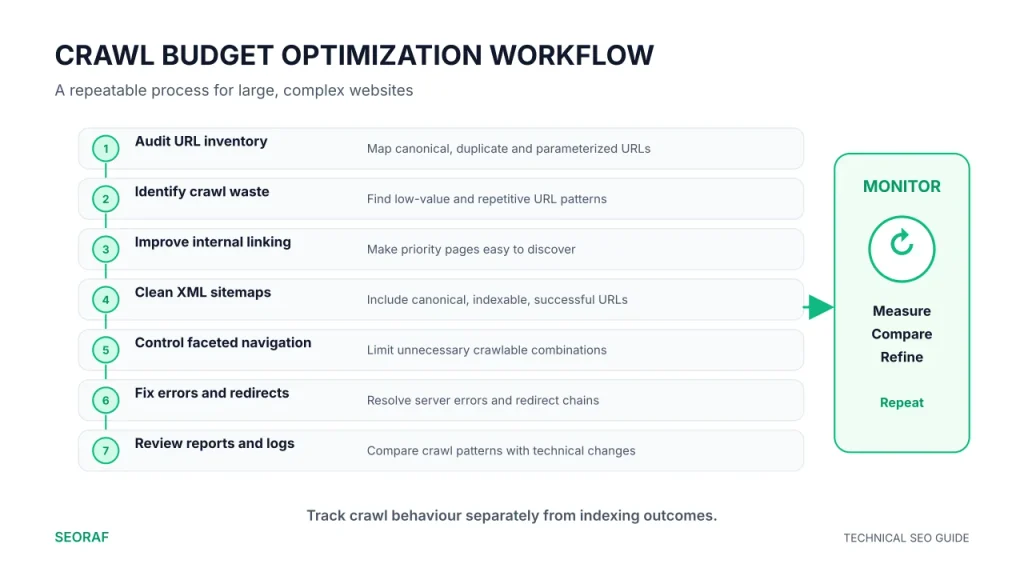
- Confirm that a real problem exists. Review site size, publishing frequency, discovery patterns and server availability. Do not start with robots.txt changes simply because the site has many URLs.
- Define the hostname scope. Identify which hostnames are relevant and examine their crawling and availability separately.
- Build a URL-pattern inventory. Group URLs by templates, parameters, filters, search pages, pagination and removed content.
- Collect verified crawl data. Analyze server logs and compare them with Crawl Stats.
- Identify unnecessary URL generators. Find templates that expose duplicate, low-value or unlimited URL combinations.
- Choose the correct control. Depending on the problem, use internal link changes, canonical signals, robots.txt, appropriate HTTP responses or sitemap corrections.
- Protect important URLs. Verify that product, category and editorial pages remain accessible and discoverable.
- Test one pattern at a time. Validate representative URLs before applying changes across the entire site.
- Monitor the deployment. Check server responses, Crawl Stats and verified log patterns after implementation.
- Document and maintain. Record the change, its owner, expected behavior and rollback conditions.
Common Crawl Budget Optimization Mistakes
| Mistake | Why it is problematic | Better approach |
|---|---|---|
| Optimizing crawl budget on every website | Most smaller sites do not have a meaningful crawl capacity problem | Confirm the problem before starting a dedicated project |
| Blocking URLs without reviewing indexing effects | Google may still know about blocked URLs but cannot read page-level directives | Choose crawling and indexing controls separately |
| Using canonical tags to stop crawling | Canonical signals do not prevent requests to duplicate URLs | Reduce URL generation or use an appropriate crawl control |
| Removing useful pagination | Important products or content may become harder to discover | Preserve meaningful crawlable navigation |
| Changing dates without meaningful updates | Artificial freshness does not create genuine content value | Update content when it has actually changed |
| Assuming every Discovered URL is a crawl-budget problem | The status alone does not establish the cause | Combine indexing reports with logs and inventory analysis |
| Blocking JavaScript or CSS without testing | Essential content may become harder to render | Test rendered pages before changing resource access |
| Redirecting every removed product to the homepage | Unrelated redirects can confuse users and search engines | Use a relevant replacement or an appropriate 404/410 response |
| Using user-agent strings as proof of Googlebot | Other clients can spoof crawler user agents | Verify source IPs using Google’s documented methods |
| Measuring only total crawl requests | A total can hide which URL patterns receive requests | Segment logs by hostname and URL pattern |
Practical Crawl Budget Optimization Checklist
Use this checklist when reviewing a large website. Not every item applies to every platform. Select controls according to the site’s architecture, URL inventory and actual crawling evidence.
Discovery and Architecture
- Important pages are reachable through crawlable internal links.
- Important URLs have consistent canonical and internal linking signals.
- Unnecessary tracking parameters are not added to internal navigation.
- Pagination and category navigation expose relevant content.
- URL patterns are documented by hostname and template.
Crawling and Indexing Controls
- Robots.txt rules are reviewed against representative URLs.
- Canonical declarations point to appropriate preferred URLs.
- Noindex directives are accessible to crawlers when required.
- Unnecessary filter combinations are controlled.
- Empty and invalid URLs return appropriate HTTP status codes.
- Important JavaScript resources remain accessible where needed.
Server and Monitoring
- Googlebot requests are verified before analysis.
- Server logs cover relevant serving layers.
- 5xx and 429 responses are monitored.
- Response latency is reviewed over time.
- Crawl Stats is checked at the appropriate property level.
- Baseline measurements are recorded before major changes.
Sitemaps and Maintenance
- Sitemaps contain preferred canonical URLs.
- Removed URLs are handled appropriately.
- Lastmod values reflect meaningful content updates.
- Sitemap indexes are used when necessary.
- URL-generation rules have clear owners.
- Changes are documented and reviewed after deployment.
Frequently Asked Questions
1. What Is Crawl Budget Optimization?
Crawl budget optimization is the process of improving how efficiently search-engine crawlers discover and access important URLs on a website. It commonly involves reducing unnecessary URL variations, improving internal linking, maintaining accurate sitemaps and resolving server availability problems. It is most relevant to very large or frequently updated websites.
2. Does Every Website Need Crawl Budget Optimization?
No. Google says most websites do not need to manage crawl budget actively. Smaller websites with stable content and prompt crawling generally benefit more from maintaining their sitemaps and monitoring indexing than from running a dedicated crawl-budget program.
3. What Is the Difference Between Crawl Capacity and Crawl Demand?
Crawl capacity describes how much crawling a website’s server can handle. Crawl demand describes how much Google wants to crawl the URLs it knows about. Capacity is influenced by server health and response behavior, while demand is influenced by factors such as perceived URL inventory, popularity and content freshness.
4. Does Crawl Budget Affect Rankings?
Crawl budget is not a direct ranking factor. However, crawling is necessary for Google to process pages for Search. Improving crawling efficiency can help Google access important content, but it does not guarantee indexing or better rankings.
5. How Can I Check Googlebot Crawling Activity?
Use the Crawl Stats report in Google Search Console to review aggregate crawling activity, response behavior and host availability. Use verified server logs when you need URL-level information about which pages Googlebot requested and what responses your server returned.
6. Does Robots.txt Remove URLs From Google’s Index?
No. Robots.txt controls crawling, not guaranteed indexing removal. Google may still know about a blocked URL through external links or other discovery sources. If you need to prevent indexing, use an appropriate indexing directive while allowing Google to crawl the page so it can read that directive.
7. Do Canonical Tags Prevent Duplicate URLs From Being Crawled?
No. Canonical tags help indicate a preferred URL among duplicate or similar pages, but they do not prevent Google from crawling the alternative URLs. Reducing unnecessary URL generation is a separate crawling-control task.
8. How Do Faceted Navigation URLs Waste Crawl Resources?
Filter combinations can generate very large numbers of unique URLs. If many combinations provide little distinct search value, crawlers may spend requests accessing pages that are not important. Controlling unnecessary combinations can help preserve crawling resources for more useful URLs.
9. Can Faster Server Responses Increase Crawl Budget?
Improving server response consistency can support a higher crawl capacity limit when server health is the constraint. However, faster responses do not automatically create greater crawl demand. Google’s decision also depends on other factors, including the site’s URL inventory and the value of its content.
10. What Is the Best Tool for Crawl Budget Analysis?
There is no single best tool for every website. Google Search Console Crawl Stats provides aggregate crawling information, while server logs provide request-level evidence. Site crawlers can help identify discoverable URL patterns. Larger organizations may also use dedicated log-analysis platforms. The appropriate combination depends on site size, infrastructure and the problem being investigated.
11. What Does Discovered – Currently Not Indexed Mean?
It means Google knows about a URL but has not crawled it yet. A large share of these URLs can justify further investigation, particularly on large sites. However, the status alone does not prove that the site’s crawl capacity limit has been reached or identify the exact reason for the delay.
12. How Often Should a Large Website Review Crawl Budget?
Review frequency depends on how quickly the website changes and whether crawling or server problems are present. A large ecommerce platform with frequent catalog changes may need regular monitoring. A stable site may only require periodic reviews and additional checks after major deployments, migrations or architecture changes.
Conclusion: Make Crawling More Efficient, Not Just More Frequent
Crawl budget optimization is not about persuading Google to request every URL on a large website. It is about helping Google discover and access the URLs that matter while reducing unnecessary crawling and avoiding preventable server problems.
Start by confirming that a real crawling problem exists. Build a URL-pattern inventory, inspect verified server logs and review Crawl Stats. Then address the specific causes: uncontrolled parameters, unnecessary faceted navigation, duplicate URLs, weak internal discovery, inaccurate sitemaps or server availability issues.
Make changes carefully, measure the results and evaluate indexing separately from crawling. A clean URL inventory and reliable technical architecture are more useful than chasing a higher crawl-request count.
The most effective crawl strategy is not necessarily the one that generates more requests. It is the one that makes important content easier to discover and access without wasting resources on URLs that provide little value.
Sources and Further Reading
The following primary sources were used to check the technical explanations and recommendations in this guide. Google documentation should take priority when interpreting Google’s crawling and indexing behavior.
- Google: Optimize Your Crawl Budget — Crawl capacity limit, crawl demand, site scope and qualification criteria.
- Google Search Console: Crawl Stats Report — Crawl activity, host availability and report limitations.
- Google: Managing Crawling of Faceted Navigation URLs — Faceted URL generation and crawling recommendations.
- Google: What Is Googlebot? — URL discovery, crawler behavior and Googlebot verification.
- Google: Introduction to Robots.txt — Crawling controls and indexing distinctions.
- Google: JavaScript SEO Basics — Crawling, rendering and indexing JavaScript pages.
- Google: Fix Search-Related JavaScript Problems — Rendering and resource troubleshooting.
- Google: Link Best Practices — Crawlable HTML links and anchor text.
- Google: Troubleshoot Crawling Errors — Server responses and crawling troubleshooting.
- Google Search Central: Crawling December — Faceted Navigation — Additional context on faceted navigation.
Editorial note: This guide explains documented Google behavior and general technical SEO recommendations. Implementation decisions should be validated against each website’s architecture, server configuration and indexing requirements. No crawling or ranking outcome is guaranteed.
By Mousume Akter, Founder & Editor, SEORAF