
JavaScript SEO Checklist: A Practical Guide to Crawling, Rendering, Indexing & Performance
By Mousume Akter · Last reviewed 2 October 2026
A JavaScript SEO checklist helps you verify whether JavaScript-dependent pages can be discovered, crawled, rendered, indexed, and presented correctly in search results. JavaScript is used across modern websites for navigation, filtering, interactive interfaces, content loading, applications, and other user experiences. The technology itself is not automatically an SEO problem. The important question is whether search engines can access and process the content and signals that matter.
This guide provides a practical framework for auditing JavaScript SEO without assuming that every website needs the same technical architecture. It covers crawlability, rendering, content, links, indexability, canonical URLs, metadata, structured data, HTTP status codes, internal linking, performance, mobile behavior, and URL testing.
The checklist is designed to help you identify where a problem occurs in the search-processing path rather than simply treating JavaScript as the cause.JavaScript SEO is closely connected to technical SEO because JavaScript can affect how a page is crawled, rendered, understood, and ultimately evaluated for indexing.
Quick JavaScript SEO Checklist
If you need a fast first-pass review, start with these checks before moving into the detailed sections.
- ☐ Important URLs can be discovered.
- ☐ Important pages are not unintentionally blocked from crawling.
- ☐ Required JavaScript, CSS, and other resources are accessible.
- ☐ The main content is available after rendering.
- ☐ Important links have usable destination URLs.
- ☐ Important pages have the intended indexability signals.
- ☐ Canonical URLs are correct.
- ☐ Titles and meta descriptions represent the intended pages.
- ☐ Structured data is accurate where used.
- ☐ Important URLs return appropriate HTTP status codes.
- ☐ Internal links expose important pages effectively.
- ☐ JavaScript-loaded content is available when required.
- ☐ JavaScript does not create unnecessary performance problems.
- ☐ Mobile rendering and functionality have been tested.
- ☐ Representative URLs from each important template have been tested.
This quick list is a screening tool, not a substitute for testing the actual implementation. A page can pass a superficial check and still contain problems that appear only after rendering or when different URL states are tested.
What Is JavaScript SEO?
JavaScript SEO is the practice of making JavaScript-dependent websites and page elements accessible and processable for search engines. It includes the technical decisions that affect URL discovery, crawling, rendering, indexing, and the search presentation of pages.
JavaScript can be responsible for many parts of a website. A page may use it to display navigation, load additional content, update product information, generate filters, change page elements, communicate with an API, or provide an application-like interface.
None of those uses automatically makes a page unsuitable for search. The SEO question is whether important information and signals remain available through the technical process used by search engines.
JavaScript SEO is broader than rendering
A common mistake is to treat JavaScript SEO as a rendering-only problem. Rendering is important, but it is only one part of the process.
A useful audit also considers:
- URL discovery
- Crawlability
- Resource accessibility
- Rendering
- Rendered content
- Internal links
- Indexability directives
- Canonicalization
- Page metadata
- Structured data
- HTTP status codes
- Performance
- Mobile behavior
What JavaScript SEO does not mean
JavaScript SEO does not mean that every JavaScript framework should be removed, that every website must use server-side rendering, or that static HTML is automatically superior for every project.
The appropriate implementation depends on the website, its architecture, its content, its requirements, and the way important information is delivered.
How Search Engines Process JavaScript
Understanding the general processing sequence makes a JavaScript SEO checklist much easier to use. Instead of asking only whether JavaScript works in a browser, ask what happens at each stage between the URL and the final searchable page.
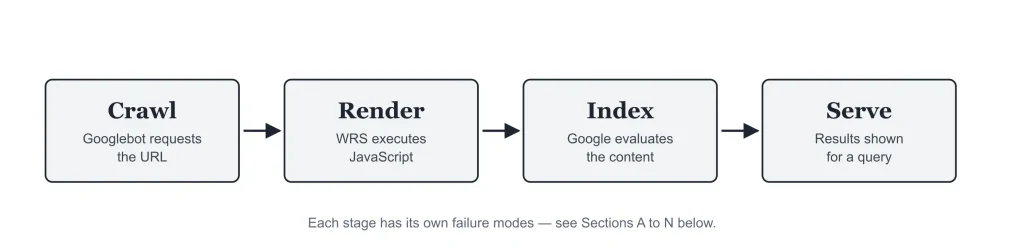
Stage 1: Discovery
A search engine first needs to discover a URL. URLs can be found through links, sitemaps, previously known URLs, and other discovery sources.
If an important page has no effective discovery path, its JavaScript implementation may never become relevant to the indexing process.For JavaScript implementation details, see the MDN JavaScript Guide .MDN also explains how to add JavaScript to a web page , including external scripts and considerations around script execution.
Stage 2: Crawling
Once a URL is known, a crawler requests resources according to the search engine’s systems and policies. Crawlability problems can prevent a page or its necessary resources from being accessed.
Stage 3: Rendering
For pages that depend on JavaScript, rendering can be necessary to process the page as users experience it. The rendered document can contain content and links that were not present in the initial HTML.
Stage 4: Indexing
After processing the page, search systems determine what information can be stored and used in search. Indexing is not simply a matter of seeing a page in a browser.
Stage 5: Serving
When a search result is generated, search systems use available information to determine which pages and content are relevant to a search.
For a JavaScript-heavy website, the practical lesson is simple: test the complete path rather than one technical stage in isolation.
Why JavaScript SEO Matters
Modern websites increasingly rely on client-side code. A site can look completely functional to a visitor while still having technical differences between the initial server response and the final rendered document.
Those differences can matter when important SEO information exists only after JavaScript executes.
Examples of JavaScript-dependent SEO elements
- Article or product content loaded after page initialization
- Navigation links generated by application code
- Dynamic titles
- Dynamic meta descriptions
- Canonical URL changes
- Structured data inserted at runtime
- Content loaded through APIs
- Client-side routing
- Filtering and faceted navigation
- Infinite scrolling interfaces
The presence of these features does not automatically indicate a problem. They simply identify areas that deserve testing.
1. Check Crawlability
The first major section of a JavaScript SEO checklist is crawlability. Search engines need to access the URLs and resources required to understand important pages.
Check important URLs
Create a sample of important URLs from different templates. Include high-value pages rather than testing only the homepage.
- Homepage
- Category pages
- Important articles
- Product or service pages
- Landing pages
- Pages using dynamic navigation
- Pages using client-side rendering
Check whether URLs are discoverable
Look at how important pages are connected to the rest of the site. If a page depends entirely on an interaction that does not expose a clear URL, its discovery path may need additional review.
Check crawlable navigation
Main navigation and important contextual links should expose clear destinations. Do not rely exclusively on visual interactions when a normal link can provide the destination.
2. Review Robots.txt and Resource Access
Robots.txt controls crawler access to URLs and can affect the ability to retrieve resources. Review the file carefully before assuming that a rendering problem is caused by JavaScript itself.
Review blocked paths
Look for rules that unintentionally restrict important URLs or resources. Pay particular attention to directories containing JavaScript, CSS, images, API resources, or other assets required by the page.
Do not use robots.txt as an indexing directive
Robots.txt and page-level indexing directives serve different purposes. If the goal is to control whether a page can be indexed, use the appropriate indexing mechanism rather than treating robots.txt as a universal replacement.
Checklist
- ☐ Important URLs are not unintentionally disallowed.
- ☐ Required resources can be accessed.
- ☐ Robots.txt rules have been reviewed after major site changes.
- ☐ Temporary development rules have not reached production.
3. Check JavaScript Rendering
Rendering is one of the most important parts of a JavaScript SEO checklist. The key question is whether the final rendered page contains the information and structure that the page needs.
Compare initial and rendered HTML
Inspect what the server initially returns and compare it with the rendered document. Identify important elements that appear only after JavaScript executes.
Check the main content
The primary content should remain available in the rendered page. If an article’s main text, product information, category description, or other important material is added dynamically, test that implementation carefully.
Check headings
Confirm that the intended heading structure is present after rendering. JavaScript should not unexpectedly remove, duplicate, or replace important headings.
Check navigation
Review whether the final rendered document contains the links that users and crawlers need to move through the website.
4. Check Rendered Content
A browser can display content after executing JavaScript, but an SEO audit should verify the actual rendered output rather than assuming that browser visibility proves everything works as intended.
Important content to verify
- Main article text
- Product descriptions
- Category descriptions
- Important headings
- Breadcrumb information
- Internal links
- Important text supporting search intent
Watch for placeholder content
Some applications initially render loading placeholders and replace them with content later. Test whether the final content is reliably available on representative URLs.
Watch for empty application shells
A single-page application can initially return an application shell while the meaningful page content is assembled later. This architecture deserves additional testing when the content is important for organic search.
5. Check JavaScript-Generated Links
Links are an important part of site discovery and architecture. JavaScript can create, modify, hide, or replace links, so links deserve their own audit section.
Use normal link destinations for important navigation
When an element is intended to take users to another URL, use an appropriate HTML link implementation wherever practical.
Review click handlers
Custom click handlers can provide useful application behavior, but important navigation should not depend unnecessarily on a mechanism that fails to expose a clear destination.
Check these link groups
- Main navigation
- Breadcrumbs
- Related articles
- Category links
- Pagination
- Product links
- Contextual editorial links
- Footer navigation
Check URL consistency
Verify that JavaScript does not unexpectedly rewrite important destinations into tracking URLs, duplicate URLs, temporary URLs, or incorrect routes.
6. Check Indexability
Crawlability and indexability are not the same thing. A page can be accessible to a crawler while still carrying signals that affect whether it can be indexed.
Review robots directives
Check the page’s indexing directives and confirm that they match the intended state of the URL.
Check dynamically generated directives
If JavaScript changes metadata, test the final rendered state. Unexpected changes can create inconsistencies between templates or URL states.
Check staging rules
Development environments often use noindex directives or access restrictions. Verify that production pages do not accidentally retain development settings.
7. Check Canonical URLs
Canonicalization helps communicate the preferred URL when multiple URL versions represent similar or duplicate content.
JavaScript-heavy websites can accidentally produce canonical inconsistencies if the canonical element is inserted, replaced, or changed dynamically.
Canonical checklist
- ☐ The canonical URL represents the intended page.
- ☐ The canonical URL is absolute where appropriate.
- ☐ Protocol and hostname are consistent.
- ☐ Important pages do not canonicalize to unrelated pages.
- ☐ Canonical behavior is consistent across templates.
- ☐ Rendering does not unexpectedly replace the canonical.
Check URL parameters
Filtering, sorting, search parameters, and application state can create many URLs. Review whether those URLs need to exist as search-accessible pages and whether their canonicalization is consistent with the site’s intended architecture.
8. Check Titles and Meta Descriptions
JavaScript applications can update document metadata dynamically. This can be useful, but it also creates another place where inconsistent SEO signals can occur.
Title checklist
- ☐ Each important page has an appropriate title.
- ☐ The title represents the actual page content.
- ☐ Template variables are populated correctly.
- ☐ JavaScript does not unexpectedly overwrite the title.
Meta description checklist
- ☐ Important pages have appropriate descriptions where useful.
- ☐ Descriptions match the page.
- ☐ Dynamic templates do not produce accidental duplicates.
- ☐ JavaScript does not replace intended metadata incorrectly.
Do not treat a specific character count as a guarantee of how a search result will appear. Search engines can generate or modify search-result snippets.
9. Check Structured Data
Structured data can be generated in the initial HTML or inserted dynamically. If your implementation uses JavaScript, verify the final output and its relationship to the visible page.
Check accuracy
Structured data should describe the actual page and should not be used to claim information that visitors cannot reasonably find on the page.
Check duplication
Frameworks, plugins, tag managers, and custom scripts can sometimes create duplicate structured-data blocks. Review the complete output when debugging schema issues.
Check implementation after rendering
If schema is inserted by JavaScript, confirm that the intended markup exists in the final document and remains valid according to the applicable structured-data documentation.
10. Check HTTP Status Codes
A JavaScript application can display a page-like interface even when the underlying HTTP response is not what you expect. This is why status codes belong in every JavaScript SEO audit.
Check important URLs directly
Review the server response for representative URLs instead of testing only what appears in the browser.
Look for these issues
- Unexpected 404 responses
- Incorrect redirect behavior
- Redirect chains
- Application errors
- Soft-404-like pages
- Unexpected server errors
Why this matters
The browser experience and the server response are related but not identical. A technically convincing interface does not remove the need to verify the underlying HTTP behavior.
11. Check Internal Linking
Internal linking helps users navigate a site and gives search engines paths between URLs. JavaScript should not unintentionally remove important internal-link relationships.
Review site navigation
Test the main navigation and important category paths. Confirm that important destinations remain accessible without relying on a fragile interaction.
Review contextual links
Editorial content should contain useful contextual links where they help users understand related topics. For SEORAF content, only use verified live internal URLs.
Review breadcrumbs
Breadcrumbs should point to meaningful, valid URLs and should remain consistent between the visible interface and the underlying document.
12. Check Pagination and Filters
JavaScript-powered category interfaces often use filtering, sorting, infinite scrolling, or client-side pagination. These features require careful URL and content testing.
Pagination
If multiple pages contain important content, make sure users and search engines have appropriate ways to reach those pages.
Infinite scrolling
Infinite scrolling can create a good user experience, but an audit should determine whether additional content has an appropriate URL-based representation when search accessibility is important.
Filters
Filters can create a very large number of URL combinations. Decide which filtered states are meaningful search pages and which should remain primarily user-interface states.
Sorting
Sorting parameters can generate alternate URLs that contain the same underlying content. Review whether those URLs should be crawlable and how they should be handled.
13. Check JavaScript-Loaded Content
Many modern websites load content from APIs after the initial page load. This approach can be efficient for applications, but important search content needs deliberate testing.
Identify API-dependent content
Create an inventory of important content that depends on API responses. Examples include product information, article content, reviews, category descriptions, and related-content modules.
Test failure scenarios
Ask what happens when an API request fails, takes too long, returns empty data, or produces an unexpected response.
A robust website should handle failures gracefully. Important content should not silently disappear because a secondary request failed.
Check loading states
Review whether the final document replaces loading placeholders with the intended content. Test representative URLs rather than assuming that one successful page proves the entire application works.
14. Check JavaScript Performance
JavaScript can affect page loading and responsiveness. Performance should therefore be included in a broader technical SEO review.
Review JavaScript size
Large JavaScript bundles can increase the amount of code that needs to be downloaded and processed. Review whether all shipped code is necessary for the page.
Review third-party scripts
Analytics, advertising, chat, testing, widgets, social integrations, and other third-party scripts can add processing work. Review which scripts are genuinely required.
Review long-running tasks
Long-running JavaScript can interfere with responsiveness. Use appropriate performance testing tools to identify expensive tasks and unnecessary execution.
Do not optimize blindly
Avoid removing useful functionality solely because it uses JavaScript. Measure the actual issue, identify the responsible code, and then test the proposed change.
15. Check Mobile Rendering
JavaScript behavior can vary across devices, connection conditions, and viewport sizes. Important pages should therefore be tested on mobile as well as desktop.
Mobile JavaScript SEO checklist
- ☐ Main content is available.
- ☐ Navigation works correctly.
- ☐ Important links remain accessible.
- ☐ Interactive elements do not hide critical content.
- ☐ Dynamic content loads correctly.
- ☐ No important content exists only in a desktop-specific component.
- ☐ Performance has been measured under realistic conditions.
Do not assume that a page working on a powerful desktop computer will behave identically on a mobile device or slower connection.
16. Check Single-Page Applications
Single-page applications, or SPAs, commonly use JavaScript to change views without loading a traditional full HTML document for every navigation event.
That architecture can work with search, but it makes URL management especially important.
Check unique URLs
Important application states that represent distinct search pages should have appropriate URLs.
Check client-side routing
Test direct access to routes. A URL should not work only after a user enters the application through the homepage if that route is intended to function as an independent page.
Check refresh behavior
Open important routes directly and refresh them. Review whether the server correctly handles the route instead of returning an error or an incorrect page.
Check navigation transitions
Test whether client-side navigation updates the title, content, canonical, structured data, and other relevant page information as expected.
17. JavaScript Frameworks and SEO
JavaScript frameworks provide different development patterns, but the same fundamental SEO questions remain relevant.
React
React applications can use different rendering approaches. The important SEO checks concern the final URL, content, links, metadata, rendering behavior, and server response rather than the framework name alone.
Vue
Vue-based sites should be tested for routing, rendered content, metadata, internal links, and the availability of important content.
Angular
Angular applications can also use different rendering architectures. Review the actual implementation rather than assuming that the framework itself determines the SEO outcome.
Next.js and other application frameworks
Frameworks that provide multiple rendering options can simplify some SEO implementations, but configuration still matters. Test the final output and server behavior of the actual website.
The framework is not the audit result
A JavaScript SEO audit should identify concrete implementation behavior. Avoid declaring a framework good or bad for SEO without looking at how the site actually delivers its pages.
18. Understand Rendering Approaches
JavaScript applications can use different approaches to deliver content. Understanding the distinction helps you diagnose technical issues.
Client-side rendering
With client-side rendering, the browser or rendering environment uses JavaScript to construct much of the page. This approach can provide application-like experiences, but important content and signals require careful testing.
Server-side rendering
Server-side rendering generates HTML on the server for a request. This can make important content available earlier in the response, but the implementation still needs to be tested for correctness.
Static generation
Static generation produces pages ahead of time. It can simplify delivery for certain content types, but dynamic functionality and client-side interactions may still exist.
Hybrid rendering
Many modern applications combine multiple rendering approaches. Some routes may be generated ahead of time while others are rendered dynamically.
The correct question is not which label sounds best. The correct question is whether the actual implementation reliably exposes the content and signals required by the website.
19. Test Important URLs
A strong JavaScript SEO checklist uses representative URL testing rather than checking only one page.
Choose representative templates
- Homepage
- Main category page
- Subcategory page
- Important article
- Product page
- Landing page
- Search or filter page where relevant
- JavaScript-heavy application route
Test different content states
If the site has different states, test them separately. For example, compare a normal category page with a filtered category page or a standard article with an article containing dynamic components.
Document findings
Record the URL, template, observed behavior, expected behavior, technical cause when known, and recommended next action. This makes retesting much easier after development changes.
20. JavaScript SEO Testing Tools
Tools should support the investigation rather than replace it. Use different tools for different questions.
Google Search Console
Search Console can provide information about how Google processes and reports on your website. Use the available inspection and reporting features when investigating individual URLs or broader indexing issues.
Browser developer tools
Developer tools can help you inspect the DOM, network requests, JavaScript errors, resource loading, HTTP responses, and other implementation details.
URL inspection workflows
For important pages, inspect representative URLs using appropriate search-engine tools. Compare the observed information with the page’s intended implementation.
Performance testing tools
Performance tools can help identify large resources, expensive JavaScript execution, loading delays, and other bottlenecks.
Source and rendered HTML comparison
One of the most useful manual techniques is comparing the initial response with the rendered document. The differences can reveal content and metadata that depend on JavaScript.
Use official documentation for search-specific claims
Search-engine behavior and documentation can change. When making technical implementation decisions, verify search-specific claims against current official documentation rather than relying on old blog posts or assumptions.For Google’s current guidance, see Google Search Central’s JavaScript SEO documentation .
Common JavaScript SEO Mistakes
Mistake 1: Assuming browser visibility proves indexing
A user can see content in a browser after JavaScript executes. That observation alone does not establish how a search engine has processed the page.
Mistake 2: Blocking required resources
Unintentionally blocking important resources can interfere with processing. Review robots.txt and other access controls before diagnosing deeper rendering issues.
Mistake 3: Using JavaScript for important navigation without clear URLs
Complex interactions can make navigation harder to discover and test. Important destinations should have clear URL paths.
Mistake 4: Dynamically replacing metadata without testing
Changing titles, canonical URLs, or other metadata through JavaScript can introduce unexpected inconsistencies.
Mistake 5: Testing only the homepage
The homepage may use a different template and rendering process from articles, categories, products, or application routes.
Mistake 6: Treating all JavaScript as an SEO problem
JavaScript is a technology, not a diagnosis. Identify the concrete issue instead of removing functionality without evidence.
Mistake 7: Ignoring HTTP responses
A visually functional page can still have an unexpected server response. Always include status-code testing.
Mistake 8: Forgetting mobile testing
Mobile conditions can expose problems that are not visible during desktop testing.
Mistake 9: Creating unlimited filter URLs
Faceted navigation can create many URL combinations. Review which states deserve search visibility and which should remain application states.
Mistake 10: Making changes without a baseline
Record the original behavior before changing the implementation. This makes it easier to determine whether a change actually solved the problem.
JavaScript SEO Troubleshooting Workflow
Before troubleshooting rendering, first understand how crawling in SEO works. A crawler must be able to discover and request the URL before JavaScript-dependent processing becomes relevant.When a JavaScript-dependent page has an SEO problem, use a structured troubleshooting process. Start by checking whether the URL can be discovered and crawled, then move through rendering, rendered content, indexability, and other signals.
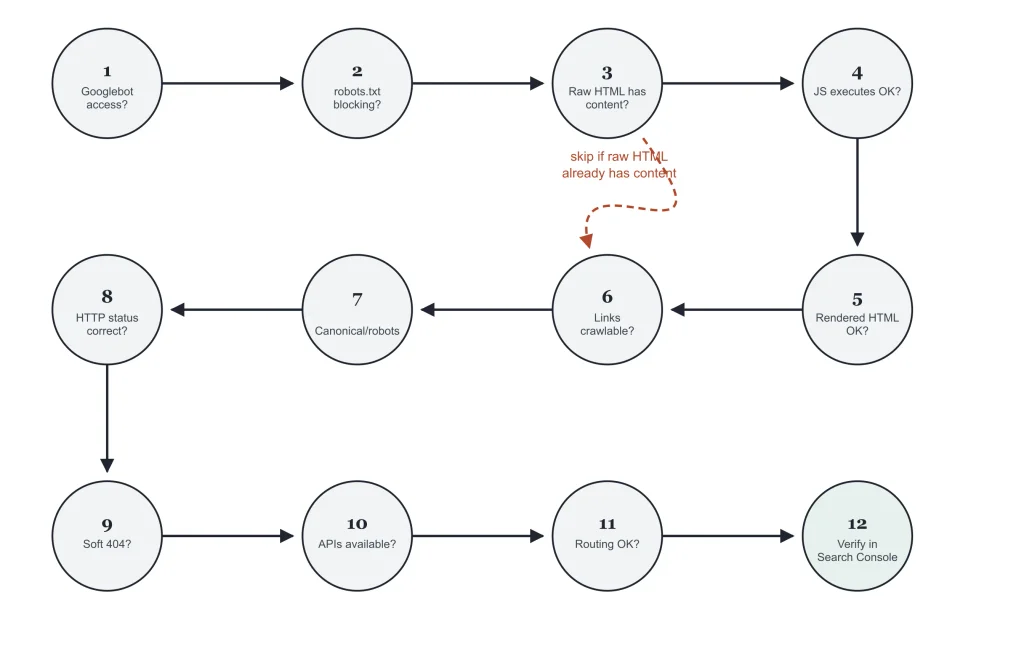
Step 1: Define the symptom
Start with the observable problem. Examples include missing content, an incorrect canonical, unexpected indexing behavior, missing internal links, or an incorrect title.
Step 2: Identify affected templates
Determine whether the problem affects one URL or multiple URLs. If several pages are affected, look for a shared template or application component.
Step 3: Inspect the server response
Check the HTTP status and initial HTML. This separates server-side issues from problems introduced later in the rendering process.
Step 4: Inspect rendered output
Compare the rendered document with the initial response. Identify which elements appear, disappear, or change.
Step 5: Inspect network requests
Look for failed JavaScript, CSS, API, image, or other resource requests that could explain missing content.
Step 6: Review indexing signals
Check robots directives, canonical URLs, and other relevant indexability signals.
Step 7: Check links
Verify that important internal links exist in the expected state and point to the correct URLs.
Step 8: Fix the underlying implementation
Prefer addressing the root cause instead of adding a workaround that creates another technical dependency.
Step 9: Retest
Test the affected URL and several representative URLs using the same process used for the original diagnosis.
Step 10: Monitor after deployment
Important technical changes should be monitored after release. Watch for unexpected crawling, indexing, rendering, or performance changes.
JavaScript SEO Audit Template
Use this simple structure when documenting a JavaScript SEO audit.
| Check | What to review | Status | Notes |
|---|---|---|---|
| Crawlability | Important URLs and resources can be accessed. | Pass / Review / Fail | |
| Rendering | Important content appears in the rendered page. | Pass / Review / Fail | |
| Links | Important internal links have appropriate destinations. | Pass / Review / Fail | |
| Indexability | Indexing directives match the intended state. | Pass / Review / Fail | |
| Canonical | Canonical URLs are correct and consistent. | Pass / Review / Fail | |
| Metadata | Titles and descriptions represent the page. | Pass / Review / Fail | |
| Structured data | Markup is accurate and appropriate. | Pass / Review / Fail | |
| Status codes | Important URLs return appropriate responses. | Pass / Review / Fail | |
| Performance | JavaScript execution has been reviewed. | Pass / Review / Fail | |
| Mobile | Mobile rendering and interactions work correctly. | Pass / Review / Fail |
Final JavaScript SEO Checklist
Use this final list before publishing, migrating, redesigning, or approving a JavaScript-heavy website.
Crawling and discovery
- ☐ Important URLs can be discovered.
- ☐ Important URLs are not unintentionally blocked.
- ☐ Required resources can be accessed.
- ☐ Important navigation exposes useful destinations.
Rendering and content
- ☐ Main content appears after rendering.
- ☐ Important headings are present.
- ☐ Dynamically loaded content works as intended.
- ☐ Application routes render the correct content.
Links
- ☐ Important links have usable destinations.
- ☐ Internal links are not unintentionally hidden.
- ☐ Breadcrumbs point to correct URLs.
- ☐ Pagination and important category paths are testable.
Indexing signals
- ☐ Robots directives are correct.
- ☐ Canonical URLs are correct.
- ☐ Titles are correct.
- ☐ Meta descriptions are appropriate.
- ☐ Structured data is accurate where used.
Technical delivery
- ☐ HTTP status codes are correct.
- ☐ Redirect behavior is correct.
- ☐ API-dependent content has been tested.
- ☐ JavaScript performance has been measured.
- ☐ Mobile behavior has been tested.
Testing
- ☐ Homepage tested.
- ☐ Category template tested.
- ☐ Article template tested.
- ☐ Important dynamic template tested.
- ☐ Representative URLs tested after deployment.
JavaScript SEO FAQ
Is JavaScript bad for SEO?
No. JavaScript is widely used on modern websites. The important issue is whether search engines can access and process the content, links, and SEO signals that matter for the page.
What is a JavaScript SEO checklist?
A JavaScript SEO checklist is a structured set of technical checks used to review JavaScript-dependent websites. Typical checks cover crawling, rendering, content, links, indexability, canonicalization, metadata, structured data, status codes, performance, and mobile behavior.
Why does JavaScript affect SEO?
JavaScript can control how content, links, metadata, and application routes are created or changed. If important information depends on JavaScript, the implementation should be tested to ensure the expected information is available during search-engine processing.
Can JavaScript-generated content be indexed?
JavaScript-generated content can be processed by search engines in some circumstances. However, the exact implementation matters. Important content should be tested rather than assumed to be available simply because it appears in a browser.
Should I remove JavaScript for SEO?
Not necessarily. JavaScript can provide useful functionality and user experiences. The better approach is to identify specific crawlability, rendering, content, linking, indexing, or performance problems and address their underlying causes.
How do I audit JavaScript SEO?
Start with representative URLs. Check the server response, crawlability, rendered content, internal links, indexability signals, canonical URLs, metadata, structured data, HTTP status codes, performance, and mobile behavior. Then retest after changes.
What should I check first when JavaScript content is missing?
Start by identifying whether the content exists in the initial HTML or appears only after rendering. Then inspect resource access, JavaScript errors, API requests, rendering behavior, and the final document.
Are single-page applications bad for SEO?
A single-page application is not automatically unsuitable for SEO. The implementation should provide appropriate URLs, accessible content, usable navigation, correct metadata, and reliable rendering for important pages.
Does server-side rendering solve every JavaScript SEO problem?
No. Server-side rendering can change how content is delivered, but other issues can still exist, including incorrect canonical URLs, broken links, status-code problems, indexing directives, client-side navigation issues, and performance problems.
How often should JavaScript SEO be checked?
The frequency depends on how often the website changes. A major framework migration, redesign, routing change, template change, or large JavaScript deployment should trigger a new technical review.
SEORAF Editorial Note
This guide is an educational JavaScript SEO checklist, not a guarantee of indexing, rankings, traffic, or search-result visibility. Search-engine systems and documentation can change, so verify search-specific implementation details against current official documentation before making significant technical changes.
For a real audit, document the affected URLs, compare expected and actual behavior, identify the underlying technical cause, make one controlled change at a time, and retest representative templates.
Last reviewed: 2 October 2026