
Quick Answer: Crawlability is a website’s ability to let a search engine or other crawler discover and request a URL. It is an access and discovery concern that comes before a crawler can evaluate the page for rendering, indexing, or search eligibility. Common crawlability barriers include restrictive robots.txt rules, weak internal linking, missing sitemap discovery signals, and server failures that prevent a successful request.
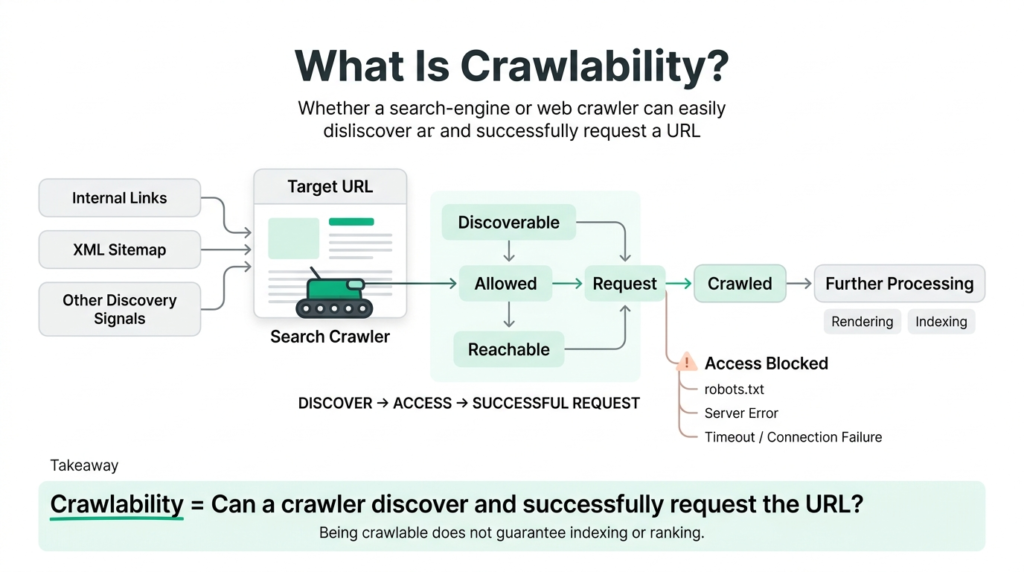
Crawlability problems are easy to miss because they do not necessarily look like content problems. A page can be well-written, fast, and mobile-friendly and still fail to receive a crawler request because the URL is difficult to discover, explicitly restricted, or unreachable when requested.
This article explains what crawlability means, how it differs from indexability, where crawlability fits within the broader crawling-to-indexing process, what commonly prevents crawlers from reaching URLs, and how to diagnose access problems using Search Console and server log data.
What Is Crawlability?
Crawlability describes whether a crawler is able to discover and request a URL under the site’s current technical configuration. For search engines, this includes factors such as URL discovery, robots.txt rules, internal linking, sitemap signals, DNS and server availability, HTTP responses, and other conditions that determine whether a request can successfully reach the resource.
The same access principle applies to non-search crawlers, including AI crawlers that identify themselves with their own user-agent strings. However, crawler policies differ by provider, so access should always be evaluated for the specific crawler rather than assuming that one crawler’s permissions apply to every crawler.
Crawlability is therefore an upstream technical concern. It does not determine whether a page is useful, high quality, indexed, or ranked. It determines whether the crawler can get far enough to evaluate the URL in the first place.
Crawlability vs. Indexability
Crawlability asks: Can the crawler discover and request this URL?
Indexability asks a different question: After the URL has been crawled, is the content eligible to be considered for storage and appearance in search?
These concepts are related but not interchangeable. A URL can be crawlable and still remain out of the index because of directives, canonicalization, duplication, content selection, or other indexing systems. Conversely, blocking a URL from crawling prevents the crawler from accessing the page’s content and therefore prevents the crawler from evaluating page-level directives that it would otherwise need to read from the page.
For the mechanics of how crawled content is evaluated and selected for indexing, see the Indexing guide .
How Crawlability Fits the Crawling → Rendering → Indexing Process
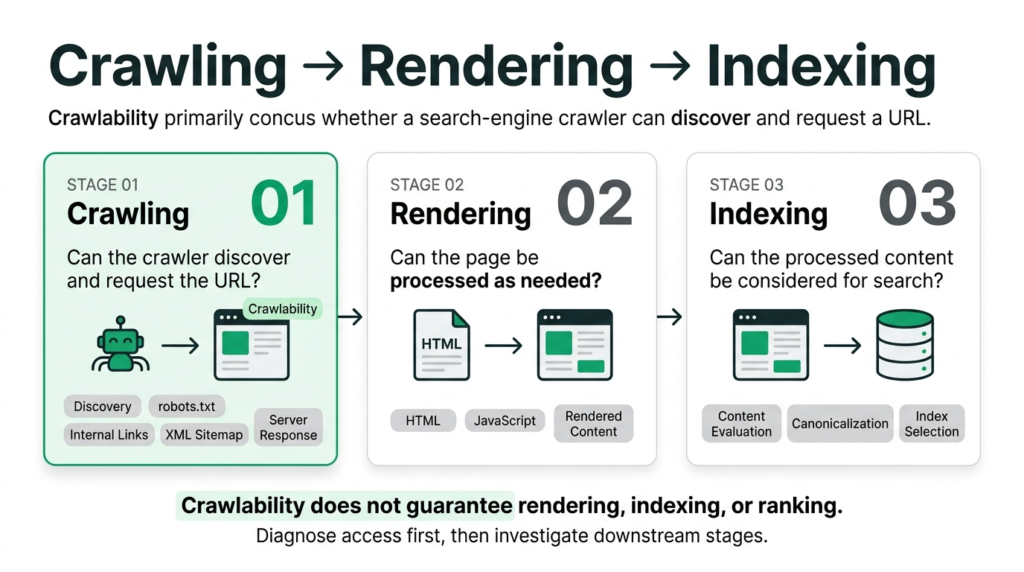
Crawling, rendering, and indexing describe different parts of a search engine’s processing systems. They should not be treated as interchangeable terms. Crawlability concerns whether a crawler can obtain the resource; rendering may then be required to process JavaScript-dependent content; indexing concerns subsequent evaluation and storage of content for search.
The Crawling → Rendering → Indexing Process
| Stage | Core Question |
|---|---|
| 1. Crawling | Can the crawler discover and successfully request the URL? This is where crawlability primarily applies. |
| 2. Rendering | If rendering is required, can the crawler process the page’s JavaScript and construct the content and links needed for evaluation? |
| 3. Indexing | After the content has been processed, does the URL and its content qualify to be considered for storage and search results? |
A crawlability failure prevents the crawler from obtaining the resource, so downstream page evaluation cannot proceed from that request. However, the stages should not be interpreted as a rigid one-size-fits-all pipeline: search engines use multiple systems for discovery, fetching, rendering, canonicalization, and indexing, and not every URL requires the same rendering treatment.
The practical diagnostic lesson remains simple: verify access before investigating downstream indexing symptoms. If the crawler cannot obtain the URL, changing page content or indexing signals will not fix the underlying access problem.
Rendering and indexing have their own detailed treatment: Rendering guide and Indexing guide .
What Affects Crawlability
Robots.txt Directives
Robots.txt is a plain-text file that provides crawler access rules for paths on a host. A broad or incorrectly configured Disallow rule can prevent a crawler from requesting URLs that the site owner intended to make accessible.
This is particularly important after migrations, staging-to-production launches, CMS changes, or automated robots.txt modifications, where a rule intended for a limited environment can accidentally affect production URLs.
Robots.txt is a crawl-control mechanism, not a reliable method for guaranteeing that a URL will never appear in Google’s search results. Google documents that a blocked URL may still be discovered through other sources and may appear as a URL-only result without its page content being crawled.
Source: Google Search Central — Robots.txt Introduction and Guide
Internal Link Depth
Internal link depth describes how many link steps a crawler may need to follow from important entry points to reach a URL. A page that is several navigation layers away from the site’s main content can be harder to discover than a page that is clearly connected through relevant internal links.
Link depth should not be treated as a universal crawlability threshold. Search engines use many discovery and scheduling signals, so a deep URL is not automatically uncrawlable. The practical objective is to make important pages discoverable through a logical, connected internal-link structure rather than relying on isolated URLs.
Note: “click depth” is a common informal expression for the same general concept. SEORAF uses “internal link depth” as the canonical editorial term on this page.
XML Sitemap Inclusion
An XML sitemap provides search engines with a structured list of URLs that the site considers important for discovery. It can be particularly useful for newly published content, large sites, and URLs that may not yet have strong internal link pathways.
Sitemap inclusion is a discovery signal, not a guarantee that a URL will be crawled or indexed. A sitemap should therefore complement a strong internal-link architecture rather than substitute for it.
Google also documents that sitemap elements such as <priority> and <changefreq> are ignored. The sitemap’s value is primarily in communicating URL discovery and metadata that search engines support.
Source: Google Search Central — Build and Submit a Sitemap
Server Reachability
A crawler must be able to establish a connection and receive a usable response from the server. DNS failures, connection failures, timeouts, server errors, network problems, and aggressive rate limiting can all interfere with successful crawling.
A slow response is not automatically equivalent to a crawlability failure. The important diagnostic question is whether the crawler can successfully request and receive the resource under the server’s actual operating conditions. Intermittent failures are especially important because a URL may be accessible during a manual browser test while failing during some crawler requests.
Common Crawlability Issues
Orphan Pages
An orphan page is a URL with no internal links pointing to it. Without internal links, the site’s own navigation structure provides no normal path to discover the page.
An orphan URL may still be discovered through an XML sitemap, external links, redirects, previously known URLs, or other discovery systems. Therefore, “orphan” does not mean “impossible to crawl.” It means the page lacks an internal-link discovery path, which is an important structural weakness for pages that are intended to remain discoverable.
How to Diagnose Crawlability Issues
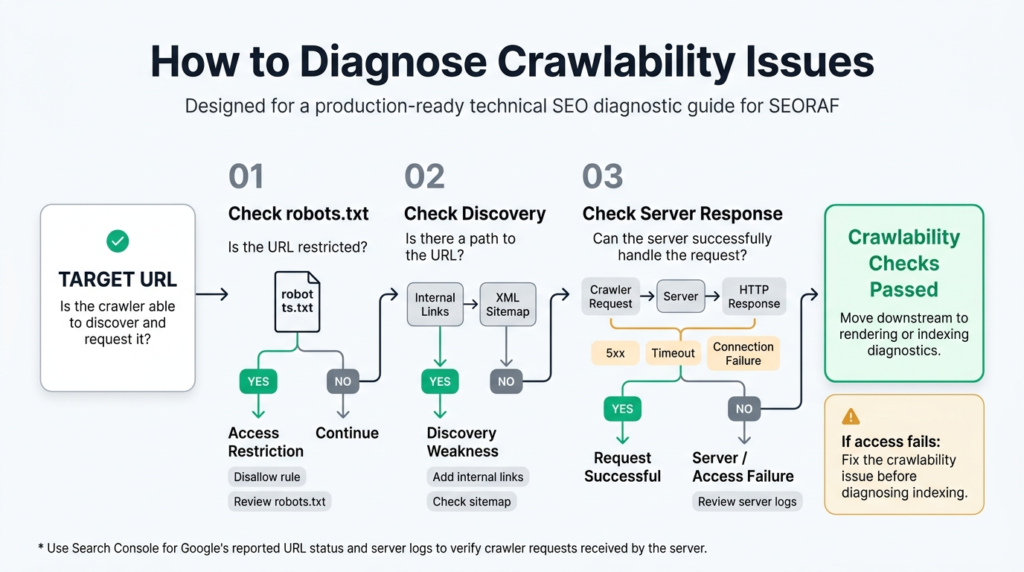
Crawlability diagnosis works best as a sequence. Start with the access rules and discovery paths that the site controls, then verify what the server actually received. This separates a genuine crawlability failure from a downstream indexing or rendering problem.
| Question | How to Check | Diagnostic Purpose |
|---|---|---|
| Is the URL restricted by robots.txt? | Review the live robots.txt file and the applicable crawler rules. | Identifies an explicit crawler-access restriction before investigating downstream indexing symptoms. |
| Does the site provide a discovery path to the URL? | Review internal links, navigation paths, and XML sitemap inclusion. | Determines whether the URL is connected to the site’s controlled discovery systems. |
| Can the server successfully handle the crawler request? | Review server logs for crawler requests, timestamps, response codes, and relevant failures. | Confirms what happened at the server rather than relying only on downstream reporting. |
If access and server reachability are healthy, move downstream to rendering and indexing diagnostics. This order prevents an indexing report from becoming a catch-all explanation for a problem that actually occurred earlier during discovery or fetching.
Google Search Console
Google Search Console provides a Google-specific view of URL processing. The Page indexing report groups URLs by reported indexing status and reasons, while URL Inspection provides information about Google’s known state for an individual URL and allows a live test when supported.
Search Console should be treated as one diagnostic layer rather than a complete replacement for server-side evidence. A report can show what Google knows about a URL, while server logs can show whether and when the server actually received crawler requests.
Server Log Files
Server logs record requests received by the server, including timestamps, requested URLs, user-agent information where available, response status codes, and other request metadata depending on the logging configuration.
This makes log analysis especially valuable for crawlability investigations: it can distinguish a URL that has never been requested from one that is being requested but repeatedly returns errors or experiences intermittent failures.
AI Crawler Governance and Crawlability
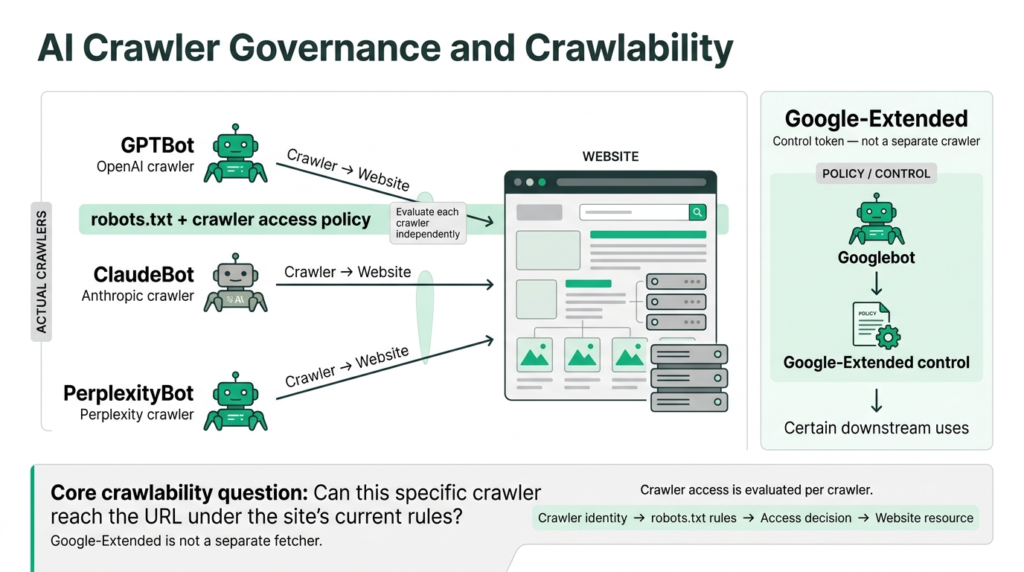
AI crawler governance belongs in the crawlability discussion because some AI services use identifiable web crawlers with their own user-agent strings. GPTBot, ClaudeBot, and PerplexityBot are examples of crawler identities that site owners may encounter and govern separately.
A robots.txt rule targeted at one crawler should not automatically be interpreted as a rule for every other crawler. Each provider may document different user-agent names, behavior, and controls, so AI crawler governance should be maintained as an explicit policy rather than assumed from generic “AI bot” terminology.
Google-Extended is materially different. Google documents it as a control token rather than a separate crawler. Googlebot remains the crawler making the request; Google-Extended provides a mechanism for controlling certain uses of content after it has been crawled. Blocking Google-Extended therefore should not be interpreted as blocking Googlebot’s ability to crawl or a site’s eligibility for Google Search.
Source: Google for Developers — Google’s Common Crawlers
The operational rule is straightforward: evaluate each crawler independently. A site’s crawlability posture should identify which crawlers are intentionally allowed, restricted, or governed and should be reviewed whenever crawler behavior or provider documentation changes.
Crawlability and Related Concepts
Scope note: This page focuses specifically on crawler discovery and access. Rendering, indexing, and crawl budget are related concepts, but each has distinct mechanics and failure modes. Keeping them separate makes the diagnostic model more useful and prevents crawlability from becoming a catch-all term for every technical SEO problem.
- Rendering — concerns how a crawler processes the fetched resource and, where applicable, executes JavaScript to obtain additional content or links. Read the Rendering guide .
- Indexing — concerns what happens after content has been crawled and processed. Crawlability is a prerequisite for page-level crawling, but it does not guarantee indexing. Read the Indexing guide .
- Crawl Budget — concerns how crawling resources and activity are managed across a site’s URLs, particularly at larger scale. It is related to crawlability but is not synonymous with it. Read the Crawl Budget guide .