
The guide also includes a prioritization formula, a baseline worksheet, troubleshooting tables, and answers to common questions.
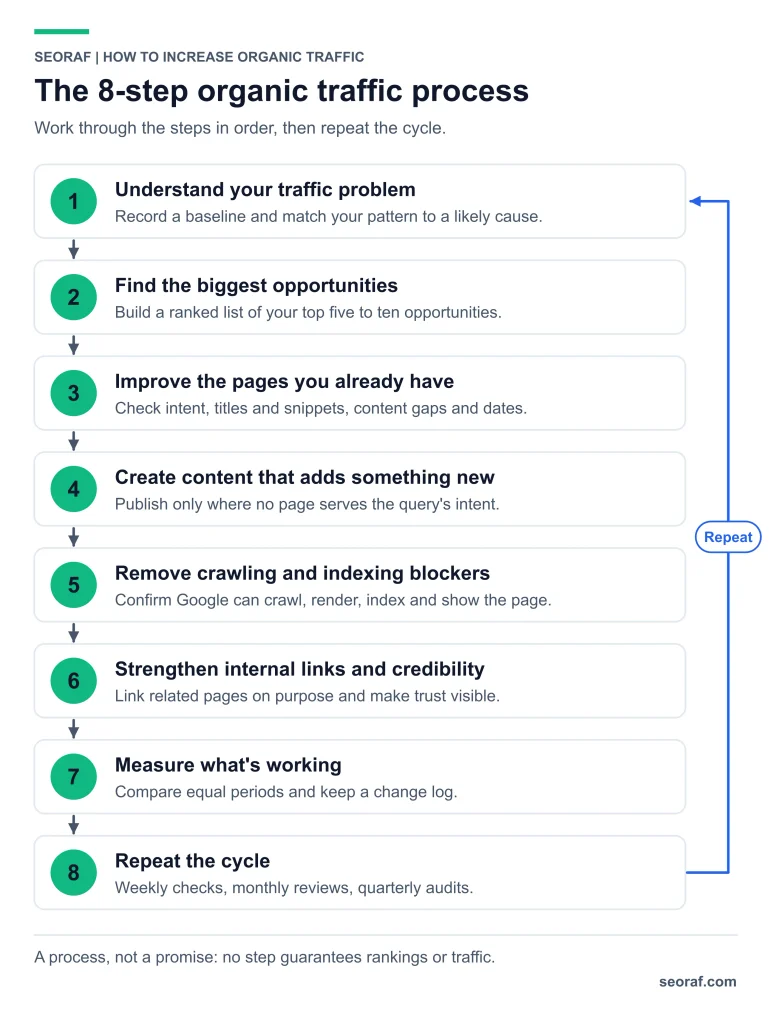
Who this guide is for, and how it is built
This guide is for site owners, writers, and marketers whose Google organic search traffic is flat, declining, or lower than expected. It focuses on diagnosing problems and prioritizing improvements rather than teaching every SEO discipline. For a starting point, see SEORAF’s SEO basics hub.
SEORAF groups organic traffic problems into four practical categories: pages Google cannot find or index, pages that appear but earn few clicks, pages that do not match search intent, and relevant topics that the site does not cover. The steps below help identify the likely problem before you invest time in changes.
Step 1: Understand your traffic problem
What organic traffic means here
Organic traffic refers to visits originating from unpaid search results. Google Search Console reports Google Search impressions and clicks. Google Analytics 4 reports website activity, including sessions attributed to the Organic Search channel. These measurements are not interchangeable, so use Search Console to evaluate search performance and Analytics to understand what visitors do after arriving.
Work out which problem you have
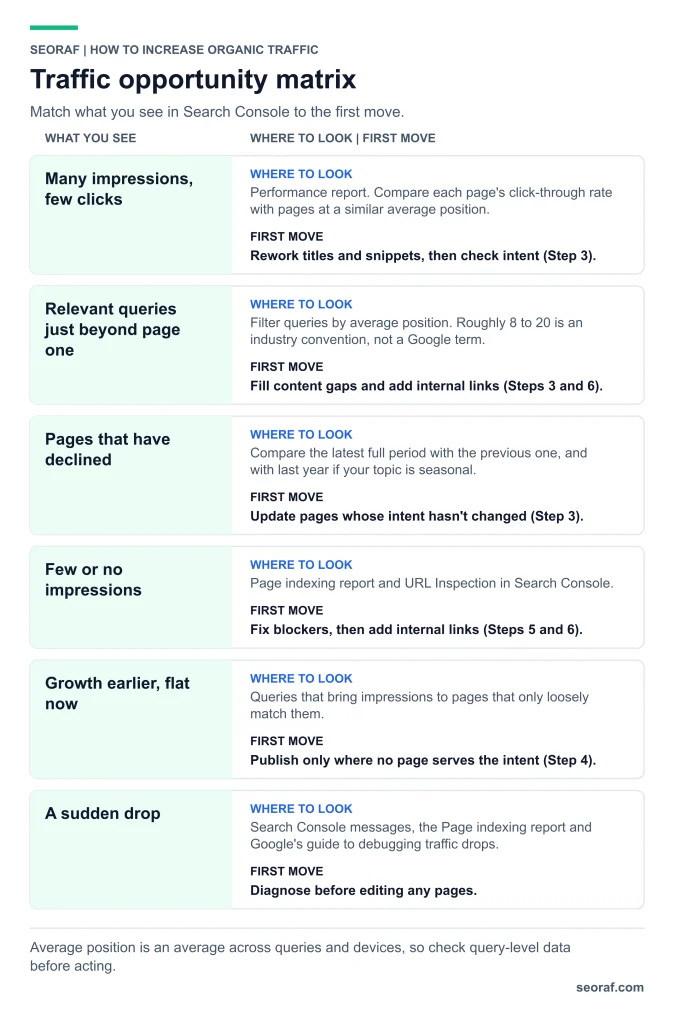
Match what you see in Search Console to the first thing to investigate
| What you see | What it may mean | Start with |
|---|---|---|
| Few or no impressions for relevant pages | The pages may not be indexed, may be difficult to discover, or may not match actual queries | Steps 5 and 6 |
| Many impressions but few clicks | Titles, snippets, intent, or the search-result layout may explain the pattern | Step 3 |
| Relevant queries with average positions beyond the first page | The page may not satisfy the query as well as competing results, or other competitive factors may matter | Steps 3 and 6 |
| Earlier growth followed by a plateau | Existing topics may be well covered, or demand and competition may have changed | Steps 2 and 4 |
| A sudden drop | A technical issue, tracking change, search update, demand change, or policy action is possible | Troubleshooting |
Capture a baseline
Before changing anything, record the current performance. Compare complete calendar months with the preceding period. For seasonal topics, compare the same period in the previous year as well.
- Clicks, impressions, click-through rate, and average position for the site and important pages.
- Branded versus non-branded queries, using an appropriate Search Console query filter.
- Indexing status for important URLs.
- Organic sessions and key events in Google Analytics 4, if configured.
Use the worksheet in Step 7 to record these measurements consistently.
What changed with AI features
Google documents: SEO best practices remain relevant to Google’s generative AI search features. To be eligible to appear in AI Overviews or AI Mode, a page must meet the applicable Search technical requirements, including being indexed and eligible to appear with a snippet. The site must also be included in Search Console’s generative AI features for Search. Eligibility does not guarantee that a page will appear.
Google also says that creating an llms.txt file or breaking content into small chunks is not required for Google Search. See Google’s guide to generative AI features and the Search generative AI features help page.
Google documents: generative AI performance reporting is available in Search Console, with visibility data for supported AI features. Google announced the wider rollout of dedicated generative AI performance reports in August 2026. See the official announcement.
SEORAF recommendation: measure clicks and impressions separately, and assess actual search performance rather than assuming AI features have helped or harmed your site. Treat third-party AI visibility scores as separate measurements, not as Google’s own data.
Step 2: Find the biggest opportunities
Open Search Console, choose the Performance report and select Search results. Use the same date range as your baseline. The following methods help identify candidates for improvement.
Pages with impressions but few clicks
Sort pages by impressions and compare their click-through rates with relevant peers. A page with fewer clicks than expected may need a clearer title, a more useful snippet, or a better match with search intent.
Do not compare CTR using average position alone. Query intent, device, branded versus non-branded demand, and the search-result layout can all affect click behaviour. Compare similar queries and pages where possible, and inspect the live results before changing a title.
Queries just beyond the first page
Filter queries by average position. A starting range of roughly 8 to 20 is sometimes called “striking distance” in SEO practice. This is an industry term, not a Google-defined threshold. Adjust the range to your site and prioritize queries with meaningful impressions where your page genuinely satisfies the intent.
Pages that have declined
Compare the latest complete period with the previous period, then check the same period last year if seasonality is relevant. Investigate whether the decline is limited to one page, affects a topic group, or appears across the site. A decline does not automatically mean that the content needs rewriting.
Topics you do not cover yet
Look for relevant queries that your existing pages only partially address. If a query deserves a separate page and no existing page satisfies it, add it to your research list. Check current search results to understand the expected page type and angle. For the research process, see SEORAF’s keyword research guide.
Prioritize with a simple score
Score each candidate from 1 to 5 for impact, confidence, and effort. Impact represents the potential value of the improvement; confidence represents how plausible the proposed fix is; effort represents the work required. Calculate:
Priority score = Impact × Confidence ÷ Effort
This is a SEORAF planning heuristic, not a validated traffic forecast. Keep the scoring consistent across candidates and use it to organize work rather than predict exact gains.
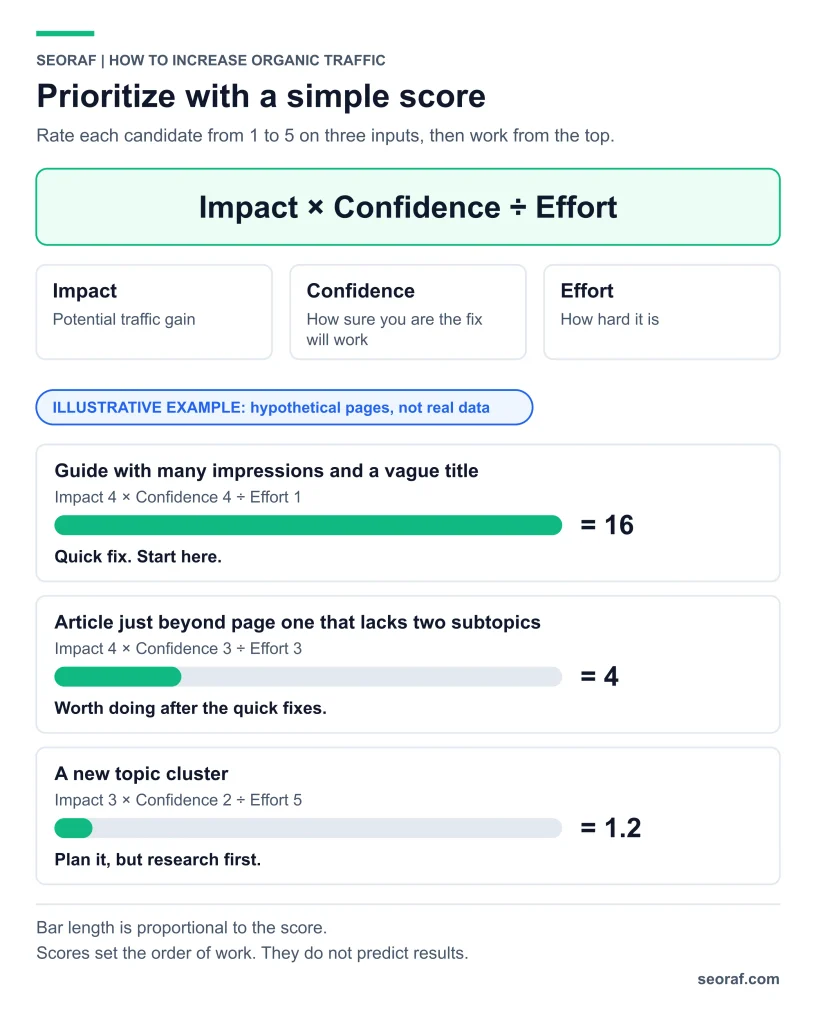
Illustrative scoring example — hypothetical pages, not real data
| Candidate | Impact | Confidence | Effort | Score | Interpretation |
|---|---|---|---|---|---|
| Guide with many impressions and a vague title | 4 | 4 | 1 | 16 | Potential quick fix; investigate first |
| Article beyond page one that lacks two relevant subtopics | 4 | 3 | 3 | 4 | Potential improvement after quick fixes |
| A new topic cluster | 3 | 2 | 5 | 1.2 | Research the opportunity before committing resources |
Output of this step: a ranked list of five to ten opportunities, each with a proposed action and a reason for prioritization.
Step 3: Improve the pages you already have
Existing pages that already earn impressions can be useful candidates for improvement because Search Console provides evidence about their visibility and queries. Whether updating them is the best use of time depends on the problem and the likely effort. This is a SEORAF recommendation, not a Google-documented timeline or guarantee.
Check intent against the live results
Search the target query and examine the page types that appear: guides, product pages, comparisons, videos, or forum discussions. Note what these pages answer and what your page misses. If your page type does not fit the apparent intent, consider revising it or creating a distinct page when the need is genuinely different.
Illustrative example: a sales page titled “Email Marketing Services” appears beyond page one for “how to write a welcome email,” while the results are tutorials with examples. Adding the query phrase to the sales page is unlikely to resolve the mismatch. A tutorial that answers the question, linked naturally from the sales page, may be more appropriate.
Write titles and snippets for people
Google documents: the title link and snippet shown in Search may differ from the title and description you provide. Google can generate title links using several sources, and snippets are primarily generated from page content. See Google’s title-link guidance and snippet guidance.
SEORAF recommendation: write a specific, accurate title that reflects the page’s actual value. Put a clear answer near the beginning when it helps readers. Improving a title may affect how people respond to a result, but CTR should not be treated as a confirmed direct ranking factor or as a guarantee of more traffic.
Illustrative title rewrite: “Widgets Guide” becomes “How to Choose a Widget: Five Questions to Ask Before You Buy,” provided the page really answers those questions.
Fill the gaps that matter
- Correct facts, screenshots, or steps that have become outdated.
- Answer relevant questions the page currently misses.
- Add original evidence or first-hand detail only when it genuinely exists.
- Bring an important answer forward when readers currently have to search for it.
- Add useful contextual links to and from related pages.
Google documents: there is no ideal word count for a page. Add information that helps readers, not words added merely to reach a target. See Google’s people-first content guidance.
Handle dates honestly
Update the visible publication or modification date when it accurately reflects the content’s history. Do not change a date simply to make an unchanged page look fresh. When appropriate, briefly explain the substantive improvements made.
Decide: update, merge, remove, or leave alone
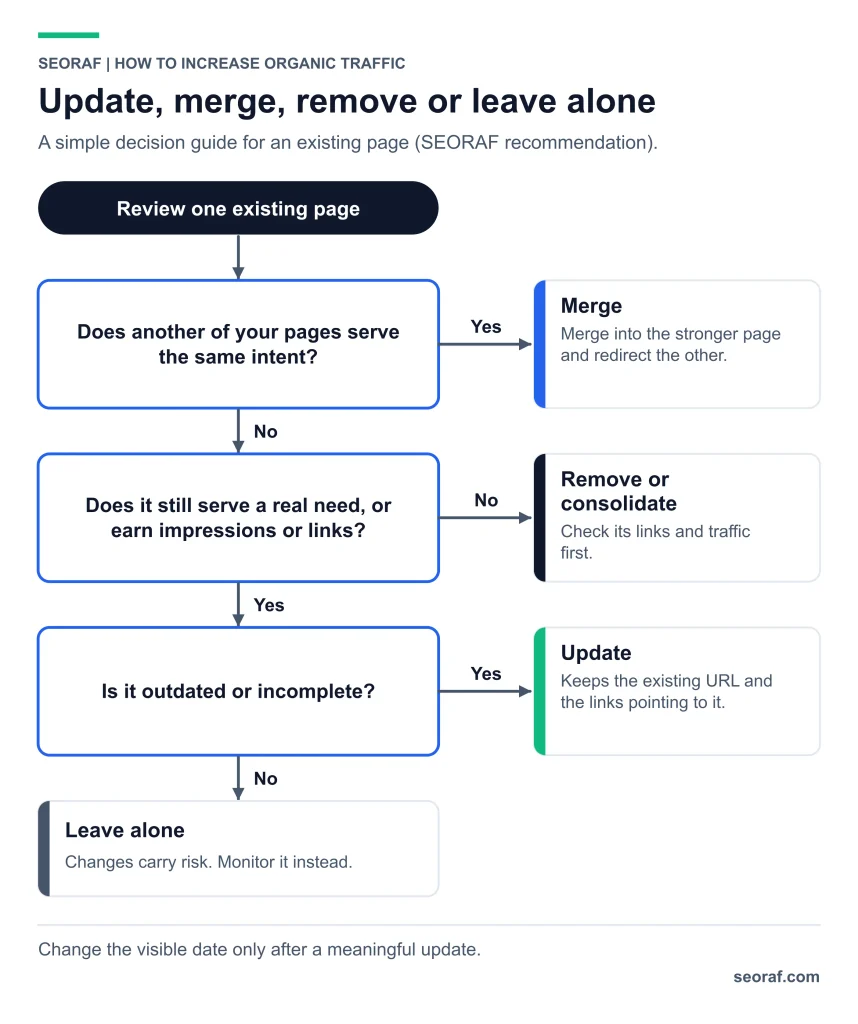
A simple decision guide — SEORAF recommendation
| Situation | Possible action | Reason |
|---|---|---|
| Right topic and intent, but outdated or incomplete | Update | Retains the existing URL and its relevant history and links |
| Two pages serve substantially the same intent | Consider merging and redirecting the retired URL | May simplify navigation and reduce unnecessary overlap |
| A page serves no clear need and has no meaningful traffic or links | Evaluate consolidation or removal | Reduces maintenance, after checking for other value and dependencies |
| A page performs well and still satisfies its intent | Leave it alone and monitor | Unnecessary changes can introduce risk |
Do not remove a page solely because it has few impressions. Check its purpose, links, conversions, and relationship to other pages before making a decision.
Step 4: Create content that adds something new
Publish a new page when no existing page serves the query’s intent and you can create a useful, distinct resource. Otherwise, consider improving or consolidating existing content.
Write a short brief first
- Who is the reader, and what are they trying to accomplish?
- What page types and formats appear in current search results?
- What important questions remain unanswered?
- What useful information can this page contribute?
- Which authoritative sources support its factual claims?
- Who created the content, how was it created, and why does it exist?
What “something new” can honestly be
Original value can take several forms: data collected through a genuine process, a documented workflow, a useful template, a clearer explanation, or input from a qualified person who has agreed to contribute. Not every article needs original research, but it should offer real value appropriate to its purpose.
SEORAF recommendation: distinguish first-hand work from sourced information. Never imply personal experience, testing, or results that cannot be substantiated.
Avoid pages made for query variations
Google documents: scaled content abuse includes generating many pages primarily to manipulate Search rankings rather than help people, regardless of whether the content is produced by automation, people, or both. Creating a separate page for every small query variation can also create unnecessary duplication. See Google’s spam policies.
SEORAF recommendation: group queries by genuine shared intent, but keep distinct user needs on distinct pages when necessary. For page-level writing and optimization, see SEORAF’s Content SEO Guide.
Step 5: Remove crawling and indexing blockers
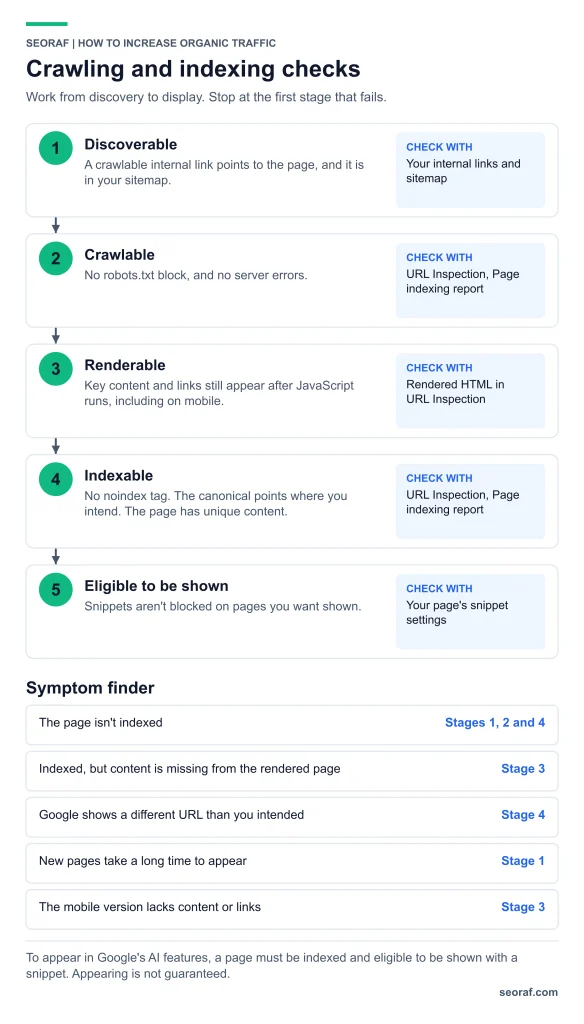
A page needs to be discoverable, crawlable, indexable, and relevant to a query to earn organic search traffic. Passing a technical check does not guarantee indexing or ranking, but fixing access problems can remove barriers that would otherwise prevent visibility.
Check indexing status
- Open URL Inspection in Search Console for an important page and review its reported indexing status.
- Open the Page indexing report to investigate indexed and non-indexed URLs.
- Check for unintended robots.txt restrictions, a noindex directive, and canonical signals that point away from the intended URL.
- Confirm that the page can be discovered through relevant, crawlable internal links.
- If important content depends on JavaScript, compare the rendered page with the content and links you expect Google to see.
For AI search visibility, also check Google’s current eligibility requirements. A page that is not eligible to appear with a snippet cannot qualify for these generative AI search features. Eligibility alone does not guarantee inclusion.
Triage common problems
Indexing triage: symptoms,possible causes, and where to look
| Symptom | Possible causes | Where to check |
|---|---|---|
| The page is not indexed | Noindex, crawl restrictions, canonical signals, server errors, weak discovery, or other indexing decisions | URL Inspection and Page indexing report |
| Important content is missing from the rendered page | JavaScript rendering or resource problems | URL Inspection rendered HTML and the JavaScript SEO checklist |
| Google selects a different URL | Duplicate URLs or conflicting canonical signals | URL Inspection and canonical declarations |
| A new page has not appeared in Search | Discovery, crawling, rendering, or indexing may be delayed or unsuccessful | URL Inspection, internal links, sitemap, and server status |
| The mobile version lacks important content or links | Content is hidden or omitted on mobile | Mobile rendering and page implementation |
To understand how discovery, crawling, rendering, and indexing differ, read SEORAF’s Crawling in SEO guide. Google primarily uses the mobile version of a page’s content for indexing, so important information and links should remain available on mobile.
Do page-experience work your data justifies
Google documents: Core Web Vitals are used by Google’s ranking systems. The recommended good-experience thresholds are:
- Largest Contentful Paint (LCP): 2.5 seconds or less.
- Interaction to Next Paint (INP): less than 200 milliseconds.
- Cumulative Layout Shift (CLS): less than 0.1.
INP replaced First Input Delay as a Core Web Vital in March 2024. Google also explains that good Core Web Vitals results do not guarantee top rankings and that page experience involves more than these metrics. See Core Web Vitals and page experience in Search.
SEORAF recommendation: investigate real performance problems using field data and improve the experience for visitors. Do not assume that improving a score by itself will increase organic traffic.
Step 6: Strengthen internal links and credibility
Internal links help readers and crawlers discover related pages. Clear authorship, accurate sourcing, and transparent editorial practices help readers assess credibility. Neither substitutes for useful content.
Use internal links on purpose
- List the pages from Step 2 that you want to improve.
- Find relevant existing pages that can naturally introduce those topics.
- Add a contextual link where it genuinely helps readers continue learning.
- Use descriptive, natural anchor text rather than “click here” or repetitive exact-match phrases.
- Use crawlable HTML links, following Google’s guidance on crawlable links.
- Look for important pages with no incoming internal links and decide whether they need better discovery or a different role on the site.
Illustrative example: a keyword research guide discusses search intent and links from that discussion to a more detailed guide on the same subject. The link uses descriptive anchor text because that helps the reader understand the destination, not because a particular anchor guarantees rankings.
Plan clusters honestly
Grouping related pages around a topic can help you organize coverage, identify gaps, and avoid overlapping pages. “Topic cluster” and “topical authority” are industry terms; this guide does not treat them as confirmed Google ranking factors. If two pages serve the same intent, evaluate whether they should be differentiated or consolidated.
Earn external links carefully
Links from other websites can introduce readers to your content and help search engines discover pages. Google’s spam policies prohibit link schemes intended to manipulate rankings, including buying or selling links for ranking purposes. Focus on creating resources that people may find worth referencing rather than relying on guaranteed link-building outcomes.
Make trust visible
- A byline that accurately represents the author’s background.
- Publication and update dates that reflect the page’s real history.
- Sources near important factual claims.
- A clear explanation of how the content was produced when useful.
- Disclosure of relevant commercial relationships.
Google documents: E-E-A-T is not itself a specific ranking factor, although Google’s systems use a variety of signals to identify helpful content. Trust is the most important aspect of E-E-A-T. Google’s people-first guidance also encourages publishers to consider who created content, how it was created, and why it exists.
Source: Creating helpful, reliable, people-first content.
Step 7: Measure what is working
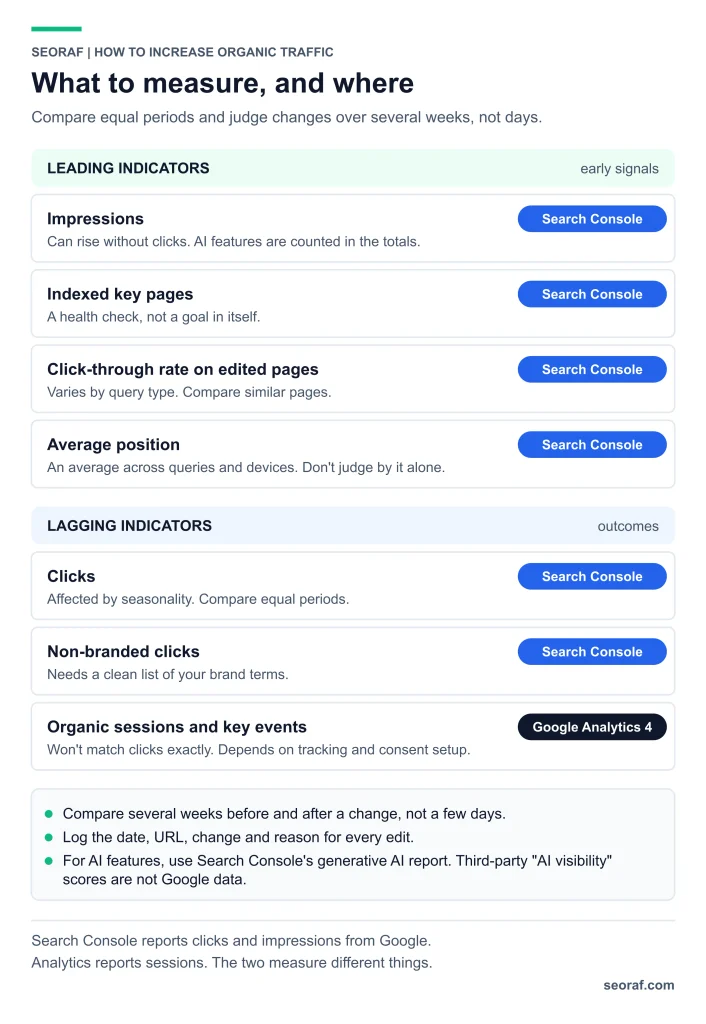
Evaluate progress by comparing equivalent periods, tracking your changes, and checking whether the intended outcome occurred. Avoid drawing conclusions from a few days of data or a single average-position number.
Metrics to track, where to find them, and how to interpret them
| Metric | Role | Where | Caution |
|---|---|---|---|
| Impressions | Visibility indicator | Search Console Performance report | Can rise without clicks; totals include supported AI search activity |
| Indexed key pages | Technical health check | Page indexing report and URL Inspection | Indexing alone is not a traffic goal |
| Click-through rate on edited pages | Search-result response | Search Console | Interpret by query, position, device, and result layout |
| Average position | Visibility indicator | Search Console | An aggregate metric that should not be judged alone |
| Clicks | Search traffic outcome | Search Console | Can change with seasonality, demand, and result layouts |
| Non-branded clicks | Discovery outcome | Search Console query filters | Requires a sensible list of brand terms |
| Organic sessions and key events | On-site outcome | Google Analytics 4 | May differ from Search Console clicks because the tools measure different things |
Keep a change log
Record the date, URL, change, and reason for each important edit. This makes it easier to compare performance before and after changes, although it does not prove causation. Compare several weeks of data when appropriate and consider seasonality and other changes that occurred during the same period.
Google’s core updates guidance explains how to assess changes in Search performance. Avoid assuming that every fluctuation is caused by an update or that every content improvement will produce an immediate effect.
Measure AI features with the appropriate tool
Use the Generative AI performance report in Search Console where available to examine reported visibility from supported AI features. Compare it with your broader search performance and baseline. Third-party AI visibility scores are separate measurements and should not be described as Google’s internal ranking data.
Baseline worksheet
Copy this worksheet into a spreadsheet and record the date range
| Field | What to record |
|---|---|
| Date range and comparison period | Complete months and, where useful, the same period last year |
| Site totals | Clicks, impressions, click-through rate, and average position |
| Non-branded clicks | Clicks after filtering out identified brand queries |
| Top pages by clicks | The ten pages most relevant to your current goals |
| High impressions, relatively low CTR | Pages that underperform comparable pages after accounting for intent and position |
| Queries beyond page one | Query, page, impressions, and average position |
| Indexing status | Current status of each important URL |
| Organic key events | Relevant Google Analytics 4 events, if tracked |
| Planned changes | Date, URL, change, and reason |
Troubleshooting: when traffic does not move
Symptoms, possible causes, checks, and next actions
| Symptom | Possible causes | How to check | What to do |
|---|---|---|---|
| Impressions are flat | Indexing problems, limited topic coverage, lower demand, or seasonality | Page indexing report and year-over-year comparisons | Fix confirmed blockers and investigate relevant topic gaps |
| Impressions rise but clicks remain flat | Query mix, title/snippet mismatch, low positions, or changes to the results layout | Query-level metrics and current search results | Review intent and titles without assuming CTR is a ranking factor |
| Average position improves but clicks do not | Seasonality, a changing query mix, or a different results layout | Query-level data and comparable date ranges | Evaluate clicks, impressions, and the value of the queries |
| A sudden drop | Technical errors, tracking changes, search updates, demand changes, or a policy action | Search Console messages, indexing reports, and Google’s traffic-drop troubleshooting guide | Diagnose before making sweeping changes |
| Traffic arrives for irrelevant queries | The page’s purpose is unclear or its content does not meet the intent | Page-level query data and the actual page | Clarify the purpose or separate genuinely distinct intents |
| Two pages appear for the same query | Overlapping intent or similar content | Search Console query filter and Pages tab | Assess whether the pages need differentiation or consolidation |
| Analytics and Search Console disagree | Different metrics, attribution, tracking, consent, or date settings | Metric definitions and reporting configurations | Use Search Console for search performance and Analytics for on-site behaviour |
Step 8: Repeat the cycle
Treat organic traffic improvement as an ongoing process rather than a one-time project.
- Weekly: check Search Console messages, indexing issues, and unusual performance changes.
- Monthly: update the baseline, review the priority list, and choose the next manageable tasks.
- Quarterly: check overlapping pages, outdated information, broken links, and relevant changes to official documentation.
A realistic first month
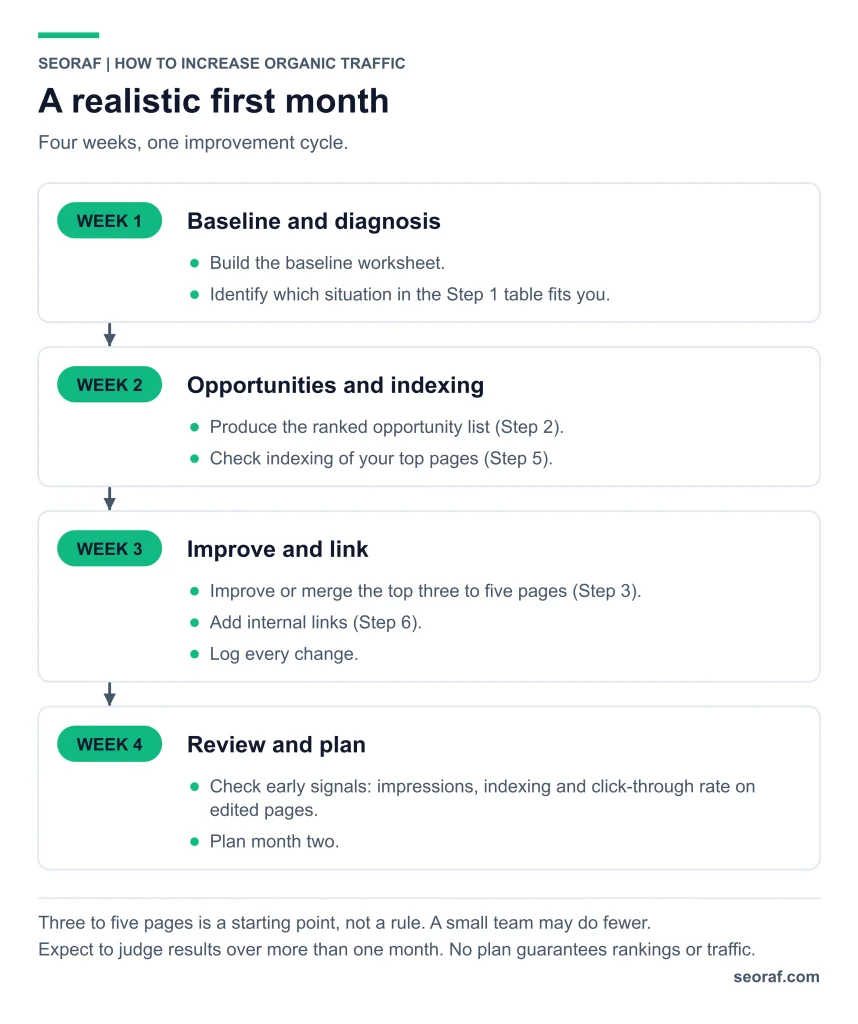
- Week 1: create the baseline worksheet and identify the main traffic problem.
- Week 2: rank the opportunities and inspect indexing for important pages.
- Week 3: improve or consolidate a manageable number of pages, add relevant internal links, and record the changes.
- Week 4: review early signals such as impressions, indexing, and CTR on edited pages, then plan the next cycle.
Three to five pages can be a practical starting point, not a universal target. The appropriate workload depends on your available time and the complexity of each change. A month is enough to review implementation and early signals, but not necessarily enough to judge the final traffic effect.
Common advice versus Google’s documentation
Popular claims compared with documented guidance
| Common advice | What Google documents | Takeaway |
|---|---|---|
| Add FAQ schema to win rich results | FAQ rich results stopped appearing in Google Search in May 2026; HowTo rich results were deprecated in 2023 | Keep useful FAQs for readers, not as a promise of a rich result. See documentation updates and the FAQ and HowTo announcement. |
| Write at least a fixed number of words | Google says there is no ideal page length | Cover the subject adequately without padding. See people-first content guidance. |
| Change the date to look fresh | Google’s content guidance cautions against changing dates without substantial updates | Make dates reflect the real content history. |
| Publish a page for every query variation | Scaled content abuse includes generating many pages primarily to manipulate rankings rather than help users | Build pages around genuine needs. See Google’s spam policies. |
| Create llms.txt or split every page into tiny chunks for Google AI | Google says neither is required for Google Search | Prioritize accessible, useful content and established SEO practices. See the AI features guide. |
| Good Core Web Vitals guarantee higher rankings | Core Web Vitals are used by ranking systems, but good scores do not guarantee top rankings | Fix meaningful user-experience problems without promising a ranking jump. |
| E-E-A-T is a score you can optimize | E-E-A-T is not itself a specific ranking factor; trust is its most important aspect | Make authorship, sources, and editorial purpose clear. See Google’s content guidance. |
Frequently asked questions
How long does it take to increase organic traffic?
There is no reliable universal timeline. Results depend on the issue being addressed, competition, crawling and indexing, search demand, and other changes in Search. Review implementation and early signals over several weeks, then assess longer-term results using comparable periods. A change in performance does not by itself prove that a particular edit caused it.
What is the fastest way to increase organic traffic?
Start by investigating relevant pages that already earn impressions. Check whether their titles accurately describe the content, whether the page satisfies search intent, whether important information is missing, and whether relevant internal links exist. This is a SEORAF prioritization recommendation, not a documented timeline or guarantee.
Do I need backlinks to increase organic traffic?
External links may help people discover your content and can be relevant to search visibility. Their importance varies by query and competitive context. Review the pages ranking for your target queries, improve your own content and accessibility, and avoid buying or selling links to manipulate rankings. No single backlink strategy guarantees traffic.
Should I update old content or publish new content?
Update an existing page when it serves the right intent but needs meaningful improvements. Consider a new page when no current page meets a distinct search need and you can offer useful coverage. If two pages substantially overlap, assess whether they should be differentiated or consolidated.
Does AI search make organic traffic less worthwhile?
Google says established SEO best practices remain relevant to its generative AI search features. Search Console reporting can help you examine supported AI-feature visibility, but visibility does not guarantee clicks or conversions. Evaluate your own search and on-site data rather than assuming AI search has a uniform effect on every topic.
Next step
Open Search Console and complete the baseline worksheet in Step 7. Identify your three highest-priority opportunities, document why each matters, and make changes one at a time where practical. Record the date and review comparable performance data before deciding what to do next.
Sources and further reading
Google documentation changes over time. Verify time-sensitive details against the current source before relying on them.
- Creating helpful, reliable, people-first content
- Optimizing a website for generative AI features on Google Search
- AI features and your website
- Title links in Search results
- Snippets in Search results
- Core Web Vitals
- Understanding page experience in Search
- Core updates
- Spam policies for Google web search
- Debugging drops in Search traffic
- Using Search Console and Google Analytics data for SEO
- Making links crawlable
- Google Search documentation updates
- Changes to HowTo and FAQ rich results
- Generative AI performance reports announcement
- Page indexing report — Search Console Help
- Generative AI performance report — Search Console Help
- Search generative AI features requirements — Search Console Help
About this guide
Written by Mousume Akter, Founder & Editor of SEORAF. SEORAF is an independent SEO knowledge resource, not an agency, and it does not sell rankings or guarantee traffic. This guide contains no affiliate links, client case studies, or reported traffic results. Its examples are illustrative. SEORAF’s Editorial Policy, Affiliate Disclosure, and contact page are linked in the site footer. If you identify an error, please report it so it can be reviewed and corrected.