
Moz Software Explained: Products, Pricing and Who It’s For (2026)
Affiliate disclosure: This article contains affiliate links to Moz. If you buy through them, SEORAF may earn a commission at no extra cost to you. That does not change what I write: the limits, the alternatives and the cases where you should skip Moz are covered in full. Read the affiliate disclosure.
Search for “Moz software” and you will find plenty of reviews, price lists and feature tours. Many of them focus on Moz Pro alone, yet Moz sells a small family of products. The question behind your search is usually simpler: which of these, if any, do I actually need, and what will it cost me?
This guide maps the Moz product line, explains how the tools work, walks through the main Moz Pro capabilities, lays out current published pricing and says plainly where Moz fits and where you would be better off elsewhere. For a verdict-style opinion, see my full Moz review. For depth on the main subscription, see my Moz Pro review.
Moz Software at a Glance
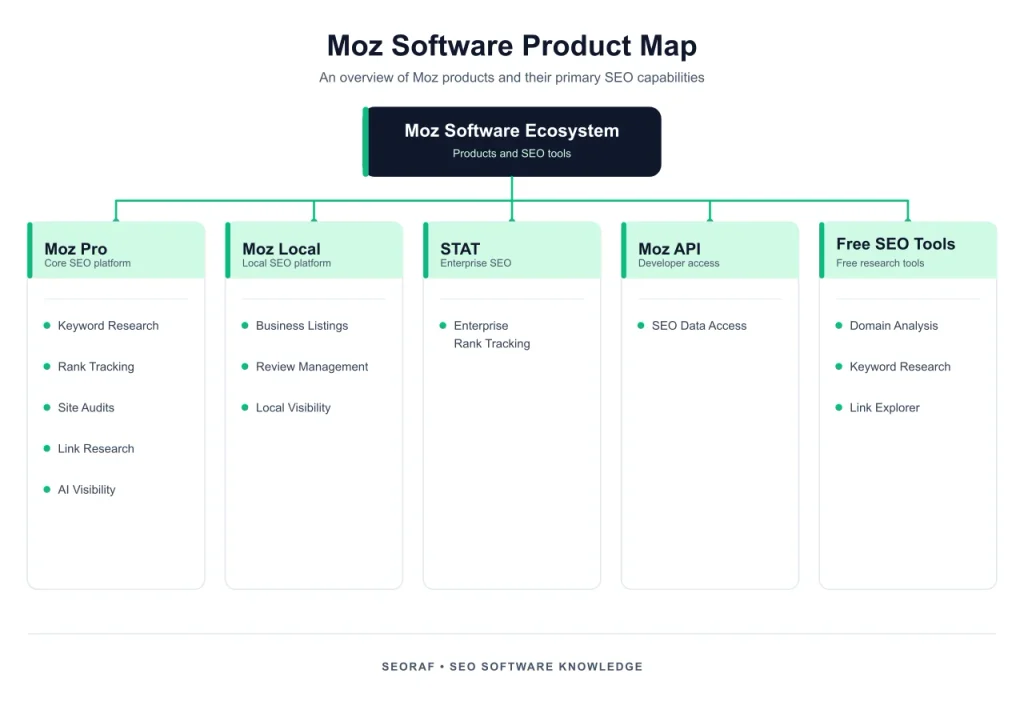
The short answer: Moz software is a family of SEO products from Moz. Moz Pro covers keyword research, rank tracking, site audits, link analysis and AI visibility tracking. Moz Local manages business listings and reviews for local businesses. STAT, the Moz API and Moz Data serve enterprise and developer use cases. Free tools such as MozBar fill some of the gaps. Moz Pro is the flagship product and the one most reviews focus on.
- Best for: beginners, small teams, freelancers and businesses that want an established SEO toolkit and access to Moz metrics such as Domain Authority.
- Less suitable for: teams that need extensive keyword or backlink datasets, or users who depend on third-party website traffic estimates.
- Moz Pro starting price: $49/month for the entry-level single-website option. Standard starts at $99/month, with lower monthly equivalents on annual billing.
- Free options: a free Moz account with limited queries, MozBar and selected free checkers. Moz Pro’s main subscription plans are paid.
Quick picks:
- Only need occasional Domain Authority lookups: start with the free tools.
- Need local listings and review management: look at Moz Local.
- Need SEO research and tracking in one place: look at Moz Pro.
- Need extensive keyword research or competitor traffic estimates: compare Ahrefs or Semrush before choosing.
Research note: I did not test Moz hands-on for this article, and I will not pretend otherwise. Product descriptions and pricing are based on Moz’s published product information and independent sources. Where I could verify a detail on Moz’s own website, I prioritize that information. Where a claim comes only from third-party reporting, I label it accordingly.
How to read the labels: Moz-stated means information published by Moz about its own products. Reported means an independent reviewer or directory has published the information. My view is my editorial judgment, not a hands-on test result.
What Is Moz Software?
Moz in brief
Moz began in Seattle in 2004 as SEOmoz, a blog and community started by Rand Fishkin and Gillian Muessig. It grew into a software company and became widely known for the Domain Authority metric and its educational content. Independent sources report that iContact acquired Moz in 2021.
The Moz product map
| Product | What it does | Typically suits | Go deeper |
|---|---|---|---|
| Moz Pro | Keyword research, rank tracking, site crawls, link analysis and AI visibility tracking | Small sites, freelancers and small agencies | Moz Pro review |
| Moz Local | Business listings, local visibility and review management | Local and multi-location businesses | Local SEO software comparison |
| STAT | Large-scale rank tracking and SERP monitoring | Enterprises and larger agencies | Moz STAT product information |
| Moz API | Programmatic access to link and authority metrics | Developers and tool builders | Moz API guide |
| Moz Data | Data solutions built around Moz’s SEO datasets | Data and technology teams | Moz product information |
| MozBar and free tools | Quick browser metrics, Domain Analysis and limited research tools | Anyone who needs occasional checks | See the free tools section below |
Product overview based on Moz’s product information and independent reviews. Availability and packaging can change; confirm the current product line on Moz’s website.Moz softwareMoz ProMoz LocalMozBar & free toolsSTATMoz APIMoz DataSEO research and trackingListings and reviewsQuick checksEnterprise rank trackingLink and metric dataCustom datasetsOriginal SEORAF diagram: the Moz product line grouped by the job each product does.
Which products most readers can ignore
If you run one website, Moz Pro or the free tools may be the only products you need to consider. If you run a business with physical locations, Moz Local may matter more than Moz Pro. STAT, Moz Data and the API are aimed at larger or more technical use cases, so most individual site owners can skip them unless they have a specific need.
How Moz Works
The data underneath
Moz uses its own datasets for link analysis, keyword research and search-result information. These datasets support features such as Link Explorer, Keyword Explorer and Domain Overview. The size and coverage of any SEO database can change, and different providers count keywords, links and indexed records in different ways. A headline database number alone does not establish which tool has the most useful data for a particular website or market.
Independent reviewers have compared Moz’s link data with other SEO platforms and found that coverage can vary from one domain to another. The practical lesson is simple: every index sees only part of the web, so cross-check important link and keyword decisions in a second source when accuracy matters.
Moz’s own metrics
- Domain Authority (DA) is a 1-to-100 score that estimates how likely a domain is to rank compared with other domains. Page Authority (PA) is the page-level version.
- Spam Score estimates how closely a site resembles other sites associated with spam-related characteristics. It is a signal to investigate, not proof that a site is harmful.
- Priority combines keyword metrics to help users compare potential keyword opportunities. Check the current Keyword Explorer documentation for the exact inputs used in the score.
One caution matters more than the rest. Moz says Domain Authority is not a Google ranking factor, and Google’s John Mueller has also explained that Google does not use Moz’s DA score. Use DA to compare sites within Moz or as one piece of context when reviewing link prospects. Do not treat it as a score to chase or a substitute for organic performance data.
The campaign model
Moz Pro organizes much of its ongoing site tracking around campaigns. A campaign connects a website with the keywords and competitors you want to monitor. The number of campaigns, tracked sites, keyword rankings and other limits depends on the subscription. Moz also provides certain on-demand tools, but the availability and usage limits differ from campaign-based features. Check the current plan comparison before assuming a particular task is included.
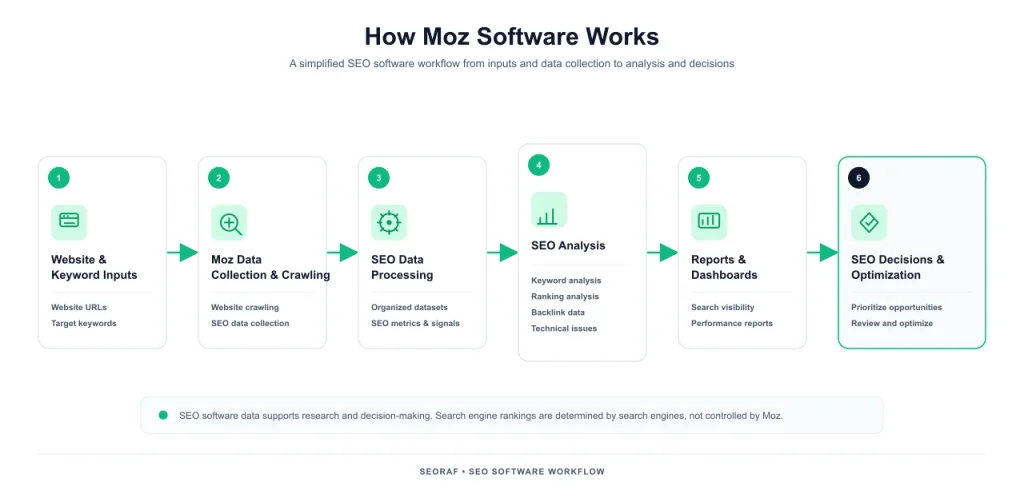
Moz dataMoz metricsYour campaignReports and actionsLink index, keywords and SERP dataDA, PA, Spam Score and PrioritySite, keywords and competitorsAudits, tracking and researchOriginal SEORAF diagram: a simplified view of how Moz data becomes decisions.
Moz Pro Features: What You Get
Moz Pro bundles several SEO jobs: finding keywords, tracking rankings, auditing a site, analyzing links and monitoring AI visibility on eligible plans. Below is what each feature does, where it may be useful and what to check before relying on it. The example scenarios are illustrative, not results from my own testing.
Keyword research capabilities
Keyword Explorer provides keyword research information such as estimated monthly search volume, difficulty, organic click potential, search intent and SERP features. Moz also provides topic-oriented keyword research features to help users explore related ideas rather than researching only one phrase at a time.
Strengths: the interface presents several useful keyword indicators together, which can make initial research easier to understand. Limits: search-volume and difficulty figures are estimates, not guarantees of traffic or ranking outcomes. Available queries, keyword lists and results depend on the plan. The current pricing comparison lists monthly keyword-query allowances of 150 for Standard, 5,000 for Medium and 15,000 for Large; these are query limits, not the same thing as the number of tracked keyword rankings.
Example scenario: a small bakery owner wants blog topics. She enters “sourdough”, reviews the intent and difficulty information, and shortlists a few informational phrases for further research. That is a reasonable use of a keyword tool. A publisher planning thousands of long-tail terms should compare export, list and query limits before choosing a plan. For a method to evaluate keyword opportunities, see my guide to low-competition keywords.
Rank tracking
Within a campaign, Moz Pro tracks selected keywords so users can review ranking changes over time. Location settings can also matter for local businesses that want to understand visibility in a particular market. Moz separately lists on-demand rank-checker query allowances in its plan comparison: 200 queries per day on Standard and Medium, and 500 per day on Large. These are query allowances; they should not be confused with a promise that every tracked keyword updates daily.
Limit to check: confirm the search engines, locations, device settings and update frequency available for the specific tracking feature you intend to use. If daily ranking data is essential to your workflow, compare the current feature documentation and plan limits with dedicated rank-tracking tools. My overview of rank tracking software explains what to compare.
Example scenario: a freelancer tracks a selected group of keywords for a client’s café in one city, then reviews changes after important website updates. The data can help identify patterns, but it does not explain every ranking movement by itself.
Site auditing
Site Crawl checks a campaign website for technical and on-page issues such as broken internal links, duplicate titles, missing metadata and crawl problems. The on-page grader can help review an individual page against a target keyword. The number of pages crawled and the available crawl features depend on the selected plan.
Limits: a crawler is only one part of technical SEO. It does not replace browser testing, server-log analysis, performance measurement or manual review of important pages. In my view, Moz can be a useful starting point for a small site’s routine checks, but it should not be treated as a complete technical audit by itself. See my guide to fixing Core Web Vitals for performance work, or try a free SEO audit tool.
Link analysis
Link Explorer provides backlink information such as linking domains, anchor text, new and lost links, Domain Authority and Page Authority. Link intersect-style research can help identify websites that link to competitors but not to your own site. The exact query and result allowances vary by plan.
Limits: backlink databases are incomplete by nature, and different providers may discover different links. Spam Score is not a direct measurement of an individual link’s toxicity. Treat it as a reason to investigate a site, not as an automatic reason to reject or disavow a link.
Example scenario: you use link intersect research to find websites that link to two competitors but not to you. You review the list manually and contact only the relevant sites with a useful reason to connect. Link building done this way takes time and offers no guarantee of rankings.
AI visibility and reporting
Moz Pro’s current Standard, Medium and Large plans include AI visibility tracking. Moz lists GPT, Gemini and Google AI Mode as the tracked AI models. The published allowances are 3 dashboards and 150 tracked prompts on Standard, 6 dashboards and 300 prompts on Medium, and 12 dashboards and 600 prompts on Large. Prompt tracking is listed as weekly, and the plans also include different monthly AI content-brief allowances.
Limits: AI visibility metrics are observations of how a brand or website appears in selected AI experiences; they are not a promise that a brand will be cited or recommended. The models and feature limits can change, so check the current Moz Pro pricing and feature comparison before buying. For connecting reports to your own performance metrics, see my SEO KPI dashboard guide.
Moz Software Pricing and Plans
Pricing verification: Moz Pro prices and the plan limits below were checked against Moz’s published pricing page on November 10, 2026. Prices are in US dollars. Moz Local prices are identified as reported and should be confirmed on its official pricing page before purchase. Taxes, regional availability and future price changes may affect the final amount.
Moz Pro plans
| Plan | Monthly billing | Annual billing (monthly equivalent) |
|---|---|---|
| Starter | $49 | Not listed on the current pricing page |
| Standard | $99 | $79/month ($950 billed for the first year) |
| Medium | $179 | $143/month ($1,719 billed for the first year) |
| Large | $299 | $239/month ($2,868 billed for the first year) |
| Enterprise | Custom pricing; contact Moz | |
Moz Pro pricing published on Moz’s official pricing page, checked November 10, 2026. Annual figures are monthly equivalents; the full first-year amount is shown where published. Starter is listed at $49/month, but an annual equivalent is not displayed on the page.
The Starter option is described by Moz as an entry-level solution for individuals managing a single website. The Standard, Medium and Large plans add higher limits for tracked sites, keywords, users, crawling and research. The table below summarizes selected published limits; it is not a complete list of every feature or quota.
| Plan | Tracked sites | Tracked keywords | Included users | AI dashboards | AI prompts | AI briefs/month |
|---|---|---|---|---|---|---|
| Starter | 1 | Not listed in the public comparison | Not listed in the public comparison | Not listed | Not listed | Not listed |
| Standard | 3 | 300 | 1 | 3 | 150 | 2 |
| Medium | 10 | 1,500 | 2 | 6 | 300 | 10 |
| Large | 25 | 3,000 | 3 | 12 | 600 | 50 |
Selected limits from Moz’s official Pro plan comparison, checked November 10, 2026. Moz lists three tracked AI models—GPT, Gemini and Google AI Mode—with weekly prompt tracking on Standard, Medium and Large. Starter limits not shown in the public comparison are marked as not listed rather than estimated.
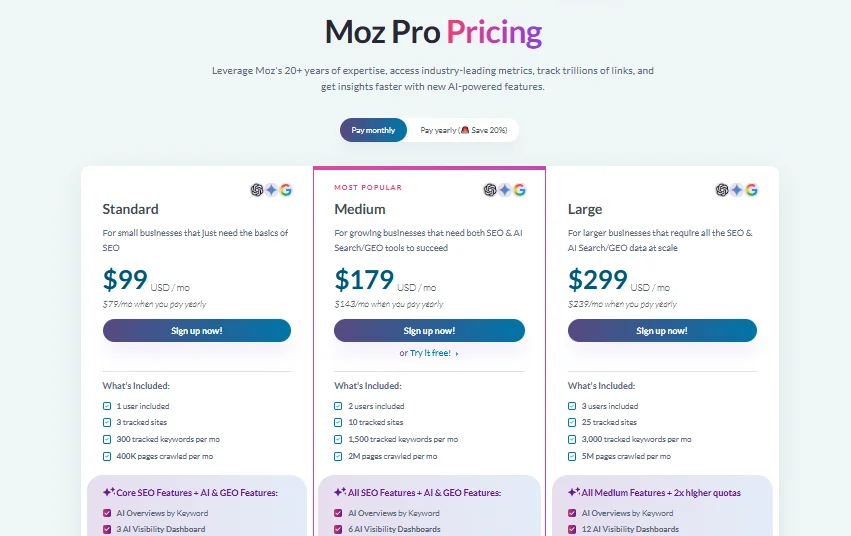
Other published limits include 400,000, 2 million and 5 million pages crawled per month on Standard, Medium and Large respectively. The comparison also lists 100,000, 500,000 and 1.25 million pages crawled per week. These are separate displayed measures in Moz’s plan information, so check the wording and current quota for the feature you intend to use.
Affiliate link. Prices, plan limits and trial terms are set by Moz and can change. Check the official pricing page before subscribing.
Moz Local pricing
Moz Local is priced per location rather than as one unlimited account for every branch. Recent independent pricing sources report three main self-serve tiers plus a custom Enterprise option. The figures below are third-party reported prices, not a live price quote. Confirm the current amount, location eligibility and included features on Moz Local’s official pricing page before buying.
| Plan | Monthly billing | Annual billing | What it adds (reported) |
|---|---|---|---|
| Lite | $20 per location | $199/year per location | Listing distribution, review monitoring, Local Grid and data-health features |
| Preferred | $30 per location | $299/year per location | Lite features plus review responses and additional reputation or social features |
| Elite | $40 per location | $399/year per location | Higher-tier social, reporting and selected AI features |
| Enterprise | Custom pricing | ||
Reported Moz Local prices from independent pricing references checked in 2026. Annual totals are per location. Features and add-ons can vary; verify the current offer directly with Moz.
If local visibility is your main goal, my Google Business Profile checklist is a useful companion. Listing tools can help manage business information across directories, but they do not replace a complete and well-maintained Google Business Profile.
STAT, Moz API and Moz Data
STAT, Moz API and Moz Data are aimed at larger or more technical buyers. Their pricing and usage terms depend on the product, volume and business requirements. Some third-party reviews publish indicative starting prices for STAT or API access, but those figures may not represent a current quote or the full cost of a particular use case. Contact Moz for current product availability, quotas and pricing.
Moz free trial, free tools and paid plans
There are three kinds of “free” here, and they are easy to confuse:
- Free tools and account: Moz offers a free account and selected free tools, including limited access to some research features and MozBar. The number of available queries and reports can be restricted. Check the current free-account limits before relying on them for regular work.
- A paid-plan trial: Moz’s pricing page displays a “Try it free” option for the Medium plan. The public pricing information does not clearly establish the trial duration, payment-card requirement or post-trial billing conditions. Read the signup and checkout terms carefully before starting.
- Paid plans: the Moz Pro subscriptions listed above. Do not assume that a trial or free account includes every feature or quota in a paid plan.
Free toolsFree accountPlan trialPaid planMozBar and selected checkersLimited research accessCheck duration and billing termsMoz Pro or Moz LocalOriginal SEORAF diagram: the Moz free-to-paid ladder. Bars widen as cost and commitment rise. Trial terms can change, so verify them before signing up.
Costs beyond the sticker price
- Additional AI visibility dashboards: Moz lists an additional dashboard at $20 each on the published Pro plan comparison.
- Additional tracked prompts: Moz lists $50 per 100 additional prompts.
- Extra users, campaigns and other usage: check the current plan comparison and any overage terms. Do not assume every additional item has the same price across plans.
- Moz Local add-ons: some AI-related features may be sold separately depending on the plan. Check the current Local pricing page for the add-ons that apply.
How to start a Moz trial without surprises
- Read Moz’s current pricing and signup pages. Identify which plan carries the trial, how long it lasts and whether a payment card is required.
- Check which plan will be billed when the trial ends and the exact amount and billing frequency.
- Set a reminder before the trial end date if you do not want the subscription to continue.
- List what you need to evaluate before you start: add your site as a campaign, review a crawl, research a few keywords, set up rank tracking and inspect a report.
- If you decide not to continue, follow Moz’s current cancellation process and keep the confirmation for your records.
When you are ready, check Moz’s current plan and trial terms (affiliate link). Read the plan, trial duration, payment-card requirement and renewal conditions on the signup page before proceeding.
Advantages and Limitations
Where Moz is strong
- Approachable learning resources. Moz is known for its educational material, including Moz Academy and the Beginner’s Guide to SEO. The learning resources can help users understand SEO concepts alongside the software.
- A familiar industry metric. Domain Authority is widely recognized in SEO discussions and outreach, even though Google does not use it as a ranking factor.
- A connected SEO workflow. Keyword research, rank tracking, site crawling and link analysis are available within one product family.
- Plan-based capacity. Standard, Medium and Large offer different allowances for tracked sites, keywords, users, crawling and research.
- AI visibility features. Moz Pro includes tracked AI prompts, dashboards and AI content briefs on its published Standard, Medium and Large plans.
Independent review platforms publish customer ratings for Moz, but ratings change over time and depend on who leaves a review. Treat them as one source of user feedback, not proof that the product will fit your workflow.
Where Moz may fall short
- Dataset coverage: Moz’s keyword and backlink data may not provide the depth some large publishers or competitive research teams need. Compare sample results in your own market rather than relying on headline database-size claims.
- Plan limits: tracked sites, keyword rankings, monthly keyword queries, campaigns, users and AI prompts have separate quotas. Check the exact allowance for the task you need.
- Traffic estimates: Moz is not a direct replacement for Google Analytics or Search Console, and users who need third-party competitor traffic estimates may prefer a different platform.
- Technical audit depth: a general SEO crawler may not replace specialist crawling, log analysis, performance testing or manual technical investigation.
- Research quotas: monthly keyword-query limits differ substantially by plan. Standard has a much smaller published allowance than Medium or Large.
- Support and availability: support channels and service terms can depend on the plan and may change. Moz’s plan comparison lists 24/7 support for the main paid tiers; check the current support documentation for the exact channel and response terms.
- Mobile workflow: if you expect to do most SEO research on a phone, check the current interface on your device before subscribing. A desktop browser may be more practical for detailed analysis.
What this means in practice
| Strength or limitation | It matters most when… |
|---|---|
| Educational resources | You are learning SEO or onboarding someone new |
| Domain Authority recognition | You compare link prospects or communicate with people familiar with DA |
| Dataset coverage | You work in competitive or long-tail-heavy topics |
| Separate plan quotas | You need to track many sites, keywords or AI prompts |
| No direct competitor traffic estimates | You need to estimate traffic for websites you do not own |
| Campaign-based workflow | You manage many websites or client projects |
Who Should Use Moz
Best-fit profiles
- Small site owners and beginners: start with the free tools, then consider a paid Moz Pro plan if you need ongoing rank tracking, keyword research and site audits.
- Local businesses: Moz Local may help manage listings and reviews across supported directories and locations.
- Freelancers and small agencies: Standard or Medium may suit teams that need multiple campaigns and reporting, depending on the number of client sites and required quotas.
- Educators and teams onboarding juniors: Moz’s learning resources can be useful alongside practical SEO work.
- Developers: the Moz API is the relevant product to investigate when you need programmatic access to Moz metrics.
Three practical Moz workflows
These are example frameworks, not workflows I have tested inside Moz. Adapt them to your website, team and reporting needs. For more tool-by-job ideas, see my SEO tools by use case hub and SEO tools for startups.
1. The solo site owner (free-first stack)
- Install MozBar and create a free Moz account.
- Use Google Search Console and Google Analytics for your own site’s search performance and traffic data.
- Use Moz’s free checks occasionally for competitor and link context.
- Consider upgrading only when regular rank tracking, keyword research or site auditing becomes important enough to justify the subscription.
2. The local business
- Fix the basics first: your Google Business Profile (see my checklist and Google Maps SEO guide).
- Evaluate Moz Local if you need to manage business listings and reviews across supported directories.
- Consider Moz Pro separately if you also need website keyword research, site crawling or rank tracking.
3. The small agency
- Compare Standard, Medium and Large against the number of websites, campaigns, users and tracked keywords you manage.
- Use the available research and reporting features for recurring client work, after checking the plan’s quotas.
- Cross-check important link and keyword decisions in a second dataset, because no SEO index provides a complete view of the web.
Who Should Skip Moz
When another tool may fit better
- You need very large keyword or backlink datasets for a large website or highly competitive market.
- You rely on third-party traffic estimates or extensive competitor traffic research.
- You want PPC, social media or broader content-marketing tools in the same suite.
- You need a rank-tracking workflow with specific update frequencies, alerts or location coverage that Moz does not provide on the plan you are considering.
- You regularly export large keyword lists and the available query, list or export limits do not fit your process.
When the free tools are enough
If you open Moz occasionally to check Domain Authority or perform a quick research task, MozBar and the free tools may be enough. A paid plan would be unnecessary if you do not use its ongoing research, tracking and reporting features. That is a perfectly reasonable outcome.
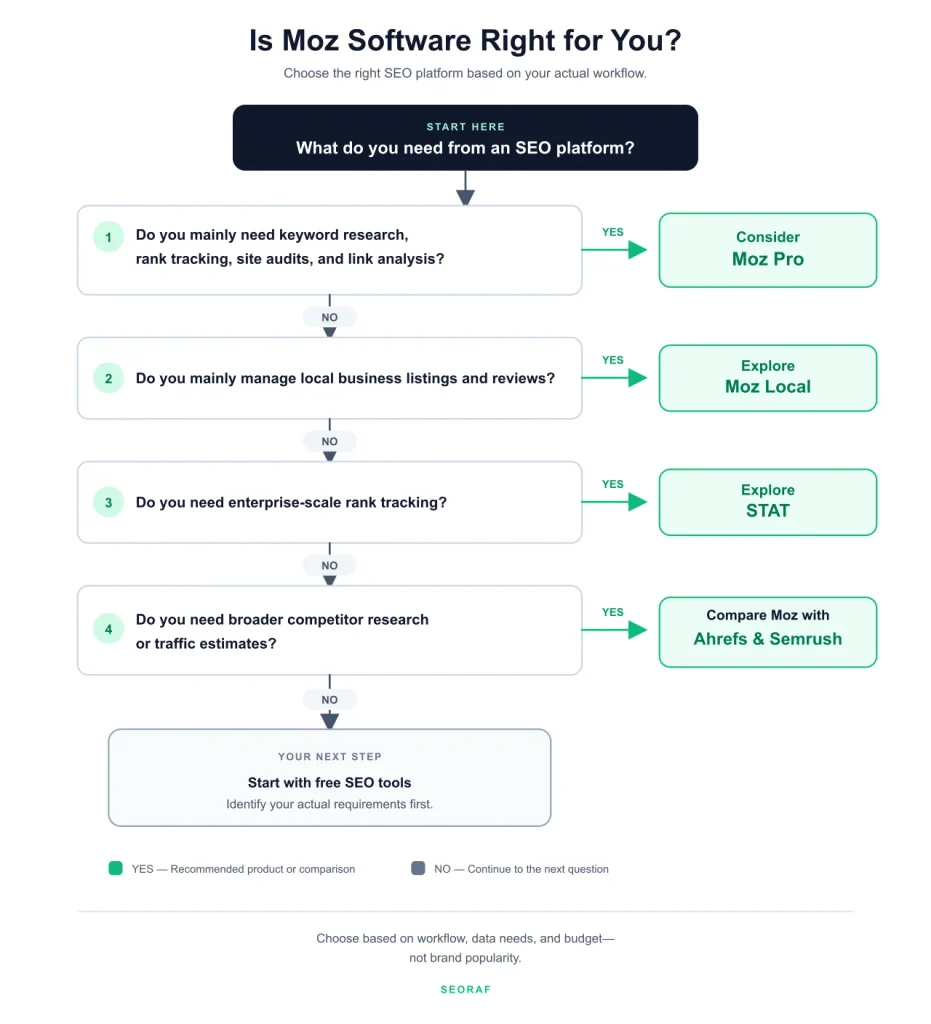
A quick chooser
NoNoNoDo you only need Domain Authoritylookups or occasional checks?Is local listings and review managementyour main need?Do you need extensive keyword or backlink data,or third-party traffic estimates?Yes: start free with MozBar and a free accountYes: look at Moz Local (priced per location)Yes: compare Ahrefs or Semrush firstNo to all: Moz Pro may be a reasonable fit.Check plan limits first.Original SEORAF decision tree: a simple way to decide whether Moz software fits your needs.
If you ended on “Moz Pro may be a reasonable fit”, the next step is to review Moz Pro’s current plan limits and compare them with your needs.
Moz Alternatives by Job
Rather than rank ten tools, here is how I would choose by what you need.
If you need deeper backlink and keyword research
Ahrefs and Semrush are common alternatives to compare. Their interfaces, datasets, query limits and pricing structures differ from Moz. Rather than comparing headline database-size claims that may use different counting methods, test the same domains and keywords in each platform. Check which one returns the most useful data for your market and workflow. Both platforms also provide competitor research features that Moz users may find useful.
If you want a budget all-rounder
SE Ranking and Mangools are worth a look if the larger suites feel too complex or expensive (my view). Compare the limits and features you actually need rather than choosing on starting price alone. See my SE Ranking alternatives guide and my Mangools pricing breakdown for more detail.
If you mainly need local listings
BrightLocal, Yext, Synup, Uberall and Whitespark are among the services that buyers may compare with Moz Local. Their location coverage, listing networks, review features and pricing models differ. Which one fits depends on how many locations you manage and how much reporting you need. My local SEO software comparison is the place to start.
Moz vs Ahrefs vs Semrush
Here is a practical comparison by product positioning. I have left out database-size totals because providers count and describe their indexes differently, making simple comparisons potentially misleading. I have also left out competitor prices because their plan structures and quotas change frequently.
| Factor | Moz | Ahrefs | Semrush |
|---|---|---|---|
| Core focus | SEO research, tracking, link metrics and AI visibility | SEO research, backlink analysis and competitor research | SEO and a broader digital marketing toolkit |
| Backlink research | Link Explorer and Moz link metrics | Backlink research and link analysis | Backlink Analytics and related research tools |
| Keyword research | Keyword Explorer and topic-oriented research | Keywords Explorer and related tools | Keyword research and competitive analysis tools |
| Traffic estimates | Not a direct replacement for third-party competitor traffic estimates | Provides estimated competitor traffic metrics | Provides estimated competitor traffic metrics |
| AI visibility tooling | AI prompt tracking and dashboards on eligible plans | Check current AI-related features and plan availability | Check current AI-related features and plan availability |
| My summary: consider it when… | You want Moz’s SEO workflow, learning resources and DA metrics | You prioritize backlink and SEO competitor research | You want SEO alongside a wider marketing toolset |
Product-positioning comparison based on published product information. SEORAF has not independently tested these platforms side by side. Features and plan limits can change.
The takeaway: Moz is worth considering if its workflow, learning resources and metrics match your needs. Ahrefs may be a better fit when backlink and SEO competitor research are central to your work. Semrush may appeal if you want SEO alongside a broader marketing toolkit. None is automatically best for every user. For detailed head-to-heads, see my SEO software comparisons hub.
Frequently Asked Questions About Moz
Is Moz software free?
Partly. Moz offers a free account, MozBar and selected limited free tools. Moz Pro and Moz Local have paid plans. Moz Pro’s entry-level option is listed at $49 a month, while Standard, Medium and Large have higher prices. Moz also displays a free-trial option for Medium, but check the signup page for the current duration and billing conditions.
How much does Moz cost?
Moz Pro’s published prices start at $49/month for the entry-level option. Standard is $99/month or $79/month when billed annually; Medium is $179/month or $143/month annually; and Large is $299/month or $239/month annually. Enterprise pricing is custom. Moz Local is priced per location, with independent sources reporting Lite at $20/month, Preferred at $30/month and Elite at $40/month. Check the pricing section and Moz’s official pages for current terms.
What is the difference between Moz Pro and Moz Local?
Moz Pro is an SEO research and tracking suite for websites. Moz Local helps businesses manage listings and reviews for physical locations. They solve different problems and are priced separately.
Is Moz good for beginners?
Moz may suit beginners who want an established SEO toolkit and educational resources. However, the best fit depends on which features you need, how much data you work with and whether the plan limits match your workflow. Start with the free tools if you are unsure.
Is Domain Authority a Google ranking factor?
No. Domain Authority is a Moz metric, not a Google ranking factor. Use DA as a comparative SEO metric within its intended context, not as a score that Google uses to rank websites.
Can I use Moz alongside Ahrefs or Semrush?
Yes. Some SEO professionals use more than one platform because each provider has different datasets, metrics and workflows. You can use Moz’s free tools or MozBar alongside another paid suite, provided the extra tool adds enough value to justify the time and cost.
Does Moz have an API?
Yes. Moz offers an API for programmatic access to selected SEO metrics and data. Availability, endpoints, quotas and pricing depend on the current API offering. See my Moz API guide for more detail.
Can I cancel Moz anytime?
Check the current cancellation and renewal terms on Moz’s official help and billing pages before subscribing. If you start a trial, note the renewal date and follow the cancellation process shown in your account if you decide not to continue. Keep the confirmation for your records.
Is Moz still worth it in 2026?
It can be worth considering for beginners, small teams and businesses that want Moz’s SEO workflow, learning resources and Domain Authority metrics. It may be a weaker fit for users who need extensive keyword or backlink datasets, or third-party competitor traffic estimates. My Moz review gives a fuller product verdict.
Final Recommendation: Is Moz Right for You?
My view by buyer type
- Beginners and small site owners: Moz is worth evaluating if you want an established SEO toolkit. Start with the free tools and pay only when the features justify the subscription.
- Local businesses: Moz Local deserves a look if you need listings and review management across supported locations.
- Freelancers and small agencies: Moz Pro Standard or Medium may work, depending on the number of campaigns, users and research limits you need.
- Data-heavy teams: compare Moz with Ahrefs and Semrush using the same websites and keywords before choosing a platform.
Your next step
Moz is a tool, not a ranking strategy, and no software guarantees rankings or income. If the chooser pointed you to Moz, read the plan limits above first, then decide whether the features justify the cost. If it pointed elsewhere, that is a good answer too.
Explore Moz Pro plans and trial terms
Affiliate link. Not sure yet? Start with Moz’s free tools first. If you buy through this link, SEORAF may earn a commission at no extra cost to you. Read the affiliate disclosure.
How I Researched This Article
I did not test Moz hands-on for this guide. I reviewed Moz’s published product and pricing information, independent software reviews and pricing references, then compared the claims. Where I could verify a product limit or price on Moz’s own website, I used the official information. Where a claim came only from a third-party source, I labeled it as reported or left it out if the evidence was not strong enough.
Some sources have commercial interests. Independent review sites may use affiliate links, and some comparison sites also sell competing products. Their reporting can still provide useful context, but it should not be treated as independent hands-on testing by SEORAF. My general approach is described on my review methodology page.
Last verified: November 10, 2026.
Update log: November 10, 2026. Moz Pro prices and selected plan limits checked against Moz’s official pricing page. Moz Local prices identified as third-party reported. Unverified trial details and database-size comparisons removed.
Sources
- Moz: Official Moz Pro pricing and plan comparison
- Moz: Official Moz Local pricing
- Style Factory: Moz Review
- Search Atlas: Moz Review
- TechRadar: Moz Pro review
- ChatSEO: Is Moz Free?
- ToolJunction: Moz product information
- AI Comparison: Ahrefs vs Semrush vs Moz
- Capterra: Moz Pro software listing and user reviews
- The Next Web: Business listing accuracy and local search
- Tekpon: Moz Local pricing information
- Dupple: Best local SEO tools
- Search Engine Journal: Is Domain Authority a ranking factor?