
How to Fix Core Web Vitals Issues Fast (2026 Guide)
In the hyper-competitive digital ecosystem of 2026, website speed is no longer just a technical metric—it is the currency of trust and the foundation of visibility. As Google’s algorithms evolve to prioritize user experience (UX) above all else, learning how to fix Core Web Vitals issues has shifted from a “nice-to-have” optimization to a critical business survival skill.
Did you know that a delay of just 0.1 seconds in load time can reduce conversion rates by over 8%? For enterprise-level SaaS companies and high-volume ecommerce stores, this translates to millions in lost revenue annually. If your website lags, you aren’t just annoying visitors; you are actively handing them to your competitors on a silver platter. If you have noticed a Google traffic drop recently, failing to know how to fix Core Web Vitals issues is likely a primary culprit.
This comprehensive guide is designed to take you from novice to expert. We will dive deep into the technical weeds, providing a roadmap on how to fix Core Web Vitals issues, interpret the data, and implement enterprise-level strategies to dominate the SERPs. If your website is not showing on Google as prominently as it should, speed is often the first lever to pull.
Losing Traffic to Slow Speeds?
Don’t let technical bottlenecks kill your revenue. Our team of elite engineers specializes in the technical SEO guide principles and speed optimization.
Book a Free Speed AuditWhat Are Core Web Vitals?
Before we can discuss how to fix Core Web Vitals issues, we must define the battlefield. Core Web Vitals are a standardized set of metrics derived from real-world user data (Field Data) that Google uses to measure UX. According to web.dev, they are grouped into three distinct pillars that you must understand if you want to master how to fix Core Web Vitals issues.
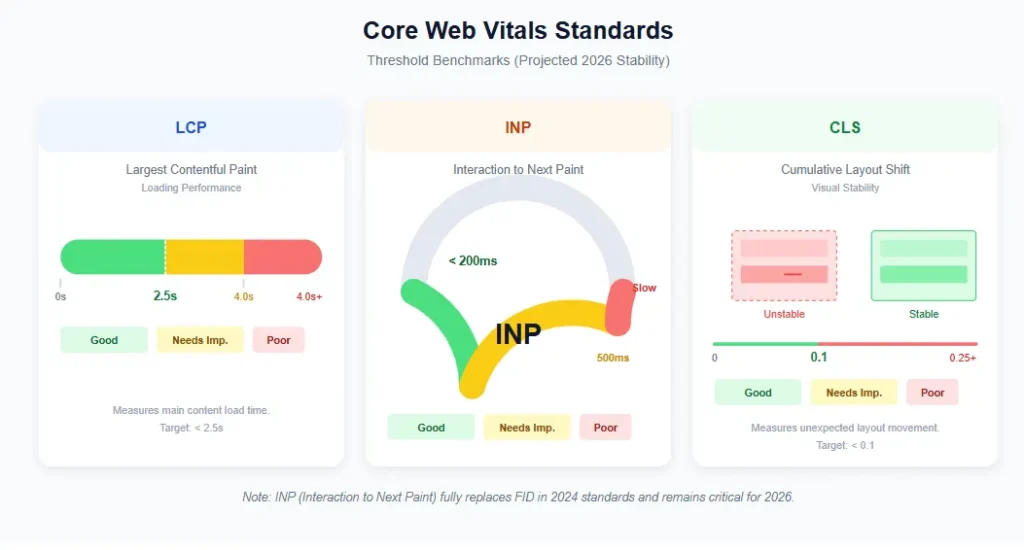
- Largest Contentful Paint (LCP): Measures loading performance. It marks the point in the page load timeline when the page’s main content has likely loaded. A fast LCP helps reassure the user that the page is useful. Threshold: ≤ 2.5s.
- Interaction to Next Paint (INP): Measures interactivity. It assesses latency—the time it takes for the page to respond to user input (clicks, taps, keystrokes). A low INP ensures the page feels responsive and snappy. Threshold: ≤ 200ms.
- Cumulative Layout Shift (CLS): Measures visual stability. It quantifies how much the page content “jumps around” as it loads. A low CLS ensures the user doesn’t accidentally click the wrong button because it moved at the last second. Threshold: ≤ 0.1.
Why Core Web Vitals Matter for SEO
Many website owners ask: “Is learning how to fix Core Web Vitals issues really worth the effort?” The answer is a resounding yes. In 2026, Google is aggressively filtering out low-quality experiences.
1. The Ranking Signal is Real
Google confirmed via Google Search Central that page experience signals, including Core Web Vitals, are part of their ranking algorithm. While content relevance remains king, speed is the queen. If two pages have equally relevant content, the one with better Core Web Vitals will rank higher. If you are looking to perform a technical SEO audit, this is the first place to look.
2. The AI Search Factor
With the rise of AI Overviews and Generative Search, Google is becoming more selective about which sources it cites. AI models prioritize stable, fast-loading websites that are easy to parse and render. If you fail to improve Core Web Vitals, you risk being excluded from these high-visibility AI snippets.
3. Crawl Budget Efficiency
Slow servers waste Google’s crawl budget. If Googlebot spends too much time waiting for your heavy pages to load, it may leave before indexing your newer content. This often leads to indexing issues. You can learn more about resolving these issues in our guide on how to fix crawl errors.
Common Causes of Poor Core Web Vitals
To master how to fix Core Web Vitals issues, you must identify the enemy. In our experience performing thousands of audits using our SEO audit checklist, these are the primary culprits:
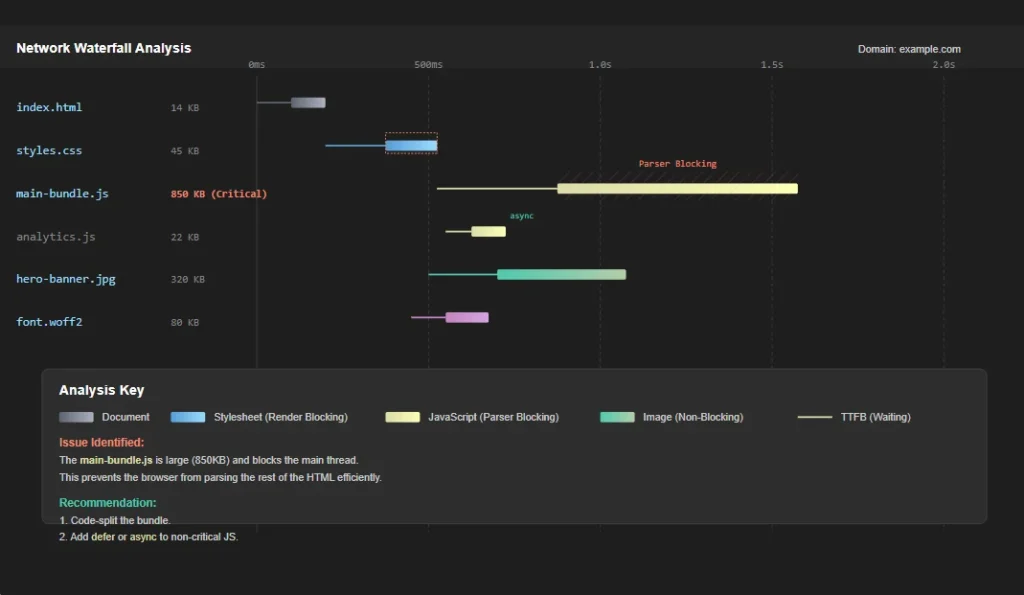
- Render-Blocking Resources: Massive CSS files and JavaScript libraries stopping the browser from painting the page.
- Oversized Images: Uploading 5MB PNGs directly from a camera is the #1 killer of LCP. A key part of how to fix Core Web Vitals issues is image compression.
- Slow Server Response Time (TTFB): Cheap shared hosting that cannot handle database queries efficiently.
- Excessive JavaScript: Bloated themes and too many plugins or third-party scripts (ads, chat widgets) clogging the main thread.
- Font Loading Problems: Web fonts causing invisible text (FOUT) or layout shifts when they swap in.
How to Measure Core Web Vitals
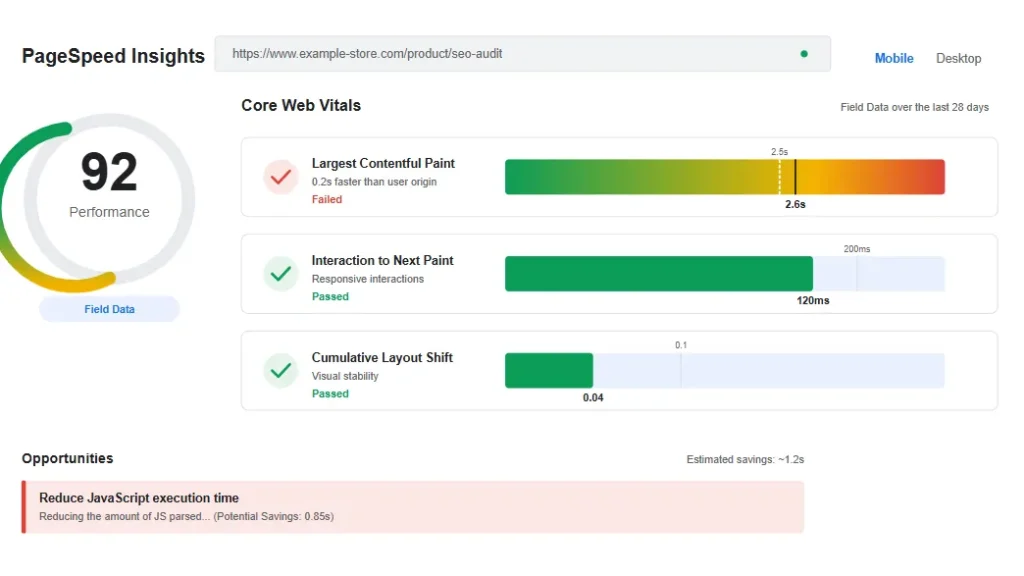
You cannot fix what you do not measure. Relying on a single tool is a mistake. You need a combination of lab data (simulated) and field data (real users). The primary tool for this is Google PageSpeed Insights.
- Google PageSpeed Insights: The gold standard. It provides both lab data and CrUX field data. Check the “Origin Summary” for site-wide performance.
- Google Search Console: Look at the “Core Web Vitals” report to see which specific URLs are failing based on real user data. This is the source of truth.
- Lighthouse & Chrome DevTools: Built into Chrome. Excellent for local debugging and seeing waterfall charts of resource loading. You can read the Chrome DevTools documentation to master this.
- WebPageTest: For deep, granular analysis of third-party script impact.
How to Fix LCP Issues
LCP is often the hardest metric to pass because it relies heavily on external resources like images and server response times. Here is the step-by-step process on how to fix Core Web Vitals issues specifically for LCP.
1. Image Optimization (The Heavy Lifter)
Images are the LCP element on 90% of pages. To fix LCP issues:
- Next-Gen Formats: Stop using JPEGs and PNGs. Convert everything to WebP or AVIF. AVIF can reduce file sizes by 50% compared to JPEG with no visible quality loss.
- Compression: Use aggressive lossy compression. A visual difference of 2% is acceptable for a 40% reduction in file size.
- Dimensions: Never upload a 4000px wide image for a 800px container. Resize images at the source before uploading.
2. Server Response Time (TTFB)
If your server takes 1.5 seconds to respond, you have already failed LCP. How to fix Core Web Vitals issues related to server speed?
- Upgrade Hosting: Move away from cheap shared hosting. Use cloud hosting like Kinsta, WP Engine, or a VPS.
- Use a CDN: A Content Delivery Network (like Cloudflare or BunnyCDN) caches your content on edge servers globally, reducing physical latency.
- HTTP/3: Ensure your server supports modern protocols to multiplex requests.
3. Preload Critical Resources
Tell the browser to prioritize the LCP image. Add this to your <head>:
<link rel="preload" as="image" href="hero-image.webp">How to Fix CLS Issues
Cumulative Layout Shift destroys trust. Users hate it when they go to click a “Buy” button and it jumps down the screen. Here is how to fix Core Web Vitals issues regarding layout stability.
1. Reserve Space for Images
Always include width and height attributes on your <img> tags. This allows the browser to calculate the aspect ratio and draw a placeholder box before the image downloads.
<img src="product.webp" width="600" height="400" alt="Product">2. Font Loading Strategy
Web fonts often cause “Flash of Invisible Text” (FOIT) or “Flash of Unstyled Text” (FOUT), both of which shift layout. Use font-display: swap in your CSS. This tells the browser to show the text immediately in a system font, then swap it for the custom font once loaded. This is a critical step in how to fix Core Web Vitals issues on modern typography-heavy sites. For more on technical structure, check our on-page SEO checklist.
3. Dynamic Content & Ads
Avoid inserting content (like ads or notifications) above existing content unless you have reserved a specific slot for it. If an ad pushes the header down, you fail CLS. Use sticky positioning for ads that stay in place rather than pushing content.
How to Fix INP Issues
INP is the new standard (replacing FID) for measuring responsiveness. A poor INP means the browser’s main thread is blocked by JavaScript. Mastering how to fix Core Web Vitals issues for INP requires code optimization.
1. Reduce JavaScript Execution Time
Break up “Long Tasks.” If a script runs for more than 50ms, it blocks the user from interacting. Use code splitting to load JavaScript only when needed.
2. Optimize Third-Party Scripts
Third-party tags (Chat widgets, Facebook Pixel, Hotjar, Google Analytics) are the #1 killer of INP. Strategies to fix this include:
- Loading scripts with the
deferorasyncattribute. - Delaying non-critical scripts. For example, don’t load a chat widget until the user has been on the page for 5 seconds.
- Using Google Tag Manager to manage firing triggers more efficiently.
3. Main Thread Work
Move heavy calculations to Web Workers. This offloads processing from the main thread, keeping the UI responsive for the user. This is an advanced technique in how to fix Core Web Vitals issues for complex web apps.
WordPress Core Web Vitals Optimization
WordPress powers 43% of the web, but it can be bloated. Here is the specific stack on how to fix Core Web Vitals issues for WordPress users. If you are just starting out, our SEO for beginners guide covers the basics of setup.
| Function | Recommended Tool | Why |
|---|---|---|
| Caching | WP Rocket, LiteSpeed Cache, FlyingPress | Effortless page caching, Gzip, and lazy loading out of the box. |
| Image Optimization | ShortPixel, Imagify | Automatic WebP/AVIF conversion and compression. |
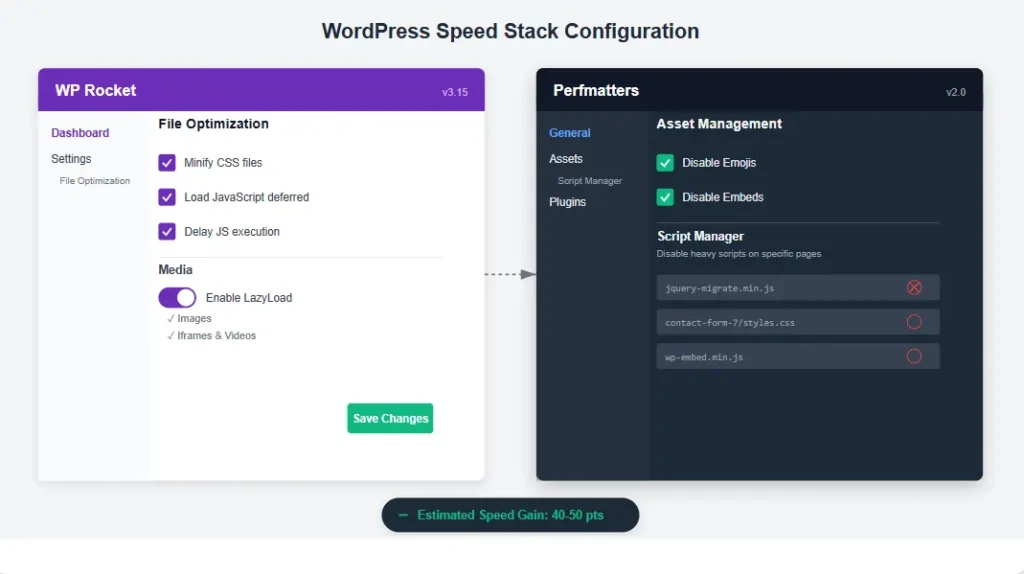
| Script Management | Perfmatters | Disables unused scripts and allows delaying JS. |
| Database Cleanup | WP-Optimize | Cleans up revisions and transients to speed up TTFB. |
When configuring Core Web Vitals WordPress plugins, ensure you enable “Delay JavaScript Execution” (set to 2-5 seconds) and “Remove Unused CSS.” These two settings fix 80% of INP and LCP problems on standard WordPress sites.
Ecommerce Core Web Vitals Optimization
Ecommerce sites are heavy due to dynamic carts and high-res images. How to fix Core Web Vitals issues for WooCommerce or Shopify?
WooCommerce
- Use a dedicated host like Nexcess or Liquid Web that specializes in WooCommerce database optimization.
- Avoid heavy page builders (Elementor/Divi) for checkout pages. Use the native block editor or a lightweight theme.
- Disable AJAX cart fragments if they cause layout shifts.
For a full audit of your store, refer to our ecommerce SEO audit checklist.
Shopify
- Audit your apps. Every app adds JavaScript. Delete unused apps.
- Use the Dawn theme, which is performance-optimized by Shopify.
- Ensure all product images are the exact same aspect ratio to prevent gallery shifting.
Advanced Performance Optimization
For enterprise-level solutions on how to fix Core Web Vitals issues, basic plugins aren’t enough. This is where site speed optimization becomes a science. Consult the Lighthouse documentation for deeper technical insights.
1. Edge Side Includes (ESI)
Use ESI to cache dynamic parts of the page (like a user-specific “Hello, [Name]”) separately from static content. This allows you to cache the whole page aggressively without losing personalization.
2. Server-Side Rendering (SSR)
If you use React or Vue, ensure you are using SSR via Next.js. Sending fully rendered HTML is vastly superior for LCP than sending a blank shell and waiting for JavaScript to build the page (Client-Side Rendering).
3. Early Hints
Configure your server to send 103 Early Hints. This allows the browser to start preloading fonts and CSS while the server is still processing the main HTML request.
Need Enterprise Technical SEO?
We specialize in advanced speed optimization for high-traffic platforms. Stop guessing with plugins. Let’s engineer speed.
Book a Strategy CallCore Web Vitals Checklist
To help you execute on how to fix Core Web Vitals issues, use this Core Web Vitals checklist:
| Task | Priority | Impact |
|---|---|---|
| Enable Gzip/Brotli Compression | High | Reduces file transfer size. |
| Upload WebP/AVIF images only | High | Massive LCP improvement. |
| Add width/height to all images | High (CLS) | Prevents layout shift. |
| Defer non-critical JavaScript | High (INP) | Reduces main thread blocking. |
| Implement a CDN (Cloudflare) | High | Reduces TTFB globally. |
| Minify CSS and JS files | Medium | Slight speed boost. |
| Upgrade PHP to 8.2+ | Medium | Faster processing. |
| Use font-display: swap | Medium | Improves font loading. |
Case Study: SaaS Platform Recovery
We worked with a B2B SaaS company whose landing page had an LCP of 4.2s and an INP of 450ms. Their bounce rate was 85%. They were suffering from traffic drops they couldn’t explain, fearing a keyword cannibalization fix was needed, but it was actually a speed issue. They needed to know how to fix Core Web Vitals issues immediately.
The Implementation
- Architecture: Migrated from Client-Side Rendering (React) to Next.js Server-Side Rendering.
- Images: Implemented an image CDN with automatic AVIF serving.
- Scripts: Isolated and delayed all non-critical third-party tracking scripts using Perfmatters logic.
The Results
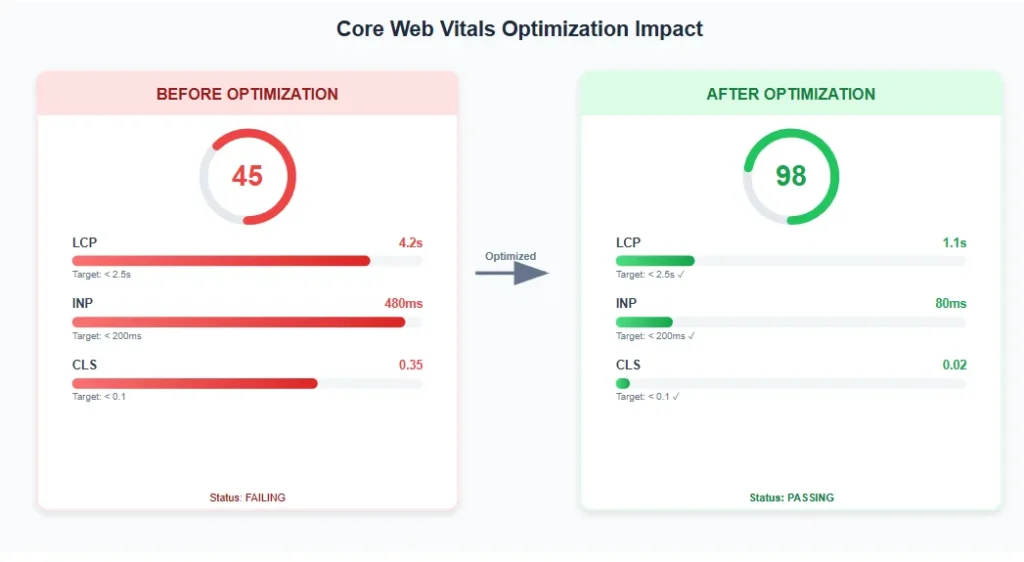
- LCP: 4.2s → 1.6s
- INP: 450ms → 120ms
- Organic Traffic: Increased by 34% in 60 days.
- Leads: Increased by 28% due to improved UX.
This proves that website performance optimization directly impacts the bottom line. We utilized custom SEO templates to track their progress.
Common Mistakes to Avoid
In your quest to improve website speed, avoid these pitfalls:
- Blindly Optimizing Scores: Don’t block critical CSS or JS just to get a 100 on Lighthouse if it breaks functionality. Real user experience matters more than lab scores.
- Cheap Hosting: You cannot cache your way out of a slow server. Invest in quality hosting.
- Too Many Plugins: More plugins = more database queries. Keep your installation lean.
- Neglecting Mobile: Always test on mobile. Mobile hardware is weaker, so INP issues are more prevalent there.
- Unnecessary Animations: Heavy parallax effects and auto-playing videos destroy performance. Keep it simple.
Future of Core Web Vitals
Looking ahead to 2027 and beyond, expect Google to refine these metrics further. We anticipate a greater emphasis on Memory Constraints on mobile devices and stricter penalties for Main Thread Work. The rise of AI Search means that Google will prioritize citing sources that are not just fast, but stable and accessible.
Understanding search intent will remain crucial, but speed will be the gatekeeper. Staying ahead of the curve requires constant vigilance and a commitment to content SEO guide best practices combined with technical excellence.
Frequently Asked Questions
Do Core Web Vitals affect SEO rankings?
Yes, Core Web Vitals are a confirmed Google ranking factor. Understanding how to fix Core Web Vitals issues is crucial for mobile rankings and AI search citations.
What is the easiest way to fix Core Web Vitals on WordPress?
The easiest method is installing a premium caching plugin like WP Rocket or LiteSpeed Cache, enabling image optimization (WebP/AVIF), and deferring JavaScript execution. This fixes 80% of issues without coding.
How long does it take to fix Core Web Vitals?
Technical fixes can be implemented in days, but Google’s data is based on a 28-day rolling average. It typically takes 30 days to see the status update in Search Console after you fix Core Web Vitals issues.
What is the difference between LCP and FCP?
FCP (First Contentful Paint) measures when the *first* bit of content (any text or image) appears. LCP measures when the *largest* content appears. LCP is a better reflection of when the page is actually “useful” to the user.
Does hosting really affect Core Web Vitals?
Yes. Slow Time to First Byte (TTFB) caused by cheap hosting is a leading cause of LCP failure. You cannot effectively fix Core Web Vitals issues on a slow server.
Why is mobile Core Web Vitals harder than desktop?
Mobile devices have less CPU power and memory. JavaScript that runs fine on a desktop might block the main thread for 500ms on a phone, causing INP failures. Mobile networks are also slower, affecting LCP.
Can I fix Core Web Vitals without coding?
Largely, yes. On platforms like WordPress and Shopify, plugins and apps handle 90% of the work. However, for advanced INP issues, some code cleanup or developer assistance may be required.
How much does page speed optimization cost?
It varies. A basic plugin setup is free/cheap. Enterprise-level optimization involving code refactoring, server migration, and custom CDN setups can range from $2,000 to $10,000+ depending on site complexity.
Do ads affect Core Web Vitals?
Significantly. Ads often cause CLS (shifting layout) and increase INP (heavy scripts). Use sticky ad units with reserved space to minimize CLS.
Is Google PageSpeed Insights accurate?
It is the standard for Lab Data. However, the “Field Data” section (CrUX) is the most accurate as it comes from real Chrome users. Trust Field Data over Lab Data when diagnosing real-world issues.
Conclusion: Learning how to fix Core Web Vitals issues is not a one-time task; it is an ongoing process of optimization. As web standards evolve, your site must evolve with them. By following this 2026 guide, you are positioning your site for higher rankings, better traffic, and increased conversions.
Remember, if you need expert help, download our PDF guide or contact our team. We know exactly how to fix Core Web Vitals issues for any platform. Check out our technical SEO checklist PDF for offline reference.
Stop Losing Revenue to Speed
Get the full audit help you need to dominate your niche.
Get Your Free Audit