
Google Maps SEO: A Complete Guide to Improving Local Visibility
Last reviewed: October 30, 2026. Google changes its local features and policies often, so I link to the official page behind every rule I describe.
Google Maps SEO is the work of improving how often, and how prominently, a local business appears in Google Maps and in the local results Google shows in Search. In practice it centers on your Google Business Profile, supported by reviews, your website, and consistent business information across the web. It cannot guarantee a ranking: Google states that there is no way to request or pay for a better local ranking.
This guide is written for beginners who need a safe starting point and for experienced marketers who want a clear line between what Google documents and what the industry assumes. I am not an agency selling you a package here. SEORAF is an independent SEO knowledge resource, and I have kept this article free of promises about results.
How to read the evidence labels
- Google-documented: stated on an official Google help or Search Central page I reviewed.
- Expert survey: opinion from published practitioner research, such as Whitespark’s annual survey. Useful, but not a statement from Google.
- Practitioner view: advice widely repeated, or tests reported by others, that I could not confirm in Google’s documentation.
- My recommendation: a workflow or judgment I built from the sources in this guide. I have not run controlled experiments for it.
- Unverified: sources conflict, or I could not trace the original.
What Google Maps SEO Actually Means
People use this phrase loosely, so I want to separate the pieces before going further. When someone searches for a plumber, a dentist, or a coffee shop near them, Google can show local results in two places: the Maps app or site, and a block of businesses with a map inside regular Search results, often called the local pack. Google Maps SEO is the practice of improving your visibility in those places.
| Term | What it covers | Where it appears | Main levers |
|---|---|---|---|
| Google Maps SEO (this guide) | Improving visibility for your business in Maps and in local results | Maps app and site; local results in Search | Business Profile, reviews, website, consistent information |
| Google Business Profile optimization | Completing and maintaining the profile itself. It is the core of Maps SEO, not all of it. | Your profile in Maps and Search | Categories, hours, services, photos, posts, review replies |
| Local pack | The map plus a short list of nearby businesses that Google shows for some local searches | Google Search | The same signals as above; the businesses shown can vary by searcher location |
| Local organic SEO | Ranking your website’s pages for searches with local intent | Standard web results | Page content, links, site quality |
| Paid local ads | Paid placements, which are a separate product from organic ranking | Search and Maps, depending on ad format | Budget and ad settings. Google says you cannot pay to improve your organic local ranking. |
My recommendation: treat the Business Profile as the center of your effort, then use your website, reviews, and consistent listings to support it. This guide covers the website work that supports your profile. For a broader discussion of ranking signals, see SEORAF’s guide to local SEO ranking factors.
How Google Decides Who Ranks in Local Results
Relevance, distance, and prominence
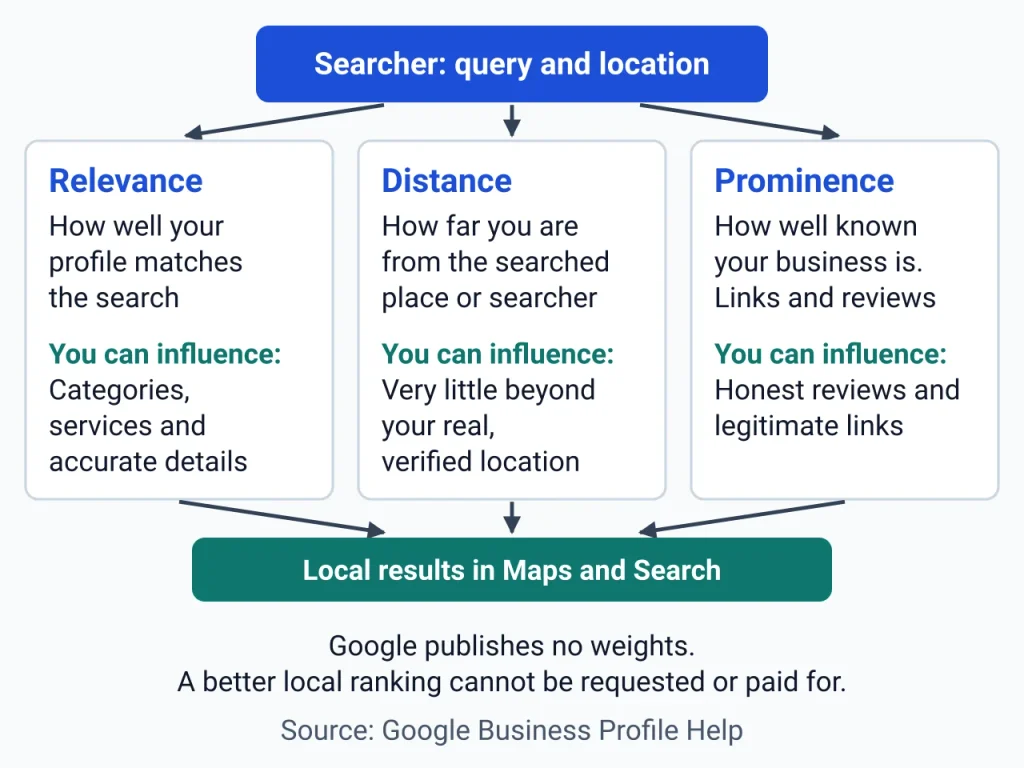
Google’s help page on improving your local ranking says local results are mainly based on three things: relevance, distance, and prominence. Together they help Google find the best match for a search. The page also states plainly that you cannot request or pay for a better local ranking.
| Factor | What Google says | What you can influence | Evidence |
|---|---|---|---|
| Relevance | How well a profile matches what someone is searching for. Complete, detailed business information helps Google match you to relevant searches. | Categories, services, description, accurate details | Google-documented |
| Distance | How far each business is from the location used in the search. If the searcher doesn’t name a place, Google uses what it knows about their location. | Very little beyond your real, verified location | Google-documented |
| Prominence | How well known a business is. Google says it draws on information such as links to your business and your reviews, and that more reviews and positive ratings can help your local ranking. | Reviews, reputation, local links, mentions | Google-documented |
Google also states that the categories you select affect your local ranking, in its business category guidance. That is one of the few specific profile fields Google ties directly to ranking.
What experts say matters
Google does not publish weights or a ranked list of factors. The best-known attempt to fill that gap is Whitespark’s annual Local Search Ranking Factors survey, whose 2026 edition was published in November 2025. In the version I reviewed, practitioners scored the primary Business Profile category and the proximity of the business to the searcher as the top two factors for the local pack and Maps.
Expert survey, not Google: these results reflect what experienced practitioners believe correlates with rankings. Several websites repeat percentage weights for each factor group, and I found those figures inconsistent across secondary sources. I have not repeated any of them. If you quote percentages elsewhere, trace them to Whitespark’s original report first.
Why proximity limits you
Because distance is part of the calculation, a competitor physically closer to the searcher has an advantage you cannot change by working harder on your profile. I would not promise any reader a ranking radius. What you can do is make sure your relevance and prominence signals are as strong and accurate as they can honestly be, and focus on the searches where your location is a natural fit.
Why rankings look different across a city
This follows from the distance factor, though the explanation below is my own inference rather than a Google statement. If distance is measured from the searcher’s location, two people a few streets apart can see different results for the same search. That is why a single “I searched and I’m number two” check is a weak way to judge progress. I return to this in the measurement section.
Claims you will see that Google has not documented
Many guides present the following as confirmed ranking factors. I did not find any of them stated on the official pages I reviewed:
- Click-through rate on your listing as a ranking factor
- Geotagged (EXIF) photo data helping verify your location
- Keywords in review replies or in customer reviews boosting rank
- Embedding a Google Map on your website as a location signal
- Posting frequency on your profile as a ranking factor
- Photo file names affecting Maps ranking
Absence from a help page does not prove a factor doesn’t matter. It means nobody outside Google can present it as official. Where I discuss these later, I label them as practitioner views.
Check Eligibility and Choose Your Business Model First
Most suspensions are cheaper to prevent than to fix, and the prevention happens before any optimizing. Google’s eligibility and ownership guidelines say a business must make in-person contact with customers during its stated hours to qualify. The guidelines for representing your business then govern how you set up each field.
The 10-minute compliance check
Open your profile (or your planned details) and test each field against the table. Every rule below is Google-documented, though I paraphrase it.
| Field | What Google’s guidelines say | Quick test |
|---|---|---|
| Name | Use your real-world name as it appears on your storefront, website, and stationery. Don’t add taglines, store codes, hours, phone numbers, URLs, or service and location descriptions. | Does the name match your signage exactly, with nothing added for search? |
| Address | Use a precise, real address. P.O. boxes and remote mailboxes aren’t acceptable. Virtual offices aren’t eligible. Co-working addresses qualify only with clear signage, customers received there during business hours, and your own staff present. Don’t put keywords or URLs in address lines. | Could a customer walk in at that address during your listed hours? |
| Signage | If you show an address, keep permanent fixed signage with your business name there. | Is there a sign at the address? |
| Service area | A service-area business without a storefront should hide its address and define a service area. The overall area shouldn’t extend beyond roughly two hours of driving from where you’re based, with exceptions for some businesses. | Is your area realistic for how you actually serve customers? |
| Phone | Use a number that connects to your business location, under your direct control. Use a local number instead of a call-center number when possible. Premium numbers aren’t acceptable. | Does the number reach your real business? |
| Website | Provide a website that represents your individual location. Avoid URLs or numbers that refer users to something other than the business itself. | Does the link lead to your own business pages? |
| Hours | List your regular customer-facing hours, with special hours for holidays. Some business types, such as appointment-only ones, shouldn’t list hours. | Are your hours correct today and for upcoming holidays? |
| Categories | Use the fewest categories needed to describe your core business. Don’t use categories as keywords. | Does each category describe what your business is? |
| Description | Describe your services, history, or mission honestly. No links, and no promotions or prices. | Is there any link, discount, or price in the text? |
| Duplicates | One profile per business location. | Search your name and address for second listings. |
Which business type are you?
Your setup depends on how you serve customers. Google has specific rules for each model, summarized below.
| Business type | Typical setup | Rules to check |
|---|---|---|
| Storefront | Show your address; list hours; one profile per location | Signage at the address; staffed during stated hours |
| Hybrid (storefront plus service area) | Show your storefront address and set a service area | The location must be staffed and able to receive customers in stated hours |
| Service-area business (no storefront) | One profile, address hidden, service area defined | No virtual office unless it is staffed; realistic service area |
| Individual practitioner (doctor, lawyer, agent) | Own profile if public-facing and reachable at the verified location during hours | Support staff shouldn’t have profiles; one profile per practitioner, not one per specialization |
| Chain or multi-location | One profile per location | Consistent names and categories across locations, with limited exceptions |
| Department within a larger business | Separate profile only if it is a distinct public-facing entity | Different name and a different primary category from the main business |
Some businesses aren’t eligible at all. Google’s examples include online-only businesses, lead-generation agents or companies, rental or for-sale properties such as vacation homes, and ongoing classes or meetings at a location you don’t own or represent. If you fall into one of these groups, the profile route isn’t open to you, and I would not look for a workaround, because disguised profiles are a common route to suspension. Your website and other marketing channels remain available.
If you manage a profile for someone else, Google’s guidelines for authorized representatives say you should never claim a profile without the owner’s consent, should work with the owner on verification, and should transfer ownership on request. Where possible, the business owner should own the profile and add you as a manager.
Local Keyword and Category Research
How keywords actually matter in Maps
Google says relevance comes from how well your profile matches a search, and that complete, detailed information helps. It does not publish a list of fields where keywords carry weight, apart from the statement that categories affect ranking. In practice, the words that describe your business live in a few places: your categories, your services list, your description, your website, and the words customers use in their own reviews.
My recommendation: treat keyword research as a vocabulary exercise, not a stuffing exercise. You are working out the words customers use for what you do and where you do it, then using those words naturally and truthfully. Google’s guidelines are explicit that names and categories shouldn’t carry keywords, so the natural places are your services list, description, and website pages.
Choosing your categories
Google’s category guidance advises choosing a specific primary category, for example “Nail salon” rather than “Salon.” You cannot create your own category. If no specific category exists, choose a more general one. Google’s illustration uses a pizza restaurant, noting that its primary category might lead to it showing for searches such as restaurants, Italian restaurants, or pizza. Several details matter:
- Additional categories: use a few from the provided list. Google says not to select a category for every product or service.
- Independent departments: if a separately owned business operates inside yours, it gets its own profile, and you shouldn’t add its category to yours.
- Changes: adding or editing a category may prompt Google to ask you to verify again.
- A category cap: the pages I read don’t state a maximum number of additional categories. Many guides say nine, which is a practitioner figure. Google’s own guidance is to use the fewest that describe your core business.
The guidelines also give a helpful test: your category should complete the sentence “this business is a…” rather than “this business has a…”. A pharmacy inside a supermarket, for example, doesn’t make the supermarket a pharmacy.
Competitor pack teardown
This is a repeatable way to see how businesses that already appear for your searches describe themselves. It is my own workflow, not a Google method.
- Pick three to five searches that match how customers would describe your service and area.
- Run each search from the location that matters to you, such as your premises or the center of your service area. Treat what you see as a snapshot, because results can vary by location and device.
- For each of the top few businesses, record the details in the table below.
- Look for patterns. Does everyone use the same primary category? Do they list services you don’t?
- Decide what truthfully applies to you. Never copy a category that doesn’t describe your business.
- Write down the date and your decisions so you can compare later.
| Business | Primary category | Other categories | Review count | Recent reviews? | Services listed | Distance from search point | Matching website page? |
|---|---|---|---|---|---|---|---|
| Competitor 1 | |||||||
| Competitor 2 | |||||||
| Competitor 3 | |||||||
| Your business |
Illustrative example (hypothetical, not a real business): imagine a tile installer whose profile lists a very general category while the top results all use a more specific one that truthfully describes the same work. The sensible decision is to switch to the specific category, log the change, and expect that Google may ask for re-verification. The decision follows from accuracy, not from imitation.
Types of local searches
| Search type | Example pattern | What it means for you |
|---|---|---|
| “Near me” | “[service] near me” | Distance dominates. Your verified location matters most. |
| Place-modified | “[service] in [city or neighborhood]” | Your service area and website location pages matter. |
| Service-specific | “[specific job] [area]” | Services list and matching website pages help relevance. |
| Branded | “[your business name]” | Accuracy of every profile detail. |
| Conversational | A full question about what a place offers | Accurate details across profile and website. See the AI section. |
I have not included search volumes. I did not have access to verified keyword data for this guide, and I’d rather leave the column out than invent figures. A keyword tool or Google’s own tools can fill that gap for your specific market.
Build and Optimize Your Google Business Profile
Verify and complete the core fields
Verification matters more than people expect. Google says photos and videos show on Google only after you verify your profile, performance data is available only for verified profiles, and Google may reject content added to unverified profiles. Replying to reviews also requires verification. Google’s page on verifying your business covers the available methods, which can vary by profile.
Once verified, complete the name, address or service area, hours, phone, website, and categories using the compliance check above. Google’s ranking page says businesses with complete and accurate information are more likely to show in local results, and that incomplete or inaccurate details can hurt how your profile appears for relevant searches.
Services, description, and attributes
Google’s description rules are narrower than many guides suggest. The guidelines ask for useful information on services and products, your mission and history, written honestly. The description can’t contain links of any kind, and it can’t focus on special promotions or prices. Misspellings, gimmicky characters, and distracting content are also out. I did not find a character limit on the pages I read, so check the field itself as you edit.
My recommendation: write the description for a customer who has never heard of you. Say what you do, who you serve, and where, in plain sentences. If a phrase feels like it was written for a search engine, rewrite it.
For services, Google provides a services editor, and its ranking page lists details such as parking or Wi-Fi under attributes. Some vendors describe a test where adding predefined services quickly changed rankings. I could not verify that test’s details, so I treat service completeness as a relevance and accuracy task, not a ranking trick. List what you genuinely offer, and no more.
Photos and video
Google’s photo and video guidance sets practical standards:
- Photos in JPG or PNG, between 10 KB and 5 MB, recommended at 720 by 720 pixels, minimum 250 by 250.
- Photos that are in focus and well lit, without heavy filters or alterations. Google says the image should represent reality.
- Videos up to 30 seconds, up to 75 MB, at 720p or higher.
- New media is reviewed. It can show as pending, not approved, or live, and Google says it can take 24 to 48 hours to appear.
Google’s pages describe photos as a way to help customers recognize and understand your business. I found no statement that photos, geotag data, or descriptive file names change your Maps ranking. Descriptive file names are harmless and tidy, but I would not present them as a ranking tactic.
Posts and the end of the Q&A format
Google’s page on creating and managing posts describes three post types: updates, offers, and events. Google reviews posts against its content policy, and a post can be live, pending, or not approved. Posts older than six months are archived unless they have a date range. Posts that include a phone number may be rejected if it can’t be tied to the business. Google’s photos, videos, and posts content policy adds that unverified contact information in posts may be removed.
The posts page describes posts as a way to share information that helps customers decide. It doesn’t say posts affect ranking. Some agencies say frequent posting helps, and others report tests that found no measurable change. I could not verify either claim, so I treat posts as customer communication: use them for real updates, not as a ranking chore.
Q&A is changing. In December 2025, a Google product specialist wrote on the Business Profile Help forums that the Q&A feature was being replaced by an Ask experience in Maps, as reported by Search Engine Roundtable. According to that report, owners can still answer existing questions in the Q&A section, and published answers may continue to inform Google’s understanding of the business. I have not opened the original forum thread, so treat the details as reported. The practical consequence is that advice to “seed your own Q&A” is now questionable.
My recommendation: put your common customer questions and clear answers on your own website, and keep your profile details accurate, since those are the sources an answer feature could draw on.
What to skip
- Keywords, service words, or locations added to your business name
- Extra categories that describe services rather than what you are
- Links, prices, or promotions in the description (promotions belong in posts)
- Second listings for the same location
- Virtual-office or mailbox addresses
- Repeating the same content over and over, which Google’s content policy lists as repetitive content
Earn Reviews Without Breaking Google’s Rules
What Google allows and prohibits
Google’s prohibited and restricted content policy says reviews must reflect a genuine experience. Its tips for getting more reviews page calls incentives for reviews strictly prohibited. Here is the summary I use:
| Allowed (Google-documented) | Not allowed (Google-documented) |
|---|---|
| Asking customers for genuine reviews | Offering payment, discounts, free goods, or services for a review |
| Sharing a review link or QR code from your profile | Offering an incentive to revise or remove a negative review |
| Replying publicly to reviews | Discouraging negative reviews, or soliciting only positive ones |
| Reporting reviews that break Google’s content policies | Requiring or pressuring customers to review while on your premises |
| Asking staff to meet a review quota, or to solicit reviews that include specific content such as staff names | |
| Reviews from people with a conflict of interest, such as current or former employees, competitors, or family | |
| Reviews posted from multiple accounts by one person, or paid for directly or in kind |
The older phrase “review gating” doesn’t appear on the policy page I read. What the policy does prohibit is discouraging negative reviews or selectively soliciting positive ones, which covers the same behavior. Any tool that asks “how was your visit?” and then only sends happy customers to Google is worth examining against that wording.
Not every popular guide agrees with Google here. At least one widely read guide suggests offering incentives for reviews if you can afford it. Google’s policy says the opposite, so I would not follow that advice.
A guardrailed review-request workflow
This is my own process, built to stay inside Google’s wording.
- Get your link. Use the review link or QR code available from your verified profile, as described on Google’s review tips page.
- Ask everyone. Make the request part of how you finish a job or sale for all customers, not only the ones you think are pleased.
- Use neutral wording. Don’t ask for a rating, a specific word, or a staff member’s name.
- Offer nothing in return. No discount, entry, gift, or favor.
- Don’t pressure. No asking customers to write it on the spot while they’re in your premises.
- Keep staff out of quotas. No per-employee review targets.
- Track and reply. Record the reviews you receive and reply as described below.
Example of neutral wording: “Thank you for choosing us. If you’d like to share your experience on Google, you can do that here: [link]. Honest feedback of any kind is welcome.” Notice what it leaves out: no star request, no promise, no deadline.
Replying to reviews
Google’s guidance on replies is more relaxed than many guides. It says to be professional, keep replies short, and reply when you have new or relevant information to share. It notes you don’t need to thank every reviewer publicly. It also says reviewers are already customers, so replies should read like a friend rather than a salesperson, with no deals or promotions. For negative reviews, Google suggests protecting the reviewer’s privacy, avoiding personal attacks, finding out what went wrong, being honest about what you can and can’t do, apologizing where fitting, signing with a name or initials, and responding in a timely way.
Practitioner view: many agencies recommend replying to every review. It is a sensible habit for customer relations, but Google doesn’t require it. Equally, I found no Google statement that keywords in your replies improve ranking, so don’t stuff them in. If a review breaks Google’s policies, you can report it to Google.
How many reviews are enough?
There is no official number. Google says more reviews and positive ratings can help, and the practical benchmark is the businesses currently shown for your searches. Use the teardown table above to see what they have. Chasing a target by any means is risky: Google’s policy lists unusual volumes or patterns of reviews that suggest manipulation among the things it treats as rating manipulation. A steady, honest flow tied to real customers is the safer pattern.
Support Signals: Citations, Website, and Local Links
Citations and consistent business details
A citation is a mention of your business name, address, and phone number on another site. Google says information shown on a profile is compiled from several sources, including user reports and licensed content, as described in its overview of Business Profile policies. That is a good reason to keep your details consistent: conflicting information elsewhere can feed into what Google shows.
Google’s local ranking page names links and reviews under prominence. I did not see citation counts listed as a factor on the pages I reviewed. Expert surveys do include citation signals, though evidence on their weight is mixed, so treat them as support rather than a lever.
| Step | Task | Output |
|---|---|---|
| 1 | Write down your exact name, address, and phone as they appear on your profile | One reference record |
| 2 | Search for your business name and phone number to find where you are listed | A list of listings |
| 3 | Fix wrong or outdated listings on the sources that matter most for your market | Corrected listings |
| 4 | Claim listings on a few reputable platforms relevant to your area and industry | Consistent presence |
| 5 | Recheck every few months and after any move or change | Updated reference record |
Directory advice is often US-centered. If you operate elsewhere, check which platforms matter locally rather than copying a US list. Also beware of mass-submission packages: Google’s spam policies list links from low-quality directory or bookmark sites as an example of link spam.
Website signals
Service and location pages. A page for each real service, and one for each real location, gives customers and search engines clear destinations. The risk is volume without value. Google’s spam policies describe doorway abuse as creating pages to rank for specific, similar queries that funnel users onward, including multiple pages aimed at specific cities that lead to a single destination. They also describe scaled content abuse as generating many pages primarily to manipulate rankings, however they’re created, and keyword stuffing as blocks of text listing the cities a page is trying to rank for. These are Google Search policies for web pages, not Business Profile rules, but they govern the pages you would build. The fix is to create a location or service page only when you have something genuinely different to say about it.
Structured data. Google’s LocalBusiness structured data documentation explains how markup can help Google display details such as opening hours and departments. The required properties are the business name and address. Google recommends coordinates with at least five decimal places, hours, telephone, URL, and price range where relevant, and the most specific business subtype available. It also notes that Google cannot guarantee any feature that uses structured data will appear. The page does not say markup improves Maps ranking. I use it for clarity and accuracy, and I would not sell it as a ranking lever.
Your website link. Google’s guidelines ask for a website that represents your individual location. If you run several locations, link each profile to the page for that location.
Embedded maps and mobile experience. Both are good for visitors. I found no Google statement that an embedded map is a ranking signal, so I’d call it a usability feature.
Local links
Google lists links to your business as part of prominence. The way you earn them matters. Practical, legitimate sources include your local chamber of commerce or trade association, suppliers or partners who list you, community events you genuinely take part in, and local coverage of something newsworthy about your business. Google’s spam policies treat buying or selling links for ranking purposes, and exchanging goods or services for links, as link spam unless the links are qualified with the appropriate attributes. So if a sponsorship comes with a link, ask for it to be marked appropriately and don’t treat the link as the goal of the sponsorship.
A Staged Rollout Plan With a Change Log
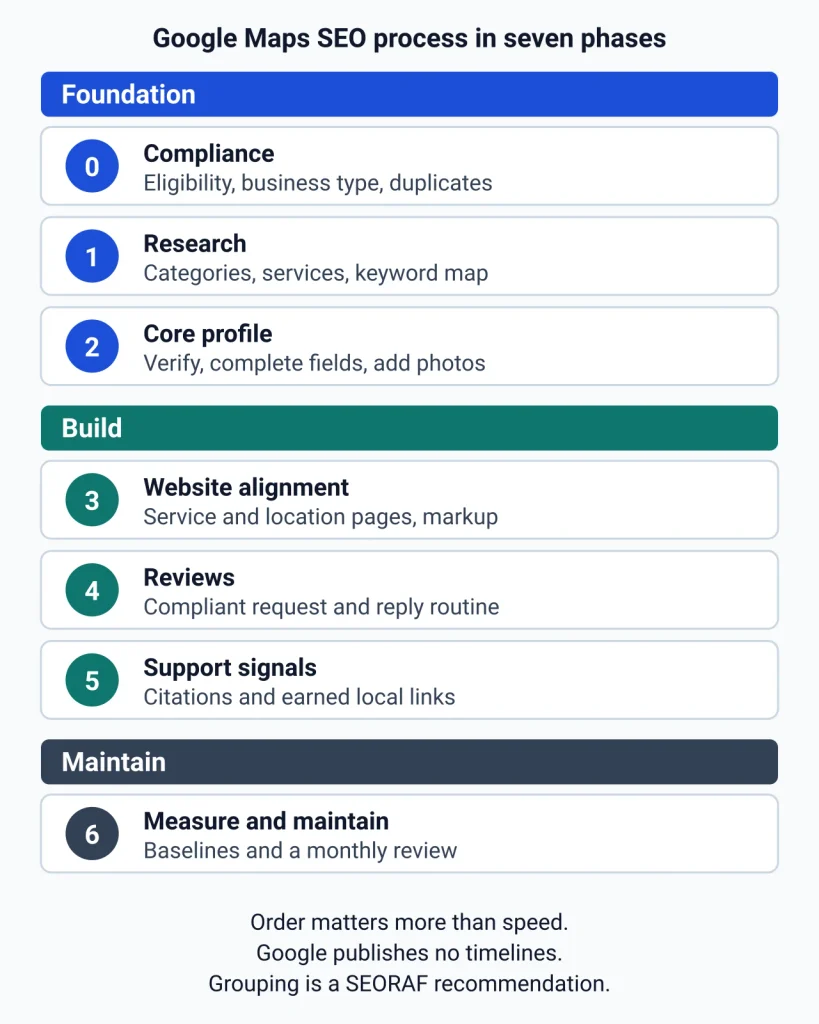
You now have the pieces. This section puts them in sequence. I deliberately give no durations, because Google doesn’t publish timelines and the numbers that circulate vary wildly by source. The order matters more than the speed.
| Phase | Goal | Main tasks | Output |
|---|---|---|---|
| 0. Compliance | Confirm you’re eligible and set up correctly | Run the 10-minute check; pick your business type; resolve duplicates | A clean baseline |
| 1. Research | Decide categories and services | Competitor teardown; vocabulary list | A written category and services decision |
| 2. Core profile | Complete and verify the profile | Verify; fill fields; add photos; write description | A complete profile |
| 3. Website alignment | Make your site match the profile | Service and location pages; structured data; matching details | Consistent web presence |
| 4. Reviews | Set up a rule-abiding review habit | Request workflow; reply process | A repeatable system |
| 5. Support signals | Fix citations and earn local links | Citation audit; local relationships | Consistent listings |
| 6. Measure and maintain | See what changed | Baselines; monthly review | A reporting routine |
Change log template
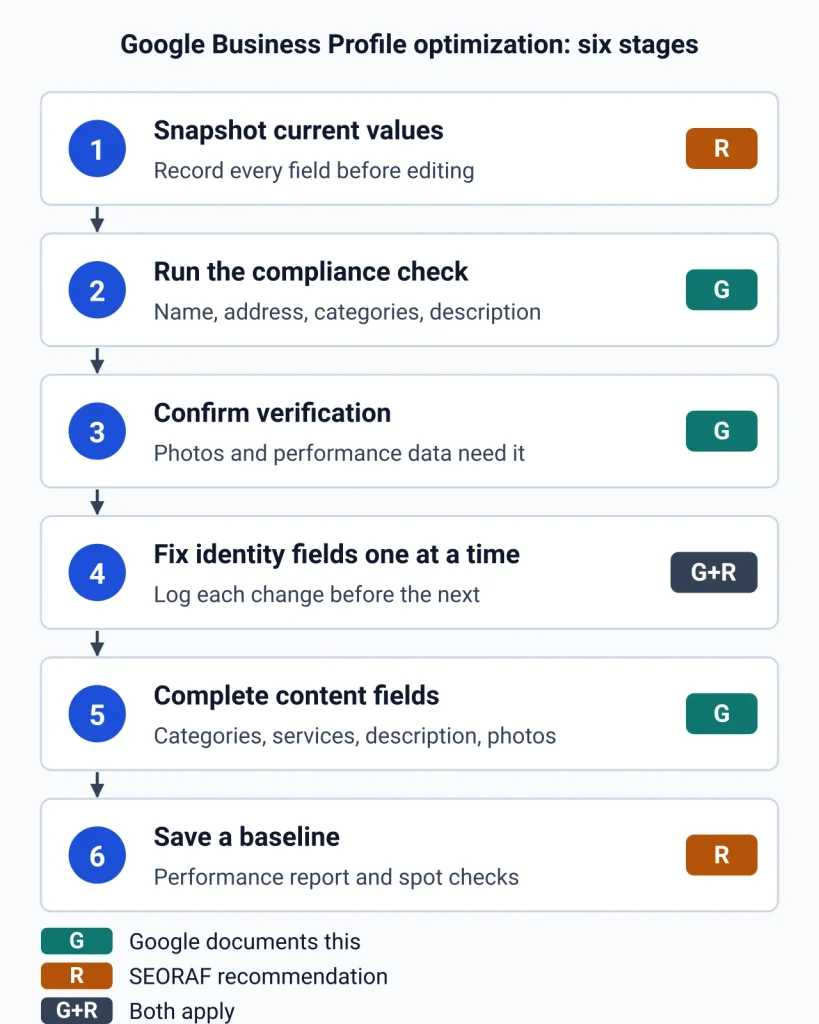
Google says significant edits, such as major changes to the business name or category, may be rejected, and that adding or editing a category may prompt re-verification. Google doesn’t publish a recommended waiting period between edits. Practitioners report suspensions that followed bursts of edits, but the reports come mostly from agencies and I could not verify a mechanism.
My recommendation: change one major field at a time, record each change, and check the result before making the next. A simple log makes problems traceable.
| Date | Field changed | Old value | New value | Reason | Guideline checked | Who edited | Check result on |
|---|---|---|---|---|---|---|---|
| (example) Date | Primary category | General category | Specific category | Matches core service | Category guidance | Owner | Follow-up date |
Monthly maintenance
- Check that hours, phone, website, and address are still correct
- Look for edits you didn’t make, including suggestions from other users
- Reply to new reviews where you have something useful to add
- Add genuine photos or posts when something changes
- Review performance data and spot-check results (see next section)
Measure Progress Without Guessing
Why manual “near me” checks mislead
Because distance is part of how Google ranks local results, searching from your desk tells you what is shown near your desk. Results can also differ by device and account. A single rank check is a data point, not a trend. Please also don’t automate it: Google’s spam policies list scraping results for rank-checking, and other automated access without permission, as machine-generated traffic that violates its policies. Third-party rank tools are a different matter, though I have not verified how any particular tool collects its data.
What Google reports
Google’s performance and insights page lists what you can see for a verified profile. It reports activity, not ranking position. I found no rank metric in its list.
| Metric | What Google says it counts | How I’d use it |
|---|---|---|
| Views | Unique visitors who viewed your profile on Search and Maps, counted once a day | Trend over time, not an exact audience size |
| Searches | The search terms people used to find your profile. Updated at the start of each month; can take up to five days to appear. | Vocabulary check. Google notes you can’t directly manage these queries. |
| Directions | Unique direction requests, adjusted for multiple taps, cancellations, and spam | A visit-intent signal |
| Calls | Clicks on the call button | Compare with calls you actually receive |
| Website clicks | Clicks on your website link | Compare with your own web analytics |
| Messages, bookings, menus, products, offers | Interactions that apply to your business | Use only those that match your setup |
The data includes activity from both organic results and Google Ads, only metrics that apply to your business appear, and you can set a date range and download a report, including for several profiles at once.
A simple spot-check method
This is my own low-cost method. Choose a handful of search points: your premises, plus a few places around your service area. For each, run the same search at the same time of day on the same device and note whether you appear in the local results and roughly where. Repeat monthly. It won’t match a paid tool, but it gives you a consistent baseline and respects the way distance works.
Connecting analytics
Google has a help article on connecting your Business Profile to Google Analytics. On the web side, using Search Console and Google Analytics data can show how visitors behave once they reach your site.
If you plan to use a call-tracking number on your profile, read Google’s phone guidance first. It asks for a number under your direct control that connects to your business, and I did not find a statement endorsing tracking numbers as the primary line.
Baselines and comparison windows
Before you change anything, save your performance figures and your spot-check results. Afterward, compare the same period length and the same weekdays, and note any other changes, such as seasonality. If you changed several things at once, you won’t know which one mattered, which is one more reason to use the change log.
Troubleshooting Drops, Missing Reviews, and Suspensions
| Symptom | Possible causes | What to check | Evidence level |
|---|---|---|---|
| Ranking dropped | Competitor improvements, a changed searcher location, edits you or others made, a policy issue | Change log; unexpected edits; competitor teardown; compliance check | No single documented cause. Diagnosis is by elimination. |
| Review count fell | Reviews removed or delayed, policy enforcement | Google’s page on missing or delayed reviews; your own request practices against the policy | Google-documented policies; causes in specific cases are often unknowable |
| “Hours might differ” label | Conflicting hours between sources (practitioner explanation) | Hours on profile, website, and major listings, including holidays | Practitioner view |
| Unwanted edits to your profile | Google compiles information from several sources, including user contributions | Monthly profile review; correct changes promptly | Google-documented sourcing |
| Duplicate listing | Another profile for the same location | Google’s duplicate and ownership help | Google-documented rule: one profile per location |
| Photo or post not showing | Pending review, rejection, or an unverified profile | Status in the profile; content policy; verification | Google-documented |
| Profile suspended | A guideline violation (see below) | Fix first, then appeal | Google-documented process |
If your profile is suspended
Google’s page on fixing suspended or disabled profiles says it may suspend or disable profiles that don’t follow its guidelines, and that you can appeal if you believe it should be reinstated. Here is what that page documents:
- Make sure the profile follows the guidelines before you appeal.
- Gather evidence. Optional evidence can include official business registration, a business license, tax certificates, or business utility bills. The business name and address on each document should match the profile.
- Use the appeals tool. It shows the decision date, the reason, a link to the violated policy, and whether the decision can be appealed.
- Appeal once. Google says appeals can only be submitted once. If the request is denied, an additional review may be possible, where you can add evidence you didn’t include originally.
- Don’t create a new profile for the same business. Google says so explicitly.
Two further points from Google’s documentation. If an account is restricted, the profiles it manages are suspended, and the account restriction must be lifted first. Google’s overview of Business Profile policies lists reasons such as a P.O. box address, a business that doesn’t exist at the location claimed, or a pattern of policy violations as grounds for suspension or restriction.
“Soft” and “hard” suspension are industry labels. The Google pages I read don’t use them, so I use “suspended” and “disabled.” I also don’t quote response times. A snippet of Google’s page showed a short review period, but I could not find it in the page copy I opened, and third-party sources give very different waits, so I treat any figure as unverified.
What AI Overviews and Ask Maps Change (and Don’t)
Ask Maps. Google announced Ask Maps, a Gemini-powered conversational feature in Google Maps, on March 12, 2026. Coverage at the time, including Search Engine Roundtable’s report, described a rollout to Android and iOS in the US and India. Availability may have changed since, so check Google’s current announcements.
How Ask Maps chooses and describes businesses isn’t documented in the sources I reviewed. Vendor pages disagree: some say it draws only on profile data and reviews, others that it also reads websites. I treat both claims as unverified. What is safe to say is that accurate profile details, honest reviews, and clear website information are what any answer system would have to work from.
AI Overviews. Figures for how often AI Overviews appear on local searches vary widely. Ahrefs reports in its Google Maps SEO guide that about 7.9% of local searches trigger one, while other studies cited by agencies report much higher rates for informational local questions. The difference appears to come from the type of query counted, but I could not trace the original studies, so treat every percentage here as unverified and dependent on search intent.
Google’s spam policies now state that they apply to attempts to manipulate generative AI responses in Search. That is one more reason not to look for tricks.
My recommendation: keep doing what is useful regardless of the interface: accurate details, real reviews, clear service pages, and consistent information everywhere. Then watch your own performance data instead of reacting to headlines.
Google Maps SEO Checklist
Each item traces back to a section above.

Eligibility and setup
- ☐ My business makes in-person contact with customers, or travels to them, in stated hours
- ☐ I chose the right business type (storefront, hybrid, service-area, practitioner, chain, department)
- ☐ My name matches my real-world name, with nothing added
- ☐ My address is real and signed; no P.O. box, remote mailbox, or virtual office
- ☐ If I have no storefront, my address is hidden and my service area is realistic
- ☐ I have one profile per location
- ☐ The profile is verified
Profile
- ☐ My primary category is specific and truthful
- ☐ My additional categories are few and describe what the business is
- ☐ Hours, special hours, phone, and website are correct
- ☐ My description has no links, prices, or promotions
- ☐ My services list reflects what I actually offer
- ☐ Photos are genuine and meet Google’s specifications
- ☐ Posts, if used, contain real updates
Reviews
- ☐ I ask all customers, not only happy ones
- ☐ I offer no incentives and set no staff quotas
- ☐ I use neutral wording and never script review content
- ☐ I reply with useful information and report policy-breaking reviews
Website and listings
- ☐ The profile links to a page that represents this location
- ☐ I have a genuine page for each real service or location, with no cloned city pages
- ☐ My business name, address, and phone are consistent across major listings
- ☐ LocalBusiness markup, if used, matches the profile and passes testing
- ☐ My local links are earned and, where required, properly qualified
Measurement and maintenance
- ☐ I saved a baseline of performance data and spot-check results
- ☐ I keep a change log and change one major field at a time
- ☐ I review the profile monthly for unexpected edits
- ☐ I know the steps for a suspension: fix first, gather evidence, appeal once, no new profile
Frequently Asked Questions
Is there SEO for Google Maps?
Yes, in the sense that you can influence parts of how your business appears. Google says local results rely on relevance, distance, and prominence, and that you can improve your presence by keeping your profile complete and accurate. It also says you cannot pay for a better local ranking.
Is Google Maps SEO free?
Google states that you can’t buy a better organic local ranking. The costs you may face are your own time and any tools or help you choose. Paid ads are a separate product.
How long does it take to see results?
Google doesn’t publish a timeline, and the ranges quoted online come from sellers and agencies with little verifiable support. Treat any promised timeframe with caution. Set a baseline, make one change at a time, and compare over consistent windows.
Can I rank without a website?
Google’s guidelines ask for a phone number that connects to your location, or a website that represents it, so a profile can exist without a website. A website can still support your presence, and expert surveys give website signals weight, but I would not promise an outcome either way.
Can I rank without a storefront?
If you are eligible as a service-area business, yes, a profile is possible. Google’s guidelines tell service-area businesses without a storefront to hide their address and set a service area. Virtual offices don’t qualify unless staffed.
Do reviews affect ranking?
Google says review count and ratings are part of prominence, and that more reviews and positive ratings can help your local ranking. It does not publish how much. For more detail on the rules, see the review section above.
Can I ask customers for reviews?
Yes, you can ask for genuine reviews and share a link or QR code. You can’t offer incentives, discourage negative reviews, set staff quotas, or ask for specific content.
Do I need citations?
Google’s ranking page names links and reviews under prominence and doesn’t list citation counts. Consistent details still help, because Google compiles information from several sources. Prioritize accuracy over volume.
Why did my ranking drop?
There isn’t a single documented cause. Competitors improve, searcher locations vary, details change, and policies are enforced. Use your change log and the troubleshooting table to eliminate possibilities.
What should I do if my profile is suspended?
Fix the problem first, gather matching evidence, appeal once through Google’s tool, and don’t create a second profile. See the troubleshooting section for the steps.
Does AI make Google Maps SEO obsolete?
The evidence is mixed. Figures on AI Overviews in local search conflict, and the way Ask Maps selects businesses isn’t documented. The fundamentals of accurate information, honest reviews, and clear web pages remain useful either way.
How I researched this guide
I built this article from Google’s own help pages for Business Profile guidelines, eligibility, categories, reviews, photos, posts, performance data, and suspensions, plus Google’s Search spam policies and LocalBusiness structured data documentation. I added Whitespark’s published survey and news coverage where I flagged them. I have not run controlled tests for this guide, and where I mention tests or percentages from others, I say so and label them unverified. Google’s documentation changes, so please confirm important rules on the linked pages. SEORAF’s editorial policy and affiliate disclosure explain how the site handles sources and commercial relationships. If you spot something outdated, you can reach me through the contact page.
Primary sources used
- Google: Tips to improve your local ranking
- Google: Guidelines for representing your business
- Google: Business eligibility and ownership guidelines
- Google: Overview of Business Profile policies
- Google: Manage your business category
- Google: Prohibited and restricted content (Maps)
- Google: Tips to get more reviews
- Google: Manage photos and videos
- Google: Create and manage posts
- Google: Photos, videos, and posts content policy
- Google: Business Profile performance and insights
- Google: Fix suspended or disabled profiles
- Google Search Central: Spam policies
- Google Search Central: LocalBusiness structured data
- Whitespark: Local Search Ranking Factors