
Best Technical SEO Software in 2026: Crawlers, Platforms and Free Tools Compared
By Mousume Akter, Founder & Editor, SEORAF · Last verified: November 23, 2026
The right technical SEO software depends on three questions. How large is your site, and how often does it change? Does it need JavaScript to show its main content? Do you need to see what bots actually requested, or is a simulated crawl enough?
Most buying mistakes come from asking those questions after the purchase. A desktop crawler that handles a 5,000-page site comfortably can become impractical on a catalog of several hundred thousand URLs. An audit module inside a marketing suite may cap each audit well below your site size. And log analysis is wasted if you run a quarterly audit on a small blog.
This article compares twelve options: desktop and cloud crawlers, audit modules in all-in-one suites, enterprise platforms and Google’s free tools. It relies on vendor documentation, Google documentation and a small amount of published research, and it labels what each source can and cannot establish. It does not cover keyword research, backlinks or rank tracking. For those, see SEORAF’s broader SEO software comparison.
Quick answers by situation (SEORAF analysis)
- Small site, first audit: Google Search Console plus a free crawler tier (Screaming Frog’s 500-URL limit, or the free Ahrefs plan if you own the site).
- Consultants and agencies wanting configurable crawling: Screaming Frog or Sitebulb.
- Already paying for a suite: try the Semrush, Ahrefs or SE Ranking audit first, but check the per-audit page cap.
- JavaScript-heavy sites: compare how each tool includes and bills rendering. The models differ more than the feature lists suggest.
- Large sites and crawl analysis from logs: Oncrawl, Botify, JetOctopus, or Lumar with log data.
- Release QA and continuous monitoring: Lumar, Conductor Website Monitoring (formerly ContentKing) or an always-on audit add-on.
Disclosure: SEORAF did not test any of this software. Nothing here reflects hands-on use, and I say so wherever a capability rests on a vendor’s own claim. SEORAF has an affiliate relationship with SE Ranking, one of the tools reviewed below. Recommendations follow the evidence, not payouts, and the evidence rules are explained below.
Technical SEO software at a glance
Quick comparison table
| Tool | Type | Best for | Free access | Public entry price | JS rendering | Log analysis |
|---|---|---|---|---|---|---|
| Screaming Frog SEO Spider | Desktop crawler | Configurable audits, migration checks | Free to 500 URLs | £199 per licence per year | Paid licence | Separate tool, £99 per year |
| Sitebulb | Desktop and cloud auditor | Client-ready reports, shared cloud data | 14-day trial | Cloud from £95/month; desktop prices not confirmed (see review) | Included, all plans | None found |
| JetOctopus | Cloud crawler plus logs | Large sites wanting crawl, logs and GSC together | 7-day trial (opens after a demo call) | Vendor pages conflict ($349 vs $549/month) | Included; counts double against quota | Yes |
| Semrush Site Audit | Suite module | Teams already on Semrush | Free plan: 100 pages/month | Classic Pro $139.95/month; Semrush One Pro+ $299/month | Guru and Business toolkits (Pro+ and Advanced) | Enterprise product; toolkit scope not verified |
| Ahrefs Site Audit | Suite module | Teams already on Ahrefs | Free plan (limited) | $129/month (Lite) | Per-crawl setting | None found |
| SE Ranking Website Audit | Suite module | Teams wanting audit plus tracking | 14-day trial | $129/month ($103.20 billed annually) | Vendor-stated | None found |
| Lumar | Enterprise platform | Release QA, monitoring | Not verified | Custom | Yes | Via services/integration (not confirmed) |
| Botify | Enterprise platform | Enterprise crawl plus logs | No self-serve trial reported | Custom | Yes | Yes |
| Oncrawl | Enterprise platform | Very large sites, crawl and log joins | None reported | Custom | Yes | Yes |
| Google Search Console | Google reports | Everyone, as the baseline | n/a | No Google price page retrieved | Google’s own view | Crawl Stats only |
| Conductor Website Monitoring | Monitoring | Change and incident alerts | Not verified | Sales-led (not verified) | Not verified | Not verified |
| Siteimprove | Governance platform | Accessibility and QA | Not verified | Customized | Not verified | Not applicable |
Prices are vendor-stated unless noted, and currencies differ by vendor. Always confirm on the vendor’s page.
How to read the evidence labels
| Label | Meaning |
|---|---|
| Google-documented | Stated in Google Search Central or Search Console documentation |
| Vendor-stated | Claimed on the vendor’s own page; not independently verified |
| Published research | A study with a described method |
| Independent reviewer report | A reviewer or trade publication not affiliated with the vendor |
| SEORAF analysis | My reasoning from the sources, not a claim by any source |
| Not verified | No usable source found, or sources conflict |
I found no independent benchmark of crawl accuracy, speed or rendering fidelity for these products. Several aggregator pages publish “detection rates” or ratings out of ten, but their methods can’t be checked and their rankings contradict each other. I excluded all of them, so this article has no scores.
How SEORAF evaluated these tools
What I checked. For each product I read official pricing and documentation first, then Google’s documentation for technical claims, then independent reports. Each figure carries a verification date. When sources conflict, I show both and label the conflict.
What I did not do. SEORAF did not install, test or benchmark any of this software. I did not run comparative crawls or measure speed, accuracy or user experience. Statements about strengths are inferences from documented capabilities and labeled as SEORAF analysis.
Independence. Products are grouped by type and use case, not ranked. Order within a group means nothing about quality.
Update policy. Pricing changed repeatedly in 2026. Semrush restructured plans and was acquired by Adobe, SE Ranking replaced its tiers, and two JetOctopus pages disagree on prices. Re-check any price on the vendor’s page before buying.
What counts as technical SEO software?
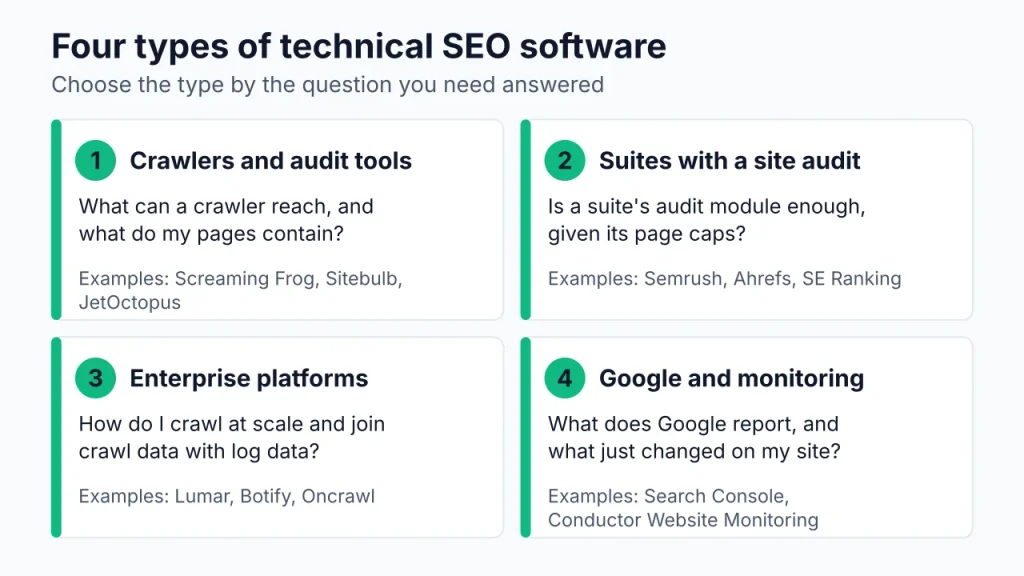
“Technical SEO software” covers products that answer different questions. Knowing which question you’re asking prevents buying the wrong class.
- Crawlers and audit tools request URLs, follow links and record what they find, then flag issues. They show what a crawler can reach and what pages contain, not what Googlebot did on your server.
- All-in-one suites with a site audit module bundle a crawler-based audit with keyword, backlink and rank tools. The audit’s limits follow the suite’s plan structure.
- Enterprise platforms emphasize scale, scheduled monitoring, team workflows and, in several cases, log analysis. They are priced through sales conversations.
- Google tools and monitoring-first products include Search Console, which reports Google’s own view, and products built around change detection and alerts.
Three data sources answer different questions about the same URL:
- A crawl shows what a crawler that follows your links can reach and what each page contains.
- Server logs show which bots requested which URLs and what your server returned.
- Search Console shows what Google reports about indexing and field performance.
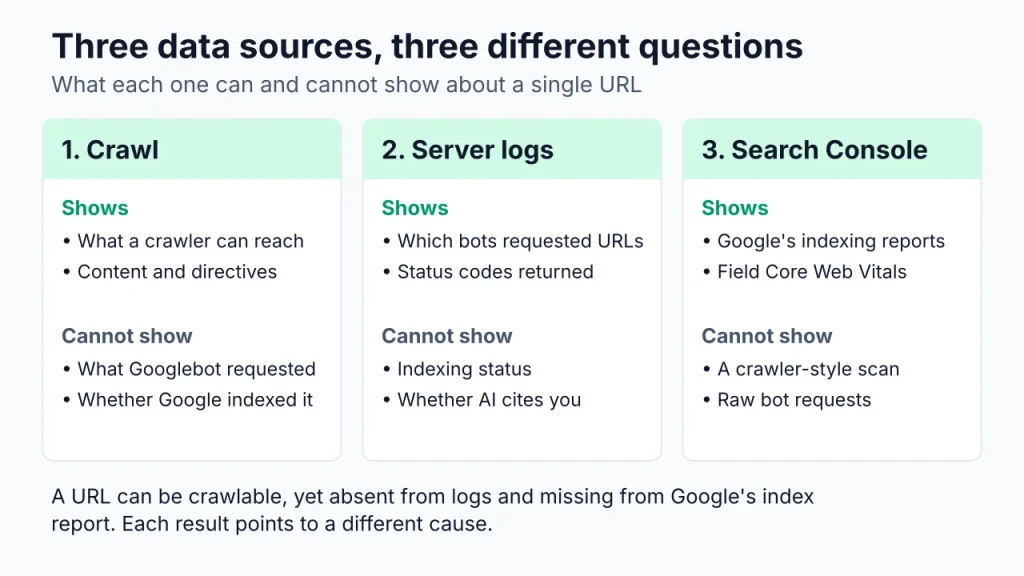
Good technical SEO work compares them. A URL can be crawlable, absent from logs and missing from Google’s index report, and each of those facts points to a different cause. That is why log analysis and Search Console integration appear as selection criteria below.
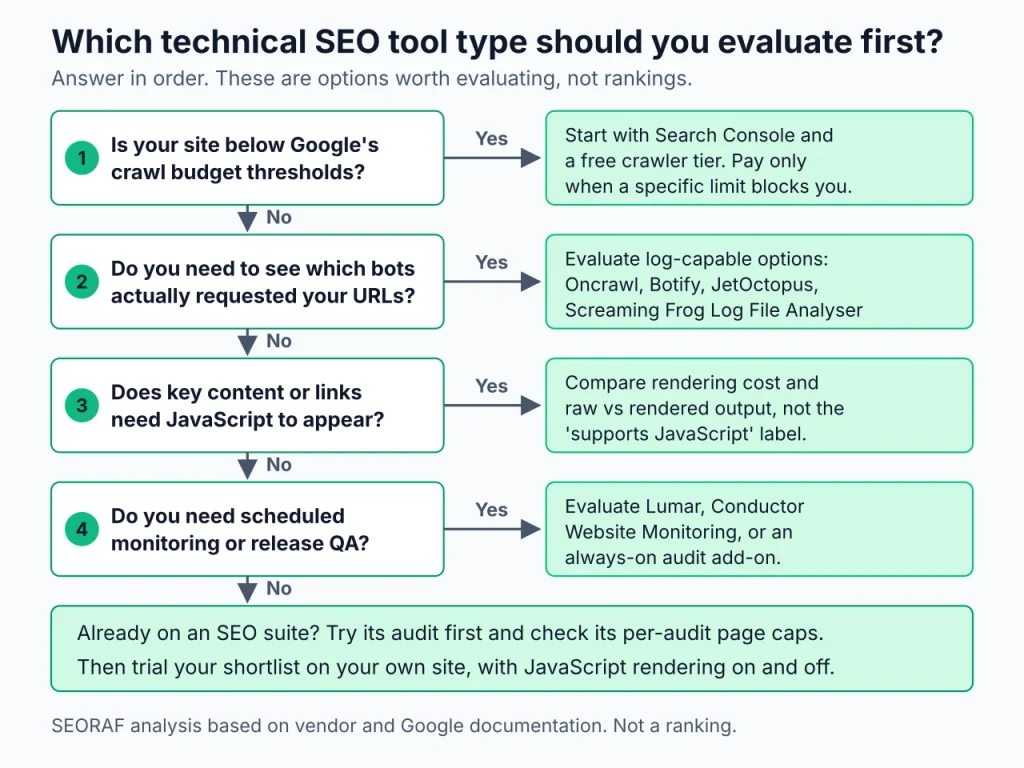
A note on crawl budget. Google’s crawl budget guide is aimed at sites with 1 million or more unique pages updated weekly, or 10,000 or more pages updated daily (Google-documented). Google adds that sites whose pages are generally crawled the day they’re published don’t need that guide. That doesn’t mean small sites need no technical audit. It does suggest enterprise crawling and log tooling is unnecessary for many of them (SEORAF analysis). For large sites, SEORAF’s crawl budget guide goes further.
Crawlers and audit tools
Screaming Frog SEO Spider (and Log File Analyser)
What’s distinctive: the most configurable option in this group, licensed per user and run on your own machine (SEORAF analysis).
Overview. The SEO Spider is a desktop crawler for Windows, macOS and Linux that is free to crawl 500 URLs, with a £199 annual licence removing the limit and unlocking advanced features (vendor-stated, per Screaming Frog’s product page). Its Log File Analyser is a separate product.
Main technical SEO capabilities (vendor-stated). The vendor says it checks for over 300 SEO issues, warnings and opportunities. The feature list covers broken links, errors and redirects, page titles and metadata, meta robots and directives, hreflang attributes, exact duplicate pages, XML sitemap generation and site visualisations. JavaScript rendering crawls the rendered HTML after scripts run, and the listing includes storing and viewing raw and rendered HTML. Structured data validation, custom robots.txt, near-duplicate content, mobile usability, AMP validation and spelling checks are also listed (see the pricing and feature comparison).
Important features. Crawls can be scheduled with automatic exports (including Google Sheets) or run from the command line, and the tool can compare crawls and compare staging against production using URL mapping. Integrations include Search Console, PageSpeed Insights, Analytics and link metrics, plus a Looker Studio crawl report. The companion Log File Analyser imports server logs, verifies search engine and AI bots, and joins log data with crawl data (vendor-stated).
Pricing considerations. The licence is £199 per year for one to four licences, falling to £169 each at 20 or more. Licences last one year and, per the vendor FAQ, are for a single user; when a licence expires the tool reverts to the restricted free version. The Log File Analyser costs £99 per licence per year and has a free version limited to 1,000 log lines (see Log File Analyser pricing).
Strengths (SEORAF analysis). Pricing, feature gating and hardware guidance are all published on the vendor’s own pages, which makes cost and fit easy to check.
Limitations. It is desktop software, so capacity depends on your machine. The vendor’s user guide says 8 GB of RAM is generally sufficient for crawls under 200,000 URLs, while crawling over a million URLs calls for an SSD and 16 GB or more. The free version leaves out much of the toolset: a licence is what unlocks saving crawls, configuration, custom extraction, Analytics and Search Console integration and JavaScript rendering. I found no cloud or shared-workspace option on the pages I read.
Best suited for (SEORAF analysis). Consultants and in-house SEOs comfortable configuring crawls, migration checks, and small to mid-size sites.
What buyers should verify. Hardware requirements for your crawl size, renewal terms, and whether you’ll also need the separate log tool.
Sitebulb
What’s distinctive: audits built around explaining and prioritizing findings, with both desktop and cloud versions (SEORAF analysis).
Overview. Sitebulb runs as desktop software for Windows and Mac, or as a cloud service in the browser (vendor-stated, per Sitebulb’s pricing page).
Main technical SEO capabilities (vendor-stated). All plans include 100+ hints, JavaScript crawling, Google Analytics, Search Console and Sheets integration, duplicate content checks and crawl maps. Pro adds 300+ hints, advanced configuration, audit comparisons, scheduled audits and customized PDF reports. The vendor FAQ lists Structured Data, International and Hreflang, Performance and Mobile Friendly, Accessibility and AMP modules as Pro features, though that page may predate recent releases.
Important features. Cloud plans add recurring audits and unlimited projects. Sitebulb has also launched an MCP connector for bringing crawl data into Claude and ChatGPT (vendor-stated).
Pricing considerations. The vendor offers a 14-day free trial equivalent to Pro on desktop, with no card required, and invoicing by purchase order for yearly plans only. Lite is limited to crawling 10,000 URLs. Prices on the vendor page render by script, so I could not confirm them. Marketplace listings such as Capterra show about $18 per month for Lite and $42 for Pro (Not verified). Cloud shows from £95 per month on the vendor page. Marketplace listings range from $125 to $245, and the lower figure is consistent with the vendor’s, so the higher one is probably outdated (SEORAF analysis). Extra Pro users start at £7 per month (vendor-stated).
Scale (vendor-stated). Pro defaults to 500,000 URLs per audit and can be raised to 2 million at your hardware’s risk. Cloud tiers run from 50,000 URLs per audit (Mini) to 1 million (Medium), with custom Enterprise plans (see Sitebulb Cloud pricing).
Strengths (SEORAF analysis). JavaScript crawling is included at every tier, and the report output suits client work.
Limitations. I found no log analyzer. An older FAQ says log analysis is not yet available and the 2026 release notes don’t mention it (Not verified). Several audit modules sit behind Pro, and desktop crawls are bounded by your computer.
Best suited for (SEORAF analysis). Agencies and consultants who deliver reports to non-specialists, and teams wanting shared cloud crawl data.
What buyers should verify. Current price in your currency, which modules your plan includes, and whether log analysis has been added.
JetOctopus
What’s distinctive: crawl, logs and Search Console data bundled into one quota-based cloud product, with no per-seat fees (vendor-stated).
Overview. The vendor’s pricing page says there are no artificial limits and no per-seat fees, and charges by crawled URLs and log lines per month.
Main technical SEO capabilities (vendor-stated). The plan table lists crawl budget visualization, a JavaScript rendering crawl mode, crawl-to-crawl comparison, segmentation, unlimited simultaneous crawls and projects, plus a log analyzer. GSC and GA4 integrations are included within property limits.
Pricing considerations. The vendor’s own pages disagree. The pricing FAQ states Growth at $349 per month on an annual plan ($459 quarterly), Pro at $809 and Ultra at $1,559, with Growth covering 500,000 crawled URLs and 2 million log lines. The pricing page I retrieved shows Pro at $549 and Ultra at $1,089 per month for 1 million and 3 million crawled URLs. I can’t tell which is current (Not verified). JavaScript rendering is included in the plan price but counts each JS-rendered page as two crawled pages. The vendor offers a 7-day trial that, per its limits FAQ, opens after a demo call and limits crawling to 10,000 URLs.
Strengths (SEORAF analysis). One quota model spans crawling, logs and Search Console data, and seats aren’t charged.
Limitations. Rendering consumes quota at twice the rate. A TechRadar review (independent reviewer report) notes the base package’s log lines count only visits from search bots; confirm the current counting rule.
Best suited for (SEORAF analysis). Large sites and in-house teams wanting logs alongside crawls without an enterprise sales process.
What buyers should verify. Which price list is current, how log lines are counted, quota use on JS crawls, and what the trial limits hide.
All-in-one SEO suites with a site audit module
Suites make sense when the audit is one tool among several. The trade-off is that audit limits follow the suite’s plan structure rather than what the audit needs.
Semrush Site Audit
What’s distinctive: a documented JavaScript Impact report, per-audit caps that matter on larger sites, and a new owner (SEORAF analysis).
Ownership. Adobe announced the completion of its acquisition of Semrush on April 28, 2026 (vendor-stated), and says customers can expect continued investment and an expanded roadmap. That is a forward-looking statement, so plan and feature changes are possible.
Main technical SEO capabilities (vendor-stated). Over 140 checks across crawlability, HTTPS, international SEO, performance, internal linking, markup and Core Web Vitals, grouped into seven thematic reports. Structured data is recognized in Microdata and JSON-LD formats. The JS Impact report shows pages where JavaScript rendering changes titles, descriptions, word count, markup, canonicals, links, client-side redirects and meta robots. Exports come as Excel, CSV and PDF, and My Reports can combine audit data with GA4 and Search Console.
Scale and gating (vendor-stated). Per the Site Audit knowledge base, a single audit covers up to 20,000 pages, or 100,000 on the Business tier. Monthly page allowances are 100,000 (Pro), 300,000 (Guru) and 1 million (Business), with 100 pages monthly on the free level. JavaScript rendering requires Guru or Business, and AMP checks require Business. The newer Semrush One tiers inherit those limits: Starter includes the Pro toolkit, Pro+ includes Guru, and Advanced includes Business. Enterprise Site Intelligence adds full JavaScript and Shadow DOM rendering, Bot Analytics and crawler profiles for AI agents and search bots.
Pricing considerations. The classic SEO Toolkit starts at $139.95 per month for Pro, per a TechRadar review (independent reviewer report). Semrush’s own Semrush One page shows Pro+ at $299 monthly, or $248.17 per month billed annually. TechRadar lists Starter at about $199 and Advanced at about $549 monthly. Annual-billing figures differ slightly between sources, so confirm at checkout. Extra users start at $45 per month. Trial length is reported as 7 or 14 days depending on plan (Not verified).
Strengths (SEORAF analysis). Audit results sit next to Semrush’s other tools, and the JS Impact report is a specific, documented rendering diagnostic.
Limitations. The 20,000-page cap applies to Pro and Guru-level audits, rendering is tier-gated, and plan names have changed.
Best suited for (SEORAF analysis). Teams already on Semrush whose audits fit the per-audit cap or can be scoped by section. The SE Ranking vs Semrush comparison covers the wider suite decision.
What buyers should verify. Current plan prices, the toolkit tier that applies, rendering availability, any log analyzer limits, and roadmap changes after the Adobe deal.
Ahrefs Site Audit
What’s distinctive: explicit crawl-credit and per-project page limits on every plan (SEORAF analysis).
Main technical SEO capabilities (vendor-stated). Over 170 issues in categories including Core Web Vitals, duplicates, indexability, localization, links, redirects, JavaScript, robots, sitemaps and structured data. It states that it checks structured data against 190+ Google and Schema.org requirements. An “Execute JavaScript” setting controls rendering, and raw and rendered HTML are both searchable. Core Web Vitals needs your own PageSpeed Insights API key, and field data may be missing for lightly visited pages.
Pricing and limits (vendor-stated). Per the Ahrefs pricing page, Lite is $129, Standard $249, Advanced $449 and Enterprise $1,499 per month. Crawl credits per month are 100,000, 500,000, 1.5 million and 5 million or more; maximum pages per project are 25,000, 50,000, 250,000 and 5 million. Enterprise requires an annual commitment. Extra users cost $40, $60 and $80 per month by plan. Always-on audits are an add-on: Project Boost Pro at $20 per month per project (10 pages per minute) and Project Boost Max at $200 per month per project (30 pages per minute). Looker Studio integration and HTTP authentication in Site Audit appear under the Advanced plan. Ahrefs says it never runs discounts, while website owners can use the free plan, which gives limited access to Site Explorer and Site Audit.
Strengths (SEORAF analysis). Published limits make costs easier to estimate than with custom-priced tools.
Limitations. Entry-plan project caps are small for many ecommerce sites. I found no log analyzer, and I did not verify how many credits a JavaScript crawl consumes.
Best suited for (SEORAF analysis). Freelancers and in-house teams already using Ahrefs, with small to mid-size sites.
What buyers should verify. Credit use on JS crawls, project caps for your site and whether the free plan’s limits fit.
SE Ranking Website Audit
What’s distinctive: a lower-priced suite with large stated audit quotas (SEORAF analysis). SEORAF has an affiliate relationship with SE Ranking, so weigh this section accordingly.
Main technical SEO capabilities (vendor-stated). More than 115 metrics by the vendor’s count, with reports on unindexable pages, HTTP statuses, link attributes and robots meta tags. A client-side JavaScript rendering option, Core Web Vitals coverage and a hreflang-to-canonical check are listed. Integrations include Data Studio, Matomo, GA and GSC, and plans include MCP access.
Pricing and limits (vendor-stated). On the SE Ranking subscription page, Core is $129 monthly or $103.20 per month billed annually, includes 250,000 audited pages per month, and has a 14-day trial with no credit card. Growth is $279 or $223.20. The plan table lists audit pages per account of 250,000 (Core) and 2 million (Growth), with maximum pages per project of 250,000 and 1 million. The vendor’s audit page separately claims 2 million pages per project, which conflicts with this table. A TechRadar review notes SE Ranking restructured its plans in 2026, replacing Essential, Pro and Business with Core, Growth and Enterprise.
Strengths (SEORAF analysis). Large stated monthly audit quotas on both public plans.
Limitations. I found no log analyzer, and structured data validation in the audit is not verified. The per-project cap is inconsistent across the vendor’s own pages.
Best suited for (SEORAF analysis). Small agencies and teams wanting audit plus tracking at a public price.
What buyers should verify. The per-project cap on your tier, JS rendering availability, and whether page change monitoring is on your plan.
Enterprise technical SEO platforms
These platforms are sold through demos and contracts, so public pricing is limited. Details below come from vendor pages and are not independently verified.
Lumar
What’s distinctive: a monitoring-and-prevention emphasis for teams that ship site changes frequently (SEORAF analysis).
Overview. Lumar describes four parts: Analyze, Monitor, Protect and Impact. The crawler page lists 350+ built-in reports in Analyze and automated QA tests in Protect. An older page still says 250+ reports, so the number has changed.
Capabilities (vendor-stated). The vendor reports crawl speeds up to 450 URLs per second (non-rendered) and 350 per second (rendered) in its own tests, a claim without a published method. Its crawler uses Google’s rendering and parsing engine for JavaScript pages. Monitor offers customizable alerts and multi-domain dashboards, and the platform lists task management, SEO QA automation, platform integrations and a GraphQL API (see Lumar’s page for SEO teams). Lumar lists log file analysis among its professional-services offerings. Earlier excerpts referred to integrations for log data, which I could not re-confirm.
Pricing considerations. No public pricing; the vendor directs buyers to book a demo. Free trial availability is not verified.
Strengths (SEORAF analysis). Automated pre-release QA with CI/CD-oriented workflows is documented.
Limitations. No public price, and how natively the platform handles logs is unclear.
Best suited for (SEORAF analysis). Large organizations with release cadence and multi-domain portfolios.
What buyers should verify. Log ingestion depth, credit model, pilot terms and contract length.
Botify
What’s distinctive: a crawler marketed with no crawl-budget limit, alongside a log analyzer (vendor-stated).
Capabilities (vendor-stated). Botify’s support documentation says SiteCrawler works without crawl budget limitations and renders JavaScript using the same rendering engine as Googlebot. The SiteCrawler page claims it can explore millions of pages with no crawl budget limits. A vendor blog describes combining SiteCrawler with a LogAnalyzer to see whether bots spend time on low-value pages. Third-party sources mention AlertPanel and ActionBoard, which I did not verify. Botify also publishes a view that most AI bots can’t render JavaScript and promotes pre-rendering, which is a vendor position.
Pricing considerations. Pricing is on request. An AWS Marketplace listing ties pricing to contract terms, and one aggregator reports no self-serve trial (Not verified). Some G2 reviewers describe the platform as expensive (independent reviewer report).
Strengths (SEORAF analysis). Crawl and log analysis from one vendor.
Limitations. No public pricing and sales-led onboarding.
Best suited for (SEORAF analysis). Enterprise teams with SEO capacity and log-led workflows.
What buyers should verify. Pricing and contract terms, rendering throughput on your site, and what a pilot includes.
Oncrawl
What’s distinctive: crawl and log data analyzed together, with an explicit URL-consumption rule for rendering (vendor-stated).
Overview. Third-party sources, such as this directory profile, report that Oncrawl has been part of BrightEdge since February 2022 (not confirmed on a vendor page).
Capabilities (vendor-stated). The crawler page lists hundreds of standard metrics, JavaScript-rendered content and Core Web Vitals, and says it can crawl millions of URLs without artificial limits on speed, depth or site size. Its log analyzer, per a vendor article, supports standard formats like IIS, Apache and Nginx plus custom ones, with uploads through a secure private FTP. The help center covers Core Web Vitals auditing and log setups for Splunk and Akamai.
Pricing considerations. No self-serve pricing; contact sales. A third-party site lists euro tiers that I treat as unreliable (Not verified). An older vendor product update says JavaScript crawls consume three times the URLs in your quota, and JavaScript plus Core Web Vitals five times; that page is undated, so verify the current rule.
Strengths (SEORAF analysis). Documented log format flexibility and crawl-log joins.
Limitations. No public price, rendering may multiply quota use, and log analysis requires raw server logs and comfort working with them.
Best suited for (SEORAF analysis). Very large sites that analyze crawl and log data together.
What buyers should verify. The current rendering multiplier, quote terms and product direction inside BrightEdge.
Monitoring, free and adjacent tools
Google Search Console
What’s distinctive: Google’s own reporting, which no third-party tool replaces (SEORAF analysis).
Capabilities (Google-documented). The Page indexing report shows which pages Google can find and index and any indexing problems, but it is not for checking a specific page; the URL Inspection tool is. The Core Web Vitals report is based on real user data for LCP, INP and CLS, with good thresholds of 2.5 seconds, 200 milliseconds and 0.1. It is not a comprehensive list of indexed URLs; it shows a sample, and its URL-group results can differ from PageSpeed Insights results for a single URL. The Crawl stats report, described in Search Console’s reports overview, shows how often Google crawls your site and how many requests it makes.
Limits (Google-documented). The URL Inspection API allows 2,000 queries per day and 600 per minute per site, per Google’s usage limits page, which constrains bulk checks through third-party tools.
Best suited for. Every site, as the baseline. Search Console reports Google’s data and inspects individual URLs, but it doesn’t crawl your whole site like a crawler. I did not retrieve a Google pricing page, so confirm access terms in your account.
Conductor Website Monitoring (ContentKing)
Conductor announced its agreement to acquire ContentKing on February 16, 2022, and the product is now sold as Conductor Website Monitoring. Conductor describes it as real-time auditing and monitoring that watches your most important pages. Search Engine Land reported that the integration would let clients crawl sites as often as every 10 minutes and get alerts on high-priority technical issues (reported, not verified on the current product). I could not verify rendering, scale, log analysis or pricing (Not verified). Pricing appears sales-led. Best suited for teams needing change and incident alerts; confirm current capabilities directly with the vendor.
Siteimprove (considered, not a core pick)
Siteimprove is a governance platform combining accessibility, quality assurance, content and SEO. Its pricing page says pricing is customized to business needs. One evaluator, The Digital Project Manager, describes it as lacking deep technical SEO features (independent reviewer report). I treat it as adjacent: useful if accessibility and governance drive the purchase, not as a primary technical SEO tool.
Technical capability comparisons
These tables compare what each vendor states. None of it has been independently benchmarked.
Crawling and JavaScript rendering
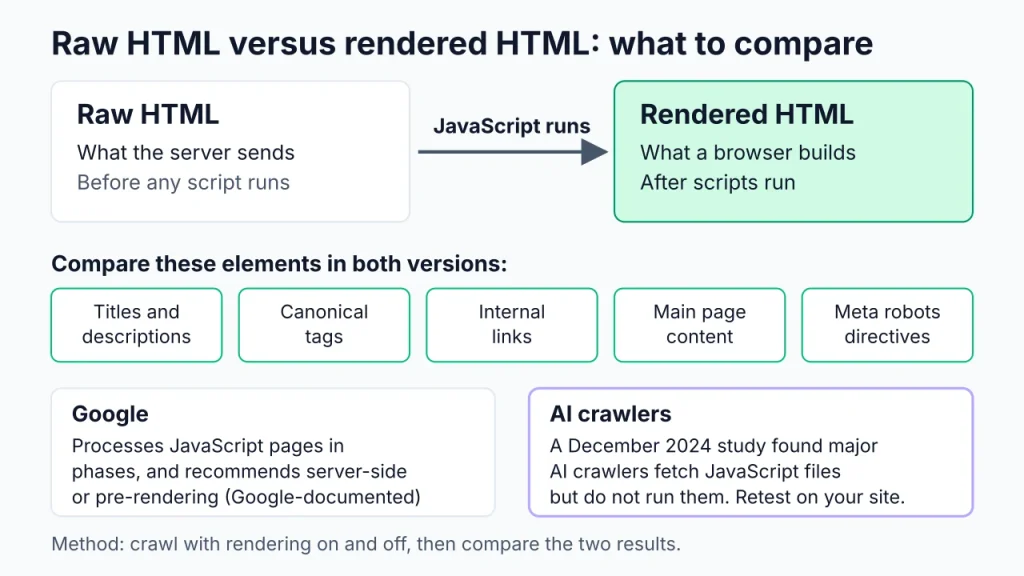
Google processes JavaScript pages in phases and recommends server-side or pre-rendering because not all bots run JavaScript (Google-documented). A MERJ and Vercel study of more than 100,000 Googlebot fetches reported that Google now attempts to render all HTML pages with an up-to-date Chromium (published research, from a hosting vendor’s network). A separate Vercel and MERJ study, published December 2024, found that major AI crawlers pull JavaScript files but do not render them, as reported by Search Engine Journal (published research). Behavior may have changed since 2024, and no AI vendor documents this, so test your own pages with JavaScript disabled.
| Tool | Deployment | JS rendering | How rendering is billed or gated |
|---|---|---|---|
| Screaming Frog | Desktop | Yes (paid licence) | Included in licence |
| Sitebulb | Desktop, Cloud | Yes, all plans | No extra cost |
| JetOctopus | Cloud | Included | One JS page counts as two |
| Semrush | Cloud | Guru and Business toolkits | Higher tiers only |
| Ahrefs | Cloud | Per-crawl setting | Credit impact not verified |
| SE Ranking | Cloud | Option in audit | Not verified |
| Lumar | Cloud | Yes | Not verified |
| Botify | Cloud | Yes | Not verified |
| Oncrawl | Cloud | Yes | 3× URLs (older vendor page) |
Indexability and Google index data
| Tool | Indexability signals | Google index data |
|---|---|---|
| Screaming Frog | Directives, canonicals, robots blocking | Search Console integration |
| Sitebulb | Directive and canonical checks | Search Console integration, all plans |
| Ahrefs | Indexability, robots, sitemaps categories | Search Console connection (wording varies by page) |
| SE Ranking | Unindexable pages and causes | Search Console integration |
| Semrush | Crawlability report | Not verified |
| Oncrawl | Not verified | GA4 and Search Console signals |
| JetOctopus | Not verified | GSC and GA4 included |
| Search Console | Page indexing report; URL Inspection | Google’s own data |
Log file analysis
Logs record what bots requested, which a simulated crawl can’t show. They don’t show indexing status or whether AI systems cite you (SEORAF analysis).
| Tool | Capability | Cost note | Label |
|---|---|---|---|
| Screaming Frog Log File Analyser | Bot verification, orphan URLs, crawl joins | £99/licence/yr; free to 1,000 lines | Vendor-stated |
| Oncrawl | Standard and custom formats; FTP upload; crawl joins | Custom | Vendor-stated |
| Botify | Log Analyzer | Custom | Vendor-stated |
| JetOctopus | Log Analyzer in all plans | Quota-based | Vendor-stated |
| Semrush | Enterprise Bot Analytics; toolkit scope not verified | Enterprise custom | Vendor-stated / Not verified |
| Lumar | Listed as a service; integration not re-confirmed | Custom | Vendor-stated / Not verified |
| Sitebulb, Ahrefs, SE Ranking | None found | – | Not verified |
| Search Console | Crawl stats only | Free | Google-documented |
Monitoring and alerts
| Tool | Stated monitoring capability |
|---|---|
| Conductor WM | Real-time monitoring and alerts |
| Lumar | Custom alerts, multi-domain dashboards, Protect QA |
| Ahrefs | Always-on audit add-on ($20 or $200 per project per month) |
| SE Ranking | Scheduled audits; page change monitoring listed in plan comparison (tier not verified) |
| Sitebulb | Scheduled audits (Pro); recurring cloud audits |
| Screaming Frog | Scheduling, crawl comparison; unattended use depends on your machine |
| Oncrawl | Vendor testimonial mentions early issue detection |
| Semrush, Botify, JetOctopus | Not itemized in sources read |
Reporting and integrations
| Tool | Reporting | Integrations / API / AI access |
|---|---|---|
| Screaming Frog | Looker Studio crawl report, exports | GA, GSC, PSI; AI integrations; MCP server |
| Sitebulb | PDF reports (Pro) | GA, GSC, Sheets; MCP connector |
| Semrush | PDF, Excel, CSV; My Reports | GA4, GSC; API on top tiers; MCP |
| Ahrefs | CSV/ZIP issue export | Looker Studio (Advanced); API and MCP |
| SE Ranking | Reports | Data Studio, Matomo, GA, GSC; API add-on; MCP |
| Lumar | Impact dashboards | GraphQL API |
| Oncrawl | Help-center guides for Splunk, Akamai log setups | Data connectors |
| JetOctopus | – | GSC, GA4; Ahrefs beta |
Website scale and crawl limits
| Tool | Stated scale | Label |
|---|---|---|
| Screaming Frog | Unlimited; bounded by memory (8 GB RAM under 200k URLs; SSD and 16 GB over 1M) | Vendor-stated |
| Sitebulb | Lite 10k; Pro 500k default (to 2M); Cloud 50k–1M per audit | Vendor-stated |
| Semrush | 20k per audit (Pro, Guru); 100k (Business) | Vendor-stated |
| Ahrefs | Max pages per project 25k–5M | Vendor-stated |
| SE Ranking | 250k (Core); 1M per project (Growth; audit page says 2M) | Vendor-stated (conflict) |
| Oncrawl | No artificial limits claimed | Vendor-stated |
| Botify | No crawl-budget limit claimed | Vendor-stated |
| JetOctopus | Tiered monthly quotas (pages conflict) | Vendor-stated |
| Search Console API | 2,000 URL inspections per day per site | Google-documented |
Units differ (pages per audit, credits, URLs per month), so these figures aren’t directly comparable.
Which tool covers which technical task?
“Stated” means the vendor’s pages list the capability. “Not itemized” means I did not find it on the pages I read, which is not the same as unsupported.
| Task | Screaming Frog | Sitebulb | Semrush | Ahrefs | SE Ranking |
|---|---|---|---|---|---|
| Hreflang validation | Stated | Stated (Pro) | Stated (International SEO report) | Stated (Localization) | Stated (hreflang-canonical check) |
| Structured data validation | Stated | Stated (Pro) | Stated (Markups report) | Stated (190+ requirements) | Not itemized |
| Core Web Vitals / performance | Via PSI integration | Stated (Pro) | Stated (CWV report) | Stated (needs PSI key) | Stated |
| Raw vs rendered HTML | Stated | JS-only link flags | Stated (JS Impact) | Stated | Not itemized |
| XML sitemap analysis/generation | Generates sitemaps | Not itemized | Not itemized | Stated (Sitemaps category) | Not itemized |
| Robots.txt testing | Stated (custom robots.txt) | Config errors flagged | Not itemized | Stated (Robots category) | Robots meta tags |
| Orphan pages | Log Analyser lists them | Not itemized | Not itemized | Not itemized | Not itemized |
| Crawl comparison / staging checks | Stated | Stated (Pro) | Not itemized | Not itemized | Not itemized |
The enterprise vendors (Lumar, Botify, Oncrawl, JetOctopus) don’t itemize these tasks on the pages I read, so ask each vendor directly.
Pricing and plan considerations
Pricing transparency by vendor
| Tool | Billing unit | Entry price (vendor-stated, Nov 2026) | Transparency (SEORAF analysis) |
|---|---|---|---|
| Screaming Frog | Per licence per year | £199 (£99 log tool) | High |
| Ahrefs | Monthly plan plus credits | $129 | High |
| SE Ranking | Monthly or annual plan | $129 ($103.20 annual) | High |
| Semrush | Plan plus per-audit and monthly caps | Classic Pro $139.95; One Pro+ $299 | Medium: plan names changed |
| Sitebulb | Per user (desktop); plan (Cloud) | Cloud from £95/month; desktop prices not confirmed | Medium |
| JetOctopus | Crawl and log quotas | $349 or $549, depending on page | Low: pages conflict |
| Lumar, Oncrawl, Botify | Contract | Custom | Low |
| Conductor WM, Siteimprove | Sales-led or customized | Not verified | Low |
Billing models and hidden constraints
Four billing models appear: per-licence (Screaming Frog), plan plus credits or page quotas (Ahrefs, Semrush, SE Ranking), quota-based cloud pricing (JetOctopus, Sitebulb Cloud) and contracts. The listed price is often not the whole cost:
- Per-audit caps can sit far below monthly quotas. Semrush’s Pro and Guru toolkits allow 20,000 pages per audit against 100,000 to 300,000 per month.
- Rendering multipliers change effective capacity: JetOctopus counts JS pages twice and Oncrawl documents 3× on an older page.
- Seats and add-ons add cost: extra Ahrefs users start at $40 per month, Semrush users at $45, and Ahrefs always-on audits cost $20 or $200 per project.
- Feature gating varies: Sitebulb locks several modules to Pro, and Semrush gates JavaScript rendering to higher tiers.
I don’t compute cost per URL across vendors. Credits, pages and URLs aren’t the same unit, and a single number would mislead.
What changed in 2026
- Adobe completed its Semrush acquisition on April 28, 2026, and Semrush One bundles SEO and AI visibility tools.
- SE Ranking moved to Core, Growth and Enterprise plans.
- Screaming Frog, Sitebulb, Ahrefs, Semrush and SE Ranking now list MCP or AI access in their pages.
- Conductor (ContentKing, 2022) and BrightEdge (Oncrawl, 2022, per third-party reports) show consolidation among monitoring and crawling vendors.
How to verify a price before buying
Check the vendor’s pricing page and its limits documentation on the day you buy. Note currency, tax, billing period and promotions. Ask whether JavaScript rendering, log analysis, API access and extra seats are included at your tier, and what happens when you exceed quotas.
Best technical SEO software by use case
| Use case | Options worth evaluating (SEORAF analysis) | Main trade-off |
|---|---|---|
| Small sites, first audit | Search Console; Screaming Frog free tier; Ahrefs free plan | URL caps and limited features |
| Freelancers, consultants | Screaming Frog; Sitebulb | Desktop limits; Sitebulb modules gated |
| Agencies, client reporting | Sitebulb; Screaming Frog; a suite audit | Report polish vs configurability |
| Ecommerce and large catalogs | Sitebulb Cloud; JetOctopus; Oncrawl; Botify | Quotas, rendering cost, pricing opacity |
| JavaScript-heavy sites | Sitebulb; Oncrawl; Botify; Lumar; Semrush (higher tiers) | Billing and gating models |
| Log-led analysis | Screaming Frog Log File Analyser; Oncrawl; Botify; JetOctopus | Cost and setup effort |
| Monitoring and release QA | Lumar; Conductor WM; Ahrefs always-on | Pricing and verification gaps |
| Already on a suite | Semrush, Ahrefs or SE Ranking audits | Per-audit caps; no logs |
| Enterprise | Lumar; Botify; Oncrawl | Sales-led pricing |
Small websites. Google’s guidance suggests many small sites don’t need crawl budget management. Start with Search Console and a free crawl, and pay only when a specific limit blocks you.
Ecommerce and large catalogs. Faceted navigation, parameter URLs and rendering are the usual stress points, so check per-audit caps and quotas first. For ecommerce-specific tooling beyond crawling, see the ecommerce SEO software guide.
JavaScript-heavy sites. Choose on rendering cost and raw-versus-rendered comparison, not on the “supports JavaScript” label. Google’s own rendering is queued, so a crawl that renders pages shows what changes after scripts run. For AI crawlers, a crawl can’t tell you whether they render JavaScript.
Log-led analysis. If crawl waste is the question, logs answer it. If it isn’t, don’t buy log tooling yet.
Free vs paid technical SEO tools
What free covers well. Search Console reports Google’s own indexing, Crawl stats and field performance. Screaming Frog’s free tier crawls up to 500 URLs. Ahrefs’ free plan gives site owners limited Site Audit access. Browser-based checks cover single pages; see the guide to SEO Chrome extensions.
Where free stops. URL caps, no saving crawls or configuration in Screaming Frog’s free version, API quotas (URL Inspection allows 2,000 queries per day per site), no log joins, and locked modules in some tools.
When paying makes sense (SEORAF analysis). When your site outgrows free caps, when you need scheduled or shared crawling, when raw-versus-rendered comparison matters, or when logs are part of the question.
A free starter workflow. Check Search Console’s Page indexing and Core Web Vitals reports, crawl up to 500 URLs with a free crawler, spot-check key templates with JavaScript disabled, and then decide what the free tools couldn’t answer. SEORAF’s technical SEO audit guide covers the process itself.
How to choose technical SEO software
- Start with site size and change rate. Compare your unique page count with Google’s thresholds. Below them, favor simple tools.
- Decide whether rendering matters. If content, links or canonicals appear only after JavaScript runs, rendering and raw-versus-rendered comparison become primary criteria, along with how rendering is billed.
- Decide which data sources you need. Crawl only, crawl plus Search Console, or crawl plus logs.
- Match the tool to your workflow. A solo consultant, a multi-person team and a release pipeline need local control, shared cloud data or automated QA, respectively.
- Test with your own site. The checklist below is guidance for you. SEORAF has not run it.
How to run a fair trial
- Pick three representative templates and one problem section, not just the homepage.
- Crawl with and without JavaScript rendering and compare titles, canonicals, internal links and word counts.
- Connect Search Console and note what it adds to the crawl.
- Check limits before you start: URL caps per audit, trial restrictions (JetOctopus’s trial caps crawls at 10,000 URLs), monthly quotas and rendering multipliers.
- Run two crawls and use the compare and scheduling features.
- If logs matter, upload a sample and check bot verification and AI-bot segmentation.
- Test exports and reports with the people who will read them.
- Record your own numbers: crawl time, memory use (desktop), and quota consumed per 10,000 pages with JavaScript on and off.
- Ask the vendor for price in your currency, contract term, renewal and overage terms.
Common selection mistakes
- Buying enterprise tooling for a small site. Google’s own threshold suggests many sites don’t need it.
- Ignoring per-audit caps. A large monthly quota doesn’t help if each audit stops at 20,000 pages.
- Assuming “supports JavaScript” means “sees what Google sees.” Rendering fidelity and billing differ, and none is independently benchmarked.
- Treating a health score as a ranking predictor. Scores are vendor-defined (SEORAF analysis).
- Skipping logs on a large site when crawl waste is the question.
- Forgetting rendering multipliers when estimating quota.
- Treating vendor comparison pages and aggregator scores as neutral.
- Choosing desktop when the team needs shared cloud data.
- Ignoring dates on pricing. Plans and ownership changed several times in 2026.
Frequently asked questions
What is technical SEO software?
Software that checks how search engines can access and process your site: crawling for errors, redirects, directives and canonicals, auditing, and sometimes rendering, logs and monitoring. It doesn’t replace Search Console, which reports Google’s own view.
What is the best technical SEO tool for small websites?
For many small sites, Search Console plus a free crawl is enough to start (SEORAF analysis). Screaming Frog’s free tier crawls up to 500 URLs. Move to a paid option only when you hit a limit or need scheduled monitoring.
Is Screaming Frog enough, or do I need a cloud crawler?
It depends on size and team. Screaming Frog is a single-user desktop tool, and its vendor recommends SSD storage and 16 GB of RAM for crawls over a million URLs. A cloud crawler suits shared data, large crawls and recurring monitoring.
What’s the difference between a crawler and a site audit tool?
A crawler collects data by following links. An audit tool turns that data into prioritized issues. Many products do both, with different depth.
Do I need log file analysis, and which tools offer it?
Mainly for large or fast-changing sites where crawl waste is the question. Vendors describing log analysis include Screaming Frog (separate tool), Oncrawl, Botify, JetOctopus and Semrush Enterprise. Lumar lists it as a service. I found none for Sitebulb, Ahrefs or SE Ranking.
Which tools handle JavaScript-heavy websites?
Screaming Frog, Sitebulb, Semrush (higher tiers), Ahrefs, SE Ranking, Lumar, Botify, Oncrawl and JetOctopus all state rendering support. Compare billing: JetOctopus counts JS pages twice, Oncrawl’s older page documents 3× URL use, and Semrush gates by tier. None of this is independently verified.
Is Google Search Console enough for technical SEO?
It’s essential but not sufficient alone. It reports Google’s view of indexing and field data and inspects individual URLs, but it doesn’t crawl your whole site like a crawler, and its API limits bulk inspection.
Are free technical SEO tools good enough?
For small sites, often yes, for a first audit. They typically cap URLs, restrict features and don’t combine logs with crawls.
Which tools suit large or enterprise sites?
Lumar, Botify and Oncrawl target enterprise use, while JetOctopus and Sitebulb Cloud serve large sites through public plans. Pricing for the first three is sales-led.
How much does technical SEO software cost?
Verified starting points: Screaming Frog £199 per licence per year, Ahrefs from $129 a month, SE Ranking from $129 a month ($103.20 billed annually), Semrush’s classic toolkit from $139.95 a month, and Semrush One Pro+ at $299 a month. JetOctopus pages disagree ($349 or $549), and enterprise platforms are custom. Check current prices before buying.
Can technical SEO tools track AI crawlers?
Some vendors state they do. Semrush Enterprise lists Bot Analytics and crawler profiles for AI agents, and Screaming Frog’s Log File Analyser verifies AI bots. Treat these as vendor claims, and remember that logs show requests, not citations.
How often should I crawl my site?
Match cadence to how often your site changes and ships (SEORAF analysis). Sites with frequent releases benefit from scheduled or always-on options.
Conclusion: practical recommendations
No tool here is proven to outperform another on accuracy or speed, because no independent benchmark exists. What the documentation does let you do is narrow the field:
- Under Google’s crawl budget thresholds: start with Search Console and a free crawl.
- Need configurable crawling: evaluate Screaming Frog and Sitebulb against your reporting needs.
- Already on a suite: try its audit, but check the per-audit cap and rendering gating.
- JavaScript-heavy or very large: shortlist by rendering cost, quotas and log support.
- Release-heavy organizations: look at Lumar and monitoring-first tools.
Verify the limits that matter to your site during a trial, and keep your audit process tool-agnostic. SEORAF’s resources hub collects related guides.
Sources and last-verified dates
All pages below were captured on November 23, 2026.
About the author. Mousume Akter is the founder and editor of SEORAF, an independent SEO research and software evaluation resource, and works as a digital marketer and SEO strategist. SEORAF does not sell rankings.
Update log. Nov 23, 2026: first publication, with prices and limits verified against the sources above.