
Crawl Budget Optimization Guide for Large Websites
If you manage a large-scale enterprise site, you have likely stared at Google Search Console and wondered why your newest pages are stuck on “Discovered – currently not indexed.” You publish high-quality content, build backlinks, and follow the rules, yet Google seems to ignore your newest digital assets. It’s a frustrating reality, but it isn’t a penalty. It is a resource allocation issue that requires this Crawl Budget Optimization Guide for Large Websites.
Welcome to the ultimate resource for mastering indexing. In this expert-level Crawl Budget Optimization Guide for Large Websites, we will move beyond basic SEO theory and dive deep into the technical mechanics of how Googlebot interacts with your server. We will explore how to audit your current crawl efficiency, identify exactly where you are wasting bandwidth, and implement a robust strategy to ensure your most important pages get found, crawled, and indexed fast.
With the Google 2026 algorithm focusing heavily on entity recognition and AI Overviews, the efficiency of your crawl budget directly dictates how quickly your content can be processed to feed these advanced systems. If your site architecture is bloated, you are effectively invisible to the new AI-driven search features. To build a foundation that can withstand these changes, I highly recommend reviewing our comprehensive technical SEO guide to understand the broader context of search engine optimization.
This Crawl Budget Optimization Guide for Large Websites is designed to bridge the gap between theoretical knowledge and practical application. Whether you are running a SaaS platform or a massive eCommerce store, the principles here will help you regain control over your indexing.
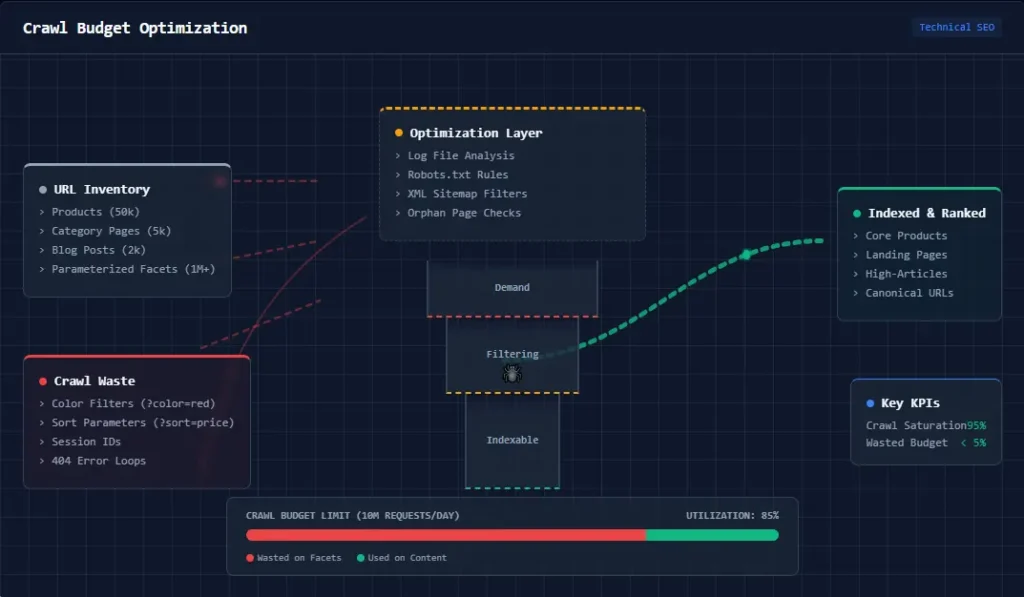
What is Crawl Budget? The Mechanics of Googlebot
Before we can fix the problem, we must define it with precision. Many SEOs confuse “crawl budget” with “crawl rate,” but they are distinct variables that behave differently based on your site’s size and health. Understanding this distinction is the first step in mastering our Crawl Budget Optimization Guide for Large Websites.
Crawl budget is defined as the number of URLs Googlebot can and is willing to crawl on your website within a specific timeframe. This budget is not a static number; it is a dynamic calculation determined by two primary factors, which we explore in detail in this Crawl Budget Optimization Guide for Large Websites:
- Crawl Rate Limit: This represents the maximum speed at which Googlebot can fetch your site without overwhelming your server infrastructure. If your server is fast and responsive, Google can crawl thousands of pages simultaneously. However, if your server slows down or returns 5xx errors, Google will throttle back the crawl rate to preserve server stability. This is designed to prevent Googlebot from crashing your website during a heavy crawl session.
- Crawl Demand: This is the measure of how much Google wants to crawl your site. It is driven by the popularity of your URLs (PageRank) and how frequently your content changes. Stale, low-authority pages will see low crawl demand, whereas trending news articles or high-traffic product pages will see high demand. Google prioritizes its resources on pages that offer the most value to searchers.
For small sites (fewer than a few thousand pages), crawl budget is rarely a concern. Google generally crawls these sites frequently enough to keep everything fresh. However, for large websites, the crawl budget becomes a finite economic resource. If you waste this budget on low-value pages, your high-value “money pages” starve, leading to delayed indexing and stagnant rankings. Using an SEO crawler is often the only way to visualize the sheer scale of this bloat and understand where your resources are going.
In this Crawl Budget Optimization Guide for Large Websites, we emphasize that managing this budget is akin to managing a financial budget; every byte of bandwidth spent on a useless URL is a dollar lost.
Why Large Websites Struggle with Crawl Efficiency
Why should you care about a theoretical budget? Because wasted crawl equals lost revenue. In my experience auditing enterprise-level clients, the disconnect between site size and crawl allocation is often the primary bottleneck for growth. This is a recurring theme in this Crawl Budget Optimization Guide for Large Websites.
The eCommerce Problem
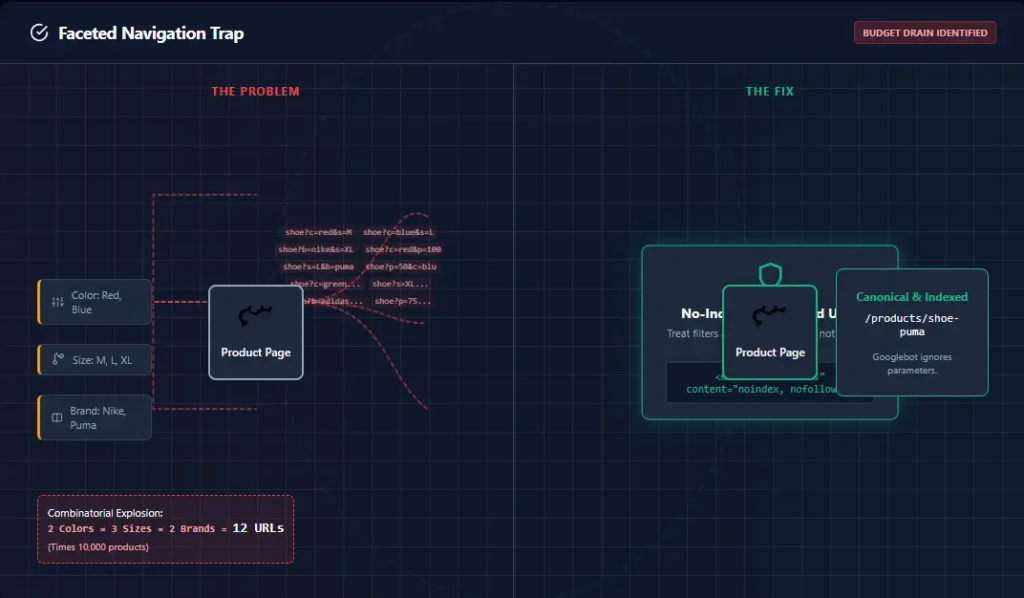
Imagine an online store with 50,000 products. Each product has three variations (color, size), generating 150,000 distinct URLs. On top of that, you have faceted navigation allowing users to filter by price, brand, material, and rating. This creates millions of potential parameter URLs (e.g., ?color=red&size=large&price=0-50). If Googlebot spends 90% of its time crawling these filtered URLs, it runs out of time to crawl your actual product pages or new arrivals. Furthermore, if you have multiple products with slight variations in description, you might face keyword cannibalization, confusing the bot about which page is the primary authority.
A core concept in this Crawl Budget Optimization Guide for Large Websites is that complexity kills crawl speed. The more complex your filters, the more likely you are to have crawl traps.
The SaaS Challenge
SaaS companies often rely on user-generated content—forums, help tickets, or user profile pages. These pages often duplicate information or contain zero unique value. If a SaaS site publishes 1,000 help articles but has 500,000 low-value user profile pages, the crawl ratio is skewed heavily toward waste. The bot spends days crawling user profiles that will never rank, while the core documentation remains unindexed. This Crawl Budget Optimization Guide for Large Websites helps SaaS managers identify and isolate these low-value user areas.
The Publisher’s Dilemma
For news and blog networks, freshness is a ranking factor. If your site architecture is bloated with duplicate archives, tag pages, or author archives, Google might not crawl your breaking news story fast enough to rank it in the Top Stories carousel. This is where a solid content SEO guide is essential to structure your editorial flow correctly.
How Google Calculates and Manages Crawl Budget
Google’s goal is to minimize the lag between when you publish content and when it appears in search results, all while minimizing the load on your servers. However, several technical factors influence this calculation, and understanding them allows us to manipulate the outcome in our favor.
1. Server Performance and HTTP Status Codes
Googlebot loves speed. If your Time to First Byte (TTFB) is high, or your server utilizes high CPU resources when crawling, Google will lower your crawl rate limit. Crucially, Google treats 5xx errors (server errors) as a critical signal to back off immediately. If you have a spike in 500 errors, your crawl budget can be slashed for days or weeks until stability returns. This is why knowing how to fix crawl errors is a prerequisite for optimization. A slow server sends a signal to Google: “I can’t handle the traffic,” and Google naturally reduces the traffic it sends. This Crawl Budget Optimization Guide for Large Websites stresses server health as a primary ranking and indexing factor.
2. URL Importance and PageRank
Not all pages are created equal. Google prioritizes pages with high PageRank (authority from backlinks), structured data markup, and historical performance. If your “About Us” page has more backlinks than your newest category page, Google will crawl the “About Us” page more often. Our job is to shift that internal equity. By building links from high-authority pages to new content, we artificially inflate the “importance” of those new pages, signaling to Google that they deserve a higher slice of the budget pie. This Crawl Budget Optimization Guide for Large Websites provides specific tactics for equity transfer.
3. URL Parameters
Google is smart, but not perfect. It attempts to identify which URL parameters change the content of a page versus those that just sort or filter it. However, relying solely on Google to figure this out is risky. You must explicitly guide them using parameter handling tools in GSC or robots.txt. If you leave it to chance, Google might crawl your sort parameters, treating ?sort=asc as a completely new page, wasting valuable resources.
The 5 Most Common Ways You Are Wasting Crawl Budget
To optimize your budget, you must identify where you are leaking “money.” Here are the most common culprits I find during audits using our SEO audit tool. Identifying these leaks is the core purpose of this Crawl Budget Optimization Guide for Large Websites.
1. Duplicate Content and Canonicalization Errors
This is the silent killer of crawl budgets. Whether it’s HTTP vs. HTTPS, www vs. non-www, or printer-friendly versions of pages, duplicates cause Googlebot to crawl the same content multiple times. This dilutes the equity passed to the canonical version. If you have multiple versions of a page competing for the same keyword, you also risk keyword cannibalization. Implementing proper canonicals signals to Google, “Don’t index this variation, index the master,” saving the crawl effort for the master page.
2. Infinite Parameter Spaces (Faceted Navigation)
As mentioned earlier, eCommerce filters are the biggest waste source. URLs like /category/shoes?filter=size&sort=asc&view=grid often create infinite crawl paths. Google gets trapped in “crawl traps,” cycling through thousands of filter combinations that no human needs to find via search. If you don’t block these, Google can spend months crawling your filter combinations without ever reaching your actual product pages. This Crawl Budget Optimization Guide for Large Websites strongly suggests auditing your filter parameters immediately.
3. Redirect Chains
Every time a bot hits a redirect (301 or 302), it has to stop, process the header, and initiate a new request. One redirect is manageable, but a chain of 4 redirects burns four times the budget for a single pageview. I frequently see sites redirecting http -> https -> www -> mobile. This is incredibly inefficient. You should always update your internal links to point directly to the final destination URL to eliminate these hops.
4. Broken Pages (Soft 404s)
A “Soft 404” occurs when a page doesn’t exist, but the server returns a 200 OK status code (often displaying a “Page not found” message but with the wrong header). Googlebot tries to crawl and index this empty page, wasting time that could be spent on real content. If you have broken links leading to actual 404s, it also disrupts the flow. You can learn more about resolving these issues in our guide on how to fix 404 errors.
5. Orphan Pages
Orphan pages are pages that have no internal links pointing to them. Google can only find them if they are in your XML sitemap. Since Google generally trusts internal linking structure over sitemaps for discovery, orphan pages are often crawled last and indexed inconsistently. A key part of this Crawl Budget Optimization Guide for Large Websites is ensuring every page has a home within your site hierarchy.
How to Optimize Crawl Budget: A Step-by-Step Framework
Now, let’s get to the fix. Here is the step-by-step process to reclaim your bandwidth and direct Googlebot to your most valuable assets. These strategies are integral to any modern technical SEO audit. This is the action phase of the Crawl Budget Optimization Guide for Large Websites.
1. Audit Your Crawlable URL Pool
You cannot optimize what you haven’t measured. Use a tool like Screaming Frog to crawl your site and identify the total number of crawlable pages versus the total number of indexed pages. If you have 1 million pages but only 10,000 are indexed, you have a massive efficiency problem. This audit should reveal the gap between what exists and what is being valued.
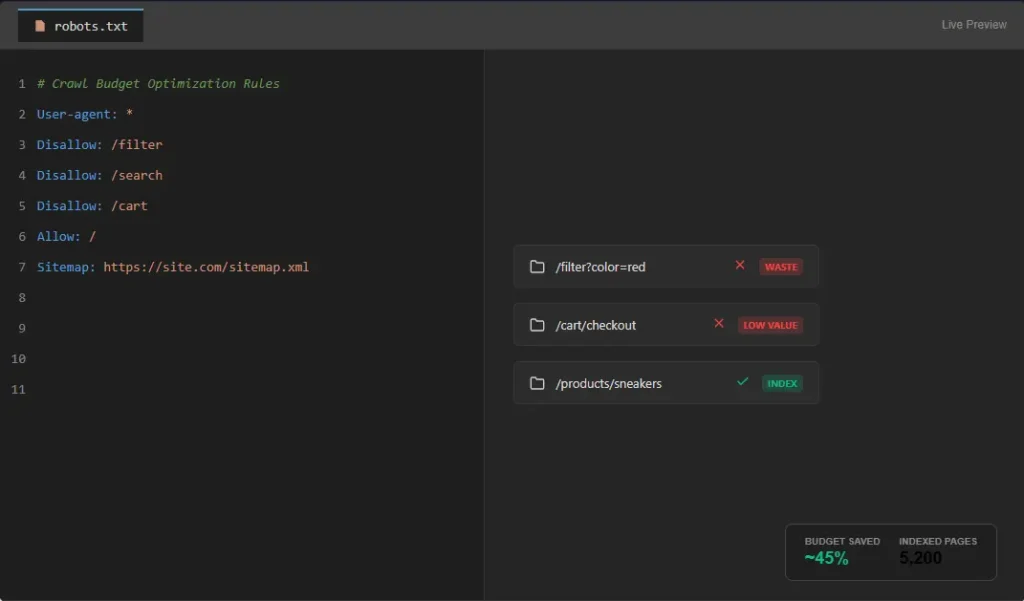
2. Block Unnecessary Pages via Robots.txt
This is your “Do Not Enter” sign. Use your robots.txt file to explicitly block areas that provide no SEO value. Examples include /search, /cart, /admin, and parameter filters (Disallow: /*?filter=). Warning: Be careful not to block CSS or JS files. Modern Googlebot needs to render the page to understand it, and blocking these resources can lead to indexing issues. If Google cannot render the page, it might not index it, regardless of your budget optimizations.
3. Optimize Your XML Sitemap
Your XML sitemap should not be a “dumping ground” for every URL on your site. Clean it up by removing indexable URLs if they are paginated, filtered, or low quality. Ensure the lastmod timestamp is accurate. If a page hasn’t changed in 2 years, don’t tell Google it was modified yesterday. This triggers unnecessary re-crawls. A clean sitemap acts as a roadmap, guiding Google directly to the pages you care about.
4. Implement Canonical Tags Properly
Use canonical tags (rel="canonical") to tell Google which version of a URL is the “master.” This consolidates ranking signals and prevents Google from wasting time crawling duplicate variants. Ensure your canonicals are self-referential (pointing to themselves) unless there is a specific reason to point elsewhere. This is a core tenet of our Crawl Budget Optimization Guide for Large Websites.
5. Improve Internal Linking Structure
The most efficient way to guide Googlebot is through a solid internal link structure. Flatten your architecture so important pages are no more than 3-4 clicks away from the homepage. An internal linking template can help systemize this. Use relevant internal links within your body content to pass link equity and guide the bot contextually. The more you link to a page, the more “authority” it accumulates, and the more frequently Google will crawl it.
6. Speed Up Your Site
Speed is not just a ranking factor; it is a crawl budget factor. A faster server can handle a higher crawl rate limit. Use CDNs, optimize images (WebP format), and minimize JavaScript execution. Using SEO analytics tools to monitor Core Web Vitals will directly correlate to better crawl health. Google will crawl your site faster if it knows your server can handle the load without crashing. This Crawl Budget Optimization Guide for Large Websites cannot stress enough the importance of Core Web Vitals.
Advanced Technical SEO Strategies for Log File Analysis
Once you have the basics in place, you need advanced tactics to squeeze out extra performance. This is where we separate the pros from the amateurs. The following sections of the Crawl Budget Optimization Guide for Large Websites delve into enterprise-level tactics.
Log File Analysis: The Gold Standard
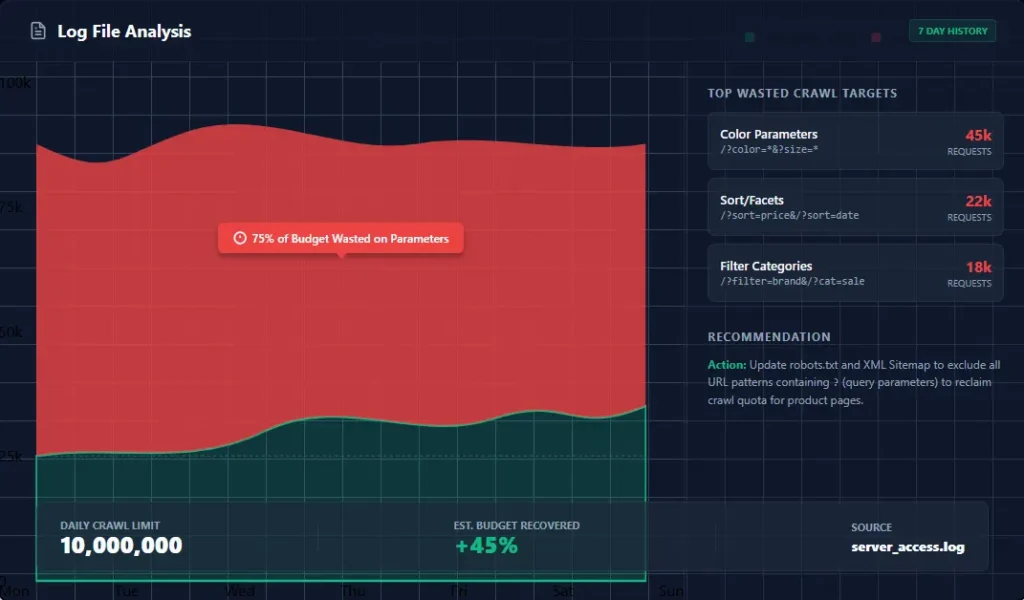
This is the single most important activity for large website optimization. You need access to your server logs (raw .log files). Download your server logs and compare them against a list of your critical URLs. You might find that Google is crawling your “Terms of Service” page 500 times a week but hasn’t touched your new product category page once. Adjust your internal linking to point to the neglected category and block the Terms page via robots.txt. This data-driven approach is unmatched. It removes the guesswork and shows you exactly what Google is doing. This Crawl Budget Optimization Guide for Large Websites recommends log file analysis at least quarterly.
Crawl Depth Optimization
Crawl depth refers to how many clicks it takes to reach a page from the homepage. Deep pages (e.g., 5+ clicks from home) are rarely crawled efficiently. Googlebot assigns a “crawl cost” to deep pages; the deeper it is, the less likely it is to be crawled frequently. Use “hub pages” or silo structures to pull important content closer to the surface. This is particularly crucial for local SEO where location pages can get buried deep within a large corporate site structure.
Orphan Page Fixing
Identify orphan pages using a site audit. Once found, build internal links to them from relevant parent categories. This signals to Google that these pages are now important and should be recrawled. Orphan pages are essentially dead weight until they are integrated into the site’s link graph.
Pagination Handling
For paginated series (like blog archives or product lists), use rel="next" and rel="prev" tags. Alternatively, use a “View All” page if the set of items is small enough. This helps Google understand the relationship between pages and consolidates the crawl equity to the first page. Without proper pagination signals, Google might crawl page 1 of a category, and then jump to another category, missing products on pages 2, 3, and 4 entirely.
The Best Tools for Crawl Budget Optimization
You cannot manage what you cannot measure. These are the essential tools for managing crawl budget. If you are unsure which one fits your stack, check out our comparison of SEO tools.
- Google Search Console (GSC): The first line of defense. Check the “Crawl Stats” report to see your daily crawl activity. It shows you exactly how many requests Google made and how many kilobytes were downloaded. Essential for this Crawl Budget Optimization Guide for Large Websites.
- Screaming Frog SEO Spider: The industry standard for technical audits. Identifies crawl depth, redirects, and canonicals. Its “Crawl Depth” feature is indispensable for visualizing your site structure.
- Ahrefs: Great for understanding the “Demand” side of the equation. Ahrefs helps identify pages with low Page Authority that might be wasting resources because they aren’t earning links.
- Semrush: Excellent for tracking how crawl optimization affects your overall visibility and rankings over time. Their site audit tool flags “Crawl Errors” quickly.
- SE Ranking: A cost-effective alternative that offers solid site audit capabilities for identifying crawl waste. It provides a “Page Score” which often correlates with crawl health.
Advanced Strategies: Entity Architecture and Topical Clusters
Looking toward 2026 and the evolution of AI Overviews, optimization is shifting from simple keyword matching to entity understanding. This Crawl Budget Optimization Guide for Large Websites prepares you for the future.
Entity-Based Architecture
Search engines now understand entities (people, places, concepts) rather than just strings of text. Structuring your site around entities helps Google understand the context of your pages faster, reducing the “discovery” time. Implement Schema.org markup consistently. This helps Google parse your pages without deep crawling, effectively “saving” budget for discovery. Utilizing the best keyword research tools can help identify these entities and how they relate to one another.
Topical Clusters
Instead of treating every blog post as an island, build topical clusters. Create a comprehensive “pillar” article covering a broad topic, and then build detailed “cluster” articles covering specific sub-topics, all linking back to the pillar. This creates a tight web of internal links that guides Googlebot through an entire topic area efficiently. This approach is central to a modern content SEO guide and helps establish domain authority faster.
AI-Driven SEO Optimization
Use AI tools to identify content gaps and semantic opportunities, but always validate with human expertise. AI can help programmatically generate meta tags or structure data, which can speed up site-wide optimization efforts that manually would take months. However, as noted in this Crawl Budget Optimization Guide for Large Websites, never rely solely on AI for architectural decisions; the human element of understanding user intent is irreplaceable.
Common Crawl Budget Mistakes That Kill Rankings
In my years of consulting, I have seen smart developers make avoidable errors that tank their SEO performance. Avoiding these is critical to the success of your Crawl Budget Optimization Guide for Large Websites.
- Blocking Important Pages in Robots.txt: If you
Disallow: /your staging environment or accidentally block your/blog/folder during a site migration, you essentially wipe your site from the index. Always check your robots.txt file live on the server after any deployment. - Overusing Noindex: The
noindexdirective tells Google “Do not put this page in the search results.” However, Google still crawls noindex pages to see if the directive has changed. If you have millions of noindex pages, you are still burning budget. Block unwanted URLs via robots.txt instead. - Ignoring Internal Linking: Content does not exist in a vacuum. Publishing a page and waiting for Google to find it is passive. You must actively build internal links from your homepage or top navigation to new content. If you ignore this, you rely entirely on external backlinks for discovery, which is risky.
- Neglecting Backlinks: High-quality backlinks increase “Crawl Demand.” Without a solid SEO link building plan, your site may have a healthy architecture but low demand, meaning Google simply doesn’t *want* to visit you often enough.
Frequently Asked Questions
What is crawl budget optimization?
Crawl budget optimization is the process of managing and streamlining the number of URLs Googlebot crawls on your site to ensure it focuses on your most important and valuable pages, improving indexing efficiency and site performance.
Do small websites need to worry about crawl budget?
Generally, no. Small websites with fewer than a few thousand pages are typically crawled frequently enough that crawl budget is not a limiting factor for SEO performance.
How does site speed affect crawl budget?
Site speed directly impacts the “crawl rate limit.” If your server is slow or unresponsive, Google will automatically reduce the speed at which it crawls your site to prevent overload, thereby lowering your total crawl budget.
What is the difference between crawl rate and crawl demand?
Crawl rate is the speed at which Googlebot crawls your site (limited by your server speed), while crawl demand is how often Google wants to crawl your site based on page popularity and content freshness.
How can I reduce my crawl budget waste?
You can reduce waste by cleaning up duplicate content, blocking unnecessary parameter URLs in robots.txt, fixing redirect chains, and resolving 404 errors.
Does using noindex save crawl budget?
Not necessarily. Googlebot still visits noindex pages to check the status. To save crawl budget completely, you should block unwanted URLs via robots.txt or remove them entirely.
Conclusion
Managing a large website in the modern search landscape requires more than just great content; it requires technical precision. This Crawl Budget Optimization Guide for Large Websites has walked you through the critical steps of auditing your server logs, cleaning up technical debt, and structuring your site architecture for maximum efficiency.
By treating your crawl budget as a finite financial resource, you ensure that every byte of bandwidth Google spends on your site contributes to your bottom line. Whether you are fixing 404 errors, refining your technical SEO audit, or restructuring your internal linking, the goal remains the same: make it easy for Google to find and value your best work.
Ready to dive deeper? To continue building authority and ensuring Google crawls your site efficiently, explore our comprehensive technical SEO guide. Additionally, improving your backlink profile with a solid SEO link building plan can increase crawl demand, signaling to Google that your site is a priority. This Crawl Budget Optimization Guide for Large Websites is your roadmap to success.