
All-in-One SEO Software: 12 Best Platforms Compared (2026)
By Mousume Akter, Founder & Editor, SEORAF. Official vendor pages were read on 18 November 2026. Independent reports for platforms marked “reported” were re-checked on 20 November 2026.
All-in-one SEO software puts keyword research, rank tracking, site audits, backlink data and reporting behind one login and one bill. If you now juggle a separate tool for each job, that can simplify your work. Whether it is worth paying for depends less on the feature list on a home page than on the details vendors keep on their pricing pages: tracked-keyword caps, crawl limits, seat costs, update frequency and paid add-ons.
This guide compares 12 platforms: Semrush, Ahrefs, SE Ranking, Moz Pro, Mangools, Ubersuggest, WebCEO, Serpstat, SEO PowerSuite, SpyFu, Raven Tools and Similarweb. For each one I describe what the vendor documents publicly, where the plan limits sit and which situations it plausibly suits, and I label whether each fact is official, vendor-stated or reported.
A note on the word “best.” In this guide it means “best documented fit for a stated need.” I do not score or rank these platforms and I do not name an overall winner. The order below is grouped by type of product, not by merit. I also did not run hands-on tests. Everything here comes from vendors’ official pages, Google Search Central documentation and dated independent reports, and I label which is which.
Affiliate disclosure. Some links to Mangools, SE Ranking and Moz Pro are affiliate links. If you buy through them, SEORAF may earn a commission at no extra cost to you. Commission does not decide which platforms are included, the order they appear in or what I say about them. Links to the other platforms go to their official pages without affiliate tracking.
If you want a quick orientation before the detail, these are starting points, not recommendations:
- Solo site owner on a small budget: look at the free options first (Semrush’s free plan, Ahrefs Free for sites you own, SEO PowerSuite’s free edition), then compare entry plans.
- Freelancer or small team: compare Semrush’s SEO plan, SE Ranking Core, Ahrefs Lite or Standard and Mangools, paying close attention to seats and tracked-keyword caps.
- Agency: check white-label reporting, seat pricing and usage fees before anything else. These differ widely between platforms.
- Competitor or market research first: SpyFu and Similarweb are built around it, and Ahrefs and Semrush cover it as part of a wider suite.
Quick Comparison of 12 All-in-One SEO Platforms
The table lists list prices in US dollars as shown on the sources named in the last column. “Reported” means I could not read the vendor’s own page and relied on independent sources that state when they read it. Promotional prices are excluded, and annual-equivalent prices are labelled.
| Platform | Type | Typical fit (editorial) | Entry paid plan (list price) | Free option | Source status |
|---|---|---|---|---|---|
| Semrush | Full suite | Freelancers to agencies who will budget for add-ons | SEO plan $139/month ($117.33/month billed annually) | Free plan; 7-day trial on paid plans | Official page read |
| Ahrefs | Full suite | Backlink and competitor-heavy work; teams comfortable with weekly rank updates | Starter $29; Lite $129/month | Ahrefs Free (limited, for sites you own) | Official page read |
| SE Ranking | Full suite | Small teams and agencies that want seats and reporting priced as options | Core $129/month ($103.20/month billed annually) | 14-day trial, no card | Official page read |
| Moz Pro | Full suite | Owners of a single site who value Moz’s metrics | Starter $49/month (reported) | 7-day trial on Medium, card required (reported); older sources differ | Reported only |
| Mangools | Browser tool bundle | Beginners and small teams who want simple tools | Basic $61/month ($37.70/month billed annually) (reported) | Limited free account and 10-day trial reported; confirm | Reported only |
| Ubersuggest | Entry-level suite | Solo owners and small sites | Individual $29/month (vendor blog); official page shows a $29–$99 range | One-time 7-day trial; lifetime option | Official limits read; prices from vendor blog |
| WebCEO | Suite | Small teams and agencies that want many tools per plan | Solo $36/month ($32/month annual; 3-month minimum) | 14-day trial, no card | Official page read |
| Serpstat | Suite | Teams that want daily tracking and higher caps | Individual $50/month at the annual rate (about $69 monthly, derived) | 7-day trial with $1 card verification | Official page read |
| SEO PowerSuite | Desktop suite | People who prefer licensed desktop software | Professional $349/year | Free edition, no time limit (restricted) | Official page read |
| SpyFu | Competitor-research-led | SEO and PPC competitor research | Basic $39/month ($29/month annual) (reported) | Limited free version, no trial; 30-day money-back guarantee (reported) | Reported only |
| Raven Tools | Reporting-led | Small businesses and agencies that prioritize reporting | Small Biz $49/month ($39/month prepaid yearly) | 7-day trial | Official page read |
| Similarweb | Digital-intelligence-led | Teams that need market and competitive intelligence | Web Intelligence “from $125/month” | Free trial exists | Official page partly read |
Prices verified on 18 November 2026 where the source status says “official.” Plans, limits and currency can change or vary by region, so check the vendor’s page before buying.
What Is All-in-One SEO Software?
All-in-one SEO software is a single subscription that combines the core recurring SEO jobs: keyword research, rank tracking, site audits, backlink analysis and competitor analysis, usually with reporting. Vendors also call these products SEO suites, platforms or toolkits.
The idea is simple. Instead of paying for five specialist tools and stitching their data together, a problem sometimes called tool sprawl, you pay for one product whose modules share projects, domains and reports.
What counts as all-in-one, and what does not
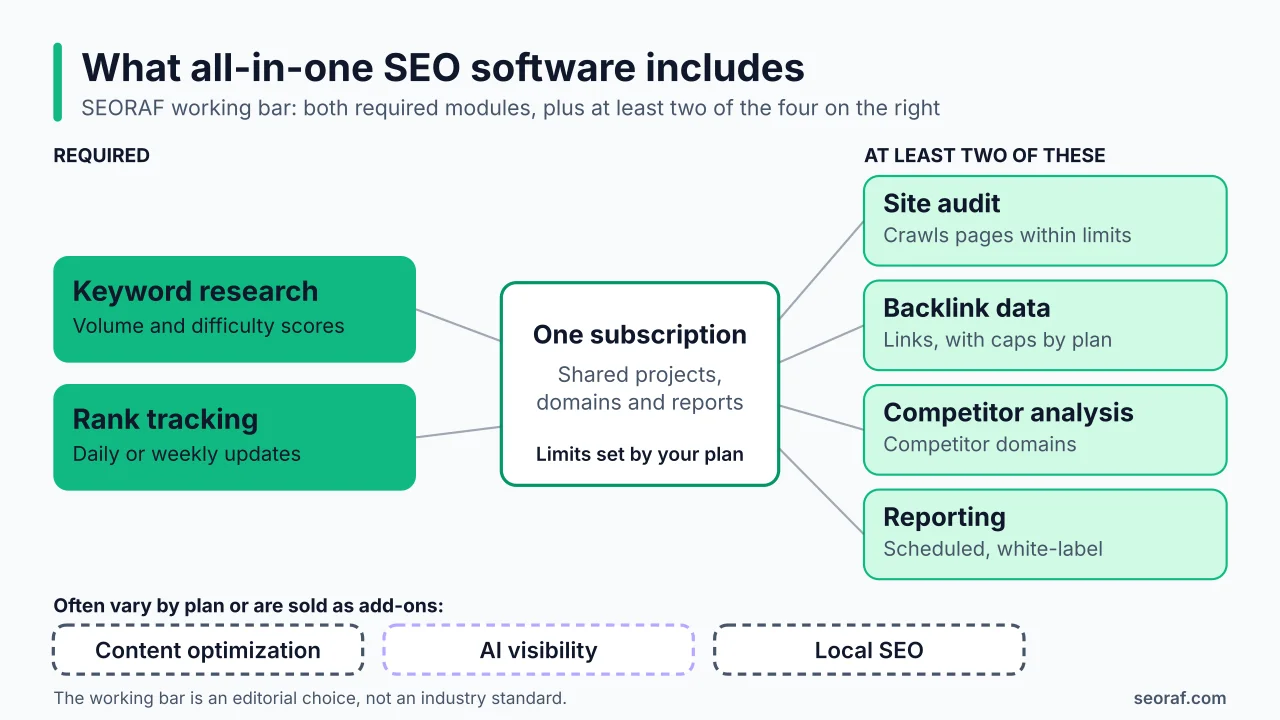
There is no agreed definition, and many roundups mix very different products. My working bar is an editorial choice, not an industry standard. A platform needs keyword research and rank tracking, plus at least two of site audit, backlink data, competitor analysis and reporting, in one subscription. Gaps are noted as limitations instead of disqualifying a platform.
Three platforms in this guide are borderline, and I say so in their sections. Similarweb positions itself as digital intelligence rather than an SEO suite, Raven Tools leads with reporting, and SpyFu leads with competitor research. I left out products that do one job well but are not suites, such as content-optimization tools, local-SEO specialists, desktop crawlers and WordPress plugins. The name also collides with the All in One SEO (AIOSEO) WordPress plugin. This guide is not about that plugin.
One more boundary matters for how you read every platform below. Google does not evaluate third-party SEO tools, and it says that third-party tools do not have access to its internal ranking data and cannot guarantee performance. Its guidance on third-party SEO tools, services and advice recommends Google Search Console as the first-party source of data from Google Search itself. None of the platforms here is “Google-approved,” and no tool can promise rankings.
How These Platforms Work
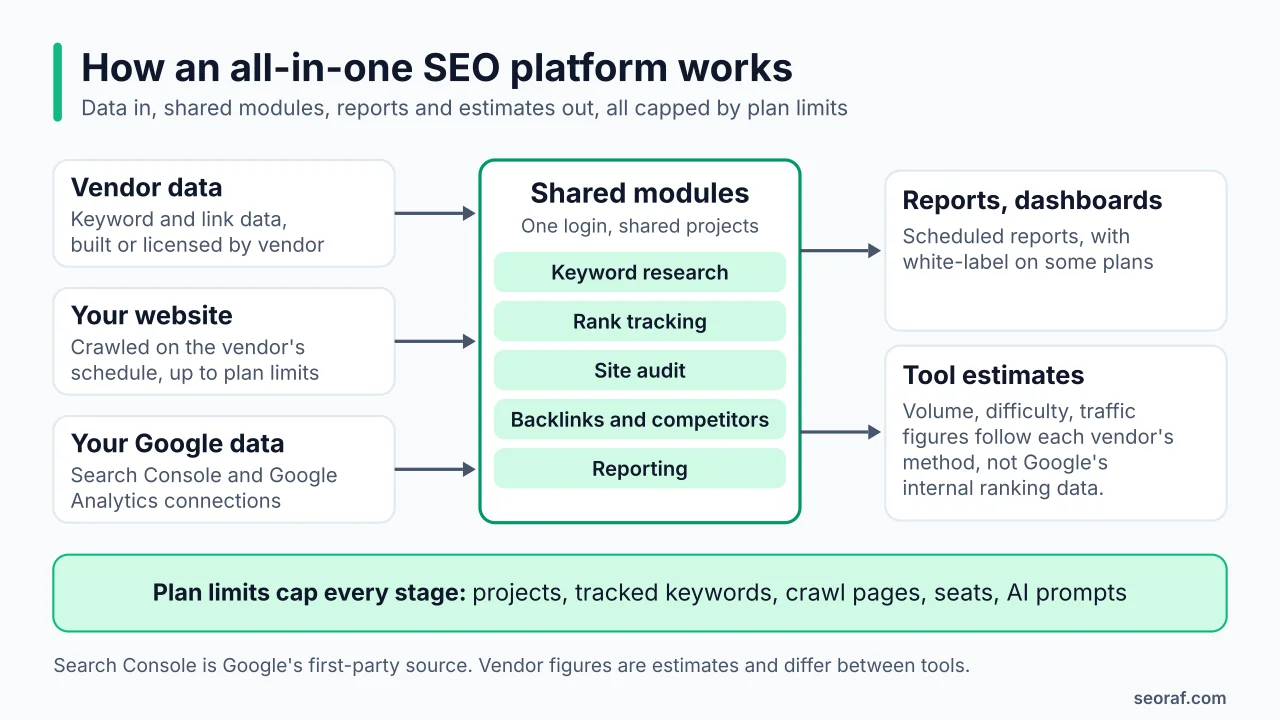
Four mechanisms explain most of what you see on a pricing page.
- A data layer. Keyword databases, backlink indexes and traffic estimates are built or licensed by each vendor. SEO PowerSuite, for example, states that its keyword database holds 216 million keywords and that its backlink index covers 6.5 trillion links. Ubersuggest states that its data is estimated from multiple providers, and Raven Tools builds its research data on Moz and Majestic. These are vendor-stated claims, and I have not tested accuracy. Expect numbers to differ between tools.
- Crawlers. Site audits crawl your pages on the vendor’s schedule, up to a plan limit. Ahrefs meters this in crawl credits, SE Ranking in pages per month and Ubersuggest in pages per weekly audit.
- Connections to your own data. Many platforms pull Search Console and Google Analytics data into reports and dashboards. That is first-party data from Google, as opposed to the tool’s own estimates.
- Plan limits. Plans cap projects, tracked keywords, crawl pages, seats and, increasingly, AI prompts. Two plans that look similar can behave very differently once you hit a cap.
A small example shows why units matter. Ubersuggest lists site-audit caps of 1,000, 5,000 and 10,000 pages across its three tiers, so a 10,000-page site only fits its top tier. SE Ranking lists page budgets of 250,000 and 2 million per month on Core and Growth. The units differ (weekly audit against monthly budget), so you cannot compare those numbers directly. You have to work out your own site size and audit frequency first.
Essential Features to Expect
Keyword research
Almost every plan includes it, so the differences are caps and workflow. Ubersuggest lists 2,000, 5,000 and 10,000 suggestions per search by tier, and Serpstat lists 100, 500, 1,000 and 5,000 searches a day across its plans. Volume and difficulty scores are each vendor’s own estimates. Use them to compare options within one tool, and use Search Console to see the queries your site actually receives.
Rank tracking
Update frequency is the detail that most often gets missed. Ahrefs lists weekly rank-tracker updates on every plan. Semrush lists daily tracking, with 500 keywords on its SEO and Starter plans. Serpstat lists daily updates, WebCEO runs weekly automated scans (daily on its Agency Unlimited plan) and Raven Tools lets you choose daily, weekly or monthly checks. Independent reports say Mangools updates weekly on Basic and Premium and daily on Agency. Weekly data can be enough for a monthly review. It is slower if you want to watch rankings after a release.
Site audits and technical SEO
An audit module crawls your site and flags issues, and the limits vary. Ahrefs lists 100,000, 500,000 and 1.5 million crawl credits a month on Lite, Standard and Advanced. Raven Tools lists 50,000 to 7 million monthly page crawls across its plans. Serpstat does not offer JavaScript rendering on its Individual plan. An audit tool reports problems. It does not fix them, and it does not tell you how Google treats your pages. For that, Google’s documentation and Search Console remain the reference.
Backlink and competitor analysis
Backlink index size is a vendor-stated claim in every case, and I have not compared indexes. What you can compare are caps: Ubersuggest lists 2,000, 5,000 and 10,000 backlink rows by tier, Ahrefs allows 20 competitors per project, and SEO PowerSuite allows 1, 5 or 40 competitors depending on edition. Traffic figures for competitor sites are modelled estimates, so treat them as directional.
Content optimization
This module is the least uniform. Semrush starts content optimization at its Pro+ plan, and SE Ranking lists 25 or 50 content articles on Core and Growth. Ubersuggest lists 2, 5 or 10 AI articles a month by tier, and Ahrefs sells a Content Kit add-on from $99 a month. Content scores are tool-specific. Google says it has no preferred word count and that its systems favor helpful, reliable content made for people, so a high score in a tool is not a Google metric.
Reporting and integrations
For agencies, reporting often causes the biggest price gap. Semrush sells report add-ons (Base Report at $10 a month and Pro Report, which includes white-labeling, at $20 a month). Ahrefs sells Report Builder at $99 a month. SE Ranking ties white-labeling to its Agency Pack, and SEO PowerSuite offers white-label reports from its Enterprise edition. Raven Tools lists unlimited automated white-label reports on its plans.
AI visibility and AI features
“AI” covers three different things, and it helps to separate them. AI inside the tool means writing help or content briefs. AI visibility tracking means checking prompts in AI engines to see whether a brand is mentioned. AI automation means the tool taking actions for you. Packaging varies. Semrush lists AI visibility on all paid plans. SE Ranking includes 25 daily prompts across five AI engines and sells a larger AI search add-on from $71.20 a month billed annually. Ahrefs sells Brand Radar as an add-on from $199 a month. Independent reports say Mangools bundles 500 prompts and Moz includes AI visibility from its Standard plan. You will also see this work called generative engine optimization (GEO) or answer engine optimization (AEO).
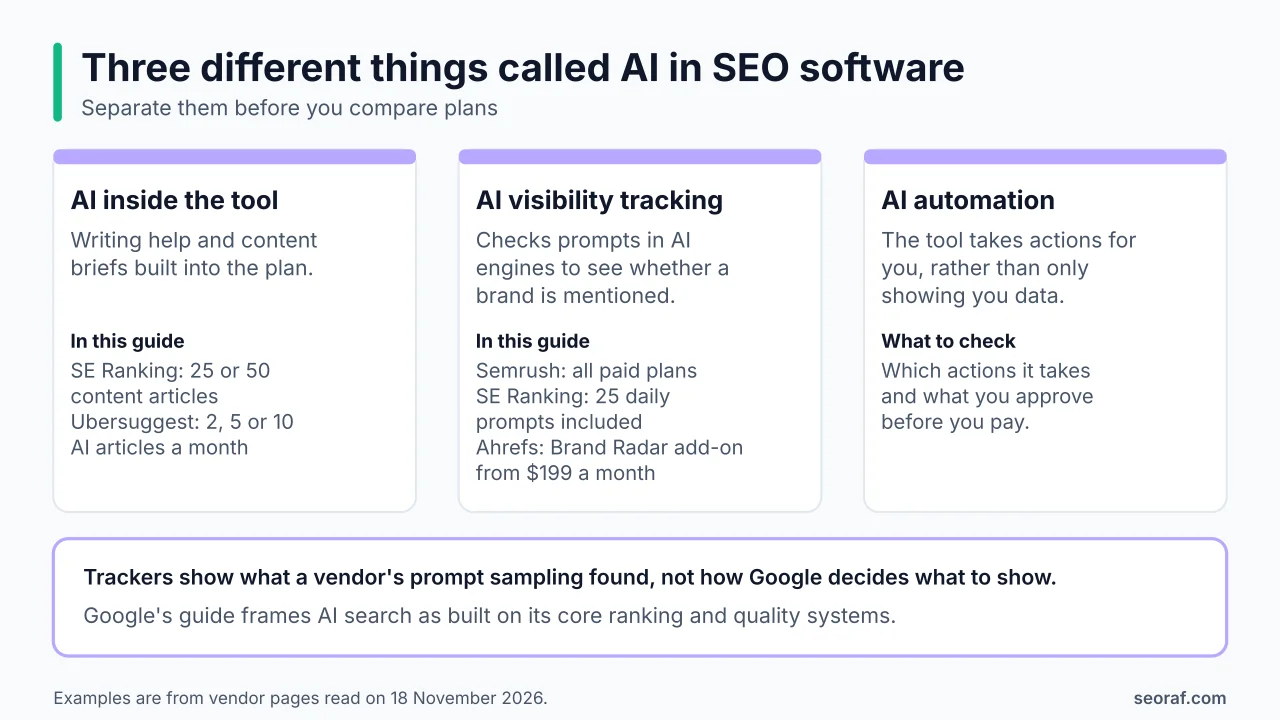
Google publishes its own guide to optimizing for generative AI features. It says its generative AI features are rooted in its core Search ranking and quality systems, and that optimizing for generative AI search is optimizing for the search experience, so it is still SEO. It also says no third-party tool has access to its internal ranking or AI systems, and it points site owners to the Generative AI performance report in Search Console to measure visibility. An AI-visibility tracker therefore shows what that vendor’s prompt sampling found, not how Google decides what to show. I have not tested how consistent any of these trackers are.
Local SEO and add-on modules
Local SEO is where suites and specialists diverge most. Semrush starts multi-location tracking at its Pro+ plan and SE Ranking lists local tools within its plans, while dedicated local specialists such as BrightLocal exist as separate products. If local rankings and listings are central to your work, check whether the suite includes local features or sells them as a separate product. I have not verified feature depth for every platform here.
How I Selected These Platforms
Inclusion bar and evidence labels
Platforms had to meet the bar described earlier and have an active product with a public pricing path. Most are named often in all-in-one roundups, and I added a few borderline entries (Similarweb, Raven Tools and SpyFu) and flagged them as such. Affiliate status played no part in inclusion or order. For every fact I used the best source available and labelled it. “Official page read” means I read the vendor’s page on 18 November 2026. “Vendor-stated” means a claim from the vendor’s own marketing, which I attribute rather than repeat as fact. “Reported” means an independent source states what the vendor’s page showed on a given date.
What this comparison is not
It is not a hands-on test, a data-accuracy benchmark or a ranking. I did not measure how well any platform improves rankings, and nothing here should be read as a promise that a tool will. Vendor pages change often, prices can differ by region and promotions come and go, so the vendor’s own page is always the authority. Where official and third-party sources disagree, I follow the official page and report unresolved conflicts openly.
12 All-in-One SEO Platforms Reviewed
I group the platforms by type: established full suites first, then lower-priced and beginner-friendly options, then platforms with higher limits or a desktop model, and finally those built around competitor research or reporting. The order is not a ranking. Every section follows the same fact box so you can compare like with like: pricing, free option and source status, followed by strengths and limitations that I tie to something the vendor documents.
Semrush: Wide Toolkit, Restructured Plan Ladder
Semrush describes its product as a way to build and measure brand visibility everywhere people search, and its plans cover keyword research, competitor analysis, rank tracking, site audits, backlink analysis and reporting. The plan structure changed during 2026 (a pricing tracker logged it in May), and older articles still use Pro, Guru and Business names that do not match the current pricing page. By Semrush’s own descriptions, the SEO plan targets freelancers and small businesses, Starter targets small teams and agencies, Pro+ targets growing teams and Advanced targets organizations that need API access and automation.
- Pricing: SEO $139/month ($117.33/month billed annually), Starter $199 ($165.17), Pro+ $299 ($248.17). Advanced is custom-priced through sales. Extra users start at $45 a month.
- Free option: a $0 plan with no credit card (one demo project, 10 reports a day) and a seven-day trial on paid plans. Some third-party pages advertise a longer trial, so check the terms shown at sign-up.
- Source status: official page read, 18 November 2026.
Documented strengths
- Site audit is included on every plan, and AI visibility is included on all paid plans.
- Daily rank tracking, with 500 keywords on SEO and Starter, 1,500 on Pro+ and 5,000 on Advanced.
- API access on Advanced and MCP access from Starter.
Limitations
- Content optimization and multi-location tracking start at Pro+.
- White-label reporting needs a paid add-on (Pro Report, $20 a month), and extra seats cost extra.
- The top plan has no public price, which makes budgeting for larger teams harder.
Ahrefs: Weekly Rank Tracking and Separately Priced Add-Ons
Ahrefs sizes its plans by team and workload. According to its plans page, Lite suits small businesses and personal projects, Standard suits freelance SEOs and consultants, and Advanced suits lean in-house teams. Ahrefs also describes itself as running the second-most active web crawler, which is a vendor claim I have not verified.
- Pricing: Starter $29, Lite $129, Standard $249 and Advanced $449 a month. Enterprise goes through sales: one snapshot I saw showed $1,499 a month with an annual commitment, while the page I read said “talk to sales,” so confirm before quoting a figure. Extra users cost $40, $60 or $80 a month on Lite, Standard and Advanced. Ahrefs says paying annually saves up to 17% and that it does not run discounts. I note the $29 Starter tier at list-price level only, so check what it includes.
- Add-ons: Content Kit from $99 a month, Report Builder at $99 a month and Brand Radar (AI visibility) from $199 a month.
- Free option: Ahrefs Free gives site owners limited Site Explorer and Site Audit access for sites they own. The page I read points to that rather than a trial.
- Source status: official page read, 18 November 2026.
Documented strengths
- Large included crawl budgets: 100,000, 500,000 and 1.5 million credits a month on Lite, Standard and Advanced.
- Twenty competitors per project, and API and MCP access on paid plans.
Limitations
- Rank tracking updates weekly on every plan, with 750, 2,000 and 5,000 tracked keywords on Lite, Standard and Advanced.
- Content and reporting features sit behind add-ons.
- Refunds are generally not offered, and pay-as-you-go overages are charged automatically, so read the billing terms before you commit.
SE Ranking: Two Plans, With Seats, Reporting and AI as Options
SE Ranking positions Core for focused SEO work and repeatable delivery, and Growth for scaling delivery, automation and collaboration. Both descriptions come from its pricing page. The interesting design choice is that seats, white-labeling and extra AI capacity are separate line items, which keeps the entry price low but means the real cost depends on how you work.
- Pricing: Core $129 a month ($103.20 billed annually) and Growth $279 ($223.20 billed annually). Enterprise is custom. The page also showed a Black Friday banner with extra savings on annual plans when I checked, and I have excluded promotions from every price in this guide.
- Options: extra manager seats from $16 a month, an Agency Pack at $69 a month (annual billing only), an AI search add-on from $71.20 a month billed annually ($89 monthly) and an API add-on at $45 a month billed annually ($48 monthly).
- Free option: a 14-day trial with no credit card. There is no permanent free plan.
- Source status: official page read, 18 November 2026.
Documented strengths
- Daily tracking for 2,000 (Core) or 5,000 (Growth) keywords, and audit budgets of 250,000 or 2 million pages a month.
- Content articles (25 or 50), 25 daily AI prompts across five AI engines and several reporting integrations, including Data Studio, Google Analytics, Search Console and MCP, are listed within the plans.
Limitations
- Core includes one manager seat, and white-labeling requires the Agency Pack.
- AI visibility beyond the included prompts and API access are paid extras.
- Payments are non-refundable and annual plans are billed upfront.
You can check current SE Ranking plans on its site (affiliate link).
Moz Pro: Domain Authority, With Reported (Not Official) Pricing
Moz introduced Domain Authority and Page Authority, and both are Moz’s own metrics rather than Google metrics. I could not retrieve Moz’s own pricing page, so everything below about plans comes from independent trackers (Shila, Toolradar and LaunchRanked) that state they read the page in October and November 2026. Recheck it on Moz’s site before you rely on any figure.
- Pricing (reported): Starter $49, Standard $99, Medium $179 and Large $299 a month, with about 20% off for annual billing. Extra users cost $49 a month, extra AI Visibility dashboards $20 each and extra prompts $50 per 100.
- Free option: the most detailed recent reports say the seven-day trial covers only the Medium plan on monthly billing and needs a card, citing Moz’s own help article. Other sources list Standard as well, or a 30-day trial, and may be out of date. A limited free Moz Community account also exists.
- Source status: reported only. Official page not read.
Strengths (reported)
- Keyword research, site crawling, link analysis, rank tracking and competitive research in one product.
- Standard is reported to track 50 weekly prompts across ChatGPT, Gemini, Google AI Mode and Perplexity.
Limitations
- Starter is reported to cover one site with 50 tracked keywords, 75 keyword queries a month, 5,000 crawled pages a week and no AI Visibility.
- Sources disagree on whether AI content briefs come with every paid plan.
- None of this is first-party verified.
If you want to check Moz’s current plans, you can visit Moz through an affiliate link.
Mangools: Five Browser Tools in One Bundle, No Reported Audit Tool
Mangools sells five tools as one bundle: KWFinder for keywords, SERPChecker for SERP analysis, SERPWatcher for rank tracking, LinkMiner for backlinks and SiteProfiler for site and competitor profiles. Independent reports also say an AI Search Watcher is included. I could not read Mangools’ own pricing page, so the plan details below are reported.
- Pricing (reported): Basic $61, Premium $81 and Agency $141 a month, or $37.70, $52.70 and $97.70 a month billed yearly, according to a review and a price tracker that say they read the page on 29 October 2026, and another report that gives the same figures as of November 2026. Another tracker saw euro prices on 21 October, so check which currency you are shown. Older lists show lower figures, such as $49 a month or $29.90 billed annually for Basic, which predate these reports.
- Free option: several recent reports describe a limited free account and a 10-day Free+ trial with no credit card, but one report found no trial, so confirm the current offer on Mangools’ page.
- Source status: reported only. Official page not read.
Strengths (reported)
- A simple, browser-based toolset in which each tool has a clear job.
- AI Search Watcher with 500 prompts bundled into every tier, and daily tracking, white-label reports, API and MCP on the Agency plan.
Limitations
- Rank tracking is reported to update weekly on Basic and Premium.
- Reports list no standalone site-audit tool in the five-tool bundle, so technical audits may need another product.
- Public price information is inconsistent.
To see Mangools’ current plans and any offer, you can visit Mangools through an affiliate link.
Ubersuggest: Low Entry Price, Weekly Crawls and Lower Caps
Ubersuggest, from Neil Patel, scales its tiers by the number of sites: Individual covers one to three sites, Business four to seven and Enterprise/Agency eight or more, according to its pricing page. That page showed a $29 to $99 range and a lifetime-access promotion when I read it, but did not render a price per tier, so the tier prices below come from Neil Patel’s own blog.
- Pricing: Individual $29, Business $49 and Enterprise/Agency $99 a month, and lifetime prices of $290, $490 and $990, all from Neil Patel’s own blog post. I could not confirm them on the pricing page, and prices can differ by region, so confirm what you are shown before buying.
- Free option: a one-time seven-day trial on monthly plans. Lifetime purchases are non-refundable.
- Limits (official page): 150, 300 or 900 reports a day and 1, 7 or 15 projects. Weekly rank tracking covers 125, 150 or 300 keywords per project, and weekly audits cover 1,000, 5,000 or 10,000 pages. Backlink reports show 2,000, 5,000 or 10,000 rows, with 5, 10 or 15 competitors and 2, 5 or 10 AI articles a month. Add-ons start at $5 a month.
- Source status: official limits read on 18 November 2026; tier and lifetime prices from the vendor blog only.
Documented strengths
- A low list entry price ($29 a month), plus a lifetime option for people who prefer a one-off payment.
- AI search visibility (ChatGPT, Gemini and AI Overviews) and AI article credits are included.
Limitations
- Rank tracking and site audits run weekly, with caps that are modest next to plans such as SE Ranking’s daily tracking of 2,000 keywords on Core.
- There is no API on its plans, and connecting Search Console requires Google sign-in.
- Ubersuggest says its data is estimated from multiple providers, which is a vendor statement I have not tested.
WebCEO: Many Tools Per Plan, With Usage Fees on the Agency Tier
WebCEO describes itself as an all-in-one SEO platform. Its pricing page points Solo at newcomers, Startup at midsize businesses, Agency Unlimited at agencies and Corporate at in-house teams. The notable design choice is that the agency plan is cheap to start but billed partly by usage.
- Pricing: Solo $36 a month ($32 billed annually, with a three-month minimum), Startup $119 ($99 annually), Agency Unlimited $99 ($83 annually) plus usage fees, and Corporate $299 ($251 annually).
- Agency usage fees: $4 per 1,000 rank queries, $0.80 per 1,000 backlinks found, $2 per project, $5 per extra user and $40 a month for a white-label domain.
- Free option: a 14-day trial with no credit card. There is no free plan.
- Source status: official page read, 18 November 2026.
Documented strengths
- Google Analytics, Google Ads and Search Console connections on all plans, and an SEO Content Assistant.
- Branded reports from Startup upward, and API access on Agency Unlimited.
Limitations
- Solo covers one project and 100 keywords, and rank scans run weekly (daily only on Agency Unlimited).
- Agency Unlimited costs vary with usage, so model the fees against your client count before comparing it with flat-price plans.
- The pricing page documents no AI-visibility features.
Serpstat: Individual, Team and Agency Plans Replace the Old Ladder
Serpstat states on its recurring payments update page that its Lite, Standard, Advanced and Enterprise plans were replaced from 1 December 2023. Its current pricing page lists Individual, Team, Team x2 and Agency, described as suited to freelancers and beginners, agencies and growing teams, and large agencies. Some older roundups still show the retired names and prices.
- Pricing: the page displays annual-billing rates of $50 (Individual), $100 (Team), $169 (Team x2) and $410 (Agency) a month, with listed annual savings of $228, $348, $480 and $1,068. From those savings, the implied monthly-billing prices are $69, $129, $209 and $499. That is my arithmetic, so confirm it with the page’s monthly toggle.
- Free option: a seven-day trial with a $1 card verification charge. The plan renews automatically after seven days unless you cancel. There is no free plan.
- Source status: official pages read, 18 November 2026.
Documented strengths
- Daily rank updates, with 10,000 to 500,000 position checks a month and audit budgets from 30,000 to 1.5 million pages, depending on plan.
- AI Visibility checks within plans (extra checks sell at $20 per 1,000, with a $40 minimum), plus ChatGPT and Claude integration, scheduled reports from Team upward and white-labeling on Agency.
Limitations
- JavaScript rendering is not available on Individual, which has a five-project limit.
- The card-verified trial that renews automatically needs careful calendar management.
- Plan names changed, so older reviews and screenshots may not apply.
SEO PowerSuite: A Desktop Suite Licensed by the Year
SEO PowerSuite is installed software rather than a browser product. Its pricing page describes Professional as suited to small businesses, Enterprise to SEO professionals and agencies, and Max+ to professionals who need every feature. It also states that its keyword database holds 216 million keywords and its backlink index covers 6.5 trillion links, which are vendor claims I have not verified.
- Pricing: one-year licenses of $349 (Professional), $599 (Enterprise) and $899 (Max+). Two-year prices are $558, $1,118 and $1,498, and three-year prices are $717, $1,377 and $1,947.
- Free option: a free edition with no time limit, restricted to one project that cannot be saved, 500 URLs and 1,100 backlinks.
- Billing terms: an annual subscription, with no refunds for partial use.
- Source status: official page read, 18 November 2026.
Documented strengths
- Unlimited projects and keywords on paid editions, and one, five or 40 competitors per project depending on edition.
- Google AI Overviews tracking, in-app content optimization and white-label reports from Enterprise upward.
Limitations
- It is desktop software, which suits solo users better than teams that expect shared browser dashboards.
- White-label reporting needs Enterprise or higher.
- The free edition is deliberately restrictive, and refunds do not cover partial use.
SpyFu: Competitor Research First, With Reported Pricing
SpyFu is best known for SEO and PPC competitor research. I could not read SpyFu’s own pricing page, so everything below is reported by independent sources.
- Pricing (reported): Basic $39 a month ($29 billed annually), Pro + AI $59 for the first month and then $119 ($89 annually), and Team/Agency $249 ($187 annually). Several reports (12 October, 31 October and November 2026) give the same figures. One report notes that SpyFu’s site has shown two different pricing pages, so confirm at checkout. Extra users cost $15 (Basic) or $30 (Pro + AI and Team/Agency), and Team/Agency includes five users.
- Free option: several reports describe a free version with truncated results and no time-limited trial, plus a 30-day money-back guarantee on paid plans. One report says this matches SpyFu’s help center, but others say there is no free plan, so confirm.
- Source status: reported only. Official page not read.
Strengths (reported)
- Competitor research is the core of the product, with weekly tracked rankings of 5,000, 15,000 or 50,000 keywords by tier.
- Pro + AI includes an AI feature called RivalFlow, and API access starts on Pro + AI, billed per row beyond an included credit.
Limitations
- Recent reports list a Site Audit module on all three plans, with crawl caps of 50,000, 500,000 and 2 million pages a month, although an earlier roundup said SpyFu has no technical crawler. Confirm on SpyFu’s page.
- I could not verify its backlink features, and independent reports say it has no official MCP server.
Raven Tools: Reporting-First, Built on Moz and Majestic Data
Raven Tools presents itself as an all-in-one SEO and marketing reporting platform for small businesses and digital agencies, and its pricing page leads with reporting. Its research data builds on Moz and Majestic, so some of what you see comes from those providers rather than a Raven-built index.
- Pricing: Small Biz $49 a month ($39 with prepaid yearly billing), Start $109 ($79), Grow $199 ($139), Thrive $299 ($249) and Lead $479 ($399). The page’s FAQ text puts Start’s annual price at about $99 a month, which conflicts with its own table. I used the table.
- Free option: a seven-day trial. Upgrading requires a credit card.
- Billing terms: no refunds on annual plans, data deleted 30 days after cancellation and extra rank checks at $0.003 each.
- Source status: official page read, 18 November 2026.
Documented strengths
- Unlimited automated white-label reports, more than 25 data sources and connections to Search Console, Google Analytics, Google Ads, social, email and call tracking.
- Unlimited keyword research, 1,500 to 30,000 rank checks and 50,000 to 7 million monthly page crawls by plan.
Limitations
- The pricing page documents no AI-visibility features.
- Annual plans are non-refundable, and the page’s internal pricing inconsistency suggests double-checking the figure at checkout.
- Its strength is reporting rather than research depth, so it suits workflows built around client reports.
Similarweb: Digital Intelligence First, With an SEO Suite on Top
Similarweb is the most borderline entry in this guide. On its pricing page it presents itself as AI-powered digital intelligence for marketers and researchers, and its Strategic SEO Suite adds keyword research, a rank tracker and SERP analysis. Site audit and backlink analytics appear on feature pages, but I could not confirm which plans include them.
- Pricing: Web Intelligence plans start “from $125 a month,” and higher packages are sales-led and custom. Independent sources give $149 or $199 for a month-to-month starter tier, so I do not quote either.
- Free option: a free trial exists, and premium features need a custom package.
- Source status: official page partly read, 18 November 2026.
Documented strengths
- Competitive and market benchmarking is the core of the product, alongside an AI SEO strategy agent.
- Real-time and bulk APIs, BI integrations, custom dashboards on business plans and MCP in business packages.
Limitations
- Pricing for anything beyond the entry tier is sales-led, so budgeting needs a quote.
- It is a market-intelligence platform first, so treat it as a complement to a rank tracker and crawler unless a quote shows those modules included.
Detailed Feature Comparison
The two tables below summarize what each platform documents. “Reported” marks details taken from independent sources, and “not verified” means I found nothing reliable. Where a cell lists several numbers, they run in plan order from the lowest tier to the highest.
| Platform | Keyword research | Rank tracking | Site audit | Backlinks | Competitor research |
|---|---|---|---|---|---|
| Semrush | Included; basic on the SEO plan, fuller from Starter | Daily; 500 / 500 / 1,500 / 5,000 keywords (SEO / Starter / Pro+ / Advanced) | Included on all plans | Backlink analysis listed | Included; deeper from Starter |
| Ahrefs | Keywords Explorer included | Weekly; 750 / 2,000 / 5,000 keywords (Lite / Standard / Advanced) | 100K / 500K / 1.5M crawl credits a month | Site Explorer included | 20 competitors per project |
| SE Ranking | Unlimited (vendor-stated) | Daily; 2,000 / 5,000 keywords (Core / Growth) | 250K / 2M pages a month | Research and monitoring included | Unlimited (vendor-stated) |
| Moz Pro | Keyword Explorer (reported); Starter 75 queries a month | Starter 50 keywords (reported) | Starter 5,000 pages a week (reported) | Link Explorer (reported) | Competitive research (reported) |
| Mangools | KWFinder (reported) | Weekly on Basic and Premium, daily on Agency (reported) | No standalone tool listed (reported) | LinkMiner (reported) | SERPChecker and SiteProfiler (reported) |
| Ubersuggest | 2,000 / 5,000 / 10,000 suggestions per search | Weekly; 125 / 150 / 300 keywords per project | Weekly; 1,000 / 5,000 / 10,000 pages | 2,000 / 5,000 / 10,000 rows | 5 / 10 / 15 competitors |
| WebCEO | Included on all plans | Weekly scans; daily on Agency Unlimited | Page limits rise by plan; Agency Unlimited capped at 50,000 pages per project | Analyzed-backlink caps rise by plan | Competitor metrics and a competitor backlink tool |
| Serpstat | 100 / 500 / 1,000 / 5,000 searches a day | Daily; 10K / 50K / 100K / 500K checks a month | 30K / 150K / 300K / 1.5M pages; no JavaScript rendering on Individual | 2,000 to 10,000 results per report | Competitor rankings on all plans |
| SEO PowerSuite | 20+ keyword tools (vendor-stated) | Unlimited keywords on paid editions | 500 URLs free; unlimited on paid editions | 1,100 links free; unlimited on paid editions | 1 / 5 / 40 competitors by edition |
| SpyFu | Included (reported) | Weekly; 5,000 / 15,000 / 50,000 keywords (reported) | Site Audit on all plans; 50K / 500K / 2M pages a month (reported) | Not verified | Core strength (reported) |
| Raven Tools | Unlimited, with Google search volume | Daily, weekly or monthly; 1,500 to 30,000 checks | 50K to 7M monthly page crawls | Majestic-based Backlink Explorer and Link Spy | Moz- and Majestic-based comparisons |
| Similarweb | Strategic SEO Suite | Rank tracker (plan inclusion not verified) | Listed on a feature page; plan inclusion not verified | Listed on a feature page; plan inclusion not verified | Core of the product |
Research modules. Sources: vendors’ official pages read on 18 November 2026, except cells marked “reported.”
| Platform | Content optimization | AI features | Reporting | Integrations and API |
|---|---|---|---|---|
| Semrush | From Pro+ | AI visibility on all paid plans; MCP from Starter | Report add-ons ($10 Base Report; $20 Pro Report with white-labeling) | Google Analytics and Search Console in reports; API on Advanced |
| Ahrefs | Content Kit add-on from $99 a month | Brand Radar add-on from $199 a month | Report Builder add-on at $99 a month | API and MCP on paid plans; Looker Studio on Advanced |
| SE Ranking | 25 / 50 content articles included | 25 daily prompts across five AI engines included; larger add-on from $71.20 a month billed annually | Report Builder; white-label via the Agency Pack | Data Studio, Matomo, Google Analytics, Search Console, MCP; API add-on |
| Moz Pro | Sources conflict on AI content briefs | Standard reported to track 50 weekly prompts; none on Starter (reported) | Scheduled reporting (reported) | Mozscape API sold separately (reported) |
| Mangools | Not listed | AI Search Watcher with 500 prompts bundled (reported) | White-label on Agency (reported) | API and MCP (reported) |
| Ubersuggest | 2 / 5 / 10 AI articles a month | AI search visibility (ChatGPT, Gemini, AI Overviews) | Not verified | No API on plans; Google sign-in for Search Console |
| WebCEO | SEO Content Assistant | Not documented on the pricing page | Branded reports from Startup; $40 a month white-label domain on Agency Unlimited | Analytics, Ads and Search Console; API on Agency Unlimited |
| Serpstat | AI tools from Team | AI Visibility checks; ChatGPT and Claude integration from Team | Scheduled reports from Team; white-label on Agency | API credits; multi-user access |
| SEO PowerSuite | In-app optimization on paid editions | Google AI Overviews tracking | White-label from Enterprise | Search Console and Google Analytics data; Dropbox |
| SpyFu | Not verified | RivalFlow AI on Pro + AI (reported) | Not verified | API on Pro + AI and above, billed per row (reported) |
| Raven Tools | WordPress publishing; Textbroker ordering | Not documented on the pricing page | Unlimited automated white-label reports | Search Console, Google Analytics, Ads, social, email, call tracking |
| Similarweb | Not verified | AI SEO strategy agent | Custom dashboards on business plans | Real-time and bulk APIs, BI tools, MCP in business packages |
Execution, AI and reporting modules. Sources: vendors’ official pages read on 18 November 2026, except cells marked “reported.”
Three patterns stand out. First, update frequency splits the field: Semrush, SE Ranking, Serpstat and Raven Tools offer daily tracking in some form, while Ahrefs updates weekly on every plan. Second, reporting and AI are bundled in some products and sold as add-ons in others, which changes the real price. Third, every table has gaps. Mangools’ reported tool list has no site-audit tool, and WebCEO and Raven Tools document no AI features on their pricing pages. I also could not confirm which Similarweb tiers include rank tracking, audits or backlinks.
Pricing and Plan Considerations
The quick table near the top shows entry prices. This section covers what happens after you pick a plan. All prices are list prices in US dollars as read on 18 November 2026 (or as reported, where marked), exclude promotions and may differ by region or currency.
| Platform | Pricing model | Seats and add-ons | Billing and refund terms |
|---|---|---|---|
| Semrush | Tiered plans plus add-ons; custom top tier | Extra users from $45 a month; Base Report $10, Pro Report $20 and Lead Generation $90 a month | Monthly and annual rates shown; check terms at checkout |
| Ahrefs | Tiered plans plus metered add-ons | Extra users $40 / $60 / $80; Content Kit from $99, Report Builder $99, Brand Radar from $199 a month | Overages charged automatically; refunds generally not offered; no discounts |
| SE Ranking | Two tiers plus options | Extra manager seats from $16; Agency Pack $69 (annual only); AI search add-on from $71.20 billed annually; API $45 billed annually | Annual plans billed upfront; payments non-refundable |
| Moz Pro | Four tiers | Extra users $49; extra AI dashboards $20 each; extra prompts $50 per 100 (reported) | Not verified |
| Mangools | Three tiers bundling five tools | Not verified | Not verified; currency may vary |
| Ubersuggest | Three tiers plus a lifetime option | Add-ons from $5 a month | Lifetime purchases non-refundable; confirm regional pricing |
| WebCEO | Four tiers; usage fees on Agency Unlimited | $5 per extra user, $2 per project, $4 per 1,000 rank queries, $0.80 per 1,000 backlinks, $40 white-label domain (Agency Unlimited) | Solo has a three-month minimum |
| Serpstat | Four tiers shown at annual rates | Extra AI Visibility checks $20 per 1,000 (minimum $40) | Trial renews automatically after seven days; $1 card verification |
| SEO PowerSuite | Annual licenses with multi-year discounts | White-label from Enterprise | Annual subscription; no refunds for partial use |
| SpyFu | Three tiers (reported) | Extra users $15 (Basic) or $30; API billed per row beyond an included credit (reported) | 30-day money-back guarantee on paid plans (reported) |
| Raven Tools | Five tiers | Extra rank checks $0.003 each | No refunds on annual plans; data deleted 30 days after cancellation |
| Similarweb | Sales-led beyond the entry tier | Custom packages | Not verified |
Pricing structure and terms. Cells marked “reported” or “not verified” need checking on the vendor’s own page.
The pricing models differ in ways that affect the final bill: some use tiered subscriptions with paid add-ons, some meter usage, SEO PowerSuite sells annual licenses, Mangools bundles five tools and Similarweb relies on sales quotes for higher packages. Use the table above and each platform’s plan details to calculate the cost of your own workflow.
A worked seat example
Take a team of three people on entry-level monthly list prices. This is seat arithmetic only. It is illustrative, it ignores differences in limits between plans and it will change with annual billing or promotions.
- Semrush SEO plan: $139 plus two extra users at $45 or more is at least $229 a month.
- Ahrefs Standard: $249 plus two extra users at $60 is $369 a month.
- SE Ranking Core: $129 plus two extra manager seats at $16 or more is at least $161 a month.
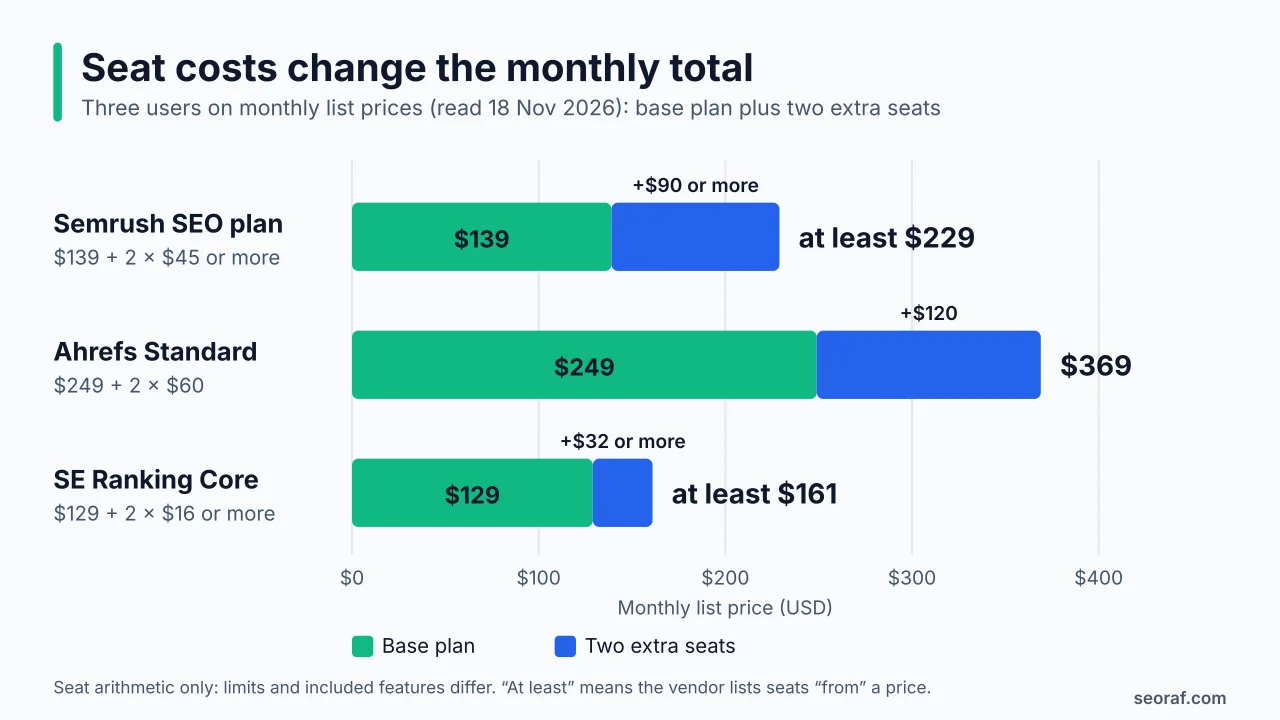
The gap shows why seat pricing deserves a line in your comparison. It does not tell you which plan is better value, because tracked-keyword caps, audit budgets and included features differ.
Free plans and trials
Free access is not consistent across this category: some products provide restricted ongoing plans, while others offer time-limited trials or no confirmed free option. Trial length, card requirements and renewal terms are listed in each platform review because several details are reported rather than confirmed on the vendor’s own page. Check the current checkout terms before starting a trial.
Where sources disagree, and what changed
- Semrush’s plan names changed during 2026, and some articles still list Advanced at $549 while the current page shows custom pricing.
- Serpstat retired its Lite-to-Enterprise ladder in favor of Individual, Team and Agency plans.
- Ahrefs now lists a $29 Starter tier that some summaries leave out.
- Mangools prices range from $29.90 to $141 across sources, and the most recent dated reports agree on $61, $81 and $141 monthly.
- Trial terms for Semrush and Moz Pro differ between official and third-party pages, and the Mangools and SpyFu details rest on independent reports.
All-in-One SEO Software by Use Case
These are shortlists to start from, built on documented limits. They are not rankings, and nothing replaces checking your own numbers against each plan.
| Situation | Check first | Worth shortlisting | Watch-outs |
|---|---|---|---|
| Solo site owner or beginner | What the free plan or trial actually unlocks | Semrush free plan, Ahrefs Free, SEO PowerSuite free edition, Ubersuggest, Mangools | Free tiers are restricted: one demo project on Semrush, only your own sites on Ahrefs Free, one unsaved project on SEO PowerSuite |
| Freelancer or small business | Tracked-keyword caps, seats and update frequency | Semrush SEO plan, SE Ranking Core, Ahrefs Lite or Standard, Mangools, WebCEO Solo or Startup | Add-ons for content and reporting; annual vs monthly billing |
| Agency | White-label reporting, seat cost, usage fees, client count | SE Ranking (Agency Pack), Semrush (Pro Report add-on, Advanced), Serpstat Agency, WebCEO Agency Unlimited, Raven Tools, SEO PowerSuite Enterprise | Usage-based fees on WebCEO, add-on stacking, custom pricing |
| In-house or enterprise team | API access, custom limits, quotes | Semrush Advanced, Ahrefs Advanced or Enterprise, SE Ranking Enterprise, Similarweb | Sales-led pricing; ask for limits in writing |
| Competitor and market research | Depth of competitor data you need | SpyFu, Similarweb, Ahrefs, Semrush | SpyFu evidence is reported only; Similarweb plan inclusion is unclear |
| Reporting-driven workflow | Automation, data connectors, white-labeling | Raven Tools, SE Ranking, SEO PowerSuite Enterprise | Raven Tools’ research data comes from Moz and Majestic |
| Prefer licensed desktop software | Annual license vs subscription | SEO PowerSuite | Desktop-only model; no refunds for partial use |
Situation-based shortlists built from the documented limits above. They are not scores or rankings.
A concrete example shows how to use the table. Imagine a three-person agency with ten clients. White-label reports, three seats and ten projects are the decisive requirements, so I would start with seat and report prices rather than tracked keywords. On list prices, that points you to the Pro Report add-on on Semrush and the Agency Pack on SE Ranking. It also points to the usage fees on WebCEO Agency Unlimited and the reporting focus of Raven Tools. Get a quote or trial for each.
Pros, Cons and Alternatives to All-in-One SEO Platforms
What an all-in-one platform does well
- One login and shared projects. Keyword lists, tracked domains and reports live in one place instead of five.
- One invoice. Billing is simpler, provided you account for seats and add-ons.
- Less to learn. Small teams onboard to one interface rather than several.
- Built-in reporting and data connections. Many platforms pull in Search Console and Google Analytics data and produce scheduled reports.
- AI visibility in the same place. Some plans bundle prompt tracking, such as Semrush on all paid plans and SE Ranking’s included daily prompts.
What it costs you in trade-offs
- Depth versus breadth. Each module sits behind caps. I have not compared any module against a specialist tool, so I cannot say where depth differs.
- Caps and add-ons. Seats, reports, AI capacity and API access are often separate line items.
- Unused modules. You pay for the whole suite even if you use two parts of it.
- Estimates, not Google data. Third-party tools do not have access to Google’s internal ranking data, so volume, difficulty, traffic and visibility figures are the vendor’s own estimates.
- Fast-changing plans. Plan names, prices and limits shifted during 2026 for several platforms in this guide.
- Exit friction. Refund terms and data-deletion rules vary (see the pricing table). I did not verify export features for each platform.
Alternatives to an all-in-one platform
A specialist stack. Choose one tool per job, such as a dedicated crawler for audits and a separate rank tracker. This can give you more depth where you need it, at the cost of more logins, invoices and manual reporting.
Free first-party data. Google recommends Google Search Console for data that comes directly from Google Search. Combine it with the free plans described earlier if your needs are modest.
Plugins and professional help. If your site runs on WordPress, SEO plugins handle on-page tasks but do not replace keyword or competitor research. If you are considering hiring someone instead, Google’s guide on whether you need an SEO covers how to interview a potential SEO and evaluate their recommendations and tools.
When an all-in-one platform is the wrong choice. It probably is if you only need one job done. It also is if a single module’s cap would limit you, such as a very large site audit or thousands of tracked keywords. The same goes if local listing management is central to your work, or if you cannot commit to a plan’s billing terms.
How to Choose All-in-One SEO Software
Four checks narrow the field quickly:
- Map your workflow to the modules you actually use.
- Check the limits that will bite first.
- Model the real cost, including seats and add-ons.
- Test on your own domain and read the cancellation terms before paying.
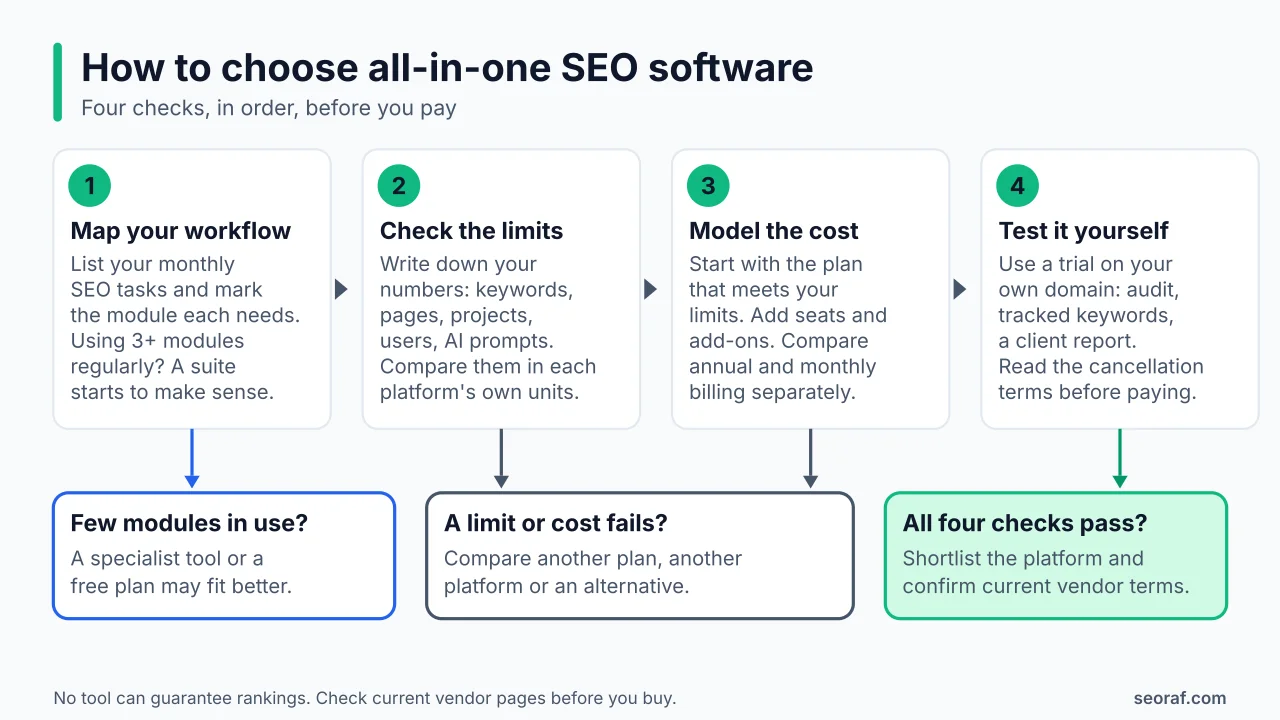
Map your workflow to the modules you actually use
List the recurring tasks you do each month, then mark which module each one needs. If you use three or more modules regularly, a suite starts to make sense. If you use one, a specialist tool or a free plan may be a better fit.
Check the limits that will bite first
Write down your numbers: tracked keywords, pages to audit, projects, users and AI prompts. Then compare them in each platform’s own units. A 10,000-page site, for instance, only fits the top Ubersuggest tier for weekly audits, while Ahrefs lists weekly rank-tracker updates on every plan, which matters if you want daily ranking updates. Decide which limit would force an upgrade first.
Model the real cost
Start from the plan that meets your limits, add seats and the add-ons you need, and compare annual and monthly billing separately. Check the currency you are shown, and ignore promotional prices unless you plan to buy during the promotion. For usage-based plans such as WebCEO’s agency tier, estimate your monthly usage and apply the published fees.
Test before you commit
Use a free plan or trial on your own domain. Run an audit and compare its findings with what Search Console reports for the same site. Set up the tracked keywords you care about, and try the report you would send to a client or manager. Before paying, read the cancellation terms. Ahrefs generally does not offer refunds, SE Ranking payments are non-refundable, Raven Tools annual plans are non-refundable, SEO PowerSuite does not refund partial use and Serpstat’s trial renews automatically after seven days. Put the trial end date in your calendar the day you start.
Common Mistakes When Buying All-in-One SEO Software
- Comparing annual-equivalent prices with monthly ones. Serpstat’s page shows annual-billing rates by default, and several platforms show both. Compare like with like.
- Forgetting seats and add-ons. The worked example earlier shows how three users change the monthly total.
- Treating weekly and daily rank tracking as equivalent. Ahrefs updates weekly on every plan, while several competitors offer daily updates.
- Relying on outdated plan names or prices. Old roundups still list Serpstat’s Lite plan, Semrush’s Pro and Guru tiers, Semrush Advanced at $549 and Mangools Basic at $29.90.
- Treating tool metrics as Google data. Domain Authority is a Moz metric, content scores are tool-specific and, as Google notes, third-party tools cannot see its internal ranking data.
- Buying AI visibility tracking as a ranking tool. Trackers report what a vendor’s prompt sampling found. They do not change how Google ranks your pages.
- Ignoring cancellation and refund terms. The differences between platforms are large, as the pricing table shows.
- Trusting vendor-owned “best” lists without checking criteria. Several roundups I reviewed are published by vendors that place their own product first, for example Search Atlas’s own comparison page when I read it. Look for stated criteria, dates and sources.
Frequently Asked Questions
How much does all-in-one SEO software cost?
Entry plans range from low-cost options to more expensive full suites. The advertised starting price is only a baseline: seats, tracked-keyword limits, crawl budgets, add-ons and billing frequency can change the actual cost. See the quick comparison and pricing table for the dated figures used in this guide.
Is there free all-in-one SEO software?
Some platforms provide restricted free plans or editions, but none should be assumed to offer the full paid workflow at no cost. Semrush, Ahrefs and SEO PowerSuite describe free access; the limits are summarized in the platform reviews above.
Is all-in-one SEO software the same as the AIOSEO WordPress plugin?
No. All in One SEO (AIOSEO) is a WordPress plugin for on-page settings. The platforms in this guide are standalone research and monitoring products that work on any website.
Can an all-in-one SEO platform replace Google Search Console?
No. Google recommends Search Console as the first-party source of data from Google Search, and third-party tools cannot see Google’s internal ranking data. Platforms add competitor data, estimates and workflow features on top.
Can a suite replace a dedicated crawler?
It depends on your site’s size and how deep an audit you need. Suites cap crawl budgets, from Ubersuggest’s weekly page limits to Ahrefs’ monthly crawl credits and SE Ranking’s monthly page budgets. I have not compared any suite’s crawler with a specialist crawler, so check the cap against your site first.
Do I need AI visibility tracking?
Only if monitoring brand mentions in AI answers matters to you. Google says its generative AI features are rooted in its core ranking and quality systems, and trackers show a vendor’s prompt sampling, not Google’s decisions. Search Console also has a Generative AI performance report for your own site. Avoid paying for add-ons unless you will act on the data.
Is one platform enough for an agency?
Possibly, if its white-label reporting, seat pricing and usage fees fit your client load. These differ widely, from Semrush’s report add-ons and SE Ranking’s Agency Pack to WebCEO’s usage-based agency fees, so model your own client count.
Should beginners start with an all-in-one platform or separate tools?
Many beginners can start with Search Console and a free plan, then move to a suite once they use several modules every month. A paid suite earns its price when it replaces tools you would otherwise buy.
Can I export my data or switch platforms easily?
I did not verify export features for each platform, so check before you buy. Raven Tools deletes data 30 days after cancellation, which makes exporting reports before you leave important.
Final Verdict: Match the Platform to the Job
I do not think one of these 12 platforms is the right answer for everyone, and the evidence I could gather does not support naming a winner. What it does support is a short list of questions that separate good fits from poor ones. How often do you need ranking updates? How large are your audits? How many people need seats? Must reports be white-labeled? Is AI visibility tracking a real requirement or a nice extra?
- If you are starting out on a small budget, begin with free plans and Search Console, and move to a paid plan when you hit a documented limit.
- If you are a freelancer or small team, compare two or three platforms on seats, tracked keywords and update frequency using the worked example above.
- If you run an agency, start with white-label reporting, seat prices and usage fees, then ask for quotes where pricing is custom.
- If competitor or market research drives your work, look at the platforms built around it and confirm which tiers include the modules you need.
Whichever you choose, test the workflow on your own domain, check cancellation terms before paying and remember that no tool can guarantee rankings. Prices and limits change, so use the vendor pages listed below as the final check.
Sources, Verification Notes and Update Log
About the author and this guide
Written and edited by Mousume Akter, Founder & Editor of SEORAF, an independent SEO knowledge resource (not an agency). This comparison is based on vendors’ official pages, Google Search Central documentation and dated independent sources. It does not report hands-on testing. If you find an out-of-date price or limit, please tell me so I can correct it and record the change below.
Sources
Google documentation
- Google Search’s guidance on using third-party SEO tools, services, and advice (read in full on 18 November 2026)
- Creating helpful, reliable, people-first content (read in full on 18 November 2026)
- Optimizing your website for generative AI features on Google Search (read in full on 20 November 2026; the page shows a last-updated date of 2026-07-10 UTC)
- Do you need an SEO? (excerpts read on 20 November 2026; not read in full)
- Get started with Google Search Console (linked from Google’s documentation menu; not read in full)
- Generative AI performance report in Search Console (linked from Google’s generative AI guide; not read)
Vendor pages, read on 18 November 2026 (vendor-stated information)
- Semrush plans and pricing
- Ahrefs plans and pricing
- SE Ranking pricing
- SEO PowerSuite pricing
- Ubersuggest pricing and Neil Patel’s Ubersuggest budget guide
- Serpstat pricing and Serpstat plan update notice
- WebCEO pricing
- Raven Tools pricing
- Similarweb pricing
Independent reports (used only where the vendor’s own page could not be read)
- Moz Pro: Shila’s Moz pricing report (price read 21 October 2026), Toolradar’s Moz Pro pricing page (prices confirmed 9 November 2026) and LaunchRanked’s Moz pricing page (figures as of 8 October 2026).
- Mangools: YourAISoft’s Mangools review (prices read 29 October 2026), Costbench’s Mangools page (checked 29 October 2026), MrKeyword’s Mangools pricing report (as of November 2026) and GetCompassSEO’s Mangools alternatives report (prices read 21 October 2026).
- SpyFu: Soku’s SpyFu review (pricing updated 12 October 2026), Costbench’s SpyFu page (checked 31 October 2026), MrKeyword’s SpyFu pricing report (as of November 2026), The Software Ninja’s SpyFu pricing report (two pricing pages noted) and AdEye’s SpyFu free-trial report.
- Semrush plan restructuring: UsagePricing’s Semrush packaging tracker.
Update log
- 20 November 2026: first version. Official vendor pages were read on 18 November 2026, and Google’s generative AI guide and the independent reports above were checked on 20 November 2026. Entries marked “reported” rest on independent sources because I could not read the vendor’s own page.