
How to Do Competitor Analysis With Ubersuggest: Workflow, Limits, and Alternatives
By Mousume Akter, Founder & Editor, SEORAF
Ubersuggest’s pricing page and the Help Center articles linked below were last checked on September 30, 2026.
Ubersuggest is an SEO tool from Neil Patel Digital that reports estimated traffic, keywords, top pages, and backlinks for any competitor domain. This guide turns those reports into a repeatable SEO competitor analysis, shows where the data stops being reliable, and explains when another tool may be worth considering. It is written for bloggers, small business owners, freelancers, and people new to SEO fundamentals.
Quick answer: In Ubersuggest, enter a competitor’s domain to see its estimated organic traffic, ranking keywords, top pages, and backlinks. The Similar Websites report then shows keywords you share with that competitor and keywords only the competitor ranks for. Treat every competitor figure as an estimate, and use live Google results as an additional validation step.
Key takeaways
- The workflow has eight steps: choose competitors, find competitor keywords, classify search intent, identify keyword and content gaps, analyze top pages, analyze backlinks and referring domains, track rankings and competitors, and prioritize realistic opportunities.
- Ubersuggest says its figures are estimates from multiple data providers, and its Help Center says backlink data is sourced exclusively from the Moz API.
- Your plan sets how many competitors, tracked keywords, and export rows you can use.
What Is Competitor Analysis in SEO?
Competitor analysis in SEO means studying the sites that rank for your target queries, so you can find keywords, topics, and link sources you can realistically pursue. You compare those sites with yours and turn the differences into a prioritized plan. It usually covers competitor keyword research, keyword and content gaps, top pages, backlinks and referring domains, and ranking changes over time.
What Ubersuggest Can Show About Competitors
Ubersuggest competitor analysis means entering a competitor’s domain to see estimated organic traffic, ranking keywords, top pages, backlinks, and similar websites, then tracking competitors over time inside a project. Report names change between updates, so check your dashboard. For a broader look at the tool, see SEORAF’s Ubersuggest page.
| Report | What it shows | Use it to |
|---|---|---|
| Traffic Overview | Estimated organic traffic history (24 months), total ranked keywords, keyword distribution by position, top pages, Domain Score (0-100) | Get a snapshot of a competitor’s search visibility |
| Similar Websites | Competitors with shared keyword profiles, plus Common Keywords and Keywords Gap | Build competitor keyword and gap lists |
| Top Pages by Traffic | Pages with the highest estimated traffic | See which content earns visits |
| Backlinks | Domains linking to a site and the content that attracts links | Find link sources |
| Content Ideas / Keyword Ideas | Topic and keyword suggestions | Research angles |
| Competitor Tracking (in a project) | Ongoing traffic, keyword, and backlink data for chosen competitors | Monitor changes |
How Reliable Is Ubersuggest Competitor Data?
Ubersuggest’s competitor figures are estimates, not readings from a competitor’s analytics. Its pricing page says it uses multiple data providers to produce estimates, and its Help Center says data updates monthly. See how Ubersuggest gathers data and how its traffic estimates work for the details.
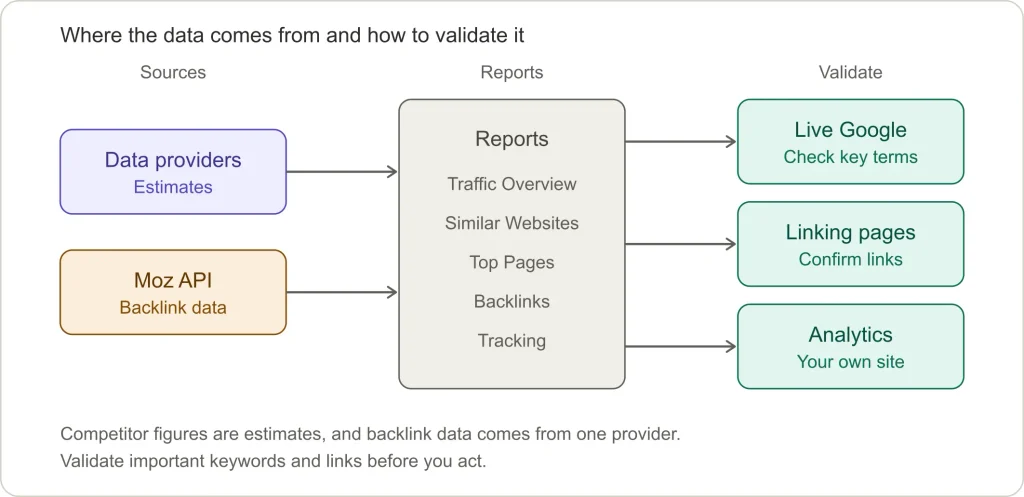
- Competitor traffic analysis: estimates combine keyword search volume, ranking position, and click-through rate. They cover organic traffic only, not referral, social, email, or direct visits.
- Your own site: if your domain has a project connected to Google Analytics, its organic traffic in Ubersuggest comes from Google Analytics rather than an estimate. Competitors are always estimated.
- Tool data versus live Google results: positions and traffic shown in the tool are modeled snapshots. Live results can vary by location, device, and search context, so check important keywords in Google as an additional validation step.
Ubersuggest Plan Limits Relevant to Competitor Analysis
Your plan determines how many reports you can run per day, how many competitors and keywords you can track, and how many rows you can view and export. The limits below come from Ubersuggest’s official pricing page, checked September 30, 2026. Plans change, so check the page before you buy.
| Limit | Lowest plan | Middle plan | Highest plan |
|---|---|---|---|
| Reports per day | 150 | 300 | 900 |
| Projects | 1 | 7 | 15 |
| Tracked competitors | 5 | 10 | 15 |
| Tracked keywords per project (updated weekly) | 125 | 150 | 300 |
| Top pages shown | 2,000 | 5,000 | 10,000 |
| Top keywords shown | 20,000 | 50,000 | 100,000 |
| Backlink rows | 2,000 | 5,000 | 10,000 |
| Rows per export | 2,000 | 5,000 | 10,000 |
| Site audit pages per report | 1,000 | 5,000 | 10,000 |
The pricing page lists monthly prices from US$29 to US$99 across the plans and describes lifetime plans as one-time payments. It describes a one-time 7-day free trial for monthly subscriptions and says lifetime purchases are final and non-refundable. It also says you can downgrade to a free account but does not describe what that account includes. According to the pricing page FAQ, Ubersuggest asks you to sign in with Google so it can access your Search Console data to find more site issues. The same page states that no API access plans are currently available.
How to Do Competitor Analysis With Ubersuggest
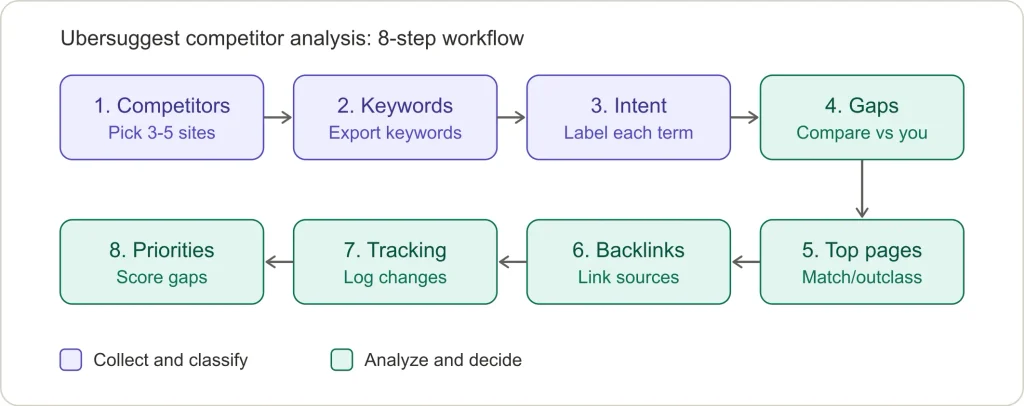
Follow eight steps in order: choose competitors, find their keywords, classify search intent, identify gaps, analyze top pages, analyze backlinks, track changes, then prioritize opportunities. Each step feeds the next.
| Step | Action | Output |
|---|---|---|
| 1 | Choose three to five relevant competitors | Competitor list |
| 2 | Find competitor keywords | Raw keyword list |
| 3 | Classify keywords by search intent | Filtered list |
| 4 | Compare with your site | Keyword gaps and content gaps |
| 5 | Analyze top-performing pages | Match, outclass, or skip decisions |
| 6 | Analyze backlinks and referring domains | Verified link targets |
| 7 | Track rankings and competitors | Ongoing log |
| 8 | Prioritize realistic opportunities | Content plan |
Ubersuggest Competitor Analysis Workflow
Step 1: How do you choose the right competitors?
Choose three to five sites that rank for your target queries and are reasonably close to your size and topic. Live search results show who is currently ranking, which is more reliable than assuming.
| Type | Definition |
|---|---|
| Business competitor | Sells what you sell to the same customers |
| SERP competitor | Ranks for your target queries, whatever its business |
| Content competitor | Publishes on your topics and attracts your audience |
Search five to ten priority keywords in Google and note domains that repeat on page one. Skip giant generic sites unless they genuinely compete with you. Benchmarking against a much larger site can produce targets that are less realistic for a newer or smaller site. According to Ubersuggest’s Help Center, subdomains are treated as separate domains in its reports, so enter the exact domain you mean.
Step 2: How do you find competitor keywords?
Open Similar Websites, enter a competitor’s domain, and drill into its keyword lists. Ubersuggest shows volume, position, estimated visits, CPC (cost per click), and SEO and paid difficulty for each keyword. The amount of data available can vary by domain, and Ubersuggest’s own guide suggests choosing a competitor with meaningful traffic for richer keyword data. That guide, How to Discover Your Competitors’ Keywords, walks through the same reports.
| Metric | Meaning | Caution |
|---|---|---|
| Volume | Estimated monthly searches | Compare terms with each other; it is not guaranteed traffic |
| SEO difficulty | How competitive the term may be | May not reflect your site’s specific strengths |
| Position | Where the competitor ranks in Google | Terms in the middle of page one or on page two are often more approachable (an editorial rule of thumb, not a tool rule) |
| Estimated visits | Modeled monthly traffic | Rough only |
For research beyond competitors, use SEORAF’s keyword research checklist.
Step 3: How do you classify search intent?
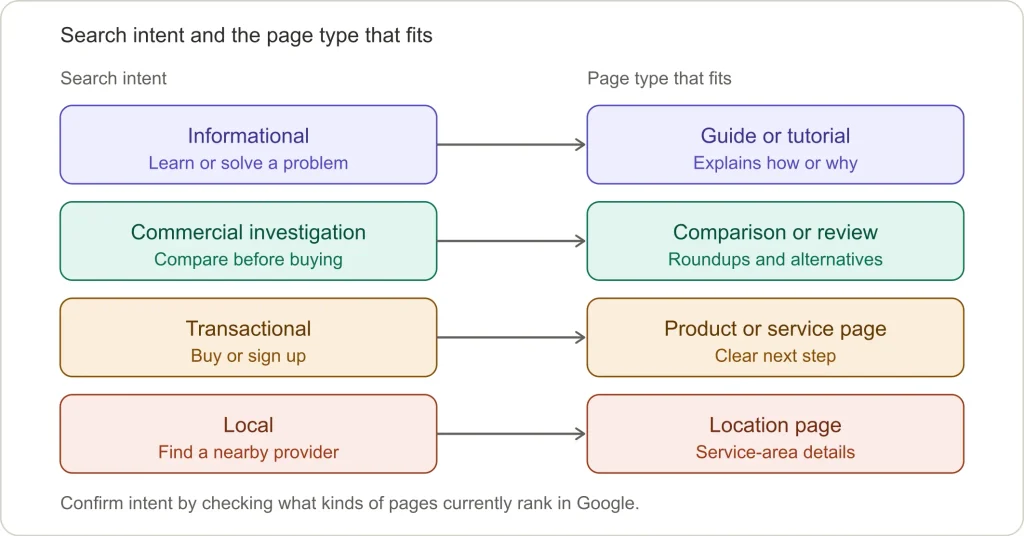
Search intent is the goal behind a query: to learn, compare, buy, or find a place. Classify each keyword by intent, then check what kinds of pages currently rank. Ubersuggest’s keyword research report lists search intent, which is a useful starting hint. Live Google results are an additional validation step. For more on how intent and entities shape page planning, see SEORAF’s semantic SEO guide.
| Intent | Page type that fits |
|---|---|
| Informational | Guide, tutorial |
| Commercial investigation | Comparison, review, “best of” page |
| Transactional | Product or service page |
| Local | Location or service-area page |
Then sort each keyword into one of three groups: keep (relevant and realistic), park (relevant but may be less realistic for now), or discard (off-topic, branded for someone else, or the wrong intent).
Step 4: What is the difference between a keyword gap and a content gap?
A competitor keyword gap is a term competitors rank for and you don’t. A competitor content gap is a subtopic, question, or format competitors cover that you lack, even when no single keyword shows it.
- Keyword gap: in Similar Websites, Common Keywords are terms both sites rank for, and Keywords Gap lists terms the competitor ranks for that you don’t. Export to CSV to work in a spreadsheet. A “weak” list (you rank, but far below them) is not a built-in report, so build it by comparing exports.
- Content gap: read the top three or four results for a target topic beside your own page. Note the subtopics, questions, and formats they include that you don’t.
Group related terms into one topic cluster instead of writing a page per keyword, since near-identical pages can overlap. A topical authority map template helps with planning.
Step 5: How do you analyze a competitor’s top pages?
Open Top Pages by Traffic, read the leading pages as a visitor would, and decide whether to match, outclass, or skip each one. Per Ubersuggest’s guide to Top Pages by Traffic, the report aggregates data globally, updates monthly, and includes subdomains in a domain’s totals.
Check each page’s search intent, format, depth compared with the next result, freshness, and internal link support.
| Decision | When to choose it |
|---|---|
| Match | The topic matters and the format is proven |
| Outclass | The page is thin, outdated, or missing something clear |
| Skip | The topic is outside your expertise or audience |
Learn why a page works, then build a better answer instead of copying its structure.
Step 6: How do you analyze competitor backlinks and referring domains?
Open the Backlinks report to see which domains link to a competitor and what content attracts those links. Prioritize referring domains, meaning unique sites that link to a page, over raw link counts, then turn the list into realistic outreach targets.
- Sort by referring domain.
- Remove obvious low-value sources, such as irrelevant or low-quality directories.
- Highlight sites that link to two or more competitors but not to you.
- Group what remains: resource pages, roundups, guest post sources, and earnable mentions.
Validate before outreach. Ubersuggest’s Help Center says its backlink data is sourced exclusively from the Moz API, so a tool that draws on Moz data may not give you an independent second opinion. Open each linking page to confirm the link exists. For your own site, compare against Google Search Console’s links report.
Step 7: How do you track rankings and competitors over time?
Track your keywords in Ubersuggest’s rank tracker, which updates weekly, and add competitors to a project through Competitor Tracking on the project dashboard. Competitor tracking is monitoring changes over time, such as new pages, ranking shifts, and new links. Ubersuggest’s guide, How To Track Your Competitors’ Rankings, covers the setup.
| Cadence | What to check |
|---|---|
| Weekly | Your own ranking trends |
| Monthly | New competitor pages and traffic changes (new-month data can take a few days to appear) |
| Quarterly | A full refresh of one competitor’s keywords, top pages, and links |
| After major events | Algorithm updates or competitor site changes |
For keywords that matter, compare the tool’s positions with live Google results. Results can still vary by location, device, and search context, so use them as an additional check rather than a single source of truth.
Step 8: How do you prioritize realistic SEO opportunities?
Score each gap from 1 to 3 on intent fit, realistic difficulty, business value, and competitor weakness, then act on the highest totals first. An SEO opportunity is a gap you can realistically act on with your resources.
| Factor | 1 | 2 | 3 |
|---|---|---|---|
| Intent fit | Loose | Partial | Direct |
| Realistic difficulty | Very demanding | Moderate | Approachable |
| Business value | Low | Some | High |
| Competitor weakness | None | Some | Clear |
This scale is an editorial method, not a tool feature or industry standard. Adjust it to your site.
For each opportunity, write a short brief covering the target query, the reader’s question, the sections you need, and your unique angle. SEORAF’s SEO templates can speed this up.
Limitations of Ubersuggest for Competitor Analysis
Ubersuggest’s main limits are estimate-based data, backlink data that depends on one provider, plan caps on competitors, keywords, and rows, and site audits capped by page count. None of these rules the tool out. They tell you what to validate independently.
| Area | Limitation | What to validate |
|---|---|---|
| Traffic and keyword data | Figures are estimates from multiple providers, updated monthly | Check important keywords in live Google results |
| Backlinks | Sourced exclusively from the Moz API | Open linking pages to confirm links; use a tool with its own stated link data source if backlinks drive decisions |
| Historical data | The pricing page lists 3 years of link history and a 30-day new-and-lost-links window | Confirm whether that window fits your outreach timing |
| Reports and exports | Caps on reports per day and rows per export | Check your plan’s limits before starting |
| Scale | Caps on projects, tracked competitors, and tracked keywords | Confirm the limits fit your number of sites |
| Traffic scope | Organic only; excludes referral, social, email, and direct | Use Google Analytics for your own site |
| Site audit | Crawl capped at 1,000 to 10,000 pages per report by plan | Use a dedicated crawler for larger sites |
| API | The pricing page says no API access plans are currently available | Plan around manual exports |
Common accuracy traps: branded terms can inflate a competitor’s keyword count, seasonal terms can look more valuable than they are year-round, and difficulty scores may not reflect your site’s topical strengths.
Is Ubersuggest Enough for Competitor Analysis?
For one site and a handful of competitors, Ubersuggest covers this workflow. Consider another tool only when a specific limit blocks you, such as backlink independence, client reporting, higher limits, or a large-site crawler.
Answer these six questions with yes or no:
- Can I identify three to five relevant competitors?
- Does Ubersuggest show usable data for them?
- Can I produce a filtered list of 20 to 50 realistic targets?
- Do my plan’s limits cover the analysis I need?
- Do live Google checks roughly match the tool’s estimates?
- Can Ubersuggest meet my needs without independent backlink data, client reporting, or a large-site crawler?
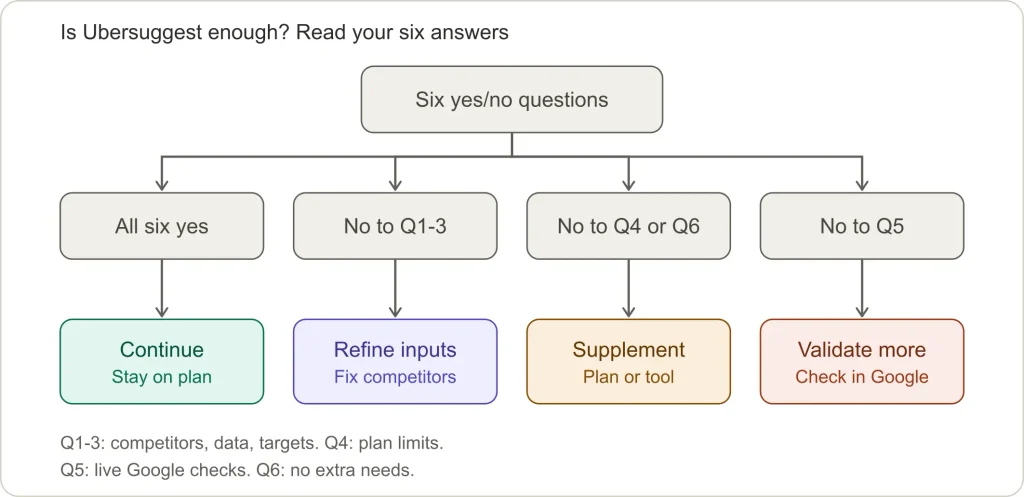
How to read your answers: yes to all six means you can continue with Ubersuggest. A no to question 1, 2, or 3 usually points to refining your competitor selection or keyword filters before changing tools. A no to question 4 or 6 suggests checking a higher plan or supplementing Ubersuggest. A no to question 5 means relying more on live Google checks, and on a second data source if the decision is costly.
Affiliate disclosure: Links to tools in the next section may be affiliate links. If you sign up through a qualifying affiliate link, SEORAF may earn a commission at no extra cost to you. Affiliate links use
rel="sponsored", as Google Search Central asks. Tools are grouped by use case and are not ranked. See About SEORAF for more on how affiliate links are handled.
Ubersuggest Alternatives for Competitor Analysis
Consider an alternative only when a specific limit blocks your workflow. Match the tool to the limit, not to a feature list. Descriptions below are limited to what could be checked against vendor-published pages, and some rows are phrased as things to check rather than confirmed features. Confirm current features, data sources, and limits on each vendor’s site before choosing. For a wider overview, compare SEO tools by use case.
| If your limit is… | Tool to evaluate | Why it may fit | Confirm before choosing |
|---|---|---|---|
| Broader SEO competitor research and reporting in one platform | SE Ranking | Its help center lists keyword research, competitive research, backlink checking and monitoring, website audits, a content editor, local marketing, and report building, plus an agency pack with white-labeling. | Plan limits for projects, keywords, and data. See SE Ranking plans and pricing. |
| Keyword research and rank tracking | Mangools | Worth checking if keyword research or rank tracking is the limit you are hitting in Ubersuggest. | Whether its current plans cover keyword research, rank tracking, and competitor research as you need them. |
| Reporting across several sites or clients | WebCEO | Worth checking if client reporting or managing multiple sites is the limit you are hitting. | Whether its current features, reporting options, and plan limits cover your needs. |
| A task-based suite for rankings, audits, backlinks, and outreach | SEO PowerSuite | The vendor’s site lists four tools: Rank Tracker, WebSite Auditor, SEO SpyGlass (backlink analysis), and LinkAssistant (link building). | Current licensing, free-plan limits, and each tool’s data sources. |
| Backlink data from a source other than Moz | SE Ranking or SEO PowerSuite | Both vendors list backlink tools. Whether their link data suits you depends on the source and coverage. | Each tool’s stated link data source and coverage. |
Because Ubersuggest’s backlink data comes from the Moz API, Moz’s own tools may not provide an independent second opinion on backlinks.
To test any alternative, run the same competitor through both tools, search a few keywords that appear in only one list, and open a sample of backlinks from each. Switch only if the alternative solves the limit you identified. Free trials and refund terms differ by vendor, so check current offers on each vendor’s site.
Frequently Asked Questions
Can Ubersuggest analyze any competitor’s website?
Most public domains work, but the amount of available data can vary by domain. Smaller or newer sites may show less.
How accurate is Ubersuggest’s competitor data?
Ubersuggest says it uses multiple data providers to produce estimates. Treat the numbers as directional and use live Google results as an additional validation step.
Is there a free version of Ubersuggest?
The pricing page describes a one-time 7-day free trial for monthly plans and says you can downgrade to a free account. It does not say what a free account includes, so check inside the app.
How many competitors can I track in Ubersuggest?
Five, ten, or fifteen per project, depending on your plan. The pricing page also lists add-ons for more.
Does Ubersuggest show competitor backlinks?
Yes. The data comes from the Moz API, so open linking pages to confirm important links before outreach.
How often should I repeat competitor analysis?
Ubersuggest data updates monthly and rankings update weekly, so a monthly check and a quarterly refresh are a sensible rhythm.
Final Takeaway
Ubersuggest competitor research works best as a decision process: choose the right competitors, filter keywords by intent, treat estimates as estimates, and publish from the results. If a specific limit starts to block your workflow, match the alternative to that limit rather than switching tools by default.
Next step: open Similar Websites for one competitor, export the Keywords Gap list, and score the top 20.