
Google Algorithm Updates: Timeline, Types and What to Do
Google algorithm updates are changes to the systems that decide which pages appear in Search and in what order. Some are announced and tracked, some are not, and a ranking drop that happens near one is easy to blame on it and hard to prove. This guide sets out what Google has confirmed about 2025 and 2026, how the update types differ, which older systems have been retired, and how to investigate a traffic drop with Search Console before you change anything on your site.
Last verified against Google’s documentation and the Google Search Status Dashboard on . Where this guide gives SEORAF’s own judgment instead of a Google statement, it says so.
Quick answers
- Core updates are broad changes to Google’s ranking systems. Google says they do not target specific sites or pages.
- Spam updates are improvements to Google’s automated spam detection, including its AI-based system, SpamBrain.
- The most recent core update in the dashboard history as of 14 October 2026 is the May 2026 core update (started 21 May, completed 2 June). The most recent update of any kind is the September 2026 spam update, completed on 8 October.
- A drop after an update is not proof of cause. Technical faults, security problems, manual actions, seasonality, site moves and reporting glitches can look identical in a traffic chart.
- Recovery has no fixed schedule. Google says some changes can take effect within days but it could take several months, and it gives no guarantee.
What are Google algorithm updates?
Google describes its approach as continuous improvement. Its traffic-drop guidance says Google is always improving how it assesses content and updating its ranking and serving algorithms accordingly. Most of those changes are never announced. Google lists the notable ones that are relevant to website owners on the Google Search Status Dashboard, which keeps five years of history, according to its documentation.
Two practical points follow from that.
- The dashboard is the record of confirmed updates. If a blog post names an update that the dashboard does not list, treat the name as unconfirmed. Third-party trackers sometimes label ranking volatility with names of their own.
- Not every change is announced. Google’s core updates page says it continually makes smaller core updates and does not announce them because they are not widely noticeable. A traffic change with no matching dashboard entry is therefore possible, and it is not by itself evidence of a hidden update.
Core, spam and other update types
Core updates
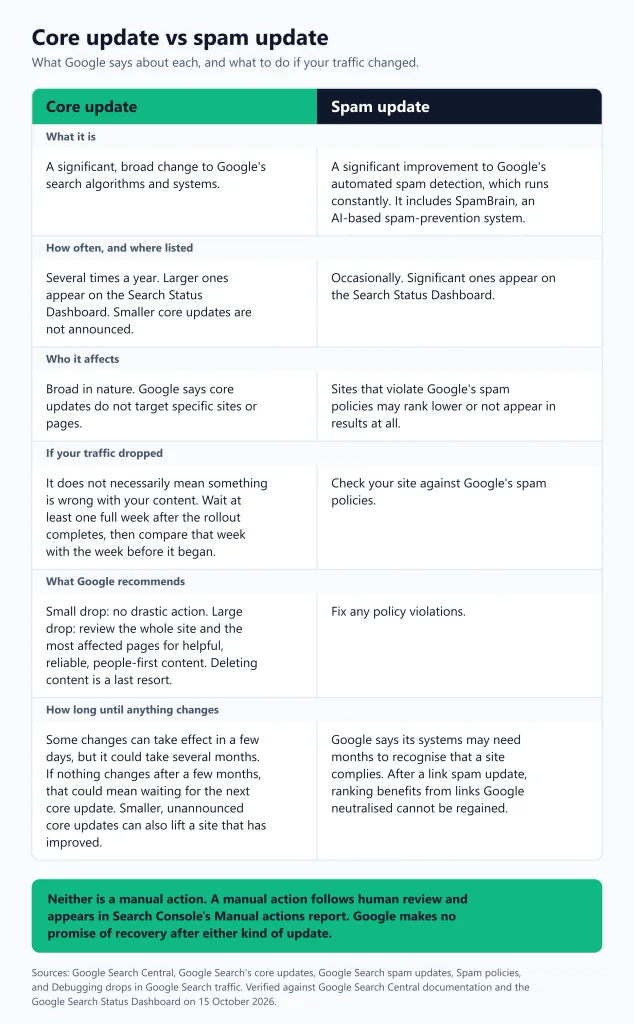
Google’s core updates documentation says that several times a year it makes significant, broad changes to its search algorithms and systems, and that these changes do not target specific sites or individual pages. The practical consequence is that a lower position after a core update does not mean your site was singled out or penalised. Google’s debugging guidance says there might not be anything fundamentally wrong with your content.
Spam updates
Google says its automated spam detection runs constantly and that it occasionally makes significant improvements, each of which is called a spam update. The page describes SpamBrain as an AI-based spam-prevention system that Google improves over time. Sites that violate the spam policies may rank lower or not appear in results at all. The policies cover practices such as cloaking, doorway abuse, expired domain abuse, hidden text, keyword stuffing, link spam, scaled content abuse, scraping, site reputation abuse and sneaky redirects.
Link spam updates carry a specific warning: when Google neutralises spammy links, any ranking benefit they provided is lost, and Google says that benefit cannot be regained.
Manual actions are not algorithm updates
A manual action is issued after a human reviewer finds pages that do not comply with Google’s spam policies. Unlike an algorithmic change, it appears in the Manual actions report in Search Console, and Google also notifies you in the message center. If you have one, you fix the problem on all affected pages and submit a review request. Google says reviews can take some time, with most taking several days or weeks and some, such as link-related requests, taking longer, and that you should not resubmit while a request is pending.
Other named updates
The dashboard has also listed updates outside the core and spam categories. Examples from its history are product reviews and reviews updates (2021 to 2023), the page experience update for desktop (February 2022), helpful content updates (2022 and 2023) and, most recently, the February 2026 Discover core update. That last one was released for English-language users in the US, with Google saying it would look to expand it to other countries and languages in the future. It completed on 27 February 2026. No later Discover entry appears in the dashboard history I reviewed on 14 October 2026.
Ranking systems, and which ones were retired
Updates change systems, so it helps to know the systems. Google’s guide to ranking systems lists those currently in use. They include BERT, neural matching, RankBrain, passage ranking, freshness systems, link analysis systems (PageRank remains part of the core ranking systems), the original content systems, the reviews system, the site diversity system, deduplication systems, the exact match domain system and spam detection systems. The guide says MUM is not used for general ranking, only for specific applications.
The guide also keeps a short list of retired systems, noted for historical purposes because they have been incorporated into successor systems or made part of the core ranking systems.
| System | Introduced | What Google says happened |
|---|---|---|
| Hummingbird | August 2013 | Described as a major improvement to overall ranking systems. Ranking systems have continued to evolve since. |
| Panda | Announced 2011 | Aimed to surface high-quality, original content. Became part of the core ranking systems in 2015. |
| Penguin | Announced 2012 | Targeted link spam. Integrated into the core ranking systems in 2016. |
| Helpful content system | Announced 2022 | Became part of the core ranking systems in March 2024. |
This is why advice that treats “the Helpful Content Update” as a separate, switchable penalty is out of date. Google’s guidance on creating helpful, reliable, people-first content remains current, but the guidance does not describe a standalone helpful content system. It refers to Google’s automated and core ranking systems.
Confirmed Google algorithm updates timeline, 2021 to 2026
Every row below comes from the Search Status Dashboard history and the individual incident pages it links to. Start and completion times on those pages are in US Pacific time, so the date you see locally can differ by a day. “Listed duration” is the figure the dashboard displays. The last column is Google’s own estimate in the launch message, which was an estimate and not a commitment.
2025 to 2026
| Update | Type | Started | Completed | Listed duration | Google’s estimate at launch |
|---|---|---|---|---|---|
| September 2026 spam update | Spam | 24 Sep 2026 | 8 Oct 2026 | 13 days 16 hours | Up to two weeks |
| August 2026 spam update | Spam | 18 Aug 2026 | 21 Aug 2026 | 2 days 16 hours | A few days |
| June 2026 spam update | Spam | 24 Jun 2026 | 26 Jun 2026 | 2 days 1 hour | A few days |
| May 2026 core update | Core | 21 May 2026 | 2 Jun 2026 | 11 days 21 hours | Up to 2 weeks |
| March 2026 core update | Core | 27 Mar 2026 | 8 Apr 2026 | 12 days 4 hours | Up to 2 weeks |
| March 2026 spam update | Spam | 24 Mar 2026 | 25 Mar 2026 | 19 hours 30 minutes | A few days |
| February 2026 Discover update | Discover core | 5 Feb 2026 | 27 Feb 2026 | 21 days 17 hours | Up to 2 weeks |
| December 2025 core update | Core | 11 Dec 2025 | 29 Dec 2025 | 18 days 2 hours | Up to 3 weeks |
| August 2025 spam update | Spam | 26 Aug 2025 | 22 Sep 2025 | 26 days 15 hours | A few weeks |
| June 2025 core update | Core | 30 Jun 2025 | 17 Jul 2025 | 16 days 18 hours | Up to 3 weeks |
| March 2025 core update | Core | 13 Mar 2025 | 27 Mar 2025 | 13 days 21 hours | Up to 2 weeks |
Google’s launch messages for the August 2025 spam update and all four 2026 spam updates say they apply globally and to all languages.
2024
| Update | Type | Started | Completed | Listed duration | Google’s estimate at launch |
|---|---|---|---|---|---|
| December 2024 spam update | Spam | 19 Dec 2024 | 26 Dec 2024 | 7 days 2 hours | Up to 1 week |
| December 2024 core update | Core | 12 Dec 2024 | 18 Dec 2024 | 6 days 4 hours | Up to 2 weeks |
| November 2024 core update | Core | 11 Nov 2024 | 5 Dec 2024 | 23 days 13 hours | Up to 2 weeks |
| August 2024 core update | Core | 15 Aug 2024 | 3 Sep 2024 | 19 days 4 hours | Up to a month |
| June 2024 spam update | Spam | 20 Jun 2024 | 27 Jun 2024 | 7 days 1 hour | Up to 1 week |
| March 2024 spam update | Spam | 5 Mar 2024 | 20 Mar 2024 | 14 days 21 hours | Up to 2 weeks |
| March 2024 core update | Core | 5 Mar 2024 | 19 Apr 2024 | 45 days | Up to a month |
The dashboard also lists two unnamed incidents titled “Ranking is experiencing an ongoing issue” (one starting 5 October 2023 and one starting 15 August 2024). They are not named updates, so this guide does not count them as such.
2021 to 2023
The dashboard history provides a rolling five-year record. The table below lists the ranking-update entries available in that history for 2021 to 2023; it is not a complete history of every Google update ever announced. For these older entries, the dashboard provides a start date and listed duration, so completion dates are not shown here.
| Update | Started | Listed duration |
|---|---|---|
| November 2023 reviews update | 8 Nov 2023 | 29 days |
| November 2023 core update | 2 Nov 2023 | 25 days 21 hours |
| October 2023 core update | 5 Oct 2023 | 13 days 23 hours |
| October 2023 spam update | 4 Oct 2023 | 15 days 12 hours |
| September 2023 helpful content update | 14 Sep 2023 | 13 days 11 hours |
| August 2023 core update | 22 Aug 2023 | 16 days 3 hours |
| April 2023 reviews update | 12 Apr 2023 | 13 days 2 hours |
| March 2023 core update | 15 Mar 2023 | 13 days 7 hours |
| February 2023 product reviews update | 21 Feb 2023 | 14 days |
| December 2022 link spam update | 14 Dec 2022 | 29 days |
| December 2022 helpful content update | 5 Dec 2022 | 38 days |
| October 2022 spam update | 19 Oct 2022 | 2 days |
| September 2022 product reviews update | 20 Sep 2022 | 6 days |
| September 2022 core update | 12 Sep 2022 | 14 days |
| August 2022 helpful content update | 25 Aug 2022 | 15 days |
| July 2022 product reviews update | 27 Jul 2022 | 6 days |
| May 2022 core update | 25 May 2022 | 15 days |
| March 2022 product reviews update | 23 Mar 2022 | 14 days |
| Page experience update for desktop | 22 Feb 2022 | 9 days |
| December 2021 product reviews update | 1 Dec 2021 | 20 days |
| November 2021 core update | 17 Nov 2021 | 13 days |
| November 2021 spam update | 3 Nov 2021 | 8 days 1 hour |
Spam policy changes worth knowing
Spam policy changes are announced separately from ranking updates, in the Search Central updates log. The March 2024 announcement is the one most often misdated. Google’s March 2024 announcement introduced policies on scaled content abuse, site reputation abuse and expired domain abuse, and the updates log dates the “New spam policies” entry 5 March 2024. The announcement said enforcement of the site reputation abuse policy would begin on 5 May 2024. The three categories are therefore a 2024 change, not a 2025 one.
The updates log also lists these later spam-policy entries, which this guide cites by title only:
- 13 April 2026: “Introducing a new spam policy for back button hijacking”
- 15 May 2026: “Clarifying that spam policies apply to generative AI responses in Google Search”
- 28 August 2026: “Updated the site reputation policy” (the log describes it as an adjustment to enforcement in the European Economic Area)
Read the full entries before relying on any of them for a specific site. Google’s current spam policies page was last updated on 28 August 2026.
What the timeline does and does not tell you
A few observations come straight from the dates above. They describe the past and do not predict the next update.
- 2025 had three confirmed core updates (March, June, December) and one spam update (August).
- 2026 so far has two core updates (March, May), four spam updates (March, June, August, September) and one Discover update (February).
- The gaps between core update start dates from March 2025 to May 2026 were 109, 164, 106 and 55 days. There is no regular rhythm to rely on.
- Completed core updates in 2025 and 2026 ran from about 12 to 18 days by the dashboard’s own figures. Google’s launch estimates were up to two or three weeks.
- Estimates can be wrong. The March 2024 core update was announced as taking up to a month and the dashboard lists 45 days.
- As of 14 October 2026 the dashboard history shows no core update after May 2026, and no update in progress. That is 146 calendar days since the May update started and 134 since it completed.
The dashboard messages themselves are short release and completion notices. They do not explain what changed. Anyone who tells you the specific cause of a specific update has either read it in Google’s own documentation or is guessing, and this guide does not guess.
What Google says about the impact of updates
Google’s published statements about impact are general, and the most specific one is about the March 2024 update. Google said it expected the combined changes to reduce low-quality, unoriginal content in results by 40 percent, and in an update to the announcement dated 26 April 2024 it said users would now see 45 percent less. That figure is Google’s own claim about its own results, and this guide has not independently verified it.
For individual sites, Google gives no per-update list of winners and losers. Several third-party tools track ranking volatility and publish their own analyses. This guide does not use them as evidence, because their methods and samples differ from one tool to the next. The only impact you can act on is the impact visible in your own Search Console data, which is what the workflow below is for.
Did an update cause your drop?
A decline that follows an update is a correlation. Google’s guidance on debugging drops in Search traffic lists several other explanations that can produce the same chart:
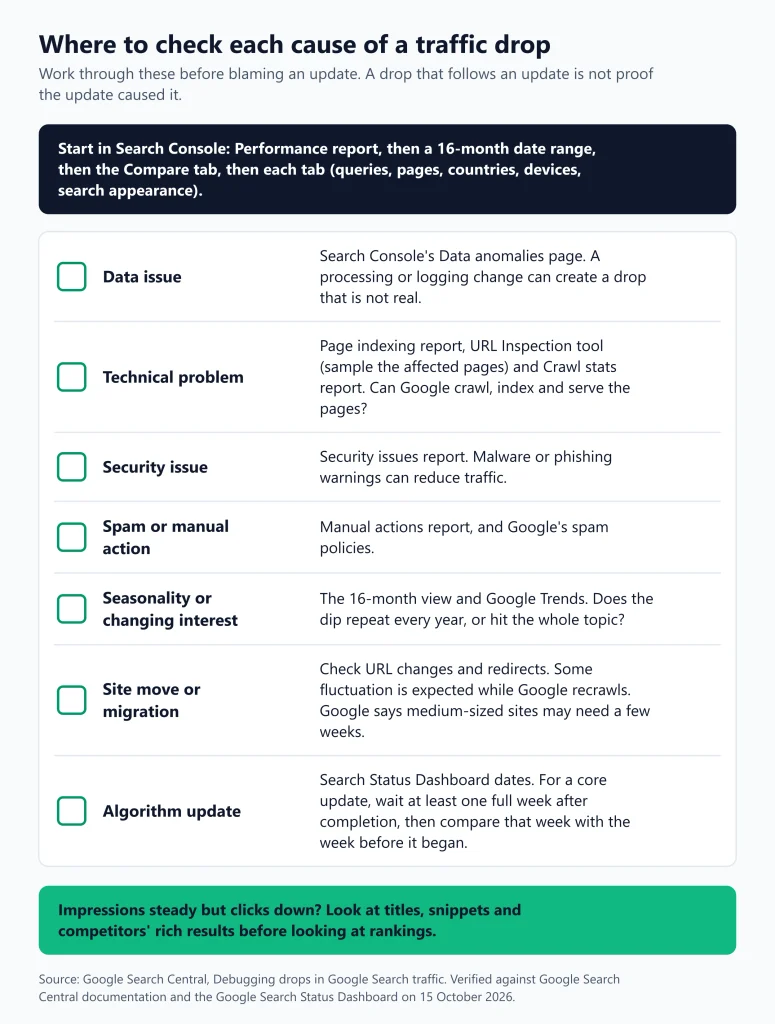
- Data issues, such as a processing change or logging error in Search Console
- Technical issues that stop Google from crawling, indexing or serving pages
- Security issues, such as malware or phishing warnings
- Spam issues, including manual actions
- Seasonality and changing interests in a topic
- Site moves and migrations, which can cause fluctuations while Google recrawls
- An algorithmic update, including core updates
An update becomes a credible explanation only when the timing fits, the pattern in the data fits, and the other causes have been checked. The scenarios below are illustrations of that reasoning. They are not case studies, and no real site or result is described.
- Impressions held steady but clicks fell. Google’s guidance says this pattern can point to titles and snippets or to competitors with stronger rich results, which is a different problem from losing rankings.
- The same dip appears a year earlier. A 16-month view that shows the same shape last year suggests seasonality, not an update.
- The decline began before the rollout started. In SEORAF’s judgment, a drop that starts days before the start date on the dashboard is a poor match for that update, and a recent site change deserves a closer look first.
- One folder of URLs lost traffic and the rest did not. That points toward a technical or migration cause. In SEORAF’s judgment, because core updates are described as broad, a narrow, sharp pattern is worth checking in the Page indexing report and the URL Inspection tool before you assume otherwise.
- The drop is small. Google says small position drops can recover without action and that there is no need to take drastic action.
Search Console investigation workflow
This workflow follows Google’s traffic-drop debugging steps and adds the extra timing guidance from the core updates documentation. Work through it in order, and write down what you find at each step before you change anything.
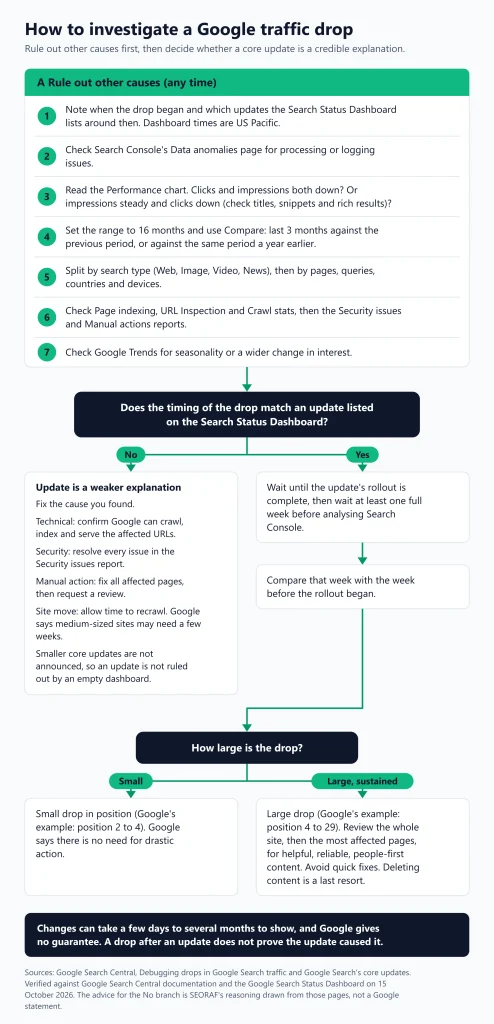
- Check the dashboard first. Open the Search Status Dashboard history. Note whether an update was running when your drop began and when it completed.
- Check for data issues. Review the Data anomalies page in Search Console. A processing change or logging error can create a drop that is not real.
- Read the shape of the chart. In the Performance report, see whether clicks and impressions both fell. If impressions are steady and clicks fell, look at titles, snippets and search result features before looking at rankings.
- Extend the date range to 16 months. This shows whether the drop repeats every year. For longer history, Google points to the Search Analytics API and bulk data exports.
- Compare periods. Use the Compare tab to compare the last three months with the previous period, or with the same period a year earlier. The Performance report help page defines the metrics, including that average position in the chart is the average position of your site’s topmost result across the whole site.
- Split by search type. Check Web, Image, Video and News separately. A drop in one can be hidden by stability in another.
- Find the pattern in affected pages. Sort the Pages table by clicks difference. Check queries, countries, devices and search appearance for changes. Treat average position as a secondary signal.
- Test for technical problems. For a site-wide drop, check the Page indexing report. For a group of pages, sample them with the URL Inspection tool, and look at the Crawl stats report for spikes in errors.
- Check Security issues and Manual actions. Both are separate Search Console reports. A manual action needs a fix and a review request, not a wait for the next update.
- Compare against the wider market. Use Google Trends to see whether interest in your main topics declined for everyone, which would indicate seasonality or changing interest.
- If an update is still in the frame, wait for it to finish and then wait a full week. Google recommends waiting at least a full week after a core update completes before analysing Search Console, then comparing that week with the week before the update started. For the May 2026 core update, which completed on 2 June 2026, that points to analysing from about 9 June.
- Judge the size of the change. Review your top pages and top queries. Google distinguishes small drops, where it advises against drastic action, from large and sustained drops, where it recommends a deeper assessment of the whole site.
| What you see | What to check first | Why |
|---|---|---|
| Clicks down, impressions steady | Titles, snippets, search result features, competitors’ rich results | Google’s guidance links this pattern to snippets and rich results. |
| Same dip the previous year | 16-month view, Google Trends | Seasonality and changing interests are listed causes. |
| Sudden, site-wide loss of indexed pages | Page indexing report, URL Inspection, Crawl stats | Technical issues can stop Google crawling, indexing or serving pages. |
| Drop right after a migration or URL change | Redirects, indexing status of new URLs | Site moves can cause fluctuations while Google recrawls. Google says medium-sized sites may need a few weeks. |
| A notice in Search Console | Manual actions and Security issues reports | These are not algorithmic changes and have their own fix and review process. |
| Broad, sustained drop that starts inside a core update window | Wait a week after completion, then compare. Then assess top pages for helpfulness | This is the situation Google’s core update guidance addresses. |
If you want a shorter diagnostic checklist, SEORAF also has a guide to diagnosing a Google traffic drop and a guide to using Google Search Console.
Recovery checklist
Recovery depends on the cause, and the first job is to make sure you have identified one. The checklist below separates what Google says from what SEORAF suggests.
If the cause looks like a core update
- Confirm the update has finished on the dashboard and note its start and end dates.
- Wait at least a full week after completion before analysing, then compare that week with the week before the update began.
- Review your top pages and queries to size the drop. For a small drop, Google says there is no need to take drastic action.
- For a large, sustained drop, assess whether your site overall is delivering helpful, reliable, people-first content, using Google’s self-assessment questions.
- Evaluate the most affected pages against those same questions. Google advises against quick-fix changes and treats deleting content as a last resort.
- Expect no guarantee. Google says some changes can take effect in a few days, but it could take several months, and if there is no effect after a few months that could mean waiting until the next core update.
If the cause looks like a spam update
- Review the spam policies and check your site against each practice that could apply to you, including scaled content, thin affiliate pages, user-generated spam, expired domain use and third-party content published on your site.
- Fix the issues across the whole site, not on a sample of pages.
- Be realistic about timing. Google says its systems may need months to recognise that a site complies.
- For link spam, accept that benefits from links Google neutralised cannot be regained, and focus on links and content that are legitimate.
If you have a manual action
- Open the Manual actions report and read which URL patterns are affected.
- Fix the problem on all affected pages. Google says fixing only some will not earn a partial restoration.
- Select Request Review and describe what you fixed. Do not resubmit while a request is pending.
If the cause is technical, security or a site move
- Fix the fault, then confirm with the Page indexing report and URL Inspection that Google can crawl, index and serve the affected URLs.
- Resolve every issue in the Security issues report.
- After a migration, check redirects and give Google time to recrawl.
Working habits SEORAF recommends
These are working practices, not Google requirements.
- Keep a change log. Record the date of every significant change to templates, titles, internal links, redirects and content. It lets you separate your own changes from an update later.
- Change one thing group at a time. If you rewrite a hundred pages at once, you cannot tell which change helped or hurt.
- Do not announce a cause until you have ruled out the others. That applies to client reports as much as to your own posts.
- Do not promise recovery. Google does not, so no one else can honestly do so.
For a longer, step-by-step walkthrough, see SEORAF’s guide to recovering from a Google algorithm update.
Common mistakes that get blamed on updates
Many problems that surface around an update were already present. These five themes come from SEORAF’s earlier coverage of this topic, rewritten here around what Google documents.
- Mismatched search intent. A page can target the right keyword and still not match what searchers want, such as a blog post for a query where people expect a tool or a comparison. Check what currently ranks and what those pages do. This is SEORAF’s own working method, not a Google rule.
- Volume over value. Producing many pages mainly to manipulate rankings falls under Google’s scaled content abuse policy, whether the pages are produced by automation, humans or both. Google’s helpful content guidance says using generative AI to produce large amounts of text without manual oversight or curation represents little to no effort, and it recommends disclosing automation where readers might expect to know how content was created.
- Weak technical basics. Google lists technical errors that stop crawling, indexing or serving as a separate cause of traffic loss. Blocked resources, stray noindex tags, server errors and redirect problems are worth ruling out before you blame an update. Search Console’s Page indexing report is the first place to look.
- Misreading links. Links still matter as part of Google’s link analysis systems, and PageRank remains part of the core ranking systems. But Google says benefits from links it neutralises in a link spam update cannot be regained. This guide has not found an official source for any link “weighting” percentage, and SEORAF’s earlier percentages for this topic have been removed.
- No monitoring routine. Without a log of changes and a habit of checking the dashboard, every drop looks mysterious. Subscribing to the dashboard feed takes a minute.
On trust and authorship: Google’s helpful content guidance says trust is the most important aspect of E-E-A-T, and that E-E-A-T itself is not a specific ranking factor, though a mix of factors that identify good E-E-A-T is useful. It also describes fabricating creator profiles, such as with AI-generated headshots, as a form of deception.
How to keep up with Google algorithm updates
- Subscribe to the dashboard’s RSS feed, or read the history page directly.
- Watch the Search Central updates log for documentation and spam policy changes, which are announced separately.
- Re-read the core updates and spam updates pages when a new update lands. Both pages show a last-updated date of 10 December 2025, and the updates log records a section on smaller core updates being added on 9 December 2025.
- Annotate your own analytics and Search Console records with update dates and your own site changes.
FAQs about Google algorithm updates
What are Google algorithm updates?
They are changes to the systems Google uses to rank and serve results. Google says it is always improving them, and it lists notable ones that matter to site owners on the Search Status Dashboard. Many smaller changes are never announced.
How often does Google update its algorithm?
Google says core updates happen several times a year. The dashboard shows three core updates in 2025 and two so far in 2026, plus several spam updates. The gaps between core updates have varied from 55 to 164 days, so there is no fixed schedule.
What was the latest Google update?
As of 14 October 2026, the latest update in the dashboard history is the September 2026 spam update, which started on 24 September and completed on 8 October 2026. The latest core update is the May 2026 core update, which started on 21 May and completed on 2 June 2026. Check the dashboard for anything newer.
Is a Google update happening right now?
The dashboard is the only reliable way to answer that on any given day. As of 14 October 2026, no update was shown as in progress.
How long does a core update take?
Google’s launch messages have estimated up to two or three weeks. The five core updates from March 2025 to May 2026 had listed durations between 11 days 21 hours and 18 days 2 hours. The March 2024 core update, estimated at up to a month, ran for 45 days, so an estimate is not a limit.
What is the difference between a core update and a spam update?
A core update is a broad change to Google’s ranking systems that does not target specific sites. A spam update is an improvement to Google’s automated spam detection, which can cause sites that violate the spam policies to rank lower or not appear at all.
How do I know if an update affected my site?
Match the timing of any change against the dashboard, then use Search Console’s Performance report with a 16-month view and a period comparison. Rule out data issues, technical problems, security issues, manual actions, seasonality and site moves. The workflow above lays out the steps.
Can I recover after a core update, and how long does it take?
Google says some changes can take effect in a few days but it could take several months, that smaller drops often need no drastic action, and that there is no guarantee that changes you make will have a noticeable impact. If there is no effect after a few months, Google says that could mean waiting until the next core update.
Is the helpful content update still a separate system?
No. Google’s ranking systems guide lists the helpful content system as retired and says it became part of the core ranking systems in March 2024. The people-first content guidance still applies.
Is E-E-A-T a ranking factor?
Google’s helpful content guidance says E-E-A-T itself is not a specific ranking factor, and that trust is the most important of its aspects. Using a mix of factors that identify good E-E-A-T is useful.
Official resources
- Google Search Status Dashboard: ranking updates history
- About the Search Status Dashboard
- Google Search’s core updates and your website
- Google Search spam updates and your website
- Spam policies for Google web search
- A guide to Google Search ranking systems
- Debugging drops in Google Search traffic
- Creating helpful, reliable, people-first content
- Search Console Performance report (Search results)
- Search Console Manual actions report
- Google Search Central updates log
- Google’s March 2024 core update and spam policies announcement
How this guide was checked
Update names, start and completion dates, durations and Google’s launch estimates come from the Search Status Dashboard history and the incident pages it links to, reviewed on 14 October 2026. Definitions, recommendations and timing guidance come from Google’s own documentation pages named in the text. Observations about patterns in the timeline are SEORAF’s own counts from those dates. This guide does not use third-party volatility trackers, ranking-factor weightings or case studies. It cannot tell you why a particular update changed a particular site, because Google’s dashboard messages do not say.