
Home / Technical SEO / Crawling / Crawl Budget
Crawl Budget: What It Is, Who Needs It & How to Optimize It
By Mousume Akter, Founder, SEORAF · Reviewed against Google’s official documentation, last verified 2026-08-29
What Crawl Budget Is
Crawl budget is the set of URLs on your site that Google can crawl and wants to crawl within a given period. It’s not a fixed number handed out once — it’s a dynamic balance between two things: how much crawling your server can comfortably handle, and how much crawling Google actually thinks is worthwhile for your content.
Think of it less as a “budget” in the strict financial sense and more as an ongoing negotiation. Your server sets the ceiling on how many requests it can absorb without strain. Your content’s freshness, uniqueness, and popularity determine how eager Google is to keep visiting. Crawl budget is where those two forces meet.
This matters because crawling always comes before indexing. A page Google hasn’t crawled can’t appear in Search results, no matter how well it’s written or how relevant it is to a query.
Why Crawl Budget Matters
For most websites, crawl budget is a non-issue. Google is efficient enough at discovering and revisiting content that site owners never need to think about it directly.
It becomes a practical concern when a site has more URLs than Google can reasonably get through in a reasonable timeframe. When that happens, the symptoms are usually indirect rather than obvious:
- New pages take unusually long to appear in Search
- Updated content doesn’t get re-crawled promptly, so stale information lingers in results
- Some pages sit in a “discovered but not yet visited” state indefinitely
None of these symptoms announce themselves as “crawl budget problem” — they show up as slow indexing, which is why understanding the underlying mechanics matters before you start troubleshooting.
Crawl Capacity Limit (Sometimes Called Crawl Rate)
The crawl capacity limit is the ceiling on how much crawling your server can sustain without being overloaded. Every site starts with a conservative default, which Google adjusts up or down over time based on how your server actually responds.
If your server answers requests quickly and reliably, Google gradually increases the number of simultaneous connections it’s willing to use, allowing more to be crawled in the same window of time. If response times start climbing, or your server begins returning server errors, Google pulls back — not out of caution for its own sake, but to avoid making a struggling server worse.
You’ll sometimes see this described as “crawl rate,” an older and looser way of referring to the same underlying mechanism. The more precise, current framing is capacity: it’s less about a single speed dial and more about how much load your infrastructure can take before crawling starts causing problems for real visitors too.
A useful way to picture it: your server has a certain number of “hands” it can use to serve requests at once. Googlebot will use more of those hands as long as doing so doesn’t slow anything down. The moment it does, Googlebot backs off.
This adjustment isn’t a one-time setup step — it’s continuous. Every site starts at the same conservative default regardless of size, and the limit moves gradually in both directions as Google observes real server behavior over time. A migration to faster hosting, better caching, or a CDN doesn’t instantly unlock a higher limit; Google has to see the improved performance hold up across repeated crawl sessions before it raises the ceiling. The same is true in reverse — a single bad day of server errors won’t collapse your crawl capacity permanently, but a sustained pattern of slow responses or 5xx errors will.
Multi-Site and Subdomain Considerations
One detail that surprises a lot of site owners: Google treats each unique hostname as its own site for crawl budget purposes. www.example.com, shop.example.com, and blog.example.com are three separate sites as far as crawl capacity and crawl demand are concerned, each with its own independently-adjusted limit.
For enterprise sites running separate subdomains for different functions — a marketing site, an e-commerce storefront, a documentation portal, a blog — this means crawl budget problems on one subdomain don’t automatically indicate a problem on another, and fixes applied to one subdomain’s server won’t affect the others. It also means consolidating content onto a single hostname (rather than spreading it across several subdomains) can, in some cases, simplify crawl budget management by concentrating demand signals in one place instead of splitting them.
Crawl Demand
Crawl demand is how much Google actually wants to crawl your site, independent of how much it’s technically able to. Capacity without demand still results in light crawling — a fast, healthy server with little to say gets visited infrequently, because there’s simply not much reason to keep coming back.
Three things shape crawl demand in practice:
- Perceived inventory — Google’s own read on how many genuinely distinct, worthwhile URLs your site actually has. This is the factor most within your control: sites with large amounts of duplicate, thin, or low-value URLs signal a smaller “real” inventory than their raw URL count would suggest.
- Popularity — pages that attract more attention, whether through links or traffic, tend to be treated as more worth revisiting.
- Staleness — content that changes meaningfully and often gets revisited more frequently than content that rarely changes.
A useful example: an e-commerce category page that gets new products weekly will naturally attract more frequent crawling than a static “About Us” page that hasn’t changed in two years — not because one page is favored, but because one gives Google more reason to keep checking back.
How Google Balances Crawl Capacity and Crawl Demand
Crawl budget is what happens where these two factors intersect — and it’s worth being precise about how they interact, because it’s a common source of confusion.
Having spare capacity doesn’t guarantee more crawling. If demand is low, Google will crawl a site lightly even when the server could easily handle more requests. Capacity is a ceiling, not a target Google tries to fill.
Conversely, high demand doesn’t override a tight capacity limit. A site with excellent, frequently updated content but a slow, error-prone server will still be held back by that server’s limitations, regardless of how much Google would otherwise like to revisit it.
In practice, this means crawl budget problems come from two genuinely different root causes that require different fixes: a capacity problem is a server/infrastructure issue, while a demand problem is a content/site-structure issue. Diagnosing which one you’re actually facing starts with understanding that they’re not the same lever.
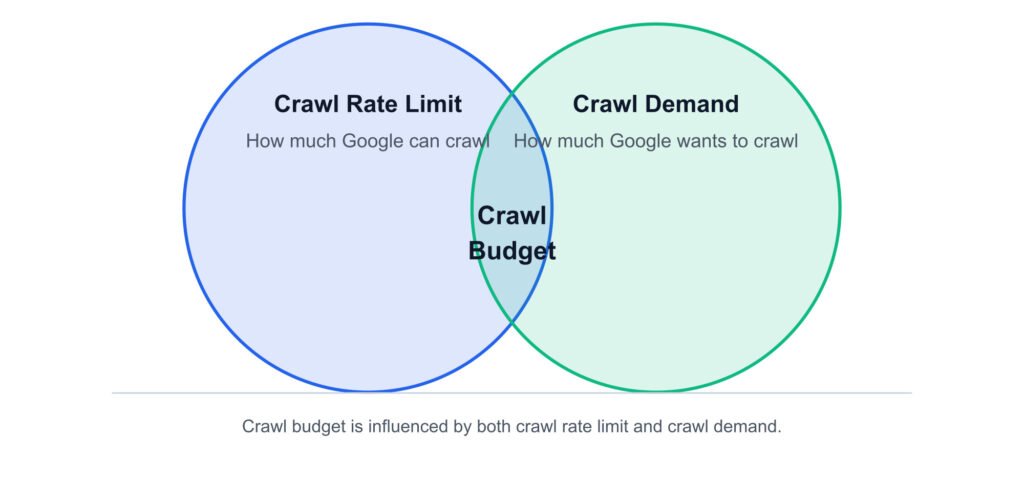
Crawl budget only exists where sufficient capacity and sufficient demand overlap — high demand can’t override a tight capacity limit, and spare capacity doesn’t create crawling on its own.
Why this distinction matters more than it first appears: the two-lever model isn’t just a definitional nicety — it changes what “fixing” a crawl budget problem actually means. A capacity problem is solved by removing friction (faster servers, fewer errors); a demand problem is solved by adding signal (better content, cleaner inventory). Treating a demand problem as a capacity problem leads teams to spend money on infrastructure that a duplicate-content cleanup would have fixed for free — and treating a capacity problem as a demand problem leads to content investment that a struggling server will never let Google fully benefit from. Diagnosing which lever is actually broken, before touching either one, is the single highest-leverage step in this entire process.
How Crawl Budget Relates to Googlebot
Googlebot is the crawler carrying out the work that crawl budget describes, but it’s worth understanding the structure underneath that name. Google actually runs several distinct crawlers for different purposes — the main Search crawler, an ads-related crawler, a shopping-related crawler, and others — and each one has its own independent sense of crawl demand for your site.
What they don’t have independently is capacity. All of Google’s crawlers share a single site-wide crawl capacity limit. This means if one crawler is making heavy demands on your server, it can reduce the room available for the others — a detail that matters most for larger sites running multiple Google-facing surfaces (Search, Shopping, Ads) at once.
Crawl Budget vs. Crawling vs. Indexing
These three terms get used loosely and interchangeably, but they describe distinct, sequential stages — and mixing them up leads to real confusion when diagnosing problems.
- Crawling is the act of Googlebot requesting and downloading a URL.
- Indexing is the separate, later process where Google evaluates that crawled content and decides whether — and how — to store it for potential use in Search results.
- Crawl budget governs the first stage only. It determines whether and how often a URL gets crawled at all; it has no direct bearing on whether a crawled page then gets indexed.
This distinction matters practically: a crawl budget problem shows up as pages not being visited in the first place, while an indexing problem shows up as pages being visited but still not appearing in Search. They call for different diagnostics, and treating them as the same issue is one of the more common troubleshooting mistakes.
It’s also worth being direct about something many articles blur: crawling itself is not a Google ranking factor. A page must be crawled to have any chance of ranking, but crawling more often doesn’t make a page rank higher — it simply makes it eligible to be evaluated and re-evaluated.
Who This Actually Applies To
Most websites will genuinely never need to manage crawl budget directly — this isn’t a hedge, it’s the realistic picture. Google’s own guidance points to a fairly specific profile of sites where this becomes worth actively managing:
| Profile | Threshold |
|---|---|
| Large site | Roughly 1 million+ unique pages, changing at least moderately often (weekly) |
| Medium-to-large, fast-changing site | 10,000+ pages, changing very frequently (daily) |
| Any site with a discovery backlog | A substantial share of pages sitting in “Discovered – currently not indexed” in Search Console |
If your site doesn’t resemble either of those profiles, crawl budget is unlikely to be limiting your visibility — keeping your sitemap accurate and occasionally checking your indexing status is typically all that’s needed.
Factors That Influence Crawling Activity
Beyond the core capacity/demand model, several structural and technical factors shape how crawling actually plays out on a given site:
- Duplicate URLs — multiple URLs serving the same or near-identical content split crawling attention across versions instead of concentrating it on one
- Server errors and slow response times — directly and immediately affect the crawl capacity limit
- Internal linking structure — pages that are well-linked internally are easier for Google to discover and tend to be revisited more consistently than orphaned or deeply buried pages
- Sitemap accuracy — sitemaps help signal what exists and when it last changed, supporting crawl demand rather than directly expanding capacity
- Redirects — long chains of redirects add overhead to each crawl request without adding value
What Actually Wastes Crawl Budget — And What Doesn’t
Before optimizing anything, it’s worth being precise about what genuinely consumes crawl budget — because some commonly-cited “waste sources” are more myth than mechanism, and treating them the same as real ones misdirects effort.
Genuine waste sources
| Source | Why it wastes budget | Fix |
|---|---|---|
| Duplicate or near-duplicate URLs | Google spends requests crawling multiple versions of the same content instead of unique pages | Consolidate via canonicalization, redirects, or parameter handling |
| Soft 404s | Pages returning a 200 status but effectively empty/error content continue being crawled indefinitely | Return a genuine 404/410 for removed or empty content |
| Long redirect chains | Each hop adds overhead to a single crawl request | Point redirects directly to their final destination in one hop |
| Alternate URLs and embedded resources | AMP pages, hreflang variants, and embedded CSS/JS/XHR calls all count toward crawl budget | Keep alternate URL sets lean; avoid unnecessary variant proliferation |
Not genuine waste sources (a common misconception)
It’s worth stating directly: hard 4xx errors — other than HTTP 429 — do not waste crawl budget. A crawl request that cleanly returns a 404 completes normally and signals Google not to retry; it isn’t lingering overhead the way a soft 404 is. Treating ordinary 404s as an urgent crawl-budget threat leads teams to spend effort “cleaning up” pages that were never actually a problem.
Similarly, disallowed URLs in robots.txt were never consuming crawl budget to begin with, since they’re never fetched — blocking them doesn’t reallocate budget elsewhere; it simply confirms Google won’t request them.
No verified figure exists for how much a redirect chain “costs” in crawl terms. Google’s own guidance is limited to avoiding long chains generally, without a documented multiplier — treat any specific number you encounter elsewhere for this as an unverified estimate, not a Google-sourced fact.
Faceted Navigation and Parameter URLs at Scale
Faceted navigation is, by a wide margin, the most common source of overcrawling that site owners report to Google — more than any other single cause. It’s worth understanding exactly why, because the mechanism explains the fix.
Each filter combination in a faceted navigation system typically generates its own unique URL. A product listing with color, size, and price filters can produce something like:
https://example.com/shoes?color=red&size=10&price=under-50Change any one parameter, and you get a new URL. With even a modest number of filter options, the combinations multiply fast — a handful of facets can produce thousands or millions of technically-unique URLs from what is, to a shopper, one underlying product catalog.
| Situation | Recommended approach |
|---|---|
| Filter combination has no independent search value (e.g., a five-way filter stack) | Block via robots.txt or URL fragments so it’s never crawled |
| Filter combination has genuine standalone search demand (e.g., “red shoes”) | Allow crawling, but use consistent parameter ordering, standard key=value syntax, and return a genuine 404 for empty result sets |
| Filter produces a duplicate of an existing category page | Canonicalize to the primary version rather than blocking outright |
Robots.txt, Noindex, and Nofollow: What Each One Actually Controls
These three mechanisms get treated interchangeably in a lot of SEO advice, but they intervene at different points, and conflating them leads to ineffective fixes.
| Mechanism | What it actually does | Common misconception |
|---|---|---|
| Robots.txt disallow | Prevents the crawl request from happening at all | Assumed to “free up” budget elsewhere — it doesn’t reallocate anything |
| Noindex | Still requires the page to be crawled once so Google can see the directive; only indirectly reduces crawl activity over time | Assumed to be an effective direct crawl-budget lever — it isn’t, at least not immediately |
| Nofollow | Only affects that specific link; the target can still be crawled via any other unlabeled link | Assumed to reliably prevent crawling — it doesn’t guarantee this |
The pattern underneath all three mechanisms: each one intervenes at a different stage of the pipeline — robots.txt at discovery (does the request happen at all), noindex at evaluation (does the crawled page get stored), nofollow at link equity (does this specific path count as an endorsement). None of them is a general-purpose “crawl budget lever” — they’re stage-specific tools that only work when matched to the stage where the actual problem lives. This is why “just noindex it” is such a common but ineffective first response to a crawl-budget concern: it’s reaching for an evaluation-stage tool to solve a discovery-stage problem.
One more mechanism worth ruling out explicitly: the crawl-delay directive in robots.txt is not honored by Google at all. It’s a non-standard directive some other crawlers respect, but it has no effect on Googlebot’s crawl rate.
Signs You Might Have a Crawl Budget Problem
Before reaching for the diagnostic workflow below, it helps to know what a genuine crawl budget problem tends to look like in practice, since the symptoms overlap with several unrelated issues:
- New pages take days or weeks to appear in Search, even though they’re linked internally and included in your sitemap.
- A large share of URLs sit in “Discovered – currently not indexed” in Search Console’s Page Indexing report, rather than “Crawled – currently not indexed” (the latter suggests a quality/indexing decision, not a crawl-budget one).
- Updated content doesn’t get re-crawled promptly, so search results continue showing outdated prices, availability, or information well after a page changes.
- Crawl Stats shows a declining or flat trend in total crawl requests even as your site’s URL count grows.
- Host Status shows a flagged category (robots.txt fetch, DNS, or server connectivity) rather than a clean status.
If none of these apply, it’s worth pausing before investing further — a site that’s indexing new content promptly and showing a healthy Host Status almost certainly doesn’t have a crawl budget problem, whatever its raw size.
Crawl Budget on Large E-commerce Catalogs
E-commerce sites tend to accumulate crawl-budget pressure from several directions at once, which is why they’re disproportionately represented among sites that genuinely need to manage this. Beyond the faceted navigation issue covered above, a few catalog-specific patterns are worth naming directly:
- Out-of-stock and discontinued product pages. These often get left live indefinitely with a “200 OK” status even though the product is gone — Google keeps recrawling them as if they might still be relevant. Where a product is genuinely and permanently discontinued, returning a real 404/410 (rather than leaving a stale “out of stock” page live) removes it from ongoing recrawl consideration; where it’s temporarily out of stock, keeping the page live with clear on-page messaging is usually the better user-facing choice, accepting the modest ongoing crawl cost.
- Product variant URLs. Color, size, and style variants implemented as separate URLs rather than as in-page selectors multiply the effective URL count the same way faceted navigation does, for the same underlying reason — each variant is technically a distinct, crawlable URL competing for the same demand signal.
- Pagination across large category listings. Deep pagination chains (page 2, 3, 4… of a category) are all genuinely distinct, crawlable URLs. This isn’t inherently wasteful the way faceted duplication is, but very deep pagination on categories that rarely get browsed past the first few pages is a candidate for the same “does this combination have independent value” question applied to faceted URLs.
- Category and collection overlap. The same product frequently appears in multiple category paths (a shoe listed under both “Running Shoes” and “New Arrivals”), which can produce several URLs pointing at logically the same product depending on how the catalog is structured. Canonicalizing to a single preferred URL per product, consistent with the general duplicate-URL guidance above, applies directly here.
None of this requires treating the entire catalog as a crawl-budget emergency — it requires applying the same core principle (keep Google’s perceived inventory close to your actual, genuinely distinct inventory) systematically across a catalog large enough that small per-product inefficiencies compound into a real aggregate cost.
A Step-by-Step Crawl Budget Audit
This is a practical sequence for working through a suspected crawl budget issue end to end, synthesizing the diagnostic and optimization guidance above into a single workflow. It’s a SEORAF-developed methodology for applying Google’s documented guidance systematically — not a Google-published procedure itself.
- Confirm there’s actually a problem. Check the Page Indexing report for a meaningful volume of “Discovered – currently not indexed” URLs, and confirm your site matches the size/change-frequency profile where this typically matters. If neither applies, stop here — optimization effort isn’t warranted.
- Check Host Status first. A flagged status here means the problem is capacity-side, and no amount of content or URL-inventory cleanup will fix it until server performance is addressed.
- Review the crawl request breakdown for the proportion of non-200 responses and the split between HTML and embedded resource requests.
- Audit URL inventory for duplicate URLs, faceted/parameter combinations, and product variant proliferation, using the decision logic covered in the sections above.
- Check for soft 404s — pages returning 200 status with effectively empty or error content — and correct them to genuine 404/410 responses where appropriate.
- Review redirect chains and flatten any multi-hop chains to single, direct redirects.
- Confirm sitemap accuracy, including current
<lastmod>values that reflect genuine content changes. - If Search Console’s aggregated view isn’t granular enough, move to log file analysis to establish a crawl efficiency baseline before making further changes.
- Implement fixes in the priority order above (capacity issues first, then genuine waste sources, then demand-side signals).
- Validate two to four weeks later using Crawl Stats trends, the Page Indexing report, and — if used — a re-run of the crawl efficiency calculation.
How to Check Your Crawl Budget in Search Console
Start with the Crawl Stats report before assuming a crawl budget problem exists. Guessing at causes without this data leads to fixing things that aren’t actually broken.
The same branching logic is described step-by-step below, so nothing here depends on the diagram alone
- Check Host status. This section evaluates three categories over a rolling window: robots.txt fetch failures, DNS resolution failures, and server connectivity issues. Each has its own threshold — as one concrete example, DNS resolution failing on more than 5% of requests in a given day is flagged as an issue for that category. A red or flagged status here points to a capacity-side problem, not a content-side one.
- Review the crawl request breakdown. This shows requests grouped by response code, file type, crawl purpose, and Googlebot type. A high proportion of non-200 responses, or a heavy skew toward embedded resource types over HTML documents, is a signal worth investigating further.
- Read the overtime trend. Total crawl requests, total download size, and average response time are tracked over time. A sudden drop that coincides with a robots.txt change, a server slowdown, or a migration is usually diagnostic on its own.
- Cross-reference with the Page Indexing report. If crawl activity looks healthy but indexing still lags, the issue likely sits downstream of crawling — an indexing-stage problem, not a crawl-budget one.
Log File Analysis for Enterprise Diagnostics
Search Console gives you Google’s own summary of crawl activity, but it doesn’t show every individual request. For large sites where GSC’s aggregated view isn’t granular enough, server log file analysis fills that gap — this is an industry-standard diagnostic practice, not a Google-published methodology, so treat it as a practical technique rather than an official Google procedure.
- Isolate Googlebot requests in raw server logs by verified user-agent (not just user-agent string matching, which can be spoofed — verify via reverse DNS lookup where accuracy matters).
- Classify each crawled URL into value tiers: high-value, low-value, and waste.
- Calculate your crawl efficiency ratio — high-value crawls divided by total crawls — as a baseline before making changes.
- Re-run the same classification after implementing fixes to confirm the ratio actually improved.
A Brief Note on AI Crawlers and Crawl Budget
Google’s published crawl budget guidance is written specifically about Google’s own crawlers. Whether — and how — a similar capacity/demand model applies to crawlers operated by other AI systems is not something Google’s documentation addresses, and it would be inaccurate to assume identical mechanics apply. If AI crawler traffic is a specific concern for your site, that’s best handled by verifying against each crawler operator’s own published documentation.
Optimization Priorities: What to Fix First
- Fix server errors and slow response times — these directly constrain crawl capacity limit.
- Eliminate soft 404s — these continue consuming budget indefinitely until resolved.
- Consolidate duplicate URLs and manage faceted/parameter combinations — the largest source of wasted requests on most affected sites.
- Shorten redirect chains.
- Keep sitemaps current with accurate
<lastmod>values. - Review embedded resource and alternate URL footprint — lower typical impact, but relevant on sites with heavy AMP/hreflang usage.
Validating Whether Optimization Worked
- Re-check Crawl Stats trends two to four weeks after changes.
- Compare your crawl efficiency ratio before and after, if using log analysis.
- Watch the Page Indexing report for reductions in “Discovered – currently not indexed” volume.
- Avoid declaring success from crawl volume alone — check the composition, not just the total.
Crawl Budget: Myths vs. Facts
| Claim | Verdict |
|---|---|
| Compressing your sitemap increases crawl budget | False — the file still has to be fetched regardless of compression |
| Fresher content is always crawled and rated more favorably | False — Google evaluates quality regardless of age |
| Older content is inherently deprioritized | False — usefulness matters, not age alone |
| Google prefers “clean” URLs over ones with parameters | False — parameter URLs can be crawled without penalty |
| Faster pages get crawled more | True, with nuance — speed helps, but content value still governs overall demand |
| Small sites are crawled less often than large ones | False — frequency tracks importance and freshness, not size |
| Pages closer to the homepage are crawled more often | Partly true — proximity can correlate with crawl frequency, but doesn’t mean higher rankings |
| Changing a URL forces a faster recrawl | Partly true — works, but wastes resources if content didn’t meaningfully change |
| Site speed and server errors affect crawl budget | True |
| Crawling is a ranking factor | False |
| Alternate URLs and embedded content count toward crawl budget | True |
The crawl-delay directive controls Google’s crawl rate | False — not honored by Googlebot |
nofollow reliably prevents a URL from being crawled | Partly true — other unlabeled links elsewhere can still expose it |
noindex directly reduces crawl budget usage | Partly true — the page must still be crawled once to see the directive |
Common Crawl Budget Optimization Mistakes
- Treating every 404 as a crawl-budget emergency, when hard 4xx errors (aside from 429) don’t actually waste budget going forward.
- Reaching for noindex as a first response to a suspected crawl-budget issue, when robots.txt is the only mechanism of the two that actually stops the crawl request.
- Assuming a redirect chain has a specific, quantifiable “cost” and optimizing to a number that isn’t actually documented anywhere.
- Diagnosing from crawl volume alone without checking what that volume is actually composed of.
- Blocking faceted URLs indiscriminately, including combinations with genuine standalone search value.
- Skipping validation — assuming a fix worked because it made logical sense, rather than confirming it in the data afterward.
When NOT to Optimize Crawl Budget
It’s worth stating plainly: most sites should not spend meaningful effort on crawl budget optimization. If your site doesn’t fall into the large-scale or fast-changing profile above, or if your Page Indexing report doesn’t show a meaningful volume of pages stuck undiscovered, there’s no evidence-based reason to build out log file pipelines or restructure faceted navigation for crawl-budget purposes specifically. Time is better spent on content quality, site structure for users, or other technical fundamentals.
Related Reading
This guide focuses on crawl budget mechanics. For implementation depth on the tools referenced above, see our guides on Robots.txt, XML Sitemaps, and Crawlability — part of our broader Crawling guide within the Technical SEO hub.