Googlebot: How Google Crawls and Processes Websites
Published September 1, 2026 · Last updated September 1, 2026 · By Mousume Akter, Founder, SEORAF
Googlebot is the generic name for two crawlers used by Google Search: Googlebot Smartphone and Googlebot Desktop. They discover and fetch web content so it can be processed for indexing. Other Google crawlers, including those used for images, video, news, and advertising, are separate crawlers with different purposes. This distinction matters when analyzing server logs, configuring robots.txt, and troubleshooting crawling issues.
For anyone working on technical SEO, Googlebot is where crawlability stops being an abstract concept and becomes a set of observable, testable behaviors: a request in a log file, a response code, a rendering outcome. Understanding exactly what it is — and, just as importantly, what it isn’t — is the foundation everything else in the Crawling cluster builds on.
Quick Answer
Googlebot is Google’s crawler for Google Search, made up of two variants — a mobile (“Smartphone”) crawler and a desktop crawler — that discover, fetch, and hand off web content for indexing. Most sites are crawled predominantly by Googlebot Smartphone, since Google indexes primarily from the mobile version of a page under mobile-first indexing. Googlebot doesn’t rank pages, doesn’t decide what appears in search results, and isn’t the same crawler Google’s other products (Image Search, video features, Ads) use — those run separately.
What Googlebot Is
Googlebot sits at the very start of Google Search’s pipeline. Before a page can rank, or even be indexed, something has to visit and retrieve its content. Its role is to discover and fetch web resources, then pass the retrieved content to subsequent stages such as rendering and indexing. It does not perform those later stages itself. This distinction matters because crawlability problems and broader Google Search problems are often treated as the same issue. If a page is not ranking, crawling may not be the cause. If a URL cannot be accessed by Google’s search crawler, however, that is directly relevant to crawlability.
Two aspects of its identity are especially important because they are often described incorrectly.
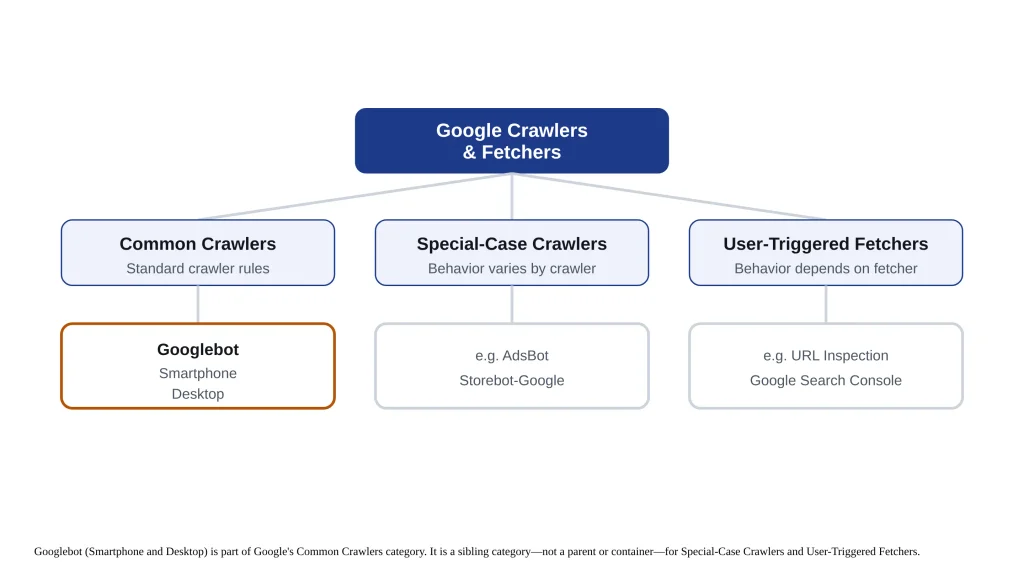
It refers to two Google Search crawlers, not an entire family of Google crawlers. According to Google’s current documentation, the name covers Googlebot Smartphone and Googlebot Desktop. Other systems that retrieve images, videos, news content, or advertising-related resources are documented separately. They operate within Google’s broader crawling infrastructure, but they are not variants of this Search crawler. For technical SEO, this distinction is useful when analyzing server logs or creating robots.txt rules. Treating names such as “Googlebot-Image” or “AdsBot” as interchangeable with the Search crawler can lead to inaccurate assumptions about which requests a rule affects.
It does not rank content. Its primary function is fetching resources for Google Search. Evaluation, indexing, ranking, and the selection of results shown to searchers occur in other parts of Google’s Search systems. As a result, a page can be accessible to the crawler and still perform poorly in search, while a well-optimized page may remain unavailable to Google’s systems if it cannot be properly discovered or fetched. These are different technical problems and should be diagnosed separately.
Why the Distinction Matters in Practice
This isn’t a purely academic correction. If you’re diagnosing a crawling issue by filtering server logs for the crawler name, a loose definition can pull in Special-Case and User-Triggered traffic that behaves differently — some of it ignoring robots.txt entirely by design — and quietly skew your read of what’s actually happening. If you’re writing a robots.txt rule aimed at Google Search’s primary crawler, the same looseness can leave you assuming a rule affects crawlers it was never written to cover. Getting the scope right at the start of an investigation saves time later.
How Googlebot Works
Functionally, the search crawler behaves like a distributed HTTP client operating at enormous scale — Google runs it across many machines simultaneously rather than as a single sequential process, because no single process could crawl the web fast enough. For a given URL, the sequence looks like this: the crawler resolves the domain via DNS, opens a connection, sends an HTTP request identifying itself with a documented user-agent string, and processes whatever response comes back.
That connection sequence is the same one any HTTP client follows — a DNS lookup to find the server’s IP address, a TCP handshake to open the connection, a TLS handshake if the site is served over HTTPS, and then the actual HTTP request and response. Nothing about that sequence is unique to Google’s search crawler; what’s specific to it is the request pattern, headers it sends, and the limits described below. A server that’s slow to complete any one of those steps — a slow DNS provider, an overloaded TLS termination layer — adds latency to crawler requests just as it would for a human visitor, and at scale that latency can affect how much of a site the search engine is able to process during a given crawl window.
A few technical specifics affect real sites:
Property
Behavior
HTML / supported file types
First 2MB fetched, including HTTP headers
PDF files
First 64MB fetched
Other Google crawlers (no specific limit set)
Default 15MB
Default protocol
HTTP/1.1 (HTTP/2 supported, no ranking or frequency benefit)
Compression supported
gzip, deflate, Brotli
Typical request interval per site
Roughly once every few seconds on average
If your HTML page exceeds its size limit, Googlebot doesn’t reject it — it stops downloading at the cutoff and sends only that truncated portion on for indexing, as if it were the complete file. For the vast majority of pages this is irrelevant, since a multi-megabyte HTML payload is unusual, but it’s a real, silent failure mode for pages that render enormous inline data or markup. Compression is worth confirming is enabled on your server regardless, since it reduces transfer size with no downside.
On crawl rate: you can’t ask Google to crawl faster, but you can limit it if Googlebot is straining your server — covered under Controlling Googlebot below.
One related point worth being direct about: Google does not support the non-standard Crawl-delay directive that some other crawlers honor in robots.txt. Adding it will simply be ignored rather than acted on. If you need to slow Google’s crawling activity, the crawl-rate setting in Search Console is the mechanism that actually works — not a robots.txt directive.
Googlebot Types and User-Agents
Googlebot Smartphone
Googlebot Desktop
Simulates
A mobile user
A desktop user
Role today
Primary crawler for most sites
Secondary, following mobile-first indexing
Identified by
A distinct, documented user-agent string
A distinct, documented user-agent string
Controlled via robots.txt
Same product token as each other — you cannot target Smartphone and Desktop separately with robots.txt rules
Since most sites are indexed primarily from their mobile version, the majority of Googlebot’s requests to a typical site come from the Smartphone crawler, with a smaller share from Desktop. You can tell which one made a given request by checking the user-agent string in your server logs — but robots.txt itself can’t distinguish them, since both obey the same rule set.
Everything outside these two — Googlebot-Image, Googlebot-Video, Googlebot-News, AdsBot, Storebot-Google, and GoogleOther — is a separate, independently documented Google crawler with its own purpose and user-agent string. They’re worth knowing about if you’re managing crawl access at scale, but they’re not part of the Googlebot Search crawlers, and treating them as if they were can lead to misconfigured robots.txt rules or misread log data.
A Brief History
Googlebot has existed since Google’s earliest days as a search engine, and its architecture has evolved substantially since then — most visibly in the shift from a desktop-first crawling model to today’s mobile-primary one. That shift, mobile-first indexing, reflects a broader change in how people actually access the web: for most sites, the mobile version of a page is now the version Google treats as authoritative for indexing purposes, and Googlebot Smartphone’s dominant share of crawl traffic on most sites is a direct consequence of that change, not an arbitrary default.
Discovery, Crawling, Rendering, and Indexing
Googlebot’s role only makes sense in the context of the stages around it, and a URL’s actual path through them looks like this:
Discovery
Discovery happens first — Google finds a URL exists, primarily through links on already-crawled pages, and secondarily through other discovery signals like XML sitemaps. A URL has to be discovered before Googlebot has any reason to visit it. Once discovered, it enters Googlebot’s crawl queue and gets scheduled based on factors like freshness signals and site structure. A page with strong internal linking from already-crawled, already-trusted pages tends to be discovered and revisited more readily than an orphaned page with no incoming links at all — discovery isn’t a one-time event so much as an ongoing signal that internal structure keeps reinforcing or failing to reinforce.
Crawling
Crawling is the actual fetch performed by the search crawler. If the response is a redirect, it follows the destination according to whether the redirect is permanent or temporary; sustained error responses can reduce how much of a site Google is willing to fetch over time.
Rendering
Rendering happens next, as a distinct pass rather than part of the initial fetch. Googlebot’s rendering service executes JavaScript to build the same DOM a browser would construct, so that content generated client-side is visible to indexing. A resource blocked from crawling — CSS or JavaScript disallowed in robots.txt, for instance — simply isn’t available during this pass, which can leave Google seeing an incomplete version of a page even though the base HTML crawled without errors.
Indexing
Indexing is where the processed, rendered content is actually added to Google’s index, or isn’t. Crawling and indexing are frequently conflated: successfully fetching a page doesn’t guarantee that it will be indexed, and preventing a page from being crawled doesn’t remove an already-indexed URL from search results — those are separate controls, detailed under Controlling Googlebot below.
Each stage feeds the next, then loops back — Googlebot revisits URLs on an ongoing basis to check for changes, at a pace influenced by how frequently a page tends to change and how much scheduling priority it’s been assigned.
This is also where server log analysis earns its keep as a diagnostic technique: because every one of these stages leaves a trace in Googlebot’s actual request pattern — which URLs get fetched, how often, with what response codes — a log file is often a more reliable record of what really happened than inferring it from Search Console alone. If a page is discovered but never crawled, crawled but never rendered correctly, or rendered but never indexed, the logs are usually where that distinction first becomes visible.
Key Concepts and Terminology
User-agent
The identifying string a crawler sends with each request, used to tell Googlebot Smartphone apart from Googlebot Desktop, and Googlebot apart from unrelated crawlers. It appears in the HTTP request headers of every fetch and is the first thing to check — and the least trustworthy on its own — when identifying traffic in a log file.
Common crawlers
Google’s current documentation category for crawlers, including Googlebot, that always respect robots.txt during automatic crawling. This is the category that matters most for the majority of technical SEO work, since it governs ordinary, scheduled crawling behavior rather than one-off or product-specific fetches.
Special-case crawlers
A separate category (AdsBot is the clearest example) used for specific Google products under an agreement with the site owner, which may or may not follow robots.txt rules. Sites that don’t use the relevant Google product generally see little or no traffic from this category.
User-triggered fetchers
Fetches initiated by a person, not a crawl schedule — Search Console’s URL Inspection tool is one example — which ignore robots.txt because a human explicitly requested the fetch. Traffic from this category tends to appear as isolated, non-repeating requests rather than the steady pattern typical of scheduled crawling.
Crawl budget
The practical ceiling on how much of a site Google will crawl in a given period, made up of crawl capacity (what your server can sustain) and crawl demand (how much Google wants to crawl your content). It matters most in practice for larger sites, where the number of crawlable URLs can genuinely exceed what Googlebot will get through in a reasonable timeframe — on a small site, crawl budget is rarely the binding constraint on indexing. Full mechanics: Crawl Budget.
Mobile-first indexing
Google’s practice of indexing primarily from a page’s mobile version, which is why Googlebot Smartphone does most of the crawling on most sites.
Verifying Googlebot
The user-agent string Googlebot sends can be faked. Any script can identify itself as “Googlebot” in an HTTP header, and plenty of scrapers do exactly that to slip past bot-blocking rules — so the user-agent string alone isn’t evidence of who’s actually making a request.
Reverse DNS Verification
The recommended method: take the source IP from your logs, run a reverse DNS lookup on it, and confirm the resulting hostname resolves to googlebot.com, google.com, or googleusercontent.com. Then run a forward DNS lookup on that hostname and check it maps back to the original IP:
host 66.249.66.1
→ resolves to a hostname under googlebot.com

host [that hostname]
→ should resolve back to 66.249.66.1
If both checks match, the request is genuine. If a spoofer sets up their own reverse DNS to point at a fake googlebot.com-style hostname, the forward lookup catches it — the two steps together are what make this reliable, not either one alone.
IP Range Files
Google publishes the current IP ranges its crawlers and fetchers use as JSON files, organized by category — common crawlers (which includes Googlebot), special-case crawlers, and user-triggered fetchers each have their own file. Matching a request’s source IP against the relevant file works well at volume, where running a DNS lookup on every request isn’t practical.
Common mistake: don’t hardcode a static list of Googlebot IP addresses into your firewall or bot-detection rules and consider the job done. Google updates these ranges, and a list accurate last year can silently start blocking real Googlebot traffic today. Either verify dynamically via DNS or pull the current JSON file on a recurring basis.
Verification matters for more than SEO diagnostics. Bot-management and security tooling frequently needs to distinguish genuine Googlebot traffic from scrapers impersonating it — both to avoid wasting rate-limiting or CAPTCHA challenges on a legitimate crawler (which can suppress indexing) and to avoid the opposite mistake of trusting a spoofed user-agent as if it were verified. The same reverse-DNS-plus-forward-DNS method described above is the correct check regardless of which team is running it.
Controlling Googlebot
Three different controls exist for three different goals, and mixing them up is the most common mistake in this area.
If your goal is…
Use…
Not…
Stopping Googlebot from fetching a page
A Disallow rule in robots.txt
noindex alone (Googlebot has to crawl a page to see the tag)
Removing a page from search results
A noindex directive
A robots.txt block on its own (it hides content, it doesn’t deindex an already-indexed URL)
Reducing server load from crawling
The crawl-rate setting in Search Console
Blocking outright, if the content still needs to stay indexed
Blocking crawling and blocking indexing are not the same action. A Disallow rule tells Googlebot not to fetch a page. It does not remove that page’s URL from search results if the URL is already indexed or if Google has other reasons to know about it. Full directive syntax and precedence rules: Robots.txt.
This creates a specific, easy-to-miss failure mode: a page blocked in robots.txt and marked noindex at the same time. Googlebot never crawls the page, which means it never sees the noindex tag — the directive sits there, unread, doing nothing. If you want a page genuinely deindexed, it needs to stay crawlable long enough for Googlebot to see the noindex tag, then be blocked afterward if you also want to stop future crawling.
If your goal is limiting server load rather than controlling what’s indexed, Search Console’s crawl-rate setting caps how fast Googlebot requests pages from your site. It won’t get you crawled faster — Google’s own systems determine the ceiling on crawl frequency, and no setting raises it — only slower, if that’s what your infrastructure needs.
Common Mistakes Worth Checking For Directly
Robots.txt and noindex combined on the same URL, canceling the noindex out
Treating a static, hardcoded Googlebot IP list as permanent (see Verifying Googlebot, above)
Blocking CSS or JavaScript that the page’s rendering depends on, without realizing the rendering pass — not just the initial crawl — needs those resources
Assuming a robots.txt change takes effect instantly, rather than waiting for Googlebot’s next fetch of the file
Troubleshooting Googlebot Issues
Symptom
Check first
Likely cause
No crawl activity in logs
robots.txt, then server/CDN firewall rules
Overly broad Disallow, or Googlebot IP ranges unintentionally blocked
Crawled but not indexed
Whether the page has both a robots.txt block and a noindex tag
The block prevents Googlebot from ever reading the noindex
Smartphone crawl share unexpectedly low
Log segmentation by user-agent
Mobile content/accessibility gap relative to desktop
Page crawls fine but content seems incomplete in search
Whether CSS/JS required for rendering is blocked in robots.txt
Rendering pass couldn’t access resources the page depends on
For no crawl activity, work in this order: check robots.txt first, since an overly broad Disallow rule is the most frequent cause — worth reviewing with fresh eyes rather than assuming the file is correct because it hasn’t changed recently. If robots.txt looks clean, check server-side or CDN bot-protection rules that might be blocking Googlebot’s IP ranges without anyone having configured that intentionally. Only after both are ruled out should you conclude the traffic really is being blocked somewhere — and confirm with the verification methods above before assuming a given request in your logs is genuinely Googlebot at all.
For a thin Smartphone crawl share, segment your server logs by user-agent to see the actual Desktop-versus-Smartphone split. If Smartphone crawling is thin relative to what you’d expect under mobile-first indexing, the likely cause is a mobile-accessibility or configuration issue — content, links, or structured data present on desktop but missing or degraded on mobile — rather than anything wrong with Googlebot itself.
Googlebot and AI Search
Google’s AI Overviews and AI Mode don’t run a separate, independently named crawler. They draw on the same index Googlebot builds through its ordinary crawling and rendering process. What determines whether your content is eligible to be used in those surfaces starts with the same fundamentals covered throughout this article: if Googlebot can’t crawl, render, and index a page, it isn’t a candidate for AI Overviews either, regardless of how the content itself is written.
Two entities are easy to confuse with Googlebot here but function differently:
Google-Extended is a robots.txt control token, not a crawler. It lets a site opt content out of use in Google’s AI training and grounding, independently of Googlebot’s Search crawling — blocking Google-Extended doesn’t affect Googlebot or Search visibility, and blocking Googlebot doesn’t control AI training use. (Fine-grained, content-level controls over what generative features can quote — such as nosnippet and data-nosnippet — are a separate mechanism again, distinct from both Googlebot and Google-Extended.)
Third-party AI crawlers — GPTBot, ClaudeBot, PerplexityBot, and similar — are operated entirely separately by their respective companies. They’re not Googlebot variants, don’t share Googlebot’s user-agent identity or IP ranges, and permitting or blocking Googlebot has no bearing on whether those crawlers can access your site.
That’s a distinct decision surface from Googlebot’s, worth configuring deliberately rather than leaving to whatever a generic robots.txt rule happens to catch. Auditing all three — Googlebot access, Google-Extended’s status, and any third-party AI crawler rules — as separate, deliberate decisions rather than one bundled “AI bot policy” avoids the common mistake of accidentally affecting Search visibility while trying to make an AI-training-specific change, or vice versa.
Frequently Asked Questions
Googlebot is the generic name for the two crawlers — Smartphone and Desktop — that Google Search uses to discover and fetch web content for indexing. It doesn’t include Google’s other crawlers, such as those used for image or video search.
It resolves a URL’s DNS, fetches the page over HTTP, and hands the result to a separate rendering pass that executes JavaScript before the content moves on to indexing. It operates as a distributed system across many machines rather than a single sequential process.
For most sites, Googlebot shouldn’t request pages more than roughly once every few seconds on average, though the exact pace depends on your site’s crawl budget and can’t be increased on request — only limited, if needed, via Search Console.
Googlebot is the generic name for the two crawlers — Smartphone and Desktop — that Google Search uses to discover and fetch web content for indexing. It doesn’t include Google’s other crawlers, such as those used for image or video search.
Run a reverse DNS lookup on the source IP and confirm it resolves to googlebot.com, google.com, or googleusercontent.com, then confirm the forward lookup matches. For high-volume verification, match source IPs against Google’s published IP range files instead.
Use a Disallow rule in robots.txt to stop Googlebot from crawling a page. If your goal is removing a page from search results rather than just stopping crawling, use a noindex directive instead — and make sure the page isn’t blocked in robots.txt at the same time, or Googlebot will never see the tag.
No. Google’s AI Overviews and AI Mode use the same index Googlebot builds rather than a separate crawler. Google-Extended, a separate control token, governs AI training and grounding use independently of Googlebot’s Search crawling.
Yes, in a separate rendering pass after the initial crawl, using a service that executes JavaScript to build the same DOM a browser would. Any CSS or JavaScript blocked in robots.txt isn’t available during that pass, which can leave the rendered version of a page incomplete even when the base HTML crawled successfully.
No. Google’s own systems determine the ceiling on crawl frequency for your site, and there’s no setting that raises it. You can only limit the rate if Googlebot is straining your server, via Search Console’s crawl-rate setting — the non-standard Crawl-delay directive in robots.txt is not supported.