
JavaScript SEO Checklist (2026): 27 Proven Fixes to Get Your Pages Indexed Fast
Are you struggling with Google indexing issues? You built a sleek, modern web application, but Google Search Console shows the dreaded “Discovered – currently not indexed” status. This comprehensive JavaScript SEO checklist provides 27 proven fixes to solve rendering problems, improve crawlability, and boost your Core Web Vitals.
In 2026, JavaScript powers the web, yet friction remains between modern development and search requirements. This JavaScript SEO checklist bridges that gap, ensuring your content is visible to both users and Googlebot. Whether you use React, Vue, or Angular, these strategies form the backbone of effective technical SEO for modern applications.
The Invisible Website Crisis: Why Your Traffic Is Flatlining
You launched a new site. The design is award-winning, and the UX is flawless. But three months later, traffic is flat. Google Search Console reports “Discovered – currently not indexed.”
You check the live URL, and it looks perfect. But when you “View Page Source,” it’s empty—just a generic `
`. This is the “JavaScript Paradox.” You built a modern web app for humans, but a ghost town for search engines.If Google cannot render your JavaScript efficiently, your content effectively does not exist. This JavaScript SEO checklist is your roadmap to visibility, covering SSR vs CSR, crawlability, and advanced rendering SEO strategies.
What is JavaScript SEO?
Traditional SEO relies on static HTML. JavaScript SEO optimizes websites that rely on client-side JavaScript (React, Vue, Angular) to generate content. In these architectures, the initial HTML is often a “shell” waiting for JavaScript to fetch data and paint the UI.
Googlebot uses a web rendering service (WRS) to process this, acting like a headless browser. However, this is resource-intensive and subject to “render budget” limits. A robust JavaScript SEO checklist ensures critical content is accessible early, minimizing indexing delays and supporting topical authority growth.
How Google Renders JavaScript Websites (2026 Update)
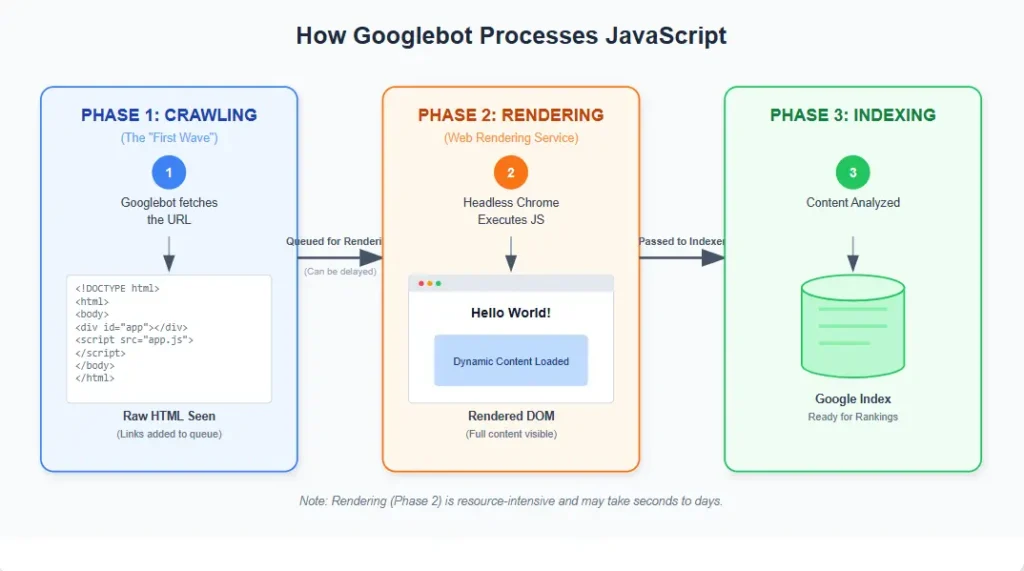
To effectively use this JavaScript SEO checklist, you must understand Google’s three-stage pipeline, as documented by Google Search Central:
- Crawling: Googlebot discovers the URL and receives the initial HTTP response (the shell).
- Rendering: The WRS queues the page, executes JavaScript, parses the DOM, and applies CSS.
- Indexing: Google analyzes the rendered HTML and updates its index.
The Critical Delay: Google uses a “two-pass” system. The first pass looks at the initial HTML. If your content is hidden behind heavy JavaScript, Google might index an empty page first, delaying re-rendering for days or weeks. This JavaScript SEO checklist focuses on reducing this time gap.
SSR vs. CSR vs. Dynamic Rendering: The Architecture Dilemma
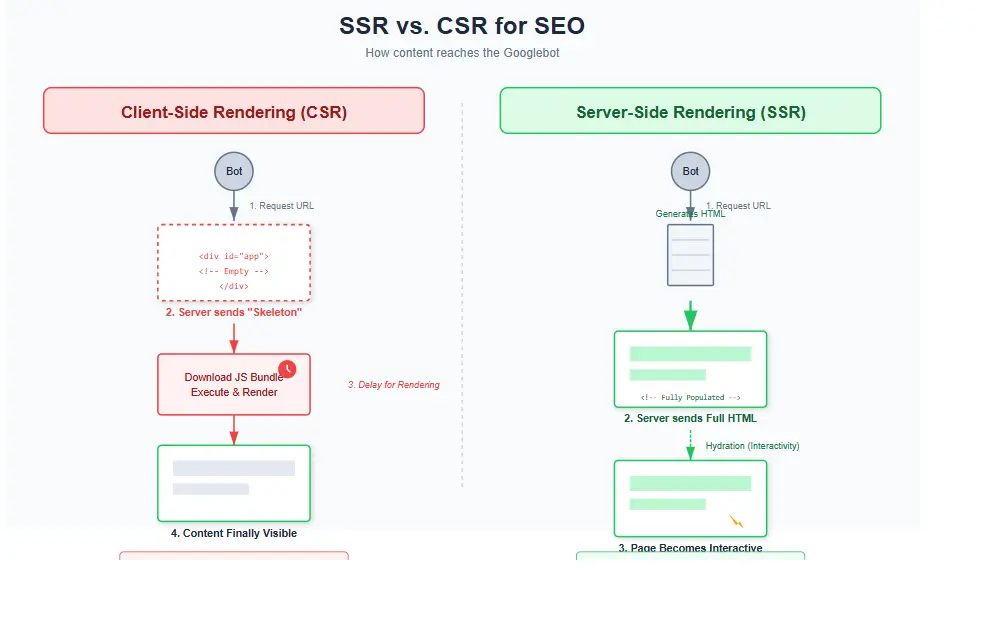
Choosing the right rendering strategy is the foundation of technical SEO. Here is how they compare in our JavaScript SEO checklist:
1. Client-Side Rendering (CSR)
How it works: The server sends a minimal HTML file. The browser downloads a JS bundle and builds the page.
SEO Risk: High. Googlebot must wait for JS execution, risking timeouts. The JavaScript SEO checklist advises against this for public pages.
Best For: Apps behind a login (dashboards).
2. Server-Side Rendering (SSR)
How it works: The server executes JS and sends fully rendered HTML.
SEO Benefit: Excellent. Content is visible immediately. This is the gold standard in our JavaScript SEO checklist.
Best For: E-commerce, marketing pages, blogs.
3. Static Site Generation (SSG)
How it works: HTML is generated at “build time.”
SEO Benefit: Perfect. Fastest load times, zero render wait.
Best For: Blogs, documentation, landing pages.
4. Dynamic Rendering
How it works: Detects user-agent; serves static HTML to bots, CSR to users.
SEO Benefit: Good “band-aid” for legacy apps.
Best For: Complex sites unable to refactor to SSR immediately.
Framework Specifics: React, Next.js, Vue, and Angular
React SEO: Use Next.js. Manage metadata via `next/head` server-side. Avoid `document.title` in `useEffect`.
Next.js SEO: Use Server Components or `getServerSideProps` for critical pages. Use `generateStaticParams` for blogs. Ensure dynamic sitemaps.
Vue.js SEO: Use Nuxt.js for SSR. Manage meta tags with the `useHead` composable.
Angular SEO: Use Angular Universal. Manage metadata via `Meta` and `Title` services from `@angular/platform-browser`.
The Ultimate JavaScript SEO Checklist (2026)
Follow these 27 steps to fix Google indexing problems and improve crawlability. This JavaScript SEO checklist covers every aspect of technical optimization.
Phase 1: Architecture & Rendering
Ensure Server-Side Rendering (SSR) for Money Pages
CSR is too slow for critical pages. SSR ensures HTML is ready when Googlebot arrives. Audit your top 20 pages; if the source is empty, implement SSR.
Use Static Site Generation (SSG) for Content
Pre-render content at build time. It is faster than SSR and simplifies your JavaScript SEO checklist. Switch blogs/docs to SSG (e.g., `getStaticProps`).
Implement Dynamic Rendering as a Fallback
For complex SPAs you cannot refactor, serve static HTML snapshots to bots. Set up a headless Chrome renderer (Rendertron/Prerender).
Avoid Client-Side Redirects
`window.location.href` redirects are slow. Use 301/302 HTTP redirects on the server (e.g., in `next.config.js` or NGINX).
Use Hydration Correctly
Ensure server-rendered HTML matches client initial state. “Hydration Mismatches” can crash pages or block indexing. Check console for warnings.
Phase 2: Crawlability & Internal Linking
Avoid Blocking JS/CSS in Robots.txt
Never block `.js` or `.css` files. Googlebot needs them to render the page. Remove `Disallow: /static/js/` rules.
Ensure Internal Links are in the DOM
Google follows `` tags, not `onClick` events. Ensure navigation links are true `` tags in the initial HTML.
Fix Infinite Scroll Without Pagination
Bots often fail to scroll. Implement standard pagination (Rel Next/Prev) or “Load More” buttons that are actual anchor links.
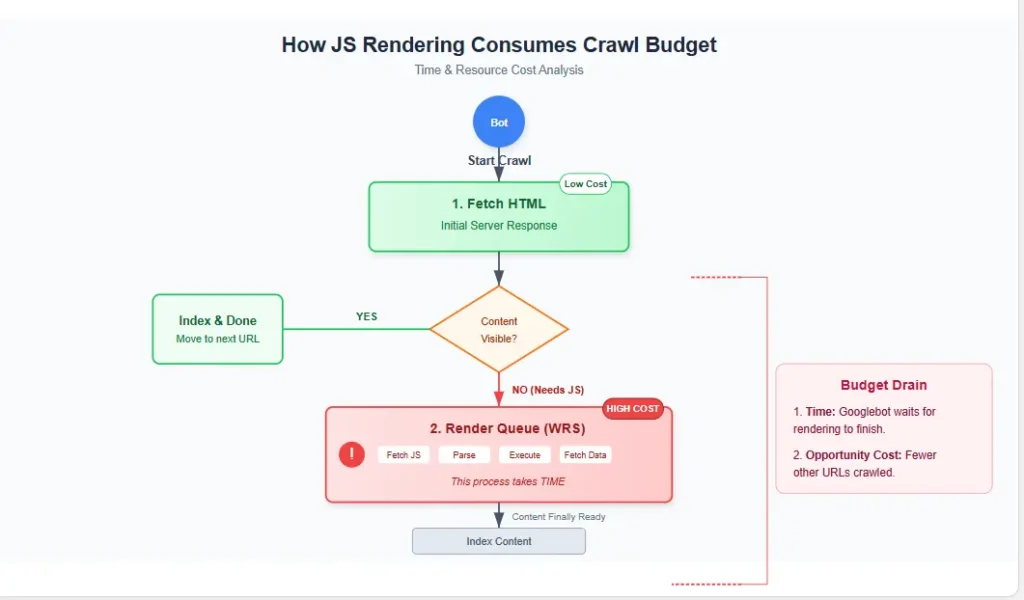
Optimize Crawl Budget
Large JS sites waste budget on rendering. Prioritize high-value pages. Use our crawl budget optimization guide.
Manage Trailing Slashes
React Router handles `/page` and `/page/` differently, causing duplicate content. Enforce a strict policy in server config.
Pro Tip: Structuring internal links correctly is vital. Use our internal linking template to ensure your architecture supports a strong site structure.
Phase 3: On-Page Technical & Metadata
Server-Side Rendered Metadata
Do not inject titles/meta descriptions via JS. Render them server-side. Use libraries like `next/head` or `vue-meta`.
Use Structured Data in HTML
JSON-LD must be in the source code, not injected later. Google often misses JS-injected schema. Reference Schema.org for types.
Canonical Tags Must Render Server-Side
Ensure the canonical link is correct in the initial HTML. JS changes confuse Google.
Handle hreflang for International SEO
Hreflang tags must be in the HTML. Implement them in your SSR logic or `
` component.Fix Soft 404s
Client-side 404s might return 200 OK, polluting the index. Ensure the server returns a 404 status code. See our guide on how to fix crawl errors.
Phase 4: Performance & Core Web Vitals
Reduce JavaScript Bundle Size
Heavy bundles delay LCP. Use code splitting and lazy loading for non-critical JS.
Improve Core Web Vitals
Heavy JS execution hurts INP. Identify long tasks blocking the main thread. Use our Core Web Vitals guide and PageSpeed Insights.
Optimize JS Execution Time
Minify and compress assets. Enable Brotli compression on your server.
Preconnect to Critical Domains
If JS fetches from an API, use `dns-prefetch` or `preconnect` headers to reduce latency.
Eliminate Render-Blocking Resources
Inline critical CSS above the fold. Large CSS files block rendering.
Phase 5: Monitoring & Diagnostics
Check Google Search Console URL Inspection
Your daily sanity check. Ensure the screenshot matches your browser and the page is “Indexed.”
Test with Mobile-Friendly Test
Google uses mobile-first indexing. Run your site via the Mobile-Friendly Test.
Use Chrome DevTools for Debugging
Simulate Slow 3G and throttled CPU to see what Googlebot “sees” (DevTools > Network > Throttling).
Audit Log Files
Analyze server logs to ensure bots are actually requesting your JS files.
Monitor Lighthouse Scores
Aim for a performance score above 90. Use Google Lighthouse regularly.
Set up Enhanced Ecommerce Tracking
Ensure GA4 tracks virtual page views in SPAs. Check our analytics tools guide.
Regularly Audit for “Orphan Pages”
Pages only accessible via JS search boxes are orphans. Use crawling tools to find pages with no internal links. This is crucial for any advanced SEO audit checklist.
Need Expert Help?
Rendering issues can be complex. If this JavaScript SEO checklist hasn’t solved your problems, get professional help.
Request a Technical SEO AuditJavaScript SEO Testing Workflow
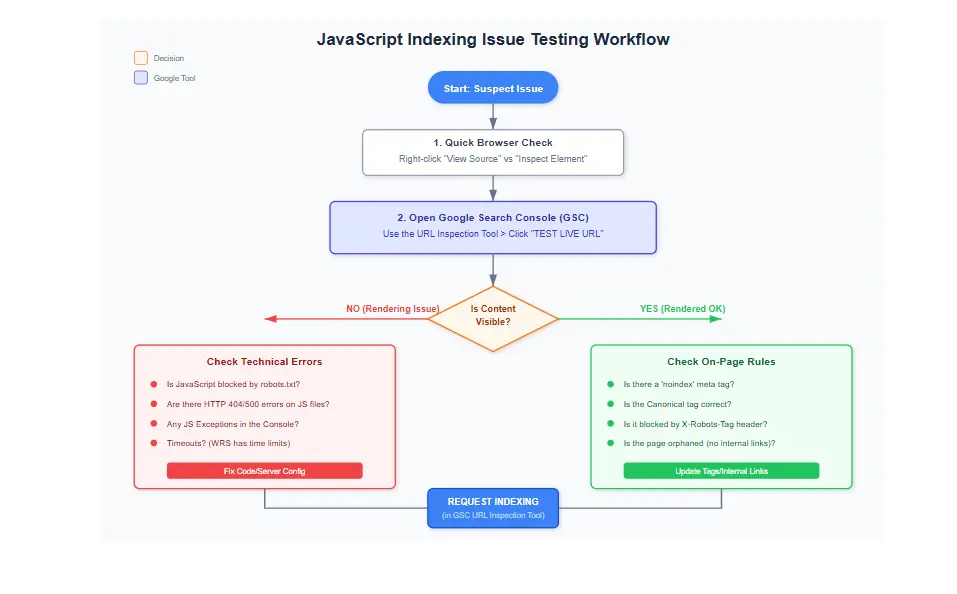
Don’t guess. Verify. Use this workflow:
- View Source: Is content in raw HTML?
- GSC Inspection: Did Google render the content?
- Fetch as Google: Request a re-index.
- Compare: If Source is empty but GSC shows content, you are on CSR. Move to SSR.
Crawl Budget Issues Caused by JavaScript
JavaScript consumes Google’s CPU/RAM. Large sites (100k+ pages) on CSR may hit a “render quota,” stopping indexing.
The Solution: Move “Thin Content” pages (login, ToS) to CSR, but keep “Rich Content” (products, blogs) on SSR. This signals value to Google. See our crawl budget guide for details.
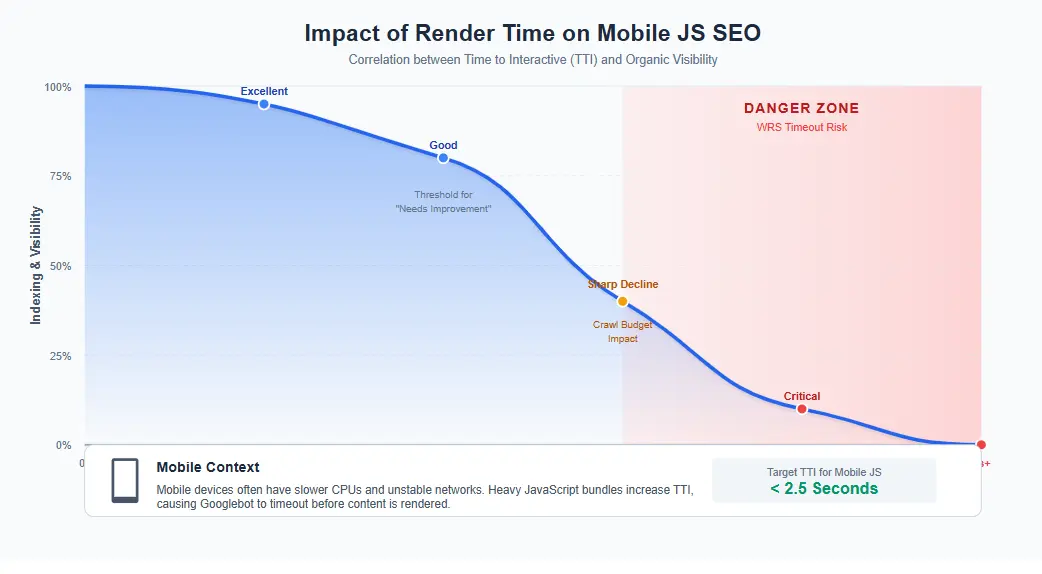
Mobile-First Indexing and JavaScript
Google indexes the mobile version. Mobile devices have less CPU; heavy JS often times out before rendering.
Key Checks:
- Ensure JS doesn’t hide mobile content via `display: none` that is visible on desktop.
- Test with throttled mobile CPU in DevTools.
Common JavaScript SEO Myths
- Myth: “Google can’t execute JavaScript.”
Fact: It can, but slower. This JavaScript SEO checklist accounts for that delay. - Myth: “Hash-bang URLs (#!) are fine.”
Fact: Obsolete. Use History API (`pushState`). - Myth: “Internal apps don’t need SEO.”
Fact: They can cannibalize rankings. Check our keyword cannibalization fix.
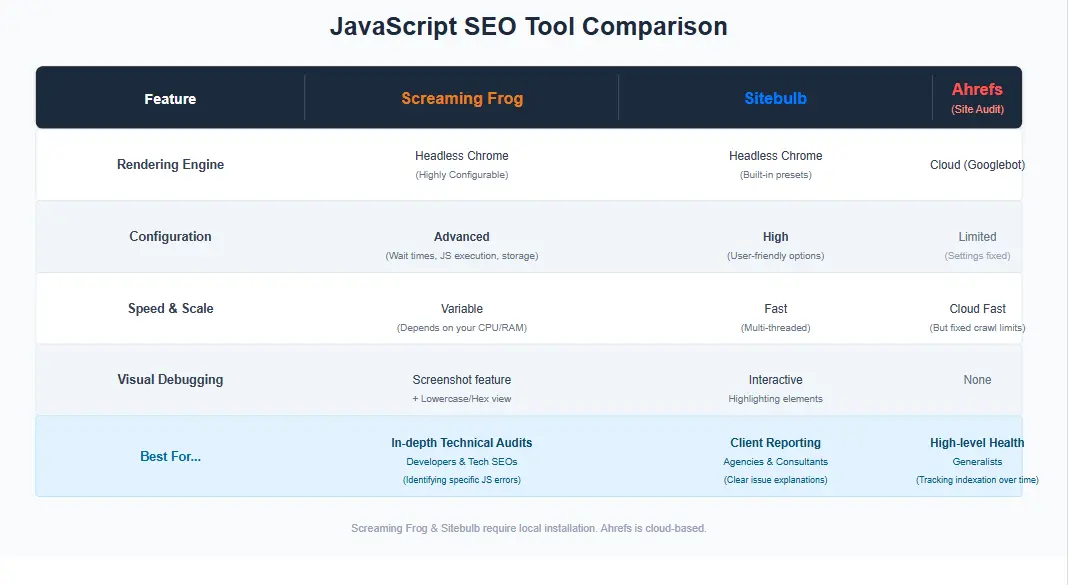
Best Tools for JavaScript SEO Optimization
You cannot execute a JavaScript SEO checklist without the right tools. We also recommend our full list of SEO analytics tools.
| Tool | Best Use Case | Technical Strength |
|---|---|---|
| Screaming Frog | Deep technical crawling | “Rendering” mode to crawl the DOM after JS execution. |
| Sitebulb | Visual audits | Excellent visualizations for orphan pages. |
| Google Search Console | Verification | Source of truth. Use GSC Help for debugging. |
| Ahrefs / Semrush | Impact Monitoring | Traffic trends and competitor performance. |
Real-World JavaScript SEO Case Studies
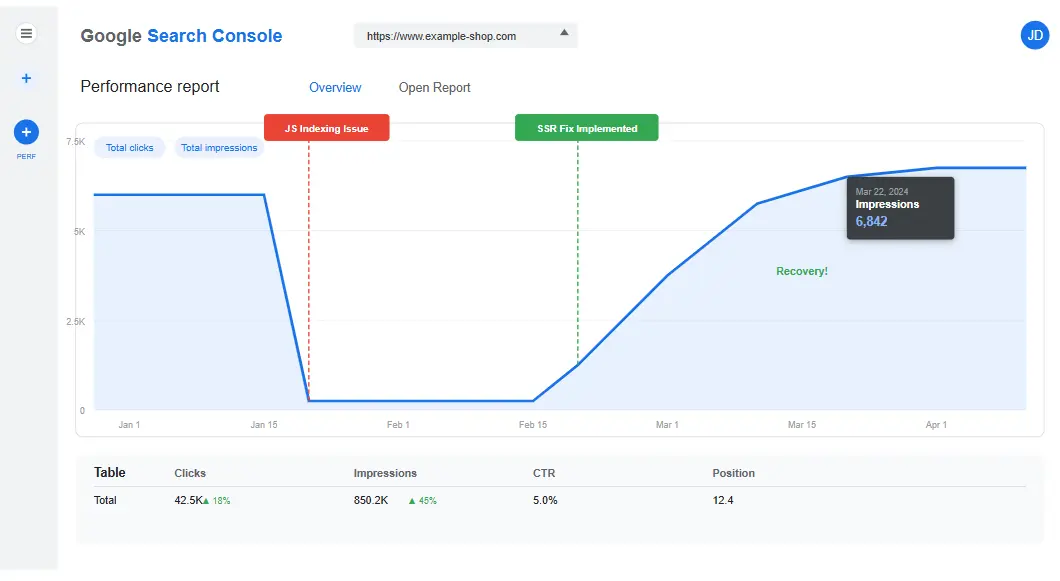
Case Study: The SaaS Recovery
Problem: A React SaaS blog saw 80% of articles drop from index. Diagnosis: CSR usage caused Googlebot timeouts on mobile. Fix: Migrated blog to Next.js SSG. Result: 95% re-indexation in 4 weeks; traffic up 45%. This validates the JavaScript SEO checklist.
Case Study: The E-Commerce Fix
Problem: Angular store with 10k products had only 500 indexed. Diagnosis: Infinite scroll without pagination. Fix: Implemented server-side pagination. Result: Indexed pages jumped to 8,000 in 60 days.
Advanced Rendering Optimization Strategies
For enterprise sites, basic fixes aren’t enough. Go beyond the standard JavaScript SEO checklist:
- Streaming SSR: Stream HTML head first, then body, to reduce TTFB.
- Edge Computing: Use Cloudflare Workers or Vercel Edge to render JS closer to the user/bot.
- Service Workers: Cache rendered HTML, but ensure you don’t serve stale content to Google (check `Cache-Control`).
Enterprise JavaScript SEO Challenges
Enterprises face unique hurdles. For major overhauls, follow a strict SEO migration checklist.
- Legacy SPAs: Migrating old Angular/React apps is risky. Use Dynamic Rendering as a bridge.
- Micro-frontends: Standardize head management to prevent teams from breaking SEO metadata.
- CDN Caching: Ensure your CDN caches *rendered* HTML, not just the shell.
The Future of JavaScript SEO: AI Overviews and SearchGPT
With AI Overviews (SGE), parsing requirements change. AI needs structured data. Content hidden in complex JS states may be missed by AI models. The JavaScript SEO checklist now includes AI readiness.
Future-Proofing:
- Prioritize Structured Data (FAQ, HowTo, Article).
- Ensure semantic HTML (`
`, ` `, ` –
`) is perfect.
- Align with search intent as AI models prioritize intent-matching content.
Frequently Asked Questions (FAQ)
Does JavaScript hurt SEO?
It adds complexity. Poor handling (blocking JS, using CSR for critical content) hurts SEO by delaying indexing. A proper JavaScript SEO checklist mitigates this.
Can Google index React websites?
Yes. However, CSR is slower. Use Next.js for SSR (as per this JavaScript SEO checklist) for best results.
Is SSR better for SEO than CSR?
Generally, yes. SSR provides content in the initial HTML, improving access and Core Web Vitals. The JavaScript SEO checklist prefers SSR.
How do I test if Google can see my JavaScript content?
Use GSC “URL Inspection.” If the screenshot lacks content, Google can’t see it. This is step one in the JavaScript SEO checklist.
Why are my JS pages not indexed?
Heavy bundles causing timeouts, blocked resources, content behind clicks, or Soft 404s. The JavaScript SEO checklist helps diagnose these.
Does lazy loading affect SEO?
Native (`loading=”lazy”`) is fine. Lazy loading *text content* can prevent Google from seeing content.
What is dynamic rendering?
Serving static HTML to bots and JS apps to users. A key tactic in this JavaScript SEO checklist for legacy apps.
How does Googlebot process JS differently?
It uses headless Chrome with a timeout limit and defers rendering to save resources. The JavaScript SEO checklist accounts for this.
How can I write better content for JS sites?
Content quality is king. Satisfy search intent. See our guide on writing SEO content using AI.
Conclusion: Take Action Today
JavaScript demands a modern SEO approach. Don’t rely on 2015 tactics. The gap between a web app and a ranked site is bridged by technical rigor.
Use this JavaScript SEO checklist as your roadmap:
- Audit rendering strategy (SSR vs CSR).
- Unblock resources.
- Optimize Core Web Vitals.
For organization, check our SEO templates or content SEO guide.
Need Help Fixing JavaScript SEO Issues?
If your team is overwhelmed or traffic is stagnant, we can help.
- Technical SEO Audit: Full diagnostic using this JavaScript SEO checklist.
- Website Indexing Consultation: Diagnose why pages fall out of the index.
- Enterprise Strategy: Large-scale migrations from CSR to SSR/SSG.
Don’t let your code hide your content. Download our PDF version of this checklist or contact us today.
JavaScript SEO Checklist (2026): 27 Proven Fixes to Get Your Pages Indexed Fast
Are you struggling with Google indexing issues? You built a sleek, modern web application, but Google Search Console shows the dreaded “Discovered – currently not indexed” status. You are not alone. This comprehensive JavaScript SEO checklist provides 27 proven fixes to solve rendering problems, improve crawlability, and boost your Core Web Vitals.
The Invisible Website Crisis: Why Your Traffic Is Flatlining
You launched your new website. It’s fast, beautiful, and interactive. The design is award-winning, the user experience is flawless, and the animations are smooth. You eagerly submit the sitemap to Google Search Console (GSC) and wait for the traffic to roll in. Three months later, the reality hits you like a brick.
The dashboard is flat. GSC reports “Discovered – currently not indexed.” You panic. You open an Incognito window to check the live URL. The content is there. The images load perfectly. Then, you do the one thing that every developer fears: you right-click and select “View Page Source.” It’s empty. Or at least, it looks empty. There’s a generic `
` or `` and nothing else of value.This is the “JavaScript Paradox.” You built a modern web app for human users, but you built a ghost town for search engines. In 2026, JavaScript powers the web, but it also introduces massive friction for Googlebot. If Google cannot render your JavaScript efficiently, your content effectively does not exist. You need a JavaScript SEO checklist to bridge this gap.
You don’t need another generic guide. You need a battle-tested strategy. This guide is designed to help webmasters, developers, and SEOs diagnose and fix Google indexing issues caused by JavaScript. We will cover everything from SSR vs CSR to crawlability and advanced rendering SEO strategies. This JavaScript SEO checklist is your roadmap to visibility.
What is JavaScript SEO?
Traditional SEO relies on static HTML. When Googlebot visits a standard HTML page, it sees the content, links, and metadata immediately in the source code. It’s an open book. JavaScript SEO is the technical discipline of optimizing websites that rely on client-side JavaScript (React, Vue, Angular) to generate content.
In these architectures, the initial HTML response is often a “shell”—a blank container waiting for JavaScript to fetch data from an API and paint the User Interface (UI). Googlebot uses a web rendering service (WRS) to process this JavaScript, effectively acting like a headless browser. However, this process is resource-intensive, slow, and subject to “render budget” limits.
A robust JavaScript SEO checklist ensures that your critical content is accessible early in this process, minimizing the risk of indexing delays. Without proper technical SEO, your JS site risks falling into the “Discovered” purgatory, where Google knows the page exists but refuses to index it. This is why a JavaScript SEO checklist is not just a luxury, but a necessity. For a deeper dive into the foundations, check our comprehensive Technical SEO Guide.
How Google Renders JavaScript Websites (2026 Update)
To effectively use this JavaScript SEO checklist, you must understand the three-stage pipeline Google uses for JavaScript sites. This process has evolved, and understanding it is crucial for diagnosing indexing problems.
- Crawling: Googlebot discovers the URL and sends a GET request. It receives the initial HTTP response (usually the HTML shell). At this stage, Google might not see any text yet. It just sees the skeleton.
- Rendering: The Web Rendering Service (WRS) queues the page for processing. It executes the JavaScript, parses the DOM, and applies CSS. This is computationally expensive and time-consuming.
- Indexing: Google analyzes the rendered HTML, extracts the content, and updates its index.
The Critical Delay: The first wave of indexing often happens *before* rendering is complete. Google uses a “two-pass” indexing system. The first pass looks at the initial HTML. If your content is hidden behind a heavy JavaScript bundle, Google might index an empty page first. It can take days or weeks for Google to come back and re-render the page. This is why the first phase of our JavaScript SEO checklist focuses on reducing the time between the “Crawl” and “Render” stages. You can read more about this official process at Google Search Central.
SSR vs. CSR vs. Dynamic Rendering: The Architecture Dilemma
Choosing the right rendering strategy is the foundation of technical SEO. There is no “one size fits all,” but for SEO, some are vastly superior. Here is how they stack up in our JavaScript SEO checklist:
1. Client-Side Rendering (CSR)
How it works: The server sends a minimal HTML file (often just a root div). The browser downloads a large JS bundle and builds the page entirely in the client.
SEO Risk: High. Googlebot must wait for the JS to execute before seeing content. On slow mobile connections, this can time out. A JavaScript SEO checklist usually advises against this for public pages.
Best For: Apps behind a login (dashboards, internal tools) where SEO is irrelevant.
2. Server-Side Rendering (SSR)
How it works: The server executes the JavaScript for every request and sends the fully rendered HTML to the browser.
SEO Benefit: Excellent. Content is visible immediately in the source code. This is the gold standard recommended by every JavaScript SEO checklist.
Best For: E-commerce, marketing pages, blogs—any public-facing content.
3. Static Site Generation (SSG)
How it works: HTML is generated at “build time” (when you deploy code). The server serves pre-built HTML files.
SEO Benefit: Perfect. Fastest load times, zero render wait for bots. If you can use SSG, do it. It simplifies your JavaScript SEO checklist significantly.
Best For: Blogs, documentation, landing pages that don’t change data every second.
4. Dynamic Rendering
How it works: You detect the user-agent. If it’s a user, you serve CSR. If it’s a bot, you serve a static HTML snapshot (generated via Puppeteer).
SEO Benefit: Good “band-aid” fix for legacy apps that cannot be refactored. It’s a common item in a JavaScript SEO checklist for enterprise legacy systems.
Best For: Complex sites that cannot be refactored to SSR immediately.
Framework Specifics: React, Next.js, Vue, and Angular
Our JavaScript SEO checklist must address the specific nuances of major frameworks. While the principles are the same, the implementation differs. Rendering SEO requires framework-specific knowledge.
- React SEO: React is CSR by default. To fix this, use Next.js (the industry standard). Ensure you are using the `` component (from `next/head`) to manage metadata server-side. Avoid using `document.title` in `useEffect`, as Google might miss it if rendering is delayed. This is a critical step in the React section of our JavaScript SEO checklist.
- Next.js SEO: Next.js is the gold standard. Use `getServerSideProps` (or Server Components in Next.js 13/14) for critical pages. Use `generateStaticParams` for static blogs. Ensure your `sitemap.xml` is generated dynamically using the `next-sitemap` package. Next.js makes following a JavaScript SEO checklist much easier.
- Vue.js SEO: Similar to React, use Nuxt.js. Nuxt offers SSR out of the box. Use the `useHead` composable to manage meta tags.
- Angular SEO: Angular Universal enables SSR. Ensure you are using the `Meta` and `Title` services from `@angular/platform-browser` rather than manipulating the DOM directly.
Pro Tip: When structuring your site content, ensure you understand the search intent behind your keywords. Even with perfect rendering, you won’t rank if the content doesn’t match user intent.
The Ultimate JavaScript SEO Checklist (2026)
This is the core of your strategy. Follow these 27 steps to fix Google indexing problems and improve crawlability. This JavaScript SEO checklist covers every aspect of technical optimization.
Phase 1: Architecture & Rendering (The Foundation)
Before you tweak meta tags, you must fix the foundation. The items in this part of the JavaScript SEO checklist address the core delivery mechanism.
Ensure Server-Side Rendering (SSR) for Money Pages
Do not rely on Client-Side Rendering for your home page, product pages, or blog posts. Googlebot can index CSR, but it is significantly slower. SSR ensures the HTML is ready the moment Googlebot requests it. This is priority #1 on our JavaScript SEO checklist.
Action: Audit your top 20 landing pages. If the source code is empty, implement SSR. If you are migrating from an old site, consult our SEO Migration Checklist to avoid traffic loss.
Use Static Site Generation (SSG) for Content
If your content doesn’t change every second (e.g., blog posts), pre-render it at build time. SSG is faster than SSR and eliminates server load. It drastically simplifies the requirements of your JavaScript SEO checklist.
Action: Switch blog and documentation routes to SSG (e.g., `export async function getStaticProps` in Next.js). This aligns with creating a robust Content SEO strategy that is easily crawlable.
Implement Dynamic Rendering as a Fallback
If you have a complex SPA that you cannot refactor, use dynamic rendering. Serve a static HTML snapshot to bots and the JS app to users. This is a classic JavaScript SEO checklist tactic for legacy apps.
Action: Set up a headless Chrome renderer (like Rendertron or Prerender) and configure your reverse proxy.
Avoid Client-Side Redirects
Redirects using `window.location.href` are slow and bad for UX. Use 301 or 302 HTTP redirects on the server level. A JavaScript SEO checklist always prioritizes server-side redirects.
Action: Replace all JS redirects with server-side redirects (e.g., in `next.config.js`, NGINX, or `.htaccess`).
Use Hydration Correctly
Ensure your server-rendered HTML matches the client-side initial state. A “Hydration Mismatch” error can crash the page or prevent Google from processing the DOM. Monitoring hydration is a key part of the JavaScript SEO checklist.
Action: Check your browser console for hydration warnings. Ensure data fetching logic is consistent between server and client.
Phase 2: Crawlability & Internal Linking
Once the page renders, Google needs to find its way around. This section of the JavaScript SEO checklist focuses on navigation and discovery.
Avoid Blocking JS/CSS in Robots.txt
This is rule #1 of any JavaScript SEO checklist. If you block `.js` or `.css` files, Googlebot sees an unstyled, broken page and often gives up. This directly leads to crawl errors.
Action: Check your `robots.txt`. Remove `Disallow: /static/js/` or `Disallow: /css/`.
Ensure Internal Links are in the DOM
Google discovers pages by following `` tags. If your navigation is built with ` Action: Audit your nav menu. Ensure all links are true `` tags present in the initial HTML. Use our internal linking template to structure this correctly.
Fix Infinite Scroll Without Pagination
Googlebot struggles with infinite scroll. It might not scroll down to load more items, leaving deeper content undiscovered. The JavaScript SEO checklist recommends pagination for content.
Action: Implement standard pagination (Rel Next/Prev) or ensure you have a “Load More” button that is an `` link, not a JS trigger.
Optimize Crawl Budget
Large JS sites waste crawl budget. Google might spend time rendering low-value JS pages instead of crawling high-value static pages. The JavaScript SEO checklist emphasizes budget management.
Action: Use our Crawl Budget Optimization Guide for Large Websites to prioritize your XML sitemap.
Manage Trailing Slashes
React Router often handles `/page` and `/page/` differently, leading to duplicate content issues. The JavaScript SEO checklist requires strict URL management.
Action: Enforce a strict trailing slash policy in your server config to avoid duplicate content issues.
Phase 3: On-Page Technical & Metadata
Even if Google renders the content, it needs context. This part of the JavaScript SEO checklist ensures your page data is accurate and semantic.
Server-Side Rendered Metadata
Do not inject `