
SEO Analytics Tools: Track & Grow Your Traffic in 2026
It was 2:00 AM, and David was staring at his laptop screen, completely paralyzed by frustration. His organic traffic had just hit a milestone—50,000 visitors in a single month. By all traditional definitions, his content strategy was a massive success. But there was a dark secret hidden behind those numbers: his revenue had actually dropped by 15% that same month.
He had poured thousands of dollars into content creation, building backlinks, and optimizing headings. The traffic flooded in, but it was the wrong traffic. People were bouncing instantly. He had no idea which pages were attracting buyers and which were attracting freebie seekers. He was flying a 747 jet blindfolded in a thunderstorm.
The turning point came when a mentor asked him one simple question: “Are you just looking at your traffic counter, or are you actually using seo analytics tools to understand user behavior?”
David realized he was confusing vanity metrics with business intelligence. Once he integrated proper website analytics tools into his workflow, the fog lifted. He identified the exact three blog posts driving his actual paying customers. He cut the fluff, doubled down on what worked, and within six months, his revenue tripled while his traffic stayed the exact same. That is the terrifying, transformative power of data.
Want to track your SEO performance like a pro?
Stop guessing and start growing. Get our exclusive SEO tracking blueprint delivered straight to your inbox.
The landscape of search engine optimization has undergone a seismic shift. As we navigate 2026, the rollout of AI overviews, zero-click searches, and highly personalized search results means that simply ranking number one is no longer a guarantee of success. Marketers who rely on gut feelings or basic dashboards are going to be left behind. To survive and thrive, you need a sophisticated approach to data. You need to leverage seo analytics tools that go far beyond surface-level metrics to uncover the true story of your digital presence.
In this comprehensive guide, we are going to pull back the curtain on exactly how to track website traffic effectively, which platforms deserve your investment, and how to build a reporting framework that directly ties search engine optimization to your bottom line. Whether you are a solo blogger, an agency owner, or an in-house marketing director, mastering these platforms is the single highest-ROI skill you can develop this year.
Why SEO Analytics Tools Are Important
Imagine trying to bake a complex, multi-tiered wedding cake without a recipe, a thermometer, or a timer. You have all the ingredients, but you are just guessing when it is done. That is exactly what attempting to build an organic search strategy without proper data looks like. The fundamental reason seo analytics tools are non-negotiable in 2026 is the sheer complexity of modern search algorithms.
Google’s algorithms now evaluate hundreds of ranking factors, from Core Web Vitals and entity connections to user intent and brand authority. When your traffic fluctuates—and it will—you cannot afford to guess why. Did a competitor publish a massive pillar page? Did an algorithmic update devalue your backlink profile? Did a change in search intent render your top-performing article obsolete? Without utilizing dedicated seo performance tools, you will never know the answer. You will just watch your numbers go up and down like a rollercoaster, powerless to control the outcome.
Furthermore, these platforms bridge the gap between marketing and revenue. According to the Google SEO Starter Guide, understanding how users interact with your site is foundational to optimization. When you have the right setup, you can prove to your stakeholders that the $5,000 a month you are spending on content is actually generating $50,000 in pipeline revenue. You can confidently answer the hardest question in any boardroom: “What is our SEO actually doing for us?”
Top SEO Analytics Tools to Use in 2026
The market is flooded with software promising to be the magic bullet for your search rankings. To save you time and budget, we have tested dozens of platforms and narrowed them down to the absolute essentials. Whether you need an SEO analytics tool for enterprise-level data or a lightweight solution for a startup, this list has you covered. You can also check our best SEO tools comparison for a side-by-side pricing breakdown.
1. Google Search Console (GSC) & Google Analytics 4 (GA4)
You cannot build a house on a weak foundation, and you cannot run a modern search strategy without Google’s native, free platforms. GA4 tells you what users do after they click on your site, while GSC tells you how they found you before they clicked.
In 2026, GSC’s performance reports are more critical than ever. With the integration of AI Overviews (SGE), GSC is one of the few places where you can actually see if your brand is being cited in generative AI answers, even if it doesn’t result in a traditional click. When combined, these free website analytics tools provide the baseline truth that all third-party paid tools build upon.
2. SE Ranking
For agencies and growing businesses, SE Ranking has emerged as a heavyweight champion. It offers a remarkably intuitive interface that combines keyword tracking, competitive analysis, and backlink monitoring into one unified dashboard. What makes it stand out as one of the premier seo analytics tools is its dynamic pricing model—you only pay for the keywords you actually want to track, making it incredibly scalable. Their page changes monitoring feature is a lifesaver, instantly alerting you if a client or a developer accidentally alters a high-ranking landing page.
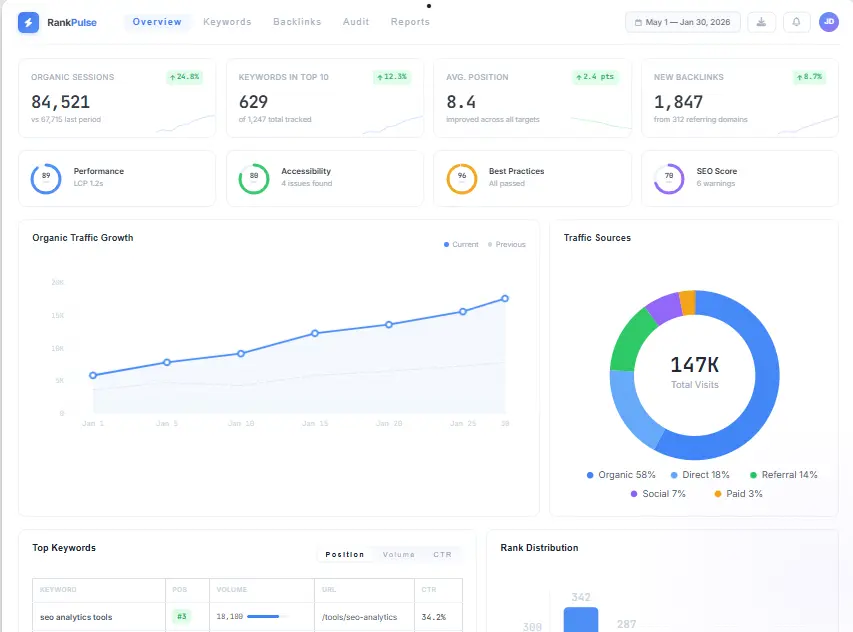
Modern analytics dashboards consolidate data from various search metrics into a single, actionable view.
3. Ahrefs
If backlinks and domain authority are your primary focus, Ahrefs is the gold standard. While it functions brilliantly as a keyword explorer, its true power lies in its Site Explorer. You can reverse-engineer a competitor’s entire link-building strategy in minutes. Ahrefs provides an incredibly accurate SEO Metrics Guide through their proprietary metrics like Domain Rating (DR) and URL Rating (UR). It is one of those seo tracking tools that makes the invisible web of links completely visible and actionable.
4. Moz Pro
Moz has been an industry staple for over a decade, and for good reason. Their domain authority checker is the most widely recognized metric in the industry. Moz Pro excels in local SEO analytics and offers an incredibly clean, beginner-friendly interface. If you are managing local businesses or need to quickly explain complex link data to non-technical clients, Moz’s visualizations make it one of the most accessible seo performance tools on the market.
5. Ubersuggest (by Neil Patel)
Budget constraints are a reality for many solo founders and small businesses. Ubersuggest bridges the gap between free and premium seo analytics tools. It provides surprisingly deep keyword data, content ideas, and site audit capabilities at a fraction of the cost of enterprise tools. It is an excellent keyword tracking tool for beginners who want to understand search volume, keyword difficulty, and seasonal trends without being overwhelmed by enterprise-level data tables.
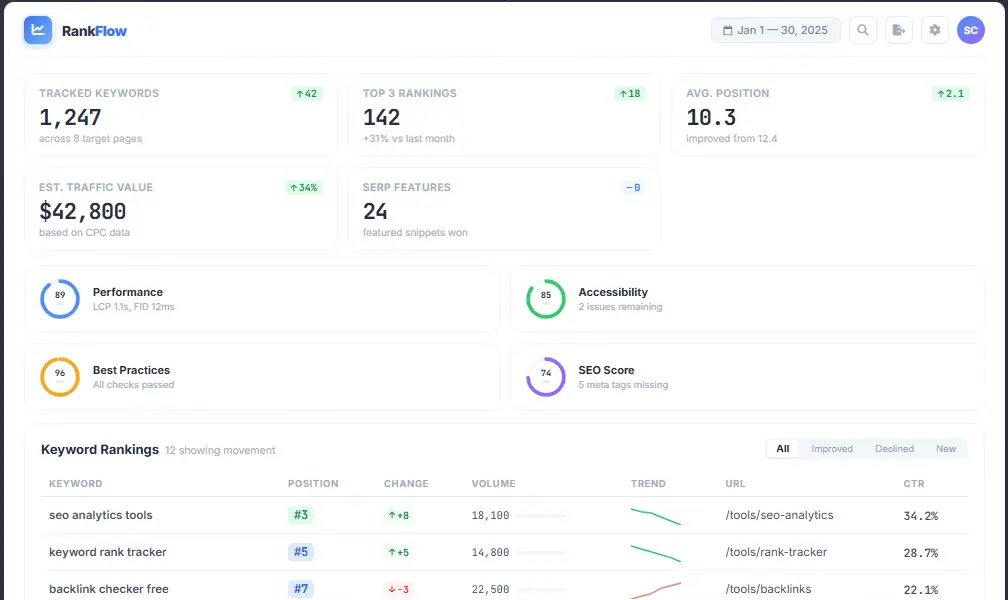
Tracking keyword fluctuations daily helps you understand the immediate impact of algorithm updates.
6. WebCEO
Designed specifically with agencies and large marketing teams in mind, WebCEO is a powerhouse for automation. It shines as an SEO reporting tool, allowing you to set up automated, white-labeled PDF reports that can be sent directly to clients on a schedule. It combines technical audits, rank tracking, and competitive research into a centralized workspace, drastically reducing the time your team spends pulling data from different platforms.
7. SEO PowerSuite
For those who prefer desktop software over cloud-based subscriptions, SEO PowerSuite is a legendary SEO tracking software. Because you download it to your computer, there are no limits on how many websites, keywords, or backlinks you can analyze. It consists of four distinct modules (Rank Tracker, Website Auditor, SEO SpyGlass, and LinkAssistant). It is ideal for data analysts who want to export massive datasets into Excel for custom modeling without hitting the strict API limits of cloud tools.
Key Metrics to Track with Website Analytics Tools
Data without context is just noise. One of the biggest mistakes marketers make is logging into their dashboards, seeing a green upward arrow next to “Sessions,” and assuming everything is fine. To truly grow, you need to understand the hierarchy of metrics. Here are the critical data points you must monitor using your seo analytics tools in 2026.
Step-by-Step Guide to Setting Up Your SEO Tracking Tools
Having the tools is only 20% of the battle. The remaining 80% is implementation. If your data is not tracked correctly from day one, your reports will be useless. Follow this step-by-step framework to build an impenetrable data infrastructure.
Step 1: Lay the Foundation with Google
First, verify your domain in both Google Search Console and Google Analytics 4. Ensure that GSC is set to the exact domain property (e.g., https://www.yoursite.com/) rather than just a URL prefix. This ensures you capture data across all subdomains and protocols. Next, link your GSC account directly to your GA4 property. This integration is what allows you to see GSC query data (what people searched for) side-by-side with GA4 engagement data (what they did on the page) inside your website analytics tools.
Step 2: Align Tracking with Business Goals
Do not track everything just because you can. Sit down with your sales or leadership team and define what a “conversion” actually looks like. Is it a form submission? An e-commerce purchase? A phone call? Set up specific conversion events in GA4. Without this step, your seo performance tools will only tell you that traffic arrived, not that it generated money.
Step 3: Configure Your Third-Party Rank Trackers
Connect your GSC account to your chosen premium platform (like SE Ranking or Ahrefs). Import your target keywords. Make sure you are tracking not just your primary “head” keywords, but the long-tail variations. If you haven’t built your keyword list yet, follow our keyword research guide to map out your cluster strategy. Set the geolocation settings accurately—if you are a local plumber in Chicago, tracking your rankings nationally will give you false hope.
Step 4: Establish an On-Page Monitoring System
Search algorithms change, and competitors update their content. You need to know when your on-page SEO becomes outdated. Use your tools to schedule weekly or bi-weekly site audits. Ensure your titles, meta descriptions, and header tags are properly optimized by utilizing our on-page SEO checklist. If a tool flags a sudden drop in your on-page score for a high-traffic URL, investigate immediately—someone may have accidentally overwritten your optimized copy.
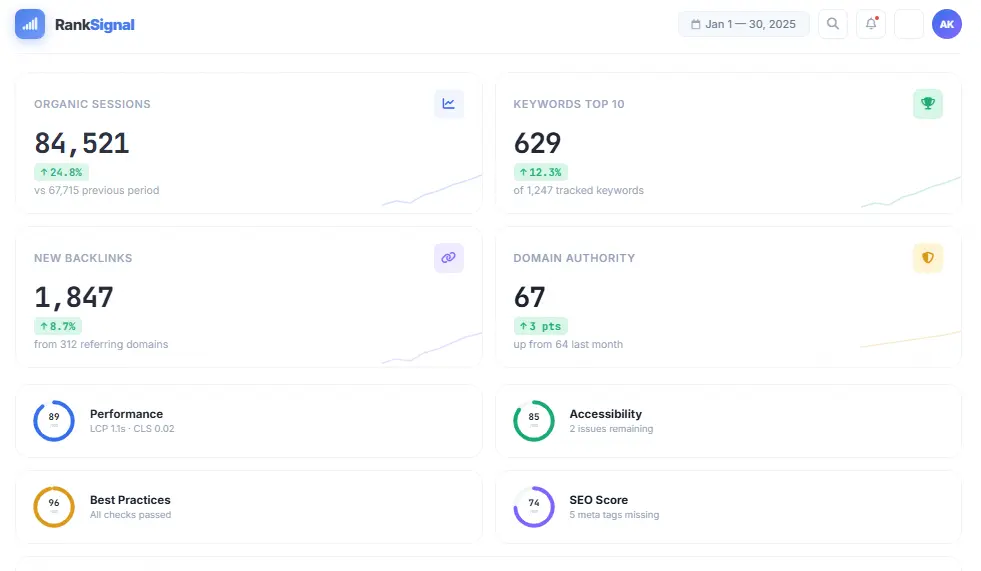
Automated reporting tools transform raw data into visual graphs that are easy to present to stakeholders.
Step 5: Build the Ultimate Custom Dashboard
Do not make your stakeholders log into five different platforms to get an update. Use the dashboard features in your seo reporting tools to create a unified view. Pull in your GA4 organic traffic, your GSC average position, and your Ahrefs domain rating into one single screen. This reduces friction and makes data accessible to decision-makers.
Download the SEO Analytics Checklist
Get our step-by-step setup checklist to ensure your tracking infrastructure is flawless from day one.
Common Mistakes When Using SEO Reporting Tools
Even the most expensive, enterprise-grade software will fail if used incorrectly. Over the years, we have audited hundreds of marketing agencies and in-house teams, and we consistently see the same fatal errors repeated. Avoid these traps to ensure your data remains pristine and actionable.
- Obsessing Over Vanity Metrics: As mentioned in David’s story at the beginning, getting 100,000 sessions means nothing if 99% of them bounce. Do not optimize for traffic; optimize for conversions and revenue. Your seo analytics tools should be a compass pointing toward profitability, not just a trophy case for visitor counts.
- Ignoring Attribution Models: In 2026, the customer journey is rarely linear. A user might find your blog post via organic search, leave, see a retargeting ad on social media a week later, and finally convert through an email link. If you give organic search 100% of the credit or 0% of the credit, your data is lying to you. Learn to use multi-channel attribution reports in GA4 to understand how organic search assists other channels.
- Suffering from “Data Paralysis”: Having access to 500 different metrics is paralyzing. You spend so much time looking at charts that you forget to actually do SEO. Combat this by picking 3 to 5 North Star metrics that truly matter to your business, and only check the rest on a monthly basis. Great seo tracking tools allow you to mute the noise and focus on the signals.
- Not Accounting for Seasonality: If you sell swimsuits, your organic traffic will naturally dip in November. If you panic and change your entire strategy based on a seasonal dip, you will ruin your summer performance. Always compare your data year-over-year (YoY), not just month-over-month (MoM). Your website analytics tools have date comparison features—use them to contextualize your data.
- Failing to Track Mobile and Desktop Separately: Google uses mobile-first indexing, but user behavior differs wildly between devices. Mobile users might bounce from a 3,000-word deep-dive article but convert highly on a short, fast-loading landing page. If you look at aggregate data, you miss these crucial behavioral nuances.
How to Choose the Right SEO Performance Tools for Your Business
With so many options, how do you decide where to allocate your budget? The decision matrix comes down to three factors: Business size, technical expertise, and primary goal.
If you are a solopreneur or small local business, stick to the free tier (GSC + GA4) paired with a low-cost option like Ubersuggest. You do not need enterprise backlink crawlers; you need to ensure your Google Business Profile is optimized and you are ranking for local intent keywords.
If you are an in-house marketer at a mid-sized B2B company, invest in SE Ranking or Moz Pro. You need accurate rank tracking to prove your value to the C-suite, and you need competitive analysis to steal market share from industry leaders. These seo analytics tools offer the perfect middle ground between depth and usability.
If you run an enterprise site or an SEO agency, you need Ahrefs or Semrush, combined with WebCEO for automated white-label reporting. You are dealing with millions of pages, international subfolders, and complex enterprise architectures. Only top-tier seo performance tools have the API limits and processing power to handle that scale of data without breaking a sweat.
Frequently Asked Questions (FAQs)
What are the best free SEO analytics tools?
Google Search Console and Google Analytics 4 are the undisputed kings of free data. While third-party tools estimate search volume and backlinks, Google gives you the actual, factual data straight from the source. For free third-party insights, Ubersuggest offers limited free daily searches, and tools like AnswerThePublic have free tiers useful for content ideation.
How often should I track website traffic?
It depends on your role. A daily check-in is fine for a quick pulse check, but never make strategy changes based on one day of data. For tactical decisions (like fixing a broken link or updating a meta tag), review your data weekly. For strategic decisions (like content pivoting or budget allocation), rely on 90-day rolling averages and Year-over-Year comparisons.
Can SEO tracking tools actually improve my rankings directly?
No tool directly improves your rankings. A hammer does not build a house; the carpenter does. What seo analytics tools do is provide the blueprint. They show you that Page A has a high impression count but a 1% CTR, prompting you to rewrite the title tag—which then directly improves your ranking and traffic. They provide the “what,” you have to execute the “how.”
What is the difference between web analytics and SEO analytics?
Web analytics (like GA4) measures everything: paid ads, social media, direct traffic, email clicks, and organic search. SEO analytics specifically isolates the data related to search engines—like keyword positions, crawl errors, indexing status, and organic SERP features. You need both, but they serve different purposes in your website analytics tools stack.
Are SEO reporting tools worth the investment for small businesses?
Absolutely, provided you have the time to act on the data. If you buy a $100/month tool but don’t have the time to write the content or fix the technical issues it uncovers, it is a waste of money. However, if you are actively investing in growing your business, spending a small amount on seo reporting tools will easily pay for itself by preventing you from wasting time optimizing the wrong keywords.
How do AI features impact SEO performance tools in 2026?
AI is transforming these platforms from “data reporters” to “data advisors.” Instead of just showing you a drop in traffic, modern AI-enhanced seo analytics tools will automatically cross-reference algorithm update timelines, check your site for technical errors, analyze competitor movements, and literally write a paragraph explaining exactly why you dropped and what you should do to fix it.
Start tracking your SEO performance today
Stop flying blind. Let us help you set up the perfect analytics stack for your business.