
How to Audit a Website: Fix Hidden Errors & Skyrocket Rankings (2026 Guide)
Why Your Site Isn’t Ranking
Imagine you have built a beautiful storefront in the middle of a busy city, investing thousands into the decor, lighting, and product quality, but instead of customers flooding in, the door remains locked and the windows are painted black.
This is essentially what is happening to your website right now, regardless of how brilliant your content or design might actually be.
Search engines are the potential customers walking by. If they cannot find the door, or if they try to enter and are met with confusing layouts and broken stairs, they will simply move on to the next shop, which happens to be your competitor.
It is a frustrating reality, but it is also entirely fixable. Learning **how to audit a website** is the master key that unlocks this door.
Is your website a ghost town? You pour your heart and soul into publishing great content. You share it across social media channels. You might have even invested in a decent design. Yet, when you check your SEO analytics and traffic stats, the numbers are heartbreaking. Crickets.
Why is this happening? It is not because you lack talent or because your niche is too crowded. It is because Google is struggling to read, trust, or understand your website. Most websites don’t rank not because they lack “good content,” but because they are silently bleeding traffic due to hidden technical errors, broken links, and outdated SEO strategies.
These are the silent killers of organic growth, eating away at your potential without you even realizing it. The truth is, you cannot fix what you cannot see.
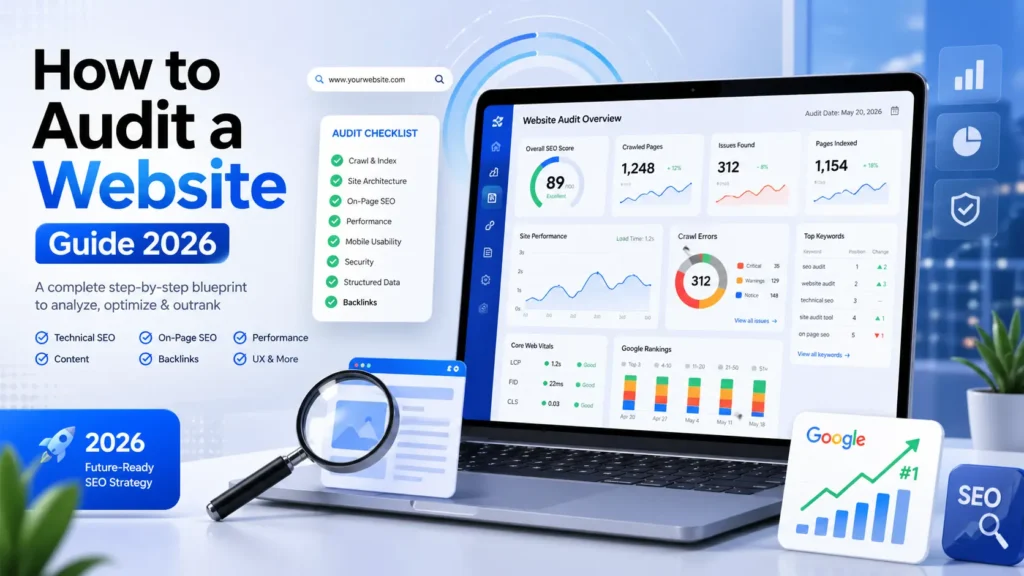
By the end of this comprehensive guide, you will know exactly **how to audit a website** like a seasoned SEO expert. You will have a clear, step-by-step roadmap to identify the errors killing your traffic and fix them fast. Let’s dive in and turn your site into the traffic-generating machine it was meant to be.
WHAT IS A WEBSITE AUDIT?
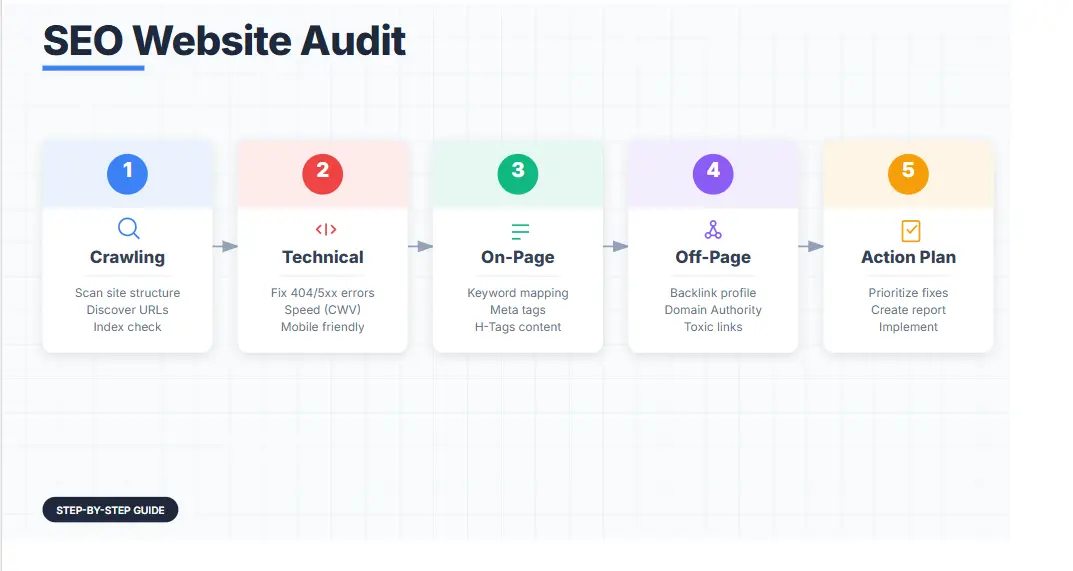
Before we pick up the tools, we need to define the process. A website audit is a comprehensive, full-scale analysis of your webpage’s performance across multiple dimensions. It is designed to identify issues that might be affecting its search engine visibility.
Unlike a simple checkup, this process looks at the entire ecosystem of your site—from the backend code to the frontend user experience—to ensure everything is working in harmony with Google’s algorithms. When you learn **how to audit a website**, you are essentially learning to see your site through the lens of a search engine.
Think of it like taking your car for a full service inspection. You might not hear a weird noise when driving, but the mechanic checks the brakes, oil, and tires to prevent a future breakdown. Similarly, a site audit checks your site’s “health” metrics before Google decides to stop sending you visitors.
Why It Matters for SEO in 2026
SEO in 2026 is vastly different from what it was even two years ago. It is hyper-competitive, and Google’s algorithms are smarter than ever.
They now focus heavily on User Experience (UX), Content Value, and AI-driven interpretation. If your site loads slowly, isn’t mobile-friendly, or has duplicate content, you are practically invisible to search engines.
A thorough site analysis is the only way to align your site with these modern standards. The methodology behind **how to audit a website** has evolved from simple keyword checking to complex semantic analysis.
The Ranking Impact
Performing a proper website audit helps you achieve critical milestones that directly influence your bottom line. It is not just about vanity metrics; it is about finding and fixing “crawl errors,” which are the barriers that stop Google from indexing your pages.
It helps you discover keyword gaps—high-value terms your competitors are ranking for that you missed.
It improves User Experience, which directly boosts your rankings by making your site easier to use, and it increases conversion rates by fixing technical bottlenecks that stop visitors from buying. Without this process, you are essentially flying blind, hoping your content sticks. Learning **how to audit a website** is the first step toward regaining control of your digital destiny.
TECHNICAL SEO AUDIT
This is the foundation of your house. If the foundation is cracked, no amount of beautiful furniture (content) or paint (design) will save it.
Technical SEO ensures that search engines can crawl, interpret, and index your website without issues. For a deeper dive into these server-side optimizations, you can review our detailed Technical SEO guide.
A major part of understanding **how to audit a website** involves getting your hands dirty with code. If you aren’t comfortable with code, don’t worry—we have a tool recommendation list below to do it for you.
1. Crawl Errors & Indexing
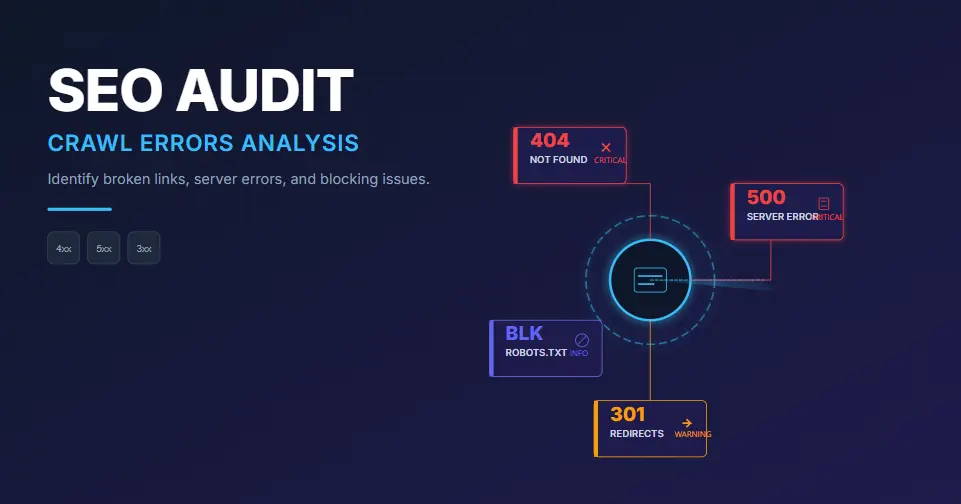
Google sends “spiders” (bots) to crawl your site. If they hit a dead end (a 404 error) or get blocked (a 5xx server error), they leave without indexing your content.
A thorough website audit always starts here because if Google can’t get in, nothing else matters. If you are wondering **how to audit a website** effectively, start with the robots.txt file.
How to check: Use Google Search Console (GSC). Go to the “Coverage” or “Pages” report. Look for specific error codes:
- 404 Not Found: Pages that don’t exist but are linked to internally or externally. These lose link juice and frustrate users.
- 500 Server Errors: Your server is rejecting requests. This is a critical red flag.
- Soft 404s: A page loads but has little content, confusing Google into thinking it’s an error page.
For official guidelines on how Google sees your site, always refer to Google Search Central.
2. Page Speed & Core Web Vitals
Speed is a confirmed ranking factor. Period.
In 2026, users won’t wait 3 seconds for a page to load; they will hit the back button and choose a competitor. Google uses Core Web Vitals to measure this. This part of the site analysis is non-negotiable.
Many people ask **how to audit a website** without slowing it down, but speed checks are lightweight and essential.
- LCP (Largest Contentful Paint): How fast the main content loads. Aim for under 2.5s.
- FID (First Input Delay): How fast the site becomes interactive.
- CLS (Cumulative Layout Shift): Visual stability (does the page jump around while loading?).
Tool: Use PageSpeed Insights. Aim for a score above 90. If you are in the red or yellow, your website audit should flag this as “Critical.”
3. Mobile Usability
Google uses “Mobile-First Indexing.” This means it looks at the mobile version of your site to decide rankings. If your mobile site is broken, your desktop ranking doesn’t matter.
A website audit must verify that buttons are tapable, text is readable, and no pop-ups cover the main content. When you study **how to audit a website**, always check the mobile view first.
Tool: Check the “Mobile Usability” report in GSC.
Use Screaming Frog to crawl your site. Filter by “Status Code” and fix any 404s by redirecting them to relevant live pages (301 Redirects). Also, ensure your entire site uses HTTPS. Non-secure sites are flagged as “Not Secure” by browsers, which destroys trust.
ON-PAGE SEO AUDIT
Once your technical foundation is solid, we optimize the pages themselves. On-page SEO tells Google what your pages are about.
This process often begins with effective keyword research to ensure you are targeting the right terms.
A crucial part of mastering **how to audit a website** involves checking every single page for on-page elements. This is where you can often see the quickest wins.
1. Title Tags Optimization
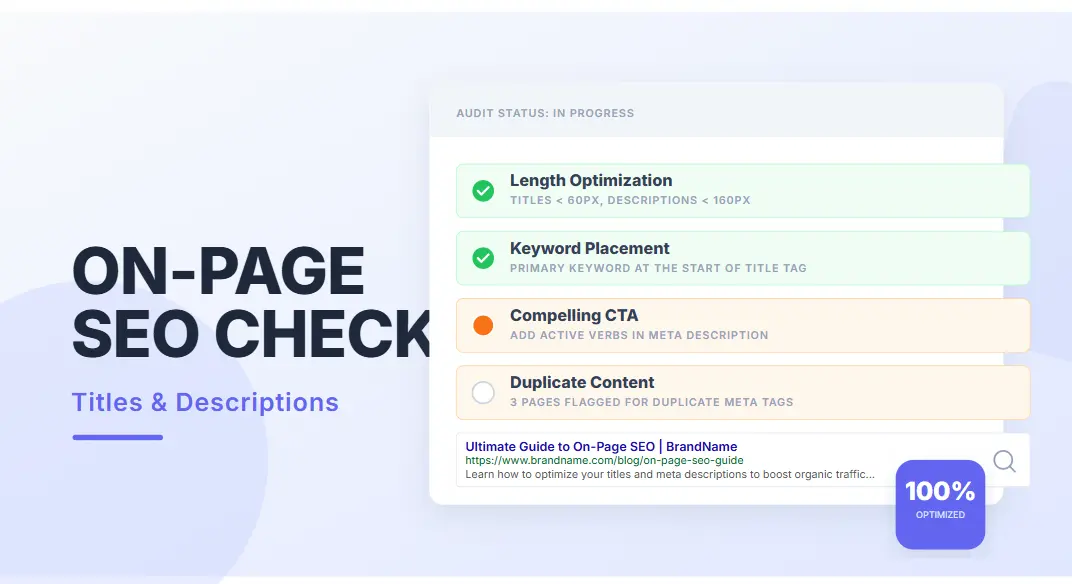
The title tag is the blue link users see in search results. It is the single most important on-page factor.
- Rule: Keep it under 60 characters.
- Keyword Placement: Put your main keyword at the beginning.
- Emotional Hook: Use power words (Ultimate, Easy, Guide, Fast) to improve Click-Through Rate (CTR).
2. Meta Descriptions
While not a direct ranking factor, this determines if people click. A website audit often reveals missing meta descriptions.
- Rule: Under 160 characters.
- Goal: Include a benefit and a Call to Action (CTA). “Learn how to…” or “Discover best…”
3. Keyword Placement & H-Tags
Google scans for structure to understand content hierarchy. If you are wondering **how to audit a website** for content structure, look at the H-tags.
- H1: Your main title (only one per page).
- H2/H3: Subheaders. Use your secondary keywords here.
- Body Content: Sprinkle your main keyword naturally. Aim for a density of 1% – 1.5%.
4. Internal Linking
This is crucial for a successful website audit. Internal links pass “link juice” from your strong pages to weaker pages, helping them rank. It also helps users navigate.
The strategy of internal linking is often overlooked when learning **how to audit a website**.
- Strategy: Link from your homepage to important category pages. Link from blog posts to relevant product pages or services using descriptive anchor text (not “click here”).
CONTENT AUDIT & E-E-A-T
Content is King, but only if it is high-quality content. In 2026, Google penalizes “content fluff.”
Your SEO audit process must include a deep dive into what you are actually publishing. For more insights on content strategy, you can browse our SEO blog for recent examples.
A key aspect of **how to audit a website** is judging the quality of the writing.
The Importance of E-E-A-T
Google now emphasizes Experience, Expertise, Authoritativeness, and Trustworthiness.
A website audit must check if your content is written by experts with real-world experience. Generic AI content is being filtered out. You need unique insights.
If you want to know **how to audit a website** for trust, check the “About Us” page and author bios.
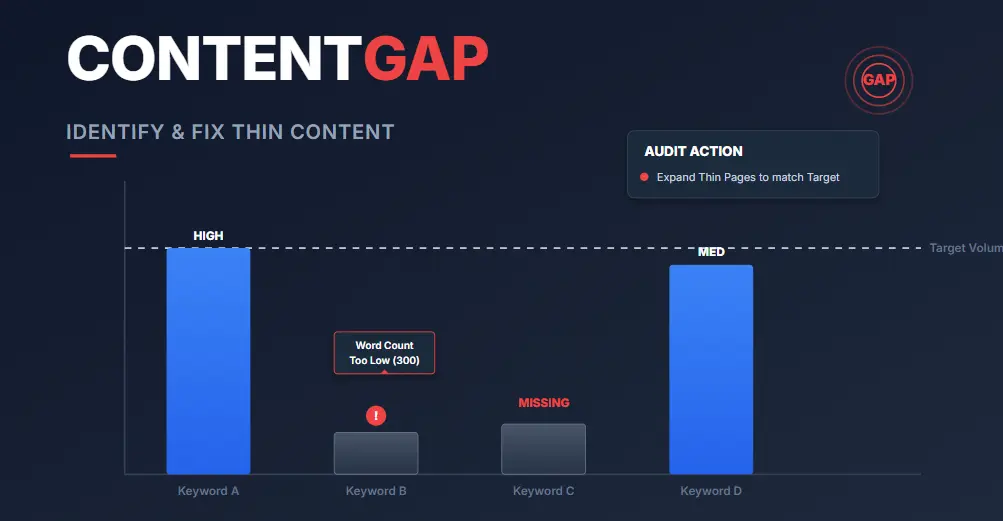
1. Thin Content Issues
“Thin content” means pages that provide little to no value to the user.
This includes pages with very few words or “doorway pages” created just for rankings.
- Fix: Expand these pages with useful information, images, and videos, or merge them into stronger pages.
2. Duplicate Content
If you have two pages with the same (or very similar) content, Google gets confused and might penalize both. This is a common issue found during a site audit on e-commerce sites.
- Fix: Use canonical tags to tell Google which version is the “master,” or rewrite the content to be unique.
3. Keyword Gaps & Content Refresh
Your competitors might be ranking for keywords you haven’t touched. This is called a “Keyword Gap.”
- Strategy: Look at your top competitors. What questions are they answering that you aren’t? Write that content.
- Refresh: Update old articles with 2026 data, new images, and recent trends. Google loves fresh content. Updating an old post often yields faster results than writing a new one. This is a secret weapon when you learn **how to audit a website**.
BACKLINK AUDIT
Backlinks are “votes of confidence” from other sites. But bad votes can hurt you.
A website audit is incomplete without checking your link profile. Industry leaders like Ahrefs emphasize that a healthy backlink profile is a primary ranking factor.
A critical component of **how to audit a website** is analyzing who is linking to you.
1. Toxic Backlinks
If you have links from spammy sites (gambling, adult, or link farms), Google sees you as guilty by association. This is known as “Negative SEO.”
- Tool: Use Ahrefs or Semrush “Backlink Audit” tool.
- Action: Create a “Disavow File” and upload it to Google Search Console. This tells Google to ignore those bad links.
2. Competitor Backlink Analysis
Steal your competitors’ success.
- Strategy: See who is linking to your top 5 competitors. Reach out to those websites and offer your content as a better resource. “Hey, I saw you linked to X. We have a more updated guide here…”
3. Domain Authority Check
Domain Authority (DA) is a metric (by Moz) predicting how likely a site is to rank. While not a Google metric, it helps you gauge your strength against competitors.
You can check this using the Moz Domain Authority guide. A website audit should track your DA growth over time.
UX & CONVERSION AUDIT
Getting traffic is great, but if they don’t buy or subscribe, you are losing money. This is often missed in a standard site analysis, but it is vital for business owners.
1. Bounce Rate Analysis
If users land on your page and leave immediately (high bounce rate), Google thinks your page isn’t helpful.
- Fix: Improve readability, add a table of contents, and ensure the page loads fast.
2. Mobile UX
Check if buttons are too small to tap on a phone. Is the text readable without zooming?
- Fix: Use large, tappable buttons and readable font sizes (16px+).
3. CTA Optimization
Your Call to Action (CTA) must be clear.
- Bad: “Click here.”
- Good: “Get Your Free SEO Audit Report.”
Place CTAs above the fold and at the end of the content.
BEST SEO TOOLS COMPARISON (2026 AUDIT STACK)
Not sure which tool to use for your website audit? This curated SEO toolkit will help you understand how to audit a website like an expert and fix ranking issues faster.
⚠️ Some links below are affiliate links. We may earn a commission at no extra cost to you.
| Tool | Best For | Price | Rating | Try Now |
|---|---|---|---|---|
| Google Search Console | Technical SEO & Indexing | Free | ⭐⭐⭐⭐⭐ | Use Free |
| Screaming Frog | Deep Website Crawl & Errors | Free / Paid | ⭐⭐⭐⭐⭐ | Download |
| SE Ranking | Full SEO Audit + Rank Tracking | Paid | ⭐⭐⭐⭐⭐ | Start Trial |
| Moz Pro | Domain Authority + SEO Insights | Paid | ⭐⭐⭐⭐⭐ | Try Moz |
| Ubersuggest | Keyword + SEO Audit | Low Cost | ⭐⭐⭐⭐ | Try Now |
| Mangools | Easy SEO Suite for Beginners | Paid | ⭐⭐⭐⭐ | Get Access |
| SEMrush | All-in-One SEO Audit Suite | Premium | ⭐⭐⭐⭐⭐ | Start Trial |
| PageSpeed Insights | Website Speed Optimization | Free | ⭐⭐⭐⭐ | Test Now |
Pro Tip: Best results come when you combine at least 3 tools:
Technical SEO + Backlink Audit + Content Analysis
COMMON SEO AUDIT MISTAKES
Even experts make mistakes. Here are the most common ones we see during a site audit:
- Ignoring Mobile Speed: Many desktop-only audits miss mobile-specific loading issues.
- Keyword Cannibalization: Using the same keyword on multiple pages, making them compete against each other.
- Forgetting Image Alt Text: Search engines can’t “see” images. You must describe them in the Alt Text for SEO.
- Blocking CSS/JS in Robots.txt: This can prevent Google from rendering your page correctly.
CASE STUDY: THE “ECOHOME” BLOG
To show you the power of a website audit, let’s look at a real example.
Problem: A blog about eco-friendly living had 50 posts but low traffic and dropping rankings.
Audit Finding:
1. 30 posts were under 300 words (Thin content).
2. 10 posts were about “Recycling in 2018” (Outdated).
3. Site had 45 broken internal links.
Action: Deleted the thin posts. Updated the 2018 posts to “Recycling in 2026 Guide.” Fixed all broken links and optimized site speed. This is a perfect example of **how to audit a website** for maximum impact.
Result: Organic traffic increased by 150% in 3 months.
FREQUENTLY ASKED QUESTIONS
Q: What exactly is a website audit?
A: A website audit is a full examination of your website’s performance regarding SEO, speed, and user experience to find and fix issues that prevent ranking.
Q: How often should I audit my website?
A: We recommend a full site analysis every 6 months. However, you should check your technical health (errors, speed) monthly.
Q: Can I do a website audit for free?
A: Yes! You can perform a basic SEO audit process for free using tools like Google Search Console, Google Analytics, and Screaming Frog (free version).
Q: How long does a professional website audit take?
A: A manual website audit can take anywhere from 4 hours for a small site to several weeks for a massive enterprise website.
Q: Is learning how to audit a website difficult?
A: No, once you understand the steps outlined in this guide, **how to audit a website** becomes a manageable and highly profitable process.
Q: What are the best tools for beginners?
A: For beginners learning **how to audit a website**, we recommend starting with Google Search Console (free) and eventually upgrading to Ahrefs or Semrush for backlink analysis.
Q: Do I need to be a developer?
A: No. While technical skills help, tools like Semrush make it easy to identify issues without touching code. Knowing **how to audit a website** is about strategy first, code second.
CONCLUSION + STRONG CTA
Your website has the potential to be your best employee, working 24/7 to bring in customers. But right now, hidden errors are holding it back.
A website audit isn’t just a technical checklist; it is the bridge between where you are and where you want to be.
We have covered technical SEO, on-page optimization, content strategies, and backlink analysis. You now have the knowledge to fix the leaks and boost your rankings.
Don’t wait until your competitors outrank you completely. Take action today.
Ready to dominate the search results?
Stop guessing and start optimizing.
Get Professional Audit Service Download Free ChecklistRemember, learning **how to audit a website** is the first step toward digital dominance. Good luck!