
Local SEO for Small Business: A Practical Guide to Getting Found Locally
By Mousume Akter, Founder & Editor, SEORAF. Google documentation referenced here was checked in November 2026.
Local SEO for small business is the work of making your business easy to find, trust and contact when nearby customers search on Google and Google Maps. It rests on a handful of practical basics: the right kind of Google Business Profile, genuine reviews, a website that matches your profile, and listings that agree with each other.
This guide covers each of them in order, from how Google decides local results to a 30-day plan you can follow yourself. I separate what Google documents from what practitioners report and from my own recommendations, so you can tell a rule from a judgment call. Nothing here promises rankings: Google says you can’t pay for a better local ranking, and results change with where the searcher is.
Short on time? Start with the business-type check under Choose Your Path, then set up your profile.
In short, here is how to do local SEO for a small business:
- Confirm whether you’re a storefront, service-area or hybrid business.
- Claim and verify your Google Business Profile with accurate details.
- Ask every customer for an honest review, and reply to the reviews you get.
- Give each core service its own page with consistent contact details.
- Check that your name, address and phone match across listings.
- Track calls, direction requests and website clicks each month.
How to Read This Guide
I separate three kinds of statements throughout:
- Google documents: stated in Google’s own help or Search Central documentation, linked where first used and listed under Sources.
- Practitioners report: observations from vendors, surveys or specialists. Useful, but not Google’s word.
- My recommendation: SEORAF’s editorial judgment, which you are free to disagree with.
The examples featuring “Northvale Plumbing” and “Maple Street Bakery” are fictional illustrations. They are not clients or case studies. The fictional examples use US-style place names and contact details for illustration; the core guidance is intended for small businesses in different markets. The Federal Trade Commission discussion is specifically for US businesses, so check the laws and platform rules that apply where you operate. This guide contains no affiliate links.
How Local SEO Works: Relevance, Distance and Prominence
Local SEO is the practice of helping a business appear in Google Search and Google Maps results for nearby customers. It combines an accurate Google Business Profile, genuine reviews, a website that clearly describes your services and area, and consistent business details across the web. Google bases local results mainly on relevance, distance and prominence.
Local searches, and why they behave differently
Some searches name a place (“emergency plumber in Northvale”). Others don’t, but Google can infer that the searcher wants something nearby (“plumber,” “coffee shop open now”). In both cases, Google tries to show businesses the searcher can realistically visit or hire, using the searcher’s location.
Regular SEO asks: which page best answers this query? Local SEO adds a second question: which business is the best nearby match? That second question is why your Business Profile, reviews and address details matter in a way they wouldn’t for an ordinary blog.
The three factors Google names
Google documents: local results are based mainly on relevance, distance and popularity. Google’s page uses “popularity” in one sentence and “prominence” in its explanation, so you’ll see both words. More complete and accurate profile information makes a business more likely to appear, and verifying the profile tells Google you’re authorized to represent it.
| Factor | What Google says | What you can influence |
|---|---|---|
| Relevance | How well a profile matches what the person searched for. Detailed, complete information helps Google match you. | Accurate categories, services and description; a website that clearly covers what you do |
| Distance | How far the business is from the searcher, using their location if shared. | Very little. Don’t fake an address. List your real location or service area |
| Prominence | How well known a business is, informed by factors such as links from websites and review count. More reviews and positive ratings can help. | Genuine reviews, local mentions and links, a recognizable and consistent presence |
The three local factors Google names. The table shows what you can influence, not how much each one counts.
Two practical consequences follow. First, you can’t optimize distance, so a competitor closer to the searcher will often appear above you for that searcher. Second, results shift by searcher location, so “my ranking” is not one number. Whitespark’s small business guide makes the same point: there is no single #1 ranking in local search (practitioners report).
Where local results appear
Local listings show up in Google Maps and as map-style results within Google Search, alongside ordinary website results. The industry calls the map-style block the “local pack.” Your profile can appear there, while your website competes separately in the regular results. A good local presence needs both.
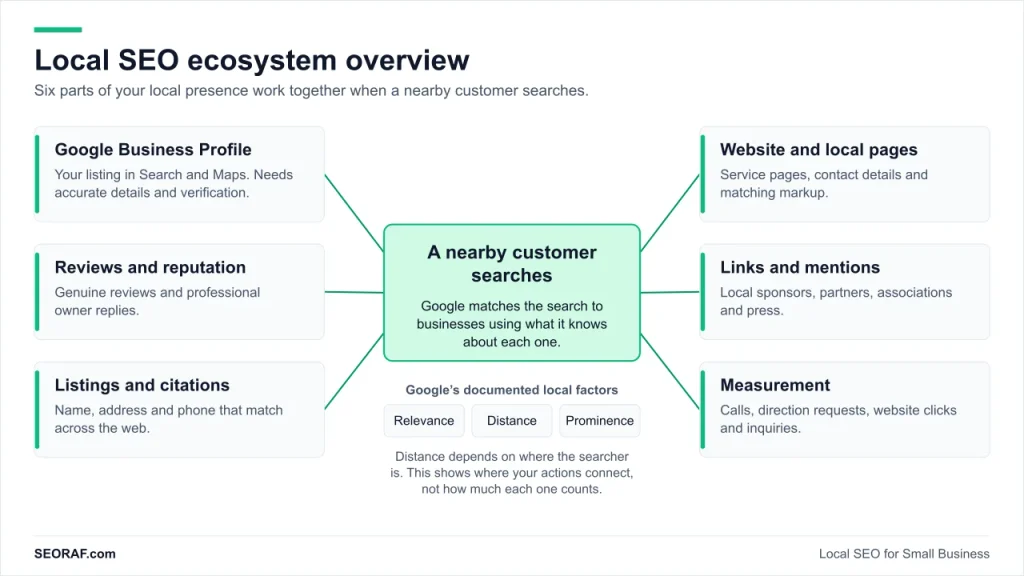
My recommendation: Treat the profile and the website as two halves of one system. The profile is how Google verifies you exist and what you offer. The website is where the searcher goes to decide.
Choose Your Path: Storefront, Service-Area or Hybrid
Most local SEO mistakes I’d call avoidable begin here, with a business filling in the wrong kind of profile. Google’s rules differ by model, so decide first.
| Feature | Storefront | Service-area business | Hybrid |
|---|---|---|---|
| Description | Customers visit your premises | You travel to customers; no storefront | You serve customers at your address and also travel |
| Address on profile | Shown, with permanent signage at the location | Hidden | Shown, plus a service area |
| Profile rule | One profile per location | One profile for your central office or location | Storefront address and a service area, if the location is staffed and receives customers |
| Typical example | Bakery, retail shop | Plumber or mobile cleaner working from home | Garage with roadside service |
How Google’s profile rules differ for storefront, service-area and hybrid businesses.
Google documents: Service-area businesses should have one profile for the central location with a designated service area, and should hide their business address. Hybrid businesses can show the storefront address and a service area when the location is staffed and able to receive customers. Google’s text says the overall service area shouldn’t extend farther than about two hours of driving time from where the business is based, though larger areas may suit some businesses.
A quick eligibility check
Run through this before you create or claim anything. All points are from Google’s eligibility and representation guidelines.
- In-person contact. A business must make in-person contact with customers during its stated hours. A service-area business meets customers at their locations.
- Not eligible: lead generation agents, online-only businesses, and addresses that are P.O. boxes or mailboxes at remote locations.
- Virtual offices don’t qualify. An address you rent but don’t operate from isn’t eligible. A co-working space qualifies only if it has clear signage, receives customers and is staffed during business hours.
- Storefront signage. A business showing its address should maintain permanent fixed signage with its name there.
- Age-restricted products (alcohol, cannabis, weapons) can’t use the service-area model without a storefront.
Where this leaves home-based and new businesses
If you run a plumbing company from your house and visit customers, you are a service-area business. You may qualify as a service-area business, and you should hide your residential address on the profile if customers do not visit that location. If you have no premises and no in-person contact (a purely online store), you aren’t eligible for a Business Profile at all, though you can still earn local visibility through your website and other channels.
My recommendation: Resist the urge to borrow a nicer address. A virtual office or mailbox might feel harmless, but it’s the quickest way to a suspended profile and the hardest thing to recover from.
Google Business Profile for Small Business: Setup, Verification and Optimization
Your Google Business Profile is the single most important local asset for most small businesses. It controls the listing that appears in Maps and Search. BrightLocal’s guidance for small businesses is to start here and improve steadily rather than trying to do everything at once (practitioners report).
Claim or create the profile
Check whether a profile for your business already exists before creating one. Google asks for one profile per business location, and duplicates cause display problems. My recommendation: use a Google account the business owns, not an employee’s personal account, so ownership never walks out the door.
Verify it
Google documents: verification tells Google you’re authorized to represent the business. Google’s systems automatically determine which verification methods your business can use, and you can’t change them. The options depend on factors such as business type, region and opening hours, and can include phone or text, email and video. If your business is eligible for video verification, Google recommends it. For a phone code you must be able to answer the business phone or receive texts, and automated phone menus won’t receive the code.
My recommendation: Be able to answer the business phone yourself, and have your storefront, signage or vehicle ready to show if video is required. Keep proof of the business, such as registration documents or signage photos, in one folder. BrightLocal also advises preparing proof documents in advance in case of suspension (practitioners report).
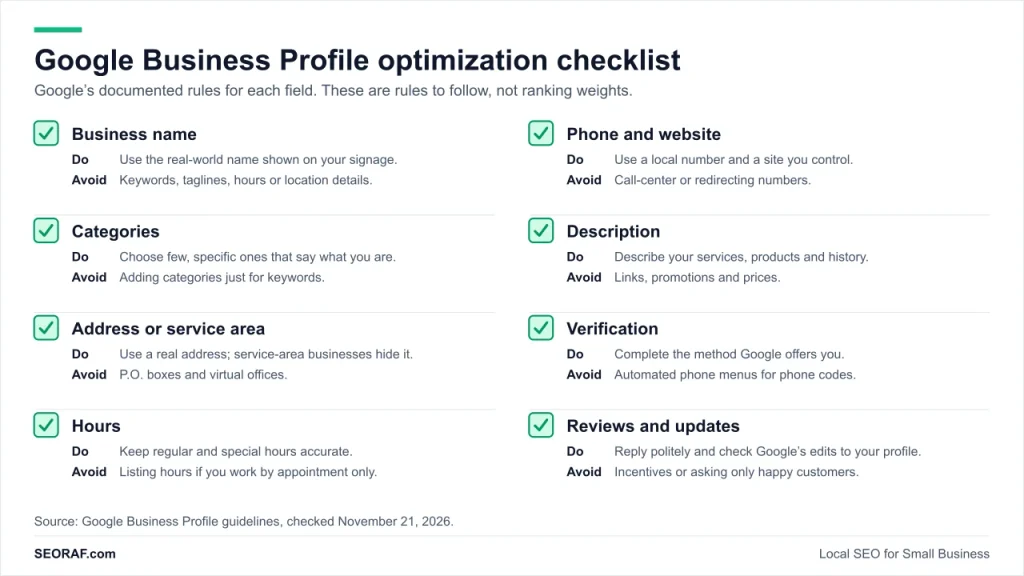
The fields that matter, and Google’s rules for each
| Field | What Google documents | Common error |
|---|---|---|
| Business name | Use the real-world name as used on signage and stationery. Taglines, hours, phone numbers, URLs, service or product details and location info aren’t allowed; unnecessary details can lead to suspension | Adding “Best Plumber Northvale” to the name |
| Legal terms | Terms like LLC or special characters only if real-world proof consistently shows them as part of the name | Adding “LLC” by habit |
| Categories | Use as few as possible, as specific as possible, don’t use categories as keywords. Ask: “this business is a…” not “has a…” | Stacking many categories for keyword coverage |
| Address / service area | Precise real-world location, or a service area. Service-area businesses hide the address | Using a P.O. box or virtual office |
| Hours | Regular customer-facing hours, with special hours for holidays. Appointment-only businesses shouldn’t provide hours | Leaving old hours up |
| Phone / website | A local number rather than a call-center line where possible, under the business’s direct control. Don’t use redirecting or referral numbers | Using a tracking number that points elsewhere |
| Description | Describe services, products, mission and history. No links, and no focus on promotions or prices | Pasting offers or URLs |
Google’s documented rules for the main Business Profile fields, with the most common error for each.
All rows above come from Google’s guidelines for representing your business.
Categories deserve a second look
Google documents: Google says to choose the most specific categories that represent your core business, and that it can also detect category information from your website and from mentions across the web.
A lot of “advanced” advice online recommends adding every plausible secondary category. That sits in tension with Google’s instruction to use as few as possible. My recommendation: pick a specific primary category, add a second only if it describes a genuinely separate core part of the business, and revisit it only when the business changes.
Photos, updates and the Ask feature
Google’s own tips are to add photos and videos so customers see what you offer, keep hours accurate, and reply to reviews. What Google doesn’t do is quantify how much each of these affects ranking, so treat them as ways to be accurate and useful rather than as ranking levers.
Q&A has also changed. Google confirmed it is removing the customer-facing Q&A feature in Maps in favor of an AI-powered Ask button, and existing questions and answers stay in the profile dashboard where they may still inform results (reported by Search Engine Roundtable). In August 2026 the same publication reported Google testing a revamped Q&A prompt flow in the dashboard, so this area is still moving; availability can vary by region. The lesson is to put your key facts, such as services, hours and policies, in the places Google reads directly, rather than relying on questions being asked.
Why your profile sometimes changes on its own
Google documents: local listing information comes from a mix of sources, including publicly available information such as crawled content from a business’s website, and licensed data. If sources report that your info is out of date, your profile can receive updates you can review.
So check your profile regularly. Don’t assume what you entered a year ago is still what customers see.
Profile Strength
Google offers a Profile Strength tool for verified listings that points out missing information, helps keep the profile consistent across Google products, and suggests content to add. It is a completion aid. Google doesn’t describe it as a ranking factor, so I wouldn’t chase a perfect score for its own sake.
Keeping the profile safe
- Don’t keyword-stuff the name.
- Don’t list an ineligible address. Google’s policy overview says profiles with a P.O. box address are suspended.
- Keep one account in charge. If someone else manages it, they should be doing so as an authorized representative who works with you and returns ownership on request.
- Review any third-party tool that edits your profile. If something changes unexpectedly, check what has access.
Customer Reviews and Reputation
Reviews sit in two places at once: Google says more reviews and positive ratings can help local ranking as part of prominence, and customers may use reviews when deciding whom to contact. Google does not publish a fixed review count or rating threshold for ranking. They are also where the most policy mistakes happen.
Asking for reviews the compliant way
Google documents: you can ask customers to visit a Google link or scan a QR code to leave a review. Customers need to be signed into a Google account. Reviews must reflect a genuine experience.
A practical approach for a small business:
- Ask every customer at the same point in your process, once the job or visit is finished.
- Send your Google review link by message, receipt or invoice, or place a QR code at the counter.
- Keep the request short and don’t specify what to write.
- Don’t skip anyone because you expect a lower rating. Google’s policy rules out selective requests, as explained below.
A simple message you could adapt:
“Thanks for choosing us today. If you have a minute, an honest review on Google helps other customers in the area find us. Here’s the link: [your link].”
What Google’s policy rules out
Google documents: merchants may not offer incentives such as payment, discounts or free goods for reviews, discourage negative reviews, or selectively solicit positive reviews. They also may not pressure customers to leave reviews while on the premises, or ask staff to solicit a certain number of reviews or reviews with specific content, such as naming a staff member. Merchants may solicit genuine reviews without incentives or attempts to influence the rating or content.
| Do | Don’t |
|---|---|
| Ask all customers for an honest review | Ask only customers you expect to be happy |
| Share a review link or QR code | Offer a discount or gift for a review |
| Reply to reviews professionally | Set staff review quotas or ask for specific wording |
| Report genuine policy violations | Pressure customers to review while they’re in the shop |
Review requests that follow Google’s policy, and those that don’t.
One of my own interpretations deserves flagging: tools that screen customers by satisfaction and send only the happy ones to Google look to me like selective solicitation. Google’s text states the principle without naming that specific tool type, so check each tool against the policy yourself.
For US businesses, the Federal Trade Commission’s rule on consumer reviews and testimonials took effect on October 21, 2024. It addresses fake reviews, buying reviews, insider reviews and review suppression. This is not legal advice, and it applies to US commerce. If you operate elsewhere, check the rules where you are.
Replying to reviews
Google documents: replies should be professional, short and not promotional. Reply to negative reviews honestly, avoid sharing a reviewer’s private information, and respond in a timely way.
A fictional example for a negative review of Maple Street Bakery:
“Thanks for letting us know. A cake that arrived late for your event isn’t the experience we want to give. I’d like to understand what happened, so please call us at the number on our profile and ask for the manager.”
It acknowledges the problem, doesn’t argue, and moves the details off the public thread. Google doesn’t say replies influence ranking, so reply for the customer reading it, not for an algorithm.
Other review platforms
Google isn’t the only place. Yelp, Facebook and industry sites matter depending on your trade. Check each platform’s own rules, since some restrict asking for reviews at all.
Local Keyword Research for Small Businesses
Local keyword research is about the words customers use, in combination with place, and about deciding which page answers each.
How local searches are phrased
| Pattern | Example (fictional plumber) | What it usually signals |
|---|---|---|
| Service + place | “drain cleaning Northvale” | Ready to hire locally |
| Service + “near me” | “plumber near me” | Immediate need; Google infers location |
| Problem-based | “kitchen sink won’t drain” | Earlier stage, often a how-to |
| Urgency | “emergency plumber tonight” | Needs a fast phone call |
| Cost or comparison | “water heater replacement cost” | Researching before deciding |
Common ways people phrase local searches, using a fictional plumber.
A simple research method
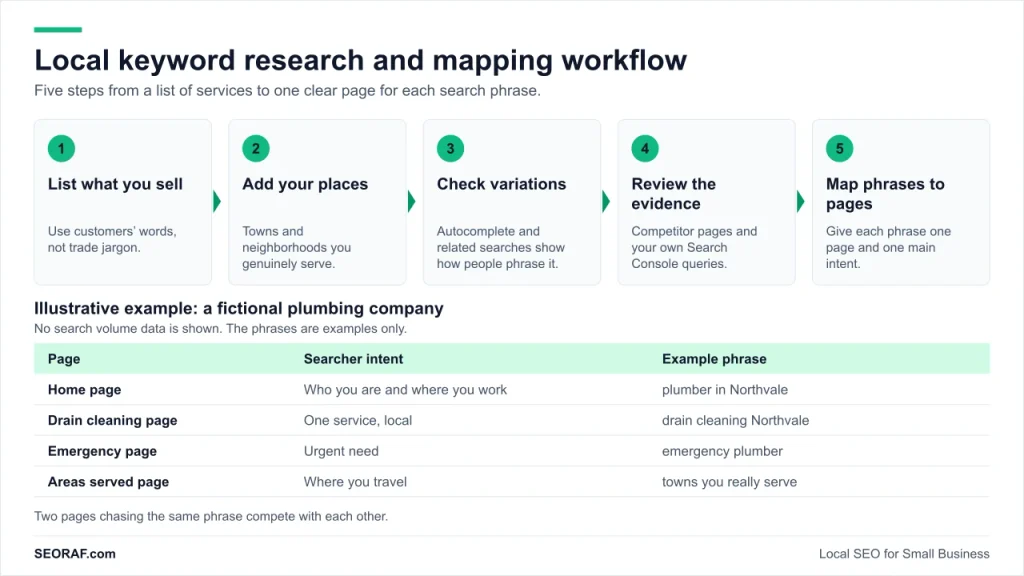
- List what you sell in the words a customer would use, not trade jargon.
- Add places you genuinely serve: town, neighborhood, nearby areas.
- Use Google’s autocomplete and related searches to see natural variations.
- Look at the pages and profiles of nearby competitors to see how they describe the same services.
- If your site already has impressions, check Search Console for the queries it appears for.
- Check your profile’s performance section for the search terms it was shown for, if your dashboard shows them.
I haven’t included search volume or difficulty figures, because they vary by tool and region. You can use Google’s free search features and Search Console for a starting point; third-party tools may provide additional keyword data, but their estimates vary by database and location.
Map keywords to pages, not to a spreadsheet
The goal is one clear intent per page. An illustrative map for a fictional two-person plumbing company:
| Page | Primary intent | Example phrase |
|---|---|---|
| Home page | Who we are and where we work | “plumber in Northvale” |
| Drain cleaning page | One service, local | “drain cleaning Northvale” |
| Water heater page | One service | “water heater replacement” |
| Emergency page | Urgent need | “emergency plumber” |
| Service areas page | Where we travel | Towns served |
An illustrative keyword-to-page map for a fictional plumbing company. No search volume data is shown.
Keep each phrase on the page it belongs to. Two pages fighting over the same phrase help neither.
Local On-Page SEO: Make Your Website Match Your Profile
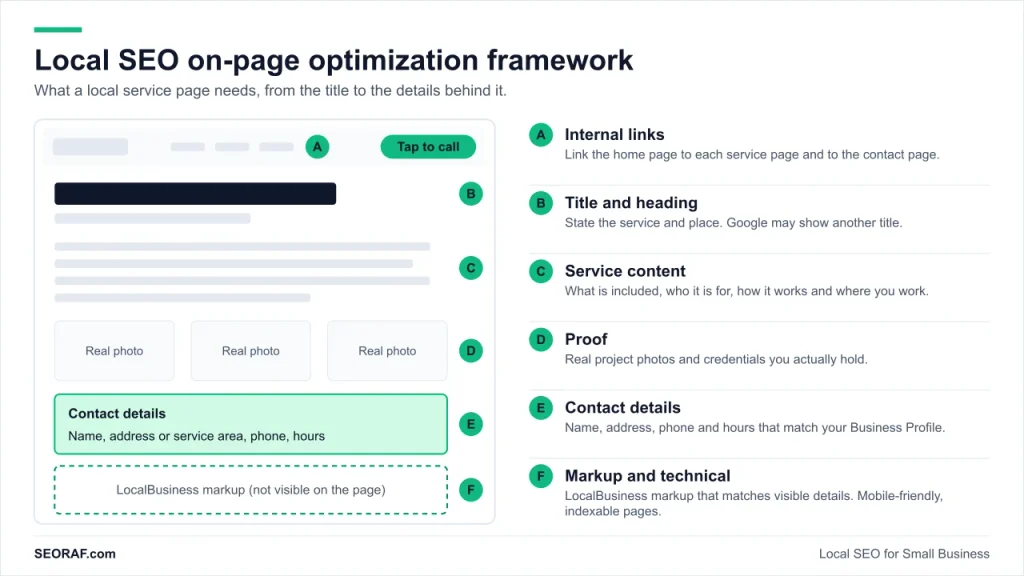
Your website is where a searcher decides. It also gives Google another place to confirm what you do and where.
The pages most local sites need
| Page | Purpose | What to include |
|---|---|---|
| Home | Orient the visitor quickly | What you do, where, how to contact you, proof you’re real |
| Service pages | One service per page | What’s included, who it’s for, typical process, area served |
| Contact | Make contact easy | Business name, appropriate public contact details, phone, hours, form, and a map only if you have a customer-facing location |
| About | Build trust | Who’s behind the business, real credentials you actually hold |
| Area / location pages | Only where justified | See the next section |
The pages most local business websites need, and what each should include.
Titles, headings and copy
Page titles should describe the page plainly. A pattern such as “Drain Cleaning in Northvale | Northvale Plumbing Co.” works because it tells a searcher what and where. Google’s title links are generated automatically from the content of a page and references to it on the web, so what appears in results can differ from the title you wrote. Treat title tags as strong suggestions and don’t obsess over them.
In the body, write for a customer. Describe the service, name the areas you really serve in a sentence or two, and show proof: real project photos, real certifications, a short process. One thing Google specifically calls out as keyword stuffing is blocks of text listing cities and regions a page is trying to rank for, so avoid the “We serve Northvale, Eastbrook, Millhaven, Rowan Heights…” paragraph.
Make contact effortless
- A phone number visitors can tap on mobile
- Hours that match your profile
- A short form that doesn’t ask for everything
- Links from the home page to each service page
Location and Service-Area Pages
Do you need them?
Not automatically. If you have one location, a strong home page, service pages and a contact page can be enough. Extra location pages make sense when you have separate real locations or genuinely distinct service areas with something specific to say about each.
What Google documents about the risk
Google documents: doorway abuse means creating sites or pages to rank for specific, similar queries that lead users to intermediate pages that aren’t as useful as the final destination. The examples include multiple domains or pages targeted at regions or cities that funnel users to one page, and substantially similar pages that are closer to search results than a clearly defined, browseable hierarchy.
Note what this doesn’t say. Google doesn’t say that every page mentioning a city is spam. The problem is the funneling, near-duplicate pattern. Google’s 2015 post on doorway pages suggests useful self-checks, such as whether pages target generic terms but show very specific content and whether they duplicate useful aggregations like locations.
My practical test
Could you swap the town name on the page for another town and change nothing else? If yes, the page probably adds nothing. That’s my heuristic, not a Google rule.
| Situation | Suggested approach | Risk |
|---|---|---|
| One location, one main area | Home + service pages, with a short “areas we serve” section | Low |
| One base, several distinct towns you really serve | A single service-area page with real detail; consider individual pages only where each has unique substance (local projects, specific considerations, local contact details) | Medium if pages are near-duplicates |
| Multiple real locations | One page per location with its own address, hours, photos, staff and links to its own profile | Low if each has real unique content |
| 40 towns, same copy with names swapped | Don’t | High |
Which location-page approach fits which situation, and the risk of each.
An illustrative example
Northvale Plumbing serves three nearby towns. Instead of three thin pages, it builds one strong “Areas we serve” page plus a service page for each core service, and adds a dedicated page for one town only after it has completed several jobs there and has real details to share (what typical plumbing problems look like in older housing stock there, for example). That structure survives scrutiny because the content gives each reader something specific.
NAP Consistency and Local Citations
What NAP and citations are
NAP stands for name, address and phone number. A citation is a mention of your business details on another site, such as a directory, chamber of commerce page or industry listing. Structured citations are formal listings. Unstructured ones are mentions in articles or blogs.
Why consistency is worth the effort
Google documents: Google’s local listing data comes from a mix of sources, including publicly available information like crawled web content and licensed data, and it may update profiles when sources report a mismatch.
Conflicting details across the web (an old phone number, a former address) give those sources conflicting signals and confuse customers. That is why I recommend consistency as housekeeping. It’s my judgment, not a named Google ranking factor.
Which listings matter
| Listing type | Examples | Priority for most small businesses |
|---|---|---|
| Google Business Profile | Primary | Essential |
| Other major platforms | Apple Business Connect, Bing Places, Facebook, Yelp | Usually worth claiming where available; availability varies by country, so verify |
| Industry directories | Trade bodies, professional directories | High if customers actually use them |
| Local organizations | Chambers of commerce, associations | Good if real memberships |
| Generic directory sites | Mass-submission directories | Low; avoid bulk submissions |
Which types of listings are worth claiming for most small businesses.
How many is enough?
Practitioners disagree. Whitespark advises against investing in sites few real people use. BrightLocal reports that removing a client from many directories didn’t hurt rankings or leads, while noting new businesses may be an exception (practitioners report, single-source observations). Meanwhile, Google’s link spam examples include low-quality directory or bookmark site links.
My recommendation: quality over volume. Claim the major platforms and the directories your customers genuinely use, then keep them accurate.
A clean-up routine
- Write down your exact name, address and phone, as you want them everywhere.
- Search your business name and phone number and list what appears.
- Correct wrong details at the source. Claim duplicates you control, and ask platforms to merge or remove the rest.
- Re-check every few months, especially after a move, rebrand or number change.
Listing-management tools can save time when you manage several locations, but compare their supported directories, update controls and recurring costs before choosing one.
Local Link Building and Community Mentions
Google documents: prominence is partly informed by how many websites link to your business. Google’s link spam policy lists buying or selling links for ranking, excessive link exchanges and automated link creation, though sponsorship links aren’t a violation if qualified with rel="nofollow" or rel="sponsored". Google also says that seeking inauthentic “mentions” across the web isn’t as helpful as it might seem.
For a small local business, legitimate links tend to come from real relationships:
- Community sponsorships: a youth sports team or local event usually lists sponsors, and a qualified link is fine.
- Suppliers and partners: trade partners often have “where to buy” or “find an installer” pages.
- Local press and blogs: a genuine story (an anniversary, a community project) is worth a pitch.
- Associations and chambers: membership listings are often legitimate links.
- Customer stories: with permission, a satisfied customer or partner may mention you.
What to avoid: paid link packages, link exchanges and bulk directory blasts. I wouldn’t expect link building to be your fastest local gain. For a small budget, reviews and an accurate profile usually deserve attention first (my recommendation, not a measured comparison).
Technical Local SEO and Local Schema
Technical local SEO is mostly about making sure search engines can access, understand and index the pages that matter. For the wider picture, see the SEORAF guide to technical SEO basics.
Make sure Google can find and index your pages
Google documents: pages need to be accessible to Google and eligible for indexing. Check that important URLs are not unintentionally blocked by robots.txt, a noindex directive or a login requirement. Use the URL Inspection tool to review a page’s indexed status and test its live version. You can request indexing for a small number of updated URLs; for many URLs, submit an XML sitemap. A request does not guarantee indexing, and crawling can take days or longer.
If you’ve published a service page and it never appears, this is the first place to look. The SEORAF guide to indexing and indexability explains the checks in more detail.
Page experience
Google recommends good Core Web Vitals, which it says align with what its core ranking systems seek to reward. The targets are LCP within 2.5 seconds, INP under 200 milliseconds and CLS under 0.1. In practice for a small site: compress images, avoid heavy sliders and pop-ups, and test on a real phone. Google doesn’t publish how much weight these carry relative to relevance, so don’t treat them as a magic fix.
Local business schema
Google documents: Google’s LocalBusiness rich-result documentation requires name and address; recommended properties include geo, openingHoursSpecification, telephone, url and priceRange. Use the most specific business subtype available, and place the markup on a page that clearly describes the business.
The important limitation for service-area businesses is that hiding a residential address on a Business Profile does not mean you should publish that private address in visible page content or invent a public address for schema. Only mark up accurate business information that is appropriate to publish and consistent with the page. If you do not have a suitable public address, do not add a fabricated one just to pursue rich-result eligibility; the page may not qualify for the LocalBusiness rich result. Google does not guarantee that valid markup will produce a search feature.
An illustrative example using fictional details:
{
  "@context": "https://schema.org",
  "@type": "Plumber",
  "name": "Northvale Plumbing Co.",
  "url": "https://www.example.com/",
  "telephone": "+1-555-0142",
  "address": {
    "@type": "PostalAddress",
    "streetAddress": "100 Example Street",
    "addressLocality": "Northvale",
    "addressRegion": "ST",
    "postalCode": "00000",
    "addressCountry": "US"
  },
  "openingHoursSpecification": [
    {
      "@type": "OpeningHoursSpecification",
      "dayOfWeek": ["Monday", "Tuesday", "Wednesday", "Thursday", "Friday"],
      "opens": "08:00",
      "closes": "17:00"
    }
  ]
}
A few cautions:
- Markup should match the information visitors can see on the page and the business details you are authorized to publish. Never expose a private home address just to satisfy a markup field.
- Don’t expect review stars for your own business. Google says pages using
LocalBusinessorOrganizationmarkup are ineligible for review-star features when the business controls the reviews about itself, including reviews shown through an embedded third-party widget. TheaggregateRatingproperty is intended for sites that capture reviews about other local businesses. - Test with Google’s Rich Results Test, and use a CMS plugin if hand-coding isn’t for you.
- Schema doesn’t have a documented ranking boost. Google’s documentation frames it as a way to provide explicit information, not as a local ranking factor.
Google’s business details guidance also recommends claiming your profile, verifying your site in Search Console, and adding Organization and Breadcrumb markup.
Local SEO in the AI Era
AI features have changed what searchers see, but less of the underlying work than the headlines suggest.
Google documents: Google’s guide to generative AI features says SEO best practices continue to apply, because those features are rooted in its core Search ranking and quality systems. To be eligible, a page must be indexed and eligible to appear in Search with a snippet. Google also says structured data isn’t required for these features, and that Merchant Center and Business Profiles can help products and services be visible in AI responses and other Search results. To see how your content appears in generative AI features, Google points to the Generative AI performance report in Search Console.
Two developments, both reported by news sources rather than Google documentation. Availability and rollout can change by country and over time:
- Ask in Maps: Google is replacing the public Q&A feature with an AI-powered Ask button, as covered in the profile section above.
- AI Mode booking: Google’s Robby Stein announced on November 4, 2026 that AI Mode now offers direct links to research and book home services through partners including Angi, Thumbtack, Housecall Pro and Jobber, available now in the US (reported by Search Engine Roundtable). If you offer home services in the US, find out whether those platforms apply to you. I’d treat this as something to watch, not a reason to rebuild your strategy.
You’ll also see claims like “your profile is AI’s primary source of truth.” Google’s wording is more modest: it says profiles can help with visibility, so I’d use that wording.
My recommendation: keep your profile accurate, collect genuine reviews, publish clear service pages and keep your listings consistent. That is both good local SEO and the best preparation for AI-driven discovery, with no separate checklist needed.
Measuring Local SEO Results
Measurement is where small businesses either waste time or get real insight. You don’t need a dozen dashboards.
What to track
| Metric | Where to find it | Caveat |
|---|---|---|
| Calls, direction requests, website clicks | The performance section of your Business Profile (Google’s help) | Calls counts clicks on the call button, not completed calls. Performance data is for verified profiles. Confirm current metric names in your dashboard |
| Search terms that showed your profile | Profile performance | Availability and detail can vary |
| Website queries, impressions, clicks | Google Search Console (see Google’s Search Console Help documentation) | Needs your site verified |
| Visits from your profile | Analytics, using tagged links | Requires setup |
| New reviews and average rating | Your profile | Quality and recency matter more than a number |
| Inquiries that became customers | Your own records | The most important number of all |
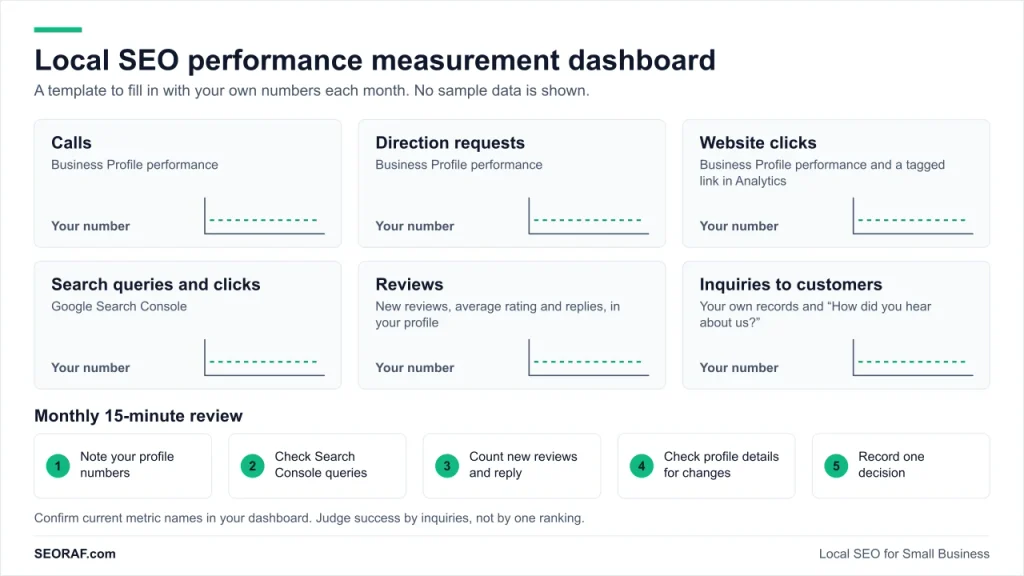
Local SEO metrics worth tracking, where to find each, and what to watch for.
Practical setup
- UTM tags: BrightLocal recommends tagging the website link on your profile so profile visits are identifiable in analytics (practitioners report).
- Call tracking: a tracking number can show which calls come from search, but keep the main number consistent and check local rules on call recording.
- Ask customers. “How did you hear about us?” on the booking form tells you things analytics can’t.
Rank tracking, with care
Rankings in local search vary by searcher location, so a single rank figure is misleading. Grid-style rank trackers can show variation across an area, but look at trends over weeks, not single readings.
A 15-minute monthly review
- Note calls, direction requests and website clicks from your profile.
- Check Search Console for queries and pages gaining or losing impressions.
- Count new reviews, and reply to any you’ve missed.
- Review your profile details for unexpected changes.
- Record one decision (“add a page for X,” “ask more customers for reviews”).
To connect these numbers to business value, compare them with the inquiries and sales recorded in your own business records.
Common Local SEO Mistakes and How to Fix Them
| Mistake | Why it matters | Fix | Where covered |
|---|---|---|---|
| Keywords or town in the business name | Google lists service and location info as not allowed in names and warns of suspension | Use your real-world name | Profile |
| Many categories chosen for keyword reach | Google says use as few, as specific as possible | Choose the specific primary and add only genuine ones | Profile |
| Virtual office or P.O. box address | Not eligible | Use a real eligible address or the service-area model | Choose Your Path |
| Links or offers in the description | Not allowed in the description | Describe services plainly | Profile |
| Offering discounts for reviews, screening who gets asked, setting staff quotas | Violates Google’s review policy | Ask everyone, no incentives | Reviews |
| Near-duplicate town pages | Doorway abuse risk | Build pages only with real unique content | Location pages |
| Inconsistent name, address or phone across listings | Conflicting information confuses customers and sources | Clean up and re-check | Citations |
| Marking up your own reviews as ratings | Not what the property is recommended for | Remove or follow Google’s guidance | Technical |
| No tracking | Can’t tell what works | Start the monthly review | Measurement |
| Chasing “#1 for everything” | Results vary by location | Aim for accuracy, reviews and visible local presence | How it works |
| Paying for guaranteed rankings or bulk reviews | Google says rankings can’t be bought | Walk away | DIY or hire |
Common local SEO mistakes, why each matters, the fix, and where this guide covers it.
If something looks wrong
- Profile suspended: read Google’s policy overview, fix the cause, then follow Google’s steps to fix suspended or disabled profiles before appealing.
- Not showing for expected searches: check verification, categories, address or service-area setup and whether the profile was edited.
- Wrong information appearing: check Google’s updates on your profile and your listings elsewhere.
Local SEO for Small Business: A 30-Day Implementation Plan
This plan is sequenced by what is foundational first. It doesn’t promise outcomes in 30 days. Local visibility depends on competition, location and many factors you don’t control.
| Days | Focus | Tasks |
|---|---|---|
| 1–3 | Decide your path | Confirm storefront, service-area or hybrid; run the eligibility checklist; write down your exact name, address, phone, hours |
| 4–7 | Profile | Claim or create; verify; set name, specific categories, address or service area, hours, phone, website, description |
| 8–10 | Profile content | Add real photos, list services; check Profile Strength |
| 11–14 | Reviews | Create your review link or QR code; write a simple request; reply to any existing reviews |
| 15–18 | Website basics | Make sure each core service has its own page; confirm contact details and hours match the profile; add click-to-call |
| 19–21 | Keyword and page mapping | List main services and places; assign each to one page; fix titles and headings |
| 22–24 | Listings | Search your name and phone; claim major platforms and key directories; correct inconsistencies |
| 25–27 | Technical | Verify the site in Search Console; submit a sitemap; check key pages are indexed; test mobile speed; add LocalBusiness schema if relevant |
| 28–30 | Measurement | Set up a UTM-tagged profile link; note baseline numbers; schedule the 15-minute monthly review |
A 30-day sequence for local SEO, grouped by day range, focus and tasks.
Adjusting for your business type
- Storefront: put extra effort into signage consistency, hours accuracy and photos of the premises.
- Service-area: spend more on service pages and the areas-served page, and make sure the address is hidden on the profile.
- New business: BrightLocal suggests new businesses may benefit more from additional listings than established ones (practitioners report). Start with the essentials, then expand.
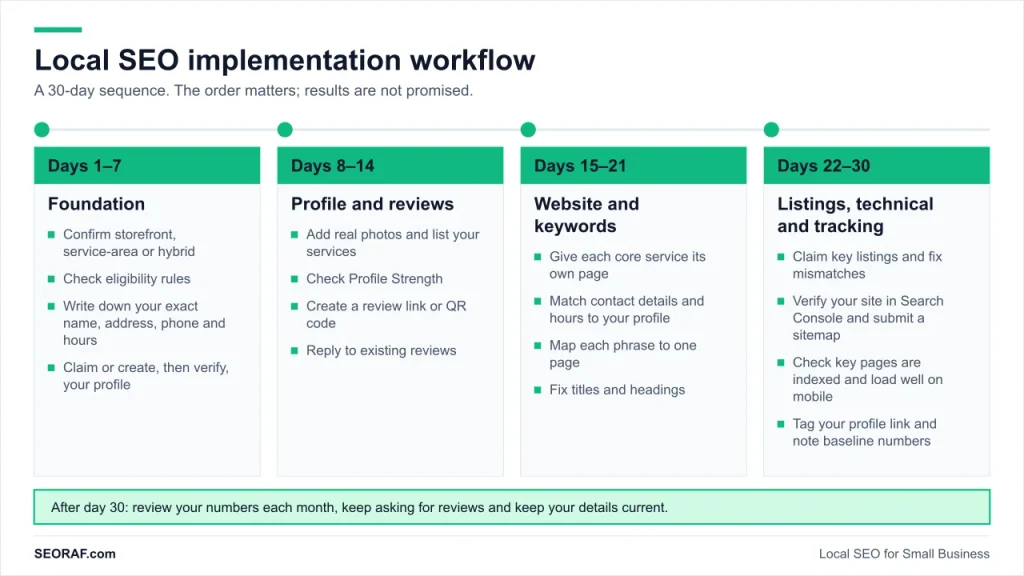
After the first 30 days, the plan becomes a routine: collect reviews continually, update your profile when anything changes, add content where customers ask questions and review your numbers each month.
DIY or Hire Help? Costs, Tools and Red Flags
When doing it yourself is realistic
Setting up and maintaining your profile, asking for reviews, cleaning up listings and tracking a few numbers are all within reach for a motivated owner. Many of the tasks above take hours, not specialist skill.
When help is worth considering
- You have several locations to manage.
- You lack time or confidence with website changes or schema.
- You’re in a very competitive area and need a deeper audit.
- You’ve had a suspension or a persistent listing problem.
What affects cost
Published price ranges for local SEO services vary widely and come from sellers, so I haven’t quoted a figure. Scope drives cost: number of locations, amount of content, review management, link outreach and reporting. Ask any provider what deliverables you receive each month.
Red flags
- Guaranteed rankings. Google says you can’t pay for a better local ranking.
- Bulk or purchased reviews.
- Taking over your profile. Google’s rules say representatives should work with the owner and transfer ownership on request, so insist the profile stays in your account.
- Vague reporting that doesn’t connect work to calls and inquiries.
- Mass-produced city pages.
If you decide to use paid software or hire help, ask for a clear scope, the exact deliverables, account ownership terms and reporting tied to customer inquiries. Do not treat a tool subscription or audit as a substitute for accurate business information and useful service pages.
Frequently Asked Questions
How long does local SEO take?
There’s no reliable number. It depends on competition, your location and how complete your profile and site are. Setup changes can be quick, while reviews and reputation build over months. Treat any specific timeline as an estimate, not a promise.
Do I need a website to do local SEO?
A profile can exist without one, but a website lets customers learn more and gives Google another source to understand your business. If you only have budget for one improvement beyond the profile, clear service pages and contact details are usually it.
Do local citations still matter?
Accurate, consistent listings help customers and give Google dependable data. Mass-submitting to low-quality directories doesn’t. Focus on the platforms people actually use.
Is local SEO worth it for a very small business?
For businesses that depend on nearby customers, the core tasks mostly cost time rather than money: an accurate profile, genuine reviews and consistent details. Whether it brings customers depends on your market, so measure inquiries, not only rankings.
Can an online-only business use local SEO?
Not through a Business Profile, since Google’s eligibility rules exclude online-only businesses. You can still serve local audiences with location-relevant content and genuine local relationships, but expect different tactics.
Should I choose local SEO or paid ads?
They answer different needs. Ads buy visibility for as long as you pay, while local SEO builds an asset over time. Google also says there’s no way to pay for organic local ranking. Many small businesses use both, but start with a solid profile.
Can a service-area business have a Google Business Profile?
Yes, if it meets customers in person at their locations. A service-area business uses one profile for its central location with a designated service area and hides the address. See Choose Your Path for the rules.
How do I show up on Google Maps?
Create or claim an accurate, verified Business Profile with your real details, then build genuine reviews and a website that matches your profile. Google says there’s no way to request or pay for a better local ranking, so accuracy and honest reputation are the realistic levers. Start with the Google Business Profile section.
Conclusion and Key Takeaways
Local SEO for small business comes down to accuracy, consistency and proof. Choose the right profile type, keep your details honest and consistent, earn reviews the way Google allows, and make your website show customers what you do and where. Then measure the few numbers that matter: calls, direction requests, website clicks and real inquiries.
None of this guarantees a ranking, and anyone who promises one is overstating what’s possible. But it gives Google accurate information and gives customers a reason to choose you. Start with your profile this week, follow the 30-day plan, and review your numbers monthly.
- Choose the right profile model first. It determines most of Google’s rules for you.
- Accuracy beats cleverness: real name, real address or service area, specific categories, honest description.
- Reviews are earned by asking everyone, not through incentives or filtering.
- Your website should confirm and extend your profile, with one clear page per service.
- Keep listings consistent, and avoid bulk directories and doorway-style town pages.
- Measure a handful of numbers monthly, and judge success by inquiries, not by one ranking.
Sources
Google documentation (checked November 2026)
- Guidelines for representing your business on Google
- Business eligibility and ownership guidelines
- Tips to improve your local ranking on Google
- Tips to get more reviews
- Maps user-generated content policy: prohibited and restricted content
- Manage your Profile Strength
- Verify your business on Google
- Overview of Google Business Profile policies
- Fix suspended or disabled profiles
- Understand Google updates on your Business Profile
- How Google sources and uses information in local listings
- Understand your Business Profile performance and insights
- Local business (LocalBusiness) structured data
- Review snippet structured data and self-serving review rules
- URL Inspection tool
- Ask Google to recrawl your URLs
- Establish your business details with Google
- Spam policies for Google web search
- An update on doorway pages (2015)
- Influencing your title links in search results
- Core Web Vitals
- Optimizing your website for generative AI features on Google Search
Practitioner and news sources
- BrightLocal: Local SEO for small businesses
- Whitespark: Small business local SEO guide
- Search Engine Roundtable: Google removing Q&A in Maps for the Ask button
- Search Engine Roundtable: Google testing a revamped Q&A feature
- Search Engine Roundtable: AI Mode home services booking