
SEO Tools by Use Case: Choose the Right Tool for Each SEO Task
By: Mousume Akter, Founder & Editor, SEORAF
Last reviewed: October 4, 2026
Affiliate disclosure: Some links on SEORAF may be affiliate links. This does not decide which tools are mentioned or how they are described.
Corrections: Please use the contact information provided on the SEORAF website to report factual corrections or outdated information.
SEO tools by use case means choosing software according to the specific SEO job you need to complete—such as finding keywords, monitoring search performance, auditing a website, improving content, tracking rankings, or preparing reports—rather than choosing a tool simply because it is popular, inexpensive, or belongs to a particular category.
This page is a practical routing guide for matching common SEO tasks with the type of tool that can help. It is not a ranking of the best SEO tools, and inclusion does not mean that one product is better than another.
The examples below are based on publicly available product information that could be checked during review. Features, plans, limits, integrations, pricing, and trial terms can change, so verify current details before making a purchase decision.
Scenarios throughout this guide are illustrative, not case studies or claims about SEORAF client results.
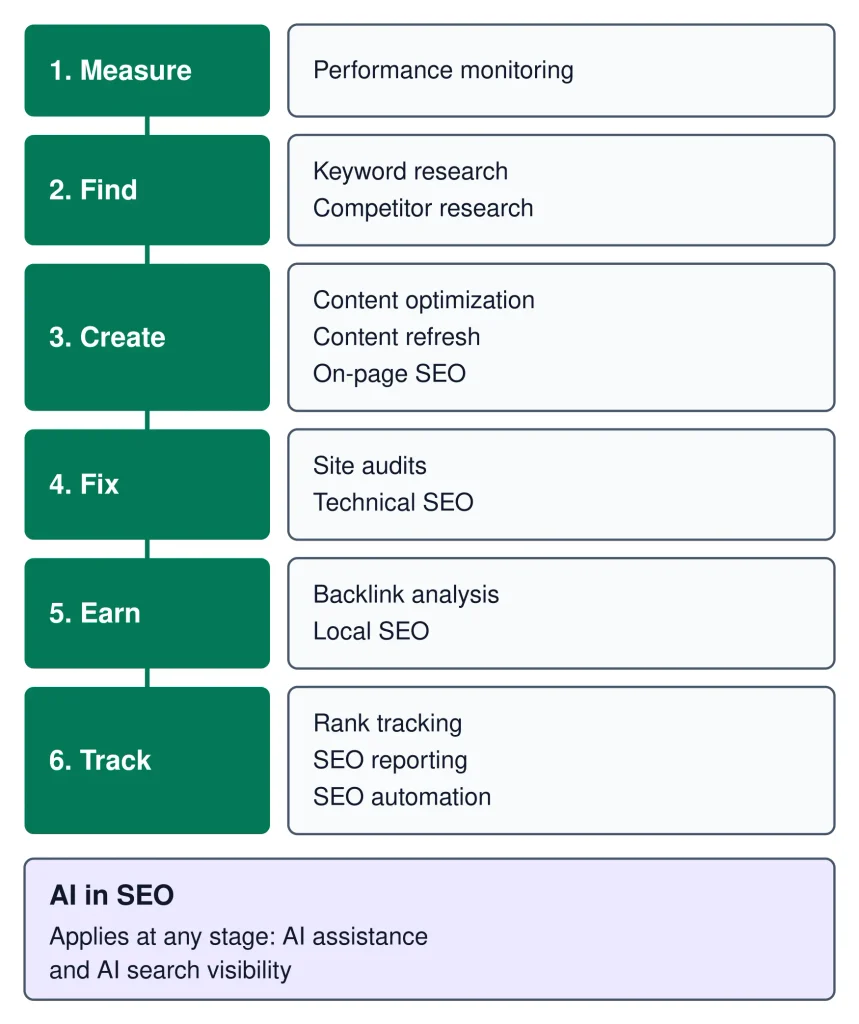
SEO work often moves through measurement, discovery, creation, technical improvement, authority building, and ongoing tracking
How to Use This Page
SEORAF uses an evidence-based approach to this guide. Product descriptions are based on publicly available information that can be checked at the time of review, while search-engine guidance should be evaluated against current official documentation.
Tool features, pricing, limits, integrations, trial terms, and product names can change. A statement that was accurate at one review date may require revision later.
If you identify an outdated or inaccurate product claim, please use the SEORAF contact information to report the correction.
Find Your Use Case Fast
The table below is organized around SEO jobs rather than product categories. Tool names are listed alphabetically within each row where practical and are not ranked.
| Your SEO task | What to look for | Examples to investigate |
|---|---|---|
| Monitor search performance | First-party search and website data | Ahrefs Free, Google Analytics, Google Search Console |
| Find keywords to target | Keyword databases, suggestions, and planning data | Ahrefs, Google Keyword Planner, SE Ranking, Semrush |
| Research competitors | Competitive estimates and search visibility data | SE Ranking, Semrush |
| Improve content before publishing | Content briefs, topic research, and optimization assistance | Semrush Content Toolkit |
| Identify content to refresh | Performance data and page inventories | Google Search Console, Screaming Frog |
| Optimize individual pages | CMS-level SEO controls and on-page guidance | Rank Math |
| Find website problems | Site crawlers and technical audit reports | Ahrefs Free, Screaming Frog, SE Ranking, Semrush |
| Investigate crawling, indexing, and speed issues | First-party diagnostics and configurable crawlers | Google Search Console, Screaming Frog |
| Analyze backlinks | Link indexes and backlink reports | Ahrefs, Ahrefs Free for verified sites |
| Work on local SEO | Local rankings, listings, and local search diagnostics | BrightLocal, Semrush Local toolkit |
| Track rankings | Keyword and position tracking | SE Ranking, Semrush |
| Show SEO progress | Dashboards, exports, and reporting workflows | SE Ranking, Screaming Frog |
| Reduce repetitive SEO work | Scheduling, alerts, integrations, or APIs | SE Ranking, Screaming Frog |
| Use AI for SEO workflows | AI-assisted research, content, or AI-search visibility features | Ahrefs, SE Ranking, Semrush |
This table is a navigation aid, not a product ranking. A tool can be suitable for one task while being unnecessary for another.
New to SEO? Start Here
If you are new to SEO, you do not need a large software stack immediately. Start by understanding what is happening on your own website and in search.
SEO basics can provide the foundation for understanding how search engines discover, interpret, and rank pages. From there, move into technical SEO, keyword research, and content SEO as your needs become more specific.
For a beginner, a sensible sequence is:
- Understand your existing search performance.
- Identify the queries and pages that matter.
- Check whether search engines can crawl and index important pages.
- Research topics and keywords before creating new content.
- Improve existing pages before automatically producing more pages.
- Track meaningful changes over time.
More software does not automatically mean better SEO. The useful tool is the one that provides evidence relevant to the decision you are trying to make.
Five Questions to Ask First
Before choosing an SEO tool, answer five basic questions.
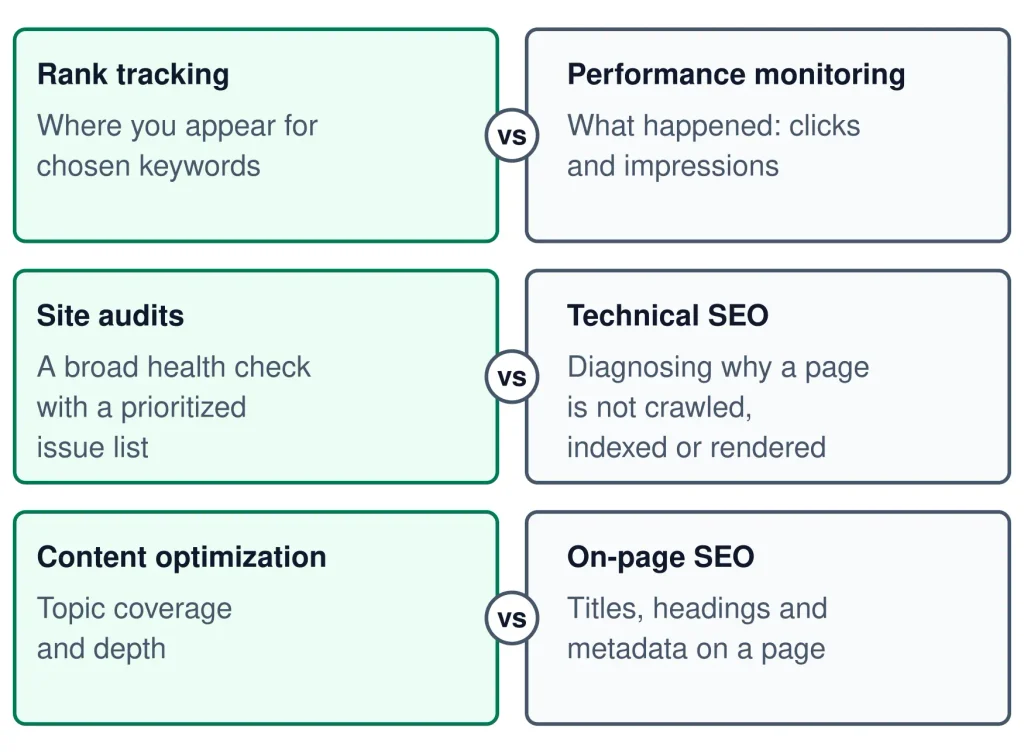
| Question | Why it matters |
|---|---|
| What exact job am I trying to complete? | It prevents buying broad software for a narrow problem. |
| Do I need first-party or third-party data? | The source affects what the numbers can actually tell you. |
| Do I need current observations or estimates? | Observed website data and vendor estimates answer different questions. |
| How much data do I actually need? | Large limits may be unnecessary for a small site. |
| Can I verify the result independently? | Independent checks reduce the risk of treating an estimate as fact. |
Shortcuts by Situation
If you already know the problem, use the shortest route:
- “I need to understand my search traffic.” Start with first-party search and analytics data.
- “I need keyword ideas.” Start with keyword research and planning tools.
- “My pages are not being indexed.” Investigate crawling, indexing, robots.txt, redirects, canonicalization, and technical signals.
- “My site has technical problems.” Use a crawler or audit tool, then verify important findings independently.
- “I need to monitor target queries.” Use a rank-tracking workflow.
- “I need local visibility data.” Use tools designed around local rankings and listings.
- “I need to report progress.” Choose a reporting workflow that combines the data sources your stakeholders actually need.
- “I want to use AI in SEO.” First define whether you need content assistance, research assistance, automation, or AI-search visibility monitoring.
Seeing What Happens in Search: SEO Performance Monitoring
SEO performance monitoring answers a basic question: what is happening to your website in search and after users arrive?
For first-party search data, Google Search Console can show information such as clicks, impressions, and average position for your site’s search performance. Google Analytics can provide broader website and app measurement.
Ahrefs Free can also provide SEO and website information for verified websites, including search and backlink-related data. The important distinction is that these sources do not all measure the same thing.
Use performance-monitoring tools when you need to:
- identify pages receiving search visibility;
- find queries associated with impressions or clicks;
- compare performance across time periods;
- spot pages that deserve investigation;
- combine search data with broader website measurement.
Do not treat an SEO tool’s estimated traffic number as equivalent to your site’s actual analytics or Search Console data.
SEO tools can expose different kinds of data, so the source and method matter as much as the number.
Finding What to Target: Keyword Research
Keyword research helps you identify the language people use when searching and evaluate which topics may deserve attention.
Different tools provide different forms of keyword evidence. Some rely on their own databases or estimates, while first-party platforms can provide information associated with your own properties or advertising activity.
Google Keyword Planner sits inside Google Ads. It suggests keywords and shows estimated monthly searches. Google’s documentation says you need a Google Ads account with setup completed, including billing details, so check the current requirements before relying on it. See the official Google Ads Keyword Planner guide for details.
Paid SEO platforms such as Ahrefs, SE Ranking, and Semrush can provide additional keyword research workflows. The exact databases, limits, metrics, and plan access should be checked against the current product documentation.
When comparing keyword tools, ask:
- Where does the keyword data come from?
- Is the search volume observed, modeled, or estimated?
- Which countries and search engines are covered?
- Can you analyze related queries and search intent?
- Are difficulty or traffic-potential metrics vendor-specific?
- Does the plan provide enough data for your actual workflow?
A keyword metric is evidence for a decision, not a guarantee that a page will rank.
Understanding Who You’re Up Against: Competitor Research
Competitor research uses available search and website data to understand which topics, queries, pages, or visibility patterns deserve investigation.
Tools such as SE Ranking and Semrush provide competitive research workflows. Their competitor metrics should be treated as estimates or vendor-specific measurements unless the source is directly observable.
For example, a tool may estimate a competitor’s organic traffic or show keywords associated with a competing domain. That can help you form hypotheses, but it does not give you access to the competitor’s private analytics.
Useful competitor research questions include:
- Which topics appear repeatedly among relevant competitors?
- Which search intents are already well served?
- Where might the existing search results leave useful gaps?
- Which pages deserve manual review?
- Which competitor metrics can be independently checked?
The goal is not to copy competitors. It is to understand the search landscape and identify decisions that deserve further research.
Improving Content: Content Optimization
Content optimization tools can help organize research, identify related topics, prepare briefs, or evaluate drafts against selected criteria.
Semrush Content Toolkit is one example of a product positioned around content research, briefs, writing assistance, and optimization workflows. Check the current product documentation and plan details before depending on a particular feature.
Regardless of the software, content optimization should begin with search intent. A page can contain many related terms and still fail to answer the user’s actual question.
A practical content review should consider:
- the primary search intent;
- the page’s main promise;
- the completeness of the answer;
- evidence and source quality;
- clear information architecture;
- readability and accessibility;
- internal links that genuinely help the reader;
- original value beyond repeating existing search results.
Updating What You Already Have: Content Refresh
Content refresh is a use case rather than a specific software category. The objective is to decide which existing pages need improvement and what should change.
Google Search Console can help identify pages and queries whose search performance has changed. A crawler such as Screaming Frog can help build a page inventory and inspect technical or on-page elements across a site.
A useful refresh workflow is:
- Identify pages with meaningful impressions, clicks, or historical visibility.
- Check whether the page still matches the search intent.
- Review outdated claims, examples, screenshots, statistics, or product information.
- Check titles, headings, links, canonicalization, and indexability.
- Improve the content where the evidence supports a change.
- Monitor the page after publication rather than assuming an improvement will produce a specific ranking result.
Refreshing a page does not necessarily mean rewriting everything. Sometimes the correct action is to update a small section, strengthen evidence, improve internal linking, or remove information that is no longer useful.
Tuning Individual Pages: On-Page SEO
On-page SEO involves improving elements of an individual page so that its content, structure, and technical signals are clear to users and search engines.
For WordPress websites, Rank Math is an example of a WordPress SEO plugin that provides controls and guidance related to on-page SEO. The exact features available can vary by version and plan, so verify current details before choosing it for a particular workflow.
On-page work can include:
- page titles;
- headings;
- descriptions;
- internal links;
- image alternatives;
- canonical settings;
- indexing directives;
- structured data where appropriate;
- content structure and clarity.
An on-page plugin can make implementation easier, but it cannot determine whether the underlying content deserves to rank.
Finding What’s Broken: Site Audits
Site-audit tools crawl a website and organize potential technical and on-page issues for investigation.
Ahrefs Free provides site-audit functionality for verified websites and reports a broad set of technical and on-page issues. Screaming Frog SEO Spider is a desktop crawler with extensive crawl configuration. Its free version has a 500-URL crawl limit, while additional functionality and larger crawl capacity are available with a licence.
SE Ranking and Semrush also provide website-audit workflows. Product limits and available features should be checked against the current plan documentation.
A site audit is most useful when it helps you prioritize issues rather than simply producing a large number of warnings.
For example, an audit may identify broken links, redirects, duplicate content, indexability issues, missing metadata, or problems involving JavaScript and structured data. Each finding still needs context.
Before fixing an issue, ask:
- Does the affected URL matter?
- Is the issue reproducible?
- Does another source confirm it?
- Could the warning be intentional?
- What user or search-engine problem would the proposed fix actually solve?
Fixing Crawl, Index and Speed Problems: Technical SEO
Technical SEO covers the systems that allow search engines to discover, crawl, process, and understand a website.
Important areas include crawling, indexing, redirects, canonicalization, XML sitemaps, JavaScript rendering, robots.txt, structured data, mobile usability, and Core Web Vitals.
Google Search Console is particularly useful when investigating issues connected to your own verified property. A configurable desktop crawler such as Screaming Frog can provide a broader site-wide view.
Use technical SEO tools to answer specific questions rather than treating every warning as an emergency.
| Problem | Useful evidence to inspect |
|---|---|
| Crawling | Crawl reports, internal links, response codes, robots.txt, crawl configuration |
| Indexing | Search Console indexing information, canonical signals, page availability |
| Page speed | Field data, lab measurements, Core Web Vitals, page resources |
| JavaScript | Rendered HTML, crawl results, browser testing, search-engine documentation |
| Site architecture | Internal links, crawl depth, URL structure, navigation |
No single crawler or audit score should be treated as a complete technical SEO diagnosis.
Evaluating and Earning Links: Backlink Analysis
Backlink analysis helps you understand which external pages link to a website and how those links are represented in a tool’s index.
Ahrefs provides backlink analysis, while Ahrefs Free provides backlink-related information for verified websites within its available limits.
Backlink databases are not identical to a complete record of every link on the web. Coverage depends on the vendor’s crawling, indexing, processing, and reporting methods.
Use backlink tools to investigate questions such as:
- Which pages attract links?
- Which domains link to the site?
- Which links may deserve manual review?
- Are important pages receiving relevant references?
- Are apparent link patterns consistent with other available evidence?
Backlink analysis should support legitimate digital PR, editorial outreach, partnerships, or useful content—not manipulative link schemes.
Winning Nearby Searches: Local SEO
Local SEO tools focus on search visibility connected to a location, local business listings, and geographic search results.
BrightLocal provides local SEO workflows that can include local rank tracking, citation-related monitoring, and local search auditing. Semrush also offers local SEO functionality through its Local toolkit.
Local SEO tools can be useful when the question is not simply “How does this website rank?” but “How does this business appear for relevant searches in a particular location?”
When evaluating a local SEO tool, check:
- which locations and search environments it supports;
- how often rankings are collected;
- how local results are represented;
- which listing or citation functions are included;
- whether limits apply per location, keyword, or project.
Local rankings can vary by location and search context, so a single ranking snapshot may not represent every searcher.
Tracking Positions Over Time: Rank Tracking
Rank tracking is useful when you need to monitor selected queries over time rather than manually checking search results.
SE Ranking and Semrush both provide rank-tracking workflows. The useful configuration depends on the queries, locations, devices, search engines, and reporting frequency you need.
Before choosing a tracker, determine:
- how many keywords you actually need to monitor;
- which countries or locations matter;
- whether desktop and mobile results both matter;
- how frequently rankings need to be collected;
- which SERP features need to be observed;
- how the tool handles historical data.
Rank tracking is a measurement system. It does not guarantee that a position will remain stable or that a higher position will automatically produce more valuable business outcomes.
Showing Progress: SEO Reporting
SEO reporting turns multiple data sources into information that another person can understand and use.
A good report should answer what changed, where it changed, why it may have changed, and what should be investigated next.
SE Ranking provides reporting workflows and integrations that can be useful for combining SEO measurements. Screaming Frog also provides reporting and export workflows, including options connected with scheduled crawl reporting.
The exact reporting stack should match the audience. A technical team may need crawl details, while a content team may need query and page performance. A business stakeholder may need a shorter summary of progress and priorities.
| Audience | Useful reporting focus |
|---|---|
| SEO specialist | Queries, pages, technical findings, links, rankings, changes |
| Content team | Content performance, queries, pages needing improvement |
| Technical team | Crawlability, indexability, redirects, rendering, performance |
| Business stakeholder | Clear trends, completed work, evidence, limitations, next priorities |
A report should distinguish measured results from interpretation. If a cause has not been established, label it as a hypothesis rather than a fact.
Removing Repetitive Work: SEO Automation
SEO automation is useful when a repeatable task can be scheduled or connected to another system without removing necessary human review.
Screaming Frog SEO Spider supports scheduled crawls, while SE Ranking offers automation-related capabilities such as scheduled workflows and an API add-on. The availability of particular functions can depend on the current product and plan.
Good automation candidates include:
- scheduled site crawls;
- recurring reports;
- routine monitoring;
- data exports;
- notifications for defined conditions;
- repeatable data collection.
Do not automate a decision simply because the data collection can be automated. SEO recommendations still require context and review.
Using AI in SEO: AI Assistance and AI Search Visibility
AI can support SEO workflows in several different ways. Content assistance, research assistance, workflow automation, and AI-search visibility are separate use cases and should not be treated as one identical problem.
Ahrefs’ pricing information mentions researching brands across a database of AI prompts and tracking your own prompts. Check which plan includes this.
SE Ranking lists an AI Search add-on. Check which AI platforms it covers before relying on it.
Semrush also offers AI-related SEO functionality. Because AI features and coverage can change quickly, verify the current product documentation before selecting a tool for a specific AI-search workflow.
When evaluating AI SEO software, ask:
- What exact task does the AI feature perform?
- What data does it use?
- Can the underlying evidence be checked?
- Does the feature generate content, analyze content, or measure visibility?
- Which AI search environments are actually supported?
- Which plan provides the feature?
AI-generated output still requires human fact-checking, editorial judgment, originality review, and quality control.
[SVG PLACEHOLDER — SEO tool decision path: Define task → Identify evidence → Select tool → Verify data → Take action]The tool should follow the decision you need to make, not determine the decision for you.
Know What Kind of Data You’re Looking At
One of the most important differences between SEO tools is where their numbers come from.
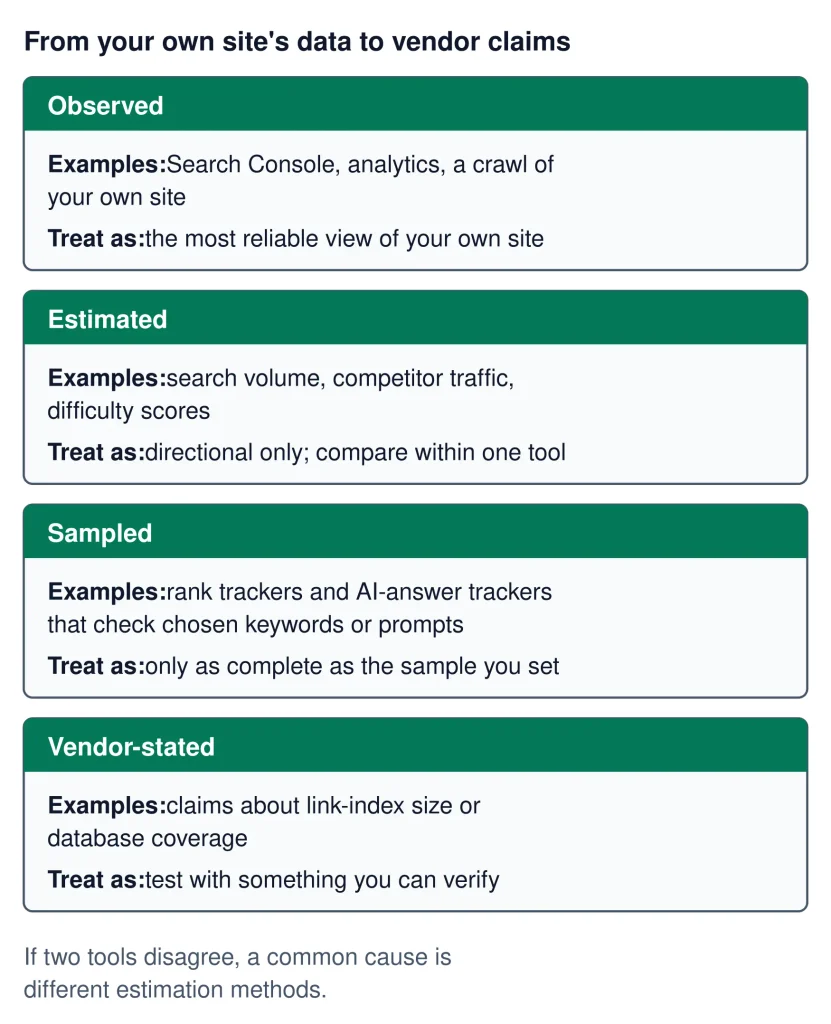
| Data type | What it means | Typical examples |
|---|---|---|
| Observed | Data collected directly from a property or measurement environment | Search Console data, analytics data, website crawls |
| Estimated | A modeled value based on a vendor’s methodology | Estimated traffic, keyword volume, difficulty |
| Sampled | Information collected from a defined subset or measurement process | Some ranking or visibility measurements |
| Vendor-stated | A figure or description supplied by the software provider | Index size, coverage, supported databases |
This distinction matters when comparing tools. Two products can display different numbers for the same website without one necessarily being technically “wrong.” They may be measuring different things or using different methodologies.
Whenever a metric could influence an important decision, look for the source, methodology, measurement period, and limitations.
Building Your SEO Tool Stack
An SEO tool stack does not need to contain every available platform. A small stack can cover a large portion of routine SEO work if each tool has a clear role.
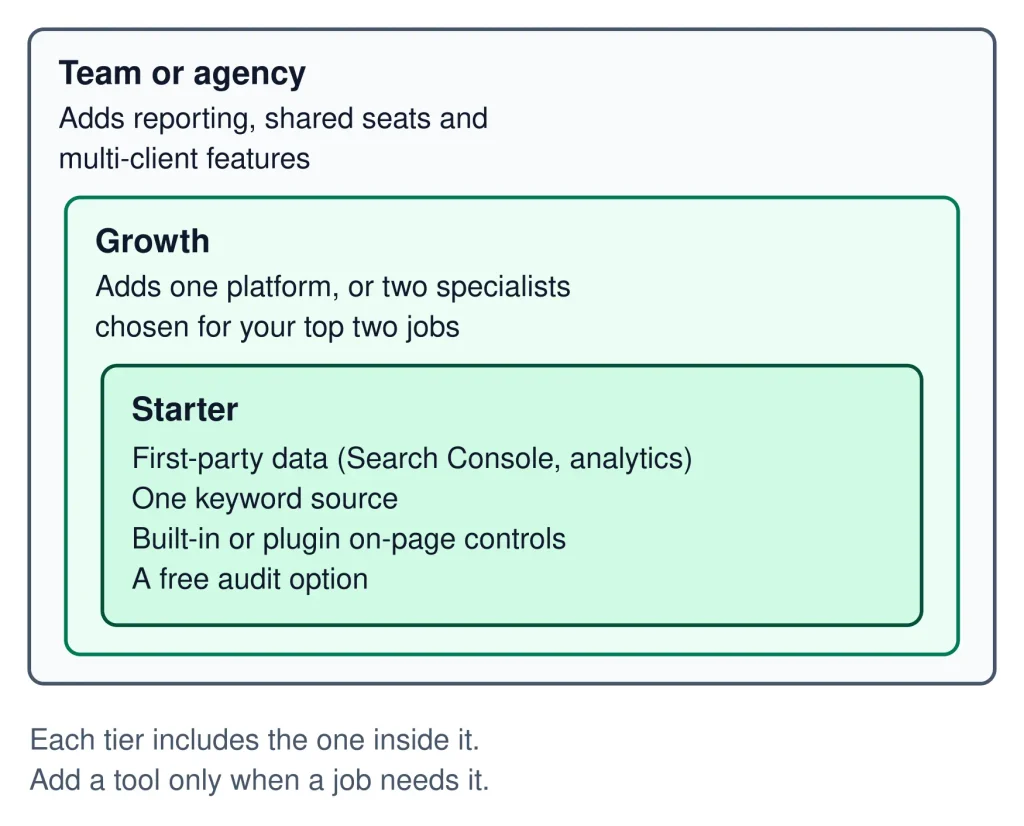
Starter Stack
A beginner may start with first-party data, basic crawling, and a focused keyword workflow. This provides evidence about the website before adding specialized software.
Growth Stack
A growing website may add broader keyword research, competitor research, rank tracking, content analysis, and recurring site audits.
Team Stack
A larger workflow may require shared reporting, scheduled crawls, integrations, APIs, larger datasets, and clearer ownership of recurring SEO tasks.
The right stack depends on site size, workflow complexity, search markets, reporting requirements, and budget. Paying for overlapping functionality can create complexity without adding useful evidence.
| Need | Start with | Add complexity when |
|---|---|---|
| Understand current search visibility | First-party search data | You need broader competitive or keyword datasets |
| Find technical issues | A crawler and first-party diagnostics | The site requires deeper crawling or recurring audits |
| Research topics | A focused keyword workflow | You need larger datasets or competitor comparisons |
| Track rankings | A small tracked keyword set | You need many locations, keywords, or historical reporting |
| Report progress | A simple evidence-based report | Multiple stakeholders need automated dashboards or exports |
Before You Pay: How to Test Any SEO Tool
Do not choose an SEO tool solely from its feature list. Test whether its data and workflow solve your actual problem.
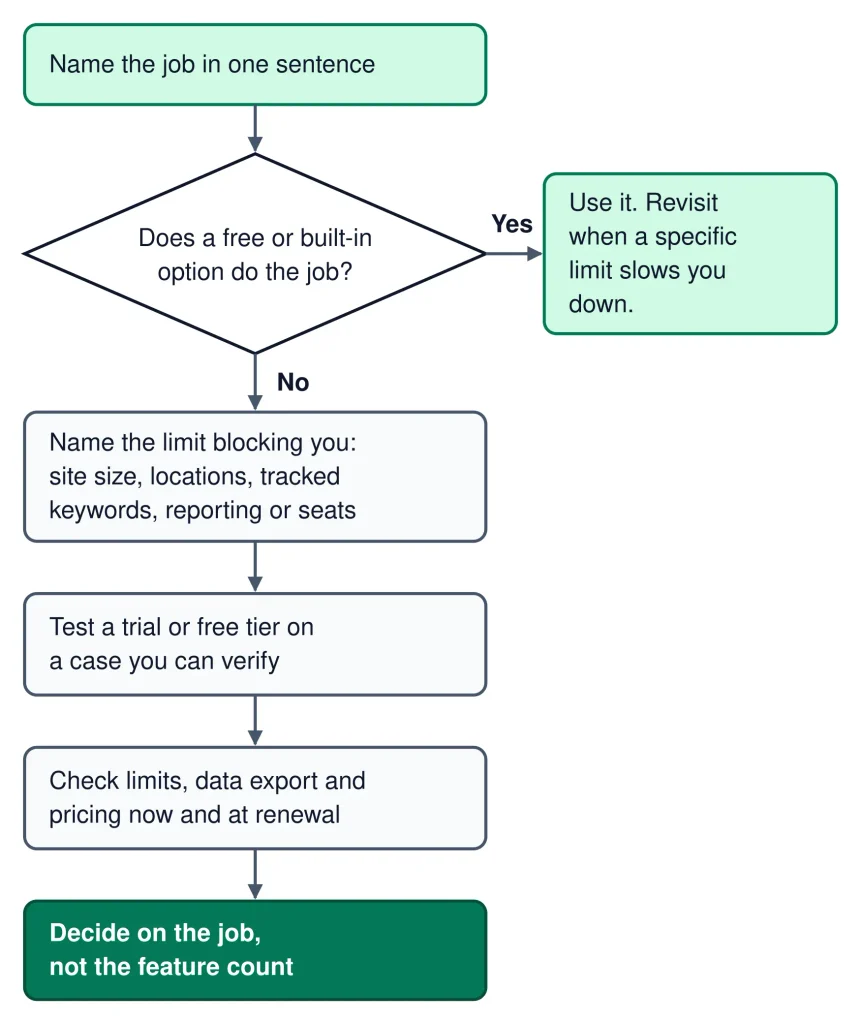
- Define one task. Write down exactly what you need the tool to accomplish.
- Use your own website where possible. This lets you compare the tool with information you can independently verify.
- Check the data source. Determine whether the metric is observed, estimated, sampled, or vendor-stated.
- Test the workflow. See how many steps are required to reach a useful decision.
- Check limits. Review keyword, crawl, project, location, export, user, or historical-data limits.
- Check plan requirements. A feature shown on a product page may belong to a particular plan.
- Check current pricing and trial terms. Trial lengths and plan details can change.
- Verify important findings elsewhere. Especially when a tool reports a serious technical or performance issue.
- Calculate actual usage. A lower-priced tool that does not fit your workflow may cost more in time.
- Cancel unnecessary tools. If a platform does not solve a recurring problem, there may be little reason to keep paying for it.
For example, a crawler may identify a large number of technical warnings. The useful question is not how many warnings exist; it is which findings affect important pages and deserve action.
SEO Tool Red Flags
Be cautious when an SEO product or sales page:
- guarantees rankings or traffic;
- presents estimates as if they were first-party measurements;
- does not clearly explain important data limitations;
- uses a single proprietary score as a substitute for diagnosis;
- hides important plan restrictions until checkout;
- encourages automated actions without review;
- makes unusually broad claims that cannot be independently checked;
- treats AI-generated output as automatically accurate.
A credible evaluation should separate documented capabilities from interpretation and should acknowledge uncertainty where the evidence is incomplete.
How This Page Is Maintained
SEORAF uses an evidence-based approach to this guide. Product descriptions are based on public information that can be checked at the time of review, while search-engine guidance should be evaluated against current official documentation.
Tool features, pricing, limits, integrations, trial terms, and product names can change. A statement that was accurate at one review date may require revision later.
If you identify an outdated or inaccurate product claim, verify the current vendor documentation first and submit the correction using the contact information above.
FAQ
What are SEO tools by use case?
SEO tools by use case are tools selected according to the SEO task you need to complete. Examples include keyword research, technical auditing, content optimization, rank tracking, local SEO, backlink analysis, reporting, and SEO performance monitoring.
Do I need many SEO tools?
No. The number of tools you need depends on your website, workflow, technical requirements, reporting needs, and budget. A smaller stack with clear roles can be more useful than several overlapping subscriptions.
Are SEO tool metrics accurate?
Accuracy depends on the metric and its source. First-party measurements, vendor estimates, sampled data, and vendor-stated figures should not be treated as interchangeable. Check the methodology and use independent evidence when a decision is important.
What is the best SEO tool?
There is no single best tool for every SEO task. The appropriate choice depends on the job, required data, website size, geographic coverage, workflow, and budget.
Can free SEO tools be enough?
They can be enough for some workflows, particularly when you primarily need first-party website and search data. As requirements become more complex, you may need additional keyword databases, competitor research, crawling capacity, rank tracking, or reporting functionality.
Should I trust an SEO tool score?
A score can be useful as a prioritization signal, but it should not replace the underlying evidence. Review the pages, queries, technical findings, data source, and context before deciding what to change.
Are AI SEO tools worth using?
They can be useful when a specific AI feature saves time or improves a defined workflow. Evaluate what the feature actually measures or produces, what data it uses, which AI environments it covers, and how much human review is required.
Other Ways to Browse SEO Tools
If you already know the type of resource you need, these SEORAF pages provide different ways to continue your research:
| Browse by | Use it when |
|---|---|
| SEO Tools | You want the broader SEO tools resource. |
| SEO Tools by Category | You want to browse tools according to a tool category. |
| Free SEO Tools | You want to start with tools that do not require a paid subscription. |
| AI SEO Tools | You want to explore tools with AI-focused SEO workflows. |
| SEO Software | You want broader software research rather than a single task. |
| Best SEO Software | You want a broader software comparison resource. |
For foundational learning, see SEO Basics. For technical and search-related guidance, consult Google’s current Search Essentials alongside your own crawl and Search Console data.
Conclusion
The most useful way to choose SEO software is to begin with the task.
If you need to understand search performance, start with relevant first-party data. If you need keyword ideas, investigate keyword research sources and their methodologies. If you need to diagnose technical problems, use a crawler and verify important findings. If you need to monitor rankings, choose a tracker that matches your locations and keyword set. If you need local visibility data, use tools designed around local search. If you need reporting, prioritize clear evidence over impressive dashboards.
SEO tools are measurement and workflow aids. They do not replace search-engine documentation, technical judgment, editorial quality, or independent verification.
The right tool is therefore not necessarily the tool with the largest feature list. It is the tool that provides relevant evidence, fits the job, and helps you make a better-informed SEO decision.