
Keyword Research Tools: Types, Uses, and How to Choose
What are keyword research tools?
A keyword research tool is software that reports search queries and related data, such as estimated demand, trends, related questions, or how your own pages appeared in search. Many products combine several of these functions, so a tool rarely fits one category only.
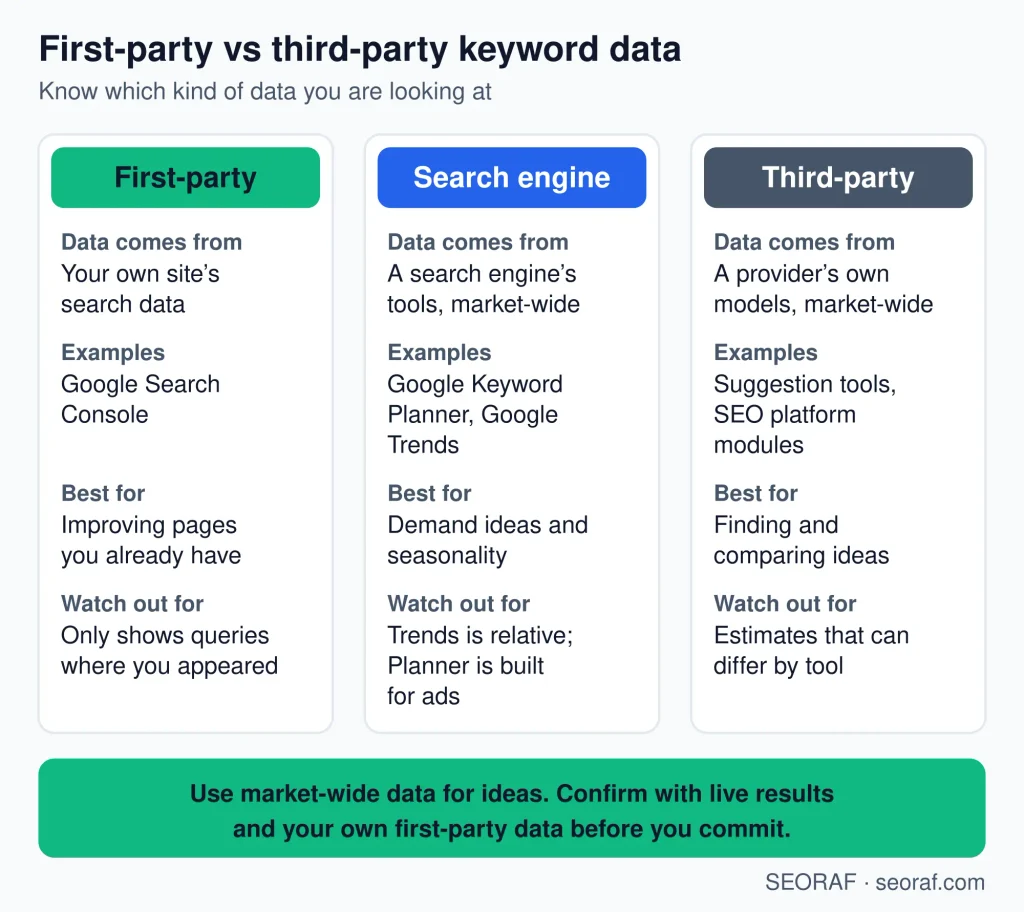
The most useful way to compare them is by where the data comes from:
What keyword research tools help you do
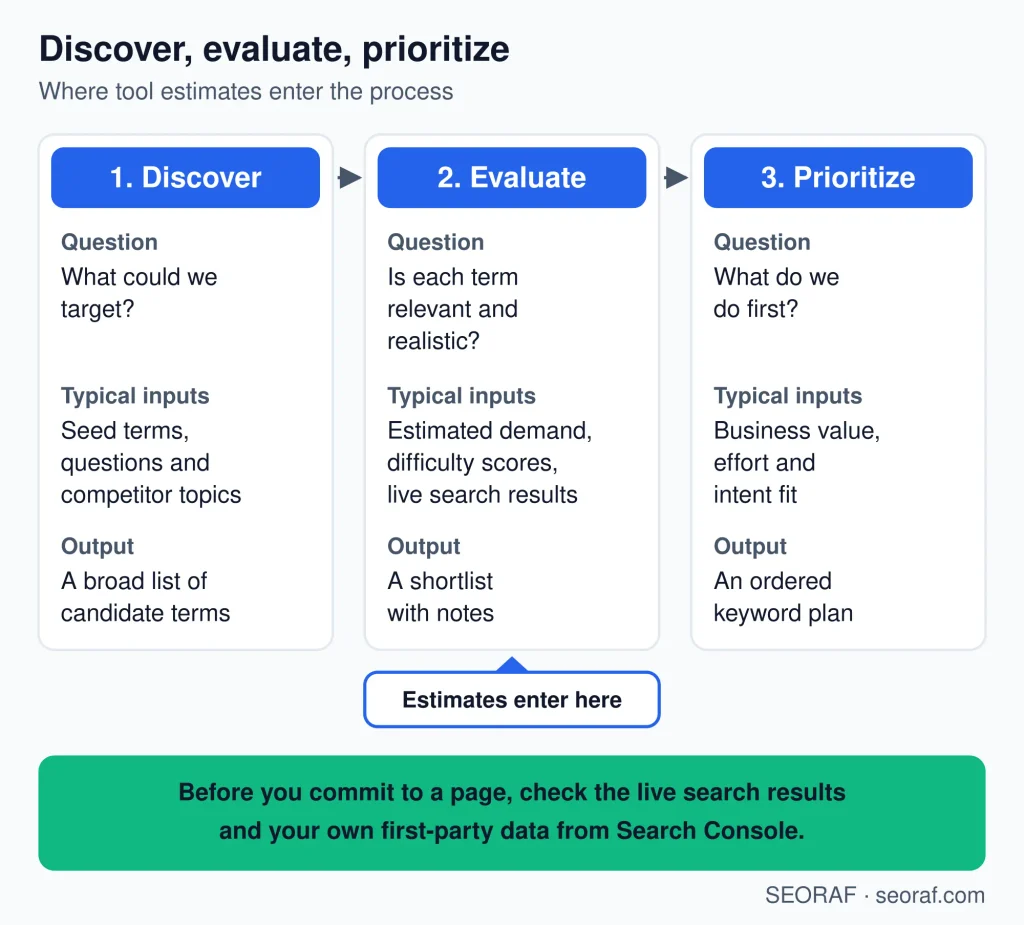
- Find topics and phrasings you had not considered.
- Compare relative demand between similar phrases.
- Spot questions and long, specific queries.
- See how interest changes over time or by location.
- Check which queries already bring impressions or clicks to your site.
- Look at what competitors appear for.
- Group related queries and export lists for planning.
They do not decide what to publish, guarantee traffic, or replace reading the live search results. This page covers choosing tools; it does not teach the research process itself.
Main types of keyword research tools
Seven types cover most needs. Products often span several rows, and the order below is not a ranking.
Keyword research tool types,uses, and main limitations
| Type | What it does | Best used for | Main limitation |
|---|---|---|---|
| First-party performance tools | Reports queries, impressions, and clicks for your own site. | Finding what your site already appears for. | Shows nothing about queries your site has not yet appeared for. |
| Idea and suggestion tools | Expands a seed keyword into related terms. | Early discovery of topics and phrasings. | Lists can include duplicates and irrelevant terms. |
| Question and long-tail tools | Surfaces question-style and specific queries. | Content angles and detailed intents. | Volume data is often thin or missing for rare queries. |
| Competitor and gap tools | Shows terms other sites appear for that yours does not. | Competitive niches and content gap checks. | Relies on the vendor’s estimates of rankings and traffic. |
| SERP analysis tools | Shows what appears in results for a query. | Judging intent and how hard a result page looks. | Results change with location, device, and time. |
| Trend tools | Shows interest over time and by region. | Seasonality and rising or falling topics. | Relative figures, not absolute search counts. |
| Platform keyword modules | Bundles research with tracking, audits, or other features. | Teams that want one workflow. | Cost and complexity can exceed what you need. |
Data limitations
- Tools disagree. Two tools can report different figures for the same query because their sources and methods differ.
- Volumes are estimates. Never treat a figure as exact.
- Difficulty is provider-specific. Compare scores only within one tool.
- Coverage varies by market, language, topic, and database.
- Seasonality can make an average misleading for a topic with peaks.
- Location and device change what people search for and see.
- Third-party and first-party data differ in kind. Vendor estimates model the market; Search Console records your own site’s appearances.
- Search Console and search volume measure different things. Impressions count appearances of your pages, not searches.
Google’s own documentation describes the Search Console performance report and notes that Google Trends data is a sample. Read both before leaning on either.
How to choose a keyword research tool
- Main goal. Discovery, validation, competitor analysis, and tracking need different tool types.
- Data coverage. Check that your country and language are supported, and how large the database is for your topic.
- Metric clarity. You should be able to tell what each metric means and where it comes from.
- Workflow fit. Look at exports, filtering, lists, and how it connects to the tools you already use.
- Learning curve. A simpler tool you use often beats a powerful one you avoid.
- Cost against actual usage. Compare the price with how often you would really research.
- Methodology transparency. Prefer vendors that explain how volume and difficulty are produced.
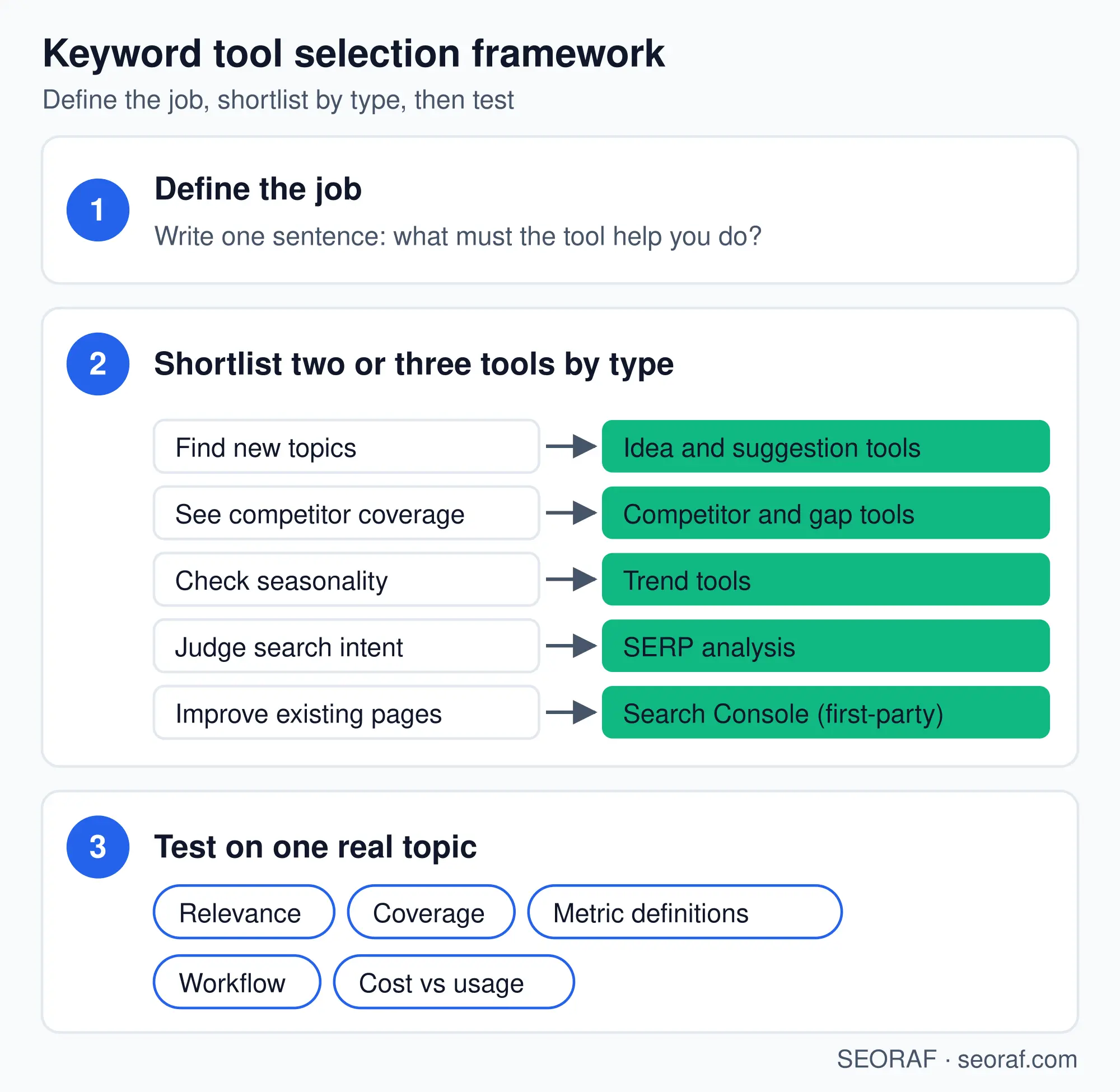
Practical selection framework
- Define the job. Write one sentence, such as “find new topics for a site with no data.”
- Shortlist two or three tool types from the table above, not specific products yet.
- Check the constraints: country and language coverage, usage limits, pricing, exports, and methodology.
- Test on the same real topic in each candidate.
- Choose by workflow fit, not the largest feature list.
Where to start by situation
| User situation | Start with | Add later |
|---|---|---|
| New site with little or no Search Console data | A suggestion or question tool plus a trend tool. | Search Console once queries appear. |
| Existing site planning content | Search Console. | A suggestion tool for gaps. |
| Competitive niche | A competitor or gap tool with SERP review. | A platform module if you need tracking. |
| Seasonal business | A trend tool. | A volume estimate tool for sizing peaks. |
| Agency or in-house team | A shared workspace with exports and user limits that fit. | Additional specialist tools only where a gap appears. |
Most people do not need an expensive platform to begin.
Test before you commit
Run the same seed keyword through each tool and compare:
- Relevance of the suggestions.
- Duplicates and near-duplicates.
- Coverage of your market and language.
- Clarity of each metric.
- Fit with your workflow.
- Export limits and project or user limits.
- Overall usefulness for your real task.
As a rough sanity check, compare a tool’s estimate for a query with your Search Console impressions for it. Use this only as a directional comparison: impressions and search volume are different measures, so they should not match.
Red flags
- Guaranteed rankings or traffic.
- Claims of exact search volume.
- Unclear methodology.
- Hidden usage limits.
- Unclear pricing restrictions.
Free vs paid
Free tools can be enough for learning, small sites, and occasional research. Paid tools can make sense for frequent research, several sites, larger datasets, exports, team workflows, or restrictive project limits. Pay only when a specific limitation justifies the cost, and check that the paid plan actually removes it.
If you are a beginner
- Begin with one simple suggestion source.
- Add Search Console when your site has data.
- Prefer clarity over feature count.
- Do not rely on a single difficulty score.
- Review the live results manually.
- Learn what each metric means before acting on it.
Local, ecommerce, and international contexts
Local
Demand varies by location, so check that a tool can report at the city or region level you care about, and compare results from the area you serve.
Ecommerce
Product and modifier queries (size, color, brand, “near me”) matter. Marketplace search behavior can differ from web search, so a general tool may not reflect it.
International and multilingual
Confirm country and language coverage. A direct translation of a keyword may not match how people search locally, so verify terms in the target market.
Tool examples
These are illustrative examples of tool types, not rankings or endorsements, and the “primary” labels are simplifications. I have not listed pricing, and I am not claiming hands-on testing. Verify features and limits on each vendor’s site.
Example tools by primary function and primary data classification
| Tool | Primary function / classification | Primary data classification |
|---|---|---|
| Google Search Console | Site performance reporting | First-party |
| Google Trends | Trend exploration | Search-engine-provided |
| Google Keyword Planner | Ad-planning keyword ideas and estimates | Search-engine-provided |
| Ahrefs Keyword Explorer | Idea, volume, and difficulty research | Third-party |
| Semrush Keyword Magic Tool | Idea expansion and grouping | Third-party |
| Moz Keyword Explorer | Idea and difficulty research | Third-party |
| Serpstat | Platform keyword research | Third-party |
| Ubersuggest | Idea and suggestion research | Third-party |
| AnswerThePublic | Question and phrase discovery | Third-party |
Where to go next
About the author: Mousume Akter is the Founder & Editor of SEORAF, an independent SEO knowledge resource, not an agency.
About this page: Tool names are used as examples of tool types, not endorsements. Features, limits, and pricing can change, so verify details on each vendor’s website before deciding.