
What Is a Technical SEO Audit? A Complete Guide to Finding and Fixing Website Issues
By Mousume Akter, Founder & Editor, SEORAF · Last reviewed: November 27, 2026
A technical SEO audit is a structured check of whether Google can reach, render, and index your important pages, followed by a prioritized plan for what is actually worth fixing. It is not a score, and it is not a list of everything a tool can flag.
If you have ever opened Search Console or run a crawler and watched the report fill with warnings (redirects, missing tags, slow pages, “excluded” URLs), you know the problem. There are hundreds of lines and no clear sense of which ones matter. That feeling usually means you need a method, not more data. An audit is that method.
In this guide I explain what an audit examines and how to run one from the first question to the final validation. You will get a seven-phase workflow, a way to prioritize findings, a 20-question checklist, three illustrative scenarios, and a troubleshooting guide. I will also be upfront about the limits. Fixing technical problems removes obstacles, but it does not guarantee that Google will index a page or rank it well.
This guide is for site owners, marketers, junior SEOs, and anyone who has been handed an audit report and wants to judge it.
Quick answer
- A technical SEO audit checks whether Google can reach, render, and index your important pages, then turns the findings into a prioritized fix list.
- Google’s baseline for indexing eligibility is three conditions: Googlebot isn’t blocked, the page returns HTTP 200, and it has indexable content. Meeting them does not guarantee indexing.
- I organize the work into six layers: Access, Discovery, Understanding, Indexing, Experience, and Variants and scale. This is my framework, not Google’s.
- Rank findings by impact, scope, confidence, and effort. Anything keeping important pages out of the index goes first.
- Fixes remove obstacles. They do not guarantee indexing or rankings.
How I wrote this guide. SEORAF is an independent SEO education resource, not an agency. I built this guide from Google Search Central and Search Console documentation. Google-documented facts are linked to their sources, and my own advice is labeled SEORAF recommendation. The examples are illustrative scenarios, not client case studies, and I do not claim results from any of them.
Key Terms in Plain English
- Crawl: Google’s crawler, Googlebot, fetches a page.
- Render: Google processes the page the way a browser would, including running JavaScript, so it can see the content that appears.
- Index: Google analyzes the page and stores it so it can be shown in results.
- Canonical URL: the version of a page Google treats as the main one when several URLs show essentially the same content.
noindex: an instruction, in a meta tag or HTTP header, asking Google not to show a page in results.- HTTP status code: the number a server returns to say what happened, such as 200 (success), 301 (moved permanently), or 404 (not found).
- Soft 404: a page that looks like an error page, or has no real content, but returns a success code.
What Is a Technical SEO Audit? The Short Answer
A technical SEO audit is a systematic review of the conditions that decide whether search engines can find, access, understand, and store your pages. It also asks whether visitors get a usable experience when they arrive. The output is not only a list of problems. A good audit explains the cause of each finding, which pages it affects, how much it likely matters, and what should happen next.
Google’s own baseline anchors the idea. According to Google’s technical requirements, a page is eligible for indexing when three things hold:
- Googlebot isn’t blocked.
- The page works, meaning Google receives an HTTP 200 status code.
- The page has indexable content.
Google adds that meeting these requirements does not guarantee indexing. An audit looks for obstacles in the way of those conditions first. It then looks for secondary problems that make pages harder to process or less pleasant to use.
What an audit is, and what it isn’t
These three things get confused, and the differences matter.
| Technical SEO audit | Crawl export | Tool score | |
|---|---|---|---|
| What it is | A reasoned review with a prioritized plan | A raw list of what a crawler found | A single number summarizing a tool’s checks |
| What it produces | Findings with cause, impact, owner, and next step | URLs, status codes, tags, and warnings | A grade or percentage, often with issue counts |
| What it can’t tell you | Whether a fix will change rankings | Which findings matter | Which pages are important or what Google actually sees |
A crawl export is an input to an audit. A score is a vendor’s summary of its own checks, so scores from different tools are not comparable. The audit is the judgment layer on top.
Why a technical SEO audit matters
Technical health is a prerequisite, not a ranking strategy. If Google can’t crawl or index a page, nothing you do to the content will help it appear. An audit checks that the foundation is sound.
I want to be careful about how I frame the stakes. Some sites may have no serious technical problem, and Google says that plenty of non-indexed URLs are perfectly fine, such as duplicates or pages blocked on purpose. Part of an audit’s value is confirming what is okay.
Google also notes that for many queries there is a lot of helpful content available. In those cases, a great page experience can contribute to success in Search. Technical quality matters most when it separates a page that can be found from one that can’t, or when other things are roughly equal.
Who needs one
- Site owners and bloggers who want to confirm their key pages are indexed.
- Marketers and new SEOs who have been asked to “run a technical audit” and need a method.
- Anyone who has received an audit report and wants to judge which findings deserve action.
- Teams planning a migration or redesign, where technical mistakes are easy to introduce.
You now know what an audit is and isn’t. Next comes the model of how Google handles a page, which the rest of the guide builds on.
How Google Processes a Page: The Framework Behind Every Audit
Google describes Search as three stages: crawling, indexing, and serving results. It also says not every page makes it through each stage.
- Crawling. Googlebot fetches pages it has discovered. Google uses an algorithmic process to decide which sites to crawl, how often, and how many pages to fetch. Googlebot does not crawl every page it discovers.
- Rendering. Google can run JavaScript using an evergreen version of Chromium. Rendering happens after the crawl, and a page may wait in a queue first. I treat this as a distinct step because content that only appears after scripts run is a common source of audit findings. See Google’s JavaScript SEO basics.
- Indexing. Google analyzes the page, decides which URL is canonical among duplicates, and stores the result.
- Serving. When someone searches, Google returns what it judges most relevant. Ranking happens here.
Here is that journey as a diagram, including where pages commonly stall.
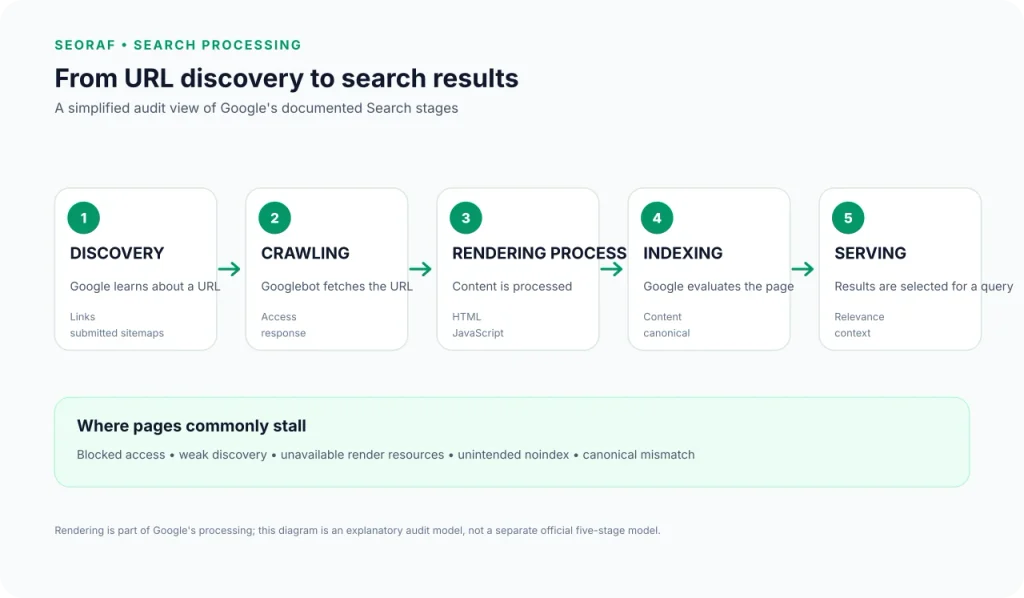
The four-step ladder
For audit work I find it useful to separate four rungs. Each needs different evidence.
- Discovered: Google knows the URL exists, through a link or a sitemap.
- Crawled: Google fetched it.
- Indexed: Google processed and stored it.
- Ranked: it appears for queries.
A page can stall at any rung. Google notes that a page being indexed doesn’t guarantee it will show up in search results. Treating “crawled,” “indexed,” and “ranking” as the same thing leads to wrong diagnoses.
The six audit layers
I organize an audit into six layers. This is my framework, not a Google standard. It gives you a repeatable way to ask, “Where could this page be getting stuck?”
| Layer | The question it asks |
|---|---|
| 1. Access | Can Google reach the page and get a working response? |
| 2. Discovery | Can Google find the page? |
| 3. Understanding | Can Google see and interpret the content? |
| 4. Indexing | Does Google keep the right version of the page? |
| 5. Experience | Is the page usable and secure for people? |
| 6. Variants and scale | Are language versions and very large sites handled correctly? (Only where relevant.) |
What an Audit Examines, Layer by Layer
The diagram below summarizes the six layers, and the sections that follow take them one at a time.
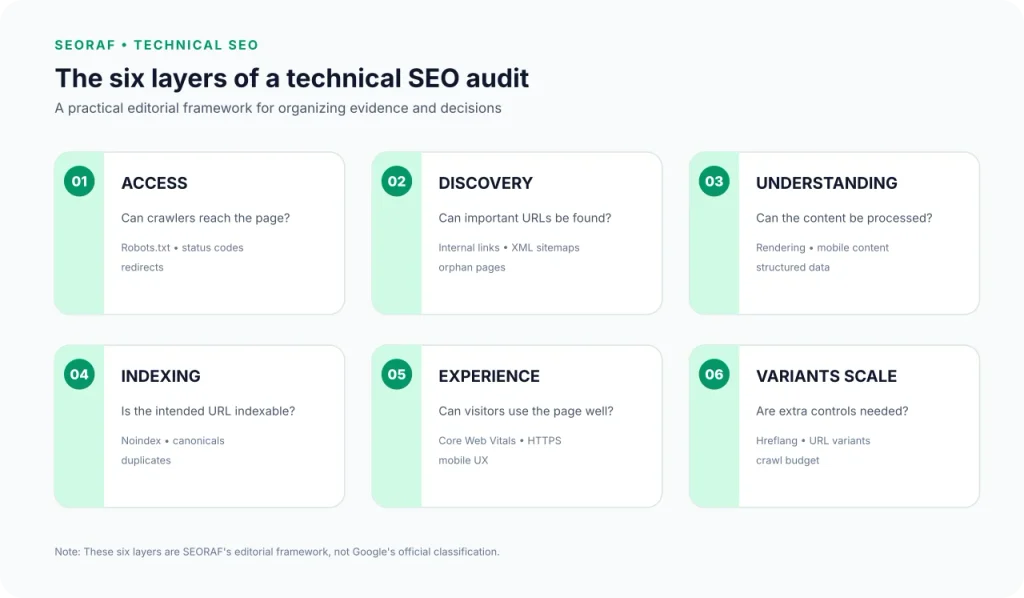
For each layer I note what the audit asks and what a finding doesn’t prove. I keep implementation details out on purpose, because those belong in deeper guides.
Layer 1: Access (can Google reach the page?)
Robots.txt. A robots.txt file tells crawlers which URLs they may fetch. Google describes it mainly as a way to manage crawler traffic, not a way to keep a page out of search. A blocked URL can still appear in results, without a description, if it is linked from elsewhere. The audit asks: Are important pages, or the scripts and styles they need for rendering, disallowed? Does the file load reliably? Google’s Crawl Stats documentation says a robots.txt request that fails, rather than returning a file or a 404, can cause Google to slow or stop crawling. One pattern to look for is a broad disallow left over from a development environment. It doesn’t prove that disallowed URLs are absent from Google.
HTTP status codes. Status codes are the server’s answer to “what happened?” Google indexes only pages served with HTTP 200, and Search Console flags 4xx and 5xx responses. Google treats a 429 as a sign the server is overloaded. The audit asks: Do important URLs return 200? Do removed pages return a real 404 or 410? Do custom “not found” pages return a real error code? It doesn’t prove that a 200 means the page is indexed, or that a 404 on a deleted page is a problem. Google calls a 404 or 410 a strong signal not to keep crawling a removed URL.
Redirects. A permanent redirect (301 or 308) signals a move. A temporary redirect keeps the source page in search results, and Google treats it only as a weak signal that the target should be canonical. The audit asks: Do moved pages redirect permanently to a relevant destination? Are there chains or loops? Do internal links, canonicals, and sitemaps still point at redirecting URLs? One pattern to look for is a temporary redirect used for a permanent move. It doesn’t prove that redirects “lose” rankings. I found no Google documentation saying so. Google does say long chains have a negative effect on crawling.
Server and DNS errors. Google handles network and DNS errors much like server errors. Crawling slows, and unreachable URLs can drop out of the index within days. Crawl Stats’ host status is the place to check.
Layer 2: Discovery (can Google find the page?)
Internal links. Google uses links to find pages and as a relevance signal. It can generally only follow <a> elements with an href attribute. Good anchor text is descriptive, reasonably concise, and relevant to both pages. The audit asks: Is every important page linked from another crawlable page? Are there orphan pages? Are menus built from real links? It doesn’t prove anything about “ideal” numbers, because Google gives no links-per-page or click-depth target.
XML sitemaps. A sitemap is a hint about the URLs you want crawled. Google’s sitemap guide says submitting one doesn’t guarantee Google will use it. Each sitemap is limited to 50 MB uncompressed or 50,000 URLs. Google ignores priority and changefreq, and uses lastmod only when it is consistently and verifiably accurate. Some sites might not need a sitemap at all. The audit asks: Does it list only the canonical, indexable, 200-status URLs you want in search? Is it reachable and submitted? It doesn’t prove that listed URLs are indexed.
Layer 3: Understanding (can Google see the content?)
Rendered content and JavaScript. Google’s JavaScript guidance documents three phases: crawling, rendering, and indexing. A few specifics matter for audits. Google won’t render JavaScript from blocked files or on blocked pages. If a page has noindex in its original HTML, Google may skip rendering, so using JavaScript to remove it may not work, and if you want a page indexed you shouldn’t put noindex in the original HTML. Links must still be crawlable anchors, and the History API is preferable to URL fragments for client-side routing. The audit asks: Does the rendered HTML contain the main content, links, and canonical? Use the URL Inspection tool to see what Google fetched. It doesn’t prove that JavaScript sites can’t be indexed. Google says it can process them.
Mobile. Google uses the mobile version of a site’s content for indexing and ranking. In 2018 Google described this as being about how content is gathered, not how it is ranked. By 2024 Google said it would crawl and index remaining sites only with its smartphone crawler, and that content not accessible on mobile would no longer be indexable. The audit asks: Are content, links, structured data, and robots meta tags equivalent on mobile and desktop? Is primary content lazy-loaded only after a user interaction? Google advises against that.
Structured data. Structured data gives Google explicit clues about a page’s meaning and can make it eligible for rich results. Eligibility isn’t a promise, and it isn’t a ranking boost. Under Google’s general guidelines, JSON-LD is the recommended format, required properties must be present, and structured data pages shouldn’t be blocked. A structured data manual action costs a page its rich result eligibility but doesn’t affect how it ranks in web search. The audit asks: Does the markup match the visible content? Are required properties present for the feature you want?
Layer 4: Indexing (does Google keep the right version?)
Indexability and noindex. A noindex rule in a robots meta tag or X-Robots-Tag header tells Google not to show a page. Google says these rules can only be followed if crawlers can access the page. A page blocked in robots.txt never has its noindex read. The audit asks: Is any important page marked noindex by a template, plugin, or header?
Canonicals and duplicate content. When several URLs show essentially the same content, Google picks one as the canonical. You can signal a preference, but Google may choose a different canonical than the one you specify. A rel="canonical" annotation is a strong signal, and sitemap inclusion is a weak one. Google also prefers HTTPS over HTTP and advises against using robots.txt for canonicalization. The audit asks: Do your declared canonicals match the canonical Google selected? Do canonicals, redirects, sitemaps, and internal links all point the same way? It doesn’t prove that duplicate content is penalized. Google says some duplication is normal and not a spam violation.
Preferred URL variants. The same page is often reachable at several addresses: HTTP and HTTPS, with and without “www,” and other minor variations. Google’s canonicalization guidance suggests choosing one version as your canonical and using redirects to send the others to it. The audit asks: Does every variant of a key page lead to one preferred URL, and do your internal links, canonicals, and sitemap all use that version?
404s and soft 404s. A soft 404 is a page that looks like an error page, or has no real content, but returns a success code. Google detects these from the content and flags them in the Page indexing report. Google says soft 404 pages keep being crawled and waste crawl budget. For single-page apps, Google’s documented fixes are to redirect to a URL that returns a real 404, or to add noindex to error views.
Layer 5: Experience (is the page usable and secure?)
Core Web Vitals. Core Web Vitals are field metrics for loading (Largest Contentful Paint, or LCP), responsiveness (Interaction to Next Paint, or INP), and visual stability (Cumulative Layout Shift, or CLS). Google’s thresholds, assessed at the 75th percentile of page visits, are:
- LCP of 2.5 seconds or less is “good,” and above 4 seconds is “poor.”
- INP of 200 milliseconds or less is “good,” and above 500 is “poor.”
- CLS of 0.1 or less is “good,” and above 0.25 is “poor.”
Google recommends achieving good Core Web Vitals, and its ranking systems use them as part of an overall page experience view. Google also says there is no single page experience signal, and that good reports don’t guarantee good rankings. If you remember an older metric called FID, Google says INP replaced it on March 12, 2024. For the fixes themselves, see my guide on fixing Core Web Vitals issues, and for the broader topic, my guide to site speed optimization.
HTTPS. HTTPS protects visitors, and Google prefers HTTPS URLs when choosing canonicals. I will be careful here, because Google’s wording has shifted over time. In 2014 Google announced it had started using HTTPS as a ranking signal, and described it then as very lightweight, affecting under 1% of global queries. Its current page experience guidance asks whether pages are served securely. It also says that, beyond Core Web Vitals, other page experience aspects don’t directly help a page rank higher, though they can make a site more satisfying to use. I treat HTTPS as part of a sound baseline, not a major ranking lever.
Mobile usability. Google’s page experience self-check asks whether content displays well on mobile devices. This is a human-experience check, separate from the content-parity issue above. Google retired Search Console’s Mobile Usability report and the Mobile-Friendly Test starting December 1, 2023, so don’t expect to find them. Lighthouse in Chrome is one alternative Google mentions.
Layer 6: Variants and scale (only where relevant)
International versions. For multilingual or multi-regional sites, Google’s localized versions guidance says each language version must list itself and all the others. Localized versions are only considered duplicates if the main content stays untranslated.
Crawl budget. This is a large-site topic. Google’s crawl budget guide is aimed mainly at sites with roughly 1 million or more pages that change about weekly, or 10,000 or more pages that change daily. Google calls those numbers a rough estimate, not exact thresholds. If your pages are generally crawled the same day they are published, Google says you don’t need the guide.
Three controls people mix up
| Control | What it affects | What it doesn’t do |
|---|---|---|
| Robots.txt disallow | Whether Googlebot fetches the URL | Doesn’t reliably keep a URL out of results. It also prevents any noindex on that page from being read |
noindex (meta tag or header) | Whether a crawled page is shown in results | Doesn’t stop crawling. It can’t work if the page is blocked |
| Canonical or redirect | Which of several duplicate URLs Google treats as the main one | Isn’t a command. Google may choose differently |
Layers at a glance
| Layer | Core question | Topics | Main evidence source | Usually fixed by |
|---|---|---|---|---|
| Access | Can Google reach it? | Robots.txt, status codes, redirects, server errors | Crawl, URL Inspection, Crawl Stats | Developer or host |
| Discovery | Can Google find it? | Internal links, sitemaps | Crawl vs sitemap vs index comparison | Site owner or editor |
| Understanding | Can Google see it? | Rendering, mobile parity, structured data | URL Inspection, Rich Results Test | Developer |
| Indexing | Does Google keep the right version? | Noindex, canonicals, soft 404s | Page indexing report, URL Inspection | SEO and developer |
| Experience | Is it usable and secure? | Core Web Vitals, HTTPS, mobile | Field data, crawl | Developer and designer |
| Variants and scale | Are extras handled? | Hreflang, crawl budget | Sitemaps, Crawl Stats, logs | Developer |
You now know what each layer checks. Next I will mark the edges of the audit so you don’t expect it to do more than it can.
What an Audit Doesn’t Cover
A technical audit sits next to other kinds of review. Keeping them separate avoids both gaps and duplicated work.
| Audit type | Main question | Typical items | Overlap with technical |
|---|---|---|---|
| Technical | Can search engines access, render, and index pages? | Crawling, indexing, rendering, performance, security | n/a |
| On-page | Does each page communicate its topic clearly? | Titles, headings, copy, internal anchor text | Titles and meta tags must be renderable and indexable |
| Content | Is the content useful, accurate, and current? | Quality, gaps, consolidation | Thin or duplicate pages can become indexing issues |
| Off-page | Who links to or mentions the site? | Backlink profile | Minimal |
| UX or conversion | Can visitors complete tasks? | Layout, forms, flows | Page experience |
| Full SEO audit | Everything above | Combined | Includes the technical audit |
For the broader picture, see my guides to on-page SEO and to how technical SEO differs from content SEO. A full SEO audit is a broader review than this one.
When to Audit and How Big the Audit Should Be
Common triggers
- Launching a new site.
- A migration, redesign, CMS change, or URL restructure.
- A drop in indexed pages or in organic traffic that you can’t explain.
- A routine review.
- Before a large content push.
On cadence: guides suggest anything from quarterly to yearly, and none of it is a Google requirement. SEORAF recommendation: I would audit when something changes, and between those moments run a light recurring check of Search Console’s indexing and Core Web Vitals reports. A fuller audit makes sense when the site changes materially.
Match the audit to the site
| Site type | Prioritize | Often lighter or skippable | Note |
|---|---|---|---|
| Small blog or brochure site | Access, Indexing, Experience | Crawl budget, log files | Google says sites under about 500 pages probably don’t need the Page indexing report and can use simple site: searches instead |
| E-commerce | Indexing (duplicates, parameters), Discovery (sitemaps), Experience | Crawl budget, unless the catalog is very large | Watch for conflicting canonical and sitemap signals |
| JavaScript-heavy site or web app | Understanding first | n/a | Compare raw and rendered HTML early |
| Multilingual site | Variants, then Indexing | n/a | Check that language versions reference each other |
| Large publisher or marketplace | Discovery, Indexing, crawl efficiency | Basic checks you have already automated | Server logs become useful |
| Migration or redesign | Access (redirects, robots, noindex), Discovery, Indexing | n/a | Check before and after launch |
Google also says its Crawl Stats report is aimed at advanced users, and that sites under about a thousand pages shouldn’t need it. Treat these as Google’s guidance, not absolutes.
A Seven-Phase Audit Workflow
The seven phases below form a loop, because validation and monitoring feed back into scope.
This is the process I recommend. Each phase has an input, an action, an output, and a stop rule. This guide keeps the process at workflow level, without click-paths or tool-specific walkthroughs.
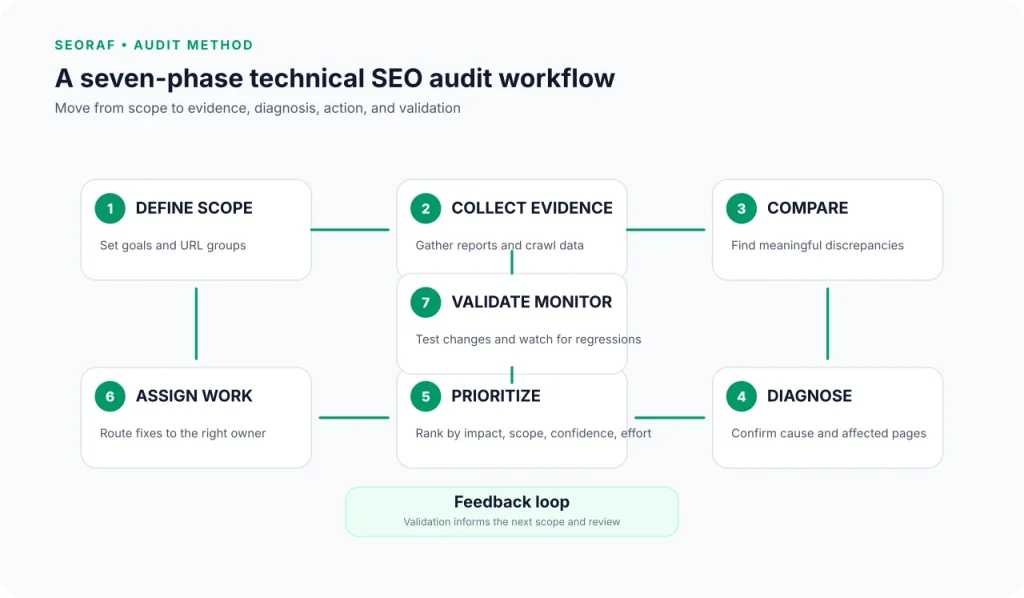
Phase 1: Define the goal and scope
Input: what triggered the audit, and your site type.
Do: list the five to ten URL groups that matter most, such as the home page, key categories, top articles, and product or service pages. Choose layers using the site-type table above.
Output: a one-paragraph scope note and a list of important URL groups.
Stop rule: if you can’t say which pages matter, don’t start crawling yet.
Phase 2: Collect evidence
Input: a verified Search Console property, your analytics, and a crawler.
Do: pull the Page indexing report’s “why pages aren’t indexed” reasons, the Sitemaps report, and the Core Web Vitals report. Add Crawl Stats if the site is large. Export your organic landing pages from Google Analytics or your analytics tool, and run a crawl.
Output: a raw evidence set.
Stop rule: collect, don’t fix.
Phase 3: Triangulate
Do: compare three lists: the URLs your crawler found through links, the URLs in your sitemap, and the URLs Search Console reports as indexed. Then read the gaps:
- In the sitemap but not found by the crawl may mean an orphan page.
- Crawled and indexable but not indexed needs investigation.
- Indexed but not in the sitemap means you should decide whether that is intended.
Output: a gap list. These are your first findings.
Phase 4: Diagnose by layer
Do: write each finding as symptom → cause → impact → action. Confirm with URL Inspection’s indexed version first, then the live test. Use “View crawled page” to see the HTTP response and HTML, and compare raw and rendered content for suspected JavaScript issues.
Output: a finding list with evidence for each item.
Phase 5: Prioritize
Do: score each finding using the method in the prioritization section below, and apply the blocker override.
Output: a ranked list.
Phase 6: Route the fix
Do: assign an owner and describe the fix type in a phrase, for example “remove the noindex setting on this template.” Include sample URLs and an acceptance test, such as “URL Inspection live test shows the page as indexable.”
Output: tickets or tasks, not a pile of warnings.
| Issue class | Typical owner | Fix type (in a phrase) | Where to learn more |
|---|---|---|---|
Unintended noindex or robots block | Site owner or developer | Change the visibility setting or remove the directive | Robots meta tag docs |
| Redirect problems | Developer or host | Replace chains with single permanent redirects | Redirects guide |
| Sitemap clean-up | Site owner or plugin | Regenerate to list only canonical, indexable URLs | Sitemap guide |
| Canonical conflicts | SEO and developer | Align canonical, redirects, sitemap, and internal links | Canonicalization |
| Soft 404s | Developer | Return the correct status, or remove empty pages | Status code guide |
| Rendering or JavaScript | Developer | Make content and links available in rendered HTML | JavaScript SEO basics |
| Core Web Vitals | Developer and designer | Template-level performance work | SEORAF Core Web Vitals guide |
| Structured data | Editor or developer | Correct the markup to match the page | Structured data intro |
Phase 7: Validate and monitor
Do: after a fix, run the live test on a few pages, then use “Validate fix” in Search Console for that issue. Google recommends this sequence. Recheck after Google has had time to recrawl, and log what you changed and when.
Output: confirmed fixes, plus a short recurring-check routine.
Stop rule: don’t promise an outcome. Google says new pages can take days to a week or so to be crawled and indexed, and it doesn’t guarantee indexing.
Search Console workflow at a glance
| Report or tool | The question it answers | Watch out for |
|---|---|---|
| Page indexing | Which URLs are indexed, and why aren’t others? | “Not indexed” isn’t automatically bad. Example lists are capped at 1,000. Totals won’t match your own count |
| URL Inspection | What does Google know about this URL? | It shows the indexed version, not the live one. “URL is on Google” doesn’t mean it is appearing. The live test can’t predict the canonical or check manual actions. There is a daily limit |
| Sitemaps report | Did Google fetch my sitemap, and were there errors? | A submitted sitemap is a hint. The report shows no data for image, video, or news URLs |
| Core Web Vitals report | Which URL groups are Good, Need improvement, or Poor in field data? | It groups similar URLs and shows a sample, not every URL. Only indexed URLs appear, and groups without enough data for both LCP and CLS are left out |
| Crawl Stats | Did Googlebot hit availability problems? | Root-level properties only. Aimed at advanced users. Numbers can differ slightly from server logs. Example URLs aren’t comprehensive |
| Links report | Which pages are linked most from within my site? | It shows a sample. Some URLs, such as non-indexed or deduplicated ones, can be omitted |
| Rich Results Test | Is my structured data valid and eligible? | Eligibility isn’t a guarantee |
Google has retired Search Console’s combined Page Experience report. Google’s announcement, as reported by Search Engine Journal, says the separate Core Web Vitals and HTTPS reports remain. Check your own Search Console for what is currently available.
Tools by category
I haven’t tested any of these tools for this guide. The examples are there to help you recognize each category, not as recommendations or test results.
| Category | Good for | Limits | Examples |
|---|---|---|---|
| Search Console | Google’s own reported view of your site | Aggregated, sometimes delayed, scoped per property | Google Search Console |
| Site crawler | Finding structural issues at scale | Not Google’s view. It can’t know which pages matter | Screaming Frog, Sitebulb, Lumar |
| All-in-one suite audit module | Scheduled crawls and dashboards | Scores are vendor-defined | Semrush Site Audit, Ahrefs Site Audit |
| Field and performance data | Real-user Core Web Vitals | Lab and field results can differ | PageSpeed Insights, Chrome UX Report (CrUX) |
| Rendering and markup checks | Seeing rendered HTML and structured data | One URL at a time | URL Inspection, Rich Results Test |
| Log analysis (advanced) | Seeing actual Googlebot requests | Needs log access. Bots must be verified | n/a |
For a deeper look, see my overview of technical SEO software and my guide to free SEO audit tools.
What tools and audit scores can’t tell you
- They don’t know which pages matter. A crawler treats a retired archive page and your best-converting page alike.
- Scores are vendor-defined. A 92 in one tool and a 78 in another say little about each other, and neither number is a Google measurement.
- They can inflate counts. A single template problem can show up as thousands of “issues.”
- Their severity labels are generic. A warning on a noindexed or blocked page often doesn’t matter for organic search.
- A crawler isn’t Googlebot. It may not render like Google, and it doesn’t see what Google chose to index.
- Lab and field data differ. A lab speed test is a simulation, while Core Web Vitals assessments are built on field data.
- Practitioners make similar arguments. For example, Search Engine Land’s piece on technical debt in SEO argues for sorting urgent blockers from low-priority tasks. I treat that as practitioner commentary, not Google guidance.
How to Prioritize Issues: Impact, Scope, Confidence, and Effort
SEORAF recommendation: a four-factor method to turn a long findings list into a short, defensible plan. This is an editorial heuristic. It isn’t a Google method and it isn’t validated research.
The four factors
| Factor | The question | 1 (low) | 2 (medium) | 3 (high) |
|---|---|---|---|---|
| Impact | Does it affect whether important pages are crawled, indexed, or shown, or a core user experience? | Cosmetic, no documented effect | Plausible effect on crawl efficiency, understanding, or experience | Blocks crawling, indexing, or serving of important pages |
| Scope | How much of the important site does it touch? | A few unimportant URLs | One template or section | Site-wide, or a high-value template |
| Confidence | How strong is the evidence that this is a real problem? | A tool warning with no corroboration | A tool warning plus a Search Console flag | Confirmed with URL Inspection, the live test, rendered HTML, or Google documentation |
| Effort | How much time, skill, and coordination does the fix need? | Quick and within your control | Moderate, needs some testing or developer time | Heavy or cross-team |
Note that for Effort, a higher number means more work.
The scoring method
Priority score = (Impact × Scope × Confidence) ÷ Effort
Scores run from about 0.3 to 27. My rough bands are a starting point, and you should adjust them to your site:
- 12 and above: act soon.
- 4 to 11: schedule it.
- Below 4: batch it with other work, or defer.
The blocker override: anything that keeps important pages out of the index goes first, whatever the score. Scoring is for ordering the rest of the list.
Use your analytics to judge scope, for example by checking which affected URLs normally receive organic landing traffic. Remember the trap: a page that isn’t indexed won’t show organic traffic, because the problem itself is the cause. Judge importance by the page’s role, not only by current traffic. To keep track of results over time, see my guide to an SEO KPI dashboard.
Worked scoring examples
These are illustrative scenarios, not real sites. In the second column, the four numbers are Impact / Scope / Confidence / Effort.
| Finding | I / S / C / E | Score | Reasoning |
|---|---|---|---|
Accidental noindex on a key service-page template | 3 / 3 / 3 / 1 | 27 | Confirmed in the rendered page. Blocker override applies |
Sitemap lists redirected and noindex URLs | 2 / 2 / 3 / 1 | 12 | Easy to confirm and fix. Weakens a discovery hint |
| Soft 404s on empty filter pages (store) | 2 / 2 / 3 / 2 | 6 | Flagged in Page indexing. Wastes crawling |
| Slow LCP on blog template (field data) | 2 / 3 / 2 / 3 | 4 | Real-user data supports it. The ranking effect is uncertain and the work is heavy |
| Three-hop redirect chain on a few old URLs | 1 / 1 / 2 / 1 | 2 | Worth tidying, low urgency |
Duplicate title tags on noindex tag archives | 1 / 1 / 1 / 1 | 1 | Pages aren’t meant to be in results |
The matrix plots the same six findings by impact and effort, with marker size showing scope and fill showing confidence.
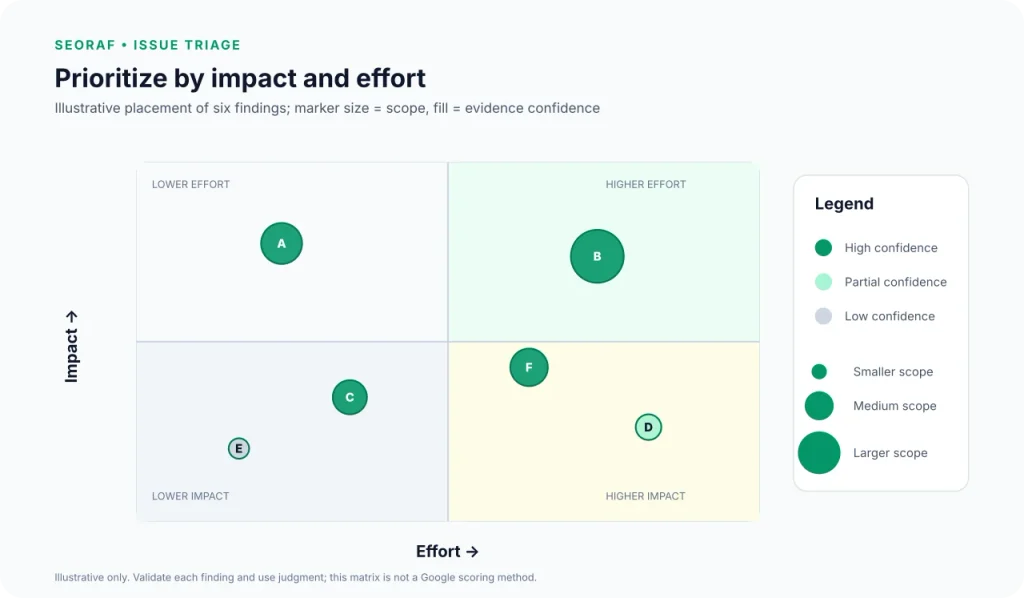
What to defer or ignore
- Warnings on pages that are blocked or
noindexby design. - Non-indexed URLs that are non-indexed for good reasons. Google says duplicate and alternate pages shouldn’t be indexed.
- Cosmetic findings with no documented effect on crawling, indexing, or experience.
What not to conclude
- That fixing an issue will raise rankings, or that it will get a page indexed.
- That every Search Console warning is critical.
- That a high tool score means a healthy site, or a low one means a broken site.
You now know how to rank findings. Next comes a checklist you can run straight away.
A 20-Question Audit Checklist
I wrote these as audit questions rather than tasks, so each one points to evidence. Default priority hint: Blocker means start here. High means likely worth fixing if confirmed. Check means verify, then fix only if confirmed. This is a compact core list. For the long version, see my full technical SEO checklist.
| # | Audit question | Evidence source | Default hint |
|---|---|---|---|
| Access | |||
| 1 | ☐ Are important URLs, and the scripts and styles they need to render, allowed by robots.txt? | robots.txt file; URL Inspection | Blocker |
| 2 | ☐ Do key URLs return HTTP 200, and removed URLs a real 404 or 410? | Crawler status codes; URL Inspection | Blocker |
| 3 | ☐ Do moved pages use one permanent redirect to a relevant page? | Crawler redirect report | High |
| 4 | ☐ Is the server stable for Googlebot, with no recurring 5xx, 429, or DNS failures? | Crawl Stats host status | High |
| Discovery | |||
| 5 | ☐ Is every important page linked from another crawlable page? | Crawler inlinks; Links report; sitemap comparison | High |
| 6 | ☐ Do internal links use real <a href> links with descriptive anchor text? | Rendered HTML | High |
| 7 | ☐ Does the sitemap list only canonical, indexable, 200 URLs, and is it reachable and submitted? | Sitemaps report | High |
| Understanding | |||
| 8 | ☐ Does the rendered HTML contain the main content and links? | URL Inspection (crawled page) | Blocker |
| 9 | ☐ Does every version of a key URL (HTTP or HTTPS, with or without “www”) lead to one preferred URL? | Crawler; redirect check | High |
| 10 | ☐ Are content, links, structured data, and robots tags equivalent on mobile and desktop? | Side-by-side comparison | High |
| 11 | ☐ Does structured data match the visible content and include required properties? | Rich Results Test | Check |
| Indexing | |||
| 12 | ☐ Are your most important pages indexed? | Page indexing; URL Inspection; site: search | Blocker |
| 13 | ☐ Is any important page marked noindex by meta tag or header? | Crawler; URL Inspection | Blocker |
| 14 | ☐ Do declared and Google-selected canonicals agree for key pages? | URL Inspection | High |
| 15 | ☐ Are duplicate and parameter URLs consolidated, not sending conflicting signals? | Crawler; Page indexing | High |
| 16 | ☐ Are soft 404s flagged, and do error pages return real error codes? | Page indexing; status codes | High |
| Experience | |||
| 17 | ☐ Do key templates meet “Good” Core Web Vitals in field data? | Core Web Vitals report; PageSpeed Insights | Check |
| 18 | ☐ Is the site consistently HTTPS, with canonicals, links, and sitemaps all using HTTPS? | Crawler | Check |
| 19 | ☐ Is the page comfortable to use on a phone? | Manual check; Lighthouse | Check |
| Variants and scale | |||
| 20 | ☐ If multilingual or very large, have language-version links and crawl efficiency been reviewed? | Crawler; Crawl Stats | Conditional |
Three Illustrative Audit Scenarios
These are hypothetical scenarios to show the method end to end. They aren’t case studies, and I am not claiming any outcome from them.
Scenario 1: A new guide isn’t being indexed
Symptom: a recently published guide doesn’t appear among indexed pages, and a search for its exact URL returns nothing.
Evidence: URL Inspection reports the URL as not on Google, with a reason pointing to a noindex rule.
Diagnosis: a visibility setting is stopping indexing. A CMS or SEO-plugin setting could be applying it to the post type, or a site-wide search-visibility option may have been left on from development.
Score: Impact 3, Scope 2, Confidence 3, Effort 1 gives 18. The blocker override applies.
Owner: the site owner.
Validation: run the live test to confirm the page is indexable, request indexing for the key page, and monitor.
A misleading signal to watch for: a crawler that reports the page as fine because it doesn’t read the setting the way Google does.
What I would not claim: that fixing it will get the guide indexed, or that it will rank.
Scenario 2: A store’s filters create a flood of URLs
Symptom: the Page indexing report lists many parameter URLs as duplicates or alternates, and a crawl finds far more URLs than products.
Evidence: the crawler’s URL count, plus URL Inspection showing the Google-selected canonical differs from the declared one on some pages. The sitemap also lists parameter URLs that canonicals point away from.
Diagnosis: the real finding isn’t the count of duplicates. Google says duplicate or alternate status is often fine. The finding is the conflict between canonical tags, the sitemap, and internal links.
Action: decide the preferred URL for each product, then align canonicals, sitemap entries, and internal links. Don’t rely on robots.txt for canonicalization.
Score: Impact 2, Scope 3, Confidence 3, Effort 2 gives 9.
Validation: recheck the Google-selected canonical on a sample after Google recrawls. Google notes re-evaluation can take time.
A misleading signal to watch for: a large “duplicate” count that looks alarming but mostly reflects Google doing its job.
Scenario 3: A web app’s pages look empty to Google
Symptom: the raw HTML is a small shell, and URL Inspection’s view of the crawled page lacks the main content.
Evidence: the robots.txt file disallows the script directory. Google won’t render JavaScript from blocked files.
Diagnosis: blocked resources prevent rendering. A second finding: pages for missing items return a success code with an empty view, which creates soft 404s.
Action: allow the needed resources. For missing items, use one of Google’s documented patterns: redirect to a URL that returns a real 404, or add noindex to the error view.
Score: Impact 3, Scope 3, Confidence 3, Effort 1 gives 27.
Validation: inspect the live URL and check the rendered HTML includes the main content.
A misleading signal to watch for: a page that looks complete in your own browser, because your browser can load resources Googlebot is blocked from.
Troubleshooting: When the Results Don’t Make Sense
“A page isn’t indexed. Now what?”
Work down this list and stop at the first “yes” that explains it, or follow the flow below.
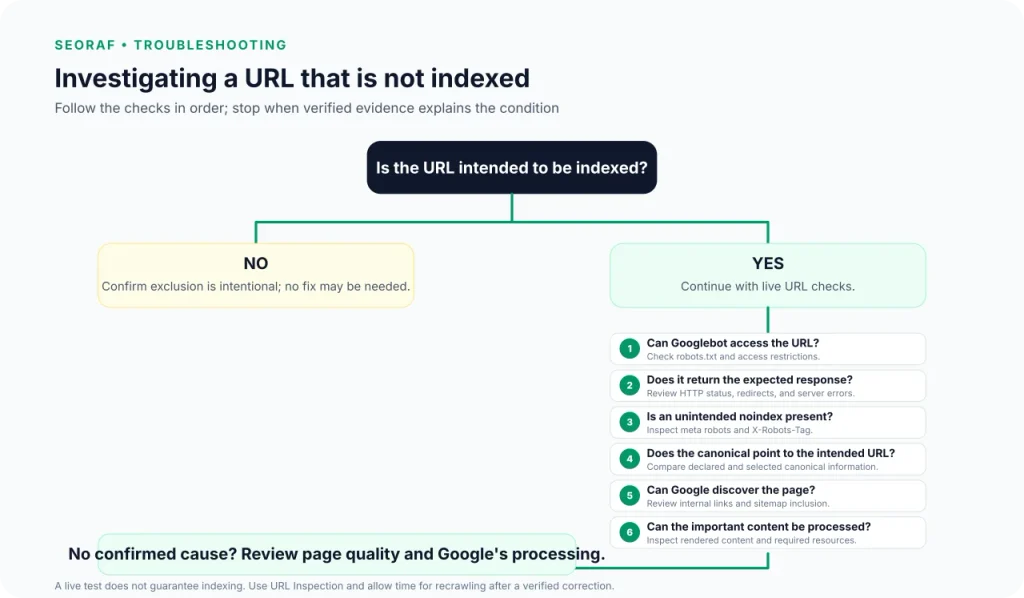
- Is it supposed to be indexed? Duplicates, utility pages, and private pages often shouldn’t be. If so, it’s fine.
- Can Googlebot reach it? Check robots.txt, logins, and server errors.
- Does it return HTTP 200?
- Is there a
noindex, in HTML, headers, or added by JavaScript? - Did Google pick another canonical? Compare declared and Google-selected canonicals.
- Does Google know the URL exists? Check internal links and the sitemap.
- Is the rendered content present and worthwhile? Google notes that indexing also depends on the content and its metadata, and that low content quality is one common cause of non-indexing.
- If everything above is clear, Google may have crawled the page and chosen not to index it. Google doesn’t guarantee indexing. My guide to the “Crawled – currently not indexed” status covers that case.
“My tool says there’s an error, but Search Console doesn’t”
The two are often looking at different things. A crawler isn’t Googlebot, so it may see errors that Google doesn’t, such as rate-limit responses. Search Console reports Google’s indexed version, which may be older than the live page. Search Console data is aggregated, and its example lists are capped. And lab and field performance data measure different things.
“After a redesign or migration, what do I check first?”
Check in this order: robots.txt, noindex carried over from staging, status codes, redirects from old to new URLs, canonicals, the sitemap, and HTTPS consistency. Google also publishes a site move guide if URLs changed.
“I fixed it. Why hasn’t anything changed?”
Google says new content can take days to a week or so to be crawled and indexed, and you can reduce the lag by requesting indexing for important URLs. Validation and recrawling take time too. A fix removes an obstacle. It doesn’t create a guarantee.
Symptom guide
| Symptom | Likely causes | First check | What not to conclude |
|---|---|---|---|
| Important page not indexed | Blocked, noindex, error status, another canonical, not discovered, content or metadata issues | URL Inspection (indexed version) | That the page is “penalized” |
| Indexed pages dropped | Site change, noindex or robots changes, server errors, consolidation | Page indexing trend and recent deployments | That an algorithm update caused it, without evidence |
| Many “excluded” URLs | Duplicates, redirects, intentional noindex | Reasons for a sample of URLs | That every exclusion is an error |
| Tool shows 5xx errors, Search Console doesn’t | Crawler load, rate limits, blocked bots | Crawl Stats and server logs | That Google saw those errors |
| Core Web Vitals failing | Template-level performance issues | Field versus lab data | That fixing it guarantees rankings |
| Traffic fell after a redesign | Changed URLs, missing redirects, rendering, noindex | Map old to new URLs | A cause from one metric alone |
Advanced Considerations
Server logs and Crawl Stats. Crawl Stats shows representative example URLs, not a complete list, and its numbers can differ slightly from your server logs, as Google’s Crawl Stats documentation explains. Server logs are therefore where you confirm whether specific URLs were requested. When reading logs, verify Googlebot using its user agent, source IP, and reverse DNS hostname, as Google describes in its crawler documentation.
Raw versus rendered comparisons at scale. For JavaScript sites, a recurring comparison of raw and rendered content can catch regressions. One related detail: Googlebot currently fetches only the first 2 MB of an HTML file, according to Google’s March 2026 post on its crawling infrastructure. That is rarely a concern, but heavy inline scripts or data can push real content past it. Google notes the limit may change.
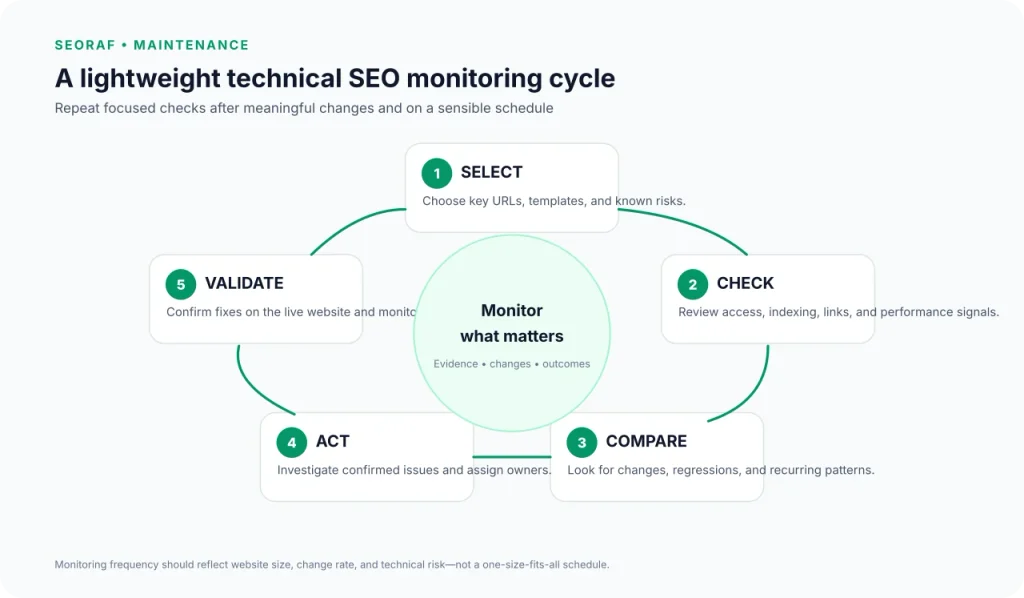
Monitoring and regressions. A light recurring check catches problems introduced by deployments. I would watch indexed-page trends, Core Web Vitals groups, sitemap errors, and changes to robots.txt and noindex rules. A light recurring check follows a simple cycle.
Crawl budget at scale. This is only relevant for the very large or fast-changing sites Google describes. Google’s advice includes consolidating duplicates, returning 404 or 410 for permanently removed pages, eliminating soft 404s, and avoiding long redirect chains. It also advises against using noindex to save crawl budget, because Google still requests the page before dropping it.
Technical foundations and AI search. Google says that to appear as a supporting link in AI Overviews or AI Mode, a page must be indexed and eligible to be shown with a snippet. It adds that there are no additional technical requirements. The same audit foundation applies. Preview controls such as nosnippet can limit what is shown.
Who Should Run the Audit: DIY, Developer, or Specialist?
| Option | Good fit when | Limits |
|---|---|---|
| DIY | A small or hosted site, and you can use Search Console and a basic crawl | Fixes involving code, rendering, or redirects at scale may need help |
| Developer | Findings involve templates, rendering, redirects, or performance | May need SEO context to know what matters |
| Specialist | Large sites, migrations, or recurring unexplained drops | Judge any audit you receive by the standards in this guide: evidence, cause, priority, owner |
You don’t need to write code to run the first four phases of the workflow. Phases 6 and 7 often involve someone who can change the site.
Frequently Asked Questions
What’s the difference between a technical SEO audit and an SEO audit?
A technical audit is one part of a broader SEO audit. It covers crawling, indexing, rendering, and experience, while a full audit also reviews content, on-page elements, and links. If your question is only “can Google index my pages?”, start with the technical audit.
How often should I run one?
There is no Google-required schedule. I would audit when something changes, such as a launch, a migration, or an unexplained indexing drop, and run a light recurring check between those moments. A practical first step is to note today’s indexed-page count and Core Web Vitals status as your baseline.
Can I do a technical SEO audit myself without coding?
You can do the evidence-gathering and diagnosis phases with Search Console and a crawler. Applying fixes in templates, rendering, or redirects often needs a developer. Start with Phases 1 to 4 and hand a clear findings list to whoever makes the changes.
What’s the first thing to check?
Whether your most important pages are indexed and not blocked. Run URL Inspection on three to five key URLs before anything else.
Is Google Search Console enough?
It is the best source for Google’s own view, but each report has scope limits. Pair it with a crawler to see your site’s structure, as in Phase 3, and compare the two lists.
Will fixing issues improve my rankings?
Fixing a real obstacle can let Google reach, index, or understand your pages. It doesn’t guarantee indexing or rankings. Measure the specific thing you fixed, such as whether the page is now indexed, rather than expecting a ranking jump.
Is every 404 or Search Console warning bad?
No. A 404 on a deleted page is expected, and Google says many non-indexed URLs are fine. For each warning, ask whether that URL should exist or be indexed before doing anything.
Does this matter for AI Overviews and AI search?
Google says there are no extra technical requirements beyond being indexed and eligible to show with a snippet, so the foundation is the same. Confirm your key pages are indexed and not restricted by nosnippet or similar controls.
Conclusion: Diagnosis, Not a Pile of Warnings
A technical SEO audit asks one question at each stage: where could this page get stuck? The six layers give you a way to ask it. The four prioritization factors let you decide what to do first. Search Console and a crawler give you evidence.
What to do next, by where you are:
- If you’re new: run the 20 checklist questions on your five most important pages.
- If you’re practicing: use the workflow, and go deeper in my guide on how to perform a technical SEO audit.
- If you’ve been handed a report: apply the scoring table before acting on any of it.
You don’t have to fix everything. You have to find what’s in the way of the pages that matter, fix those first, and check that the fix worked. Fixes remove obstacles. They don’t guarantee indexing or rankings.
About the author. Mousume Akter is the Founder & Editor of SEORAF, an independent SEO education and research resource. Learn more about SEORAF.
How this guide is kept current. Google’s documentation changes, so I note the date of each review at the top of this page. If a source linked below no longer says what this guide says it does, trust the source and let me know.
Sources and Further Reading
Google documentation
- Google Search Essentials and Google Search technical requirements
- How Google Search works
- Inside Googlebot (Search Central blog, March 2026) and Overview of Google crawlers and fetchers
- Introduction to robots.txt and Robots meta tag and X-Robots-Tag
- Build and submit a sitemap
- Canonicalization and consolidating duplicate URLs
- Redirects and Google Search
- HTTP status codes, network and DNS errors
- JavaScript SEO basics
- Mobile-first indexing best practices and Rolling out mobile-first indexing (2018)
- Core Web Vitals, page experience, and how the thresholds were defined (web.dev)
- The role of page experience in creating helpful content (2023) and HTTPS as a ranking signal (2014)
- Introduction to structured data and general structured data guidelines
- Localized versions of your page (hreflang)
- Link best practices
- Optimize your crawl budget
- Page indexing report, URL Inspection tool, Crawl Stats report, and Core Web Vitals report
- AI features and your website
- Site move with URL changes
Practitioner commentary (labeled as such in the text)