
Best SEO Tools Free: What You Get and Where Free Plans End
Short answer: if you are looking for Best SEO Tools Free, start with Google Search Console, then add one free tool per job instead of collecting twenty. Free tools can cover much of what a new or small site needs, but they fall short when you manage many sites, run a large site, or need competitor research at volume.
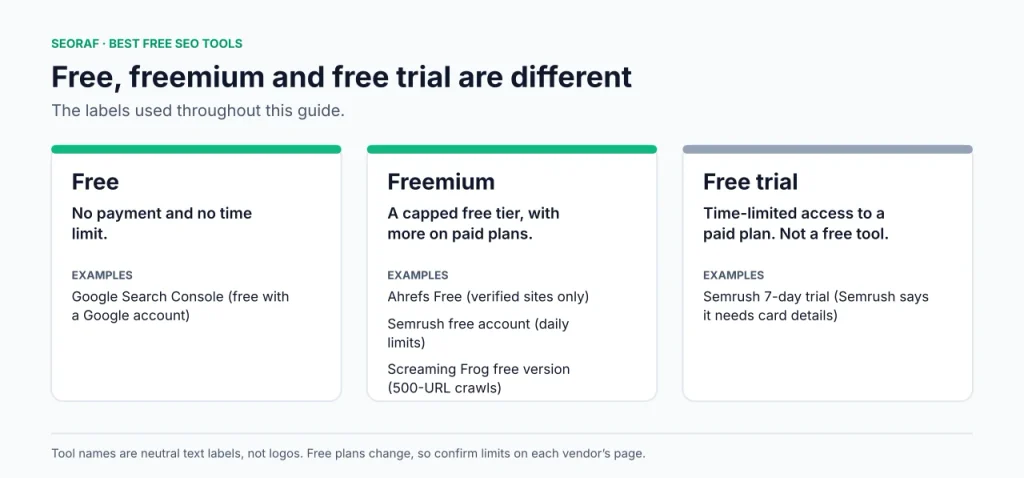
Here, free means you can use the tool without paying, although usage limits or account requirements may apply. Freemium means a product offers a free tier with restrictions and paid upgrades. A free trial is different: it provides temporary access under the vendor’s terms. Free-plan limits are summarized in one table, with source dates and verification caveats stated there.
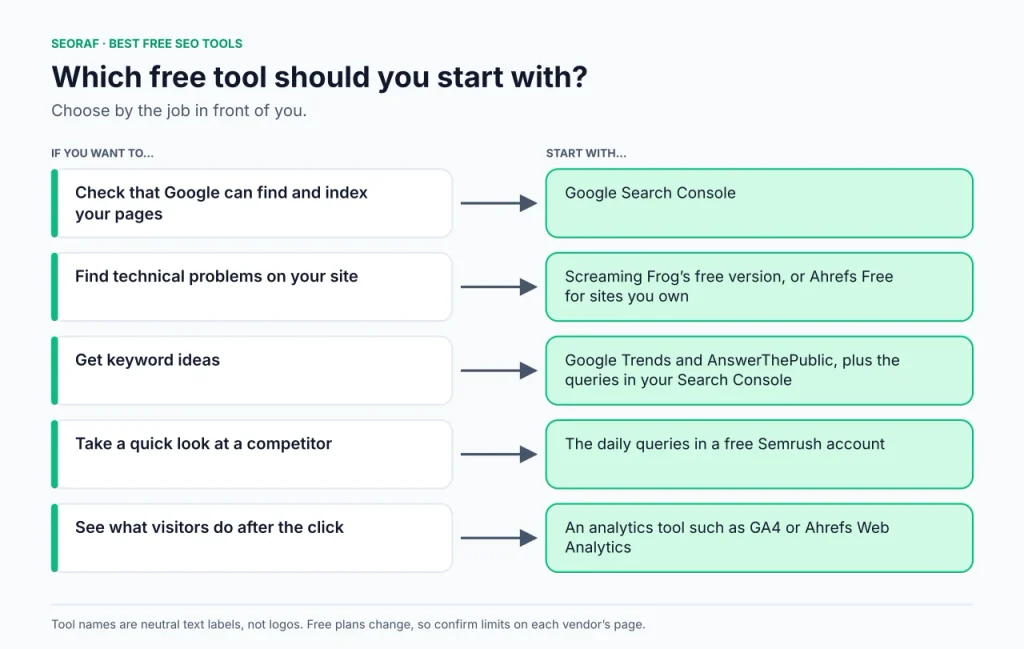
- Checking indexing and search performance: Google Search Console
- Crawling for technical issues: Screaming Frog’s free version, or Ahrefs Free for sites you own
- Finding keyword ideas: Google Trends and AnswerThePublic, plus the queries your site already appears for in Search Console
- Taking a quick look at a competitor: the daily queries in a free Semrush account
Last verified: 20 October 2026. SEORAF is an independent SEO knowledge resource, not an agency. This page contains no affiliate links. Some SEORAF pages it links to for paid tools do, and each carries its own disclosure. Tools marked “SEORAF tool” are ours. See our affiliate disclosure and editorial policy.
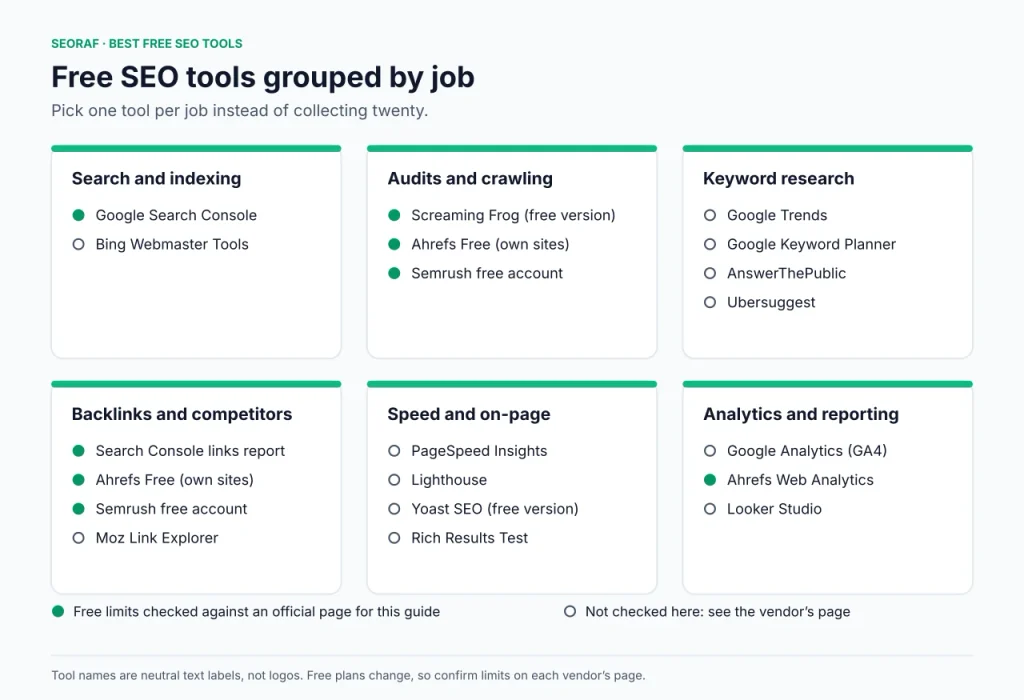
Best SEO Tools Free by Job
Use this table to shortlist tools. The sections that follow cover them in the same order, and the last column shows whether I checked a tool’s free limits against an official page for this guide. Trials are covered in the Semrush section and in the free-versus-paid section.
| Tool | Best for | Free type | Limits checked for this guide |
|---|---|---|---|
| Google Search Console | Indexing, queries, clicks | Free (Google account) | Yes |
| Bing Webmaster Tools | Bing performance and site scans | Free (account) | No |
| Screaming Frog (free version) | Crawling and technical checks | Freemium (desktop software) | Yes |
| Ahrefs Free | Audit, keywords and backlinks for your own site | Freemium (verified sites only) | Yes |
| Semrush free account | Daily research queries, small audit, 10 tracked keywords | Freemium (free account) | Historical source; current limits not confirmed |
| Google Trends | Relative interest over time | Free | No |
| Google Keyword Planner | Keyword ideas | Free (needs a Google Ads account) | No |
| AnswerThePublic | Question and phrase ideas | Freemium | No |
| Ubersuggest | Keyword and content ideas | Freemium | No |
| PageSpeed Insights, Lighthouse, GTmetrix | Page speed, one URL at a time | Free | No |
| Yoast SEO (free version) | Titles, descriptions and sitemaps in WordPress | Freemium | No |
| Google Analytics (GA4) | Visitor behavior | Free | No |
| SEORAF tools | Audit, intent, outlines, alt text, titles and meta | Free | See each tool page |
Free SEO tools by job. The last column shows the verification status; Semrush figures come from a December 2025 guide and are not confirmed current limits.
How I chose and verified these tools
I selected tools by job, then compared three things: where the data comes from, what the free tier actually limits, and what you have to hand over, such as an account, a verified site or billing details.
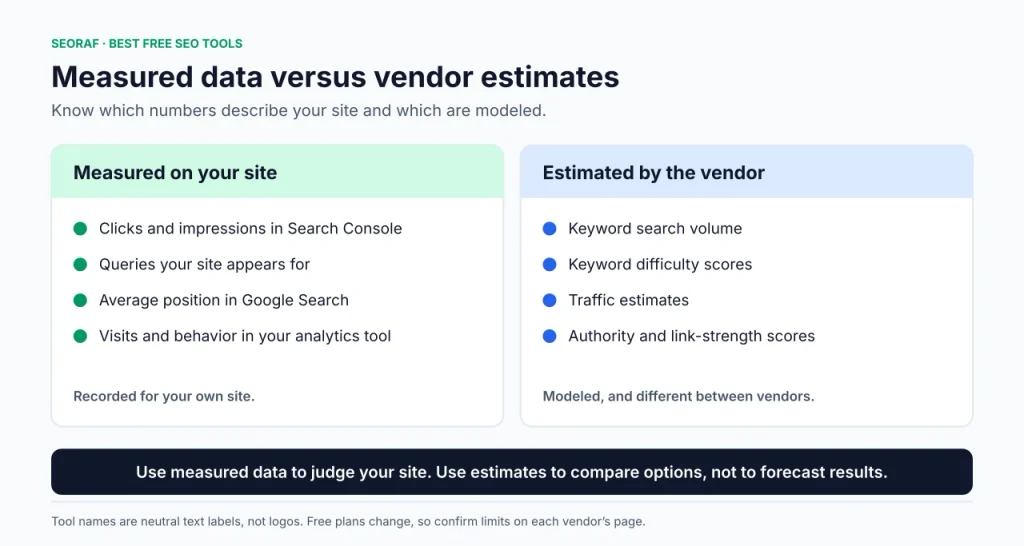
Measured data versus estimates. Search Console and your analytics tool record what happened on your site. Keyword volume, difficulty, traffic and authority scores from third-party tools are modeled estimates and differ between vendors. Use them to compare options, not to forecast results.
What “verified” means here. I checked Google’s or the vendor’s own pages for Google Search Console, Ahrefs Free and Screaming Frog on 20 October 2026 and recorded the limits as stated. The Semrush figures come from a guide dated December 2025; they are historical vendor-published information, not confirmed current limits. These details appear in the limits table. For every other tool, I describe its documented purpose only and direct you to the vendor page for limits, because free tiers change.
I did not run accuracy benchmarks or lab tests for this guide, and nothing here is a ranking or traffic promise. Opinions are labeled as SEORAF’s view. My full approach is in the review methodology.
My own tools. SEORAF built the tools marked “SEORAF tool”. I list them because they are SEORAF tools, not because I have ranked them against third-party tools.
Search performance and indexing
Google Search Console
Best for: confirming that Google can find, crawl and index your pages, and seeing which queries show your site.
According to Google’s Search Console help, it shows how often your site appears in Google Search, which queries show it, how often people click, which sites link to you, and it alerts you to indexing, spam and other issues. You don’t need it for your pages to be included in search results, but it shows how Google sees your site.
Example: you publish a post and see no traffic after two weeks. Inspect the URL in Search Console. If Google has not indexed it, you have an indexing problem. If it is indexed and the Performance report shows impressions but few clicks, look at the title and description instead.
- Pros: Data comes straight from Google; free with a Google account; covers indexing, queries, clicks and sites linking to you.
- Cons: Reports on your own site only, so there is no competitor data; it does not show what visitors do after the click.
Bing Webmaster Tools
Best for: a second first-party view of your site, from Bing. It is Bing’s equivalent of Search Console and covers Bing Search only.
- Pros: Bing’s own data on your site; free with site verification.
- Cons: Limits not verified for this guide; no Google data.
Site audits and crawling
A crawler visits your pages the way a search engine bot does and reports what it finds, such as broken links, missing titles, redirect chains and duplicate-content signals. Treat the issue list as prompts to investigate, not a score that must reach zero. For background, see our guide to crawling and the technical SEO guide.
Screaming Frog SEO Spider (free version)
Best for: finding broken links, redirects, page titles and meta data problems, duplicates and sitemap issues on small sites.
It is desktop software for Windows, macOS and Linux. The vendor says the free version needs no sign-up and has a per-crawl URL cap (see the limits table), and that the free version also restricts crawl configuration, saving crawls and advanced features such as JavaScript rendering, custom extraction and API integrations. A paid licence removes the cap. The vendor says the tool checks for over 300 issues. For a feature-by-feature comparison, read our Screaming Frog free vs paid features guide.
Example: a site with 300 crawlable URLs fits inside the free cap in one crawl. A site with thousands of crawlable URLs does not, so crawl a smaller section or folder at a time instead of buying a licence straight away. Page count and crawlable URL count are not always the same.
- Pros: No sign-up (per the vendor); exports crawl data to a spreadsheet; covers broken links, redirects, titles, meta data, directives, duplicates and sitemaps.
- Cons: Per-crawl URL cap; no saved crawls or advanced features in the free version; large crawls depend on your computer’s memory and storage, according to the vendor.
Ahrefs Free
Best for: getting audit, keyword and backlink data for sites you own.
Ahrefs renamed Webmaster Tools to Ahrefs Free, though its page still carries the old name in places. It gives free access to three tools for websites you verify as yours: Web Analytics, Site Audit and Site Explorer. The vendor says Site Audit checks 170+ technical and on-page issues, Site Explorer shows the keywords your site ranks for and who links to you, and Web Analytics is privacy-focused, with no cookies by default.
Example: verify your site, run Site Audit, then open the keyword list in Site Explorer. Pages that already appear for queries are the natural place to start improving.
- Pros: Works on an unlimited number of verified websites (per Ahrefs); includes fix guidance for each audit issue; keyword and backlink data for your own site.
- Cons: Verified sites only, so no competitor research; credit and visibility limits apply; keyword and backlink figures are vendor estimates.
Semrush free account
Best for: a quick look at any domain, and a small starter set of tracking and audit tools.
Semrush says you can create a free account with an email address and no credit card. Its daily limits are in the limits table. Semrush also says every new search in a keyword research tool counts toward the daily limit, so plan your queries before you start. The 7-day trial unlocks every toolkit but, according to Semrush, requires card details. Our Semrush free trial page covers that separately.
Verification note: the figures come from a Semrush guide dated December 2025, and that guide is not fully consistent about the audit allowance. Treat them as historical vendor-published information, not confirmed current limits. Check Semrush’s current official pricing or help documentation before relying on a specific allowance.
- Pros: Research on any domain within the daily limit (per Semrush); limited position tracking, a small audit and an on-page checker are included.
- Cons: The daily cap is easy to reach in one session (Semrush says so); tracking and audit allowances are small.
SEORAF SEO Audit Tool
My own free audit tool, listed here as a SEORAF tool. Open the SEO Audit Tool page for what it checks and any limits.
Keyword research
Keyword tools estimate demand from vendor datasets, so use them for ideas and pair them with the queries your site already appears for in Search Console. For a wider comparison that includes paid tools, see our best keyword research tools page, and for method, the keyword research guide.
| Tool | Use it for | Watch out for |
|---|---|---|
| Google Trends | Comparing interest in topics over time and spotting seasonality | It shows relative interest, not absolute search volume |
| Google Keyword Planner | Keyword ideas based on Google’s advertising data | It lives inside Google Ads, so you need a Google Ads account; its competition figure refers to advertisers, not organic difficulty. Check Google Ads Help for current access steps |
| AnswerThePublic | Question-style and phrase-style ideas from a seed topic | Check the vendor page for its current free usage |
| Ahrefs Keyword Difficulty Checker and Keyword Generator | A quick difficulty estimate and seed ideas | Difficulty is one vendor’s model; free output limits were not verified for this guide |
| Ubersuggest | Keyword and content ideas | I am publishing no free-limit number: third-party sources disagree, and its pricing page did not load in a readable form when I checked |
| Keyword Intent Tool (SEORAF tool) | Classifying a pasted keyword list by search intent and getting a suggested page type | Our own tool; its page advises confirming each result against the live search results |
Example: Trends suggests a topic gets more attention in autumn, so you plan the post ahead of time. Later, Search Console shows the post appearing for related queries with few clicks, which tells you to rework the title and opening rather than write a new page.
Backlinks and competitor snapshots
Every vendor builds its own link database, so compare patterns across tools instead of exact counts.
| Tool | Use it for | Watch out for |
|---|---|---|
| Search Console links report | Which sites link to your own site, from Google’s data | Your site only |
| Ahrefs Free | Backlinks to sites you have verified | Own sites only; see the limits table |
| Ahrefs Backlink Checker | A quick look at a site’s backlinks | Its free limits were not verified for this guide; check Ahrefs’ page for what the free version shows |
| Semrush free account | A snapshot of your own or a competitor’s backlinks and domain overview | Shares a daily query allowance |
| Moz Link Explorer | Another vendor’s link data for comparison | Check its current free terms on Moz’s site |
Example: pick one competitor. Spend a few of Semrush’s daily queries on its domain overview and backlinks, then note which topics it covers that you don’t. Record the findings in a spreadsheet so they survive the daily reset.
Page speed, on-page checks and structured data
| Tool | Use it for | Watch out for |
|---|---|---|
| PageSpeed Insights | Analyzing a URL you enter and getting suggestions | One page at a time; results vary between runs |
| Lighthouse | Auditing pages from Chrome DevTools, the command line or Node, including pages behind a login | Needs some technical comfort |
| GTmetrix | Testing a URL you enter | Check its current free terms on the vendor’s site |
| Yoast SEO (free version) | Managing titles, descriptions and sitemaps in WordPress | Check Yoast’s site for what the free version includes; its checks are guidance, not guarantees |
| Rich Results Test and Schema Markup Validator | Testing structured data on a URL or code snippet | They validate markup; they do not promise rich results |
| Title & Meta Analyzer, Content Outline Generator, Image Alt Generator (SEORAF tools) | On-page jobs: titles and meta data, outlines, image alt text | Our own tools; see each page for details and limits |
For Google’s current Core Web Vitals metrics, see web.dev. Google can change the set of metrics over time.
Analytics and reporting
| Tool | Use it for | Watch out for |
|---|---|---|
| Google Analytics (GA4) | What visitors do after they arrive, which Search Console doesn’t show | Needs setup on your site; check Google’s current free-tier terms |
| Ahrefs Web Analytics | A privacy-focused alternative, with no cookies by default (per Ahrefs) | Only on verified sites; event limit in the limits table |
| Looker Studio | Dashboards and stakeholder reports | Needs data sources connected; check current terms |
AI visibility checkers
Both Ahrefs and Semrush list free AI visibility checkers among their free tools, and other free options exist. This area changes quickly, and I have not verified their limits or methods, so check each vendor’s page and treat AI-visibility scores as estimates. For more, see the SEORAF overview of AI SEO tools.
Free-plan limits at a glance
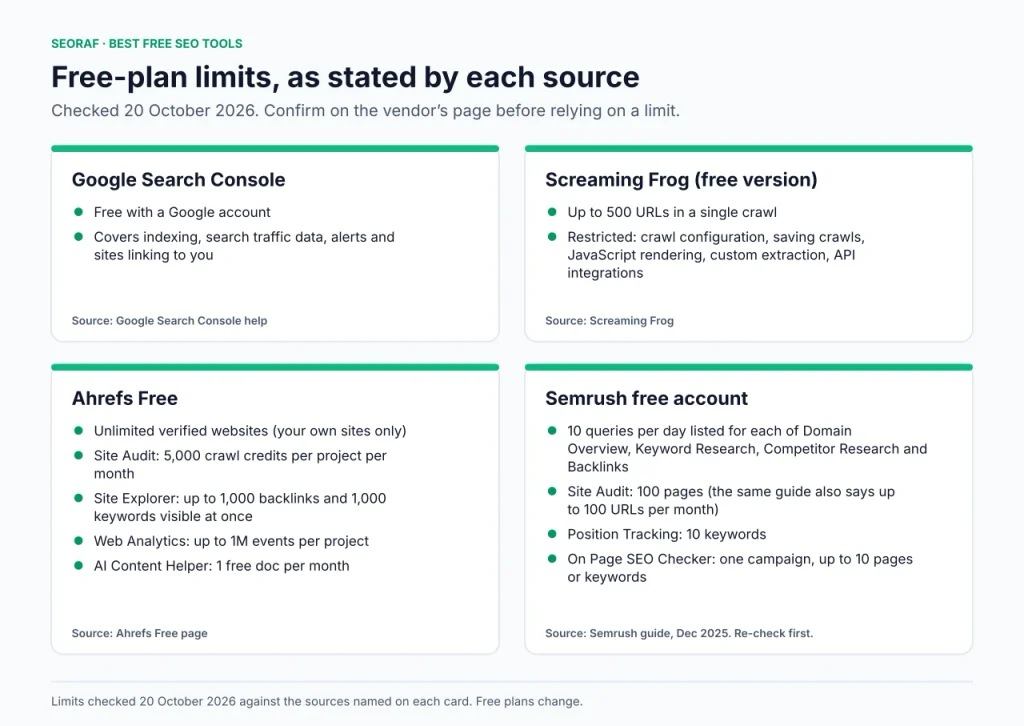
The table records the figures and source dates available for this guide. The Google Search Console, Ahrefs Free and Screaming Frog details were checked against official pages on 20 October 2026. Semrush figures come from a December 2025 guide and are not confirmed current. Free plans change, so confirm on the vendor’s page before you depend on a limit.
| Tool | What the free tier includes | Source |
|---|---|---|
| Google Search Console | Free with a Google account. Covers indexing, search traffic data, alerts and sites linking to you. | Google Search Console help |
| Ahrefs Free | Unlimited verified websites. Site Audit: 5,000 crawl credits per project per month (only HTML pages returning status 200 use credits). Site Explorer: up to 1,000 backlinks and 1,000 keywords visible at once. Web Analytics: up to 1M events per project. AI Content Helper: 1 free doc per month. Works on sites you verify as your own. | Ahrefs Free page |
| Semrush free account | A December 2025 Semrush guide lists 10 queries per day for each of Domain Overview, Keyword Research, Competitor Research and Backlinks. It lists Site Audit at 100 pages, while elsewhere saying up to 100 URLs per month; it also lists 10 tracked keywords, one On Page SEO Checker campaign of up to 10 pages or keywords, and one SEO Writing Assistant content item. Historical figures only; current limits are not confirmed. | Semrush guide (December 2025; see the caveat above) |
| Screaming Frog SEO Spider | Up to 500 URLs in a single crawl. Crawl configuration, saving crawls, JavaScript rendering, custom extraction and API integrations are restricted. | Screaming Frog |
Free-plan limits and source dates. Semrush figures are from December 2025 and are not confirmed current.
Not verified for this guide: Ubersuggest, Google Keyword Planner access details, Bing Webmaster Tools, GA4, PageSpeed Insights, Lighthouse, GTmetrix, Looker Studio, AnswerThePublic, Moz, Yoast, and the free AI visibility checkers. Check each vendor’s page for current limits.
Practical free SEO workflows
A new site, first 90 days
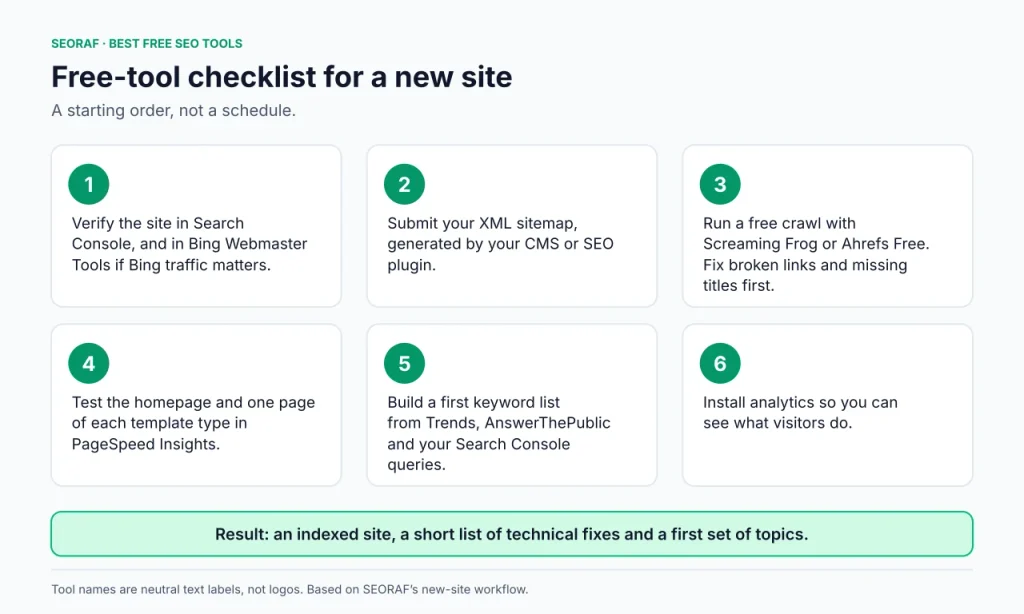
- Verify the site in Search Console, and in Bing Webmaster Tools if Bing traffic matters to you.
- Submit your XML sitemap, generated by your CMS or SEO plugin.
- Run a free crawl with Screaming Frog or Ahrefs Free, and fix broken links and missing titles first.
- Test the homepage and one page of each template type in PageSpeed Insights.
- Build a first keyword list from Trends, AnswerThePublic and, once data appears, your Search Console queries.
- Install analytics so you can see what visitors do.
Output: a site set up for search monitoring, a submitted sitemap, a short list of technical issues to investigate and a first set of topics. Submitting a sitemap does not guarantee that Google will index the site or its pages. New to the basics? Start with SEO for beginners.
A WordPress or small-business site
- Set up Search Console and an SEO plugin for titles and sitemaps.
- Confirm your service or product pages are indexed.
- Crawl for broken links and duplicate titles.
- Check speed on the homepage and your main service pages.
A 60-minute monthly routine
- Review Search Console for new indexing or other issues.
- Re-crawl after any structural change, such as a redesign or new URL structure.
- Re-test pages you changed and compare against earlier runs, since speed results vary.
- Write down what you changed and when, so you can read the results later.
A free competitor check
- Pick one competitor.
- Use a few Semrush daily queries for its domain overview and backlinks.
- Add Ahrefs Backlink Checker for a second link snapshot.
- Compare its topics with your Search Console queries and log gaps in a spreadsheet.
From a query to a content brief
- In Search Console, find a query where your page gets impressions but few clicks.
- Check the intent behind it, for example with the Keyword Intent Tool.
- Draft an outline, for example with the Content Outline Generator.
- Update the page, then recheck the query in Search Console after a few weeks. For depth, see the content SEO guide.
When free isn’t enough
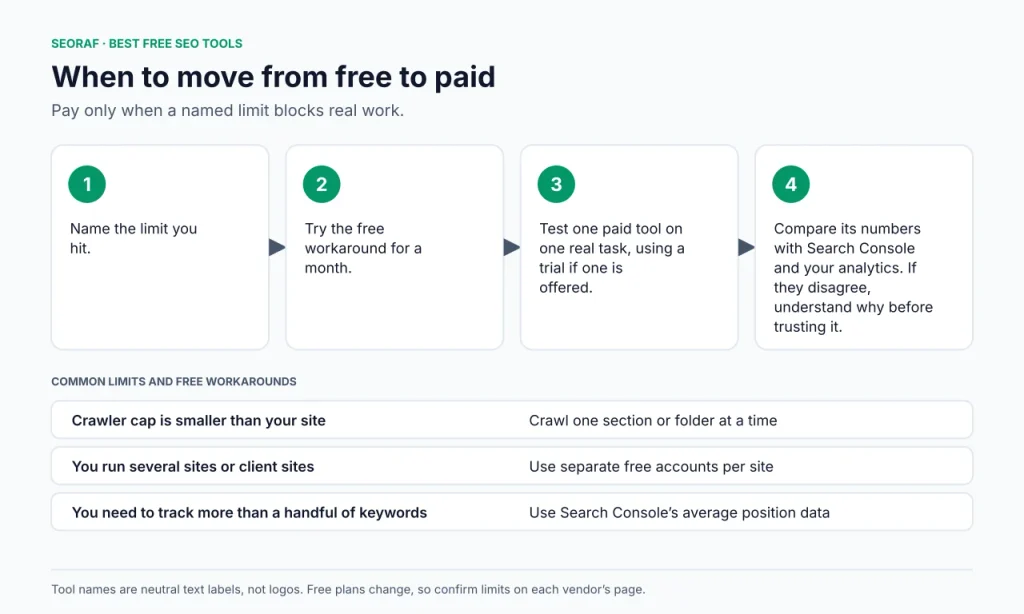
Pay only when a specific limit blocks real work and a free workaround costs more time than the tool would. Free tools usually run out at scale, history, automation and research on other people’s sites.
| If this is happening | Try this first | What a paid tool may add |
|---|---|---|
| Your site is bigger than a free crawler’s cap | Crawl one section or folder at a time | Crawling without the free URL cap |
| You run several sites or client sites | Separate free accounts per site | Multiple projects in one place |
| You need to track more than a handful of keywords over time | Search Console’s average position data | Rank tracking with history |
| Competitor and backlink research is central to your work | Limited free backlink checkers and daily queries | Larger link and keyword databases |
| You repeat the same manual reports | Manual exports and a spreadsheet | Scheduled reports |
- Name the limit you hit.
- Try the free workaround for a month.
- Test one paid tool on one real task, using a trial if one is offered.
- Compare its numbers with Search Console and your analytics. If they disagree, understand why before trusting it.
When a specific limit is blocking real work, these SEORAF pages cover paid options. Some contain affiliate links and carry their own disclosures.
- Best SEO tools: a curated list across tool types
- Best affordable SEO tools: budget-focused options
- SEO software overview: broader software coverage
- Semrush free trial: the trial’s terms, if a specific Semrush task justifies one
Frequently asked questions
What is the best free SEO tool overall?
No single tool is best for every job. Google Search Console is the best starting point because it shows measured data about your own site from Google. Add one tool per extra job, such as a crawler for technical checks and a keyword tool for ideas.
Is Google Search Console enough?
It covers Google search performance, indexing and the sites linking to you. It does not show what visitors do after the click, crawl your site the way a third-party crawler does, or research competitors. Most sites add an analytics tool and a crawler.
Is Ahrefs Free really free?
Yes, within limits. Ahrefs says it is free for an unlimited number of verified websites, with crawl credits and visibility caps. It covers sites you verify as your own; analyzing competing sites requires a paid Ahrefs subscription, according to Ahrefs.
Should I use a free Semrush account or the free trial?
A free account has daily and project limits. The 7-day trial unlocks all toolkits, and Semrush says it requires card details. Choose the trial only when you have a specific task to complete before it ends. See our Semrush free trial page.
What does Screaming Frog’s free version limit?
The vendor says the free version crawls up to 500 URLs in a single crawl and restricts crawl configuration, saving crawls and advanced features such as JavaScript rendering, custom extraction and API integrations. A paid licence removes the URL cap. Details are in our free vs paid comparison.
What is the best free keyword research tool?
It depends on the task. Search Console shows queries you already appear for. Google Trends shows relative interest over time. AnswerThePublic suggests question-style ideas. Combine one idea tool with your own Search Console data rather than relying on estimated volumes. See the keyword research guide.
Can free tools track rankings?
Search Console reports average position for queries your site appears for. A free Semrush account lets you track up to 10 keywords, according to Semrush. Tracking many keywords with history usually needs a paid plan, though plans vary. See Google’s explanation of impressions, position and clicks.
How accurate are free SEO tools?
Data measured on your own site, from Search Console and analytics, is the most reliable for that site. Vendor estimates such as volume, difficulty, traffic and authority scores are modeled and differ between tools. Compare direction and patterns rather than exact numbers.
Key takeaways
- Start with Search Console, which gives you measured data about your own site.
- Choose tools by job, then check the free limit before building a workflow around one.
- Treat vendor estimates as direction, not fact.
- Pay only when a named limit blocks real work and a free workaround isn’t enough.
SEORAF is an independent SEO knowledge resource, not an agency, and does not sell rankings. Free limits and plans change, so verify them on each vendor’s official page. Last verified: 20 October 2026.