
Crawl Rate: What It Is, What Controls It, and When It Matters
By Mousume Akter, SEORAF · Last verified October 10, 2026 against the Google pages listed under Sources
Crawl rate is the pace at which Google requests URLs from your site. You can’t set or raise it directly: Google works it out automatically from how much your server can handle and how much Google wants to crawl. For most sites it is something to monitor, not optimize.
A note on terms: Google’s documentation doesn’t define “crawl rate” itself. It describes the crawl capacity limit, crawl demand and crawl budget, so this guide uses “crawl rate” as shorthand for the observed result.
How claims are labeled: statements about Google’s behavior come from the Google pages listed under Sources. Anything else is marked (industry practice) or (SEORAF interpretation). Examples marked “hypothetical” are illustrations, not case studies or measured results.
Quick answers
- Can I set or raise Google’s crawl rate? No. Google announced that the Search Console crawl rate limiter would be deprecated on January 8, 2024, and says you can’t request an increase.
- Can I slow Google down? Only as a short emergency measure: temporary 500, 503 or 429 responses for hours to one or two days. Longer risks URLs dropping from the index.
- Is crawl rate a ranking factor? No. Google says crawling isn’t a ranking signal.
- Do I need to worry about it? Google’s crawl budget guide targets very large or fast-changing sites. If new pages are crawled the same day you publish them, Google says you don’t need that guide.
What Is Crawl Rate?
Crawl rate is the pace of Google’s requests to your site over time. Google sets it automatically by balancing what your server can handle (the crawl capacity limit) with how much Google wants to crawl (crawl demand).
Crawl rate vs. crawl budget
| Term | Plain meaning | Source |
|---|---|---|
| Crawling | Google fetching a URL | Google documentation |
| Crawl rate | The observed pace of those requests over time | Practitioner shorthand |
| Crawl capacity limit (hostload) | A cap on the total time your server spends holding connections open for Google, based on parallel connections and how long they last | Google documentation |
| Crawl demand | How much Google wants to crawl your site | Google documentation |
| Crawl budget | The set of URLs Google can and wants to crawl | Google documentation |
| Indexing | Google deciding whether to use a crawled page in Search | Google documentation |
In short: crawl budget describes what Google can and wants to crawl, and crawl rate is how that shows up as requests over time. Crawl budget strategy for very large sites is a separate topic from this page.
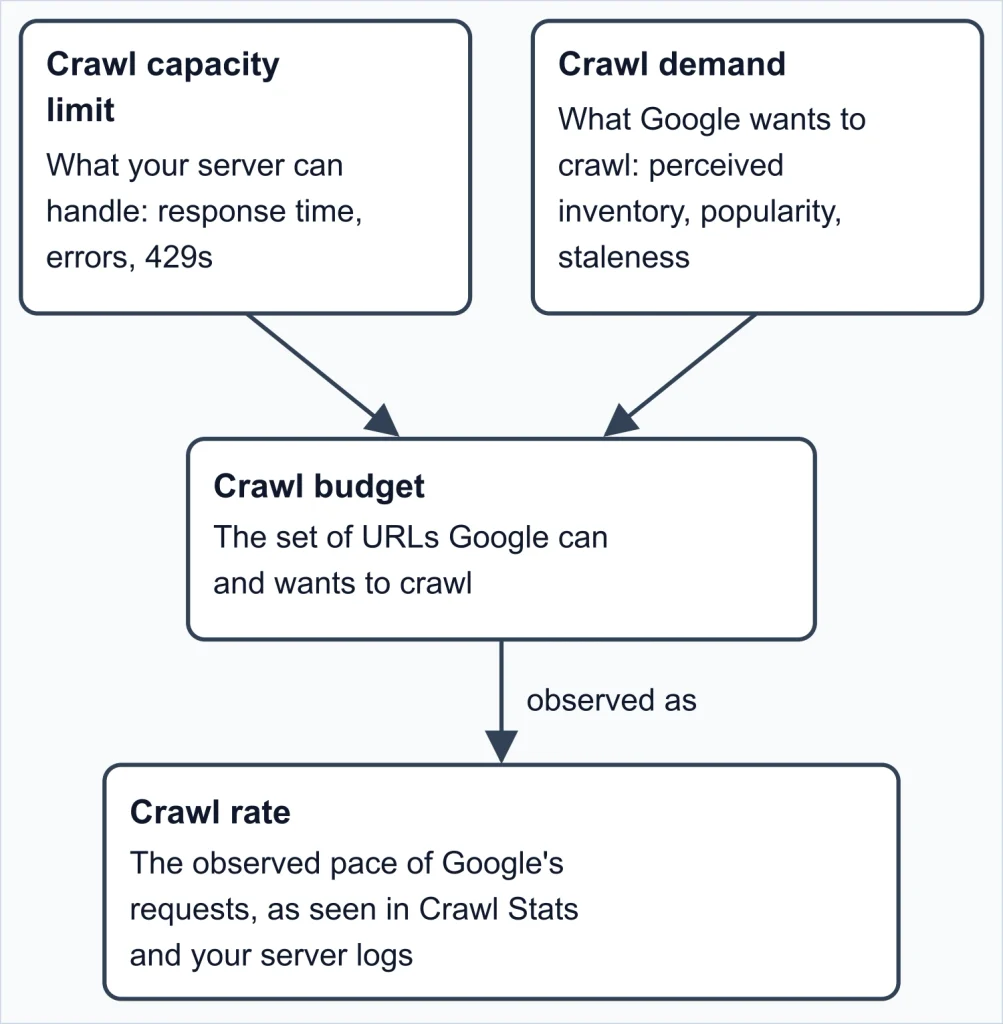
Figure 1. Capacity and demand define crawl budget; crawl rate is what you observe. “Crawl rate” is a practitioner term; Google’s documentation defines capacity, demand and budget.
Crawled doesn’t mean indexed. For Search, each crawled page is still evaluated, consolidated with duplicates and assessed before it can be indexed, so “crawl rate is low” and “my page isn’t indexed” are separate problems.
For Google’s crawl budget purposes, a “site” is a unique hostname: www.example.com and shop.example.com have separate crawl budgets. For the wider picture, see the crawling overview and the indexing guide.
What Determines Crawl Rate?
(SEORAF interpretation) Crawl rate is an outcome, not a setting. Most diagnosis comes down to one question: is the limit low, or is the demand low?
Crawl capacity limit
Google doesn’t want to overwhelm your server. Every site starts with the same conservative default, and if there is demand to crawl more and the site stays healthy, Google raises the limit automatically over time. The limit is shared across Google’s crawlers, so heavy demand from one (such as AdsBot) can reduce what is available to others. You may see “crawl rate limit” in older material; current documentation says crawl capacity limit.
Crawl health: response time and errors
Stable or improving server response times, including time to first byte (the wait before the first byte of a response arrives), let the limit rise. Slower responses, 5xx server errors, or rate-limiting signals such as HTTP 429 push it down.
Crawl demand
For Googlebot, demand depends on site size, update frequency, page quality and relevance compared with other sites. Google highlights three factors:
- Perceived inventory: the URLs Google thinks exist. If many are duplicates or unwanted, crawling is wasted. Google says this is the factor you can influence most.
- Popularity: more popular URLs tend to be crawled more often.
- Staleness: Google wants to recrawl often enough to catch changes.
Site-wide events such as a site move can temporarily raise demand while Google reprocesses URLs.
Do You Need to Worry About Crawl Rate?
Google’s crawl budget guide is aimed at sites with:
- 1 million or more unique pages that change about weekly
- 10,000 or more unique pages that change daily
- Many URLs listed as “Discovered – currently not indexed” in Search Console
Google calls these figures rough estimates. If pages are crawled the same day they’re published, it says you don’t need the guide. For Search, it suggests keeping your sitemap current and checking the Page Indexing report. Google also describes the Crawl Stats report as aimed at advanced users and says a site under about a thousand pages shouldn’t need it.
(SEORAF interpretation) A “low” crawl count on a small site that rarely changes is usually just low demand. Compare crawling with how often your important content changes before deciding something is wrong.
Worth investigating: important pages not crawled in a reasonable time, sustained server errors or slow responses, a sharp spike or drop, or a host status warning. If pages are crawled but not indexed, start with indexability instead.
How to Check Your Crawl Rate
You don’t need a paid tool for the basics. Crawl Stats and your own server logs cover the essentials. (SEORAF interpretation)
Crawl Stats in Search Console
Open Settings → Crawl stats. The report is only available for root-level properties: a Domain property, or a URL-prefix property at the root (such as https://example.com).
It shows total crawl requests, total download size and average response time, with breakdowns by response, file type, crawl purpose and Googlebot type. Crawl purpose is either discovery (a URL Google never crawled before) or refresh (a recrawl). Googlebot types include Smartphone, Desktop, Image, Video, Page resource load, AdsBot and StoreBot. Worth knowing:
- Duplicate requests for the same URL are counted individually.
- In a redirect chain, each hop is counted as a separate request.
- Average response time counts each linked resource as its own response.
- For a Domain property you can view the parent or a single child domain. Requests to sibling domains and to resources hosted outside the property aren’t shown.
Host status and “Hostload exceeded”
Host status covers the last 90 days across three categories: robots.txt fetching, DNS resolution and server connectivity. If it isn’t green, open the detail view to see which category failed.
Separately, URL Inspection can show “Hostload exceeded.” Google points to this as a sign that your server capacity is the constraint, and says adding server resources may be worth considering if that makes sense for your business.
Server logs
Logs record requests that reached your server. A common first step (industry practice) is to group Googlebot crawl activity by status code and URL pattern:
# Illustrative: assumes common/combined log format (status code is field 9)
grep "Googlebot" access.log | awk '{print $9}' | sort | uniq -c | sort -rn
Verify that the traffic is really Googlebot
Anyone can put “Googlebot” in a user-agent string, so verify before trusting the data. Google documents two methods:
- Run a reverse DNS lookup on the IP from your logs and confirm the hostname is under googlebot.com, google.com or googleusercontent.com. Then run a forward lookup on that hostname and confirm it returns the same IP.
- Match the IP against the JSON IP-range lists Google publishes, which suits large-scale checks.
host <IP-from-log>
host <hostname-returned-above>
Reading Crawl Stats and Server Logs Together
The two sources rarely match exactly, and that’s expected. They measure different things:
| Question | Crawl Stats | Server logs |
|---|---|---|
| What is counted? | Google’s own record of its requests, including resources on your site, duplicates, and each redirect hop | Requests that reached your server. Depending on setup, CDN-served requests may not appear (industry practice) |
| Failed fetches | Includes DNS and connectivity failures. “Page could not be reached” requests never reached your server | Can’t show requests that never arrived |
| robots.txt unavailable | Counts fetches Google abandoned because robots.txt was unavailable, so totals can run higher than logs | Shows only fetches actually made |
| Who made the request? | Labeled by Googlebot type | Must be verified; user agents can be faked |
| Completeness | Google says it reports most, not all, requests; example URLs aren’t comprehensive | Depends on your logging setup |
A practical way to reconcile them (industry practice, except step 4):
- Compare the same time window and the same hostname.
- Verify the Googlebot IPs in your logs first.
- Compare the status-code mix. A large difference in 5xx or 429 share matters more than a small difference in totals.
- If Crawl Stats totals are much higher than your logs, check robots.txt fetching in host status. Google says that is a known cause.
- If the totals are close but not identical, treat it as normal: Google documents slight differences as a known limitation.
Why Crawl Rate Drops or Spikes (and What to Do)
Five questions to start with
- Is it a problem at all? Compare crawling with how often your important content changes. (Industry practice)
- Is capacity limiting Google? Check response time, response codes, host status and “Hostload exceeded.”
- Is demand the issue? Look at duplicates, parameter URLs, soft 404s and unimportant URLs.
- Is crawling going to the wrong URLs? Group requests by URL pattern, not site-wide totals. (Industry practice)
- Is it really an indexing issue? If pages are crawled but not indexed, move to indexing diagnosis.
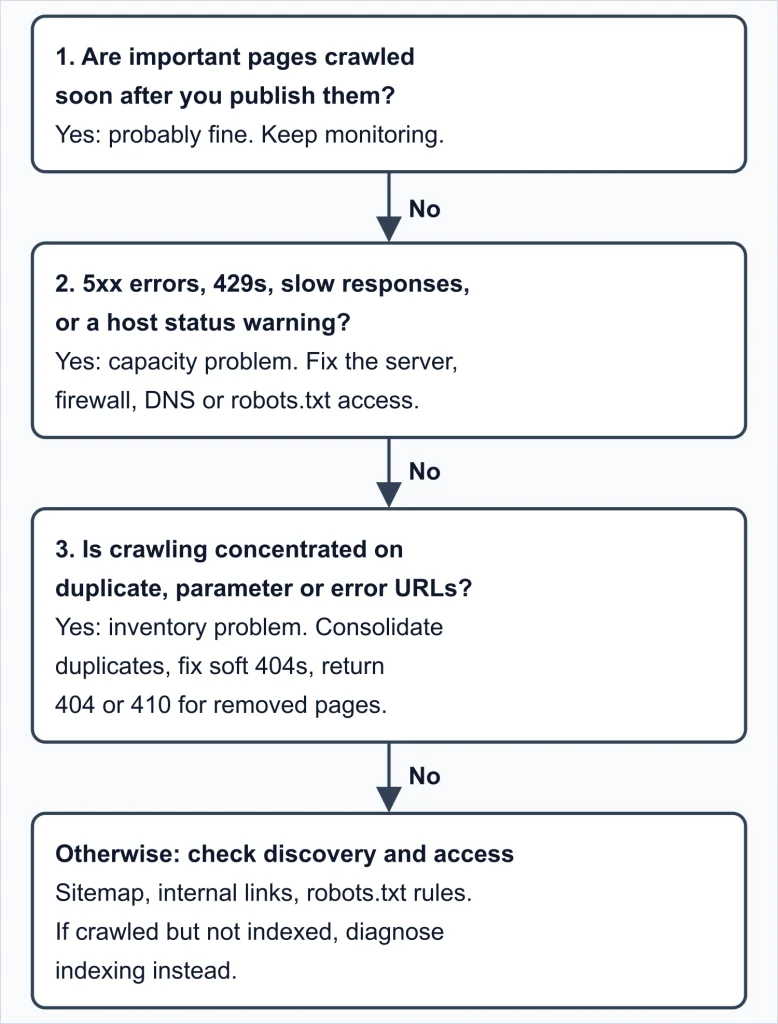
Figure 2. A starting workflow for crawl rate changes. The branches are SEORAF’s reading of Google’s documentation, not a Google-published flowchart.
Common causes
Search Console Help says crawl rate is generally fairly stable over a week or two. For a sudden drop, it lists: a new or very broad robots.txt rule (don’t block CSS or JavaScript Google needs to understand the page), slow responses, a rising server error rate, and content that changes rarely or is of lower quality. For a spike, it lists unblocking a large section, adding a large new section, or adding many Dynamic Search Ads targets. Google’s reduce-crawl-rate page also names faceted navigation and calendar-style URL sets as common causes.
(SEORAF interpretation, derived from Google’s robots.txt specification) An unexpectedly broken robots.txt can also change crawling. Google treats a 4xx response (other than 429) as “no robots.txt” and assumes there are no crawl restrictions, so an accidental 404 or 403 on that file, for example after a migration, could make previously blocked sections crawlable. Conversely, a 5xx or network failure can pause crawling, as described in the robots.txt section below.
| What you see | Check | Typical direction |
|---|---|---|
| Sharp drop | Response codes, response time, host status, robots.txt availability, new robots.txt rules | Fix the server or access problem. Crawling rises gradually once 2xx responses return |
| Sudden spike | Log URL patterns, Googlebot type (AdsBot shows separately), recent site changes, robots.txt status | Find the source before acting |
| New pages crawled slowly | Sitemap, internal links, blocks, then capacity | Fix discovery first (SEORAF interpretation) |
| Lots of crawling, little value | Duplicates, soft 404s, redirect chains | Reduce the URL inventory |
Three hypothetical examples
These are illustrations built from Google’s documentation. They are not client cases or measured results.
1. A filter-driven spike. An online store’s logs (traffic verified) show most requests hitting URLs that combine filter and sort parameters. Google names faceted navigation as a common cause and says duplicate-heavy inventory wastes crawling. Its order of preference is to consolidate duplicates, or to block unimportant variants in robots.txt if you can’t. It advises against noindex here, because Google still has to request the page. Blocking rules affect which URLs Google can see at all, so test any change carefully first.
2. A firewall throttling Googlebot. A security rule sends 429 to rapid requests, and Googlebot gets caught in it. Google treats 429 as an overload signal, so this would be expected to reduce crawling. (SEORAF interpretation, derived from Google’s documentation.) A 403 wouldn’t change crawl rate, but Google doesn’t use content from 4xx URLs and may drop them from the index over time. Check the Crawl Stats response breakdown and your firewall or CDN logs.
3. A slow release. After a deploy, response times climb and 5xx errors appear. Google says it reduces crawling in proportion to the number of URLs returning server errors, then raises it gradually once 2xx responses return. It gives no recovery timeline, so don’t promise one internally.
Decision rules
- Pages are crawled promptly after publishing: leave crawl rate alone.
- Crawling dropped and response time or 5xx/429 worsened: fix the server before touching robots.txt or sitemaps. (SEORAF interpretation)
- Crawling spiked: find the URL pattern first. Reducing crawl has broad side effects.
- Server genuinely at risk: use temporary 500, 503 or 429 with an end date, as described below.
- Crawling wasted on junk URLs: shrink the inventory instead of throttling. (SEORAF interpretation)
- Tempted by
crawl-delay, 401 or 403: don’t. They don’t control Google’s crawl rate. - Only some sections matter: measure crawl by section, not site-wide totals. (Industry practice)
robots.txt and Sitemaps: What They Mean for Crawl Rate
This page covers only how robots.txt and sitemaps relate to crawl rate, not their syntax or setup.
When Google can’t fetch robots.txt
Google fetches robots.txt before crawling, and the HTTP status of that response changes how Google behaves. From Google’s robots.txt specification:
- 2xx: Google processes the file as served.
- 4xx except 429: treated as if no valid robots.txt exists, so Google assumes there are no crawl restrictions.
- 3xx: Google follows at least five redirect hops, then stops and treats the file as a 404. It doesn’t follow JavaScript, frame or meta-refresh redirects.
- 5xx: if Google finds a robots.txt but can’t fetch it, it stops crawling the site for the first 12 hours while it keeps trying. If it still can’t fetch a new version, it uses the last good version for the next 30 days while retrying (a 503 is retried fairly often). If there’s no cached version, Google assumes there are no crawl restrictions. If errors persist after 30 days, Google behaves as if there is no robots.txt when the site is otherwise available to it, and stops crawling when the site has general availability problems, while still checking for the file.
- DNS and network failures (timeouts, invalid responses, reset or interrupted connections, HTTP chunking errors): treated as server errors.
Google typically caches robots.txt for up to 24 hours, and may cache it longer when it can’t refresh it, for example because of timeouts or 5xx errors. It may also adjust the cache lifetime based on max-age in a Cache-Control header. Search Console Help additionally lists a 429 alongside 5xx as an unsuccessful robots.txt response. This differs from the robots.txt specification’s general treatment of 4xx responses, which excludes 429; follow the specific guidance for the situation you are diagnosing. Search Console Help also advises against serving a different robots.txt to Google than to other visitors.
What robots.txt rules can’t do
- It isn’t a crawl-budget shortcut. Blocking URLs won’t shift the freed capacity to other pages unless your site is already at its capacity limit.
- It isn’t a throttle. Google doesn’t process the non-standard
crawl-delayrule. - Blocked URLs aren’t forgotten. They stay in Google’s crawl queue longer than 404s and are recrawled once you remove the block.
- Don’t block important URLs or resources Google needs to render your pages in the name of crawl-rate optimization.
Don’t use noindex to save crawling either: Google still requests the page before it sees the tag. (Removing URLs from the index can indirectly free crawling over time.)
Sitemaps
Keep sitemaps current and include the URLs you want crawled. Include <lastmod> when content changes. Compressing a sitemap won’t raise crawl budget, because the file still has to be fetched.
Cleaning up the URL inventory
- Consolidate duplicates.
- If you can’t consolidate, block truly unimportant variants with robots.txt, carefully and with testing.
- Return 404 or 410 for permanently removed pages.
- Fix soft 404s.
Structural fixes belong at the source. For how URL structure creates or prevents these problems, see site architecture.
What You Can (and Can’t) Control
| You can influence | Google decides | Not available to you |
|---|---|---|
| Server speed and stability; clean status codes; the size of your URL inventory (duplicates, junk parameters, soft 404s); sitemap accuracy; content quality | The crawl capacity limit and when to raise it; crawl demand; how often to recrawl each URL | A way to request a higher crawl rate; the retired Search Console limiter tool; crawl-delay |
No slider, and no way to request an increase
Google announced in November 2023 that the Search Console crawl rate limiter would be deprecated on January 8, 2024. It cited improved crawling logic and the tool’s slow effect, which could take over a day. Google states you can’t request an increase in crawl rate. If a guide tells you to open a crawl rate setting in Search Console, it is out of date.
Can you increase crawl rate?
Not directly. The levers are indirect:
- Faster, more stable responses support a higher capacity limit.
- Fewer wasted URLs shift crawling toward pages that matter.
- Content quality for the Google product you’re targeting. For Search, Google lists popularity, overall user value, content uniqueness and serving capacity.
For small and medium sites, Search Console Help suggests updating your sitemaps and checking that you aren’t blocking pages. (SEORAF interpretation) Most “how to increase crawl rate” advice amounts to removing reasons Google crawls less. That is my reading of the capacity-and-demand model, not a Google statement. A higher crawl rate doesn’t by itself mean better indexing or rankings.
Reducing crawl rate in an emergency
This is the one situation where this page suggests returning errors on purpose, and only when Google’s crawling is causing critical load on your servers. It is not a general optimization tactic. Return 500, 503 or 429 instead of 200 for a short period (hours, or one to two days). On 503 or 429 you can add a Retry-After header, as seconds or a UTC date-time:
HTTP/1.1 503 Service Unavailable
Retry-After: 120
Google’s cautions:
- It lowers crawling across the whole hostname, including URLs that return content normally.
- Crawling increases automatically once the errors stop.
- Google finds new pages more slowly, refreshes existing pages less often, and removed pages can linger in the index. For Google Ads, campaigns may be canceled or paused.
- If Googlebot sees these codes on the same URL for multiple days, the URL may drop from the index.
- If serving errors isn’t feasible, Google offers a special request form where you state your preferred rate. It can take several days.
Find the cause before reducing anything. Google recommends checking your server logs and talking to your hosting provider first. Older Search Console Help text gives “two or three days” as the limit and also describes temporarily blocking the overloading crawler in robots.txt. This guide follows Google’s newer reduce-crawl-rate page and doesn’t recommend blocking as a first measure, because it can have long-term effects on crawling.
How Status Codes, Redirects and Errors Affect Crawling
Response time and rendering
Faster pages let Google fetch more in the time it has, and rendering time counts as much as request time. Google also says making your site fast for users is probably more important than chasing crawl coverage, and that it may spend longer on a slower site that has more important information.
Status codes
| Status | What Google does |
|---|---|
| 2xx | Considers the content for processing. For Search, a 200 doesn’t guarantee indexing |
| 3xx | Follows up to 10 redirect hops by default. A 301 is a strong signal for the target; a 302 is a weak one |
| 304 | Signals the content is unchanged since the last crawl |
| 4xx (except 429) | Content isn’t used. Newly found 404s aren’t processed, and crawling of them gradually decreases. No effect on crawl rate |
| 429 | Treated as a server-overload signal, like a server error |
| 5xx | Prompts crawlers to slow down temporarily. Indexed URLs are kept for a while but may eventually be dropped |
Google says not to use 401 or 403 to limit crawling, because they don’t affect crawl rate. For 500 errors, the slowdown is proportionate to how many URLs return errors, and Google raises crawling gradually once 2xx responses return. (The five-hop limit for robots.txt redirects in the previous section is separate from the 10-hop default for ordinary URLs.)
Redirects and errors that waste crawling
- Long redirect chains have a negative effect on crawling. Pointing links and sitemaps at final URLs avoids them. (Industry practice)
- Soft 404s (pages that look like errors but return 200) keep being crawled and waste budget.
- Permanently removed pages should return 404 or 410. Google calls 404 a strong signal not to crawl the URL again.
- Server errors and 429s reduce crawling across the whole hostname, not just the failing URLs.
- 304 support lets Google reuse its cached copy of unchanged pages, saving your bandwidth.
Crawl Rate on Large Sites
Large and fast-changing sites are who Google’s crawl budget guide is written for.
- Each subdomain has its own crawl budget. The capacity limit is shared across Google’s crawlers.
- Other Google crawlers compete for capacity. Dynamic Search Ads targets and merchant feeds create their own demand. Search Console Help notes AdsBot crawls URLs about every two weeks.
- Embedded resources and alternate URLs count. Google says AMP or hreflang alternates and CSS, JavaScript and XHR fetches may be crawled and consume budget.
- Priorities: shrink the URL inventory, keep status codes clean, keep sitemaps accurate, and leave server headroom. (SEORAF interpretation)
Crawl Rate Myths
| Myth | Reality |
|---|---|
| Crawl rate is a ranking factor | Crawling is necessary to appear in results but isn’t a ranking signal |
| Crawl-delay slows Googlebot | Google doesn’t process it |
| Search Console has a crawl rate slider | The tool was announced for deprecation on January 8, 2024 |
| Faster pages mean more crawling | Speed helps, since Google’s resources are limited by time and crawler count, but Google may spend longer on a slower site with important content |
| Small sites are crawled less than big ones | Important, frequently changing content is crawled often regardless of size |
| 4xx pages waste crawl budget | Not 4xx other than 429 |
noindex or nofollow controls crawl budget | Google still crawls to see noindex, and nofollow links can still be crawled if found elsewhere |
| Updating dates keeps content “fresh” | There’s no extra value in trivial changes |
| A higher crawl rate means better indexing | Crawled pages still need evaluation and consolidation |
Limitations
- Crawl Stats isn’t a complete record. Google says it reports most requests, so expect small differences from your logs.
- It can also exceed your logs. Google counts fetches it would have made if robots.txt had been available, and failed requests that never reached your server won’t appear in logs.
- Example URLs aren’t comprehensive.
- Logs show what happened, not why. Timing isn’t proof of cause. (SEORAF interpretation)
- This page covers Google. Other crawlers behave differently. (SEORAF interpretation)
Frequently Asked Questions
Is there a “good” crawl rate number?
In the Google documentation I reviewed, no target is given. Compare crawling with how often your important content changes instead.
Why don’t my Crawl Stats totals match my server logs?
Google says the report covers most but not all requests, and it counts fetches skipped when robots.txt was unavailable. Failed requests that never reached your server also won’t be in your logs.
What happens to crawling if my robots.txt returns a 5xx error?
Google’s robots.txt specification says that after an unsuccessful fetch, Google stops crawling for the first 12 hours while continuing to retry. If it cannot fetch a new version, it uses the last good copy for the next 30 days; after that, behavior depends on whether the site is otherwise available. Details are in the robots.txt section above.
Is “Crawled – currently not indexed” a crawl rate problem?
Usually not. Google fetched the page but didn’t index it, which points to evaluation, not pace. Start with the indexability guide.
My crawl dropped suddenly. What should I check first?
Response time, 5xx and 429 responses, host status (robots.txt, DNS, connectivity), recent robots.txt changes, and then your server and firewall logs.
Where to Go Next
Sources
- Optimize your crawl budget (Google; updated 2026-07-22 at review)
- Reduce the Google crawl rate (Google; updated 2026-10-06 at review)
- How HTTP status codes affect Google’s crawlers (Google; updated 2026-02-04 at review)
- Myths and facts about crawling (Google; updated 2025-12-18 at review)
- How Google interprets the robots.txt specification (Google; updated 2026-08-31 at review)
- Crawl Stats report (Search Console Help; undated page)
- Verify requests from Google crawlers and fetchers (Google)
- Upcoming deprecation of Crawl Rate Limiter Tool in Search Console (Google Search Central blog, November 2023)
About This Guide
Written by Mousume Akter for SEORAF. This is a documentation-based explainer: it doesn’t report original tests, client work or measured results. Where I interpret Google’s documentation, the text says so. When Search Console Help and Google’s newer crawling pages differ, this guide follows the newer pages. Google updates these pages, so re-check specifics before acting.