
SEO Tools: What They Are, How They Differ, and How to Choose
By Mousume Akter · Last reviewed: 2 October 2026
Choosing SEO tools gets easier once you know what each type does, where its data comes from, and what it can’t do. This guide maps the SEO tools landscape in plain language, so you can match a tool to your task before you spend time or money.
It’s written for beginners, bloggers, creators, small businesses, marketers, and practitioners. No tool can guarantee rankings. The right one can save you time and show you where to look.
Start here: what are you trying to do?
| If you want to… | Go to |
|---|---|
| Understand what SEO tools are and how to choose | Keep reading below |
| Find a tool for a specific job (audits, keywords, links, tracking) | SEO tools by category |
| Find tools that suit your role or site type | SEO tools by use case |
| Work with no or a small budget | Free SEO tools |
| Judge AI features or AI visibility tracking | AI SEO tools |
| See SEORAF’s shortlist | Best SEO tools |
Independence note: SEORAF is an independent SEO knowledge resource and does not sell rankings. This page contains no affiliate links. Pages that recommend specific tools mark any commission links next to those links. How this works.
What Are SEO Tools?
SEO tools are software and online services that help you research, analyze, monitor, and improve how a website performs in organic (unpaid) search. They collect data, automate repetitive checks, and organize findings, but you still decide what to act on.
The category is wide. It includes free dashboards from search engines, browser extensions that check one page, plugins inside content management systems, and large platforms that bundle many functions. What they share is a purpose: showing how search engines and searchers interact with a site, and what to do about it.
Tools for managing paid search ads are a separate category.
How SEO Tools Work: Data, Analysis, and Workflow
Most SEO tools follow the same three steps:
- Collect. The tool crawls your site (a bot reads your pages), reads data a search engine provides about your site, or draws on its own datasets about other sites and searches.
- Analyze. It flags issues, groups keywords, scores pages, or compares you with other sites.
- Report or act. It exports findings, builds dashboards, sends alerts, or hands tasks to your team.
SEO Tools vs. SEO Services
A tool is software you operate. A service is people doing SEO work for you. A tool’s report is not a strategy, and a service is not a substitute for understanding your own data. This guide covers tools only.
Where SEO Tool Data Comes From
Every number in an SEO tool has a source. Knowing the source tells you how far to trust it.
First-party dataSource: the search engine or your own siteExamples: Search Console, Bing Webmaster ToolsScope: your own site only
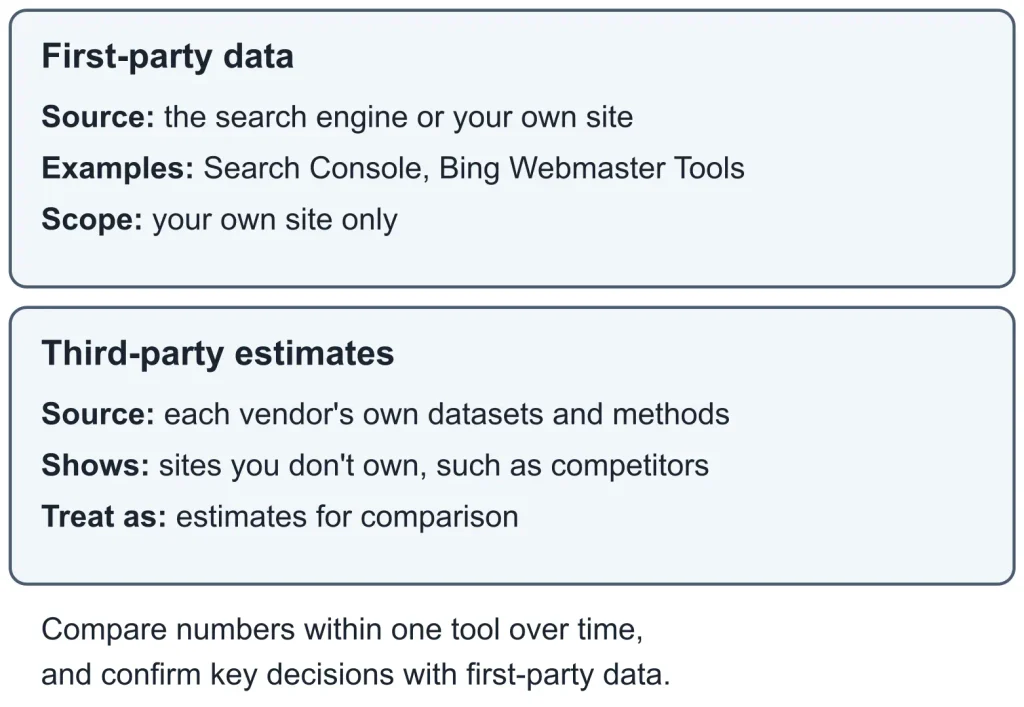
First-party data comes from search engines about your own site. Third-party figures are estimates built by each vendor.
First-Party Data From Search Engines
First-party data comes straight from a search engine or from your own site.
- Google Search Console reports how a site you own or manage appears in Google Search, including queries, clicks, impressions, and indexing status. “Indexing” means whether a page is stored in the search engine’s database.
- Bing Webmaster Tools does a similar job for Bing.
- Google Analytics measures what visitors do on your site after they arrive.
Google’s documentation states that traffic from AI features such as AI Overviews and AI Mode is included in the overall search traffic reported in Search Console. Search Console also has a Generative AI performance report for your own site.
The limit is scope: first-party tools show you your own site, not competitors.
Estimated Data From Third-Party Tools
Third-party tools can show data about sites you don’t own, such as competitor keywords or backlinks. They can’t read a search engine’s internal data for those sites, so their figures are estimates.
How each vendor builds its datasets varies, and not every vendor documents its methods in detail. Read the vendor’s documentation, and use the numbers for comparison and prioritization, not as measured fact.
Why Two Tools Can Show Different Numbers
| Reason | What it means for you |
|---|---|
| Different databases and update schedules | One tool may have newer or broader data than another |
| Different location, language, and device settings | The same keyword can return different search results pages (SERPs) |
| Different definitions | Scores such as “keyword difficulty” or “authority” are each vendor’s own calculations, not Google metrics |
| Estimated vs. reported | First-party data comes from the search engine about your site; competitor data is modeled |
Practical rule: compare numbers within one tool over time, and confirm important decisions against first-party data.
What SEO Tools Can and Cannot Do
What Tools Do Well
- Collect and organize large amounts of data quickly
- Crawl a site and surface technical issues that are hard to spot by hand
- Monitor changes over time, such as rankings, indexing, or new links
- Save time on repetitive work like reporting or checking many pages
- Help you spot patterns and decide where to look first
What Tools Cannot Do
- Guarantee rankings, traffic, or revenue. Results depend on many factors, including competition and your own work.
- Replace an understanding of search intent. A tool can show what people search for, but not always why.
- Judge quality on its own. A tool can check structure and coverage, but not whether your content is accurate, original, or trustworthy.
- Make strategic decisions. Deciding what matters for your goals stays with you.
- See inside search engines. No third-party tool has access to a search engine’s internal ranking systems.
Common Ways Tools Mislead Their Users
- Proprietary scores. Audit, difficulty, and optimization scores summarize that vendor’s own checks. A higher score doesn’t mean higher rankings.
- Issue counts without context. A long list of “errors” isn’t a ranking forecast. Some flagged items matter a great deal and others barely matter.
- Snapshots mistaken for trends. One report shows one moment. Look at changes over time.
- Metrics treated as goals. Chasing a tool’s score can pull attention from what the tool was meant to support: serving searchers well.
SEO Tasks That Tools Support
Think of SEO work as four recurring questions. Tools help with each, but the questions come first. New to SEO? Start with the SEO for beginners guide, then come back to match tools to tasks.
Discovering and Prioritizing Opportunities
Where are the opportunities? Tools help you find the queries your audience uses, group them into topics, and see where competitors cover ground you don’t. They can’t tell you which topics fit your goals, so pair the data with your own judgment about intent and value.
Maintaining a Technically Sound Site
Can search engines access and understand the site? Tools help you check crawling, indexing, page speed and Core Web Vitals, structured data, and broken pages across many URLs at once. They flag issues, but deciding which ones matter for your site takes context.
Creating, Optimizing, and Earning Authority
Does each page deserve to rank? Tools help you plan content, compare a draft with a topic’s coverage, improve titles and internal links, and see who links to you. They can’t judge whether your content is accurate, original, or useful.
Measuring, Reporting, and Monitoring
What happened, and what changed? Tools help you track clicks, positions, and conversions, build reports, and, increasingly, monitor how your brand appears in AI-generated answers. They show changes; explaining them still takes analysis.
The Main Types of SEO Tools
This guide covers 11 main types of SEO tools and supporting platforms, grouped by the job they do: first-party webmaster tools, analytics, keyword research, site audits, page testing, rank tracking, backlinks, content optimization, local SEO, reporting, and AI visibility.
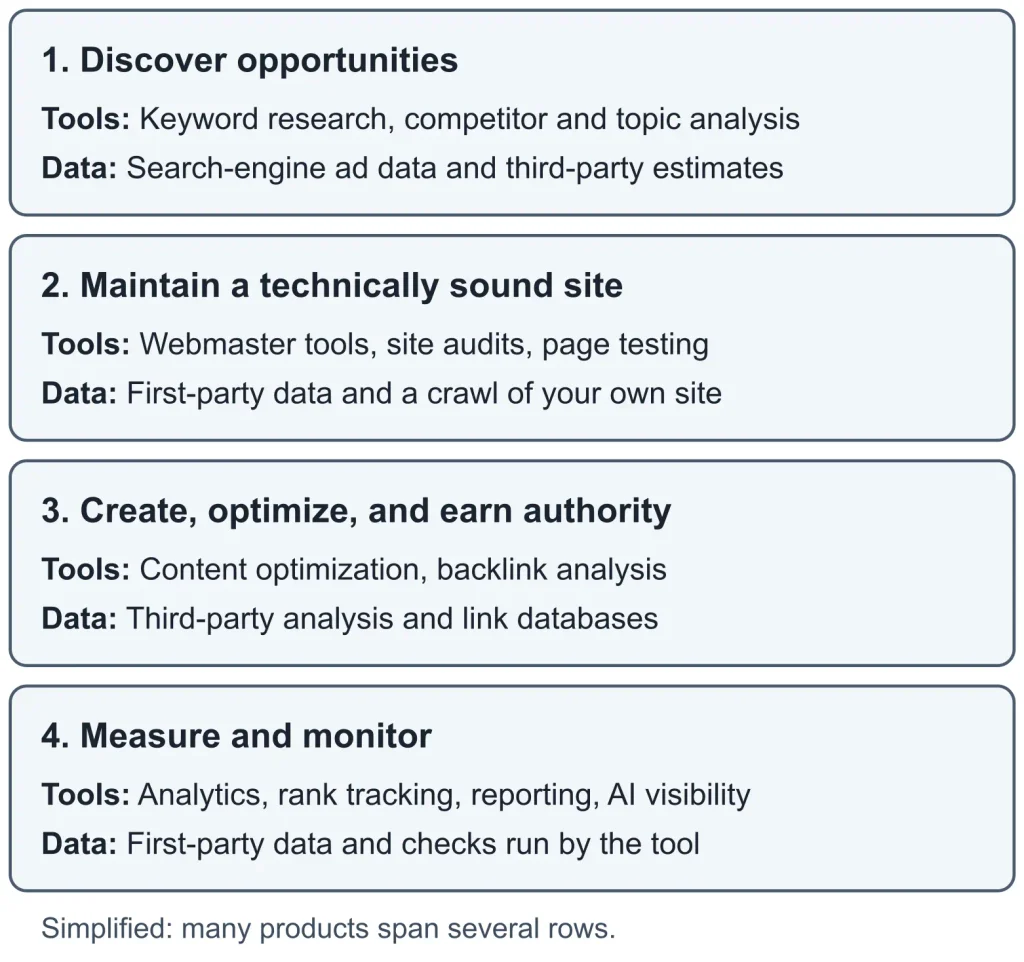
Four recurring SEO tasks, the tool types that support them, and where their data typically comes from.
| Type | Question it answers | Typical data source | First-party example |
|---|---|---|---|
| Webmaster tools | How does a search engine crawl, index, and show my site? | First-party | Google Search Console; Bing Webmaster Tools |
| Web analytics | What do visitors do after they arrive? | First-party | Google Analytics |
| Keyword research | What are people searching for? | Search-engine ad data and third-party estimates | Google Keyword Planner; Google Trends |
| Site audit and crawling | What technical issues exist across my site? | A crawl of your own site | None listed here |
| Page experience and markup testing | Is this page fast, stable, and eligible for rich results? | Tests run on the page | PageSpeed Insights; Rich Results Test |
| Rank tracking | Where do I appear for my target queries, and how is that changing? | Search checks run by the tool | Search Console Performance report (your own site) |
| Backlink analysis | Who links to me or to competitors? | Third-party link database | Search Console Links report (your own site) |
| Content optimization | Does my draft cover the topic as well as pages that rank? | Third-party analysis | None listed here |
| Local SEO | How do I appear in local results and listings? | Mixed | Google Business Profile |
| Reporting dashboards | How do I combine data in one report? | Connected tools | Looker Studio |
| AI visibility | Do AI answers mention or cite my brand? | Prompts run by the tool | Search Console Generative AI performance report (your own site) |
Many products span several rows, so a product’s marketing label is a poor guide to what it does.
Not sure which type fits your task? Browse SEO tools by category →
All-in-One vs. Specialized SEO Tools
Tool Formats: Suites, Point Tools, Extensions, Plugins, and APIs
| Format | What it is | Typical trade-off |
|---|---|---|
| All-in-one suite | One platform with modules for many SEO tasks | Breadth is convenient, but depth can vary by module |
| Point tool | Built for one function | Depth on one job, but you need others for the rest |
| Browser extension | Checks a page as you browse | Fast and light, but limited in scope |
| CMS plugin | Works inside your content management system | Convenient for on-page work, but tied to one platform |
| API or data feed | Delivers data to your own systems | Flexible, but needs technical setup |
When an All-in-One Suite Makes Sense
- You do several SEO tasks regularly and want them in one place.
- You’re still learning which tasks matter most.
- You want shared project data and fewer logins.
Check each module you plan to use, not just the suite as a whole.
When Specialized Tools Make Sense
- One job needs more depth than a suite offers, such as crawling a very large site.
- You already have a suite and have found a specific gap.
- You need a particular export, integration, or workflow.
How to Add Tools Without Creating Sprawl
- Name the job before you add the tool.
- Check what your current tools already do.
- Keep one place as the source of truth for reporting.
- Review subscriptions on a regular schedule.
- Trial any new tool on a real task from your own site.
Wondering what a setup looks like for your situation? See SEO tool stacks by use case →
Free vs. Paid SEO Tools: How to Decide
What Free Tools and Free Tiers Typically Cover
Free options usually fall into two groups: first-party tools from search engines, and limited free plans from commercial vendors. First-party tools give you real data about your own site. Free tiers from commercial vendors often limit usage, features, or projects. The limits change, so check the vendor’s current plan page.
What Paid Plans Can Add
Depending on the vendor, paid plans can include:
- Higher usage limits and larger projects
- Historical data and more frequent updates
- Competitor, keyword, and backlink datasets
- Team access, reporting, and white-label options
- Exports, API access, and support
Offerings vary, so confirm what a plan includes before you pay. Some features, such as AI visibility tracking, may be priced separately from base plans.
How to Read Trials, Freemium Models, and Plan Limits
| Model | What to check |
|---|---|
| Free trial | Length, whether payment details are required, which features are limited, and how to cancel |
| Freemium | Caps on projects, queries, or pages crawled, and what’s locked |
| Usage-based credits | What consumes credits and what happens at the limit |
| Add-ons | Whether a feature you need is included or charged separately |
| Billing terms | Monthly versus annual pricing, and renewal terms |
A Simple Rule for Choosing Free or Paid SEO Tools
- Start with free first-party tools for your own site.
- Add a paid tool only when a specific, repeated task needs data or scale the free tools can’t provide.
- Trial the tool on that task before committing.
- Reassess periodically, and cancel what you no longer use.
Starting with no budget? Browse free SEO tools and free plans →
AI in SEO Tools: What Changes and What Doesn’t
Two Meanings of “AI SEO Tool”
The term covers two different things:
- AI-assisted features inside SEO workflows, such as drafting, summarizing, clustering keywords, or suggesting outlines.
- AI visibility tools, which monitor how a brand or page appears in AI-generated answers.
They solve different problems and should be evaluated separately.
What Google Has Documented About AI Search Features
Google’s documentation on AI features says the same foundational SEO practices apply to AI Overviews and AI Mode, and that no additional requirements or other special optimizations are needed to appear in them. It also says a page must be indexed and eligible to be shown with a snippet to qualify as a supporting link.
Google’s guide to optimizing for generative AI features adds that a site must also be included in Search generative AI features in Search Console to be eligible for display. It says llms.txt files, special markup, and breaking content into small chunks are not needed for Google Search, and that no third-party tool has access to Google’s internal ranking or AI systems.
When you evaluate tools, a product claiming a special Google-only AI requirement should be able to point to documentation. Google updates these pages, so read the current versions before relying on this summary.
How to Test an AI Feature Claim Before You Pay for It
Ask the vendor, or check its documentation, for answers to these questions:
- Which AI systems, countries, and languages does it cover?
- How are prompts chosen, and how often are they refreshed?
- Can you see the underlying answers and cited sources?
- Does it measure visibility, or claim to cause results?
- What does it cost, including add-ons? Published comparisons list different prices for the same products, so use the vendor’s own pricing page.
- How do its findings compare with Search Console and your analytics?
Evaluating an AI feature? See AI SEO tools and AI visibility trackers →
How to Choose SEO Tools: Selection Criteria
The Path From Task to Tool
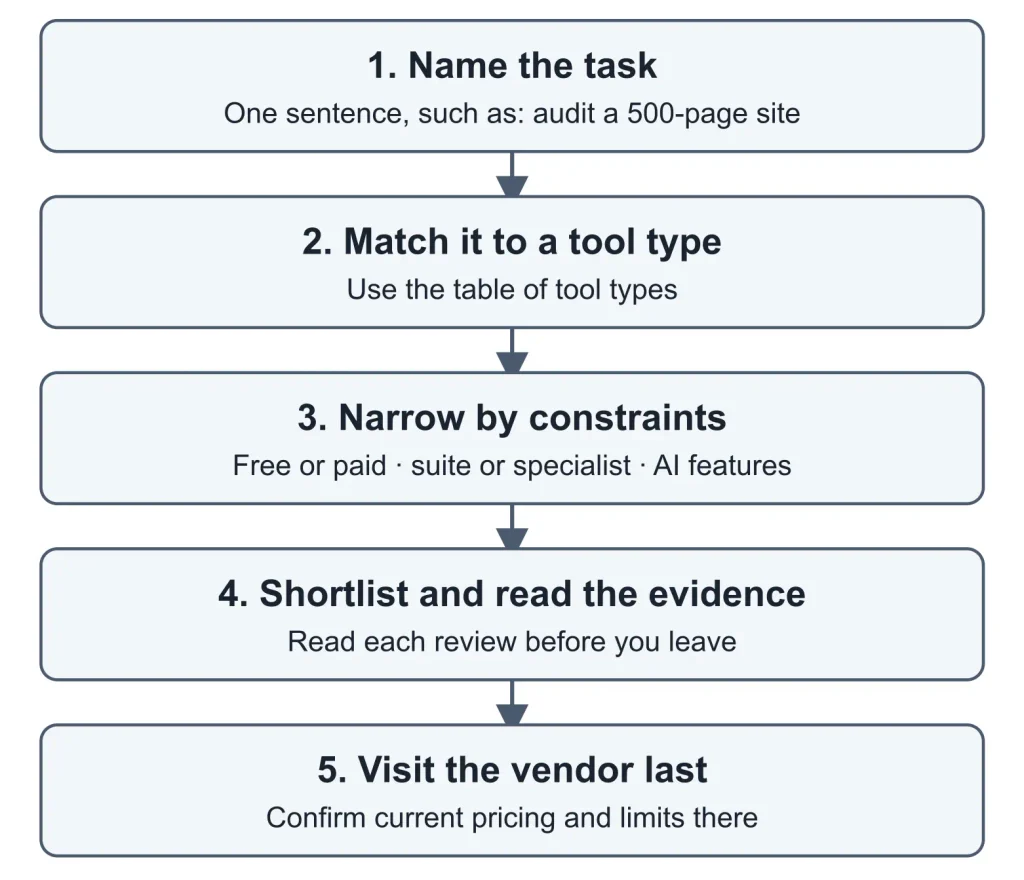
Work through these steps in order. Each one narrows the field before you spend money or time.
- Name the task. Write one sentence, such as “find keywords for a new blog” or “audit a 500-page site.”
- Match the task to a tool type. Use the table of tool types to see which type does that job.
- Narrow by constraints. Check free vs. paid, suite vs. specialist, and AI features.
- Shortlist and read the evidence. Ready to compare candidates? See SEORAF’s shortlist of SEO tools, and read each review before you leave.
- Visit the vendor last. Confirm current pricing and limits on the vendor’s own site.
1. Name the taskOne sentence, such as: audit a 500-page site2. Match it to a tool typeUse the table of tool types3. Narrow by constraintsFree or paid · suite or specialist · AI features4. Shortlist and read the evidenceRead each review before you leave5. Visit the vendor lastConfirm current pricing and limits thereThe five-step path from naming a task to visiting a vendor.
Eight Criteria That Apply to Any SEO Tool
| Criterion | Question to ask | Why it matters |
|---|---|---|
| Job fit | Does it do the specific task you need? | Avoids paying for unused features |
| Data sources | Where does the data come from, and is that documented? | Determines how far you can trust it |
| Freshness | How often is data updated? | Stale data leads to stale decisions |
| Coverage | Does it cover your countries, languages, and devices? | Mismatched coverage gives misleading results |
| Workflow fit | Can it export data and connect with tools you use? | Poor fit creates manual work |
| Usability | Can you and your team learn it in reasonable time? | A tool nobody uses has no value |
| Cost and limits | What do seats, projects, credits, and add-ons add up to? | Real cost often exceeds the headline price |
| Support and documentation | Is there clear documentation and a way to get help? | Matters most when something breaks |
Red Flags When Evaluating SEO Tools
- Promises of rankings, traffic, or revenue
- Scores or metrics with no explanation of how they’re calculated
- No documentation of data sources
- Pressure tactics, such as countdown timers or “limited slots”
- Reviews or comparisons that don’t explain how they were produced or whether the author has a commercial relationship with the vendor
SEO Tool Pre-Purchase Checklist
Before you buy, make sure each of these is true:
- I can state the job in one sentence.
- I checked what free first-party tools already show me.
- I read the vendor’s current pricing and plan limits.
- I know which features cost extra.
- I tested the tool on a real task from my own site, using a trial where available.
- I know how to export my data and cancel.
- I’ll review whether it’s earning its place after a set number of months.
How SEORAF Evaluates Tools
SEORAF is an independent SEO knowledge resource. The standards below describe how its tool coverage is meant to be produced.
How SEORAF Labels Evidence
Pages that name specific tools label substantive claims with one of three evidence levels:
| Label | What it means |
|---|---|
| Tested by SEORAF | A SEORAF author used the feature on a real task. The page states what was tested, when, and on which plan. |
| Documentation reviewed | Supported by the vendor’s or a search engine’s official documentation. Not tested by SEORAF. |
| Vendor-reported | A claim from vendor marketing that SEORAF has not verified. |
The label “Tested by SEORAF” is used only where testing took place. Where a feature wasn’t tested, the page says so. Some older tool pages may not yet carry these labels; treat unlabeled claims on any page as unverified.
Sources Used
- Vendor documentation, pricing pages, and terms, for features, limits, and prices
- Google Search Central and Bing Webmaster documentation, for what search engines say about SEO
- Regulator guidance on endorsements and disclosures
- Third-party roundups and reviews, as context only and not as a source for factual claims
Review Dates, Re-Checks, and Corrections
Pages show a last-reviewed date. Tools change plans, features, and prices often, so overview pages avoid stating prices and point readers to the vendor’s own site. If you spot an error, contact SEORAF. Verified errors are corrected and the review date is updated.
Editorial Independence and Affiliate Disclosure
How Recommendations Are Decided
Recommendations rest on fit to a defined job, the evidence available, and stated limitations. Whether a vendor offers an affiliate program is not a criterion for inclusion or ranking. Tools without affiliate programs are eligible on the same terms.
Where You’ll See Affiliate Links
This overview page contains no affiliate links. Commission links appear only on pages that name specific tools, such as reviews, comparisons, and shortlists. On those pages:
- A plain-language disclosure sits beside the links it covers, not only at the top or in a footer.
- Vendor links come after the evidence, the drawbacks, and the “who it’s for” guidance.
- Link text states the relationship, for example “Check current pricing at the vendor (SEORAF earns a commission if you buy).”
- Each commission link is marked
rel="sponsored", the value that Google’s guidance on qualifying outbound links recommends for paid links.
The U.S. Federal Trade Commission’s endorsement guidance says a disclosure must be clear and conspicuous, and that the closer it sits to the recommendation, the better.
What SEORAF Will Not Do
- Promise rankings, traffic, conversions, or revenue
- Sell rankings
- Present vendor claims as tested fact
- Publish invented testimonials, ratings, or case studies
- Hide a tool’s limitations because of a commercial relationship
SEO Tools FAQ
Are SEO tools worth paying for?
It depends on whether a paid plan solves a specific, repeated task. Free first-party tools cover search data for your own site. Paid tools can add third-party datasets, scale, and workflow features. Pay once the need is clear, and trial the tool first.
Can I do SEO without paid tools?
Yes, for many tasks. Free first-party tools show how a search engine sees your own site. The limits appear when you need competitor data, large-scale monitoring, or team workflows. Tools support SEO work, but they aren’t required for it.
Do SEO tools improve rankings by themselves?
No. Tools report and diagnose; they don’t change your rankings. Results depend on your content, how accessible your site is, and competition. Use tools to find what to fix or create, then do that work. No tool or vendor can guarantee a ranking.
Which SEO tool should I set up first?
Start with a search engine webmaster tool for your site, such as Google Search Console, because it gives you first-party data. Add analytics next. After that, add tools one at a time for the specific tasks you do most often.
Why do different SEO tools report different keyword numbers?
Tools use different databases, locations, update schedules, and definitions, and third-party figures are estimates. Use one tool consistently to compare keywords with each other, and confirm important decisions against your own first-party data.
Do I need AI SEO tools?
Not necessarily. Google’s documentation says no additional requirements exist to appear in its AI features. Consider an AI visibility tool only if you need to monitor brand presence in AI answers and understand exactly what it measures. See how to test an AI feature claim.
How many SEO tools do I actually need?
The fewest that cover your recurring jobs. A reasonable starting point is first-party tools plus one tool for the job you do most often. Add more only when a clear gap appears.
When should I visit a vendor’s website?
After you’ve named the job, checked what free tools cover, and read a review or comparison that labels its evidence. Then use the vendor’s site for current pricing, plan limits, and trial terms, which can change.
Do affiliate links influence SEORAF’s reviews?
Affiliate availability is not a criterion for what SEORAF recommends. Where commission links appear, a disclosure sits beside them, they’re marked rel="sponsored", and they come after the evidence. See editorial independence and disclosure.
Not sure which path fits? Return to the hub router.
Sources and Further Reading
- Google Search Central: AI features and your website
- Google Search Central: Optimizing your website for generative AI features on Google Search
- Google Search Central: Guidance on third-party SEO tools and advice
- Google Search Central: Qualify your outbound links to Google
- U.S. Federal Trade Commission: Endorsement Guides: What People Are Asking