
Home → Technical SEO → Crawling → XML Sitemap
XML Sitemap: What It Is, How It Works, and How to Implement It Correctly
By Mousume Akter · Updated August 25, 2026
An XML sitemap is a structured file that lists a website’s URLs so search engines can discover them for crawling. It works as a discovery aid, not a directive — listing a URL in a sitemap does not guarantee that URL will be crawled, indexed, or ranked.
What Is an XML Sitemap?
An XML sitemap is a structured file, written in XML format, that lists a website’s URLs so search engines can discover and evaluate them for crawling. It functions as a discovery aid rather than a set of instructions — a sitemap tells a search engine which pages exist and, optionally, when they were last modified, but it does not compel the search engine to crawl or index anything.
This distinction matters because it’s the source of most confusion around sitemaps. A sitemap is not a crawl directive like robots.txt, and it carries no enforcement mechanism. Google’s own documentation is explicit that sitemap submission is a hint, not a guarantee of crawling or indexing.
The format itself is jointly adopted across major search engines through the sitemaps.org protocol, which is why a single sitemap file works the same way whether it’s read by Google, Bing, or another compliant crawler. The base syntax is small and stable; extensions layered on top of it (covered in Types of XML Sitemaps below) handle specialized content like images, video, and news articles.
How Search Engines Use XML Sitemaps
Submitting a sitemap starts a specific, limited sequence of events rather than an end-to-end guarantee. First, the search engine fetches the sitemap file, either because it was declared in the robots.txt Sitemap: directive or submitted directly through a tool like Search Console. Once fetched, the file is parsed for individual URL entries.
From there, each discovered URL is added to the search engine’s crawl queue alongside URLs found through other discovery methods, such as internal and external links. Inclusion in the queue is not the same as being crawled promptly.
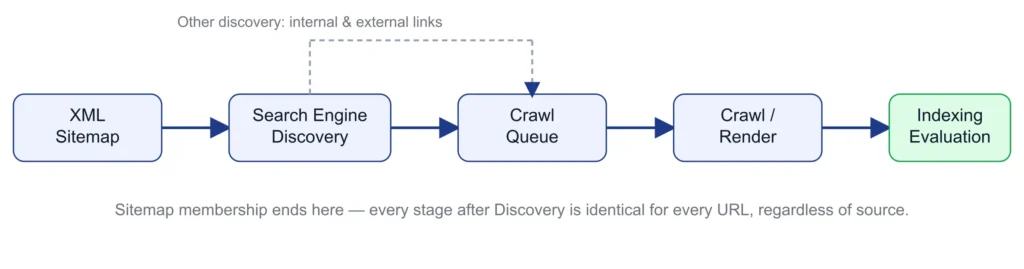
Every URL that does get crawled from a sitemap proceeds through the same evaluation pipeline as any other page. A sitemap entry receives no shortcut and no special treatment once the search engine has parsed the file — a URL appearing in a sitemap and a URL appearing in search results are two different outcomes, separated by the full crawl-to-index pipeline.
When a Website Needs an XML Sitemap
Small sites with strong internal linking
Less to gain from a sitemap, since link-based discovery already covers it well. Doesn’t hurt, but isn’t solving a pressing problem.
Large sites
Benefit more directly — a sitemap gives the search engine a direct index rather than relying entirely on traversal.
New sites or newly published pages
Offers an immediate discovery path that doesn’t depend on link accumulation happening first.
Ecommerce sites
Large, frequently changing catalogs benefit from a sitemap surfacing changes without waiting on link structure.
Sites with poorly linked or orphaned pages
A discovery path for a legitimately valuable page — though a stopgap, not a fix for the underlying internal linking gap.
XML Sitemap Syntax and Required Structure
Only three elements are required for a sitemap to validate — everything else is optional, and Google either uses those optional elements selectively or ignores them outright.
<urlset>, <url>, and <loc>
<urlset> is the root element, declaring the namespace as an XML attribute. <url> wraps each individual URL entry. <loc> holds the full, absolute URL — special characters must be entity-escaped (an ampersand becomes &).
<lastmod>: Meaning, Correct Usage, and Common Mistakes
<lastmod> records the date a URL’s content was last significantly modified. Google uses the value only if it’s consistently and verifiably accurate.
<lastmod>2026-08-12</lastmod>What counts as significant: changes to main content, structured data, or links — not cosmetic edits like a footer copyright year.
The most common mistake: setting <lastmod> to today’s date on every regeneration regardless of real changes. Once detected, search engines have documented reason to stop trusting the tag.
What it does not do: guarantee faster crawling, re-indexing, or better rankings. It’s a demand signal, not a directive.
Optional Sitemap Elements and What They Actually Do
<changefreq> and <priority> are valid, parseable tags. Neither meaningfully affects how Google crawls a site.
<url>
  <loc>https://example.com/page</loc>
  <lastmod>2026-08-12</lastmod>
  <changefreq>weekly</changefreq>
  <priority>0.8</priority>
</url>| Element | Required? | Google’s documented usage |
|---|---|---|
<loc> | Required | Used — the URL itself |
<lastmod> | Optional | Used, if consistently and verifiably accurate |
<changefreq> | Optional | Ignored |
<priority> | Optional | Ignored |
Sitemap Index Files and When to Use Them
A sitemap index uses a <sitemapindex> root element to list multiple individual sitemap files, once a site’s URL count or file size exceeds what a single sitemap can hold.
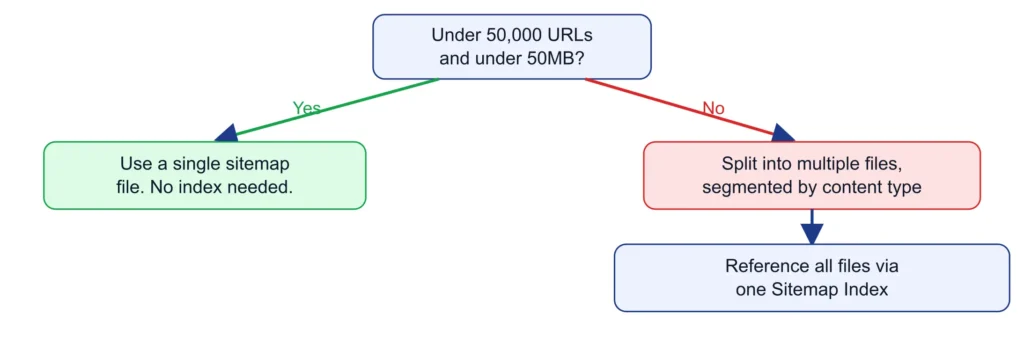
Referenced sitemaps must be hosted in the same directory as the index file, or a deeper one, unless cross-site submission has been explicitly configured.
Sitemap URL and File-Size Limits
XML Sitemap Limits at a Glance
| Limit | Value | Applies to |
|---|---|---|
| Max URLs per sitemap file | 50,000 | One <urlset> file |
| Max file size per sitemap | 50MB uncompressed | One <urlset> file |
| Max sitemaps per sitemap index | 50,000 <loc> entries | One <sitemapindex> file |
The Sitemap Index’s own 50,000-entry limit governs how many sitemap files it can reference — a distinct figure from the per-file URL limit, easily conflated.
Splitting Large Sitemaps Correctly
Segmenting by content type or site section produces sitemaps that stay meaningfully below the raw limits and keeps contents conceptually coherent. A worked example for a 150,000-product ecommerce catalog:
<?xml version="1.0" encoding="UTF-8"?>
<sitemapindex xmlns="http://www.sitemaps.org/schemas/sitemap/0.9">
  <sitemap>
    <loc>https://example.com/sitemap-products-1.xml</loc>
    <lastmod>2026-08-12</lastmod>
  </sitemap>
  <sitemap>
    <loc>https://example.com/sitemap-products-2.xml</loc>
    <lastmod>2026-08-12</lastmod>
  </sitemap>
  <sitemap>
    <loc>https://example.com/sitemap-categories.xml</loc>
    <lastmod>2026-08-12</lastmod>
  </sitemap>
</sitemapindex>
Sitemaps can be gzip-compressed (.xml.gz) to reduce transfer size — the 50MB limit applies to the uncompressed size.
Sitemap Index Example
<?xml version="1.0" encoding="UTF-8"?>
<sitemapindex xmlns="http://www.sitemaps.org/schemas/sitemap/0.9">
  <sitemap>
    <loc>https://example.com/sitemap-articles.xml</loc>
    <lastmod>2026-08-01</lastmod>
  </sitemap>
  <sitemap>
    <loc>https://example.com/sitemap-pages.xml</loc>
    <lastmod>2026-07-22</lastmod>
  </sitemap>
</sitemapindex>| Tag | Required? | Description |
|---|---|---|
<sitemapindex> | Required (root) | Wraps all <sitemap> entries |
<sitemap> | Required (one per file) | Wraps one referenced sitemap’s data |
<loc> | Required | Full URL of one sitemap file |
<lastmod> | Optional | When the referenced file was last modified |
Practical Rules for Including URLs
| URL condition | Include? | Why |
|---|---|---|
| Canonical, indexable, 200 status | Yes | Intended sitemap content |
| Non-canonical | No | Contradicts the page’s own canonical signal |
| Redirected (3xx) | No | List the final destination instead |
| 404 / 410 | No | Indicates a stale sitemap |
| 5xx | No | Wastes a crawl attempt |
| Blocked by robots.txt | No | Contradicts the crawl block |
noindex | No | Contradicts the noindex directive |
XML Sitemaps and Googlebot Crawling
Submitting a sitemap adds listed URLs to Google’s crawl queue as candidates — it does not instruct Googlebot to crawl them on any schedule, and doesn’t override its own prioritization logic, governed by the same crawl budget allocation that applies site-wide.
Discovery vs. Crawling vs. Indexing
| Stage | What happens | Sitemap’s role |
|---|---|---|
| Discovery | Google becomes aware a URL exists | One discovery input among several |
| Crawling | Googlebot fetches the URL’s content | Doesn’t guarantee or accelerate this |
| Indexing | Google evaluates crawled content | Entirely independent of sitemap presence |
XML Sitemap + Robots.txt
A URL listed in the sitemap but disallowed in robots.txt asks Google to consider it for indexing while blocking the crawl that consideration requires. The robots.txt disallow wins; the sitemap listing becomes inert.
XML Sitemap + Canonical URLs
A non-canonical sitemap listing sends two contradictory signals; Google generally trusts the canonical signal, but the contradiction complicates diagnostics.
XML Sitemap + Noindex
A sitemap listing requests indexing; a noindex directive requests the opposite. Google crawls, reads noindex, and excludes the URL regardless.
| Sitemap says | Other signal says | Result |
|---|---|---|
| “Index this URL” | robots.txt: “Don’t crawl this URL” | Crawl blocked; sitemap listing inert |
| “This URL is canonical” | rel=canonical: “A different URL is canonical” | Canonical signal generally wins; contradiction is a quality flag |
| “Index this URL” | Meta/header: “noindex” | URL crawled, then excluded from index |
HTTP Status Codes and Sitemap URL Eligibility
| Status | Sitemap eligibility |
|---|---|
| 200 | Eligible — the intended state |
| 3xx (redirect) | Not eligible — list the final destination instead |
| 404 | Not eligible — indicates a stale sitemap |
| 5xx | Not eligible — wastes the crawl attempt |
Large Websites and Sitemap Index Files
Segmenting by content type or section pays off diagnostically: a submitted-vs-indexed comparison run per segment reveals whether a specific content type has a systemic indexing problem — something an aggregate sitemap can’t surface.
Ecommerce Websites and Product/Category URLs
Faceted and parameter URLs: only facet combinations with genuine, independent search demand should ever appear in a sitemap. Inventory churn: a dynamically generated sitemap needs to drop a product URL promptly once it stops returning 200 or becomes non-canonical.
Multilingual and International Websites
Hreflang relationships can be declared inside the sitemap using <xhtml:link> elements. Each domain in a multi-domain setup requires its own sitemap infrastructure.
Dynamic/Automatically Generated Sitemaps
A generator that queries “all published pages” without checking canonical, noindex, and robots.txt status will reproduce inclusion-rule violations at scale. Review the generation logic itself periodically.
JavaScript-Heavy Websites and Sitemap Considerations
Sitemap inclusion and rendering architecture are independent concerns. Submitting a CSR-dependent URL via sitemap doesn’t compensate for or accelerate its indexing if it’s otherwise difficult to render.
How to Prioritize Important URLs in a Sitemap
- Keep
<lastmod>genuinely accurate on high-value URLs first. - Reinforce importance through internal linking, not sitemap metadata.
- Segment high-value content into its own sitemap file for isolated diagnostics.
- Don’t rely on sitemap ordering — Google has stated it doesn’t matter.
AI Search and AI Crawler Considerations
Google and Bing’s classic sitemap consumption is well-documented, as covered throughout this article. AI Search platforms are a different story: their public documentation focuses almost entirely on robots.txt-based access control, not on sitemap-specific discovery.
| Platform | Crawler(s) | Documented control mechanism | Documented sitemap consumption? |
|---|---|---|---|
| OpenAI (ChatGPT) | OAI-SearchBot (search), GPTBot (training), ChatGPT-User (user-triggered fetch) | robots.txt, per-agent directives | Not documented specifically |
| Anthropic (Claude) | Claude-SearchBot (search), ClaudeBot (training), Claude-User (user-triggered fetch) | robots.txt, per-agent directives, Crawl-delay supported | Not documented specifically |
| Perplexity | PerplexityBot (search indexing), Perplexity-User (user-triggered fetch) | robots.txt for PerplexityBot; Perplexity-User generally not governed by robots.txt | Not documented specifically |
None of these companies’ published documentation describes a sitemap-specific discovery mechanism, a submission console, or any sitemap tag carrying special weight — a meaningfully different picture from Google’s own detailed sitemap documentation.
What can be said with confidence: maintaining an accurate, well-formed sitemap is a low-cost, no-downside baseline practice regardless of AI-platform confirmation status.
What should not be claimed: that submitting or optimizing a sitemap causes an AI platform to crawl, index, or cite a page more. No current documentation supports that.
A related, frequently confused token is Google-Extended — a separate control token in Google’s robots.txt system for Gemini/AI-training data use, not a crawler in its own right, with no independent sitemap relationship distinct from Googlebot’s own.
XML Sitemap Troubleshooting and Diagnostics
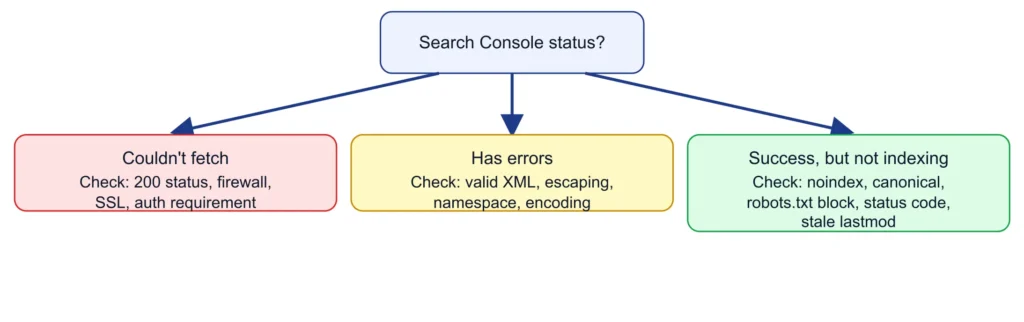
Search Console reports a submitted sitemap as Success, Has errors, or Couldn’t fetch. There is no guarantee a discovered URL will be crawled or indexed — fixing a sitemap problem removes an obstacle to discovery, it doesn’t compel crawling or indexing.
Sitemap Couldn’t Fetch
Cause: Non-200 status, server/CDN blocking Googlebot, authentication, or SSL issue.
Diagnose: Open the URL directly; run a URL Inspection Live Test.
Fix: Confirm 200 status with no redirect chain, remove authentication, check firewall/CDN rules.
Validate: Resubmit and confirm status changes.
Invalid XML / Malformed Sitemap
Cause: Unescaped characters, incorrect namespace, unclosed tags, incorrect encoding.
Diagnose: Inspect raw XML or run through a validator.
Fix: Entity-escape characters, correct the namespace, close unclosed tags.
Validate: Re-validate, resubmit, confirm Success.
Incorrect or Relative URLs
Cause: Relative URLs, or scheme/domain mismatch.
Diagnose: Sample <loc> entries for absolute, canonical-matching URLs.
Fix: Correct generation logic to output fully-qualified absolute URLs.
Validate: Spot-check and confirm resolution via URL Inspection.
404 and 410 URLs in the Sitemap
Cause: Removed pages not removed from the sitemap.
Diagnose: Crawl the sitemap’s URL list and cross-reference live status.
Fix: Remove 404/410 URLs.
Validate: Re-crawl and confirm none remain.
Redirected (3xx) URLs in the Sitemap
Cause: A moved page’s old URL was never updated.
Diagnose: Crawl and flag URLs resolving through a redirect.
Fix: Replace with the final destination directly.
Validate: Re-crawl and confirm 200 directly.
Blocked URLs (robots.txt Conflicts)
Cause: Sitemap and robots.txt maintained independently, drifted out of sync.
Diagnose: Cross-reference sitemap URLs against active Disallow rules.
Fix: Align the two files.
Validate: Re-check with URL Inspection.
Noindexed URLs in the Sitemap
Cause: A URL carries noindex while still listed.
Diagnose: URL Inspection indexing status.
Fix: Align both signals.
Validate: Re-run URL Inspection.
Canonical Mismatches
Cause: Sitemap generated from a raw URL list.
Diagnose: Sample and check against self-declared canonicals.
Fix: Update generation logic.
Validate: Re-sample for mismatches.
Duplicate URLs Within a Sitemap
Cause: Overlapping segmentation logic.
Diagnose: Crawl-based audit of raw sitemap files.
Fix: Deduplicate at the generation-logic level.
Validate: Re-audit for single-file appearance.
Incorrect <lastmod> Values
Cause: Tied to build/deploy timestamp.
Diagnose: Compare against real edit history.
Fix: Source from actual content-change timestamps.
Validate: Spot-check against real history.
Exceeding Sitemap Size or URL Limits
Cause: Exceeding 50,000 URLs or 50MB.
Diagnose: Check count and size.
Fix: Split into multiple files via a sitemap index.
Validate: Confirm each file within limits and index processes.
Sitemap Index Problems
Cause: Hosting-path violation, a child sitemap error, or exceeding 50,000 referenced sitemaps.
Diagnose: Confirm each referenced sitemap resolves and validates.
Fix: Correct path violations, fix flagged child sitemaps.
Validate: Resubmit and confirm each reports Success.
Sitemap Not Referenced in robots.txt
Cause: Submitted once via Search Console, never declared in robots.txt.
Diagnose: Fetch robots.txt for a Sitemap: line.
Fix: Add the directive.
Validate: Re-fetch and confirm it resolves.
Server Errors (5xx) During Sitemap Fetch
Cause: Dynamic generation timing out under load.
Diagnose: Check server logs for Googlebot request status.
Fix: Cache the generated sitemap or serve a static, scheduled file.
Validate: Monitor logs and confirm Search Console stabilizes.
Encoding Issues
Cause: Non-UTF-8 encoding, improperly escaped characters.
Diagnose: Check declared/actual encoding; inspect affected URLs.
Fix: Serve as UTF-8 with correct escaping.
Validate: Re-validate and confirm parsing.
Pre-Submission Sitemap Health Checklist
- File is valid XML (passes a validator)
- UTF-8 encoded, special characters entity-escaped
- All
<loc>values are absolute URLs - Every listed URL returns a 200 status
- Every listed URL is canonical
- No
noindexURLs included - No robots.txt-blocked URLs included
<lastmod>reflects real content-change dates- Under 50,000 URLs and 50MB (or correctly split via sitemap index)
- Declared via
Sitemap:in robots.txt - Submitted in Search Console