
Technical SEO / Crawling / Log File Analysis
Log File Analysis for SEO: Verifying Crawlers, Diagnosing Crawl Waste, and Reading Server Logs
Quick answer: Log file analysis for SEO is the process of analyzing server, CDN, or edge access logs to understand which crawlers request which URLs, how frequently they request them, and what responses the infrastructure returns. It helps SEO teams verify legitimate crawler activity, identify crawl waste, investigate HTTP errors, and measure how technical changes affect observed crawling behavior.
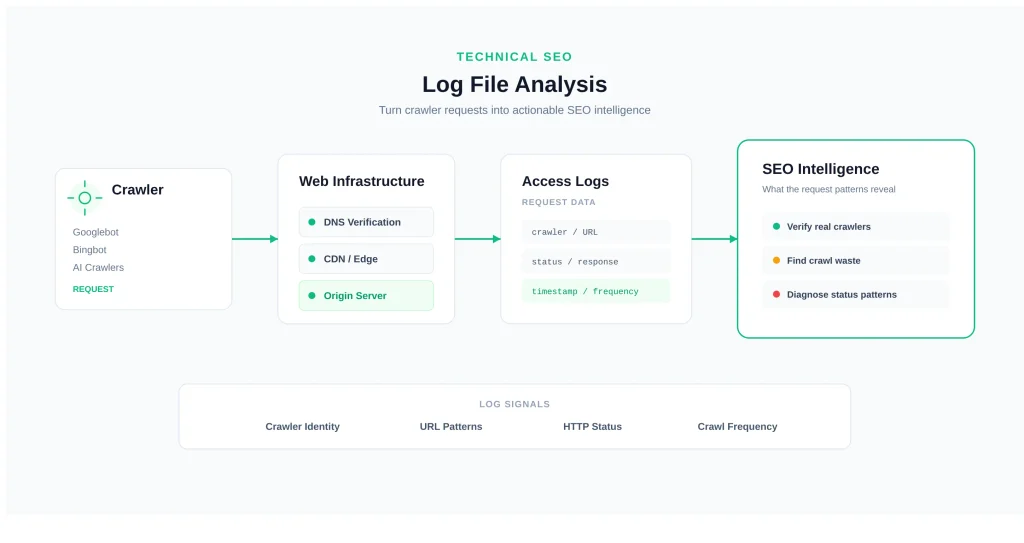
Log file analysis is one of the most direct forms of technical SEO evidence available to a website owner. Instead of asking only whether a search engine could access a URL, log analysis lets you examine requests that were actually observed by a particular logging layer.
That distinction matters on large, JavaScript-heavy, ecommerce, publishing, marketplace, and frequently updated websites. A site may be technically crawlable while search crawlers spend substantial request volume on parameters, duplicate URLs, redirects, errors, or other low-value resources. A crawl audit can identify those possibilities, but server logs can reveal whether the patterns are actually occurring.
The most useful way to think about log file analysis is not as a bot-counting exercise. It is an evidence chain: crawler identity → requested URL → response → frequency → pattern → diagnosis → action → measurement.
What Is Log File Analysis for SEO?
Log file analysis for SEO is the systematic examination of access-log data to understand how search engines, AI crawlers, browsers, monitoring systems, and other clients interact with a website.
A server access log normally records requests observed by the server or infrastructure layer generating that log. Depending on configuration, it can contain the requesting IP address, timestamp, HTTP method, requested path, status code, response size, referrer, user-agent, host, response time, cache information, and other fields.
For SEO, the value comes from combining these fields rather than interpreting one field in isolation. A request from a user-agent claiming to be Googlebot is not automatically a verified Googlebot request. A 404 is not automatically an SEO problem. A URL that receives many crawler requests is not necessarily wasteful. Context determines the conclusion.
The central questions are:
- Which automated clients are requesting the site?
- Which search-engine crawlers can be verified?
- Which URLs receive the most crawler requests?
- Which URL patterns generate unnecessary crawling?
- Which response codes are returned to important crawlers?
- Are redirects, errors, parameters, or duplicate URLs consuming significant request volume?
- Did crawler behavior change after a technical SEO deployment?
For the broader crawling framework, see the SEORAF Technical SEO Crawling hub.
What a Server Access Log Actually Records
A typical access log records a request according to the logging configuration of the server, proxy, CDN, or other infrastructure layer. It should therefore be described as an observed request record rather than an absolute transcript of everything that happened across the entire website infrastructure.
A useful SEO log dataset may include:
| Field | SEO value |
|---|---|
| IP address | Useful for crawler verification and traffic classification. |
| Timestamp | Shows when requests occurred and enables trend analysis. |
| HTTP method | Distinguishes GET, HEAD, POST, and other request types. |
| Requested URL | Identifies the resource being crawled or requested. |
| Status code | Shows whether the server returned success, redirect, client error, or server error. |
| Response size | Provides a useful infrastructure-level signal about the returned response. |
| Referrer | Can help investigate where requests originated when the field is available and meaningful. |
| User-agent | Provides the client’s claimed identity and crawler classification signal. |
| Response time | Can expose slow responses or infrastructure bottlenecks when logged. |
| Cache status | Helps distinguish edge/cache behavior from origin processing where available. |
The exact fields vary by Apache, Nginx, IIS, CDN, reverse proxy, hosting provider, and custom logging configuration. Before analysis, document what each column actually means.
Example Access-Log Entry
66.249.66.1 - - [15/Aug/2026:03:22:41 +0000]
"GET /technical-seo/crawling/ HTTP/1.1"
200 14032 "-"
"Mozilla/5.0 (compatible; Googlebot/2.1; +http://www.google.com/bot.html)"
This example contains an IP address, timestamp, request line, status code, response size, referrer, and user-agent. It provides useful evidence, but the user-agent alone does not prove that the requester is actually Googlebot.
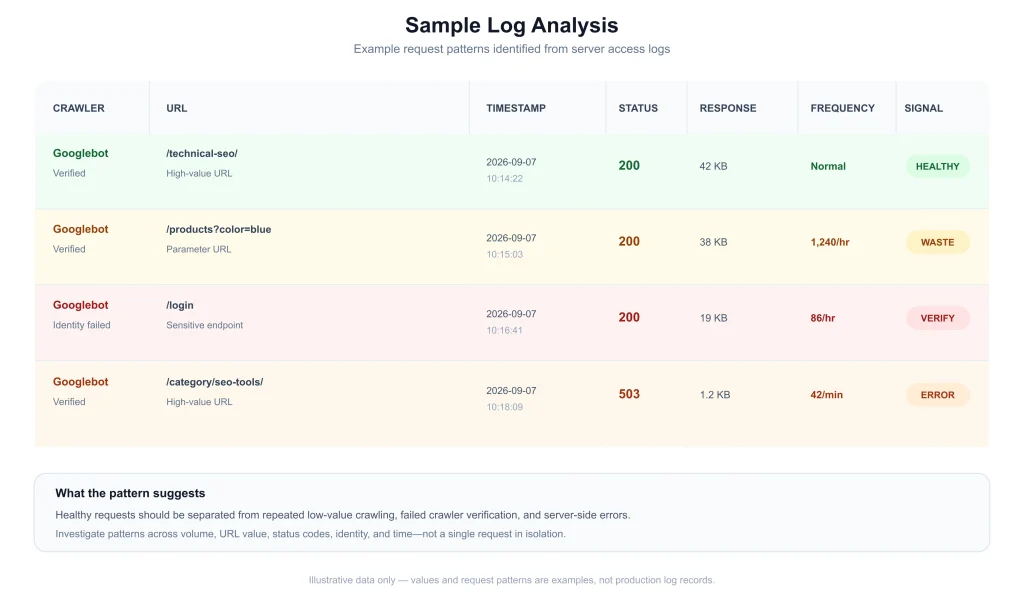
Sample Log Analysis: An illustrative view of parsed log data showing crawler identity, URL, response status, and crawl-frequency patterns. Sample values are fictional.
Log Formats: Common, Combined, and W3C Extended
Log formats vary by platform. Common Log Format provides a basic request record, while Combined Log Format adds information such as the referrer and user-agent. IIS commonly uses W3C Extended logging, which is configurable by field.
| Field | Common | Combined | W3C Extended |
|---|---|---|---|
| Client IP | Yes | Yes | Yes |
| Timestamp | Yes | Yes | Yes |
| Request line | Yes | Yes | Yes |
| Status code | Yes | Yes | Yes |
| Response bytes | Yes | Yes | Usually available |
| Referrer | No | Yes | Optional |
| User-agent | No | Yes | Optional |
For crawler analysis, a log without user-agent information significantly limits classification. IP addresses can still be investigated, but reliable identification becomes more difficult.
Origin Logs vs CDN and Edge Logs
Modern websites often place a CDN, reverse proxy, WAF, or edge platform between the crawler and the origin server. That creates multiple possible logging points.
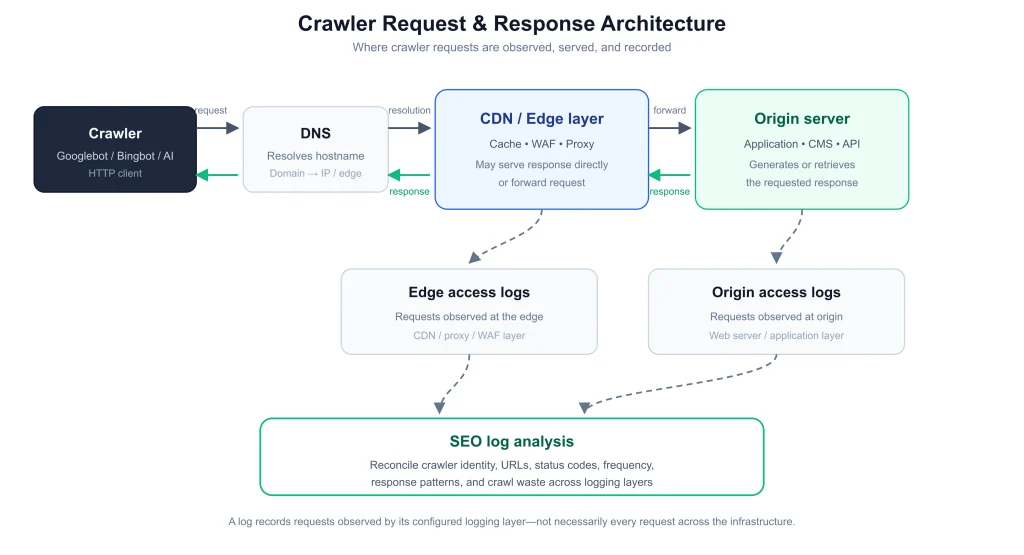
Crawler Request & Response Architecture: Requests may be visible at the edge, origin, or both depending on infrastructure and logging configuration.
This distinction is critical because an edge-served cached response may not generate a corresponding origin request. If you analyze only origin logs, you may underestimate requests that were handled by the CDN.
Conversely, an edge log may show a request that never reached the origin. Therefore, before calculating crawler volume, determine whether your dataset represents:
- edge requests,
- origin requests,
- application requests,
- a sampled subset, or
- a combination of multiple layers.
On a CDN-fronted site, a stronger analysis often reconciles edge and origin data rather than assuming that one source represents the entire request path.
Why Log Data Complements Search Console and Crawl Simulations
Log file analysis should not replace Google Search Console, crawling software, analytics, or infrastructure monitoring. Each data source answers a different question.
| Data source | Primary question |
|---|---|
| Server or edge logs | What requests were observed by this logging layer? |
| Google Search Console | What does Google report about crawling, indexing, and search performance? |
| Crawler simulation | What can a configured crawler discover and request? |
| Analytics | How do users behave after arriving? |
| CDN monitoring | What traffic reaches the edge? |
| Application monitoring | What happens after requests reach the application? |
Google’s Crawl Stats report provides aggregated information about Google’s crawling activity. Logs can provide a much more granular view of requests observed by your infrastructure.
A simulated crawl, meanwhile, tells you what happened during that controlled crawl. It does not prove that Googlebot or another search crawler made the same requests.
The strongest technical SEO diagnosis combines these sources. If logs show that Googlebot frequently requests a particular parameter pattern and a crawler simulation reveals that internal navigation generates thousands of those URLs, the two datasets reinforce each other.
For the broader concept, see what crawlability means in technical SEO.
Log File Analysis Workflow
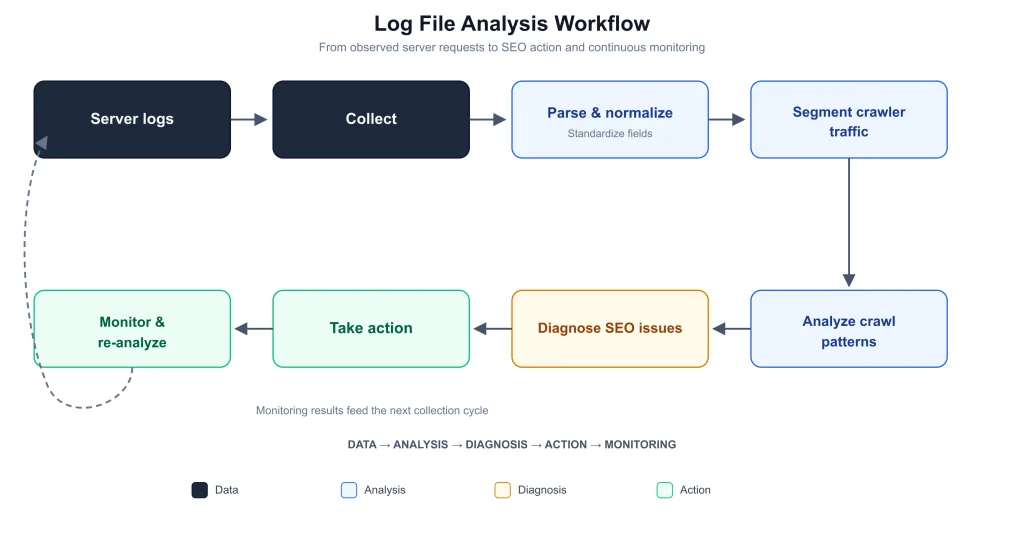
Log File Analysis Workflow: Collect, normalize, classify, analyze, diagnose, act, and monitor.
1. Collect
Identify every relevant logging source. Depending on the architecture, this may include Apache or Nginx access logs, IIS logs, CDN logs, reverse-proxy logs, load-balancer logs, and application request logs.
2. Normalize
Convert different formats into a consistent schema. A normalized dataset might contain:
timestamp
source
hostname
ip
method
path
query_string
status
bytes
user_agent
referrer
response_time
cache_status
3. Classify
Separate verified search crawlers, documented AI crawlers, other automated clients, browsers, and unknown traffic.
4. Filter
Remove irrelevant infrastructure noise where appropriate, such as health checks or internal monitoring requests. Keep the filtering rules documented so the analysis remains reproducible.
5. Segment
Break the dataset down by crawler, URL type, directory, status code, date, hostname, and parameter pattern.
6. Analyze
Look for distributions and trends rather than isolated requests. A single 404 is rarely as important as hundreds of repeated requests to the same obsolete URL.
7. Diagnose
Connect the observed pattern to a possible technical cause.
8. Act and Re-analyze
Make a controlled change and compare subsequent log behavior. This creates a feedback loop instead of a one-time audit.
How to Verify Googlebot from Server Logs
One of the highest-value uses of log file analysis is distinguishing genuine search-engine crawler requests from spoofed user-agents.
A request containing Googlebot in its user-agent is only a claimed identity. Google documents a verification process based on reverse DNS followed by forward DNS confirmation.
- Capture the requesting IP address.
- Perform a reverse DNS lookup.
- Check whether the resulting hostname fits Google’s documented crawler verification requirements.
- Perform a forward DNS lookup on that hostname.
- Confirm that the hostname resolves back to the original requesting IP.
Google’s official crawler verification documentation should be treated as the source of truth for current verification requirements.
This matters because a malicious or commercial scraper can easily place Googlebot in its user-agent. User-agent matching without infrastructure verification can therefore produce false conclusions.
Why Reverse DNS Alone Is Not Enough
A reverse lookup provides a hostname associated with the IP. The forward lookup creates a second direction of verification. Requiring the two to agree provides stronger evidence than trusting a PTR record alone.
For production workflows, automate this verification where possible and store the result as a classification field such as:
crawler = Googlebot
verification = verified
verification_method = reverse_dns + forward_dns
Verifying Bingbot and Other Search Crawlers
Bingbot should be treated similarly: identify the claimed user-agent, investigate the requesting IP, and use Bing’s official verification resources rather than relying on the user-agent alone.
Microsoft’s Verify Bingbot tool provides an official way to investigate whether a request is associated with Bing’s crawler infrastructure.
Other search engines should be verified against their own official documentation and infrastructure signals. Do not assume that a verification method documented for Google automatically proves another crawler’s identity.
Identifying AI Crawlers in Server Logs
AI-related crawler traffic has made log analysis more complex because different automated clients can serve different purposes. A crawler associated with model training should not automatically be treated as equivalent to a crawler used for search retrieval or user-requested browsing.
| Crawler | Operator | Reported function | SEO log question |
|---|---|---|---|
GPTBot | OpenAI | Training-related crawling | What content is being requested? |
OAI-SearchBot | OpenAI | Search-related crawling | Is search-oriented access occurring? |
ChatGPT-User | OpenAI | User-requested retrieval | Which pages are being fetched in response to user requests? |
ClaudeBot | Anthropic | Automated crawling | Which content receives crawler requests? |
Claude-User | Anthropic | User-requested access | Which pages are fetched for user requests? |
Claude-SearchBot | Anthropic | Search-related crawling | What search-oriented requests are observed? |
PerplexityBot | Perplexity | Search/retrieval crawling | Which content is being accessed? |
OpenAI’s publisher and developer documentation describes separate crawler identities and their functions. Anthropic similarly documents its crawler identities in its web crawler documentation.
Crawler names, purposes, IP information, and policies can change. For long-lived classification systems, periodically review the operators’ official documentation instead of hard-coding assumptions permanently.
For the broader policy and access-control framework, see SEORAF’s AI Crawler Access guide.
Web Bot Auth and Cryptographic Crawler Verification
Traditional crawler identification relies heavily on user-agent strings, IP information, and DNS verification. These mechanisms are useful but have limitations.
HTTP Message Signatures are standardized in RFC 9421. Web Bot Authentication builds on cryptographic concepts for stronger automated-client authentication.
Google’s documentation currently describes Web Bot Auth as an experimental mechanism and makes clear that it supplements existing verification rather than universally replacing it. Cloudflare also provides infrastructure for Web Bot Auth verification.
Therefore, a practical SEO log pipeline can think in layers:
User-Agent
     ↓
IP / network evidence
     ↓
DNS verification
     ↓
Official crawler documentation
     ↓
Cryptographic verification where supported
The important publishing principle is to distinguish finalized standards from active standards-development work and experimental implementations.
How to Detect Fake or Spoofed Bots
A spoofed bot is an automated client that presents itself as another crawler. For example, a scraper may send a Googlebot user-agent even though its source IP cannot be verified as Google’s infrastructure.
A useful classification process is:
- Read the user-agent.
- Extract the source IP.
- Apply the appropriate verification method.
- Compare the result with official documentation.
- Classify the request as verified, unverified, or unknown.
- Investigate traffic volume and server impact.
Low-volume suspicious traffic may simply be monitored. Persistent scraping or infrastructure abuse may justify WAF, CDN, or server-level controls. Robots.txt should not be treated as a security control for non-compliant clients.
Diagnosing Crawl Budget Waste from Log Data
Crawl budget becomes especially relevant on large websites with many URLs, frequent updates, complex navigation, faceted filtering, parameters, or generated pages.
The goal is not to maximize crawler requests. The goal is to help search engines spend crawling resources efficiently on URLs that matter.
For the conceptual framework, see SEORAF’s crawl budget guide.
Log data can expose potential waste patterns such as:
- large volumes of parameter URLs,
- faceted navigation combinations,
- duplicate URL variants,
- long redirect chains,
- repeated 404 requests,
- obsolete URLs,
- internal search URLs,
- session identifiers,
- calendar traps,
- unnecessary URL combinations.
Use Frequency Together With URL Value
High crawler frequency does not automatically mean waste. An important homepage, product page, news article, or frequently updated inventory page may legitimately receive substantial crawler activity.
The useful comparison is:
crawler frequency + URL value + indexability + response quality + discovery source.
For example, if a large percentage of crawler requests repeatedly target combinations such as:
/category/shoes?color=black
/category/shoes?color=black&size=10
/category/shoes?sort=price
/category/shoes?sort=price&color=black
the analyst should determine whether those URLs provide unique search value or simply create a large crawlable URL space.
Crawl Diagnosis Decision Tree
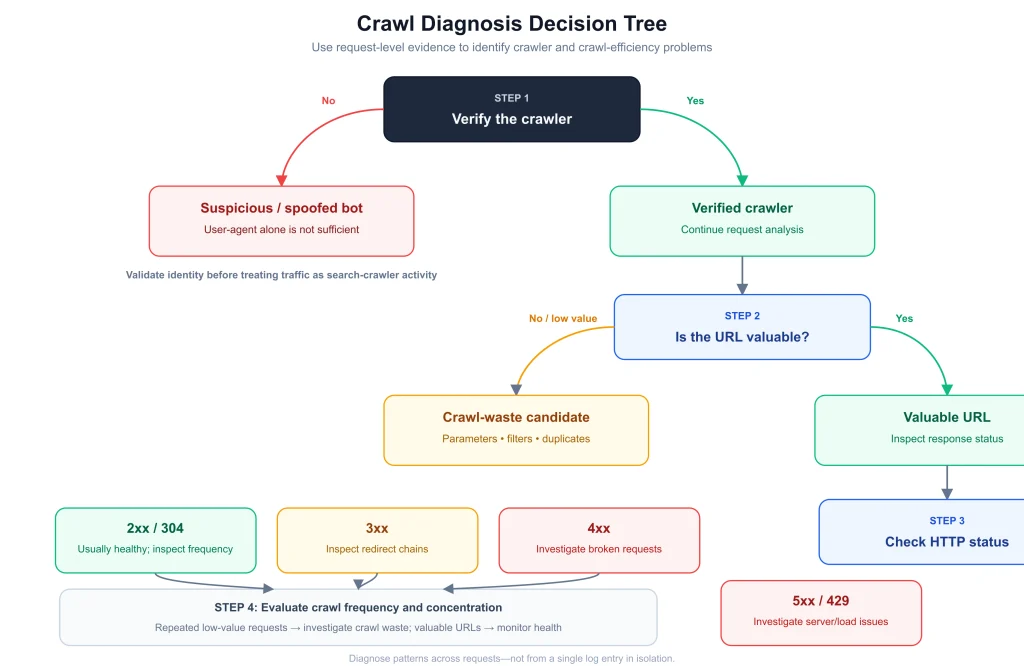
Crawl Diagnosis Decision Tree: Verify crawler identity first, then evaluate URL value, response status, and crawl frequency before selecting an action.
The decision tree prevents a common SEO mistake: applying a technical fix before establishing what the request pattern actually represents.
- Is the crawler verified? If not, classify it as unknown or suspicious.
- Is the URL valuable? If yes, protect access and investigate response quality.
- Is the response healthy? Investigate repeated errors or unnecessary redirects.
- Is crawl frequency disproportionate? Investigate URL generation and discovery.
- What creates the URL? Check internal links, sitemaps, navigation, parameters, and external discovery.
- What is the appropriate control? Consider architecture, internal linking, canonicalization, robots directives, redirects, or infrastructure changes.
A Practical Crawl-Efficiency Metric
A site can create an internal metric such as:
Crawl Efficiency Ratio = Valuable Crawler Requests ÷ Total Relevant Crawler Requests
Important: This is a practitioner-defined analytical lens, not a standardized Google metric. Use it consistently within the same site and methodology rather than comparing it with an external industry benchmark.
The useful purpose of such a metric is trend analysis. If a site changes its navigation architecture and subsequently observes a sustained reduction in low-value crawler requests while important URLs continue receiving access, that may indicate improved crawl efficiency.
It still does not prove a ranking improvement. Search visibility depends on many additional systems and signals.
Why Crawl Activity Can Be Bursty
Crawler requests are not necessarily distributed evenly across every hour or day. Infrastructure events, content freshness, crawl scheduling, site size, server responses, and other factors can influence observed patterns.
This means a single day’s log may provide a misleading picture.
A better approach is to compare multiple days or weeks and look for persistent distributions. If one URL class consistently receives a disproportionate share of requests, the evidence is stronger than an isolated spike.
HTTP Status Codes in SEO Log Analysis
Status codes are one of the most actionable log fields because they connect crawler requests with server responses.
| Status | Meaning | What to investigate |
|---|---|---|
| 200 | Successful response | Confirm that the requested resource is the intended canonical content. |
| 301 | Permanent redirect | Check unnecessary chains, loops, and outdated destinations. |
| 302 | Temporary redirect | Investigate whether the temporary behavior is intentional. |
| 404 | Not found | Trace repeated discovery sources and broken internal references. |
| 410 | Gone | Confirm that removal is intentional and appropriate. |
| 429 | Too many requests | Investigate rate limiting, bot management, and infrastructure capacity. |
| 500 | Internal server error | Investigate application or server failures. |
| 502 | Bad gateway | Check proxy and upstream infrastructure. |
| 503 | Service unavailable | Investigate maintenance, overload, and persistent availability problems. |
Repeated 404 Requests
A 404 is not automatically an SEO emergency. The useful question is why the URL is still being requested.
Potential discovery sources include:
- old internal links,
- stale XML sitemap entries,
- external links,
- redirects,
- historical crawler discovery,
- application-generated URLs.
500, 503, and 429 Patterns
Repeated server-side failures can be more significant than isolated client errors. Google’s documentation explains that significant server error rates can influence how aggressively Google crawls a site.
See Google’s crawl-rate guidance when investigating sustained server-error patterns.
The key is to examine frequency, duration, affected URLs, crawler identity, and timing rather than reacting to one isolated event.
Redirect Chains and Crawl Waste
Logs can expose redirect behavior at scale.
URL A
  ↓ 301
URL B
  ↓ 302
URL C
  ↓ 301
URL D
A redirect chain may eventually reach the intended page, but repeated chains create unnecessary request steps and can complicate migrations and crawler processing.
Aggregate redirect requests by source, destination, crawler, status, and frequency. High-frequency chains affecting important crawlers should generally receive greater priority than isolated historical redirects.
Rendering and Resource Requests
Logs may contain requests for JavaScript, CSS, images, API endpoints, and other resources. These records can provide useful clues when diagnosing JavaScript-heavy websites.
However, resource requests should not be interpreted as a complete transcript of a search engine’s internal rendering process. Caching, reused resources, infrastructure boundaries, and logging configuration can affect what appears in a particular dataset.
If a JavaScript-heavy page has suspected rendering or indexing problems, combine log analysis with rendered HTML inspection, Search Console URL Inspection, controlled crawling, and other technical diagnostics.
Robots.txt and Log Evidence
Robots.txt is an important crawler-access control mechanism, but log analysis should be used carefully when comparing intended rules with observed traffic.
If a site expects a compliant crawler not to request a URL pattern but the logs show requests, investigate:
- robots.txt syntax,
- the exact robots.txt response being served,
- hostname differences,
- crawler identity,
- deployment timing,
- redirect behavior,
- non-compliant or spoofed clients.
A request from an unverified bot against a disallowed path does not prove that the legitimate search engine ignored the robots directive.
For implementation details, see the SEORAF robots.txt guide.
Internal Linking, URL Discovery, and Crawl Patterns
Internal links are one of the major mechanisms through which crawlers discover URLs. This creates a direct relationship between site architecture and log patterns.
A navigation system that exposes thousands of parameter combinations can produce a large crawlable URL space. If those URLs provide little unique search value, the resulting requests may become a crawl-efficiency problem.
Compare:
Site architecture
      ↓
Internal links
      ↓
URL discovery
      ↓
Crawler requests
      ↓
Server responses
      ↓
Log evidence
This is why log analysis works particularly well alongside a URL discovery analysis.
Sample Crawl-Waste Analysis
Imagine an ecommerce website with the following observed crawler activity:
| URL pattern | Crawler | Requests | Initial assessment |
|---|---|---|---|
| /guide/seo/ | Verified Googlebot | 1,240 | Important content; review normally |
| /products/a/ | Verified Googlebot | 980 | Important product |
| /search?q=seo | Verified Googlebot | 3,420 | Investigate internal search crawling |
| /filter?color=red | Verified Googlebot | 5,180 | Potential crawl waste |
| /old-page/ | Verified Googlebot | 620 | Trace discovery source |
| /api/test | Unknown bot | 900 | Verify identity and purpose |
The highest-volume pattern is not automatically the highest-priority problem. The filter URLs deserve investigation because they may represent many combinations with limited unique search value. The API requests may be less important for SEO if the client is unverified and the traffic is blocked or harmless.
The next step is to inspect how these URLs are generated and discovered rather than immediately blocking them.
How to Get Server Logs for SEO
Start by identifying who controls each logging layer: hosting provider, development team, CDN provider, cloud platform, or security team.
Ask specifically for access logs rather than only error logs or system logs.
Before exporting data, document:
- time range,
- timezone,
- hostnames,
- log source,
- available fields,
- sampling rules,
- retention period,
- CDN/cache architecture.
On a CDN-fronted website, confirm whether edge logs are available. An origin-only dataset may not represent requests that were served from the edge.
Parsing and Structuring Logs for SEO Analysis
Raw log files are useful for storage but inconvenient for repeated analysis. A structured dataset makes aggregation and trend analysis much easier.
A normalized record might look like:
{
  "timestamp": "...",
  "hostname": "...",
  "ip": "...",
  "method": "GET",
  "path": "/example/",
  "status": 200,
  "bytes": 14032,
  "user_agent": "...",
  "crawler_type": "Googlebot",
  "verification": "verified"
}
Derived fields can include:
- crawler type,
- verification status,
- URL type,
- directory,
- parameter presence,
- status group,
- canonical class,
- cache state.
This allows questions such as: Which verified crawler generates the most requests to each URL class?
Enterprise Log Analysis Architecture
At enterprise scale, manual CSV analysis becomes difficult to maintain. A repeatable pipeline is more useful.
Web Servers / CDN
        ↓
Log Collection
        ↓
Object Storage
        ↓
ETL / Normalization
        ↓
Data Warehouse
        ↓
Crawler Classification
        ↓
SEO Metrics
        ↓
Dashboards
        ↓
Technical SEO Actions
A warehouse-based approach allows analysts to compare crawler behavior over months rather than repeatedly starting from scratch.
It also makes it possible to connect crawler trends with major technical events such as:
- site migrations,
- URL restructuring,
- robots.txt changes,
- navigation changes,
- CDN migrations,
- server upgrades,
- faceted-navigation changes.
Best Tools for Log File Analysis
Tool selection should depend on dataset size, automation requirements, technical resources, and reporting needs.
| Tool / approach | Best fit |
|---|---|
| Screaming Frog Log File Analyser | Practical desktop SEO analysis |
| JetOctopus | Large-scale crawler and log analysis |
| Botify | Enterprise SEO workflows |
| Splunk | Enterprise observability and custom log analysis |
| Elasticsearch / OpenSearch | Searchable and self-managed log infrastructure |
| SQL / BigQuery | Large-scale custom analysis and longitudinal reporting |
| Python | Custom parsing, classification, and automation |
The most advanced tool is not necessarily the best tool. A smaller site may need only a focused log analyzer, while an enterprise platform may require automated ingestion, storage, classification, and dashboards.
What Log File Analysis Cannot Tell You
Logs are powerful infrastructure evidence, but they do not expose every decision made by a search engine or AI system.
Logs cannot directly prove:
- why Google indexed or did not index a URL,
- why a page ranks at a particular position,
- whether a page will receive search traffic,
- how an AI system internally interpreted a page,
- whether crawler activity caused a ranking change.
They also may not contain every request across the infrastructure. CDN caching, sampling, retention, separate hosts, privacy controls, and logging configuration can all affect the dataset.
Evidence principle: Treat logs as direct evidence of requests observed at the relevant logging layer. Use Search Console, rendered-page testing, indexing reports, analytics, and other technical data to answer questions that logs alone cannot resolve.
Privacy and Log Data Governance
Access logs can contain IP addresses, URLs, query strings, user-agents, timestamps, and other information that may require careful handling depending on the jurisdiction and context.
Good operational practice includes:
- restricting access to raw logs,
- minimizing unnecessary fields,
- protecting exported datasets,
- limiting retention appropriately,
- avoiding publication of raw identifiers,
- documenting who can access the data.
Most SEO reports do not need to expose raw IP addresses. A classification such as verified_googlebot, verified_bingbot, ai_search_bot, or unknown_bot is often more useful for reporting.
Common Log Analysis Mistakes
1. Trusting User-Agent Strings
A user-agent is a claim. Verify important crawler identities.
2. Treating Every Bot as Bad
Automated clients can perform legitimate search, retrieval, monitoring, accessibility, and other functions. Classify before blocking.
3. Counting Requests Without Looking at URLs
Request volume alone does not establish crawl waste. URL type and value are essential context.
4. Treating Every 404 as an SEO Emergency
Prioritize repeated, important, or structurally generated errors.
5. Ignoring CDN Architecture
Origin logs may not contain requests served at the edge.
6. Confusing Crawling With Indexing
A crawler requesting a URL does not prove that the URL was indexed.
7. Assuming AI Crawler Traffic Equals AI Visibility
A crawler request does not prove that an AI system will cite, summarize, recommend, or otherwise surface the page.
8. Treating a Custom Metric as an Official Search Metric
Internal metrics can be useful, but label them clearly as internal analytical frameworks.
How Often Should You Analyze Server Logs?
There is no universal SEO requirement for a fixed log-analysis cadence. The appropriate frequency depends on site size, change velocity, crawl complexity, infrastructure risk, and business importance.
Small Websites
Analyze logs when diagnosing crawling problems, launching major technical changes, migrating domains, changing URL architecture, or investigating unexpected Search Console behavior.
Medium Websites
A recurring monthly or quarterly analysis can help identify crawl-pattern changes, especially when combined with technical SEO audits.
Large and Enterprise Websites
Consider automated monitoring for crawler identity, URL classes, response codes, crawl distribution, and infrastructure errors. Trigger additional analysis after major deployments.
The principle is simple: analyze logs often enough that the findings can influence decisions.
SEO Log File Analysis Checklist
Frequently Asked Questions About Log File Analysis for SEO
What is log file analysis in SEO?
Log file analysis is the examination of server, CDN, or edge request data to understand how crawlers and other clients interact with a website. SEO teams use it to analyze crawler identity, requested URLs, response codes, crawl frequency, crawl waste, and technical infrastructure behavior.
Is log file analysis better than Google Search Console?
Neither replaces the other. Search Console provides Google-specific reporting about crawling, indexing, and search performance, while logs provide request-level evidence observed by your infrastructure. Using both creates a stronger diagnostic picture.
How can I verify a real Googlebot request?
Do not rely only on the user-agent. Use Google’s documented verification process: reverse-lookup the IP, verify the resulting hostname, then perform a forward lookup and confirm that it resolves back to the original IP.
Can log files reveal crawl budget waste?
Logs can reveal patterns associated with inefficient crawling, including excessive requests to parameters, duplicate URLs, redirects, and errors. They do not directly expose every internal search-engine crawl-budget decision, so the findings should be interpreted alongside other technical SEO evidence.
Can server logs prove that Google indexed a page?
No. A Googlebot request proves that a request was observed; it does not prove indexing. Use Search Console and URL Inspection for indexing-related questions.
Can logs identify AI crawlers?
Yes, when those requests reach a logging layer and the crawler can be classified reliably. AI crawler requests should be separated by operator and function where possible. A crawler request does not, however, prove AI visibility or citation.
Why is Googlebot requesting a URL that I do not want crawled?
Investigate crawler identity, robots.txt syntax, deployment, URL discovery sources, internal links, sitemaps, redirects, and hostname differences. Do not assume that every request from a user-agent containing Googlebot is genuine Googlebot traffic.
Do 404 errors always mean there is an SEO problem?
No. The priority depends on frequency, URL importance, discovery source, and whether the errors are generated by the site’s current architecture. Repeated crawler requests for the same obsolete URL are more actionable than isolated historical 404s.
Can logs show rendering problems?
They can provide clues through resource requests and response behavior, but they cannot provide a complete transcript of a search engine’s rendering process. Combine logs with rendered HTML inspection and Search Console diagnostics.
How long should SEO logs be retained?
There is no universal SEO retention period. Retention should balance analytical requirements with storage cost, privacy, security, and organizational policies. Longer historical retention is useful when you need to compare crawler behavior before and after major technical changes.
How to Turn Log Data Into Technical SEO Actions
The most important lesson is that log file analysis should end with a decision, not a dashboard.
A useful workflow is:
Observed request
      ↓
Crawler identity
      ↓
URL classification
      ↓
HTTP response
      ↓
Frequency / trend
      ↓
Pattern
      ↓
Technical diagnosis
      ↓
SEO action
      ↓
Post-change measurement
For example, discovering thousands of requests to parameter URLs is only the beginning. The technical SEO team still needs to determine whether those URLs are valuable, how they are discovered, whether they are indexable, whether internal links generate them, and whether a change to architecture or crawler controls is appropriate.
Similarly, discovering repeated 500 responses does not tell you the precise cause. It tells you where to investigate infrastructure, application behavior, deployment history, and crawler impact.
This evidence-first approach prevents overreaction and helps teams prioritize changes based on observed behavior rather than assumptions.
Conclusion: Make Server Logs a Technical SEO Intelligence Layer
Log file analysis for SEO provides a practical bridge between technical SEO theory and real request-level infrastructure evidence.
It can reveal which crawlers request your website, which URL patterns receive attention, how frequently those requests occur, and what HTTP responses the server returns.
The strongest analysis, however, does not rely on one signal. User-agent strings require verification. Request frequency requires URL context. Status codes require frequency and cause. Origin logs must be interpreted alongside CDN architecture. Crawler activity must be separated from indexing. AI crawler traffic must not automatically be interpreted as AI visibility.
The most reliable model is therefore: identity → request → URL → response → pattern → diagnosis → action → measurement.
When that workflow becomes repeatable, server logs stop being raw infrastructure data and become a technical SEO intelligence layer that can help identify crawl waste, validate crawler behavior, investigate server problems, and measure the effects of architectural changes.