
Technical SEO Checklist PDF: A Step-by-Step Audit from Discover to Serve
Written and maintained by Mousume Akter for SEORAF, an independent technical SEO resource. This guide is reviewed periodically against Google Search Central, Search Console Help, and web.dev and updated when the underlying documentation changes materially.
A technical SEO audit is most useful when you know where to look first and how to distinguish a real problem from an expected exclusion. This checklist organizes the audit into six practical stages: discovering a URL, checking whether it can be crawled, verifying what search engines can render, checking indexability and canonical signals, reviewing indexing status, and assessing how the page is delivered and presented.
Use it to run a first audit, investigate an indexing problem, prioritize technical fixes, or give a developer a clear, evidence-based issue list. Fixing technical obstacles can improve a site’s ability to be crawled, understood, and indexed, but it does not guarantee indexing, rankings, or traffic.
Technical SEO Checklist PDF
Technical SEO Checklist PDF
Enter your name and email to access this PDF.
What’s Inside the Technical SEO Checklist PDF?
The PDF follows the same six-stage framework as this page. Each check is designed to produce a practical pass/fail finding, supporting evidence, and a clear next action.
This checklist suits:
- Site owners and bloggers running a first technical SEO audit
- SEO practitioners who want a consistent, repeatable audit sequence
- Anyone preparing an evidence-based issue list for a developer
- Teams investigating crawling, indexing, canonical, rendering, or technical site-quality issues
It is not:
- An on-page or content checklist for titles, copy, or keyword placement
- A substitute for a full crawl or server-log analysis on a large or complex site
- A guarantee of indexing, rankings, traffic, or search visibility
Preview: inside the checklist
Example checks include:
- ☐ robots.txt does not unintentionally block URLs that should be crawlable — Critical
- ☐ Important canonical URLs use consistent canonical signals — Important
- ☐ Sitemap contains the URLs you want Google to discover and treats them consistently with your canonical strategy — Important
- ☐ LCP, INP, and CLS are checked against current Core Web Vitals thresholds using appropriate field or lab data — Important
Get the checklist and future update notices
The PDF is available directly without an email address. If you want update notices when this checklist changes materially, use the site’s optional email subscription.
Download the checklist PDF
Technical SEO Checklist PDF
Enter your name and email to access this PDF.
If you subscribe to update notices, you can unsubscribe at any time.
How to approach a technical SEO audit
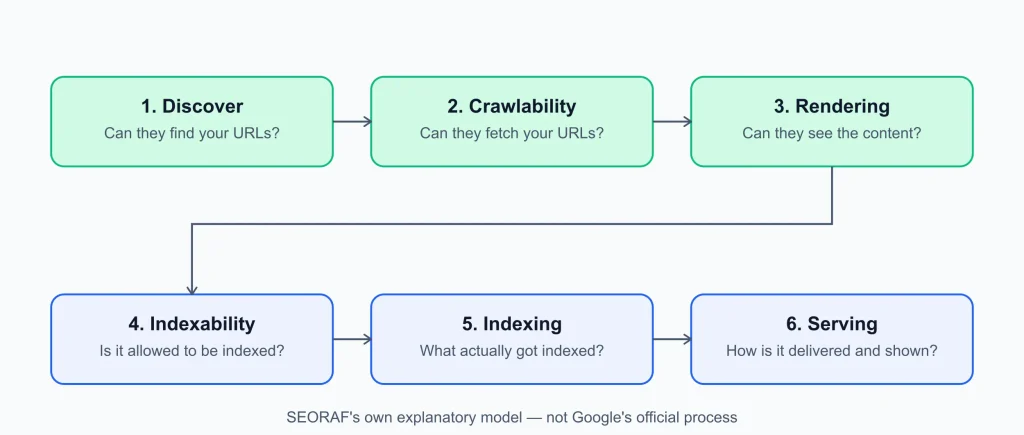
Technical SEO checklists are easier to use when individual checks are connected to the larger path a URL takes through a search engine’s systems. This framework therefore starts with discovery and access, then moves through rendering, indexability, indexing, and page delivery.
Start with the right questions
- Should this URL be indexed at all?
- Can Google discover the URL?
- Can Google crawl and fetch it?
- Can Google render the important content and links?
- Are robots directives and canonical signals consistent?
- What does Search Console show about the URL’s indexing status?
- Are there delivery, mobile, structured-data, image, or performance issues worth addressing?
Use evidence before deciding what to fix
- Confirm important findings with Search Console, HTTP responses, crawlers, source HTML, rendered output, or server logs where available.
- Separate intentional exclusions from accidental technical problems.
- Look for patterns across templates rather than fixing isolated URLs one by one when the same root cause affects many pages.
- Record an example URL, affected template, approximate scope, evidence, confidence, and recommended action.
- Do not treat a tool warning as proof of a Google indexing problem without checking the underlying condition.
Framework note: The six-stage model below — Discover → Crawlability → Rendering → Indexability → Indexing → Serving — is SEORAF’s explanatory framework for organizing an audit. It is not Google’s official six-stage search process. Google documents crawling, rendering, and indexing as important parts of how Search processes pages, while individual systems can overlap and operate asynchronously.
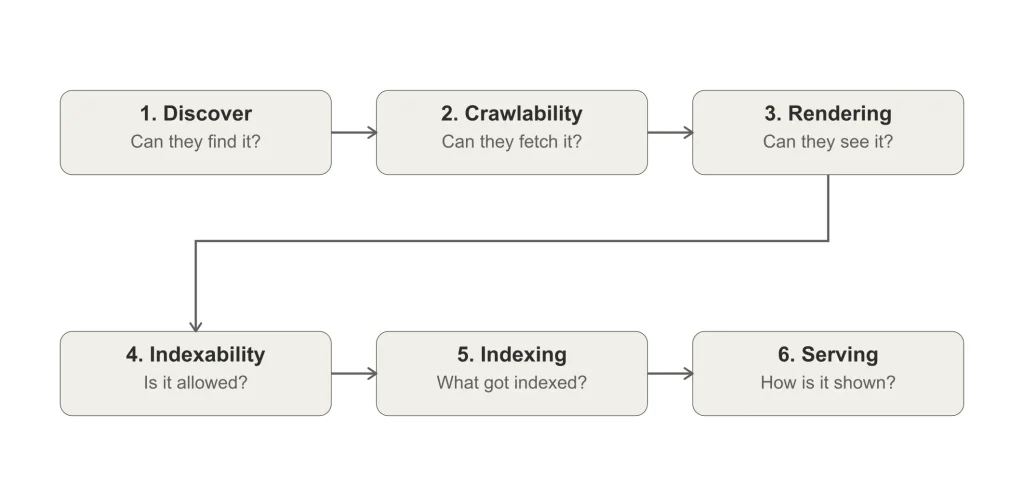
The SEORAF audit framework: what each stage checks and where to find evidence
| Stage | Question it answers | Main evidence |
|---|---|---|
| 1. Discover | Can Google find the URL? | Internal links, sitemaps, crawl data |
| 2. Crawlability | Can Google fetch the URL? | robots.txt, HTTP responses, Crawl Stats, server logs |
| 3. Rendering | Can Google process the important rendered content and links? | URL Inspection rendered output and resources |
| 4. Indexability | Are there directives or canonical conditions affecting indexing? | robots directives, canonical signals, HTTP headers |
| 5. Indexing | What does Google know about the URL and its index status? | URL Inspection, Page indexing report |
| 6. Serving | Are important delivery, mobile, structured-data, image, and experience factors working as intended? | Search Console, PageSpeed Insights, Rich Results Test, site testing |
How to decide whether a non-indexed URL is a problem
- Check the indexing goal. A duplicate, redirect, intentionally blocked URL, or deliberately noindexed page may be correctly absent from Google’s index.
- Check discovery and access. If the page should be indexed, verify that Google can discover and crawl it.
- Check rendering and indexability. Make sure important content is available and that robots directives and canonical signals do not unintentionally prevent or redirect indexing signals.
- Check the indexed result. Use URL Inspection and the Page indexing report to understand Google’s latest information about the URL.
- Allow for Google’s indexing process. A technically accessible page is not guaranteed to be indexed, and repeated indexing requests do not force indexing.
How to use this checklist
Before starting, have access to a verified Google Search Console property, your CMS or hosting settings, and server logs if available. Bing Webmaster Tools can provide additional search-engine data, while a crawler can make pattern discovery easier on larger sites.
Run the checklist once before making changes. Record each finding with an example URL, affected template, approximate scope, evidence, confidence, and proposed fix. Prioritize after you understand the wider pattern because one template-level issue can create thousands of individual symptoms.
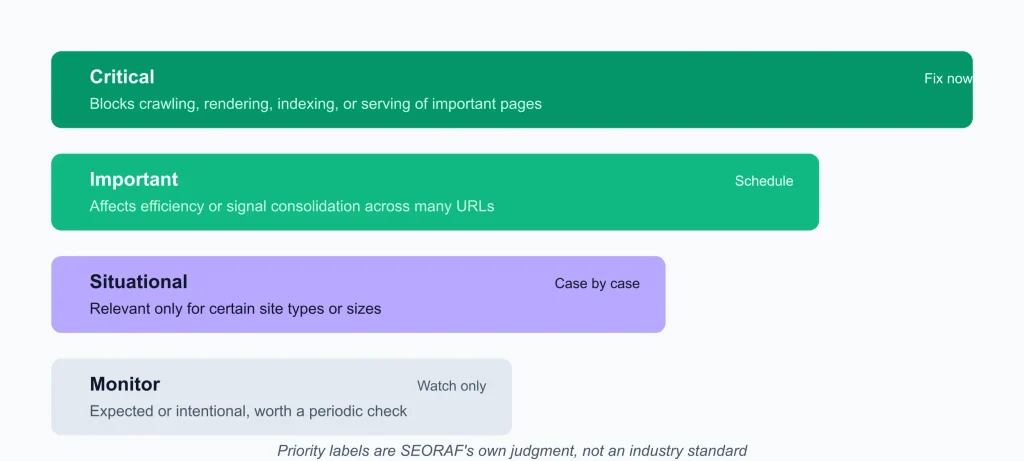
| Label | Meaning |
|---|---|
| Critical | A technical condition that can prevent important URLs from being crawled, rendered, indexed, or properly delivered. |
| Important | A condition that can affect crawling efficiency, signal consolidation, discoverability, user experience, or many URLs at once. |
| Situational | A condition that matters primarily for particular site types, architectures, or levels of scale. |
These priority labels are SEORAF’s audit convention, not Google’s official severity classification.
Stage 1: Discover — can Google find your URLs?
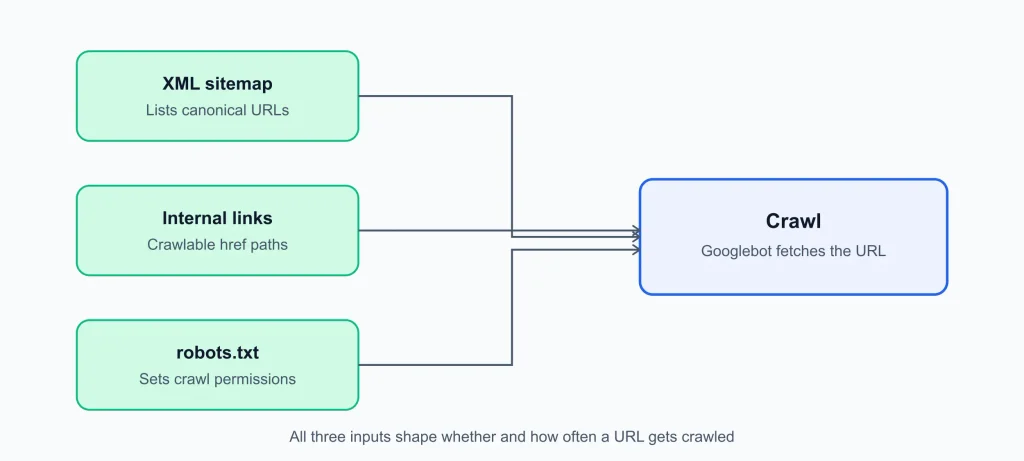
Google needs to learn about a URL before it can crawl it. A URL can be discovered through crawlable links, a sitemap, or other known references to the URL. Sitemaps are especially useful for helping Google discover large numbers of URLs, but submitting a URL does not guarantee that Google will crawl or index it.
XML sitemaps
A sitemap is a discovery aid and a way to communicate information about URLs; it is not an instruction to index every submitted URL.
- Google ignores the
<priority>and<changefreq>sitemap fields. - The
<lastmod>value should represent the last significant modification and should be consistently accurate. - A sitemap file can contain up to 50,000 URLs or 50 MB uncompressed. Larger sites can use multiple sitemap files and a sitemap index.
- Include URLs that are useful to discover and consistent with your preferred canonical strategy.
- Review sitemap errors and compare submitted URLs with indexing information in Search Console.
Check: Search Console → Sitemaps report. Compare submitted URLs with the Page indexing report and spot-check representative URLs with URL Inspection.
Priority: Important
Internal linking
Google’s crawlable-link guidance recommends standard <a> elements with an href attribute. JavaScript-based navigation can work when it ultimately produces crawlable links, but buttons, click-only controls, and interaction-dependent navigation should not be treated as equivalent to ordinary crawlable links.
Check: Crawl the site for broken internal links, links pointing to unnecessary redirects, important pages with few inbound internal links, and navigation elements that do not expose crawlable URLs.
Priority: Important
Orphan pages
An orphan page has no meaningful internal links pointing to it. Compare crawl data, sitemap URLs, Search Console information, and other known URL sources to identify pages that may be disconnected from the site’s architecture.
An orphan URL can sometimes still be discovered through a sitemap or another external source, so being an orphan does not automatically mean that Google cannot find it. The audit question is whether the page has an intentional, useful discovery path.
Check: For each important orphan, decide whether it should be internally linked, redirected, noindexed, consolidated, or removed.
Priority: Important
Site architecture and click depth
Google does not publish a universal maximum click depth that every site should follow. The practical goal is to make important pages easy to discover through logical navigation and internal-link paths rather than hiding them behind search forms, unnecessary filters, or inaccessible interaction patterns.
See the SEORAF guide to technical SEO site architecture for a deeper treatment of architecture and internal linking.
Priority: Important
URL structure
URL fragments are generally not a replacement for separate crawlable URLs when different pieces of content need to be discovered and indexed separately. Keep protocol, hostname, path, parameter handling, and trailing-slash conventions consistent.
Do not change established URLs merely for cosmetic reasons without considering redirects, internal links, canonical signals, and the existing search footprint.
Priority: Important
Stage 2: Crawlability — can Google fetch your URLs?
SEORAF covers crawling in more depth in the guide to crawling and crawl budget. The checks below cover the main technical conditions that can prevent or complicate crawling.
robots.txt
robots.txt controls which URLs crawlers are allowed to request. It is not a reliable mechanism for preventing a URL from appearing in Google’s index. If a URL must be excluded from indexing, use an appropriate noindex directive when Google can crawl the page, or use access controls when the content must be private.
- robots.txt rules apply to the protocol, hostname, and port where the robots.txt file is hosted.
- Google supports
user-agent,allow,disallow, andsitemapdirectives in robots.txt. - Google enforces a 500 KiB robots.txt file-size limit; content beyond that limit is ignored.
- A robots.txt server error can affect crawling behavior while Google attempts to retrieve the file again. Most 4xx responses to robots.txt are treated as if the file does not exist.
- A
noindexdirective cannot be discovered if the page is blocked from crawling by robots.txt.
Rules for one crawler do not automatically control another crawler. If you configure rules for other bots, check the relevant operator’s documentation separately.
Check: Open /robots.txt for each relevant host and confirm there is no accidental staging rule such as Disallow: /. Test important URL patterns against the rules.
Priority: Critical
HTTP status codes
| Code | Audit interpretation |
|---|---|
| 301 / 308 | Permanent redirects that signal a lasting move to another URL. |
| 302 / 307 | Temporary redirects; the original URL can remain relevant depending on Google’s other signals. |
| 4xx, except 429 | The requested resource is unavailable; persistent errors can affect indexing and crawling of those URLs. |
| 429 / 5xx | Temporary access or server conditions that can cause Google to reduce crawling and retry later. |
Do not use ordinary 4xx responses as a substitute for crawl-rate management. If a server needs to signal that a crawler is sending too many requests, 429 is the relevant status to investigate.
Check: Crawl for status-code distribution, then spot-check representative URLs with HTTP tools and URL Inspection.
Priority: Critical
Soft 404s
A soft 404 occurs when a URL appears to contain a not-found or empty-page experience but returns a successful response instead of an appropriate HTTP status. Redirecting many unrelated removed URLs to the homepage can also result in soft-404 treatment.
For genuinely removed content with no suitable replacement, return an appropriate 404 or 410 response. If a relevant replacement exists, redirect the old URL to that replacement.
Priority: Important
Redirects
Redirects communicate that one URL should lead to another. Permanent redirects provide a stronger canonicalization signal than temporary redirects, but Google can consider several signals when deciding which URL to index.
- Keep redirect chains short and preferably redirect directly to the final destination.
- Avoid redirect loops.
- Redirect to the closest relevant replacement when one exists.
- If no suitable replacement exists, return an appropriate 404 or 410 response rather than sending unrelated URLs to a generic page.
- For site moves, follow Google’s current migration guidance and maintain redirects for the recommended period rather than removing them immediately after the move.
Check: Use a crawler or HTTP testing tool to identify chains, loops, unnecessary hops, and redirects to irrelevant destinations.
Priority: Important; Critical during migrations when redirects are essential to preserve URL continuity.
Server errors and response availability
Review host availability and crawling patterns in Search Console’s Crawl Stats report where available. Also check server logs for recurring 5xx responses, connection failures, timeouts, firewall blocks, and bot-management rules that may affect Googlebot.
A single transient failure does not necessarily indicate a sitewide problem. Persistent or repeated failures affecting important URLs deserve investigation.
Priority: Critical when persistent or widespread
Crawl traps and crawl waste
Large numbers of duplicate, parameterized, faceted, session-based, or endlessly generated URLs can consume crawling resources without creating additional useful pages. The effect depends heavily on site size and URL patterns.
Identify URL patterns that generate large numbers of low-value or duplicate URLs and decide whether they should be crawlable, consolidated, blocked, or removed.
Priority: Situational for small sites; increasingly important as URL volume and duplication grow.
Crawl budget
Google’s crawl-budget guidance is primarily relevant to very large or frequently changing sites and situations where crawling resources are being used inefficiently. Smaller sites generally do not need to optimize crawl budget as a standalone project unless they have a specific crawling problem.
For most sites, maintain a useful sitemap, provide clear internal links, avoid unnecessary URL generation, keep the server reliable, and use Search Console to investigate actual crawl or indexing problems before attempting complex crawl-budget changes.
Priority: Situational
Faceted navigation and URL parameters
| Goal | Audit approach |
|---|---|
| Facet URLs should not be indexed | Design the site’s URL architecture so unnecessary combinations are not exposed as crawlable URLs, and use appropriate crawling or indexing controls where needed. |
| Some facet URLs should be indexable | Give useful combinations stable URLs, unique content where appropriate, consistent parameter handling, and clear internal links. |
| Facet combinations produce no useful page | Return an appropriate 404 rather than creating large numbers of empty or misleading pages. |
| Duplicate facet URLs represent the same content | Use consistent URL conventions and appropriate canonical or redirect signals rather than creating multiple competing versions. |
Priority: Situational, especially important for e-commerce, marketplace, and large listing sites.
Stage 3: Rendering — can Google process the important content and links?
Google Search can process JavaScript, but the content and links that matter should not depend unnecessarily on client-side execution. Google describes crawling, rendering, and indexing as separate parts of its processing pipeline, and rendering can occur after crawling rather than at the same moment as the initial fetch.
For JavaScript-dependent pages, compare the server-delivered HTML with the rendered output available through URL Inspection. Check whether important content, links, metadata, canonical information, structured data, and other search-relevant elements remain available after rendering.
Check: Use URL Inspection to inspect the indexed or live version and review rendered output and loaded resources where available.
Priority: Critical for JavaScript-dependent sites
JavaScript SEO essentials
- JavaScript resources must be accessible if the rendered page depends on them.
- Important content should be available in the server response or rendered reliably without depending on fragile interactions.
- Server-side rendering, static rendering, or other rendering strategies can improve reliability, performance, and compatibility.
- Google describes dynamic rendering as a workaround for certain cases rather than the preferred long-term architecture for modern sites.
- Keep canonical signals consistent and avoid changing the canonical URL unnecessarily through JavaScript.
- If a
noindexdirective is present in the initial HTML, Google may skip rendering, so JavaScript should not be expected to remove an initialnoindexreliably. - Use normal crawlable URLs and the History API for client-side routing rather than relying on URL fragments for separate indexable pages.
Priority: Critical for JavaScript-driven sites; Situational otherwise
Stage 4: Indexability — is the page eligible to be indexed?
noindex and robots directives
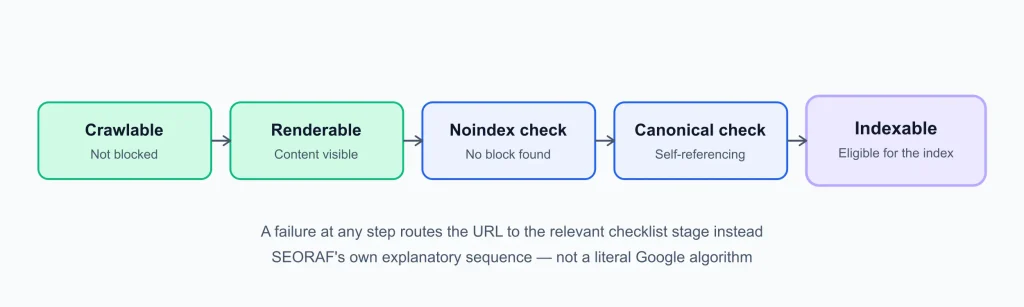
The noindex directive can be supplied through a robots meta tag or an X-Robots-Tag HTTP header. Google must be able to crawl the URL to see a page-level noindex directive. A robots.txt block prevents Google from fetching the page and therefore prevents Google from seeing a noindex tag on that page.
Check: Crawl important templates for accidental noindex directives, especially after migrations, theme changes, staging deployments, CMS changes, or SEO-plugin configuration changes.
Priority: Critical
Canonicalization
Canonicalization helps Google understand which URL represents the preferred version of similar or duplicate content. Google can consider redirects, rel="canonical", sitemap signals, internal links, and other factors when selecting a canonical.
None of these signals guarantees that Google will choose the URL you prefer. Consistency across internal links, redirects, canonical tags, and sitemaps makes the preferred version clearer.
Check: In URL Inspection, compare the user-declared canonical with Google’s selected canonical for important URLs. Remember that canonical selection is determined from indexed information; the live test cannot predict the final canonical selection.
Priority: Critical for important canonical conflicts
Duplicate URLs
Common sources include protocol variants, hostname variants, trailing-slash differences, URL parameters, tracking parameters, and multiple URLs exposing substantially the same content.
Review whether duplicate versions are intentional. Consolidate competing versions where appropriate rather than assuming every duplicate URL should independently appear in search.
Priority: Important
Pagination
Google no longer uses rel="next" and rel="prev" as pagination indexing signals. For paginated content, provide stable URLs and ordinary crawlable links between sequential pages where appropriate.
Do not automatically canonicalize every pagination URL to the first page when each page represents a distinct part of a larger collection. Use the canonical strategy that matches the actual content structure.
Priority: Situational
International SEO and hreflang
Use hreflang when genuine language or regional alternatives exist. Each alternate version should reference the relevant alternatives consistently, including the appropriate return references.
An x-default annotation can identify a default version for users who are not matched by another language or regional alternative. Do not rely on domain or subdomain structure alone to communicate every international targeting signal.
Priority: Situational, more important for multilingual and multiregional sites
Stage 5: Indexing — what got indexed, and why not the rest?
SEORAF covers indexing in more depth in the guide to how Google indexes pages, including the distinction covered in the guide to indexability.
Not every URL on a site needs to be indexed. Google explicitly notes that site owners should not expect 100% of URLs to be indexed; duplicate, redirected, intentionally blocked, and other legitimately excluded URLs may be absent from the index.
For a specific URL, use URL Inspection to determine its current index status. For patterns across a site, use the Page indexing report and investigate representative examples.
| Status | What it indicates | Suggested audit action |
|---|---|---|
| Discovered – currently not indexed | Google knows about the URL but has not crawled it yet. | Check internal discovery, sitemap signals, server availability, and unnecessary URL generation. |
| Crawled – currently not indexed | Google crawled the URL but has not currently indexed it. | Review content distinctiveness, canonical signals, indexing directives, duplication, and overall page quality. |
| Duplicate without user-selected canonical | Google considers the URL a duplicate and selected another canonical without a user-declared preference. | Review whether the selected canonical is appropriate and consolidate signals if necessary. |
| Page with redirect | The inspected URL redirects and is therefore not itself the indexable destination. | Confirm that the redirect is intentional and that the destination is the correct replacement. |
| Blocked by robots.txt | Googlebot cannot crawl the URL because of robots.txt rules. | Confirm whether the block is intentional. Remember that robots.txt does not guarantee that a URL will never appear in Google’s index. |
| Excluded by noindex | The page contains an indexing directive that tells Google not to index it. | Confirm whether the directive is intentional and remove it only when the page should be indexable. |
Google’s Page indexing documentation also notes that indexing is not immediate. New pages can take time to be discovered, crawled, and indexed, and requesting indexing does not guarantee inclusion.
Manual actions and security issues
Check the Manual actions and Security issues reports directly when investigating serious search-visibility problems. These reports address conditions that are not fully covered by ordinary URL Inspection testing.
Priority: Critical when either report shows a relevant issue
Search Console validation workflow
- Fix the underlying issue across the affected template or URL pattern, not only on one sample URL.
- Inspect representative URLs with URL Inspection and use the live test to verify conditions that the live test actually checks.
- Use the Page indexing report to understand the indexed-state issue; remember that the live test does not test every indexing condition.
- Click Validate fix after the underlying issue has been corrected.
- Do not repeatedly start new validation cycles while an existing validation is still running.
- Validation typically takes up to about two weeks, although Google notes that some cases can take longer.
- A successful validation means Google found the reported issue fixed for the URLs it checked. It does not guarantee indexing or ranking.
Stage 6: Serving — how pages are delivered and presented
HTTPS
Serve important pages securely over HTTPS, maintain a valid certificate, redirect HTTP versions appropriately, and avoid mixed-content problems.
HTTPS is one part of Google’s broader page-experience guidance. Good page experience can support users, but technical experience improvements do not guarantee higher rankings.
Priority: Critical
Mobile SEO
Google uses the mobile version of a site’s content for mobile-first indexing. Make sure important content, structured data, images, links, and other search-relevant information are available consistently on the mobile version.
Do not intentionally provide a materially reduced mobile page when the desktop version contains content that is important for search understanding.
Priority: Critical when mobile and desktop versions differ materially; otherwise Important
Core Web Vitals
Current web.dev guidance defines good Core Web Vitals thresholds at the 75th percentile as:
- LCP: 2.5 seconds or less
- INP: less than 200 milliseconds
- CLS: 0.1 or less
Use field data when evaluating real-user experience and lab tools when diagnosing individual pages. Search Console’s Core Web Vitals report groups URLs and identifies groups that need attention; it is not a replacement for page-level debugging.
Core Web Vitals are part of Google’s page-experience and ranking systems, but good scores do not guarantee strong rankings. Treat performance work as both a technical-search consideration and a user-experience investment.
Priority: Important
Structured data
Google supports JSON-LD, Microdata, and RDFa for structured data and generally recommends JSON-LD when practical.
Structured data should accurately represent the visible content of the page and follow Google’s technical and quality guidelines. Correct markup does not guarantee that a page will receive a rich result or any particular search appearance.
Before implementing markup for a specific search feature, check Google’s current documentation because supported rich-result types and eligibility requirements can change.
Priority: Important when a supported rich-result feature applies; otherwise Situational
Image SEO
Use standard image elements, descriptive alt text where appropriate, stable image URLs, and formats supported by the browsers and search features you target.
Alt text should describe the meaningful purpose or content of an image rather than repeat keywords. Decorative images can use an empty alt attribute when appropriate.
Priority: Important for image-heavy sites; otherwise Situational
Situational checks by site type
- WordPress: check search-engine visibility settings, plugin-generated sitemaps, canonical configuration, archive pages, taxonomy pages, and accidental noindex directives.
- E-commerce: investigate faceted navigation, parameter URLs, duplicate product URLs, pagination, and empty filter combinations.
- JavaScript-heavy sites: verify rendered HTML, crawlable links, routing, metadata, canonical signals, structured data, and JavaScript resource availability.
- Large sites: monitor Crawl Stats, sitemap segmentation, server responses, URL generation, and recurring indexing patterns.
- International sites: audit hreflang relationships, language/region targeting, canonical signals, and mobile parity.
Turning findings into a fix list
Evaluate each issue using four practical questions:
- Severity: Does the problem block visibility or mainly reduce efficiency or experience?
- Scope: Does it affect one URL, one template, or thousands of URLs?
- Confidence: Is the issue confirmed by Search Console, HTTP data, logs, or rendered output, or is it only a tool warning?
- Effort: Can it be fixed through configuration, or does it require development work?
| Tier | Typical contents |
|---|---|
| Fix now | Accidental sitewide blocks, unintended noindex, persistent server errors, major canonical conflicts, broken migration redirects, or serious HTTPS problems. |
| Schedule | Redirect-chain cleanup, sitemap improvements, duplicate consolidation, mobile parity issues, structured-data fixes, and performance work. |
| Monitor | Expected exclusions, intentional duplicates, temporary crawl conditions, and issues without a demonstrated search impact. |
| Ignore with a reason | Tool warnings that do not apply to the site’s actual implementation or search goal. |
Fix the highest-confidence root causes first. Then re-test representative URLs and monitor the affected pattern rather than assuming that one successful URL proves the entire site is fixed.
Technical fixes remove obstacles; they do not guarantee indexing, rankings, or traffic.
Tools for running the audit
Many technical SEO checks can be performed with free tools, although larger sites may benefit from specialized crawlers and log-analysis tools.
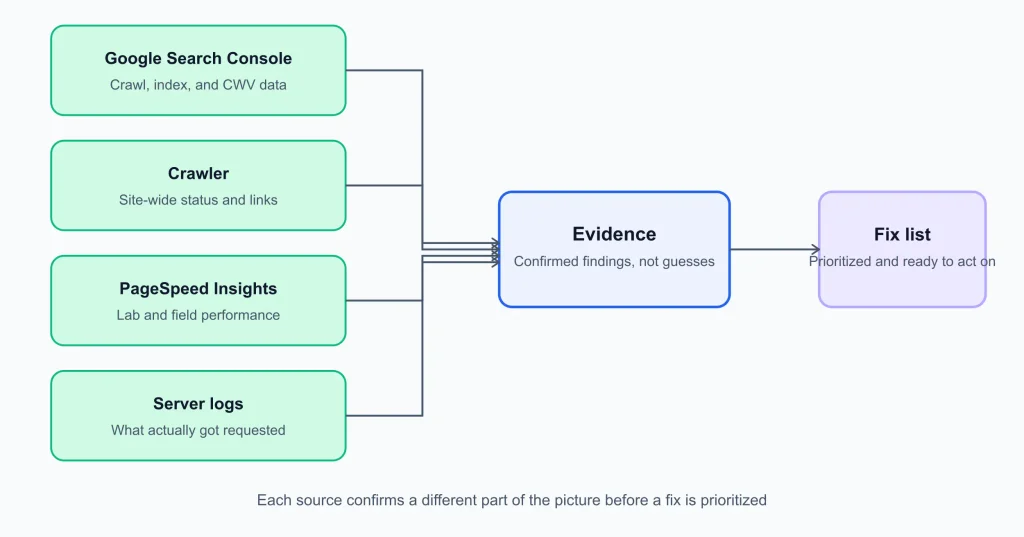
- Google Search Console: Use URL Inspection, Page indexing, Crawl Stats, Core Web Vitals, and other relevant reports to understand how Google interacts with and evaluates your site.
- PageSpeed Insights: Use lab diagnostics and, where available, real-user performance data to investigate page experience and Core Web Vitals.
- Google Rich Results Test: Use it to validate structured-data implementations for supported rich-result features.
- A crawler: Tools such as Screaming Frog SEO Spider can help identify broken links, redirects, metadata, robots directives, canonicals, duplicate patterns, and other sitewide conditions. Feature availability and crawl limits vary by product and plan, so verify current vendor documentation.
- Server logs: When available, logs can provide evidence about actual requests, response codes, crawl frequency, and recurring server-side problems.
Keeping this checklist current
Re-run the checklist after migrations, redesigns, domain changes, major CMS or plugin changes, JavaScript framework changes, or significant URL-structure changes. The appropriate review frequency depends on how often the site changes and how important technical stability is to the business.
Google Search documentation changes over time, so this guide should be reviewed against current primary documentation rather than treated as a permanent specification.
Sources
This guide uses primary documentation where practical, including Google Search Central, Google Search Console Help, and web.dev. SEORAF’s audit priorities, ordering, examples, and explanatory framework are editorial interpretations rather than Google’s official audit methodology.
- Google Search Central: Introduction to robots.txt
- Google Crawling Infrastructure: robots.txt specification
- Google Search Central: Block Search indexing with noindex
- Google Search Central: Build and submit a sitemap
- Google Search Central: Redirects and Google Search
- Google Search Central: Consolidate duplicate URLs
- Google Search Central: JavaScript SEO basics
- Google Search Central: Make your links crawlable
- Google Search Central: Pagination and incremental page loading
- Google Search Central: Localized versions of your pages
- Google Search Central: Mobile-first indexing best practices
- Google Search Central: General structured data guidelines
- Google Search Central: Image SEO best practices
- Google Search Central: Understanding page experience in Google Search results
- web.dev: Web Vitals
- Search Console Help: Page indexing report
- Search Console Help: URL Inspection tool
- Search Console Help: Core Web Vitals report
- Search Console Help: Validation details
Download the checklist PDF
Technical SEO Checklist PDF
Enter your name and email to access this PDF.
Related reading on SEORAF: the technical SEO hub, the guide to crawling, the guide to indexing, the guide to indexability, and the guide to technical SEO site architecture.
Technical SEO is a process of removing avoidable obstacles and making a site easier for search engines and users to access and understand. Use this checklist as an evidence-based starting point, then investigate the specific implementation of your own site before making large-scale changes.