
SERPWatcher Review: Features, Pricing, Accuracy & Pros and Cons
By Mousume Akter, Founder & Editor, SEORAF · Official documentation checked 5 November 2026
Affiliate disclosure: Some links to Mangools in this article are affiliate links. If you purchase through them, SEORAF may earn a commission at no additional cost to you. This does not influence the information or recommendations in this review. Read how this review was researched.
Is Mangools SERPWatcher worth using as your rank-tracking tool? It can be a practical option if you want to monitor Google rankings, track local search positions and share ranking reports without buying a large SEO platform. However, its plan limits deserve attention: Basic and Premium update rankings weekly, while daily updates are available on Agency. Tracking the same keyword on multiple locations or devices also uses additional keyword slots.
This SERPWatcher review examines its features, pricing structure, ranking updates, keyword limits, reporting, accuracy considerations and alternatives. The review is based on Mangools documentation, independent reviews and competitor documentation. I have not personally tested SERPWatcher, so I do not present hands-on results, screenshots or personal usage claims.
Quick verdict
- Best for: Bloggers, freelancers and small teams that need focused Google rank tracking and shareable reports.
- Main advantage: A focused ranking dashboard with location tracking, Performance Index reporting and competitor-monitoring options.
- Main limitation: Basic and Premium update weekly, not daily. Daily updates are available on Agency.
- Keyword limits: Basic includes 200 tracked keyword slots, Premium 700 and Agency 1,500. Locations and devices can multiply slot usage.
- Pricing: SERPWatcher is included in Mangools subscriptions rather than sold as a standalone product. Check the official pricing page for your country and billing period.
- Consider alternatives if: You need daily updates on a lower-cost plan, extensive competitor analysis or a broader SEO platform.
What Is SERPWatcher?
SERPWatcher is the rank-tracking tool included in the Mangools SEO software suite. It monitors where a website’s pages appear in Google search results for selected keywords and displays ranking changes over time.
To create a tracking, you enter a domain, choose a location and device, and add the keywords you want to monitor. SERPWatcher then collects ranking data according to the update schedule associated with your Mangools plan.
SERPWatcher is not sold separately. Mangools offers it as part of its subscription plans, alongside tools such as KWFinder, SERPChecker, LinkMiner and SiteProfiler. That means you are paying for the Mangools toolset rather than purchasing only a rank tracker. See my Mangools review for a broader look at the suite.
Important distinction: Rank tracking is not the same as complete SEO management. SERPWatcher focuses on keyword positions and ranking progress. It does not replace a technical site audit, backlink analysis or content research workflow. Also, Mangools AI Search Watcher is a separate product from SERPWatcher.
Who Should Use SERPWatcher?
| Audience | Why it may fit | What to check |
|---|---|---|
| Bloggers and niche site owners | Monitor a focused list of keywords and review ranking trends. | Whether 200 Basic keyword slots are sufficient for the required locations and devices. |
| Freelancers and consultants | Share ranking reports with clients and organize keyword groups. | Premium’s keyword capacity, sub-user allowance and login limits. |
| Local businesses | Monitor Google rankings for selected locations and review map-pack visibility. | Whether the exact locations and map-tracking workflow meet your needs. |
| Small agencies | Use reporting, white-label options and higher keyword capacity. | Agency’s daily updates, team access and actual keyword-slot requirements. |
Audience fit is SEORAF’s editorial assessment, not a Mangools performance claim.
How SERPWatcher Works
SERPWatcher uses a tracking setup built around a domain, selected keywords, a location and a device. Once the tracking is configured, Mangools collects ranking data and presents it through a dashboard, keyword table and reporting features.
The update schedule depends on the subscription: Basic and Premium receive weekly ranking updates, while Agency receives daily updates. A weekly update schedule is useful for observing longer-term movement, but it will not show every change that happens between scheduled checks.
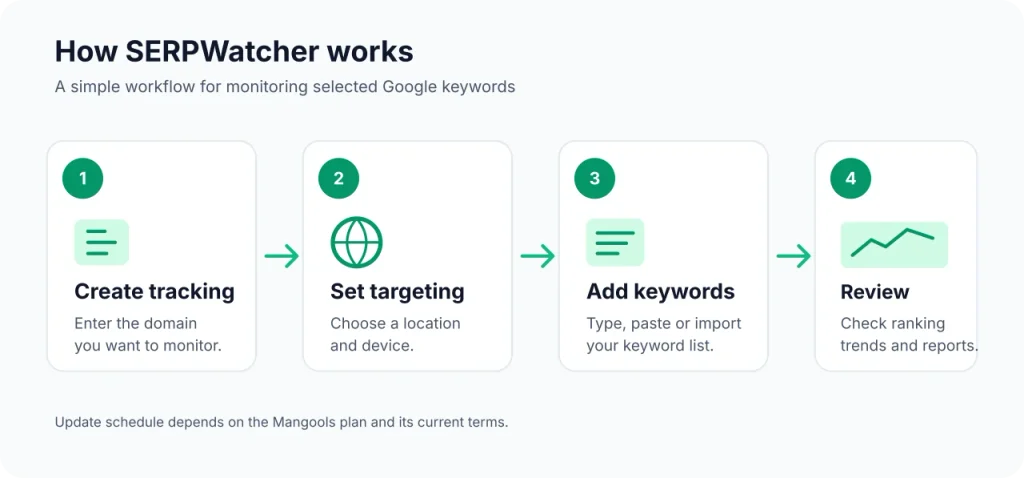
How to Use SERPWatcher
The following is a general workflow based on Mangools documentation. Interface labels and available options may change, so use the official guide if you need current step-by-step instructions.
- Create a tracking: Enter the domain you want to monitor.
- Choose a location: Select the country, city or other supported location relevant to your audience.
- Select a device: Choose desktop, mobile or both, remembering that each device uses a separate keyword slot.
- Add keywords: Enter keywords manually or use supported import options.
- Organize your list: Use tags and filters to group keywords by topic, page or campaign.
- Review ranking data: Check the dashboard after scheduled updates and review individual keyword changes.
- Share reports: Use available reporting options when teammates or clients need access to ranking information.
SEORAF recommendation: Plan your keyword list before creating multiple tracking configurations. A keyword monitored across several locations and devices can use substantially more slots than the number of unique keyword phrases suggests.
SERPWatcher Features Explained
This section describes features documented by Mangools. It does not imply that SEORAF has tested the product. Where a detail is not clearly explained in the available documentation, that limitation is identified rather than guessed.
1. Keyword Rank Tracking
Keyword rank tracking is SERPWatcher’s central function. You add the search terms you want to monitor, select the relevant tracking settings and review how your pages perform in Google over time.
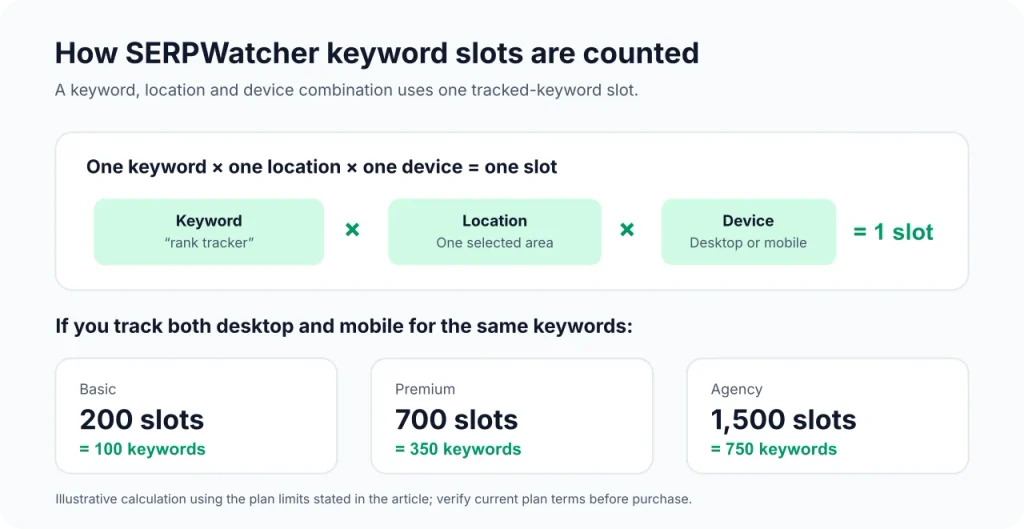
Mangools currently lists 200 tracked keyword slots on Basic, 700 on Premium and 1,500 on Agency. The limit is based on tracked keyword configurations, not simply the number of unique phrases in your list.
For example, tracking one keyword for one location on desktop uses one slot. Tracking that same keyword for the same location on mobile uses another slot. Adding another location also creates additional tracking usage.
Keyword tags and filters help organize tracking data. Mangools also documents CSV export, which can be useful when you need to review or process ranking information outside the dashboard.
2. Performance Index
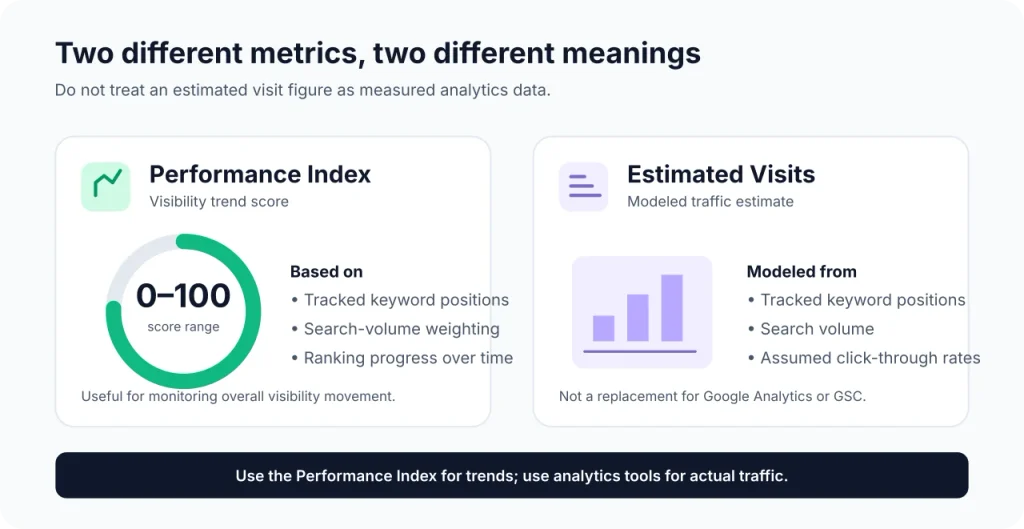
The Performance Index is a score from 0 to 100 designed to summarize ranking performance across tracked keywords. Mangools explains that the score is weighted by search volume and uses current keyword positions.
This can help summarize overall movement without checking every keyword individually. However, an aggregate score should not replace reviewing individual rankings. A change in a high-search-volume keyword can affect the overall score differently from a similar change in a low-volume keyword.
SERPWatcher also provides Estimated Visits. This is a modeled estimate based on ranking positions, search volume and expected click-through rates. It is not a measurement of actual website visits and should not be treated as a substitute for analytics data.
How to interpret these metrics: Use the Performance Index to understand broad ranking direction, inspect individual keywords to understand specific changes, and use an analytics platform to measure actual website traffic.
3. Ranking Updates: Weekly vs Daily
Update frequency is one of the most important details to check before choosing a Mangools plan. According to Mangools’ current help documentation, Basic and Premium receive weekly ranking updates, while Agency receives daily updates.
| Plan | Ranking update frequency | Practical implication |
|---|---|---|
| Basic | Weekly | Suitable for reviewing longer-term ranking movement. |
| Premium | Weekly | More keyword capacity and team access, but not daily ranking updates. |
| Agency | Daily | More frequent ranking checks for workflows that need daily data. |
Update frequency is based on Mangools’ current plan documentation. Confirm the latest details before subscribing.
Some older third-party reviews describe SERPWatcher as providing daily updates across its plans. That description does not match the current plan-specific schedule in Mangools’ documentation.
Weekly data may be enough when you are monitoring a blog or a stable group of keywords. It is less suitable when you need to observe ranking changes every day. If daily updates are essential, compare the Agency plan with other rank trackers that document daily checks.
4. Location-Based Tracking
Mangools describes SERPWatcher as supporting more than 65,000 locations, including cities, districts and countries. Location selection matters because search results can vary depending on where a search is performed.
This capability may be useful for businesses that serve specific geographic areas or websites targeting audiences in multiple regions. Before creating a tracking, confirm that the location you need is available in the product.
5. Desktop and Mobile Tracking
SERPWatcher supports desktop and mobile rank tracking. These are counted separately, which means monitoring the same keyword on both devices uses two keyword slots for each selected location.
For example, tracking 50 keywords in one location on both desktop and mobile uses 100 slots. If you monitor those same 50 keywords across two locations on both devices, the total becomes 200 slots.
Keyword-slot calculation: tracked keyword slots = keywords × locations × devices.
| Keywords | Locations | Devices | Slots used |
|---|---|---|---|
| 50 | 1 | 1 | 50 |
| 50 | 1 | 2 | 100 |
| 50 | 2 | 2 | 200 |
| 100 | 3 | 2 | 600 |
Examples calculated from the keyword, location and device counting rule documented by Mangools.
6. SERP Feature Monitoring
Mangools documents featured snippet detection and map-pack tracking as SERP-related capabilities. Map-pack tracking requires connecting a Google Business Profile, according to its help documentation.
There is an important detail about featured snippets: SERPWatcher records them separately from the standard organic ranking. A featured snippet does not automatically change the position displayed in the Rank column.
Do not assume that every Google SERP feature is monitored. Features such as People Also Ask should not be treated as supported unless Mangools explicitly documents them.
7. Interactive Reports, Alerts and White-Label Options
Mangools documents shareable reports that can be opened in a browser. Report viewers can review ranking information and use available filtering and timeframe options. Scheduled email reports and ranking alerts are also part of its reporting workflow.
Mangools’ help documentation also describes white-label reports and custom-domain options across its plans. This can be useful when a business wants to share ranking reports with its own branding rather than presenting a standard third-party report.
A Looker Studio connector and API access are also documented. The current plan comparison lists API and MCP access as included across paid plans. Check the relevant documentation for usage limits and technical requirements before building a reporting workflow around these integrations.
8. Competitor Tracking
SERPWatcher supports competitor rank tracking, but its workflow is different from tools that provide a single side-by-side competitor dashboard. To monitor a competitor, create a separate tracking for that competitor’s domain using the same keywords, location and device as your own tracking.
Each competitor tracking uses additional tracked keyword slots. You can compare rankings by switching between trackings, reviewing their Performance Index scores or exporting keyword data to CSV. SERPWatcher does not currently provide a single screen that combines your rankings and competitor rankings side by side.
Important limitation: Competitor tracking history starts when you create that tracking. It does not automatically provide historical ranking data from before the tracking was set up. Plan your keyword allocation accordingly.
SERPWatcher Accuracy: What Should You Know?
Rank-tracking accuracy is important, but it needs to be interpreted carefully. Mangools does not publish a specific accuracy percentage or a detailed public methodology that would allow SEORAF to independently verify an accuracy claim. I have also not run a controlled test of SERPWatcher, so I cannot provide a personal accuracy verdict.
Ranking data can differ between tools and between a tracking report and a manual Google search. Several factors help explain why:
- Location: Search results can differ between cities, regions and countries.
- Device: Desktop and mobile search results may not be identical.
- Search environment: Personalization, search settings and other contextual factors can affect what an individual sees.
- Timing: A weekly update cannot show every ranking change that occurs between scheduled checks.
- Metric definitions: Rank trackers and Google Search Console do not necessarily calculate or report position in the same way.
Google Search Console explains that its average position metric represents the average position of the topmost result from a site for a particular query, rather than a simple copy of a rank tracker’s keyword position. Read Google’s explanation of impressions, clicks and position before comparing the two data sources.
Mangools also explains why rankings shown in SERPWatcher may differ from what someone sees in a manual Google search. Its tracking reflects the selected location, device and collection time. The Preview SERP feature can help you inspect the stored search results for a tracked keyword.
SEORAF recommendation: Use rank-tracking data to identify trends, keep location and device settings consistent, and investigate meaningful changes rather than reacting to every position movement. For your own website, compare ranking observations with Search Console and analytics data. Treat Estimated Visits as an estimate, not actual traffic.
SERPWatcher Pricing and Plans
SERPWatcher is included in Mangools subscriptions, so there is no separate SERPWatcher-only plan to purchase. The subscription choice affects keyword capacity, update frequency and team access.
Mangools’ pricing can vary depending on country and billing frequency. Because the displayed price may change, check the official Mangools pricing page for the amount currently offered to your account. I am not publishing unverified third-party price figures as confirmed prices.
Mangools Plan Limits for SERPWatcher
| Plan | Tracked keyword slots | Ranking updates | Sub-users | Simultaneous logins | API and MCP |
|---|---|---|---|---|---|
| Basic | 200 | Weekly | 0 | 1 | Included |
| Premium | 700 | Weekly | 3 | 3 | Included |
| Agency | 1,500 | Daily | 5 | 10 | Included |
Plan limits based on Mangools’ current plan comparison and help documentation. White-label reports and custom domains are also documented across plans. Verify current terms before purchasing.
Remember that the keyword allowance is a slot allowance. If you monitor the same keyword on desktop and mobile, it uses two slots for each location. Competitor tracking can also use additional slots, so calculate your actual requirements before choosing a plan.
Free Plan, Free+ Access and Refunds
Mangools currently documents a Free+ period for new accounts. The Free+ period lasts 10 days and includes 50 tracked keywords and one domain. A payment card is not required for this free access.
| Access type | Duration | Tracked keywords | Domains | Card required |
|---|---|---|---|---|
| Free+ | 10 days for new accounts | 50 | 1 | No |
| Free | Ongoing free plan | 5 | 1 | No |
Free and Free+ limits based on Mangools’ current help-center explanation. Check the sign-up screen for the terms offered to your account.
There is an important ranking-update limitation. Free-plan ranking updates are available for 30 days from signup or the last payment, including the Free+ period. After that period, ranking updates stop until the account is upgraded. Existing tracking history remains available according to Mangools’ documentation.
Mangools documents a 48-hour money-back guarantee for a first subscription, subject to its stated conditions. Its help center also describes a separate refund window for eligible annual subscription renewals: a refund request may be made within 14 days of renewal. These are different situations, so read the official refund policy before relying on either rule.
If you cancel a paid subscription, Mangools says the account returns to the Free plan when the paid period ends. SERPWatcher continues updating for 30 days after the last payment, after which updates stop. Existing trackings and history remain, subject to the Free plan’s limits.
Next step: Check the current Mangools plans and Free+ access (affiliate link). Review the keyword-slot calculation and update schedule before subscribing.
SERPWatcher Pros and Cons
| Pros | Cons |
|---|---|
| Focused Google rank-tracking workflow. | Basic and Premium receive weekly rather than daily updates. |
| Performance Index summarizes ranking progress. | Aggregate scores do not replace individual keyword analysis. |
| Supports desktop and mobile tracking. | Each device uses a separate keyword slot. |
| More than 65,000 supported locations are documented. | Location and device combinations increase slot usage. |
| Interactive reports and scheduled emails are available. | It is not a complete technical SEO or backlink-analysis platform. |
| White-label reports and custom domains are documented. | Competitor tracking requires separate tracking configurations and additional slots. |
| Free and Free+ access are available. | Free-plan ranking updates stop after the documented 30-day period. |
| Included with other Mangools tools. | You cannot purchase SERPWatcher as a standalone product. |
Pros and cons are based on Mangools documentation and SEORAF’s editorial assessment, not personal product testing.
Is SERPWatcher Easy to Use?
SERPWatcher is presented by Mangools as a focused rank-tracking tool, with a dashboard centered on keyword positions, ranking progress and reporting. That design may appeal to users who want to monitor a selected keyword list without working inside a larger enterprise SEO interface.
However, I have not personally tested its interface, so I cannot provide a first-hand usability rating. Independent reviews of Mangools often describe the suite as approachable for beginners and smaller teams, but that is third-party commentary rather than SEORAF testing.
A sensible way to evaluate the workflow is to use the available free access with a small group of relevant keywords. Check whether the dashboard, location settings, update schedule and reporting options fit your requirements before paying.
SERPWatcher Limitations
| Limitation | Why it matters | What to consider |
|---|---|---|
| Weekly updates on Basic and Premium | Ranking changes between scheduled checks are not captured as daily updates. | Consider Agency or a tracker with daily updates. |
| Keyword slots multiply | Multiple locations and devices use additional slots. | Calculate the total before choosing a plan. |
| Google-focused tracking | Other search engines are not part of the documented core SERPWatcher workflow. | Choose a multi-engine tracker if you need broader coverage. |
| Rank tracking is its focus | It does not replace a complete technical audit or backlink research platform. | Pair it with other SEO tools if you need those workflows. |
| Bundle-only purchase | You pay for a Mangools subscription rather than a standalone rank tracker. | Compare the whole bundle against dedicated rank trackers. |
| Competitor tracking uses separate configurations | It does not provide a combined side-by-side competitor dashboard. | Account for extra slots and separate tracking history. |
| Free-plan update restriction | Ranking updates stop after the documented 30-day period. | Do not treat the free plan as unlimited ongoing rank tracking. |
Limitations summarized from Mangools documentation and SEORAF’s review of the documented workflow.
SERPWatcher Alternatives
The right alternative depends on your priorities. If you need daily ranking updates, compare tools that document daily checks. If you want rank tracking inside a broader SEO platform, consider an all-in-one suite. If you only need performance data for your own verified website, Google Search Console is a useful complement, although it is not a configurable keyword rank tracker.
| Tool | Update frequency | Main distinction | Best reason to compare |
|---|---|---|---|
| SERPWatcher | Weekly on Basic and Premium; daily on Agency. | Focused Google rank tracking included in Mangools. | You want a straightforward tracker bundled with other SEO tools. |
| SE Ranking | Daily updates described by the vendor. | Broader SEO platform with rank tracking, competitor features and other SEO workflows. | You want daily tracking and a wider set of SEO features. |
| Semrush Position Tracking | Daily data is documented; historical reporting has additional update-frequency considerations. | Position tracking is part of a larger SEO platform. | You need broader keyword, competitor and SEO research workflows. |
| Ahrefs Rank Tracker | Weekly by default; daily updates are available through a paid add-on. | Rank tracking is included in a broader SEO research platform. | You already need Ahrefs’ wider research capabilities. |
Comparison based on vendor documentation. Features, limits and update schedules can change; verify the current plan details before buying.
SERPWatcher vs SE Ranking
SE Ranking is worth comparing if daily updates and a broader SEO workflow matter to you. Its rank-tracking product page describes daily updates, location and device tracking, keyword grouping and competitor-monitoring features.
SERPWatcher has a narrower focus and is included in the Mangools bundle. Basic and Premium update weekly, while daily updates are reserved for Agency. If daily tracking is a priority, compare SE Ranking’s current plan limits and total subscription cost with Mangools Agency rather than comparing feature names alone.
I have not verified every current SE Ranking plan limit or price for this comparison, so I will not declare one product the winner. See the Mangools vs SE Ranking comparison if available on SEORAF.
SERPWatcher vs Semrush
Semrush Position Tracking is part of a much broader SEO platform. Its documentation describes daily position tracking and multiple targeting options. Semrush also provides additional SEO research workflows that are outside SERPWatcher’s core purpose.
SERPWatcher may be sufficient if your main requirement is monitoring a focused set of Google rankings inside the Mangools suite. Semrush may be worth evaluating if you also need a broader collection of keyword, competitor and site research tools.
Semrush’s historical reporting and update behavior can differ from its current tracking frequency, so check its documentation rather than assuming every historical data point is refreshed daily. For a suite-level comparison, see my Mangools vs Semrush comparison.
SERPWatcher vs Ahrefs
Ahrefs Rank Tracker is included in the Ahrefs SEO platform. According to its help documentation, tracked keywords are updated weekly by default, with daily updates available through a paid add-on.
That makes the default update schedule comparable to SERPWatcher Basic and Premium. The bigger distinction is the wider product ecosystem: Ahrefs offers additional SEO research capabilities, while Mangools combines SERPWatcher with its own suite of tools.
Compare the total subscription cost, keyword allowance and additional features you will actually use. For a broader suite comparison, see my Mangools vs Ahrefs comparison.
Who Should Choose SERPWatcher?
SERPWatcher may be worth considering if the following describe your requirements:
- You monitor a focused list of Google keywords.
- Weekly ranking updates are sufficient for your workflow.
- You want a summarized view of ranking progress through the Performance Index.
- You need location-based tracking and desktop/mobile options.
- You want shareable reports and are comfortable with the Mangools subscription model.
- You already use or plan to use other Mangools tools, such as KWFinder. See my KWFinder review.
Next step: Check Mangools’ current plans and free access (affiliate link) and test whether the available keyword allowance fits your tracking needs.
Who Should Avoid SERPWatcher?
SERPWatcher may not be the right fit if you:
- Need daily ranking updates but do not want the Agency plan.
- Track a large number of keywords across many locations and devices.
- Need a single dashboard with your own and competitors’ rankings displayed side by side.
- Need rank tracking across search engines beyond Google’s documented SERPWatcher workflow.
- Want a standalone rank tracker rather than a bundled SEO subscription.
- Need a complete platform for technical audits, backlink analysis and content research.
Is SERPWatcher Worth It?
SERPWatcher is worth considering when its update schedule, keyword capacity and bundled pricing match your needs. Before subscribing, answer three questions:
- Is weekly data enough? Basic and Premium update weekly. If you need daily updates, you need to evaluate Agency or another tool.
- Will your keyword list fit? Multiply your keywords by the number of locations and devices you plan to monitor. Include separate competitor tracking in your capacity estimate.
- Does the Mangools bundle make financial sense? You cannot buy SERPWatcher alone, so compare the full subscription with other tools you would realistically use.
If the update schedule and slot allowance work for you, SERPWatcher may be a reasonable focused rank-tracking option. If they do not, compare alternatives before committing to a paid plan.
Final Verdict: Should You Use SERPWatcher?
SERPWatcher is a focused Google rank tracker with location-based monitoring, desktop and mobile tracking, a Performance Index and shareable reporting options. Its main strengths are its clear rank-tracking purpose and its inclusion in the wider Mangools toolset.
Its limitations are equally important. Basic and Premium update weekly rather than daily, keyword slots increase when you add locations or devices, competitor tracking requires separate configurations, and SERPWatcher is not available as a standalone subscription.
I cannot verify its ranking accuracy through personal testing, and Mangools does not publish a specific accuracy percentage or detailed public methodology. For that reason, use ranking data to understand trends and cross-check important changes with other relevant data sources.
My assessment: SERPWatcher may suit bloggers, freelancers and smaller teams that want focused Google rank tracking and can work with weekly updates. It is less suitable for users who require daily updates on a lower plan, extensive side-by-side competitor analysis or a standalone tracker.
Check before buying: View the current Mangools plans and free access (affiliate link). Confirm the price, keyword allowance, update schedule and refund terms on the official site.
Frequently Asked Questions
What is SERPWatcher used for?
SERPWatcher is used to monitor where a website ranks in Google for selected keywords. It provides ranking information, progress metrics and reporting features.
Is SERPWatcher worth it?
It may be worth considering if weekly updates, the available keyword slots and the Mangools subscription bundle fit your requirements. Review the SERPWatcher worth-it assessment before choosing a plan.
Is SERPWatcher accurate?
Mangools does not publish a specific accuracy percentage or a detailed public accuracy methodology. I have not personally tested the tool. Ranking results can vary by location, device and timing, so compare trends and cross-check important data with Google Search Console.
Does SERPWatcher offer daily rank tracking?
According to Mangools’ current documentation, daily ranking updates are available on the Agency plan. Basic and Premium receive weekly updates.
How many keywords can SERPWatcher track?
Mangools lists 200 tracked keyword slots on Basic, 700 on Premium and 1,500 on Agency. Each keyword-location-device combination uses a slot, so tracking across multiple locations or devices increases usage.
Does SERPWatcher track desktop and mobile rankings?
Yes. SERPWatcher supports desktop and mobile tracking. Each device is counted separately, so monitoring one keyword on both devices uses two slots for each selected location.
Does SERPWatcher support local rank tracking?
Mangools documents support for more than 65,000 locations, including cities, districts and countries. It also documents map-pack tracking through a connected Google Business Profile.
Can SERPWatcher track competitors?
Yes. You can create a separate tracking for a competitor’s domain using the same keywords, location and device. This uses additional keyword slots. SERPWatcher does not provide a single screen that combines your own and competitor rankings side by side.
Does SERPWatcher have a free plan?
Yes. Mangools documents a Free plan with five tracked keywords and one domain. New accounts also receive a 10-day Free+ period with 50 tracked keywords and one domain. Ranking updates on free access are limited to 30 days from signup, after which updates stop until an upgrade.
Can I buy SERPWatcher separately?
No. SERPWatcher is included in Mangools subscription plans. You need to choose a Mangools plan rather than purchase SERPWatcher as a standalone product.
What are the best SERPWatcher alternatives?
SE Ranking, Semrush and Ahrefs are alternatives worth comparing. The right choice depends on your preferred update frequency, keyword capacity, reporting needs and whether you need a broader SEO platform.
What happens to SERPWatcher after I cancel Mangools?
According to Mangools’ help documentation, the account returns to the Free plan when the paid subscription ends. Ranking updates continue for 30 days after the last payment and then stop. Existing trackings and history remain available subject to the Free plan’s limits.
Affiliate Disclosure and How This Review Was Researched
SEORAF is an independent SEO knowledge resource. Some Mangools links in this article are affiliate links and are marked accordingly. If you purchase through one of these links, SEORAF may earn a commission. Affiliate relationships do not change the factual standards used in this review.
Product information is based primarily on Mangools’ official product pages and help documentation. Competitor information is based on the respective vendors’ documentation, while independent reviews are used as secondary context rather than proof of product performance.
I did not personally test SERPWatcher. This article does not claim hands-on experience, measured ranking accuracy, original product screenshots or independently reproduced test results. Where official documentation does not establish a detail, I identify the limitation rather than presenting an assumption as fact.
Last documentation review: 5 November 2026. Pricing, features, plan limits and product terms can change. Check the linked official documentation before making a purchase decision.
Sources
Mangools official product and plan documentation
- SERPWatcher product page
- SERPWatcher guide
- Mangools plans and pricing
- Mangools plans compared
- SERPWatcher ranking update frequency
- Free and Free+ plans explained
- How tracked keywords are counted
- How to track a competitor’s rankings
- Performance Index and Estimated Visits
- Keyword rankings and SERP features
- Why SERPWatcher rankings can differ from Google
- White-label reports and custom domains
- Mangools refund policy
- Cancel your Mangools subscription
Competitor and independent documentation
- SE Ranking Position Tracking
- Semrush Position Tracking
- Semrush: Why Position Tracking results can differ from Google
- Ahrefs Rank Tracker update frequency
- Ahrefs Rank Tracker overview
- Google Search Console: impressions, clicks and position
Independent reviews consulted for context: Gizmodo’s Mangools review and Content Distribution’s SERPWatcher review. These are secondary sources, not substitutes for current vendor documentation.