
How to Measure SEO ROI: Formula, GA4 Tracking and Worked Examples
SEO reports often lead with rankings, impressions and traffic. The question a budget holder usually asks is different: did the work pay for itself?
Measuring SEO ROI is harder than measuring paid ads because there is no click-by-click invoice, results arrive with a delay, and organic search often shares credit with other channels. The formula is simple. The hard part is defining the return and the investment so the number means something.
This guide shows how to measure SEO ROI step by step: how to count costs, which return measure to use, how to set up Google Analytics 4 (GA4), Search Console and CRM data, and how to handle attribution and time lag. It includes worked examples with the arithmetic shown. All example numbers are illustrative; they are not benchmarks or SEORAF client results.
The short answer
To measure SEO ROI, do three things for a defined period:
- Add up your SEO investment: tools, content, development, links, agency fees and the cost of internal time.
- Identify the return that organic search produced in that same period, using one consistent attribution approach and one consistent definition of return.
- Apply the formula below.
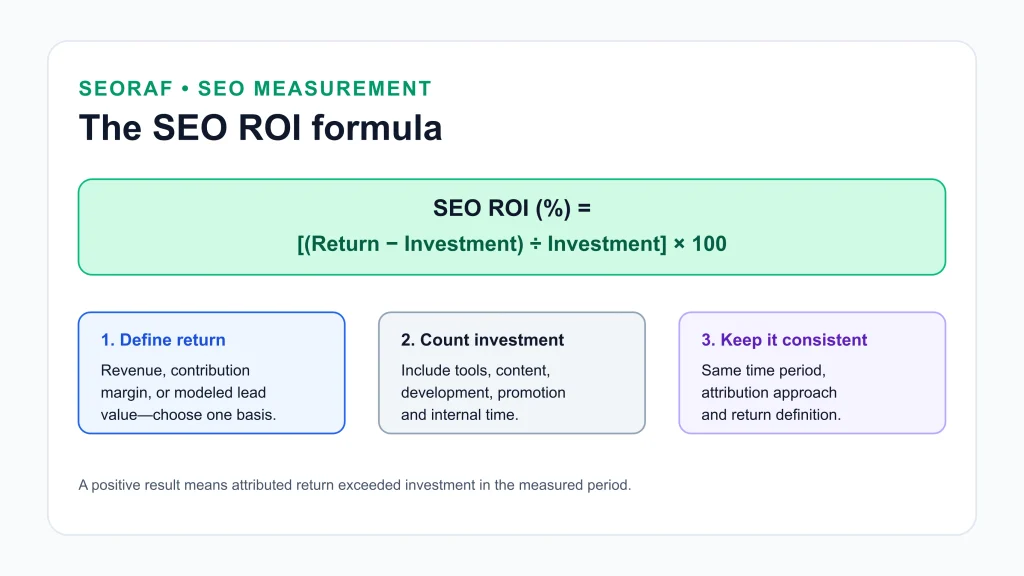
SEO ROI (%) = [(SEO-attributed return − SEO investment) ÷ SEO investment] × 100
A positive result means the attributed return exceeded what you invested. A negative result means it did not, at least within the period you measured. Because SEO results build over time, the measurement window matters as much as the formula.
What SEO ROI is, and what it is not
SEO ROI compares the return attributed to organic search with the money and time spent to earn it. It is related to, but different from, the metrics SEO teams report most often.
| Metric | What it tells you | What it leaves out |
|---|---|---|
| Organic traffic growth | How many visits arrive from search | Visit quality, conversions and cost |
| Conversion rate | The share of organic visits that complete a goal | Traffic volume, the value of each goal and cost |
| Organic revenue | Money attributed to organic search | What you spent, and often the cost of delivering the product |
| SEO ROI | Return relative to investment | Effects you cannot attribute, and returns that arrive after your window |
These metrics can move in different directions. Suppose a store earns $20,000 from 10,000 organic sessions at a 2% conversion rate and a $100 average order value (10,000 × 0.02 × $100). A year later, organic sessions rise 40% to 14,000, but the conversion rate falls to 1.2%. Revenue becomes 14,000 × 0.012 × $100 = $16,800, a 16% decline despite the traffic gain. If the SEO investment was $10,000 in both years, revenue-based ROI fell from 100% to 68%. Traffic growth alone would have hidden that.
The SEO ROI formula, defined carefully
SEO ROI (%) = [(SEO-attributed return − SEO investment) ÷ SEO investment] × 100
The formula is standard. The quality of the result depends on how you define each term.
Choose one definition of return and stay with it
“Return” can mean several different things. Pick one, state it in every report, and never mix definitions within a comparison.
| Definition | How it works | Main limitation |
|---|---|---|
| Revenue | Sales value attributed to organic search | Ignores the cost of delivering the product, so it can make a program look healthier than it is |
| Profit or contribution margin | Revenue minus the variable costs of delivering it (product cost, shipping, payment fees, and similar) | Needs margin data from finance, and the definition of “variable cost” must be agreed |
| Modeled lead value | Leads × close rate × value per customer | Only as reliable as the close rate and customer value behind it |
Revenue-based ROI is not wrong, but it should be labeled “revenue-based” because it overstates economic return. Contribution margin is usually the better basis for decisions. SEO costs are the investment in the formula, so do not also subtract them when you calculate contribution margin; otherwise they are deducted twice. The two bases are not interchangeable: do not compare a revenue-based SEO ROI with a profit-based ROI from paid ads or any other channel. Whichever basis you choose, apply it to every channel you compare, and measure returns net of refunds and discounts where you can.
ROI percentage versus return multiple
ROI is a net figure: it subtracts the investment. A return multiple is the gross return divided by the investment. An ROI of 100% equals a 2.0× return multiple, because every $1 invested came back as $2, which is $1 net. A 5:1 multiple equals 400% ROI, not 500%. Mixing these two up is one of the most common errors in SEO reporting.
What if investment is zero, or return cannot be attributed?
If the investment is zero, the formula divides by zero and ROI is undefined. It is not “infinite.” In practice, “free” SEO almost always has a cost in time. Assign a realistic cost to the hours spent, then calculate ROI. If you truly cannot assign a cost, report the return and the cost per result instead of an ROI percentage.
If the return is zero and the investment is greater than zero, ROI is −100%. For example, $5,000 invested with no attributed return gives ($0 − $5,000) ÷ $5,000 = −100%. That figure describes the measurement window, not the long-term outcome.
If the return cannot be reliably attributed, do not force a single precise number. Report a range with explicit assumptions: a conservative figure (for example, non-branded organic traffic only) and a broader one. Show leading indicators such as Search Console clicks to your target pages, but label them as indicators and not as return. A transparent range is more credible than false precision.
What counts as SEO investment
Underestimating cost is the easiest way to inflate ROI. A complete cost base usually includes:
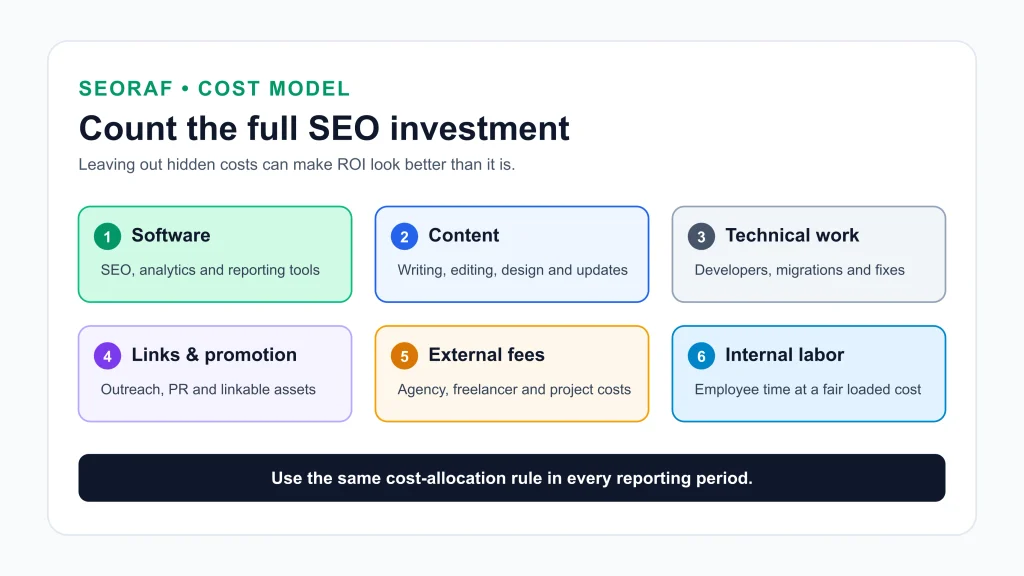
- Software: SEO, analytics and reporting tools. Convert annual fees to the monthly equivalent, and allocate only a fair share of any tool that other teams also use.
- Content: writers, editors, designers, subject-matter experts and updates to existing pages.
- Technical work: developer time for site speed, structured data, migrations and fixes, such as those surfaced in a technical SEO audit.
- Links and promotion: outreach tools, digital PR and linkable assets.
- Agency or freelancer fees: retainers and project fees.
- Internal labor: the share of employee time spent on SEO, at a loaded hourly cost that includes salary and related employment costs. For example, a team member spending 5 hours a week at a $40 loaded hourly cost represents 5 × $40 × 52 = $10,400 a year.
- Training: courses and certifications, if you choose to include them.
Decide how to treat one-off projects, such as a site rebuild, and apply the same rule every period. For instance, you might count them in full when incurred, or spread them over a stated number of months. Write the rule down so that later reports stay comparable.
Tracking setup: GA4, Search Console and CRM data
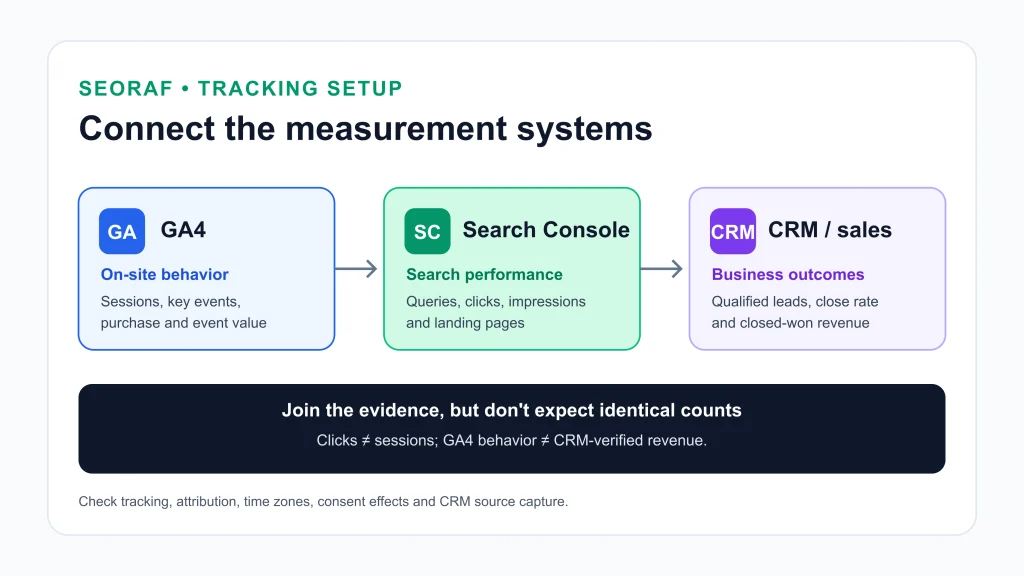
Return is only as good as your tracking. Three systems usually work together: GA4 for on-site behavior, Search Console for search performance, and your CRM (or sales records) for what happens after a lead arrives.
GA4: key events and conversion value
GA4 records important actions as key events. Any event you collect can be marked as a key event, for example a purchase, a form submission or a demo request. Once marked, you can see how many users complete it and evaluate performance across the channels that led to it.
- Ecommerce: use GA4’s ecommerce events so purchase value is passed to analytics. For terminology, see Google’s glossary entry on ecommerce events.
- Lead generation: mark the actions that indicate a real lead as key events, and give each a value based on your own close rate and customer value (see the lead-generation example below). How an event value is set depends on your implementation, so check Google’s current documentation before relying on it. Treat the value as an estimate and update it as your sales data improves.
- Segment organic traffic: Google’s own guidance filters Google organic sessions with session source “google” and session medium “organic.” Its traffic acquisition report shows sessions and engagement by source and medium, and its guidance suggests a landing page report filtered to Google organic sessions to see how useful each page is to organic visitors and how well it drives engagement and conversions.
Search Console: the search-side view
Search Console reports how your site performs in Google Search: impressions, clicks, queries and pages. Google describes it as the source of truth for search performance, and GA as the source of truth for behavior on your site. Use Search Console to see which queries and pages earn the clicks. Google’s branded queries filter, available in the Search results Performance report where it has rolled out to your property, separates branded from non-branded queries automatically. Because the classification is automated, spot-check it against your own brand terms before relying on it. Search Console reports on Google Search only, so compare it with GA sessions filtered to Google organic.
CRM: connecting leads to closed revenue
For businesses where the sale happens later, offline, or by phone, GA4 shows the lead but not the revenue. Record the original source of each lead in your CRM where your forms and CRM allow it (check your CRM’s documentation for how), and report closed-won revenue by source. That lets you replace an estimated lead value with actual outcomes over time. If you use call tracking or ask customers how they found you, treat those inputs as supporting evidence, and note their limits.
Why your numbers will not match
Search Console clicks and GA sessions are calculated differently, so they will not match exactly. Google’s guidance on using the two tools together lists common causes: tracking tags missing from some pages, users who decline tracking, bot traffic, differing time zones (Search Console defaults to Pacific Time), attribution differences, and canonical URL handling. Small gaps are normal. Focus on whether the trends move together, and investigate only large, persistent gaps.
Attribution: how much credit does SEO get?
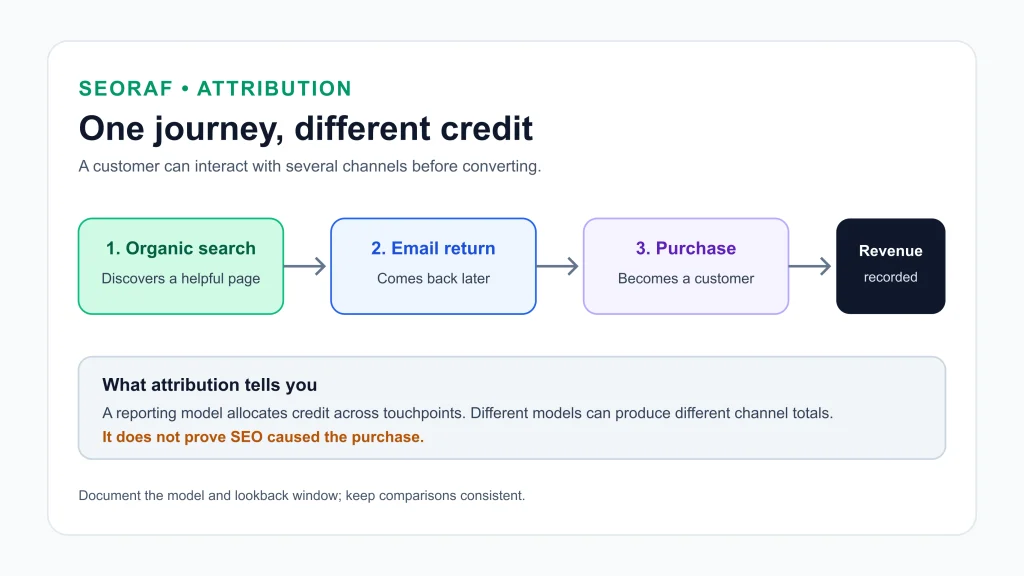
A customer may search, read a post, return later through email, then purchase. Attribution decides how much credit organic search receives. According to Google’s documentation, the attribution reports in GA4 offer three models:
- Data-driven attribution distributes credit using machine learning on both converting and non-converting paths, specific to each key event.
- Paid and organic last click gives 100% of the credit to the last channel the customer clicked through, ignoring direct visits.
- Google paid channels last click gives 100% of the credit to the last Google Ads click and falls back to the paid and organic last click when there is none.
Google notes that the first click, linear, time decay and position-based models have not been available since November 2023, so older advice recommending them no longer applies to GA4. Several other details matter for SEO reporting:
- All models exclude direct visits from credit unless the entire path is direct.
- With data-driven attribution, a conversion can show as fractional credit across touchpoints.
- The key event lookback window decides how far back a touchpoint can still earn credit. Google’s defaults are 90 days for most key events (30 or 60 days are also available) and 30 days for acquisition events.
- Changing the reporting attribution model applies to historical data as well as future data. Record which model each exported report used, or your period-over-period comparisons will not line up.
- Check the “channels that can receive credit” setting. Google’s settings page distinguishes Google paid channels from paid and organic channels, and lists paid and organic as the default for Google Analytics reports. Confirm that your property gives organic search credit.
You can review these settings in GA4 Admin, under Data display, Events, then Attribution settings (see Google’s attribution settings guide and its introduction to attribution).
No attribution model proves that SEO caused a sale. Under last-click models, organic search can capture credit from customers who already knew your brand, and it can lose credit when it started the journey but another channel closed it. A practical approach is to choose one model, document it, and look at a second model as a sensitivity check. Where feasible, compare groups of similar pages or markets with and without a change. Avoid pausing SEO on pages that generate revenue just to run a test.
Time lag and payback period
SEO returns arrive after the costs. Google’s SEO Starter Guide says changes can take anywhere from a few hours to several months to be reflected in search, and suggests waiting a few weeks before judging whether a change worked. Google does not give a standard time to positive ROI. Timelines you see elsewhere, such as “six to twelve months,” are industry rules of thumb that vary by competition, site and strategy, so treat them as such.
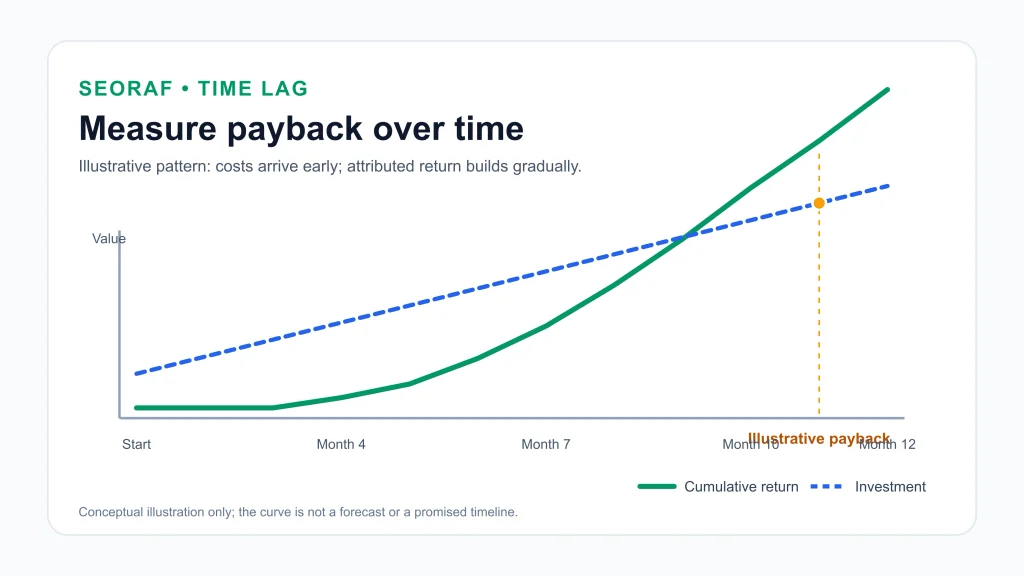
Because of the lag, a single ROI number can mislead. Track:
- Cumulative ROI from the start of the program, measured at consistent intervals.
- Payback period: the point where cumulative return overtakes cumulative investment.
- Sales lag: for long sales cycles, leads generated now may close after your reporting window ends, and may also fall outside the lookback window. Use CRM data to catch them.
Because returns build gradually, consider measuring over rolling 12-month periods rather than judging each month in isolation.
Choosing the return measure for your business model
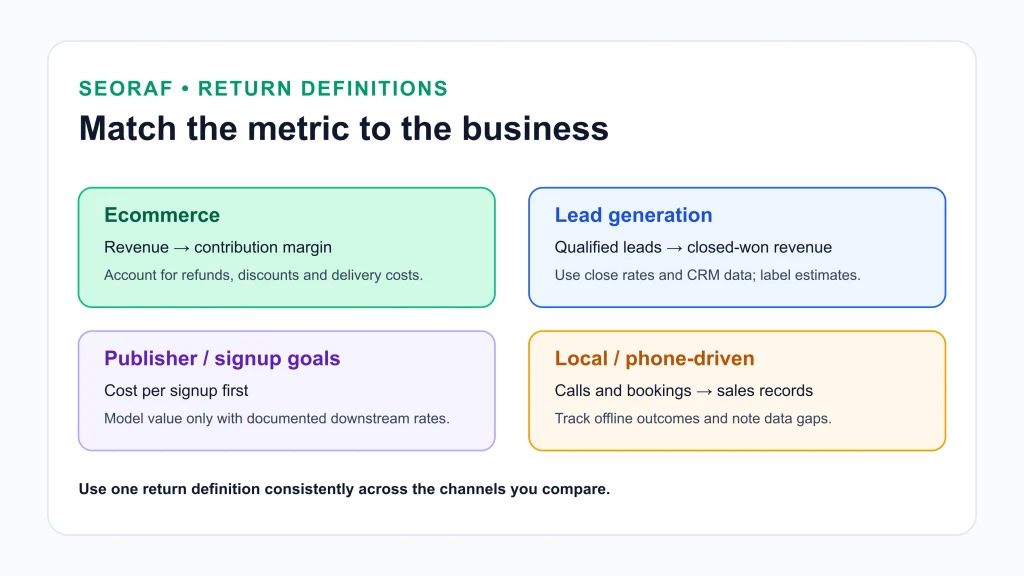
| Business model | Return measure | Main watch-outs |
|---|---|---|
| Ecommerce | Purchase revenue, ideally converted to contribution margin | Refunds, discounts, repeat purchases and cross-channel journeys |
| Lead generation | Lead value (leads × close rate × customer value), replaced with closed-won revenue from the CRM when available | Long sales cycles, lead quality and unreliable estimated values |
| Non-revenue goals (newsletter signups, downloads) | Cost per key event first; a modeled value only if downstream rates are documented | Modeled values are assumptions and can be fragile |
| Local or phone-driven | Calls, bookings and visits, matched to sales records | Offline conversions need call tracking or customer self-reporting |
Worked examples
All inputs below are illustrative. They are invented to show the arithmetic and are not benchmarks or results from any real business. Replace them with your own data.
Example 1: Ecommerce, revenue versus contribution margin
A store measures a 12-month program using non-branded organic traffic.
| Item | Value |
|---|---|
| Non-branded organic sessions | 60,000 |
| Conversion rate | 1.5% |
| Orders | 60,000 × 0.015 = 900 |
| Average order value (net of refunds and discounts) | $80 |
| Revenue | 900 × $80 = $72,000 |
| Contribution margin | 40% |
| Contribution margin in dollars | $72,000 × 0.40 = $28,800 |
| Cost item | Amount |
|---|---|
| Content | $18,000 |
| Tools | $2,400 |
| Development | $4,000 |
| Links and promotion | $3,000 |
| Internal time | $6,000 |
| Total investment | $33,400 |
- Revenue-based ROI: ($72,000 − $33,400) ÷ $33,400 = 1.1557, or 115.6%.
- Contribution-margin ROI: ($28,800 − $33,400) ÷ $33,400 = −0.1377, or −13.8%.
The same program looks strongly positive on revenue and slightly negative on margin. Over 12 months it recovered about $0.86 of margin per $1 invested ($28,800 ÷ $33,400). Limitations: this assumes all 900 orders are attributable to the program, and it ignores repeat purchases and the continuing traffic that published content may keep earning after the window.
Example 2: Lead generation, valuation and sales lag
A B2B company measures a six-month program.
| Cost item | Calculation | Amount |
|---|---|---|
| Tools | $500 × 6 | $3,000 |
| Content | $2,000 × 6 | $12,000 |
| Technical work | $1,500 × 6 | $9,000 |
| SEO specialist time (allocated) | $4,000 × 6 | $24,000 |
| Total investment | $3,000 + $12,000 + $9,000 + $24,000 | $48,000 |
Assumptions: organic search produced 120 qualified leads. The lead-to-customer close rate is 15%, so 120 × 0.15 = 18 customers. Each customer brings $5,000 of first-year revenue (not lifetime value), at a 70% contribution margin. Value per lead is 0.15 × $5,000 = $750, and cost per lead is $48,000 ÷ 120 = $400. Cost per customer acquired is $48,000 ÷ 18 ≈ $2,667.
| Scenario | Revenue | Contribution (70%) | Revenue-based ROI | Contribution-based ROI |
|---|---|---|---|---|
| All 18 customers have closed | $90,000 | $63,000 | ($90,000 − $48,000) ÷ $48,000 = 87.5% | ($63,000 − $48,000) ÷ $48,000 = 31.25% |
| Only 10 have closed inside the window | $50,000 | $35,000 | ($50,000 − $48,000) ÷ $48,000 ≈ 4.2% | ($35,000 − $48,000) ÷ $48,000 ≈ −27.1% |
The second row shows the effect of sales lag: the same leads can look profitable or unprofitable depending on when you measure. The 87.5% figure is correct, but it is revenue-based and assumes every lead has already closed. Limitations: the 15% close rate and $5,000 value are assumptions until your CRM provides actual data.
Example 3: Payback period over 12 months
A program costs $4,000 a month, or $48,000 over 12 months. The monthly contribution margin attributed to organic search ramps up slowly.
| Month | Monthly return (contribution margin) | Cumulative investment | Cumulative return | Cumulative net |
|---|---|---|---|---|
| 1 | $0 | $4,000 | $0 | −$4,000 |
| 2 | $0 | $8,000 | $0 | −$8,000 |
| 3 | $0 | $12,000 | $0 | −$12,000 |
| 4 | $1,000 | $16,000 | $1,000 | −$15,000 |
| 5 | $2,000 | $20,000 | $3,000 | −$17,000 |
| 6 | $3,500 | $24,000 | $6,500 | −$17,500 |
| 7 | $5,000 | $28,000 | $11,500 | −$16,500 |
| 8 | $6,500 | $32,000 | $18,000 | −$14,000 |
| 9 | $8,000 | $36,000 | $26,000 | −$10,000 |
| 10 | $9,000 | $40,000 | $35,000 | −$5,000 |
| 11 | $10,000 | $44,000 | $45,000 | +$1,000 |
| 12 | $11,000 | $48,000 | $56,000 | +$8,000 |
- ROI at month 6: ($6,500 − $24,000) ÷ $24,000 ≈ −72.9%.
- ROI at month 12: ($56,000 − $48,000) ÷ $48,000 ≈ 16.7%.
- Payback: cumulative return passes cumulative investment in month 11, and the largest deficit ($17,500) occurs in month 6.
Judged at month 6, this program would look like a failure. Judged at month 12, it is modestly positive. Limitations: the monthly returns are invented to show a ramp-up pattern. Real programs vary widely, and returns from content published in the window can continue after month 12 while costs also continue.
Example 4: Branded versus non-branded organic revenue
Branded searches (people searching your company name) often reflect demand created by other marketing. Separating them gives a more conservative view of what SEO work itself earned. This example uses revenue for both lines.
| View | Organic revenue | SEO investment | Revenue-based ROI |
|---|---|---|---|
| All organic revenue ($70,000 branded + $50,000 non-branded) | $120,000 | $30,000 | ($120,000 − $30,000) ÷ $30,000 = 300% |
| Non-branded only | $50,000 | $30,000 | ($50,000 − $30,000) ÷ $30,000 ≈ 66.7% |
Report both as a range. The real figure lies somewhere between them, because SEO may still influence some branded demand. That influence is hard to separate.
Example 5: A non-revenue conversion
A publisher spends $6,000 in a quarter and organic search produces 1,200 newsletter signups. Cost per signup is $6,000 ÷ 1,200 = $5.00. If it has documented evidence that 4% of signups become customers worth $150 each in contribution margin, the modeled return is 1,200 × 0.04 × $150 = $7,200, and ROI is ($7,200 − $6,000) ÷ $6,000 = 20%. This is a modeled figure built on two assumptions. Report cost per signup as the primary measure and show the modeled ROI as a labeled estimate.
Forecasting SEO ROI before you invest
Everything above measures results after the fact. To estimate ROI before spending, a common approach is to model the return from the searches you expect to win:
Estimated monthly return = monthly search volume × expected click-through rate × conversion rate × value per conversion
One published version of this approach is Seer Interactive’s SEO ROI estimate. Then apply the same ROI formula, using the monthly cost of the program.
Illustrative example: a keyword set with 20,000 combined monthly searches, an assumed 3% click-through rate and a 2% conversion rate gives 20,000 × 0.03 = 600 visits and 600 × 0.02 = 12 conversions. At $150 of contribution margin per conversion, the estimated return is 12 × $150 = $1,800 a month. Against a monthly cost of $1,200, the forecast ROI is ($1,800 − $1,200) ÷ $1,200 = 50%.
Limitations: a forecast is a model, not a measurement. Search volumes from tools are estimates, click-through rate depends on ranking position and on what else appears on the results page, and this example assumes your pages reach the positions behind the 3% assumption, which no one can guarantee. Use a forecast to compare options, and replace its assumptions with measured data as soon as you have it.
A practical measurement workflow
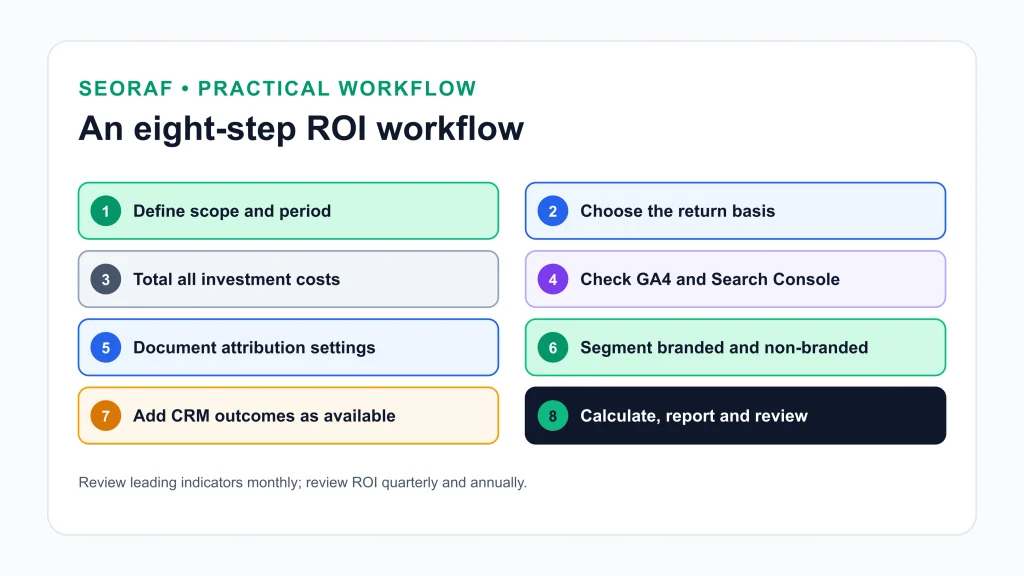
- Define the scope and period. Decide which site, pages and months you are measuring, and whether you will use a rolling 12-month view.
- Choose the return basis. Revenue, contribution margin or modeled lead value. Write it down.
- Total the investment. Use the cost categories above, including internal time.
- Check tracking. Confirm key events fire, values are assigned, and Search Console is verified. Compare trends between the two tools.
- Fix the attribution approach. Choose a GA4 reporting model and lookback window, confirm that organic channels can receive credit, record all three, and keep them stable.
- Segment the return. Separate non-branded from branded organic traffic, and revenue pages from informational pages.
- Add CRM outcomes. Replace estimated lead values with closed-won revenue as it becomes available.
- Calculate ROI and payback. Use the formula, report cumulative figures, and show a range where attribution is uncertain.
- Review on a schedule. Track leading indicators monthly and ROI quarterly and annually.
A reusable reporting table
Copy this structure into a spreadsheet or report. The numbers below are illustrative. Every return figure uses contribution margin, so the basis is consistent across rows.
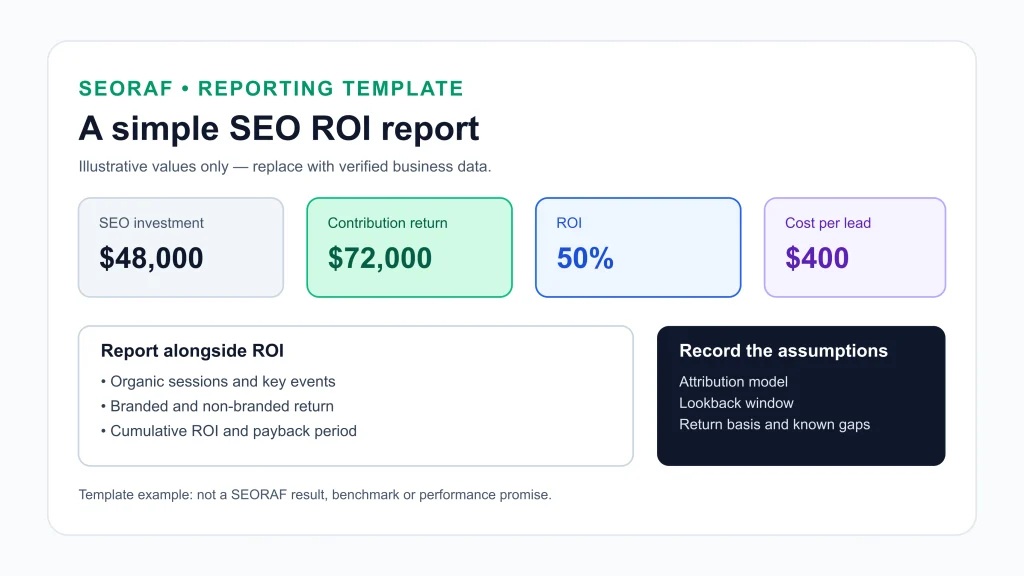
| Quarter | SEO investment | Organic sessions (GA4) | Attributed key events | Return (contribution margin) | ROI | Cumulative ROI |
|---|---|---|---|---|---|---|
| Q1 | $12,000 | 18,000 | 90 | $9,000 | −25% | −25% |
| Q2 | $12,000 | 22,000 | 130 | $15,000 | 25% | 0% |
| Q3 | $12,000 | 27,000 | 180 | $21,000 | 75% | 25% |
| Q4 | $12,000 | 33,000 | 230 | $27,000 | 125% | 50% |
| Year | $48,000 | 100,000 | 630 | $72,000 | 50% | 50% |
Cumulative ROI compares total return with total investment since the start. In this illustration it reaches 0% at the end of Q2, which is the cumulative breakeven point. Record the following notes with every report so that periods stay comparable:
| Field | Illustrative entry |
|---|---|
| Attribution model | Data-driven (GA4 reporting attribution model) |
| Lookback window | 90 days |
| Return basis | Contribution margin |
| Scope | All Google organic; non-branded reported separately |
| Known tracking issues | Visitors who decline tracking are not counted in GA4 |
Common measurement mistakes
- Counting only agency fees. Leaving out tools, development and internal time overstates ROI.
- Mixing return definitions. Comparing revenue-based ROI for SEO against profit-based ROI for another channel.
- Confusing ratio and percentage. A 3:1 return multiple is 200% ROI.
- Judging too early. Measuring at three months what takes longer to build, or ignoring sales lag.
- Letting branded traffic inflate the result. Report non-branded organic return separately.
- Changing attribution settings mid-comparison. A model change reaches historical data in GA4, so earlier exports may no longer match.
- Treating estimates as facts. Lead values, close rates and modeled returns should be labeled as assumptions.
- Reporting ROI without a range. Where attribution is uncertain, show a conservative and a broader view.
- Chasing traffic instead of outcomes. Rankings and sessions are useful indicators, but they are not return.
Common questions
What is a good SEO ROI?
There is no universal benchmark. A good result depends on your margins, sales cycle, competition and the basis you use for return. Compare your ROI with your other channels on the same basis and with your own history, and be cautious with any benchmark that does not state its source, period and definition.
How long does it take to see a positive SEO ROI?
Google does not publish a standard timeline. It says changes can take hours to several months to show up in search. A rolling 12-month view is a practical way to smooth early costs and later returns, and payback depends on how quickly costs and returns arrive.
Should I include branded traffic?
Report both. All-organic ROI shows the channel’s total contribution, while non-branded ROI shows a more conservative view of what SEO work itself earned.
Can I calculate ROI if I cannot track revenue directly?
Yes, with a modeled value. Use your close rate and customer value, label the result an estimate, and replace it with CRM outcomes as they accumulate. If you cannot support even a modeled value, report cost per result and leading indicators instead.
Conclusion
Measuring SEO ROI comes down to disciplined definitions: a complete investment figure, one consistent return basis, a documented attribution approach and a measurement window long enough to match how SEO works. Where attribution is uncertain, show a range and state your assumptions. That builds more trust than a single confident number.
If you want an outside review of your site’s SEO, the SEO audit service page explains what SEORAF’s audit covers. For more step-by-step guidance, browse the SEO guides.
Sources
- Google Analytics Help: Get started with attribution
- Google Analytics Help: Select attribution settings
- Google Analytics Help: Key event
- Google Analytics Help: Traffic acquisition report
- Google Search Central: Using Search Console and Google Analytics data for SEO
- Google Search Central: SEO Starter Guide
- Google Search Central Blog: Introducing the branded queries filter in Search Console
- Seer Interactive: How to calculate estimated ROI for SEO (forecasting formula)