
What “Crawled – currently not indexed” means
Googlebot requested the URL and received the page. Google then did not add it to its index. The word “currently” matters: Google says the status can change, but it does not say when or what would change it.
You can find the status in Search Console under Indexing → Pages, in the “Why pages aren’t indexed” table. For a single page, use the URL Inspection tool instead. Google says the Page indexing report is not meant for investigating specific pages, that you cannot search it by URL, and that its example list is capped at 1,000 rows and may not show every affected URL (Google: Page indexing report).
What the status does not mean
- The page was blocked. Google reports robots.txt blocks and noindex directives as separate statuses. This one means the page was fetched.
- You received a penalty. Google groups this status with other “not indexed” reasons and says not indexing a URL is not necessarily bad. Google’s URL Inspection documentation notes that the tool does not check for manual actions, which are reported elsewhere in Search Console.
- Your content is confirmed to be low quality. Google gives no reason for this status. Quality, duplication and other page-level factors may be worth reviewing, but this status alone does not identify the cause.
- Every URL should be indexed. Google says not every URL on a site should be indexed and that you should not expect 100% coverage.
Crawling, indexing and ranking are different steps
People often use “crawled,” “indexed” and “ranking” as if they meant the same thing. They are separate stages, and each is visible in different places. This status means a page cleared crawling and then was not stored.
| Stage | What happens | Where you can look |
|---|---|---|
| Discovery | Google finds the URL through a link or a sitemap. | URL Inspection lists sitemaps and possibly a referring page. |
| Crawling | Googlebot fetches the page. | URL Inspection shows last crawl date and page fetch result. |
| Indexing | Google processes the page, selects a canonical among similar pages, and decides whether to store it. | URL Inspection shows the declared and Google-selected canonical, and whether the URL is on Google. |
| Showing and ranking | Google decides whether and where a stored page appears for a given search. | Not shown in URL Inspection. Use the Performance report for impressions and clicks. |
The four stages and where each is visible. Sources: Google’s Page indexing report and URL Inspection documentation.
A page that is not indexed cannot rank. A page that is indexed is only eligible to appear: Google says “URL is on Google” does not guarantee the page will show up in results (Google: URL Inspection tool).
How “Crawled – currently not indexed” compares with other indexing statuses
Several statuses in the same report sound alike. The key difference is where Google stopped and what that suggests you check first. Definitions below follow Google’s Page indexing report help.
| Status | What Google reports | First thing to check |
|---|---|---|
| Crawled – currently not indexed | Page was fetched but not indexed. It may or may not be indexed later. | Whether the URL should be indexed, then canonical, content received, links and usefulness. |
| Discovered – currently not indexed | Google found the URL but has not crawled it. Typically the crawl was rescheduled to avoid overloading the site. | Server capacity and URL volume, mainly on larger sites. See Discovered – currently not indexed explained. |
| Duplicate without user-selected canonical | A duplicate of another page, with no canonical declared. Google chose a different URL. | Whether the pages are truly duplicates. See Duplicate without user-selected canonical explained. |
| Duplicate, Google chose different canonical than user | You declared a canonical, but Google selected another URL. | Whether your signals (tag, links, sitemap, redirects) agree. |
| Alternate page with proper canonical tag | The page correctly points to an indexed canonical. | Usually nothing, if that is intended. |
| Page with redirect | The URL redirects, so it is not indexed itself. The target may or may not be. | Whether the redirect is intended and the target is indexed. |
| URL marked ‘noindex’ | Google found a noindex directive. | Whether the directive is intentional. |
| Blocked by robots.txt | A robots.txt rule stopped Google from crawling the URL. | Whether the rule is intentional. See noindex vs robots.txt. |
| Soft 404 | Google treats the page as “not found” despite a success response. | Whether the page should exist, and the status code it returns. |
Where each status stops and what to check first. “First thing to check” is SEORAF guidance, not Google’s wording.
Label note: Google’s help page names the noindex status “URL marked ‘noindex’.” Many guides call it “Excluded by ‘noindex’ tag.” Check the wording in your own Search Console, since interface labels can change.
Which of these can the live test detect?
The URL Inspection live test can check the current fetch and indexing directives, but it cannot reproduce the Crawled – currently not indexed or Discovered – currently not indexed status, or predict Google’s canonical selection. The live test also follows redirects without telling you it did. A passing live test confirms only aspects of the current fetch; it does not explain why the indexed result excludes a page (Google: URL Inspection tool).
First, check that the report is right
Before changing a page, confirm that it is actually not indexed. Three things can make the report misleading.
- Timing. The report can show an older state. Inspect the URL and check its last crawl date against the date of your last change (Google: Page indexing report).
- A sudden site-wide change. If many unrelated URLs change status at once, inspect a representative sample, check Search Console announcements, and compare the indexed result with the report before making bulk edits. This is a cautious SEORAF recommendation, not proof of a reporting bug.
- You may not need the report. Google notes that smaller sites may not need to rely on this report. A
site:search can offer a rough indication, but it is not a definitive index-status check. For a specific URL, use URL Inspection.
New to the report? See how to read the Page indexing report.
Should this URL be indexed at all?
Google says it is fine for some URLs to stay out of the index, such as duplicates and pages marked noindex. Many sites also have archives, filtered listings and utility pages that were never meant to rank.
SEORAF recommendation: before touching a URL, ask three questions.
- Would a searcher be glad to land on this page from search results?
- Does it answer something that no other page on my site answers?
- Is it the page I want to represent this topic, rather than a variant, archive or utility page?
If the answer to the first or third is no, leaving the URL out, or excluding it deliberately, may be the right outcome. If the answers are yes, keep investigating.
Possible causes and what to do about each
Google does not list causes for this status, so everything below is a set of possibilities. Do not assume one cause explains every affected URL: a thin article, an archive page and a near-duplicate service page can all appear in the same list for different reasons.
| Possible cause | What to look for | Evidence status |
|---|---|---|
| Page not valued enough to store | Generic, thin or very similar to other pages | Google documents a quality bar for indexing. That it applies to a specific URL is a hypothesis. |
| Duplicate or near-duplicate | Google-selected canonical differs; overlapping pages | Google documents that duplicates are not indexed. Whether they appear under this status is a hypothesis. |
| Conflicting canonical signals | Tag, sitemap and links point to different URLs | Google documents canonical signals. The link to this status is a hypothesis. |
| Weak internal path | Few or no internal links | Google documents the link advice. The link to this status is a hypothesis. |
| Content not delivered to Google | Main content missing from the crawled HTML | Hypothesis. Verify in URL Inspection. |
| Broader site usefulness | Many pages across unrelated sections, with no clear technical cause | SEORAF review recommendation; not a diagnosis supplied by Google. |
| Newness | Recently published page | Google says new pages can take time. Whether that explains a given URL is a hypothesis. |
| A URL not meant to rank | Archives, filters, utility pages | Google says not indexing such URLs can be fine. |
| Reporting lag | URL Inspection says the URL is on Google while the report still lists it | Google documents that reports can take time to update. |
Possible causes, not a diagnosis. “Hypothesis” means plausible but not confirmed by Google for this status.
Page quality and usefulness
Google’s URL Inspection documentation says a page’s quality must be high enough to warrant indexing. Google’s guidance on helpful, reliable, people-first content offers self-assessment questions worth applying to an affected page. For example: does it provide original information or analysis, a substantial and complete treatment of the topic, and real value compared with other pages in search results? If it draws on other sources, does it add more than a rewrite?
The same page says Google has no preferred word count. It also says that changing dates to look fresh, or adding and removing large amounts of content just to seem fresh, will not help.
SEORAF recommendations:
- Improve pages you want to keep with something specific: first-hand detail, original examples, accurate sourcing, a clearer answer.
- Merge overlapping pages into one stronger page and redirect the old URLs.
- Exclude deliberately pages that exist for navigation or utility.
- Do not pad pages to reach a length or change dates to simulate updates.
More on this in creating helpful, people-first content.
Duplicate content and canonical signals
When similar pages exist, Google picks one as the canonical and may leave the others out. Google’s canonicalization guidance describes redirects and rel="canonical" as strong signals and sitemap inclusion as a weaker one. It recommends that your signals agree with each other.
- Put a self-referencing canonical on the page you want indexed, and link to that URL consistently from inside your site.
- To retire a duplicate, use a permanent redirect to the preferred URL.
- Do not use robots.txt to handle canonicalization, and do not use noindex to choose between duplicates. Google says
rel="canonical"is the preferred tool for that. - If you think two pages are not duplicates, make sure their content differs substantially.
Learn more in canonical tags explained.
Internal linking and discoverability
Google says every page you care about should be linked from at least one other page on your site, using <a> elements with an href and descriptive anchor text (Google: link best practices).
One caution. This status means Google already found and crawled the page, so basic discovery is not the problem. Whether weak internal links influence this status is a hypothesis, since Google does not say so. Contextual links from relevant pages are still worth adding for readers. See internal linking for SEO.
Sitemaps
Google says a sitemap helps it discover pages but does not guarantee crawling or indexing. Because Google treats sitemap URLs as suggested canonicals, list only canonical, indexable pages you want in search, and keep noindexed or redirected URLs out. Google also notes that small, well-linked sites may not need a sitemap (Google: sitemaps overview). Adding a URL to a sitemap is not a documented way to make Google index a page it already crawled. See XML sitemaps explained.
robots.txt and noindex
These two tools do different jobs, and mixing them up is a common source of trouble.
- robots.txt manages which URLs crawlers can access, mainly to avoid overloading your site. Google says it is not a mechanism for keeping a page out of Google. A blocked page can still be indexed if other sites link to it, and the result may show without a description (Google: introduction to robots.txt).
- noindex tells Google not to index a page, but only works if Google can crawl it. If robots.txt blocks the page, Google never sees the noindex rule (Google: noindex). Google says a newly added noindex can take months to be noticed on a page it rarely recrawls.
- To keep a page out of Google, Google points to noindex, password protection or removal, not robots.txt.
For this status, neither is usually the cause, since the page was crawled and no blocking status applies. But check them anyway, because an accidental noindex or block elsewhere in your templates can confuse the picture. Also avoid blocking scripts and styles a page needs to render. Google says it won’t render JavaScript from blocked files (Google: JavaScript SEO basics). See noindex vs robots.txt.
JavaScript rendering and content delivery
Google processes JavaScript pages in three phases: crawling, rendering and indexing. A page waits in a queue for rendering, which can take longer than a few seconds, and Google uses the rendered HTML to index the page. If your main content only appears after scripts run, what Google received may look much thinner than what visitors see (Google: JavaScript SEO basics).
- Use URL Inspection’s “View crawled page” and the live test screenshot to compare what Google received with what you intend it to see.
- Google’s JavaScript guidance says to use meaningful HTTP status codes and to avoid soft 404 errors in single-page apps.
- Google says it can pick up a canonical injected with JavaScript. SEORAF recommendation: where you can, place the canonical and important content in the server response so nothing depends on rendering.
That JavaScript causes this status for a given URL is a hypothesis. Test it before acting. See JavaScript SEO basics.
Technical accessibility
Because the crawl succeeded, access problems are less likely, but rule them out. Google notes that a page can be fetched successfully and still not be indexed. Confirm that the page returns a normal response to Google, that crawling and indexing are allowed as you intend, and that no login wall or firewall rule treats Google differently from visitors.
When the pattern points to the whole site
If many unrelated URLs across a site share this status and URL-level checks reveal no clear technical issue, review broader patterns: whether pages substantially overlap, whether they serve distinct search needs, and whether the site provides useful information beyond what is already available. This is a SEORAF diagnostic recommendation, not a confirmed explanation from Google for this status.
SEORAF recommendation: if many URLs across unrelated sections show this status, compare them against your best indexed pages and review whether the site as a whole offers something distinct, instead of repeating per-URL fixes.
How to investigate one URL with URL Inspection
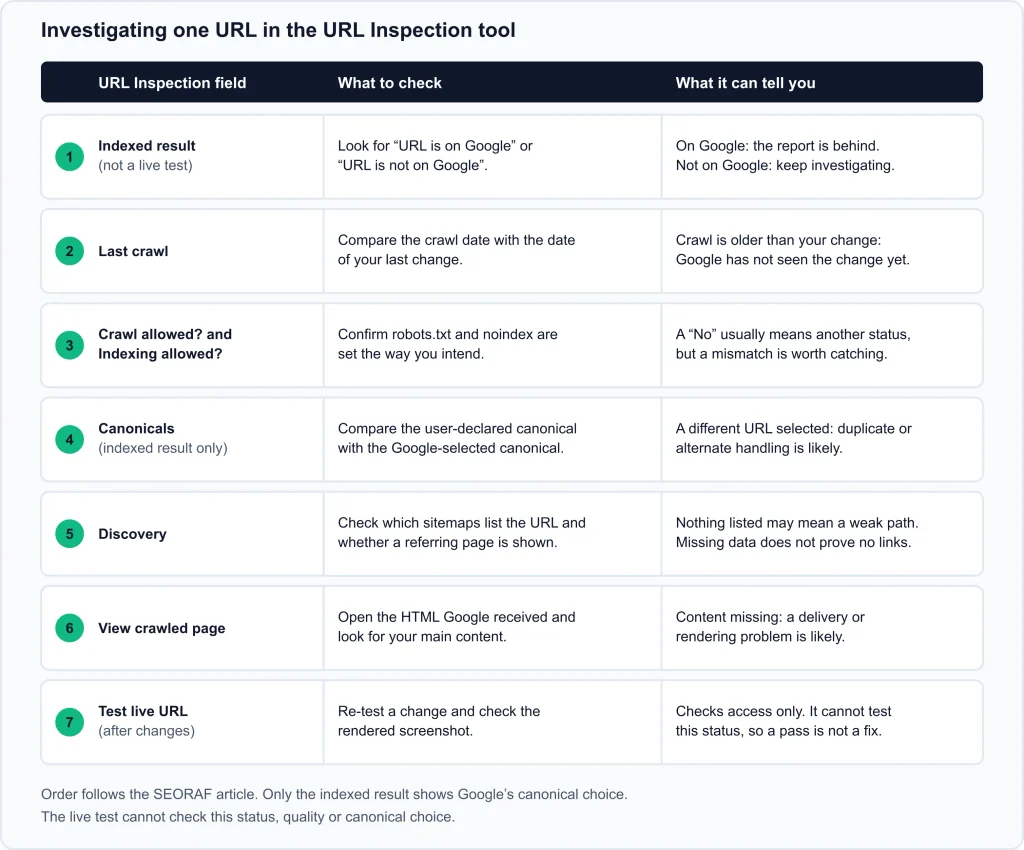
The URL Inspection tool is available from the search bar at the top of any Search Console screen, and it only works for URLs in a property you have access to (Google: URL Inspection tool). Record what you see for each important URL.
- Read the indexed result. This is the version Google last indexed, not a live test. “URL is on Google” means the page is eligible to appear. “URL is not on Google” means it cannot appear in results.
- Note the last crawl date. If you changed the page afterwards, Google has not seen the change yet.
- Check “Crawl allowed?” and “Indexing allowed?”. These reveal robots.txt and noindex settings.
- Compare the user-declared and Google-selected canonical. Use the indexed result to see the canonical Google selected for its indexed version. The live test cannot predict that choice. If Google selected another URL, investigate duplication and conflicting canonical signals.
- Look at discovery. See which sitemaps list the URL and whether a referring page appears. Missing information does not prove that no links exist.
- Open “View crawled page.” Confirm your main content and links are in the HTML Google received.
- Run “Test live URL” after you make changes, and check the screenshot. Keep its limits in mind (below).
What URL Inspection cannot do
- The live test cannot reproduce this status or determine Google’s final indexing and canonical decisions.
- A passing live test does not guarantee indexing. A successful live test does not establish that Google considers the page unique, selects it as canonical, or decides it merits indexing.
- It does not check manual actions or security issues.
- It cannot tell you why a page was excluded for quality reasons.
- Inspections and indexing requests have daily limits per property.
See also how to use the URL Inspection tool.
Diagnostic table: evidence, meaning and next action
Use this table once you have collected evidence for a URL. “Interpretation” gives possibilities, not proof.
| Evidence you see | Possible interpretation | Next action (SEORAF recommendation) |
|---|---|---|
| Inspection says “URL is on Google” | The page is indexed; the report may not yet reflect the latest URL-level state. | No fix. Re-check the report later. |
| Not on Google; recent crawl; the page is its own canonical; content present | Google evaluated it and left it out. Cause unknown. | Apply the purpose test, then compare value and links. |
| Google-selected canonical is a different URL | Google treats this page as a duplicate or alternate. | Compare the pages. Consolidate, align canonical signals, or make the content genuinely different. |
| Crawled HTML lacks your main content | A delivery or rendering problem is likely. | Make the content available in the HTML Google receives, then re-test. |
| “Indexing allowed?” shows No | A noindex directive or other indexing restriction is present. | Remove it only if you want the page indexed. Do not block the page in robots.txt. |
| “Crawl allowed?” shows No | A robots.txt rule blocks the current fetch. | Review the rule if crawling is intended. A blocked URL may not show the same status until Google can crawl it. |
| No sitemap, no referring page, few internal links | Weak path to the page. | Add contextual internal links from relevant pages. |
| A similar indexed page covers the same ground | Overlap between your pages. | Merge and redirect, or add original value. |
| Many URLs from one template (tags, filters, parameters) | URLs that may never have been meant to rank. | Decide once per pattern: leave, noindex, redirect or remove. |
| Many pages across unrelated sections, no technical cause | Possible broader pattern; cause remains unknown. | Review overall site usefulness. |
| Last crawl is older than your fix | Google has not seen the change. | Wait. Consider one indexing request if the page changed materially and matters. |
| Live test passes | The page is accessible. | Do not treat it as a fix. |
Evidence, interpretation and next action. Interpretations are possibilities. Actions are SEORAF recommendations unless a Google source is linked above.
When to request indexing, and why repeating it is not a fix
What Google documents:
- For this status, Google says there is no need to resubmit the URL for crawling (Page indexing report).
- Requesting a crawl does not guarantee inclusion in search results, and Google’s systems prioritize high-quality, useful content. There is a quota for individual URLs, and requesting a recrawl several times for the same URL will not make it crawl faster (Google: ask Google to recrawl your URLs).
- You cannot request indexing for a page the live test considers non-indexable. For many URLs, Google recommends a sitemap with accurate
<lastmod>dates instead (URL Inspection tool).
SEORAF recommendation: request indexing once, after a page has changed in a meaningful way and matters to you. Hypothesis: because Google already crawled the page, repeating the request on an unchanged page gives Google nothing new to evaluate. Google does not state this directly.
Time ranges Google states
Google gives no timeline for a page leaving this status. The ranges below refer to related crawling, inspection or validation actions; they are not an indexing forecast.
| Situation | What Google says | Source |
|---|---|---|
| A new page or site | It can take about a week or so for Google to start crawling and indexing. | Page indexing report |
| After a recrawl request | Crawling can take a few days to a few weeks. | Recrawl documentation |
| After Request indexing | Typically a day or so but can take much longer. The same page also mentions up to a week or two. | URL Inspection tool |
| Validate fix | Typically up to about two weeks, sometimes much longer. | Page indexing report |
| A newly added noindex being noticed | It may take months, depending on page importance. | noindex documentation |
Google’s stated ranges for related actions. They are not predictions for any specific page.
Step-by-step troubleshooting workflow
The numbered steps summarize the checks in sequence. It is SEORAF’s recommended workflow, not a Google process or a guarantee of indexing.
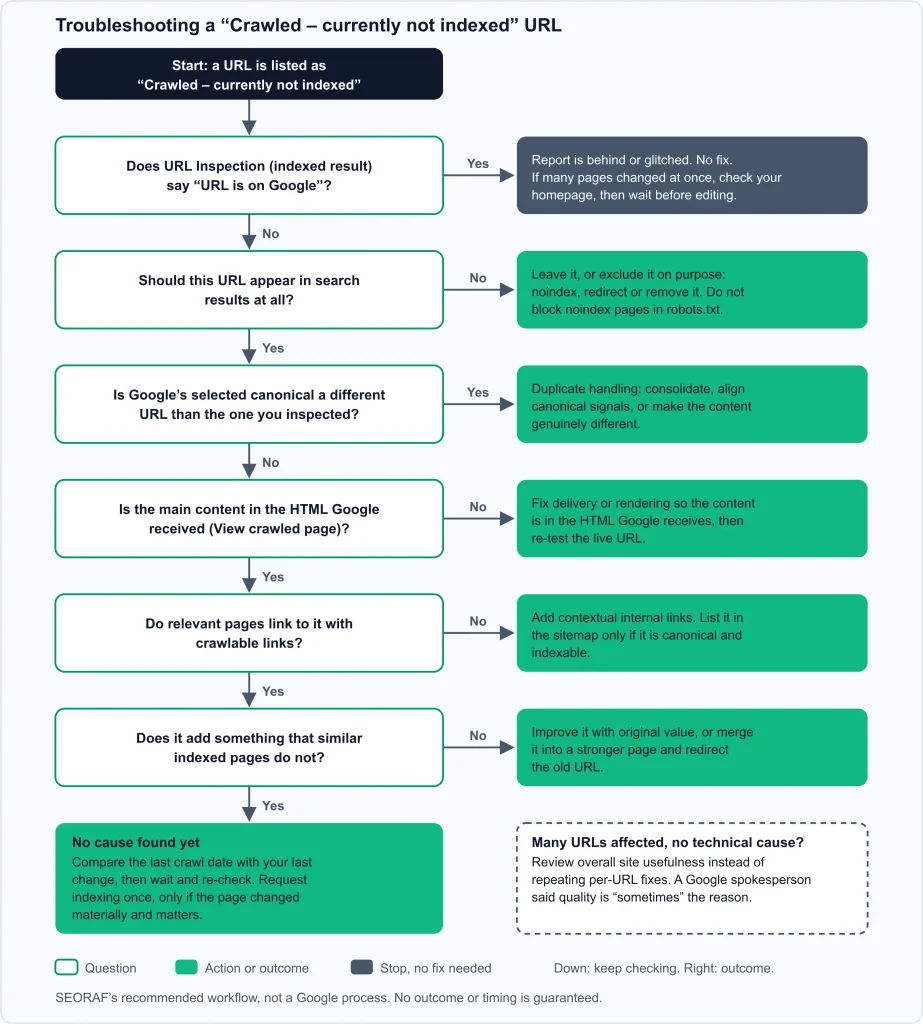
- Confirm the state. Inspect the URL. If it is on Google, stop and re-check the report later.
- Check for a broader reporting change. If many pages changed status at once, check representative URLs and Search Console announcements before making bulk edits.
- Apply the purpose test. If the page should not rank, decide whether to leave it, noindex it, redirect it or remove it. Keep noindexed pages crawlable.
- Record the evidence. Note the last crawl date, both canonicals, discovery details and what the crawled HTML contains.
- Branch on what you find. A different Google-selected canonical points to consolidation or aligning signals. Missing content points to delivery or rendering. No internal path points to adding links. Otherwise compare the page’s value with similar indexed pages.
- Make one meaningful change at a time, so you can tell what mattered.
- Ask for a recrawl once, only if the page changed materially and is important.
- Re-check after a few weeks, comparing the new crawl date with the date of your change.
- Look wider if many URLs share the status and you find no technical cause. Review overall site usefulness rather than repeating page fixes.
Quick troubleshooting checklist
- ☐ The URL really is not on Google (inspected, not just in the report).
- ☐ I have decided whether this URL should be indexed.
- ☐ The Google-selected canonical matches the URL I want indexed.
- ☐ The crawled HTML contains the main content and links.
- ☐ Crawling and indexing are allowed as I intend (robots.txt and noindex).
- ☐ At least one relevant page links to the URL with a crawlable link.
- ☐ The sitemap lists only canonical, indexable URLs.
- ☐ The page adds something similar indexed pages do not.
- ☐ I recorded the date, the change and the next check.
Illustrative examples
These are reasoning examples, not case studies. SEORAF has not tested them on real sites and reports no results from them.
A small blog with a few recent posts flagged
Inspection shows a recent crawl, the page as its own canonical, and content present. Nothing technical stands out. Reasonable steps: check whether the posts overlap with indexed ones, add relevant internal links, improve anything thin, then re-check later. Newness is possible but unconfirmed, and a small site may not need the report at all.
A list dominated by archive-style URLs
Export the list and group it by pattern. If most are tag, author or date archives, one decision may cover hundreds of URLs: leave them out, or noindex them deliberately and keep them out of the sitemap. Do not block them in robots.txt while relying on noindex.
Near-identical service-area pages
Inspection shows some pages with a different Google-selected canonical and others without. Statuses can differ across similar pages, so do not assume one cause. Decide whether to merge them or add genuine local differences, then align canonical tags, links and sitemap.
A page that was improved and requested, but is still excluded
First confirm the crawl date is later than your change. If it is, compare the page’s value with indexed pages on the topic and ask whether the pattern is site-wide. Stop repeating requests. Google documents no way to make a crawled page indexed on demand.
Content that appears only after JavaScript runs
“View crawled page” shows a nearly empty shell, while the live screenshot shows the full article. That gap suggests rendering or delivery is worth investigating. Make the content available in the server response where possible, then re-test. It does not prove this caused the status.
How to monitor the outcome without promising a date
SEORAF recommendations, except where a Google source is linked:
- Freeze a list of the URLs you care about and their starting state, and track that same list. A falling total in the report does not prove improvement, because removing pages also lowers it.
- Re-inspect a few representative URLs every couple of weeks. Look at the last crawl date and the indexed result.
- Use the report’s sitemap filter. Google says the Page indexing report can be filtered by all known pages, all submitted pages, unsubmitted pages or a specific sitemap (Page indexing report).
- Treat “Validate fix” as optional. Google says validation stops if one instance of the issue remains, and asks you not to click it again while a run is in progress. How well it suits a judgment-based status is not documented, so use it only after fixing a whole group.
- Expect lag. Google keeps an issue listed for 90 days after the last instance is gone.
- Do not equate indexed with ranking. An indexed page may still not appear for a given search. Use the Performance report to see impressions and clicks.
Common myths and risky advice
Advice about this status often goes beyond what Google says. These are common claims and how they compare with Google’s documentation.
| Claim in circulation | What the evidence says |
|---|---|
| “It’s a Google penalty.” | Google does not describe it as one. Manual actions are reported separately. |
| “Just wait; nothing to do.” | Oversimplified. Google says the page may or may not be indexed later; the status itself does not identify the cause. |
| “It always means low-quality or AI content.” | Google does not identify content type or quality as the cause of this individual status. |
| “Keep clicking Request indexing.” | Google says repeated requests for the same URL will not speed up crawling, and there is a quota. |
| “Add more words.” | Google says it has no preferred word count. |
| “Change the date so it looks fresh.” | Google lists changing dates without substantial change as ineffective. |
| “Block it in robots.txt to fix or hide it.” | Google says robots.txt is not a way to keep a page out of Google, and a blocked page can still be indexed. |
| “Use noindex to pick the canonical.” | Google says rel="canonical" is the preferred tool for that. |
| “The live test passed, so it will be indexed.” | Google says a pass does not guarantee indexing and that the live test cannot test this status. |
| “Fix every URL in the report.” | Google says not every URL should be indexed. |
| “It will be indexed in 2–4 weeks.” | Google gives no timeline for this status. Treat such figures as unsupported. |
Myths compared with Google documentation.
Frequently asked questions
Is it normal to have some URLs with this status?
Google gives no figure for what is normal. It says you should not expect every URL to be indexed. What matters is whether your important pages are indexed, not the size of the list.
Can a page leave this status without me doing anything?
Google says the page may or may not be indexed in the future. It does not say when or why that would happen. For an important page, improving what you can control is a better use of time than waiting.
Should I noindex or delete these pages?
It depends on whether the page should ever appear in search. For pages you want excluded, Google recommends noindex rather than robots.txt, and noindex only works when Google can crawl the page. For moved pages, a redirect is the documented approach. For pages with no purpose and no replacement, removal is a reasonable choice. Decide per pattern, not per status.
Does adding the URL to my sitemap help?
Google says a sitemap helps discovery but does not guarantee crawling or indexing. Since this page has already been crawled, a sitemap is unlikely to change the picture by itself. It is still good practice to list only canonical, indexable URLs.
Why did “Validate fix” fail or sit pending?
Google says validation stops if even one instance of the issue remains and typically takes up to about two weeks, sometimes much longer. For a status without a clear technical fix, a failed validation may simply mean the URLs are unchanged from Google’s perspective. That is an inference, not a Google statement.
Is there a way to force Google to index a page it has crawled?
The Google documentation SEORAF reviewed describes no way to force it. The documented options are improving the page, fixing signals and, where appropriate, requesting a recrawl or using a sitemap.
Action plan
- Inspect your important URLs, not the whole list.
- Decide which URLs should never rank, and handle them deliberately.
- For the rest, record the canonical, crawled content, links and sitemap status.
- Fix one thing at a time: canonical signals, content delivery, internal links or the page’s usefulness.
- Request indexing once for important pages that changed materially.
- Re-check against a frozen list after a few weeks, without expecting a specific date.
For wider context, see the Google Search Console guide and the technical SEO indexing hub.
Sources
Google documentation
- Page indexing report (Search Console Help)
- URL Inspection tool (Search Console Help)
- Ask Google to recrawl your URLs
- How to specify a canonical with rel=”canonical” and other methods
- Block Search indexing with noindex
- Introduction to robots.txt
- Understand the JavaScript SEO basics
- SEO link best practices for Google
- Learn about sitemaps
- Creating helpful, reliable, people-first content
About this article
SEORAF is an independent SEO knowledge resource, not an agency, and sells no services or tools. This guide is based on Google’s published documentation and clearly labeled SEORAF recommendations. It does not contain original experiments, client results or testimonials. Statements marked “SEORAF recommendation” or “hypothesis” are the author’s judgment, not Google requirements. Search Console wording and Google’s documentation can change, so check the linked pages for the latest.