
AI SEO Tools (2026): Compared by Category, Use Cases & Pricing
Written by Mousume Akter for SEORAF — an independent SEO knowledge resource, not an agency.
How this comparison is put together: SEORAF is run by one person, not a team of testers, so this page is honest about what that means. Where a tool has genuinely been used hands-on, that’s stated explicitly in its full review (linked below). Everywhere else, the description is compiled from public product documentation, vendor sites, and how the tool is generally discussed in the industry — not presented as first-hand testing it isn’t. The “Visit official site” links below currently go to each vendor’s plain, non-affiliate homepage or pricing page. Some may become affiliate links in future, meaning SEORAF could earn a commission if you sign up through them at no extra cost to you — if and when that’s true for a given vendor, this disclosure will say so explicitly next to that link. Whether a program exists has no bearing on which tools are covered or how they’re described here — see SEORAF’s about page and legal & disclosure page for the full policy.
AI SEO tools are everywhere right now, and most of the marketing around them sounds the same: “10x your rankings,” “automate your entire SEO strategy,” “never write a brief again.” Some of that is fair. A lot of it isn’t.
This page is meant to cut through that and get you to a decision. It’s organized so you can move at whatever pace you need: skim the quick picks and comparison table if you already know your category, or read through the fuller breakdown below if you’re still figuring out which category of tool actually solves your problem.
Quick answer: there is no single “best” AI SEO tool — the right choice depends on whether your bottleneck is content optimization, keyword research, technical SEO, AI writing, or tracking your visibility in AI-generated answers like ChatGPT or Google’s AI Overviews. The quick picks below are organized by exactly that.
Every price, feature claim, and named tool on this page should be checked against the vendor’s current site before you buy — AI tool pricing and features change quickly, published third-party pricing figures for this market frequently disagree with each other, and nothing here should be treated as final without that check.
Quick Picks by Category
Start here if you already know roughly what you need. Each pick links to the vendor’s official site and, where SEORAF has published one, a full independent review. None of these are paid placements, and none is presented as “tested” unless the linked review says so explicitly.
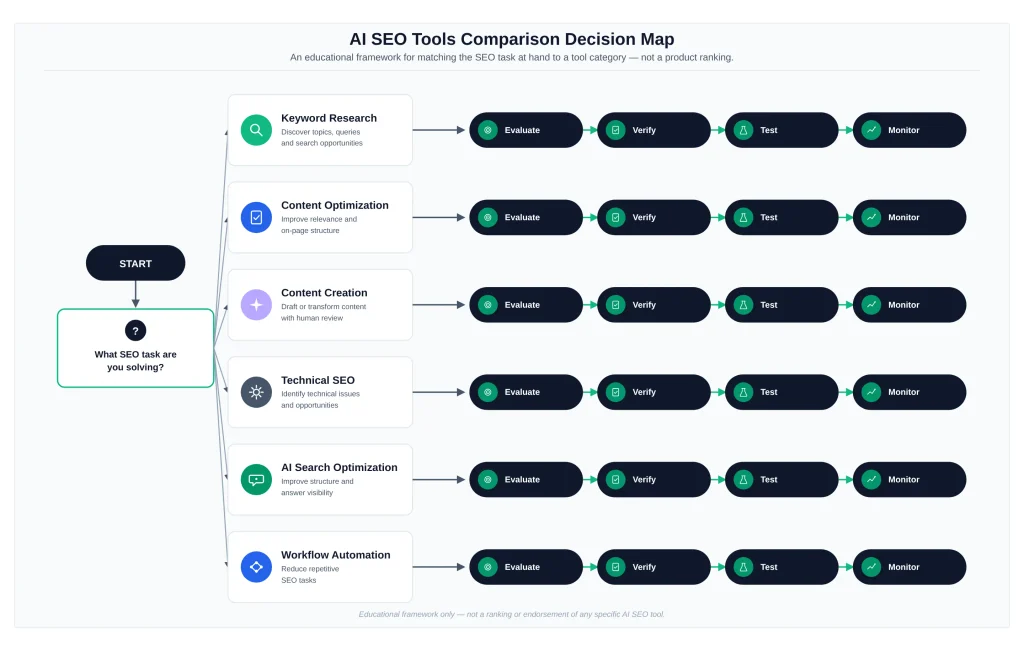
Not sure any of these fit? The category breakdown below explains what each type of tool actually does, and the evaluation criteria walk through how to judge one not listed here.
Comparison Table: 10 AI SEO Tools at a Glance
The table below compares the ten named tools covered in this guide directly — SE Ranking, Moz, Ubersuggest, Mangools, WebCEO, SEO PowerSuite, Frase, Outranking, NeuronWriter, and Rank Math — using the same fields throughout: use case, AI capabilities, key SEO features, pricing/free option, integrations, ideal user, and limitations. Every cell reflects what could be verified directly on the vendor’s own site at research time, or is marked as reported-but-unverified where it couldn’t be. Prices and feature details change quickly in this market — confirm current figures on the vendor’s site before you buy, and treat anything marked “unverified” with extra caution.
Ten named AI SEO tools compared by use case, AI capabilities, key features, pricing, integrations, ideal user, limitations, and link status
| Tool | Use case | AI capabilities | Key SEO features | Pricing / free option | Integrations | Ideal user | Limitations | Link status |
|---|---|---|---|---|---|---|---|---|
| SE Ranking | All-in-one SEO + AI-visibility tracking | “AI Search” add-on tracks ChatGPT, Perplexity, Google AI Overviews & AI Mode; MCP server for AI-assistant access to data | Rank tracking, site audit, keyword research, backlink checker, white-label reporting | Core from ~$103–129/mo, Growth from ~$223–279/mo; 14-day free trial; no permanent free plan | Google Search Console, GA4, Looker Studio, Matomo, MCP | Solo consultant or small agency wanting one login for traditional + AI-visibility SEO | Full API gated behind add-on; smaller backlink index per third-party reviewers (unverified) | Plain official link (non-affiliate) |
| Moz | General SEO + Domain Authority (DA) metric | AI keyword suggestions; “AI Visibility Dashboard” reported as beta (unverified) | Keyword Explorer, Link Explorer, Site Crawl, rank tracking, DA score, MozBar | Unverified — moz.com blocked direct access. Third-party figures range ~$39–$599/mo; free Community account exists; trial length inconsistent across sources | Google Analytics, Search Console (reported, unverified) | Teams that specifically want DA alongside general keyword/backlink research | Pricing could not be directly confirmed; AI feature reported as beta-stage | Plain official link — pricing unverified, confirm before quoting |
| Ubersuggest | Budget alternative to Semrush/Ahrefs/Moz | AI Chat; AI Search Visibility (Gemini, AI Overviews); AI Model Insights (ChatGPT, Gemini, AI Overview); AI-generated prompt ideas | Keyword research, rank tracking, site audit, backlink data, competitor analysis | $29–$99/mo per official pricing page; 7-day free trial; a free/downgraded tier is referenced but not detailed | Google sign-in for Search Console data; no third-party API | Solo operator or small business wanting low-cost keyword research plus basic AI-visibility tracking | No API access; capped keyword-suggestion volumes; AI features run on a credit system | Plain official link (non-affiliate) |
| Mangools | Budget keyword-research suite | No AI-specific feature confirmed — flagged, not verified as an AI tool | KWFinder, SERPChecker, SERPWatcher, LinkMiner, SiteProfiler | Low confidence — sources disagree substantially. Reported from ~$19.90/mo; limited free daily lookups reported | Slack (reported); no strong evidence of GSC/GA4-level integration | Someone whose main need is fast, cheap keyword research without expecting AI features | Keyword-research-first, not a full platform; free tier is very limited | Plain official link — AI capability and pricing unverified |
| WebCEO | Agency white-label SEO & reporting suite | No AI-specific feature confirmed — flagged, not verified as an AI tool | 24-tool suite: site audit, rank tracking, link building, competitor analysis, social metrics, white-label reports | Solo $36/mo, Startup $119/mo, Agency Unlimited $99/mo, Corporate $299/mo (official); no free plan found | Google Analytics (reported) | Agency wanting a large traditional (non-AI) reporting bundle | No documented AI feature; interface described by reviewers as dated; plan-tier pricing is non-linear (worth double-checking) | Plain official link (non-affiliate) |
| SEO PowerSuite | Desktop-licensed alternative to monthly SaaS tools | “AI Text Generation” referenced by one reviewer source — not independently confirmed | Rank Tracker, WebSite Auditor, SEO SpyGlass (backlinks), LinkAssistant (outreach) | Free plan (capped limits) + Professional at $299/year — annual license, not monthly SaaS | Google Analytics, Google Search Console | Someone managing many sites who wants to avoid per-seat monthly fees | Desktop software, not cloud-based; AI capability is the least evidenced of the ten tools here | Plain official link (parent company link-assistant.com) |
| Frase | SERP-based content briefs + AI drafting | In-editor “AI Commands” for drafting/rewriting; AI-generated content briefs from SERP data; newer AI-visibility feature reported but unconfirmed | Content briefs, topic/question research, content editor with scoring, outline generation | Solo $15/mo, Basic $45/mo, Team $115/mo (official); no permanent free plan; trial policy reported inconsistently | Google Docs, WordPress (reported) | Solo blogger or small content team wanting low-cost briefs plus in-editor AI drafting | AI-written intros/conclusions reported weaker than the brief feature; trial/refund policy unclear | Plain official link (non-affiliate) |
| Outranking | Keyword-to-draft content workflow + automatic interlinking | AI outline/title generation from top-ranking pages; auto-interlinking; a “Concepts” feature aimed at reducing AI hallucination (older/cached documentation) | Content briefs, AI drafting, SERP/competitor analysis, automatic interlinking | Unconfirmed. Reported $19–$219/mo range across sources, highly inconsistent | Google Docs, WordPress, Grammarly, Semrush, Search Console (reported, unverified) | Content team wanting draft + internal-linking automation — contingent on the site being fully operational | Site-access concern: a recent third-party source reported the pricing pages returning 404s and the G2 listing delisted; a direct fetch in this research returned only a bare page with no content | ⚠ Do not treat as a working official/affiliate link until independently reconfirmed live |
| NeuronWriter | Budget content optimization + AI drafting | AI-generated outlines/paragraphs (credit system); NLP term/entity suggestions; AutoInsert & Content Designer (Gold plan+) | Content/SERP analysis, keyword research, competitor analysis, content planning, plagiarism checker (Gold+) | Bronze $23/mo to Diamond $117/mo across 5 tiers (official); 7-day free trial with full Gold features | WordPress, Shopify, Chrome extension, PlagiaShield | Solo creator or small agency wanting a lower entry price than Surfer or Clearscope | Semantic/NLP data quality reported weaker outside English and major languages | Plain official link (non-affiliate) |
| Rank Math | WordPress on-page & schema AI optimization | “Content AI” — headline/meta generation, content scoring, keyword/LSI suggestions (credit-based) | On-page optimization, 18+ schema types, redirection manager, XML sitemaps, rank tracking | Full-featured free version; Business ~$20.99/mo, Agency ~$49.99/mo (entry Pro price inconsistent across sources — confirm directly) | WordPress (native), Google Search Console, Google Analytics | WordPress site owner or agency wanting AI on-page work inside the CMS they already use | Content AI credits reported easy to exhaust; Pro tier covers personal sites only, not client sites | Plain official link (non-affiliate) |
Link status reflects each vendor’s plain, non-affiliate URL as of this research. None of these are confirmed affiliate relationships — see the disclosure at the top of this page. Outranking is the one exception: given the site-access concern noted above, that link should be treated as unconfirmed rather than a working destination until someone checks it directly.
What Are AI SEO Tools?
At a basic level, an AI SEO tool is any SEO-focused software that uses artificial intelligence — usually natural language processing, machine learning models, or large language models (LLMs) — to do work that used to require a person doing it manually. That covers a wide range of tasks: scoring how well a draft matches what’s already ranking, clustering thousands of keywords into topic groups, flagging technical issues on a site, drafting a first pass at an article, or checking whether ChatGPT mentions your brand when someone asks it a relevant question.
The “AI” label gets used loosely in this market. Some tools genuinely use AI to do analytical work that would be slow or impractical by hand. Others use “AI-powered” as a marketing label on top of features that are really just automated rules or existing data, repackaged. The evaluation criteria further down are built to help tell the difference.
AI SEO vs. GEO vs. AEO — Key Differences
Three terms get used almost interchangeably in this space, and it’s worth being precise about them:
- AI SEO is the broad umbrella — using AI to do SEO work. It’s still fundamentally about ranking in traditional search results.
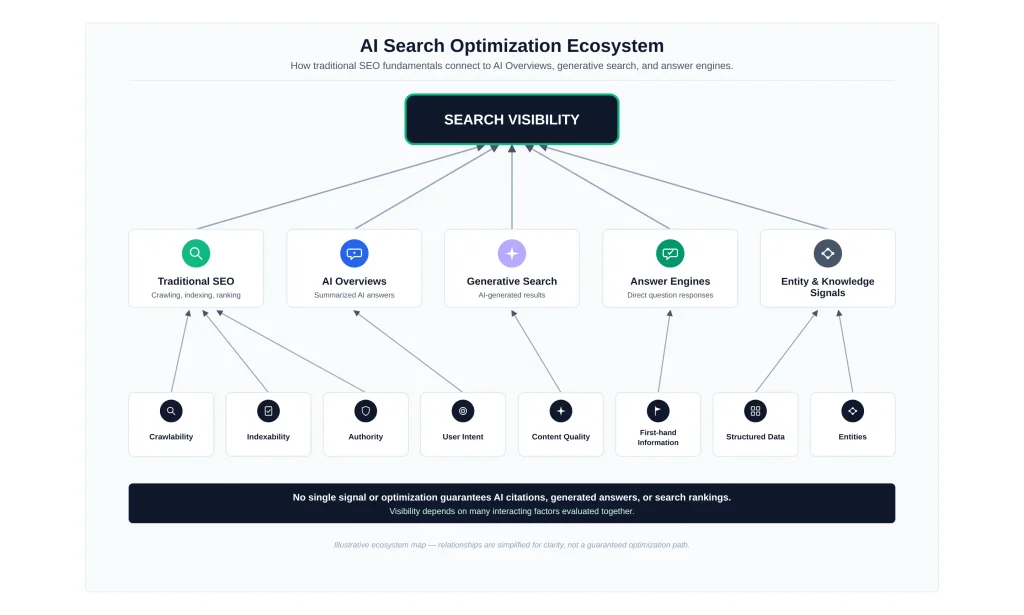
- GEO (Generative Engine Optimization) refers to optimizing content so it gets picked up, summarized, or cited by generative AI systems like ChatGPT, Google’s AI Overviews, Perplexity, or Gemini.
- AEO (Answer Engine Optimization) is closely related and sometimes used interchangeably with GEO — structuring content so it directly and clearly answers a specific question, which helps both traditional featured snippets and AI-generated answers extract and cite it.
The industry hasn’t fully standardized these terms yet — treat the definitions above as a reasonable working distinction rather than a fixed standard. For the broader entity- and intent-based thinking these terms build on, see SEORAF’s semantic SEO guide. For more on why traditional rankings alone no longer guarantee visibility, see SEORAF’s zero-click SEO strategy guide.
If you’re mapping out topics before you start comparing tools, SEORAF’s free keyword research checklist is a reasonable starting point regardless of which category of tool you end up choosing.
Categories of AI SEO Tools
If the quick picks above didn’t match your situation, here’s the fuller category breakdown — what each type of tool actually does, and which named examples fit where.
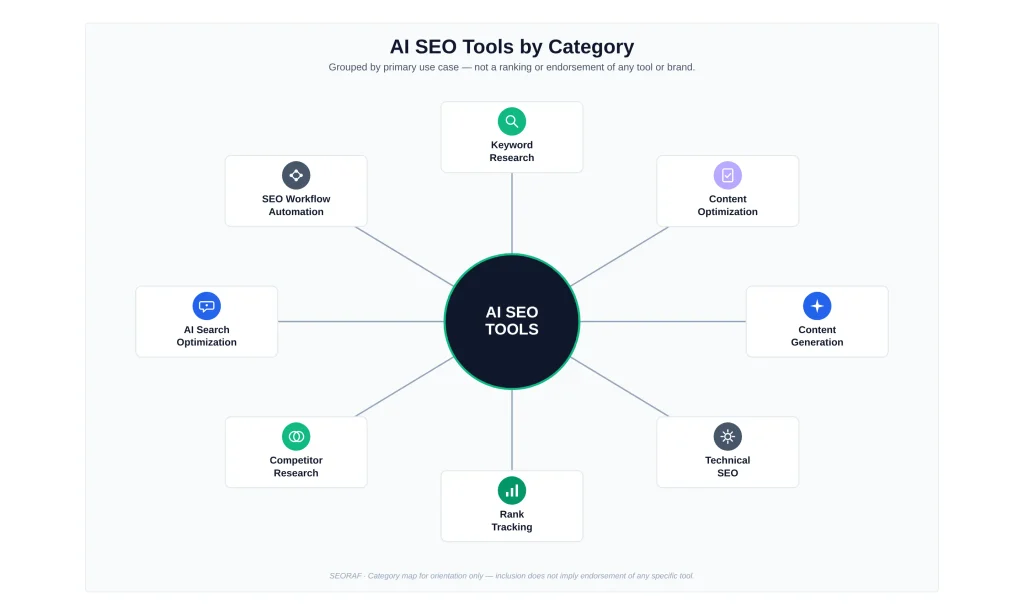
AI Content Optimization Tools
These tools analyze your draft against top-ranking pages for a target keyword and suggest changes — related terms to add, structural adjustments, ideal length, sometimes a numeric “content score.” Examples: NeuronWriter (NeuronWriter review), Surfer SEO, and Clearscope. Current feature sets shift often — confirm directly before you rely on any of them.
Content Strategy & Topical Authority Tools
Rather than scoring one article, these tools analyze gaps and clusters across an entire site to guide a longer-term content roadmap. Example: MarketMuse (MarketMuse review) — see also SEORAF’s topical authority map guide for the underlying concept.
AI Writing & Content Generation Tools
These tools produce draft text based on a prompt, a keyword, or a brief. Quality varies, and even the better tools in this category are consistently described — by their own vendors, in many cases — as producing a starting draft that still needs human editing and fact-checking. Examples: Writesonic (Writesonic review) and Outranking (Outranking review) — see the comparison table above for a site-stability concern found with Outranking during recent research. General-purpose assistants like ChatGPT and Claude are also widely used here even though they aren’t purpose-built SEO products.
AI Keyword Research & Clustering Tools
Tools in this category group large keyword lists into topic clusters based on SERP overlap or semantic similarity, helping decide which keywords belong on the same page. See SEORAF’s best keyword research tools guide for the underlying process. Specific tool names and clustering methodology in this category are worth confirming directly before citing them elsewhere.
AI-Driven Technical SEO & Audit Tools
These tools crawl a site and use AI to prioritize technical issues, sometimes suggesting or implementing fixes automatically (subject to approval). Example: Rank Math (Rank Math Pro review), a WordPress-focused plugin that leans on AI for schema and metadata generation. This is a smaller, more specialized category than content or keyword tools.
AI Visibility / GEO & AEO Tracking Tools
The newest and fastest-growing category. These tools run realistic prompts against AI platforms — ChatGPT, Perplexity, Gemini, Google’s AI Overviews — on a schedule, and report whether and how your brand gets mentioned or cited. SEORAF has not independently verified a specific vendor in this category closely enough to name one here yet; see SEORAF’s guide to SEO analytics tools for more on what Search Console can and can’t currently show you about AI Overview citations. How a vendor collects this data (official API vs. scraping consumer interfaces) matters a great deal to how trustworthy its numbers are — ask directly before trusting a visibility score.
All-in-One SEO Platforms With AI Features
Several long-established SEO platforms have added AI layers on top of existing keyword research, backlink, and site-audit tools, including their own AI-visibility tracking add-ons. Examples: SE Ranking bundles an AI-visibility add-on directly into its platform, while Moz and Ubersuggest have each added AI-related features to their existing keyword and rank-tracking tools. See SEORAF’s SEO tools comparison for a broader look at platforms in this space. Which specific platform currently offers the strongest AI features, and under what plan, is worth confirming directly.
Explore Ubersuggest’s official pricing →
General AI Assistants (ChatGPT, Claude, etc.) Used for SEO Tasks
General-purpose AI assistants aren’t SEO tools in the dedicated sense — no live keyword volumes, no backlink index, and they can produce confidently wrong information if you don’t fact-check it. Still genuinely useful for supporting tasks: drafting meta descriptions, summarizing a competitor article, brainstorming angles. Not a substitute for dedicated SEO software.
A Note on Overlap Between Categories
These categories aren’t as cleanly separated in practice as this list suggests. Vendors compete by adding features from adjacent categories — a keyword-clustering tool adds content scoring, a content-optimization tool adds an AI-visibility tracker. The labels above are best understood as “what this tool is primarily known for,” not a strict boundary.
Supporting AI SEO & Content Tools
The two tools below — Rytr and Jenni AI — come up often in searches related to AI SEO tools, so they’re worth addressing directly. Neither is a dedicated SEO platform: neither does keyword research, rank tracking, backlink analysis, technical auditing, or AI-visibility/GEO tracking. They’re general-purpose AI writing tools that some people layer into part of a content workflow. They’re described here on their own terms, not scored against the ten primary tools above or placed in the comparison table, since comparing a general writing assistant to a dedicated SEO platform on the same rubric wouldn’t produce a meaningful answer either way.
Rytr
Official URL: rytr.me — pricing and features confirmed via a direct fetch of the vendor’s own homepage.
- Use case: affordable, general-purpose short-to-medium-form content — blog sections, ad copy, emails, social posts — across 40+ use-case templates.
- Core AI capabilities: GPT-based text generation with tone-matching (a “My Voice” custom tone feature), AI autocomplete and continue-writing, text expansion/shortening, grammar and rewording tools. One of its 40+ templates is specifically an “SEO Meta Title” generator — that’s the extent of its SEO-specific functionality, not a broader SEO capability.
- Key features: 40+ use-case templates, 20+ tones, up to 40+ languages depending on plan, a Chrome browser extension, a built-in plagiarism checker, and a separate API product. Rytr also publishes its own comparison pages positioning itself as a lower-cost alternative to ChatGPT, Copy.ai, Jasper, and Grammarly for general writing tasks.
- Pricing model: subscription SaaS with a genuinely permanent free tier. Unlimited plan at $7.50/month billed annually (reported as $9/month billed monthly across several third-party sources); Premium plan at $24.16/month billed annually (reported as $29/month billed monthly).
- Free/trial availability: Free forever plan — 10,000 characters/month, 40+ use cases, 20+ tones, Chrome extension access — no credit card required. This is a permanent free tier, not a time-limited trial.
- Integrations: Chrome extension and a paid API product, both confirmed on the vendor’s site. WordPress integration is mentioned by at least one secondary source but wasn’t independently confirmed here.
- Limitations (editorial interpretation, based on the verified facts above): no rank tracking, keyword research, backlink data, technical auditing, or AI-visibility tracking of any kind. Its “SEO” angle begins and ends with one content template — it isn’t a research or measurement tool.
- Ideal user (editorial interpretation): a solo creator, freelancer, or small business that wants cheap, fast help drafting short-form marketing copy, and doesn’t need it to double as an SEO research tool.
- Why someone might consider it (editorial interpretation — not a ranking against the primary tools above): at $7.50–$9/month for unlimited generation, Rytr is one of the least expensive general AI writing tools available, which makes it a reasonable add-on for drafting supporting copy alongside a dedicated SEO platform — not a replacement for one.
Check current pricing on Rytr →Explore the tool →
Jenni AI
Official URL: jenni.ai — a direct fetch of the vendor’s own pricing page wasn’t accessible in this research session. The figures below are corroborated consistently across three independent third-party sources describing the same tier structure, rather than confirmed directly on jenni.ai — treat pricing as reported, not vendor-verified, until checked directly.
- Best for (reported consistently across sources): AI-assisted academic and long-form writing — research papers, essays, theses — built around citation management and drafting from uploaded source material.
- Core AI capabilities (reported): AI autocomplete and continuation within a document, an AI chat feature for research/writing questions, AI-assisted editing suggestions, and PDF upload with citation extraction from the uploaded sources. Automatic citation formatting is supported across a very large number of citation styles (reported at roughly 2,600 styles across multiple sources).
- Key features (reported): a document editor with AI autocomplete, PDF/library uploads, AI chat, a citation generator, and full-document export.
- Pricing model (reported, not vendor-confirmed): a free plan, a mid-tier paid plan (labeled “Plus” or “Unlimited” depending on the source) at roughly $12/month, and a higher “Pro” tier at roughly $29/month with unlimited usage across AI features. A smaller number of other sources report a different range (roughly $20–$30/month for the entry paid tier) — the discrepancy wasn’t resolved in this research pass, so confirm the current figure directly on jenni.ai before publishing a specific number.
- Free/trial availability (reported consistently): a free tier with daily usage caps — a limited number of AI autocompletes, PDF uploads, edits, and chat messages per day — rather than a time-limited trial.
- Integrations (reported): PDF/document upload and citation-style export. No evidence was found of any SEO-specific integration (Google Search Console, GA4, WordPress, or similar).
- Limitations (editorial interpretation, based on the reported facts above): built specifically for academic and research writing, not marketing or SEO content. No keyword research, rank tracking, SERP-based content scoring, or any other SEO-specific functionality exists in this tool. Pricing could not be independently verified directly on the vendor’s own site in this research pass.
- Ideal user (editorial interpretation): a student, researcher, or academic writer who needs AI-assisted drafting with heavy citation support — not a content marketer or SEO practitioner looking for a research or optimization tool.
- Why someone might consider it (editorial interpretation — not a ranking against the primary tools above): for the narrow case of long-form, citation-heavy writing grounded in uploaded source documents, Jenni AI does something none of the ten primary SEO tools in this guide are built for. It has no place in an SEO-tool comparison on the merits of SEO functionality — it simply solves a different, adjacent problem some content teams also happen to have.
See official features on jenni.ai →Check current pricing →
Neither Rytr nor Jenni AI is included in the comparison table above, the Quick Picks section, or any use-case recommendation on this page — they’re general writing tools, not SEO platforms, and treating them as directly comparable to the ten primary tools would misrepresent what either category of product actually does.
How to Evaluate an AI SEO Tool
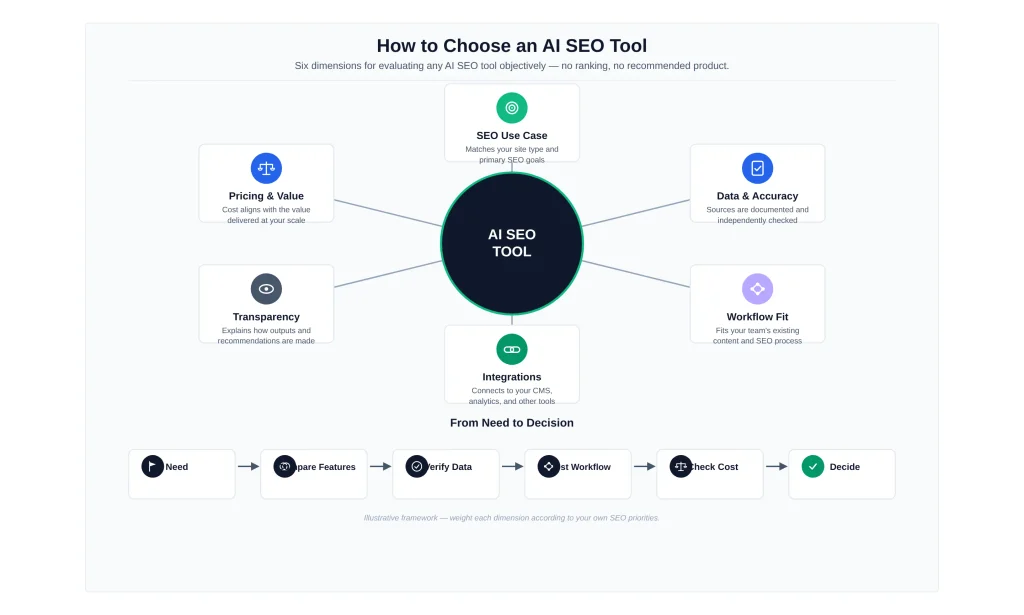
Rather than starting from “which tool is best,” it’s more useful to start from a consistent set of questions — including for a tool not covered on this page. This is the same rubric applied to every tool named above, regardless of whether it happens to have an affiliate program.
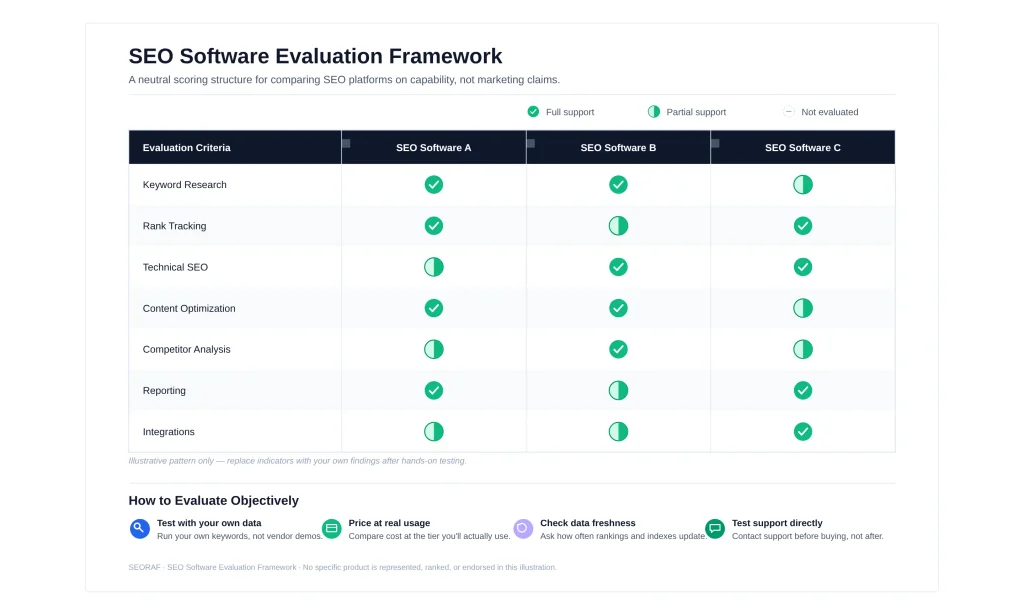
Core AI Capability
What is the AI actually doing — semantic comparison, intent classification, text generation, or AI-platform monitoring? Vague claims (“AI-powered insights”) are a signal to dig into the product documentation before trusting the label.
Pricing & Free-Tier Access
Does the tool offer a genuinely usable free tier or trial? Is pricing per seat, per project, or per keyword/prompt tracked? Check current pricing directly on the vendor’s site — published third-party figures for this market frequently disagree, and any number quoted elsewhere should be treated as a starting point pending that check.
Integrations
Does it connect to Google Search Console, Google Analytics (GA4), and your CMS (commonly WordPress)? Manual export/import erodes the time savings AI is supposed to provide.
Ease of Use
Can someone use it productively within the first session? This matters more for a solo operator than for an agency with staff dedicated to learning a complex platform.
Data Accuracy & Transparency
Does the vendor explain where its data comes from? Tools vague about methodology — particularly AI-visibility tools — deserve more scrutiny before you rely on their numbers.
Scalability for Teams/Agencies
Does pricing and feature set hold up going from one site to several, or from solo to a small team? Some budget-friendly tools get expensive fast once you add users or tracked items.
AI SEO Tools by Use Case
A note on how to read this section: tools are grouped by the problem they solve, because “best” depends entirely on what you’re fixing. None of the specific pricing, feature details, or capabilities below should be treated as final — verify each directly with the vendor first. This guide has not conducted formal, side-by-side hands-on testing of every tool named; where a full independent review exists, it’s linked, and that review states plainly whether hands-on testing was involved.
Affiliate disclosure for this section specifically: the outbound links below currently go to each vendor’s plain, non-affiliate site. Some may become affiliate links in future, meaning a signup through them could earn SEORAF a commission at no extra cost to you — if and when that’s active for a given vendor, this disclosure will say so explicitly. Whether a program exists has no bearing on which tools are covered or how they’re described.
All-in-one SEO + AI visibility
For a reader who wants one platform covering keyword research, technical auditing, and some AI-visibility tracking, established all-in-one platforms (see SEORAF’s SEO tools comparison) are generally the starting point, since they consolidate the most functions into one subscription. SE Ranking is an example of an all-in-one platform that offers AI-visibility tracking. Confirm the current scope and plan availability directly rather than relying on a single overall label.
Check current pricing on SE Ranking →
Content Optimization
NeuronWriter (NeuronWriter’s review) is positioned toward the budget end of this category; Surfer SEO is an established mid-tier option; Clearscope leans toward editorial teams willing to pay a premium for a cleaner writer-facing interface. Confirm current scoring methodology and pricing directly before choosing between them.
Explore NeuronWriter →See Surfer SEO’s official features →Check current pricing on Clearscope →
Content Strategy & Topical Authority
MarketMuse (MarketMuse’s review) is built specifically around site-wide gap analysis and cluster planning rather than single-article scoring — a better fit if your bottleneck is strategy, not editing.
AI-Assisted Writing
Writesonic (Writesonic’s review) covers broad content and marketing-copy generation with a usable free trial; Outranking (Outranking’s review) leans more toward a structured, brief-driven SEO writing workflow, though its site and pricing pages showed signs of instability during recent research — confirm the site is fully working before relying on it. Which fits depends on whether you want an open-ended writing assistant or a guided SEO-specific process.
Check current pricing on Writesonic →
Keyword Research
If keyword clustering and topic-mapping at scale is the priority, a dedicated keyword-research tool (or the keyword module of an all-in-one platform) generally beats a content or writing tool, which typically has weaker keyword-discovery features. See SEORAF’s best keyword research tools guide.
WordPress Technical SEO
Rank Math (Rank Math’s review) is the clearest fit if you’re specifically on WordPress and want AI-assisted schema and metadata generation baked into a plugin you already use.
See Rank Math’s official features →
AI Visibility / GEO Tracking
SEORAF has not independently verified a specific dedicated AI-visibility tracking vendor closely enough to recommend one by name yet. This category is changing quickly and new entrants appear often — when this section is updated with a named pick, it will carry the same disclosure and verification standard as everything else on this page.
Small Businesses & Solo Operators
AI SEO tool marketing often emphasizes agency and enterprise workflows. For a one-person operation, start with the single category that addresses the most important current bottleneck. Rank Math’s free tier and NeuronWriter’s budget positioning are both reasonable low-commitment starting points to evaluate first.
Explore Rank Math’s free version →Check current pricing on NeuronWriter →
This is also the situation SEORAF itself is built around — a solo-run, independent resource rather than an agency stack. If you’re weighing a similar decision for your own site and want a second opinion on a specific tool, reaching out directly is a reasonable option; there’s no consultation package being sold on this page, just an offer to answer a specific question if one comes up.
Free Options
Rank Math’s free WordPress plugin and MarketMuse’s limited free tier (a capped number of monthly queries) are two straightforward free-entry options among the tools named here. Ubersuggest’s low-cost entry tier and Moz’s free Community account are also worth a look if you want to compare a broader set of low-commitment starting points. Confirm current limits directly, since free-tier terms in this market change often.
Explore Rank Math’s free version →Check MarketMuse’s free tier →
Agencies
Agencies managing multiple client accounts typically need white-label reporting, multi-project support, and predictable per-seat pricing. All-in-one platforms and Rank Math’s Agency-tier plan (confirm current terms) tend to build specifically for this use case.
What AI SEO Tools Can’t Do (Where Human Expertise Still Matters)
It’s worth being direct about this, because most content in this space glosses over it in a single caveat sentence rather than treating it as its own topic.
Editorial Judgment, Brand Voice & Original Insight
AI-generated drafts, even from the better content-generation tools, tend to be competent but generic. They can structure a well-organized article and hit the right keywords, but they don’t have your actual experience, your specific client stories, or a genuine point of view. The articles that perform best long-term usually start from an AI-assisted draft or brief and then get substantially shaped by a human who knows the subject and the audience.
E-E-A-T and Human Review
Google’s guidance on content quality has increasingly emphasized experience, expertise, authoritativeness, and trustworthiness (E-E-A-T), a topic covered at more length in SEORAF’s guide to future-proof SEO. An AI tool can help you structure content that signals those qualities, but it can’t manufacture actual first-hand experience or genuine expertise.
Risks of Over-Reliance on AI-Generated Content
Publishing large volumes of lightly edited AI-generated content carries real risk: factual errors that weren’t caught, a homogenized voice, and in some cases scrutiny from search engines around low-value, mass-produced content. Google’s own position, laid out in its official guidance on AI-generated content on the Search Central blog, is that it rewards quality and helpfulness “however it is produced,” while using automation — AI included — primarily to manipulate rankings remains a spam-policy violation. It’s worth checking that this remains Google’s current published position at the time you’re reading this.
Using AI SEO Tools Responsibly
- Fact-check anything AI-generated before it publishes. The writer, not the tool, is responsible for what goes live.
- Don’t let a content score replace judgment. A high score means the draft covers expected topics — not that it’s accurate or genuinely useful.
- Be honest with clients about what’s automated. It affects expectations about turnaround time, cost, and review depth.
- Avoid guarantees you can’t back. No tool can guarantee a specific ranking, traffic number, or timeline.
- Keep a human in the loop at scale. Spot-checking a sample isn’t the same as reviewing each page.
When You Might Not Need AI-Visibility Tracking Yet
Most content in this space is written by vendors or affiliates with an incentive to recommend AI-visibility tools broadly, and it’s worth saying plainly: not every site needs one yet. If your site gets little to no traffic from AI platforms currently (check referral sources like chat.openai.com or perplexity.ai in Google Analytics), a dedicated AI-visibility subscription may be premature spend. Prioritize foundational work — solid content, clean technical SEO, working schema — first, and revisit this once your own analytics suggest a meaningful share of your audience is using AI platforms to find you.
Building an AI-Powered SEO Workflow
Rather than reviewing tools in isolation, here’s how they fit together across an actual pipeline.
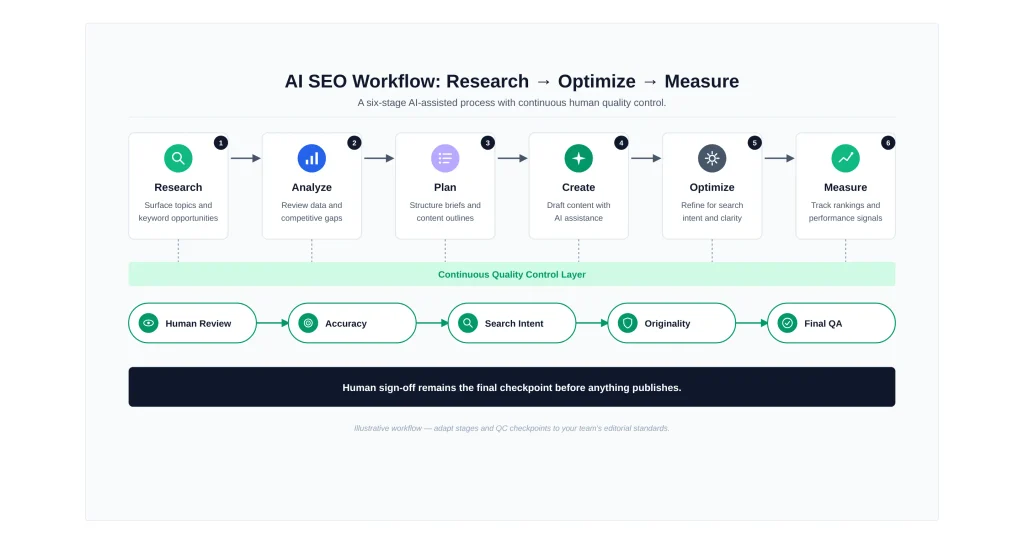
Research & Keyword Discovery
Start with keyword research and clustering — SEORAF’s keyword research checklist walks through this step.
Content Briefs & Outlines
Use a content-brief or SERP-research tool (Outranking, for example) to turn raw keyword data into an actionable outline. A topical authority map shows how an individual brief fits the wider cluster.
Drafting & Optimization
Draft the content — by hand, AI-assisted, or AI-generated and heavily edited — then run it through a content-optimization tool (NeuronWriter, Surfer, or Clearscope) to check for gaps before publishing.
Publishing & Technical Readiness
Confirm the content is technically accessible — schema, crawlability — via a full technical SEO audit. On WordPress, Rank Math covers much of this at the plugin level.
Tracking Rankings and AI Visibility Over Time
Monitor traditional rankings as usual, and — if you’ve determined it’s worth the investment — track AI-platform visibility once a dedicated, verified tool is in place.
Limitations of This Guide
- This page was researched from public vendor documentation, product sites, and general industry discussion — not from a formal, side-by-side hands-on testing process across every tool named, and it says so explicitly wherever that distinction matters.
- Pricing, feature sets, and free-tier availability in this market change frequently and are reported inconsistently across third-party sources. The vendor’s own site is the final source of truth, not this page.
- SEORAF is one person, not a review lab. Category coverage is prioritized over exhaustive feature comparisons for every product on the market.
- Nothing here is a guarantee of ranking improvement, traffic growth, or any other outcome.
Frequently Asked Questions
How should I choose an AI SEO tool?
There isn’t a single one — it depends on your bottleneck. If you’re optimizing individual articles, a content-optimization tool like Surfer SEO, Clearscope, or NeuronWriter fits. If you need topical strategy across a whole site, MarketMuse is built for that. If you’re on WordPress and want AI-assisted on-page and schema work, Rank Math covers that. This page is organized by category for exactly this reason.
Are AI SEO tools worth it?
They can be useful when a tool directly addresses a real workflow bottleneck. The practical test is whether the time or capability gained is relevant to the work you actually need to do; otherwise, a new subscription may add cost without solving a meaningful problem.
Can AI SEO tools replace an SEO specialist?
No, not fully. AI tools can automate a significant amount of repetitive analytical and drafting work, but strategic decisions still require human judgment.
What are some free or low-commitment AI SEO options?
Rank Math offers a free WordPress plugin, while MarketMuse has offered a limited free tier. Mangools and Moz also have limited free access in some areas. Confirm current limits directly on each vendor’s site before relying on them.
How do I track AI Overview or ChatGPT visibility?
This generally requires a dedicated AI-visibility tracking tool or, on a smaller scale, manually running prompts and recording results. There isn’t currently a free, official dashboard equivalent to Google Search Console for this.
Is AI-generated content penalized by Google?
Not automatically. Google states directly on its Search Central blog that its ranking systems reward quality content “however it is produced.” Using automation with the primary purpose of manipulating rankings is what violates its spam policies.
Do AI SEO tools work with WordPress?
Many do. Rank Math is built specifically as a WordPress plugin; others vary in integration depth — check directly for any specific tool you’re considering.
What’s the difference between SEO, GEO, and AEO?
See the dedicated section above — in short, SEO targets traditional rankings, GEO targets visibility in AI-generated answers, and AEO focuses on directly answering specific questions.
Pricing, features, free-tier terms, and integrations can change. Check the vendor’s current documentation and pricing before making a purchase decision. This page is an independent editorial comparison, not a guarantee of outcomes.