
Best SEO Tools for Beginners: 9 Tools to Start With
Last reviewed: 3 October 2026. Vendor facts were checked on that date.
The best SEO tools for beginners are usually a short list, not a long one. If you are new to SEO, start with free tools that report on your own site, such as Google Search Console. Add one keyword, audit, or rank-tracking tool only when a specific question calls for it, and leave specialist tools for later.
Here, “best” means best fit for a stated need, not a ranking. This guide compares nine tools by what their vendors document, what each one limits, and who it suits, so you can choose based on your goal, budget, and comfort level. It helps you choose a first tool. It does not rank every SEO tool, list every free option, or compare tools by category or job in depth, because those topics have their own pages. This guide is part of SEORAF’s SEO tools hub. For comparisons across skill levels, see the best SEO tools overall.
What SEO tools do for beginners
An SEO tool is software that reports how a site appears in search, finds keywords, checks for technical problems, or tracks rankings. Google’s SEO Starter Guide describes SEO as helping search engines understand your content and helping people decide whether to visit your site. Tools support that work. They do not replace it, and none of them can promise rankings or traffic.
For someone starting SEO, tools cover six jobs:
- Measuring your own site: seeing which searches bring people to your pages and whether Google has indexed them. Indexing means Google has stored a page so it can be shown in results.
- Keyword research: finding topics and phrases people search for.
- Site auditing and technical SEO: finding broken links, missing page titles, redirects, and crawl problems.
- Rank tracking: watching how your positions change over time.
- Backlink and competitor research: seeing who links to a site and what competitors target.
- On-page and content optimization: getting guidance while you write or edit a page.
Editorial view: beginners rarely need all six at once. Enterprise suites, multi-client dashboards, agency reporting, and large-scale crawling usually solve problems that appear later. For a closer look at each function, see SEO tools by category.
What to look for in a beginner SEO tool
This guide treats a tool as beginner-friendly when three things are true: you can test it on your own site for free or on a trial, its reports explain what they measure, and its limits are stated. That is an editorial definition, not a vendor claim. Use these criteria to check any tool, including ones not covered here.
- Learning curve and clarity. A tool whose numbers you understand is more useful than a powerful one you never open. Google, for example, offers free Analytics courses and a demo account.
- Focus or coverage. Some tools do one job. All-in-one platforms cover several. Neither is better in general. It depends on whether you have one question or many.
- First-party data or estimates. Google Search Console reports data about your own site in Google Search. Google describes Keyword Planner’s search figures as estimates. Editorial view: different keyword tools can show different figures for the same phrase, so treat any keyword number as a rough guide.
- Free access and its real limits. “Free” can mean a permanent free tool, a limited free account, or a time-limited trial. These are different, and the limits matter.
- Cost to start and cost to stay. Check the entry price, what happens after a trial, and whether plans differ by usage limits or by features.
- Fit for your site. Some tools only work on WordPress. Some only analyze sites you have verified as yours.
- Exit path. Check whether you can export your data before you commit to a paid plan.
The best SEO tools for beginners, by stage
The stages below describe a learning path, not a ranking by merit or commercial relationships. The tables and the tool-by-tool guide use a separate order: Google’s free tools first, then other tools with a free version in alphabetical order, then paid platforms with a free account or trial in alphabetical order.
- Stage 1, measure your own site: Google Search Console, Google Analytics 4, and Ahrefs Free (a free audit for sites you can verify).
- Stage 2, add one tool for one question: Google Keyword Planner, Mangools, SE Ranking, and Ubersuggest.
- Stage 3, specialists: Screaming Frog SEO Spider for crawling and Yoast SEO for WordPress writing.
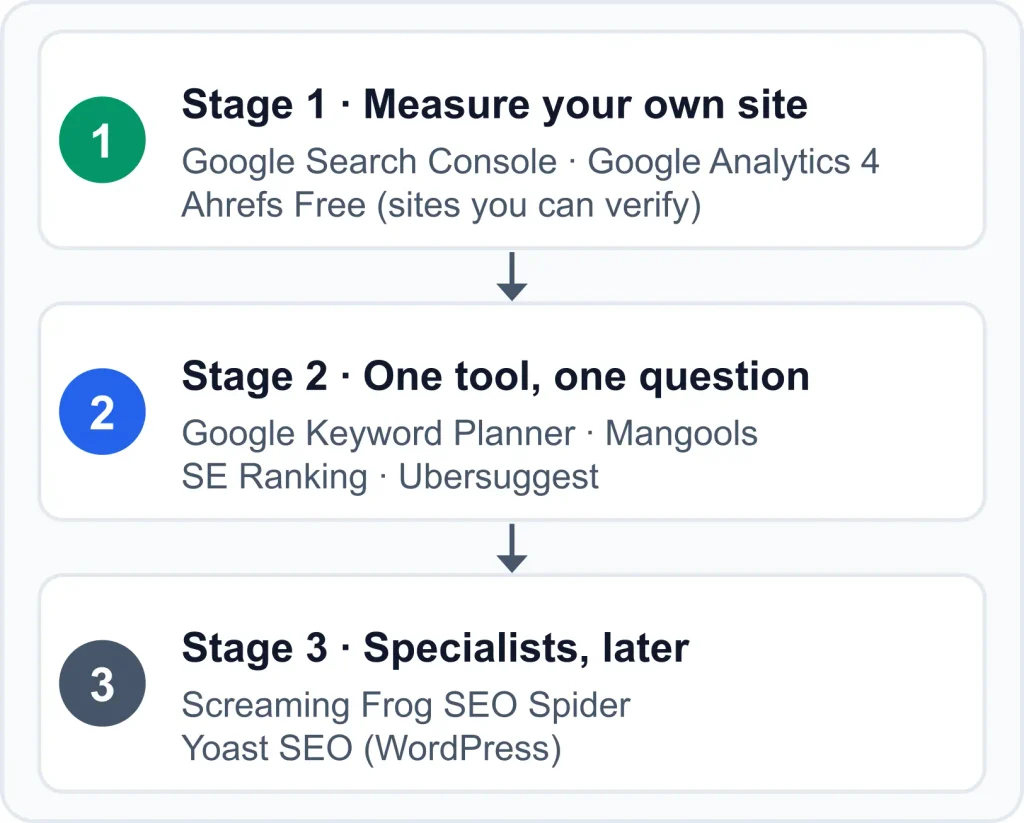
An editorial learning path, not a ranking: measure your own site first, add one tool for one question, then add specialists when a specific need appears.
Other platforms, including Semrush and Bing Webmaster Tools, are not covered here. This guide could not confirm their current features, limits, and prices from official vendor pages, so it does not describe them. They can be added once official details are verified.
Comparison table: what each tool covers and costs
The first table shows which jobs each tool covers. The second shows free access and entry cost. Entries marked “third-party” could not be confirmed on the vendor’s own page.
What each tool covers
| Tool | Best suited to (editorial) | Keyword research | Site audit | Rank tracking | Backlinks and competitors |
|---|---|---|---|---|---|
| Google Search Console | Seeing how Google finds and shows your site | Shows queries your site already appears for; no keyword discovery documented | Indexing and crawl reports and alerts; no site crawler documented | No dedicated rank tracker documented; the Performance report shows search traffic data for your queries and pages | Lists sites linking to yours; no competitor data documented |
| Google Analytics 4 | Understanding visitor behavior | None documented | None documented | None documented | None documented |
| Google Keyword Planner | Free keyword ideas | Yes, with search and cost estimates | None documented | None documented | None documented |
| Ahrefs Free | A free audit plus your own keywords and backlinks | Your own site’s ranking keywords only | Yes, 170+ technical and on-page checks | Not listed in the free tier | Your own backlinks only; competitor analysis needs a paid plan |
| Screaming Frog SEO Spider | Crawling a small site for technical issues | None documented | Yes, a crawler that finds broken links, errors, redirects, and meta data issues | None documented | None documented |
| Yoast SEO | On-page guidance while writing in WordPress | None documented | Page-level guidance while you write; no site crawler documented | None documented | None documented |
| Mangools | Keyword research and rank tracking | Yes (KWFinder) | No site audit documented | Yes (SERPWatcher) | Backlink research (LinkMiner) |
| SE Ranking | Tracking, audits, and research in one dashboard | Yes (third-party) | Yes, website and on-page audit | Yes, daily keyword tracking | Backlink and competitor research (third-party) |
| Ubersuggest | One platform with a free account | Yes (third-party) | Yes; the vendor’s FAQ refers to finding errors and issues with your site | Yes (third-party) | Backlink and competitor features (third-party) |
Capabilities as documented by vendors, checked October 2026. “None documented” means the feature does not appear in the sources reviewed for this guide. “Best suited to” is editorial interpretation.
Free access and entry cost
| Tool | Free access or trial | Paid entry | Source |
|---|---|---|---|
| Google Search Console | Free | None | Vendor |
| Google Analytics 4 | Free for standard properties | None for standard properties | Vendor |
| Google Keyword Planner | Free tool; basic features need completed Google Ads account setup | None | Vendor |
| Ahrefs Free | Free for unlimited verified websites; 5,000 crawl credits per project per month | Starter plan listed from $29 per month | Vendor |
| Screaming Frog SEO Spider | Free version, up to 500 URLs per crawl | £199 for a single licence for one year; the page also lists lower per-licence prices (third-party sources describe these as volume discounts) | Vendor |
| Yoast SEO | Free plugin | Premium $118.80 per year excluding VAT, for one site | Vendor (Premium page) |
| Mangools | Free plan with no credit card; limits refresh every 24 hours | Not shown because sources disagree | Vendor FAQ |
| SE Ranking | 14-day free trial; third-party sources report no permanent free plan | Third-party sources put the Core plan at roughly $100 or more per month on annual billing | Vendor and third-party |
| Ubersuggest | Free account; one-time 7-day trial on monthly plans; free daily limit unconfirmed | Not shown because sources disagree; lifetime plans are final and non-refundable | Vendor |
Prices, trials, and limits change. Confirm them on the vendor’s page before paying.
Tool-by-tool guide
In the entries below, “Suits” and “Beginner use cases” are editorial interpretation, and statements about what a tool does not document reflect the sources reviewed for this guide. Other details come from the linked vendor pages unless marked third-party.
Google Search Console
Google Search Console is Google’s free service for monitoring and troubleshooting a site’s presence in Google Search results.
- Useful for: confirming Google can find and crawl your site, checking indexing problems and requesting re-indexing, seeing which queries show your site and how often people click, and receiving alerts about indexing and spam issues. Google also says it shows which sites link to yours. Google’s Search Console overview lists these functions.
- Suits: anyone who owns or manages a site and wants measured data before paying for estimates.
- Beginner use cases: checking that new pages are indexed, seeing which queries your pages already appear for, and learning what Google reports about your site.
- Limitations: it covers Google Search only and only sites you have verified as yours. Google’s overview does not describe keyword discovery or a dedicated rank tracker. Its Performance report shows search traffic data for the queries and pages that already bring visitors.
- Free or paid: free. Google says you do not have to sign up to be included in search results, though it helps you understand how Google sees your site.
- AI features: Google says traffic from AI Overviews and AI Mode is included in the overall search traffic reported in Search Console. It also says no special optimization or structured data is required, and that a page must be indexed and eligible to show with a snippet. See Google’s guidance on AI features. No tool can promise inclusion.
- Next step: verify your site, using the Google overview linked above to see what each report shows.
Google Analytics 4 (GA4)
Google Analytics 4 is Google’s analytics platform for websites and apps. It is a measurement tool, not an SEO tool.
- Useful for: event-based reports. A Google Ads Help page describing Google Analytics says it collects event-based data from websites and apps to create reports with insights into your business. Google’s training guide says standard properties help you understand how customers engage with your website or app at no cost.
- Suits: site owners who want to connect search visits to what visitors do next.
- Beginner use cases: seeing how visitors engage with your pages after they arrive.
- Limitations: the sources reviewed do not describe keyword research, page audits, rank tracking, or backlink analysis in GA4.
- Free or paid: standard properties are the free version. Google’s Analytics 4 training and support guide lists free courses on Analytics Academy and a demo account.
- Next step: read the training guide linked above and look at the demo account before you set up your own property.
Google Keyword Planner
Google Keyword Planner is a free keyword research tool inside Google Ads.
- Useful for: discovering keywords related to your business and seeing estimates of the searches they receive and the cost to target them. You can start from keywords or from a website, according to Google’s Keyword Planner help page.
- Suits: beginners who want free keyword ideas and accept an ads account step.
- Beginner use cases: brainstorming topics and checking related phrases.
- Limitations: it is built for Search ad campaigns, and its figures are estimates. One version of Google’s help page says you must finish account setup with billing information to use basic features. The Google help pages reviewed for this guide do not describe an organic difficulty metric.
- Free or paid: the tool is free.
- Next step: read the help page linked above and check what account setup it asks for before you start.
Ahrefs Free (formerly Ahrefs Webmaster Tools)
Ahrefs Free is the free tier of Ahrefs. Its page states that Ahrefs Webmaster Tools is now Ahrefs Free.
- Useful for: free access to Web Analytics, Site Audit, and Site Explorer for verified websites. Site Audit scans for 170+ technical and on-page issues and tracks a Health Score. Site Explorer shows the keywords your site ranks for in Google and who links to you.
- Suits: site owners who want an audit beyond Search Console and can verify their own site.
- Beginner use cases: finding technical issues, reviewing your own backlinks, and seeing which pages bring organic traffic.
- Limitations: you get 5,000 crawl credits per verified project per month, and up to 1,000 backlinks and keywords are visible at once. Analyzing competing sites requires a paid subscription, and the free tier does not list keyword discovery or rank tracking.
- Free or paid: free for unlimited verified websites, with a paid Starter plan listed from $29 per month. See Ahrefs’ Webmaster Tools page.
- AI features: the page lists AI Content Helper with one free document per month.
- Next step: review the free limits on the Ahrefs page linked above, then verify one site to see what Site Audit reports.
Screaming Frog SEO Spider
Screaming Frog SEO Spider is a website crawler for finding technical SEO issues. Third-party sources describe it as a desktop application.
- Useful for: finding broken links, errors, and redirects, and analyzing page titles and meta data. The vendor’s feature list also includes robots directives, hreflang, duplicate pages, and XML sitemaps.
- Suits: owners of small sites who want a technical crawl and can read technical output.
- Beginner use cases: checking a site of up to 500 URLs for broken links and missing titles.
- Limitations: the sources reviewed do not describe keyword research, rank tracking, or backlink research, and you should expect a learning curve (editorial view). The vendor’s page lists some advanced features, such as Google Analytics, Search Console, and PageSpeed integrations, in its feature list. Check which of them need a licence.
- Free or paid: the free version crawls up to 500 URLs. A licence lasts one year, and a single licence is listed at £199. The page also lists lower per-licence prices, which third-party sources describe as volume discounts. See Screaming Frog’s pricing page.
- Next step: count your site’s URLs to see whether the 500-URL free limit covers you, then check the free and licence feature lists on the pricing page linked above.
Yoast SEO
Yoast SEO is a WordPress SEO plugin with a free version and a paid Premium version.
- Useful for: on-page guidance while you write in WordPress. Yoast’s Premium product page lists a redirect manager, internal linking suggestions, optimization for up to five keyphrases per page, and AI drafting of titles and meta descriptions among Premium’s features.
- Suits: WordPress bloggers and small business sites.
- Beginner use cases: checking a post’s on-page setup before publishing.
- Limitations: it works on WordPress, and the sources reviewed do not describe keyword research data in it. Third-party comparisons describe the free plugin as covering essentials such as XML sitemaps and readability analysis, with optimization limited to one keyword per page and no redirect manager or internal linking suggestions.
- Free or paid: free plugin. Premium is listed at $118.80 per year excluding VAT, and one subscription covers one site or domain.
- Next step: confirm that your site runs on WordPress, then compare the free plugin with Premium on the Yoast page linked above.
Mangools
Mangools is a suite of SEO tools including KWFinder, SERPChecker, SERPWatcher, and LinkMiner.
- Useful for: keyword research (KWFinder), reviewing search results (SERPChecker), tracking rankings (SERPWatcher), and backlink research (LinkMiner). KWFinder’s keyword difficulty metric is based on SERPChecker data, according to Mangools’ FAQ.
- Suits: beginners whose first need is keywords and rankings.
- Beginner use cases: finding keyword ideas, looking at who ranks for them, and watching your own positions over time.
- Limitations: daily lookup limits apply, and no technical site audit is documented in the sources reviewed.
- Free or paid: the FAQ describes a free plan that needs no credit card, with limits refreshed every 24 hours. Paid prices are not shown here because the sources found disagree, so check the vendor’s pricing page and trial terms.
- Next step: read the FAQ linked above on limits, then check Mangools’ current plans and whether a trial is offered.
SE Ranking
SE Ranking is a paid SEO platform with a free trial, covering rank tracking, website audits, and research.
- Useful for: daily keyword tracking, website and on-page audits, and AI prompt tracking. The pricing page lists Core, Growth, and Enterprise plans. Core is listed with 2,000 keywords tracked daily and up to 250,000 audited pages per month.
- Suits: beginners who have a budget and want tracking, audits, and research in one dashboard.
- Beginner use cases: tracking rankings for a first set of keywords and running regular site audits.
- Limitations: it is paid after the trial, and its limits are set by plan. Third-party summaries put Core at roughly $100 or more per month on annual billing, a bigger commitment than the free tools above.
- Free or paid: the vendor lists a free 14-day trial with starter usage of up to 10 projects and 750 tracked keywords per day. Third-party sources report no permanent free plan. See SE Ranking’s pricing page.
- Next step: compare Core and Growth limits on the pricing page linked above. If you trial it, write down the one question you want answered first.
Ubersuggest
Ubersuggest is an SEO platform with a free account and paid plans. Its pricing page is hosted on neilpatel.com.
- Useful for: site audits. The vendor’s pricing FAQ says connecting Google Search Console lets it find more errors and issues with your site. Third-party sources also describe keyword research, rank tracking, and backlink and competitor features. The pricing page promotes AI features.
- Suits: beginners who want one platform covering several jobs and will test the free account first.
- Beginner use cases: researching keywords, running a basic audit, and tracking a small set of keywords.
- Limitations: plan limits apply, and the free account’s daily limit is unconfirmed. One third-party review reports upsell pressure toward the lifetime plan and smaller data caps than the largest platforms. Neither point is verified here. At the time of review, the vendor’s pricing page promoted a lifetime-access discount with an “offer ends soon” message. Judge a plan on its limits, not on a deadline (editorial view).
- Free or paid: you can downgrade to a free account, and monthly plans include a one-time 7-day trial. Lifetime plans are one-time purchases that are final and non-refundable. Prices are not shown because the sources found disagree. See Ubersuggest’s pricing page.
- Next step: compare plans and trial terms on the pricing page linked above, and run the free account on your own site before paying.
How to choose your first tool based on your SEO goal
Start from the question you need answered, not from a tool name. If you need X, consider tools in category Y.
| If you need to… | Consider this category | Examples on this page | Watch for |
|---|---|---|---|
| Know whether Google can find and index your pages | First-party search data | Google Search Console | Google only; your own site only |
| See what visitors do on your site | Web analytics | Google Analytics 4 | Not SEO-specific |
| Find topic and keyword ideas | Keyword research | Google Keyword Planner, Mangools, SE Ranking, Ubersuggest | Figures are estimates and differ between tools |
| Find technical problems | Site audit and crawling | Ahrefs Free, Screaming Frog, SE Ranking, Ubersuggest | Credit, URL, and page caps |
| Track positions over time | Rank tracking | Mangools, SE Ranking, Ubersuggest | Paid, with tracked-keyword limits |
| See who links to a site or what competitors target | Backlink and competitor research | Ahrefs Free (your own site), Mangools, SE Ranking, Ubersuggest | Competitor analysis is usually a paid feature |
| Get guidance while writing on WordPress | On-page and content optimization | Yoast SEO | WordPress only; free-version limits |
A starting point for matching a first need to a category. It is not a ranking.
Several tools above include AI features, but most beginners can set them aside at first (editorial view). When you are ready, see AI SEO tools. If your choice depends on a specific job such as local or ecommerce SEO, SEO tools by use case is the better next page.
Four questions narrow the choice quickly:
- What is my main goal? Learning SEO, growing a blog, checking technical health, or tracking rankings?
- What is my budget? Free only, a small monthly amount, or one annual licence?
- How hands-on do I want to be? Dashboards, or technical output?
- What specific question is blocking me now? “Is Google indexing my pages?” and “What should I write about?” call for different tools.
Free vs paid SEO tools: how to decide
Free tools cover a lot at the start: your site’s search performance (Search Console), visitor behavior (GA4), keyword ideas (Keyword Planner), and a limited audit of verified sites (Ahrefs Free). Paid tools typically add rank tracking, competitor research, and higher usage limits. Free is not better or worse than paid. A free tool you understand can serve you better than a paid one you do not.
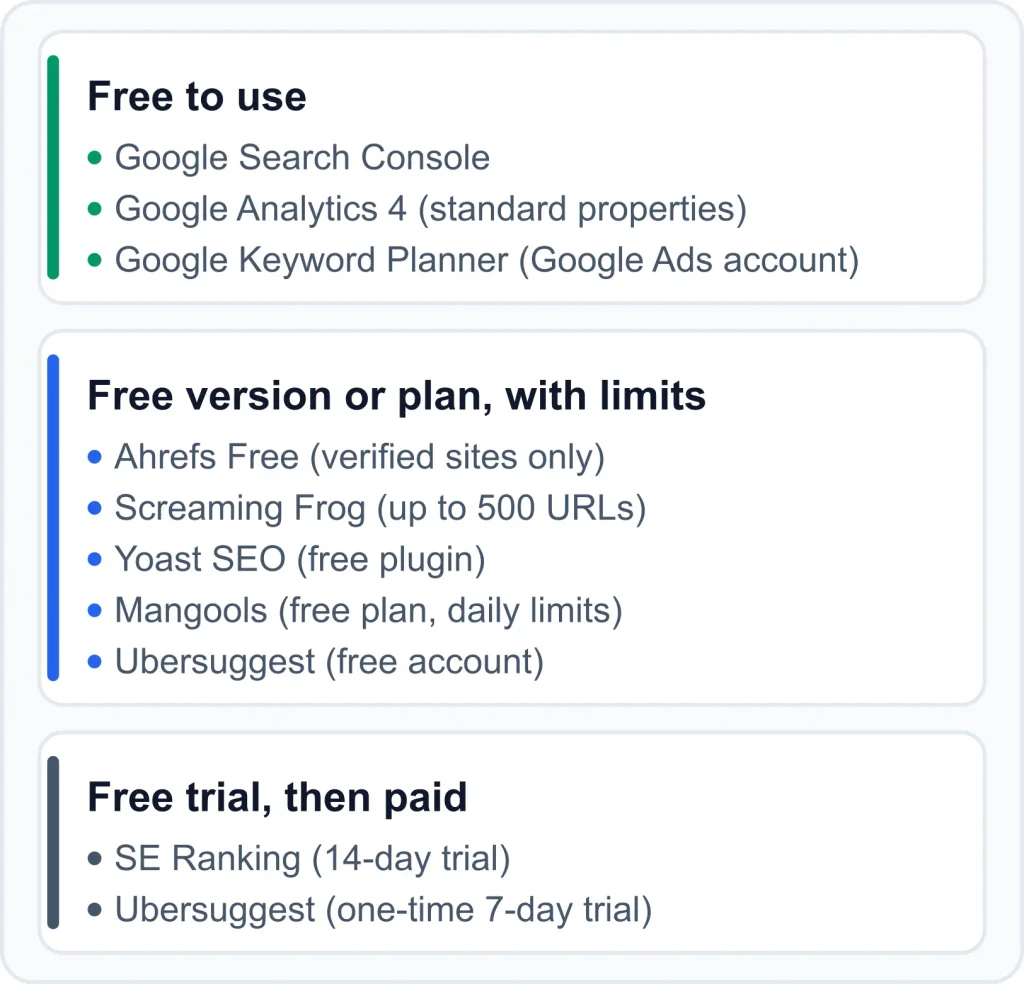
Free” takes different forms. Limits, trial lengths, and plans change, so confirm them on each vendor’s page before paying.
Paying may make sense when you can name a question the free tools cannot answer, such as how your rankings change week to week or what competitors target (editorial view). To trial a paid tool well:
- Write down the one question you want answered before you start.
- Run the trial or free account against your real site.
- Check the cancellation terms and what happens when the trial ends.
- Be cautious with lifetime plans. Ubersuggest states that lifetime purchases are final and non-refundable, so it is sensible to confirm the limits fit before buying (editorial view).
For more options at no cost, see free SEO tools.
A simple stack of SEO tools for starting out
These stacks are editorial suggestions, not prescriptions. The right stack depends on your site, budget, and how hands-on you want to be.
- Free-only stack: Google Search Console, Google Analytics 4, and Google Keyword Planner. Add Ahrefs Free if you can verify your site, and the free version of Screaming Frog if your site is under 500 URLs.
- WordPress blog stack: Google Search Console plus the free Yoast SEO plugin. Add one keyword source, either free or from a trial, when you need topic ideas.
- Ready-to-pay stack: Google Search Console plus one platform, chosen after a free account or trial. Mangools, SE Ranking, and Ubersuggest differ in limits, price, and the features they document (for example, no site audit is documented for Mangools), so compare them on the vendors’ pages.
Follow a one-new-tool rule: add a tool only when you can write down the question it will answer. If a free tool already answers it, you probably do not need the paid one yet (editorial view).
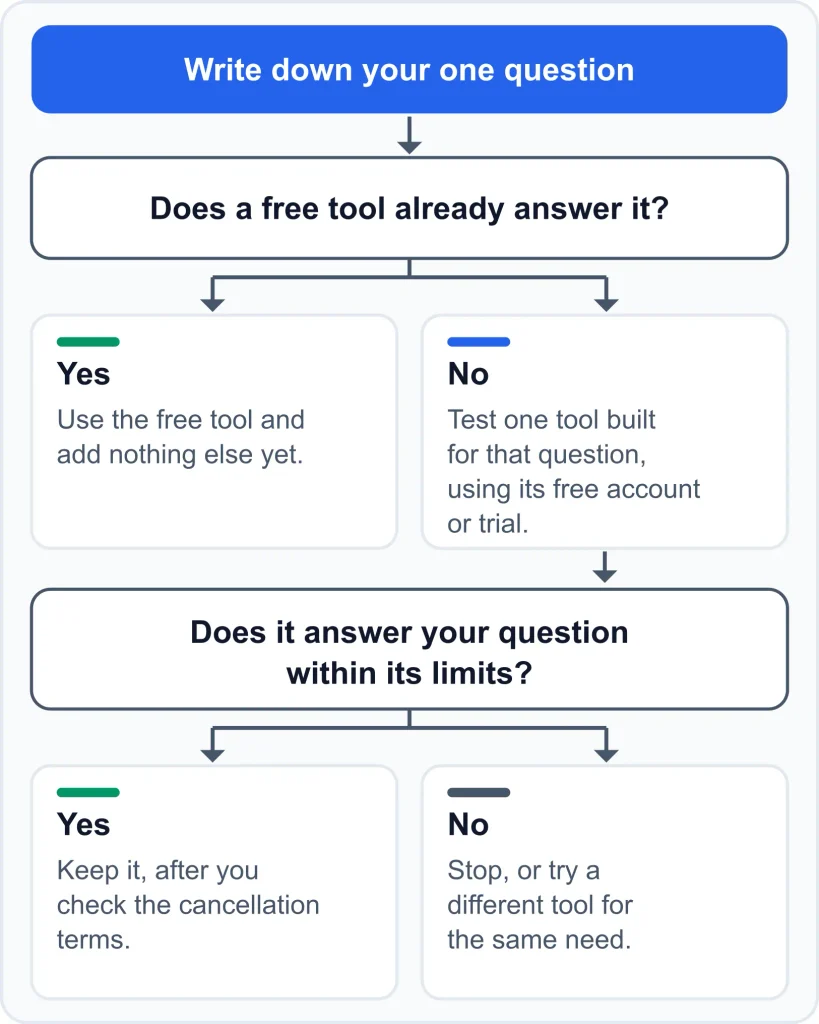
An editorial decision flow for adding a tool. It is a suggested habit, not a process documented by any vendor.
Common mistakes when choosing SEO tools
These are editorial observations, not vendor-documented facts.
- Buying an all-in-one before setting up Search Console. You lose the one dataset that is measured rather than estimated.
- Treating keyword numbers as exact. They are estimates, and Google itself calls Keyword Planner’s figures estimates.
- Chasing difficulty scores without knowing how they are built. Difficulty scores are vendor-specific. Mangools, for example, documents that its metric is based on SERPChecker data, so check how a tool builds its score before relying on it.
- Running several overlapping tools. More dashboards rarely bring more clarity.
- Trying to fix every audit flag. Audit tools surface many issues, and not all matter equally for your site.
- Choosing by feature count. Learning curve and fit usually matter more early on.
- Assuming a tool predicts rankings. Tools report data. They do not control results.
- Skipping the concepts. Learn what indexing, crawling, and search intent mean before relying on a dashboard to explain them.
Frequently asked questions about beginner SEO tools
What SEO tools should a beginner start with?
Start with Google Search Console, which is free and reports measured data about your own site in Google Search. Add Google Analytics 4 if you want visitor behavior, then one keyword, audit, or rank-tracking tool only when a specific question needs it.
Do I need a paid SEO tool as a beginner?
Not necessarily. Free tools cover your site’s search performance, visitor behavior, a limited audit of verified sites, and keyword ideas. Paid tools typically add rank tracking, competitor research, and higher usage limits.
Is Google Search Console enough to start?
It is enough to start measuring. Google describes it as a free service for monitoring and troubleshooting your site’s presence in Google Search. It does not describe keyword discovery or a dedicated rank tracker, so you may want another tool for those jobs later.
What are the easiest SEO tools for beginners?
Ease depends on you, so there is no single answer. Try the free tier or trial of the tools that match your question, and keep the one whose reports you can explain in your own words.
What is the best SEO software for beginners?
No single product is best for everyone. Match your first job (measuring your site, researching keywords, auditing, or tracking rankings) to a category, then test one tool from it.
How many SEO tools does a beginner need?
Often two or three: Google Search Console, possibly GA4, and one research or audit tool if a specific question calls for it.
What is the difference between first-party data and keyword-tool estimates?
First-party data comes from a platform about your own site, such as Search Console. Keyword-tool figures are modeled estimates, so treat any keyword number as a rough guide.
Can I do SEO with only free tools?
Yes, for the basics: search performance, visitor behavior, a limited audit, and keyword ideas. Among the tools covered here, rank tracking and competitor research are where free options thin out.
How long until I see results after using SEO tools?
Google’s SEO Starter Guide says you will likely want to wait a few weeks to judge whether your changes helped in Google Search results. A tool can show data sooner, but it does not speed up how search results change.
Do SEO tools guarantee better rankings?
No. They report data and flag issues. Results depend on your content, your site, and factors no tool controls.
Will using an SEO tool get my content into Google’s AI Overviews?
No tool can promise that. Google says specific optimization is not required for AI Overviews or AI Mode, a page must be indexed and eligible to show with a snippet, and standard SEO fundamentals still apply.
Sources and editorial notes
Vendor facts on this page come from the official pages below, checked in October 2026. Where an official page could not be reached, the detail is marked third-party or left out. Vendors change plans, limits, and prices often, so confirm current details before paying.
- Google Search Console overview
- Google Ads Help page describing Google Analytics and Google Analytics 4 training and support guide
- Google Keyword Planner help
- Ahrefs Free (Webmaster Tools) page
- Screaming Frog SEO Spider pricing
- Yoast SEO Premium product page
- Mangools FAQ
- SE Ranking pricing
- Ubersuggest pricing
- Google SEO Starter Guide
- Google: AI features and your website
Conclusion: your next step
For most beginners, the sensible order is Google Search Console first, one tool for one question second, and specialists such as Screaming Frog or Yoast SEO last. Which tool fits depends on your goal, budget, and how hands-on you want to be, not on a universal ranking. No tool on this page guarantees rankings, traffic, or AI Overview visibility. Each one reports data and flags issues, and acting on it is your work.
Your first step: add and verify your site in Google Search Console. It is free and first-party, and it gives you a baseline to compare every other tool against.
When you want a wider comparison, see the best SEO tools overall. If you would rather stay at no cost for now, browse free SEO tools. There is no deadline on any of this. Editorial view: if you cannot yet name the question a paid tool would answer, staying with free tools is a reasonable place to be.