
Best Content Optimization Tools (2026): 7 SEO Platforms Compared
Content optimization tools compare a draft with pages that currently rank for a search and suggest topics, terms and structural elements you may have missed. Used carefully, they can help organize research and identify content gaps. Used poorly, they can encourage writers to chase a score instead of helping readers. This guide compares seven content optimization tools by their documented features, pricing, usage limits and intended workflows.
I reviewed vendor websites and documentation for this comparison. I did not log into or hands-on test these products, so I do not claim that their suggestions improve rankings or outperform competing tools. I distinguish vendor-stated features from information I could not verify, and explain where plan limits may affect the real cost.
Last verified: 3 November 2026. Pricing, plan limits and trial terms can change. Confirm the current terms on each vendor’s website before purchasing.
Best Content Optimization Tools at a Glance
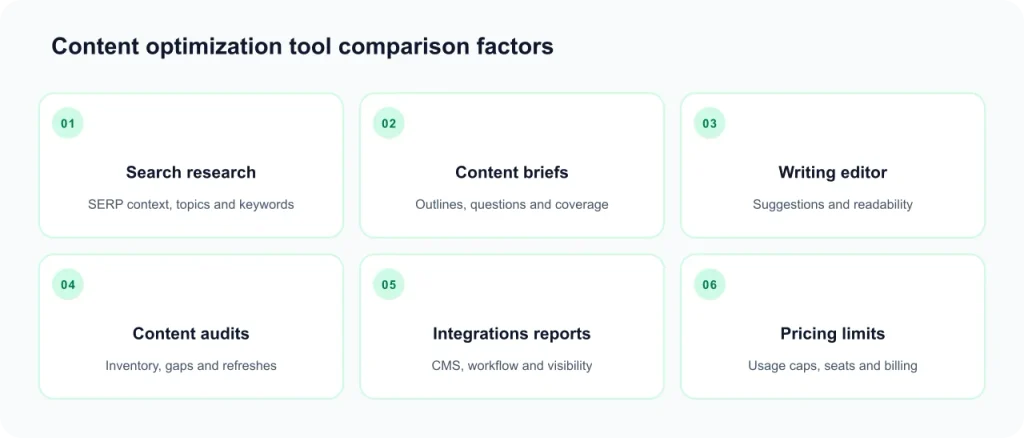
The comparison below summarizes features and limitations documented by the vendors. The order is based on workflow category, not product performance or an independent ranking. Prices are the figures recorded during the research update on 3 November 2026.
| Tool | Documented workflow | Entry price recorded | Free access | Important limitation |
|---|---|---|---|---|
| Surfer | Content editor, scoring, audits, topical maps and AI-visibility tracking | $49/month, billed yearly | No free plan; 7-day Pro trial for new accounts | Document limits and fair-use terms need checking |
| Clearscope | Content grading, inventory and query tracking | $129/month | 14-day trial | Draft, query and page limits; add-ons cost extra |
| Frase | SEO and GEO optimization, audits and AI-visibility tracking | $49/month, billed monthly | 7-day trial, no card | Starter plan has monthly article and audit limits |
| NeuronWriter | SERP analysis, content scoring, AI writing and internal linking | $23/month | Trial advertised; terms not verified | Some collaboration and integrations require higher plans |
| Dashword | Content briefs, optimization reports and monitoring | $99/month | First report free, no card | Reports consume credits |
| MarketMuse | Topic research, content inventory and briefs | Not publicly listed | Free tier with limited usage | Paid plan pricing is demo-led |
| Semrush SEO Writing Assistant | SEO, readability, tone and originality checks | Not verified | Not verified | Requires access to the Semrush ecosystem |
Vendor pricing and plan information recorded on 3 November 2026. Billing units differ between products, so monthly prices alone do not establish which tool offers the best value.
Which Content Optimization Tool Should You Consider?
There is no universal winner in this comparison. The tools cover different workflows, and the following suggestions are conditional matches based on documented features—not hands-on performance tests.
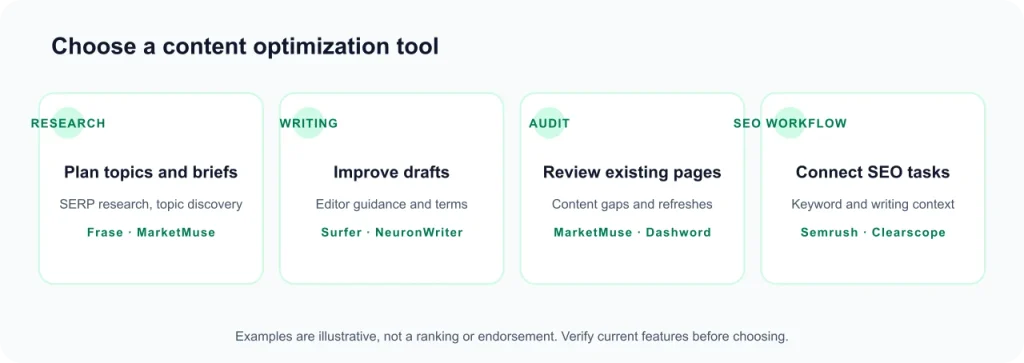
- For a broader content and SEO workflow: consider Surfer if you need an editor alongside documented audit, topical planning and AI-visibility features.
- For content grading and inventory: consider Clearscope if its grading workflow, inventory features and team access match your requirements.
- For combined SEO and GEO workflows: consider Frase if you want optimization, site audits and AI-visibility features in one product.
- For a lower published entry price: compare NeuronWriter’s Bronze plan with the monthly limits and collaboration features you actually need.
- For briefs and content monitoring: consider Dashword if its report-credit system and plan structure fit your publishing volume.
- For topic planning and content inventory: consider MarketMuse if its topic models, briefs and inventory workflow match your editorial process.
- For existing Semrush users: check whether SEO Writing Assistant is available in your current subscription before buying another tool.
Before choosing, compare the number of articles, reports, drafts or analyses included in the plan. These billing units are not interchangeable.
What Do Content Optimization Tools Do?
A typical content optimization workflow begins with a target keyword or topic. The software analyzes search results and identifies terms, subtopics, questions or structural patterns that appear in relevant pages. It then presents suggestions that writers can consider while preparing or editing a draft.
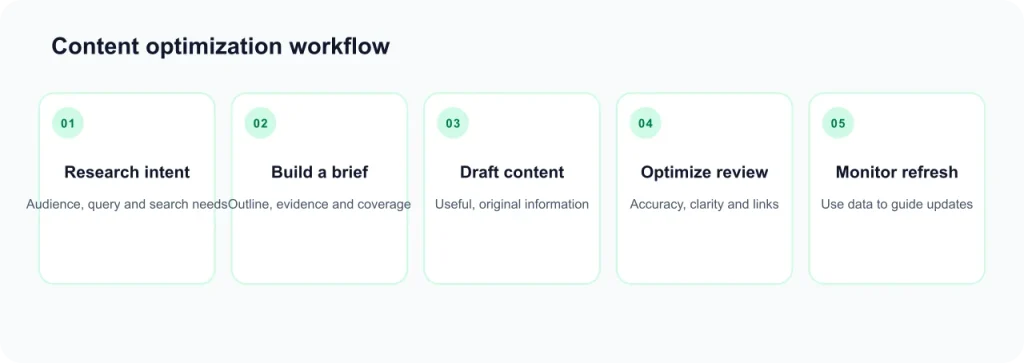
Many products also calculate a content score. This is a proprietary measurement created by the vendor. It may reflect suggested terms, topics or other signals, depending on the product. A score is not a Google metric and should not be treated as a direct measure of content quality.
Common features
- SERP analysis: examines search results for a target topic or keyword.
- Content editor: provides an environment for writing or editing a draft.
- Content scoring: measures a draft against the software’s own criteria.
- Content briefs: helps organize topics, questions and suggested sections before writing.
- Content audits: identifies existing pages that may need review or updating.
- AI visibility tracking: monitors selected brand or query mentions in supported AI platforms.
What these tools do not guarantee
A content optimization subscription does not guarantee indexing, rankings, traffic, conversions or citations in AI-generated answers. Search performance depends on many factors, including whether a page satisfies the searcher’s needs, the quality and originality of its information, technical accessibility and the wider competitive environment.
These products also serve different purposes from WordPress on-page plugins and general-purpose AI writing tools. Some combine multiple functions, but it is important to identify which workflow you are actually paying for. See the content SEO guide, semantic SEO guide and AI SEO tools for related topics.
How I Evaluated These Content Optimization Tools
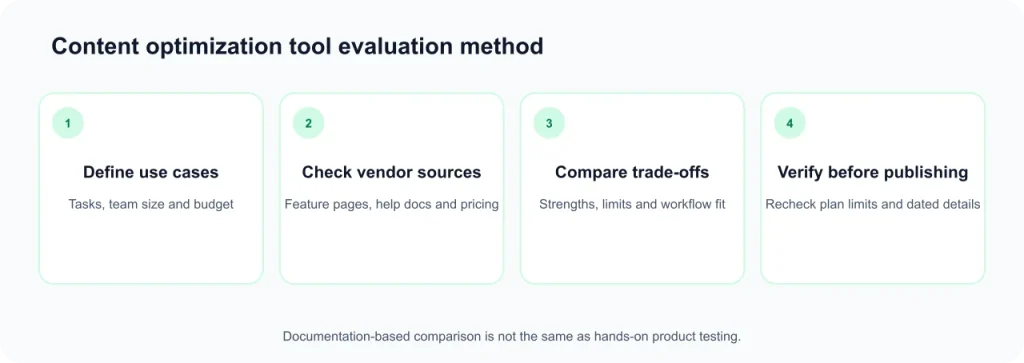
This is a documentation-based comparison, not a hands-on product test. I reviewed vendor pricing pages, product information and help documentation available during the research update. I did not independently test the accuracy of content suggestions, ease of use, customer support or ranking outcomes.
Evidence labels
- Vendor-stated: information published on an official vendor page or in its documentation. This describes what the vendor says, not independent proof of performance.
- Third-party reported: information found on review or directory websites. It is not treated as confirmed product fact.
- Unverified: information I could not confirm from an official source during the research update.
- SEORAF recommendation: an editorial suggestion based on the documented features and limitations described on this page.
Evaluation criteria
- Feature documentation: whether the vendor explains its editor, scoring, briefs and audit features.
- Workflow coverage: whether the product supports research, drafting, optimization or content refresh work.
- Scoring transparency: whether the vendor explains what its content score measures.
- AI-search features: which platforms and metrics the vendor says it supports.
- Integrations: documented support for Google Docs, WordPress, APIs or other workflows.
- Pricing transparency: whether plan prices and billing units are publicly available.
- Usage limits: document, report, draft, analysis, seat and project restrictions.
- Trial and free access: whether a free plan, trial or introductory report is available.
- Limitations: add-on costs, credit rules, plan restrictions and other purchasing considerations.
I also recorded whether vendors publish affiliate or referral programs. Their existence did not determine inclusion, product order or editorial conclusions. I do not treat vendor case studies or marketing claims as independently verified results.
Why these seven tools are included
The products included here document workflows that analyze search results and help users optimize content. I excluded general-purpose AI writers and WordPress SEO plugins because they serve different primary purposes. I also excluded Scalenut from this update because the pricing information I retrieved could not be reconciled with conflicting third-party figures.
The tool order follows workflow type rather than an overall ranking. I have not evaluated real-world performance or independently tested product output.
Content Optimization Tool Reviews
Each section summarizes vendor-documented features, relevant strengths and limitations. Pricing details are grouped in the pricing section to make plan comparisons easier.
1. Surfer
Vendor positioning: Surfer presents itself as an SEO and AI-search content platform for individuals, agencies and in-house teams. See its official pricing page.
Documented features: its product information lists a content editor, Content Score, AI optimization guidance, Surfy AI assistant, content audits, ranking-drop alerts, keyword research, topical maps and SERP analysis. The vendor also lists internal linking, plagiarism checking and AI-related writing features.
AI-search features: the pricing information reviewed lists visibility tracking across selected platforms, including ChatGPT, Perplexity, Google AI Mode, Google AI Overviews and Gemini. Available tracking varies by plan. MCP access is also listed.
Integrations: the plan information lists WordPress and Google Docs, with additional integrations and API access depending on the subscription tier.
Documented strengths
- Combines an editor with documented audit, topic-planning and AI-visibility features.
- Lists plan features, limits and seats on its pricing page.
- The vendor advertises support for multiple languages and a 7-day Pro trial for new accounts.
Limitations to consider
- The pricing page’s document limits need to be read alongside the vendor’s billing-period explanations.
- The top-tier unlimited document allowance is subject to a fair-usage policy.
- Annual subscriptions are charged upfront, according to the vendor’s plan information.
- Writers who only need occasional content scoring may not need the broader feature set.
May suit: users who want an editor and several supporting SEO content workflows in one platform, provided the plan limits match their publishing volume.
Related reading: Surfer review, Frase vs Surfer and NeuronWriter vs Surfer.
2. Clearscope
Vendor positioning: Clearscope describes its product as a content discoverability platform for SEO and AI search. Its named modules include Expand, Discover, Write, Optimize, Protect, Localize and Linking. See the official pricing page.
Documented features: Clearscope provides content grading and a Content Inventory workflow. Its help documentation explains that Inventory pages are regraded against the SERP captured when the page was added, while a fresh SERP is fetched every 30 days. A Draft uses the SERP snapshot from the time it was created. As a result, a Draft grade and an Inventory grade may differ. See the vendor’s grade explanation.
AI-search features: the vendor lists query tracking across ChatGPT and Gemini, brand-visibility tracking and query fan-out awareness. These are vendor-defined features and metrics.
Integrations: I could not confirm the relevant integration details from the vendor pages reviewed for this update. Check the current integrations documentation before relying on a specific CMS or writing-platform connection.
Documented strengths
- Pricing information lists plan caps and add-on structures.
- The vendor lists unlimited users and projects on its plans.
- A 14-day trial and no-contract arrangement are stated by the vendor.
- Its help documentation explains why grades may differ between Drafts and Inventory.
Limitations to consider
- Tracked queries, pages, Discoveries and Drafts have usage limits.
- Additional capacity may require paid add-ons.
- Teams with high content volume should calculate expected usage before selecting a plan.
May suit: content teams that prioritize grading, inventory and documented content-management workflows.
Related reading: Clearscope review.
3. Frase
Vendor positioning: Frase presents itself as an SEO and GEO platform for content workflows. GEO refers to generative engine optimization. See the official pricing page.
Documented features: the vendor lists SEO and GEO content optimization, an AI agent, AI-visibility tracking, site audits, API and MCP access, and brand-voice features. Its Starter plan information lists one site, one user, 10 AI-optimized articles and 50 audit pages per month.
Important distinction: Frase’s GEO score is its own metric. It should not be confused with a Google ranking factor or a guarantee of visibility in AI-generated answers.
Integrations: Google Docs and WordPress have appeared in Frase marketing information, but I did not reconfirm their current availability for this update. Check the vendor’s latest integration documentation.
Documented strengths
- The Starter plan has a published monthly price.
- The vendor advertises a 7-day trial without requiring a credit card.
- Optimization, audits and AI-visibility features are listed in the product offering.
- The vendor advertises a discount for annual billing.
Limitations to consider
- Starter is limited to 10 articles and 50 audit pages per month, according to the reviewed plan information.
- I could not verify the prices of higher plans from the vendor information retrieved for this update.
- The vendor’s help documentation and pricing page did not show identical plan information during the research review.
May suit: users who want to explore SEO optimization, site audits and vendor-defined GEO features in one workflow.
Related reading: Frase review, Frase vs Surfer and Frase vs competitors.
4. NeuronWriter
Vendor positioning: NeuronWriter describes its product as an NLP-based SEO content optimization platform with AI writing features. Its pricing page was the vendor source reviewed for this comparison.
Documented features: the vendor lists five tiers: Bronze, Silver, Gold, Platinum and Diamond. Plans differ in projects, monthly content analyses and AI credits. The feature information reviewed lists AI templates, advanced draft mode, internal linking, schema explorer, SERP analysis and a Chrome extension.
Gold and higher plans list additional features, including unlimited team members, plagiarism checks, Google Search Console, WordPress and Shopify integrations, use of a user’s own OpenAI key and API access.
AI credits: the vendor says one credit can produce approximately 0.3 to 5 words depending on the selected engine. Actual output therefore varies by engine and usage.
Documented strengths
- Its Bronze plan has a relatively low published entry price among the products reviewed with public pricing.
- The vendor provides a tier comparison with feature and usage differences.
- Higher plans document additional collaboration and integration features.
Limitations to consider
- Bronze and Silver list read-only content sharing; broader team collaboration starts at Gold.
- The pricing page reviewed was undated.
- I could not verify annual prices or trial terms from a vendor page during this update.
- I did not retrieve vendor documentation explaining the complete content-score calculation.
May suit: individuals and smaller teams comparing a lower entry plan with the analysis limits and collaboration features they require.
Related reading: NeuronWriter review and NeuronWriter vs Surfer.
5. Dashword
Vendor positioning: Dashword describes Startup as a plan for individuals and small teams working on new content, while Business is positioned for teams handling new and existing content. See the official pricing page.
Documented features: the vendor lists content briefs, optimization reports and content monitoring. Both plans include API and MCP access and free, unlimited content scoring. Reports consume credits. Startup also lists an AI Writer, while Business adds bulk report creation and SSO. A Google Docs add-on is also listed by the vendor.
Documented strengths
- A two-plan structure makes the main plan differences easier to review.
- The vendor says content scoring is free and unlimited.
- The first report is offered free without a card, according to the vendor.
- API and MCP access are listed on both plans.
Limitations to consider
- Each generated report consumes a credit; Startup lists 30 reports per month.
- The advertised annual discount requires contacting the vendor.
- The vendor says users retain data access after cancellation but cannot generate new reports.
- Older Dashword articles may contain outdated prices, so use the current pricing page.
May suit: individuals and teams that want briefs, report-based optimization and content monitoring with a clearly described credit system.
Related reading: content brief template.
6. MarketMuse
Vendor positioning: MarketMuse focuses on content planning and optimization for brands, publishers and agencies. Its official pricing page was the source reviewed for this comparison.
Documented features: the vendor lists four tiers: Free, Optimize, Research and Strategy. Its pricing information describes Content Score as a measure of how many subtopics from a topic model a page includes. It also defines metrics such as Personalized Difficulty, Topic Authority, Competitive Advantage and Page Authority.
The vendor also documents content inventory features and multiple brief types. The tier information reviewed listed these limits:
| Tier | Documented limits |
|---|---|
| Free | Limited applications, 1 user and 10 queries per month |
| Optimize | 1 site inventory, 1 user, 100 tracked topics and 5 briefs per month |
| Research | 1 site inventory, 3 users, 1,000 tracked topics and 10 briefs per month |
| Strategy | 1 site inventory, 5 users, 10,000 tracked topics and 20 briefs per month |
Documented strengths
- The vendor defines its main content metrics.
- Inventory and brief features support topic-planning workflows.
- A limited Free tier is listed.
Limitations to consider
- Paid plan prices are not publicly listed in the pricing information reviewed.
- Each tier lists one site inventory, which may be restrictive for users managing several sites.
- Proprietary methods and patent-related statements are vendor claims, not independently verified in this comparison.
- I could not verify the relevant AI-search features during this review.
May suit: publishers and content teams whose primary need is topic planning, briefs and site-level content inventory.
Related reading: MarketMuse review.
7. Semrush SEO Writing Assistant
Vendor positioning: Semrush SEO Writing Assistant is a writing-support tool within the wider Semrush ecosystem.
Documented features: Semrush documentation says the tool analyzes the top 10 Google results and checks SEO potential, readability, tone of voice and originality. It also provides an overall score out of 10. See the vendor’s article optimization guide.
Semrush documentation also describes use in Google Docs, WordPress and the Semrush interface. See its SEO quality guide.
Plan access: I could not confirm the exact current subscription tier required for SEO Writing Assistant or verify a separate product price during this update. Check Semrush’s current plan documentation before subscribing.
Documented strengths
- May be convenient for users who already have access to Semrush.
- Combines SEO suggestions with readability, tone and originality checks.
- Documentation describes workflows in Google Docs and WordPress.
Limitations to consider
- It is part of the Semrush ecosystem rather than a separately priced standalone product in the information reviewed.
- I did not find sufficient documentation to confirm a dedicated brief builder or published-page audit within Writing Assistant itself.
- Exact plan placement and trial access were not verified for this update.
May suit: writers who already use Semrush and want to check whether their existing subscription includes the Writing Assistant workflow.
Related reading: best SEO tools and best all-in-one SEO tools.
Content Optimization Tools: Pricing, Free Plans and Trials
The following figures were recorded from vendor pages reviewed on 3 November 2026. They are not guaranteed to remain current. Check the vendor’s checkout page for the final price, billing period, taxes, usage limits and cancellation terms.
Published plan prices
| Tool | Plans recorded | Billing notes | Free access |
|---|---|---|---|
| Surfer | Discovery $49, Standard $99, Pro $182 and Peace of Mind $299 per month billed yearly; separate AI Search Analytics plan $82 per month billed yearly; Enterprise custom | Annual billing charged upfront. Vendor advertises a discount of up to 17%. Monthly-billed prices were not verified in the reviewed information. | No free plan; 7-day Pro trial for new accounts |
| Clearscope | Essentials $129 and Business $399 per month; Enterprise custom | Extra pages and Drafts may be add-ons. No annual price was shown in the reviewed information. | 14-day free trial |
| Frase | Starter $49 per month, billed monthly | Vendor advertises a 20% annual-billing discount. Higher plan prices were not verified. | 7-day trial, no card |
| NeuronWriter | Bronze $23, Silver $45, Gold $69, Platinum $93 and Diamond $117 per month | Annual prices were not verified on a vendor page. | Trial advertised; terms not verified |
| Dashword | Startup $99 per month; Business from $349 per month | Vendor advertises a 20% annual discount arranged through contact. | First report free, no card |
| MarketMuse | Paid prices not published in the reviewed information | Demo-led pricing | Free tier with 10 queries per month |
| Semrush SEO Writing Assistant | Separate price not verified | Plan placement not verified | Not verified |
Historical vendor pricing snapshot checked on 3 November 2026. Confirm current prices and plan conditions directly with each provider.
Free plans and trials
Free access varies considerably. MarketMuse lists a limited Free tier with 10 queries per month. Dashword offers a free first report, while Surfer, Clearscope and Frase advertise trials in the information reviewed. NeuronWriter also advertises a trial, but I could not verify its exact terms.
Google Search Console is a free option for measuring search performance. It does not replace a dedicated content optimization platform, but it can help you monitor clicks, impressions, queries and page performance before and after content updates.
Why plan limits are not directly comparable
Vendors count usage in different ways. One plan may include documents, another Drafts, reports, analyses or AI-optimized articles. A document in one product is not necessarily equivalent to a report or analysis in another.
For a fair comparison, estimate how many new articles and existing-page updates you handle each month. Then calculate how many billable units each tool would consume for that workload.
Billing details that can affect the real cost
- Annual billing: check whether the full annual amount is charged upfront.
- Credit expiry: confirm whether unused monthly or annual credits roll over.
- Add-ons: check whether additional pages, Drafts or reports cost extra.
- Fair-use policies: read the terms behind any unlimited allowance.
- Report credits: understand how many credits a typical report consumes.
- Team seats: confirm whether collaborators require paid seats or higher-tier access.
Which Content Optimization Tool Fits Your Situation?
Use these scenarios as a starting point. They are conditional recommendations based on the vendor-documented features in this comparison, not conclusions from product testing.
Bloggers and solo creators
Start by comparing the entry plans of NeuronWriter, Frase and Dashword. Check the number of monthly analyses, articles or reports included. A low entry price is not necessarily economical if your normal publishing volume exceeds the plan allowance.
SEO beginners
Try a free trial or introductory report before paying for a subscription. Use one new draft and one existing page to understand the workflow. Learn the fundamentals of search intent and content quality first through the content SEO guide. A high content score does not automatically mean a draft is useful or complete.
Freelance writers
Check where you write and how you share drafts. Surfer and Semrush document Google Docs workflows, while Dashword lists a Google Docs add-on. Confirm whether clients need their own accounts, whether collaboration is included and who pays for additional seats.
Content marketers and in-house teams
Compare team access, briefs, content inventory and refresh workflows. Clearscope lists unlimited users, while Surfer, Dashword and MarketMuse describe plan-based team or seat limits. NeuronWriter lists unlimited team members from Gold. Check the exact plan conditions before making a decision.
Small businesses
A paid content optimization platform may not be necessary if you publish only a small number of pages. First identify the actual problem: topic selection, content quality, technical SEO or an outdated page. If you already subscribe to Semrush, check whether SEO Writing Assistant is included before purchasing another product.
SEO professionals and agencies
Multi-site support, collaboration, reporting and automation may matter more than the entry price. Compare Surfer’s documented workspaces and API access, Dashword’s API and MCP features, and MarketMuse’s inventory workflow. Confirm the number of supported sites and usage limits for the exact plan you are considering.
Buyer’s Guide to Content Optimization Software
Do you actually need a content optimization tool?
Not always. If you publish occasionally, already understand your audience and can review search results manually, a paid tool may add unnecessary cost. It will not fix a page whose main problem is technical accessibility, weak information or a mismatch with search intent.
A dedicated platform becomes more useful when you publish regularly, manage many existing pages or need a repeatable process for briefs and content updates. The important question is whether the time saved and workflow features justify the subscription.
Features worth comparing before you buy
- Editor and score: understand what the score measures and whether the vendor explains its calculation.
- Content briefs: check how many briefs you can create and what information they contain.
- Audit or inventory: see how the tool identifies existing pages for review.
- Integrations: confirm support for Google Docs, WordPress, APIs or your preferred workflow.
- Language support: verify that the product supports the language in which you publish.
- Seats and projects: check how many people and websites your plan can accommodate.
- Usage limits: identify what happens when you exceed the included allowance.
- Cancellation terms: understand billing, renewal and data-access conditions.
AI-search features: what should you expect?
Some content optimization products now track brand mentions in AI answers or provide vendor-defined GEO scores. These features may help users monitor selected platforms, but their metrics are not universal standards.
Google’s guidance says there are no additional requirements to appear in its AI features and no special optimization is required for those features. See Google Search Central’s guidance on AI features. A vendor’s GEO score should therefore be treated as its own diagnostic—not a Google criterion or a guarantee of AI citations.
How to use a content score without chasing it
A content score can help you notice topics or concepts that may be missing from a draft. However, it is not a direct measurement of usefulness, originality, accuracy or reader satisfaction. Adding every suggested term can make an article repetitive and unnatural.
A reader-focused workflow is more reliable:
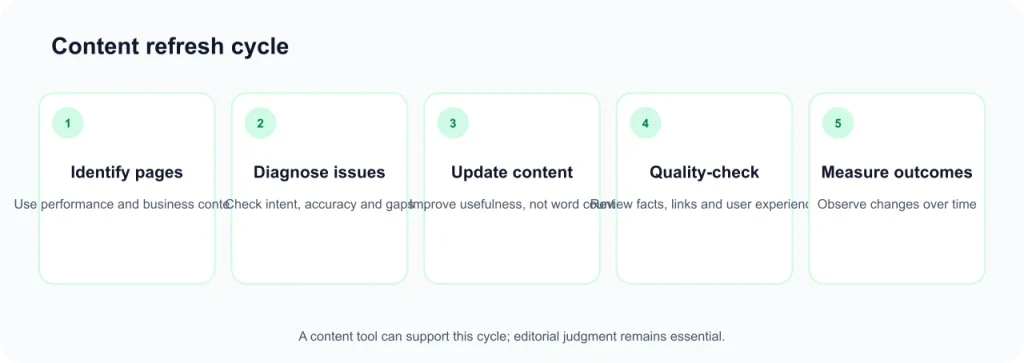
- Review the search results and identify the searcher’s likely intent.
- Build an outline using your own research and relevant tool suggestions. You can start with the content brief template or content outline generator.
- Write the draft to answer the reader’s questions clearly.
- Use the content score as a review prompt, not a target.
- Remove suggestions that do not fit the topic or improve the explanation.
- Check facts, originality, sources and editorial quality before publishing.
- Record a Search Console baseline and review performance over time.
What to check during a free trial
- Run one new draft through the editor.
- Review one existing page if the product offers an audit or inventory feature.
- Check whether the suggestions are relevant to your topic and audience.
- Record how many credits, reports or documents the workflow consumes.
- Test the integrations you actually need.
- Review billing, renewal and cancellation terms before the trial ends.
Frequently Asked Questions
What are content optimization tools?
Content optimization tools analyze search results and help writers review topics, terms and structure in a draft. Some also provide content scores, briefs, audits, inventory features and AI-search visibility tracking.
Do content optimization tools improve Google rankings?
No tool can guarantee better rankings. These products can help identify content gaps, but search performance depends on many factors. Their scores should not be treated as proof that a page will rank higher.
Is a content score a Google ranking factor?
No. A content score is a proprietary metric created by the software vendor. It is not a Google metric or a direct measurement of content quality.
Are there free content optimization tools?
Free access is limited among the products reviewed. MarketMuse lists a Free tier with 10 queries per month, while Dashword offers a free first report. Several other vendors advertise trials. Google Search Console is free for monitoring search performance, although it is not a dedicated content optimization editor.
Do I need a content optimization tool if I use Rank Math or Yoast?
Not necessarily. WordPress SEO plugins and content optimization platforms serve different purposes. SEO plugins typically provide on-page checks and technical or metadata features, while content optimization platforms compare drafts with search results and suggest topics or terms. Some publishers use both, but your needs and budget should determine whether an additional subscription is worthwhile.
How are content optimization tools different from AI writing tools?
AI writing tools primarily generate or rewrite text. Content optimization tools primarily analyze search results and guide content edits. Some products combine both functions, so check which features are included in the plan you are considering.
Can over-optimizing hurt content quality?
Yes, it can make content less natural and less useful to readers. Forcing every suggested term into an article may create repetition or distract from the main topic. Keep suggestions that improve the explanation and ignore those that do not.
Can these tools help with Google AI Overviews or ChatGPT visibility?
Some vendors offer AI-visibility tracking or GEO-related features. These can monitor selected platforms according to each vendor’s methodology, but they cannot guarantee that a page or brand will appear in AI-generated answers.
Can I use content optimization tools to update existing posts?
Yes. Several products document audit or inventory workflows, including Surfer’s Content Audit, Clearscope’s Content Inventory, Frase’s site audits and MarketMuse’s inventory features. Check the number of pages included in the plan before relying on these features.
How long does it take to see SEO results after optimizing content?
There is no reliable universal timeline. Search performance can change for several reasons, and a content tool cannot guarantee when results will appear. Record a baseline in Google Search Console, compare similar periods and consider other changes made to the page or website.
SEORAF Editorial Policy and Affiliate Disclosure
SEORAF aims to provide independent, documentation-based SEO information. Product features, prices and plan limits are checked against vendor information where available. When I cannot verify a detail, I say so rather than presenting an estimate as fact.
Some links may be affiliate links if an approved affiliate relationship exists. Any link that earns a commission will be clearly identified as an affiliate link. A commission, where applicable, does not determine a product’s inclusion, position or editorial assessment. I do not accept payment for favorable placement or guarantee product performance, rankings or business results.
I have not hands-on tested the products in this comparison. Vendor-stated features should be understood as vendor claims, not independent test results. If you find an inaccurate or outdated detail, please use the contact page to report it for review.
Conclusion: Choosing the Right Content Optimization Tool
The best content optimization tool depends on the work you need to do. Surfer documents a broad editor and SEO workflow; Clearscope focuses on grading and inventory; Frase combines optimization with GEO-related features; NeuronWriter offers several entry tiers; Dashword focuses on briefs and reports; MarketMuse emphasizes topic planning; and Semrush SEO Writing Assistant may be convenient if you already use Semrush.
Before paying, compare the actual limits that matter to your workflow: articles, documents, reports, analyses, seats and supported websites. Use a trial where available, check the vendor’s current terms and avoid choosing a product simply because it displays a high content score.
Most importantly, use optimization suggestions to improve the usefulness and completeness of your content—not to replace editorial judgment. A tool can support research and editing, but the final page still needs to answer the reader’s question accurately and clearly.
Sources and Verification
The following vendor and documentation pages were used for the product information summarized in this article. Pricing and feature availability may change after the verification date.
- Surfer: pricing and plan guide.
- Clearscope: pricing and grade explanation.
- Frase: pricing and plans and pricing documentation.
- NeuronWriter: pricing.
- Dashword: pricing.
- MarketMuse: pricing.
- Semrush: article optimization guide and SEO quality guide.
- Google Search Central: AI features and your website.