
Keyword Research Tools: Types, Uses, and How to Choose
What are keyword research tools?
Keyword research tools are software products that report search queries and related data, such as estimated demand, trends, related questions, competitor visibility, or how your own pages appeared in search. You use them to decide what to create, improve, or leave alone.
Many products combine several functions, so a tool rarely fits one category only. A more reliable way to compare them is by the question each one answers: where do I already appear, what else are people asking, how are other sites doing, and when does interest change?
Three kinds of data behind the tools
What keyword research tools help you do
- Keyword discovery. Expand a starting phrase into related terms and wording you may not have considered.
- Topic discovery. See which subtopics and questions cluster around a subject, so you can judge how much ground it covers.
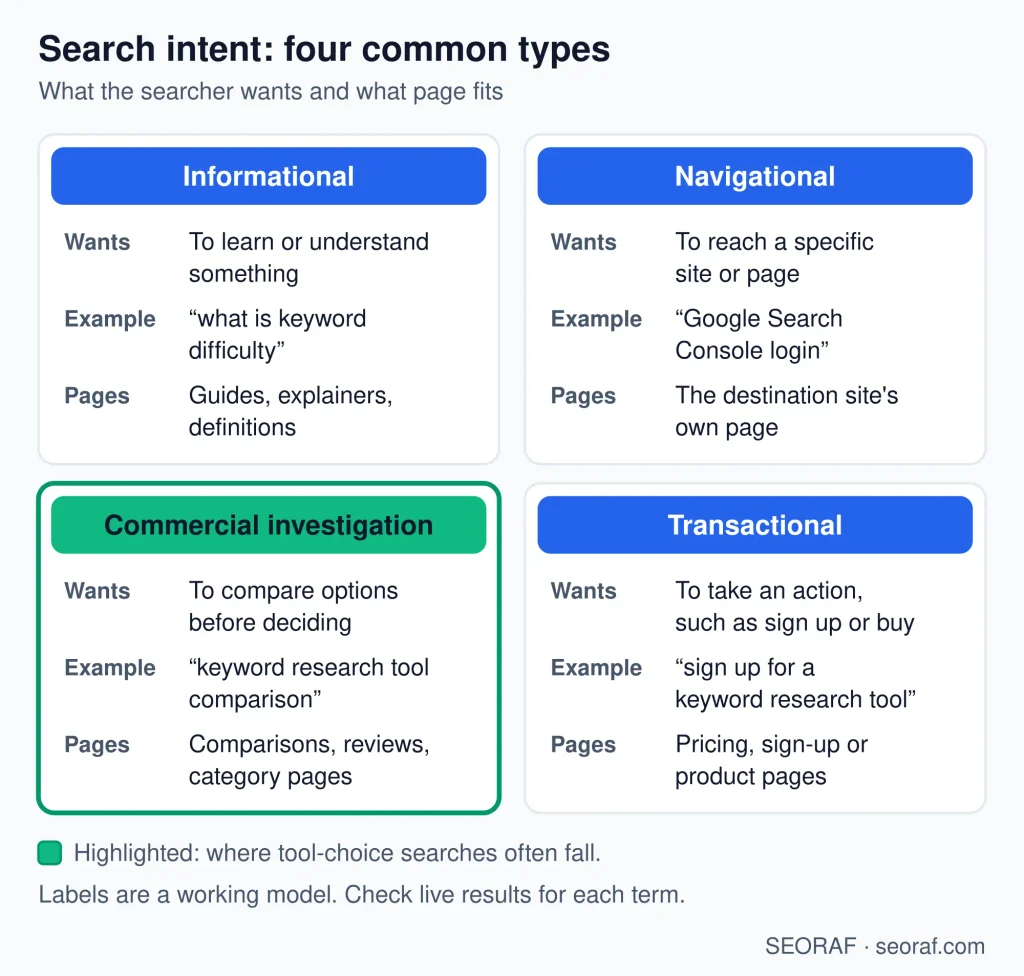
- Search-intent research. Check what kind of results appear for a query to judge whether people want to learn, compare, or buy.
- Competitor research. See which terms other sites appear for that yours does not, as a starting point for gap checks.
- SERP analysis. Review result types, formats, and the sites that appear before you decide whether a page can compete.
- Trend analysis. Watch how interest rises, falls, or repeats across seasons and regions.
- Content planning. Turn a researched list into a shortlist of topics, with estimated demand as one input among several.
- Keyword clustering. Group related queries so one page can cover a topic instead of many thin pages.
- Finding existing opportunities in Search Console. Spot queries where your pages already get impressions but few clicks, which can point to pages worth improving.
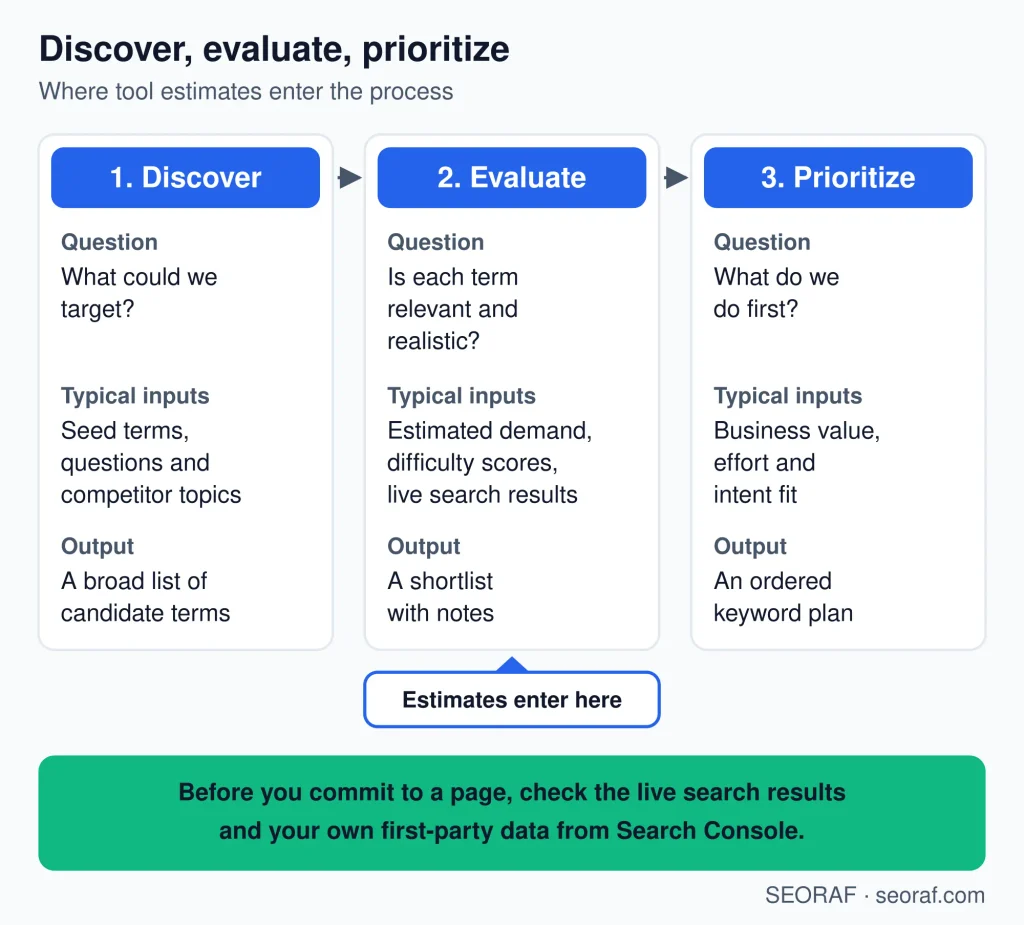
Tools do not decide what to publish, guarantee traffic, or replace reading the live results. This page is about choosing tools; it is not a tutorial on the research process.
Main types of keyword research tools
Seven types cover most needs. Products often span several rows, and the order below is not a ranking.
Keyword research tool types,uses, and main limitations
| Type | What it does | Best used for | Main limitation |
|---|---|---|---|
| First-party performance tools | Reports queries, impressions, and clicks for your own site. | Finding what your site already appears for. | Shows nothing about queries your site has not yet appeared for. |
| Idea and suggestion tools | Expands a seed keyword into related terms. | Early discovery of topics and phrasings. | Lists can include duplicates and irrelevant terms. |
| Question and long-tail tools | Surfaces question-style and specific queries. | Content angles and detailed intents. | Volume data is often thin or missing for rare queries. |
| Competitor and gap tools | Shows terms other sites appear for that yours does not. | Competitive niches and content gap checks. | Relies on the vendor’s estimates of rankings and traffic. |
| SERP analysis tools | Shows what appears in results for a query. | Judging intent and how hard a result page looks. | Results change with location, device, and time. |
| Trend tools | Shows interest over time and by region. | Seasonality and rising or falling topics. | Relative figures, not absolute search counts. |
| Platform keyword modules | Bundles research with tracking, audits, or other features. | Teams that want one workflow. | Cost and complexity can exceed what you need. |
Data limitations
- Estimated volume. Search volume is modeled, not counted. Use it to compare phrases roughly, not to forecast visits.
- Different methods. Vendors use their own sources, sampling, and calculations, so the same query can show different figures in different tools.
- Database coverage. A tool can only report on queries and sites in its database, and coverage varies by topic.
- Country and language. Check whether your market and language are supported, and whether figures are shown for that market or for a broader one.
- Seasonality. A single averaged figure can hide peaks and troughs.
- Personalization, location, and device. What people see in results differs by person, place, and device, so no single view is “the” result.
- SERP changes. Layouts and features change over time, which can alter the value of a ranking position.
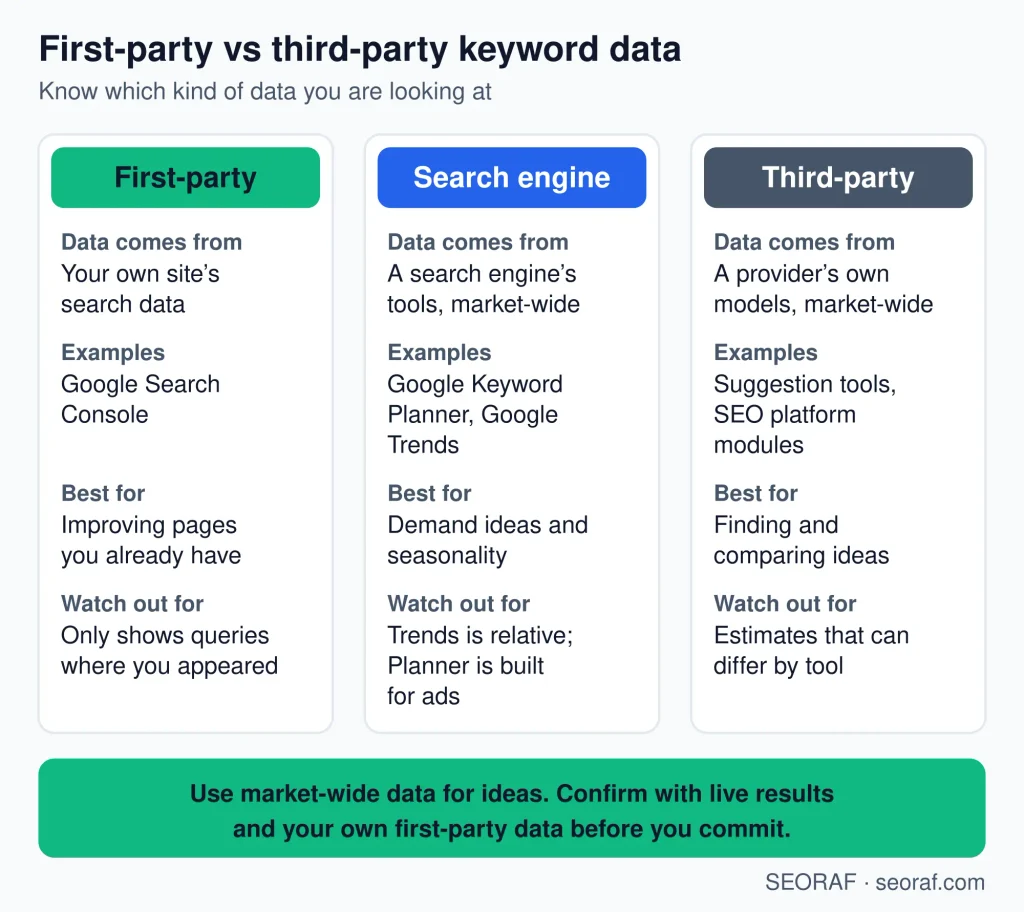
- First-party vs third-party. Search Console records your own site’s appearances; vendor tools model the wider market. They measure different things.
Why Search Console impressions are not search volume
Impressions count how many times your site appeared in search results. Search volume estimates how often a query is searched. A query can be searched often while your pages never appear, and a page can appear without being the main result. The two should not be expected to match. Use impressions to understand your own visibility, and volume to compare demand roughly.
Google’s documentation explains the Search Console performance report, and it states that Google Trends data is a sample. Read both before relying on either. For vendor tools, look for a plain explanation of how volume and difficulty are produced; the absence of one is itself information.
How to choose a keyword research tool
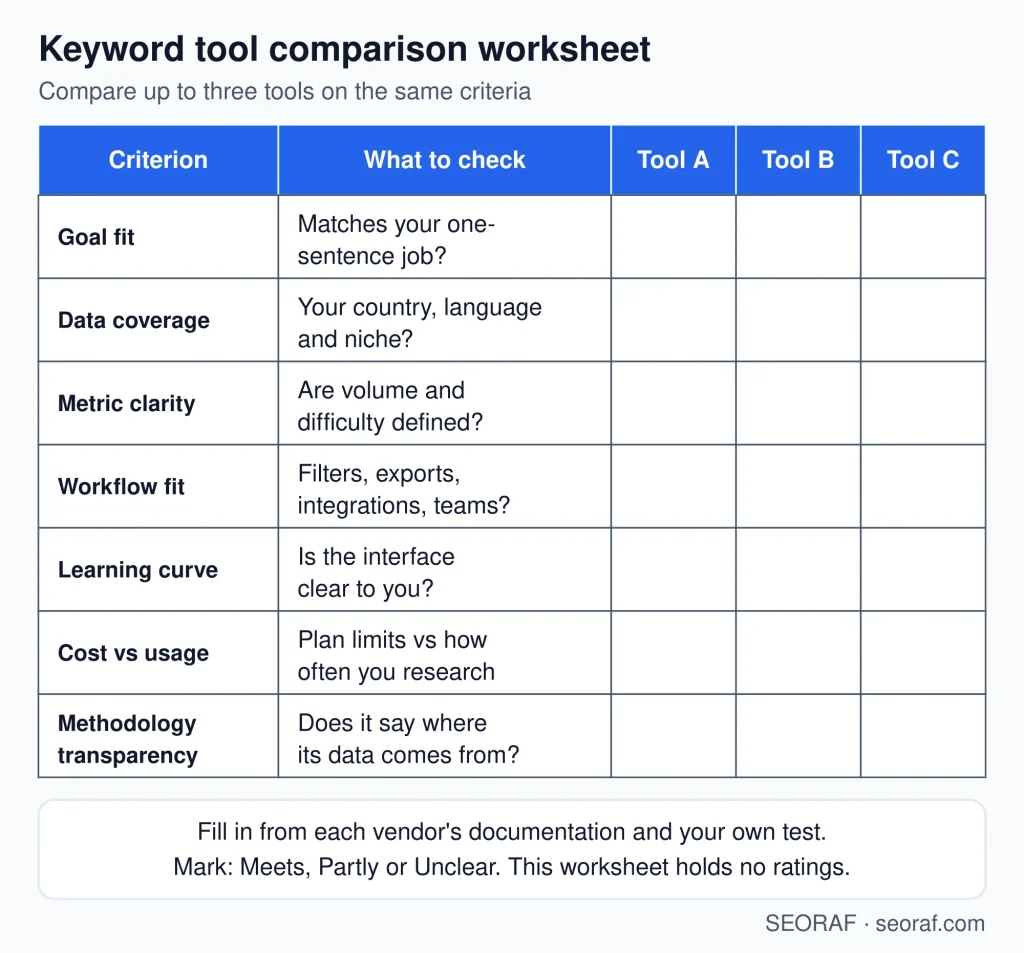
- Main goal. Discovery, validation, competitor analysis, and trend watching need different tool types. Name the job first.
- Market and database coverage. Confirm your country and language are supported, and how deep the data is for your topic.
- Metric transparency. You should be able to tell what each metric means and where it comes from.
- Workflow fit. Look at filtering, saved lists, and whether results fit how you plan content.
- Exports. If you work in spreadsheets or other tools, check what can be exported and in what format.
- Limits. Check caps on searches, saved keywords, projects, and users, and whether they match your real usage.
- Learning curve. A simpler tool you use regularly beats a powerful one you avoid.
- Pricing. Compare cost with how often you would research. Verify current plans on the vendor’s site.
- Methodology. Prefer vendors that explain how volume and difficulty are produced.
- Integrations, where relevant. Connections to analytics or reporting tools matter only if they are part of your workflow.
Practical selection framework
Move through the same chain each time: goal, tool type, constraints, real-topic test, compare output, choose.
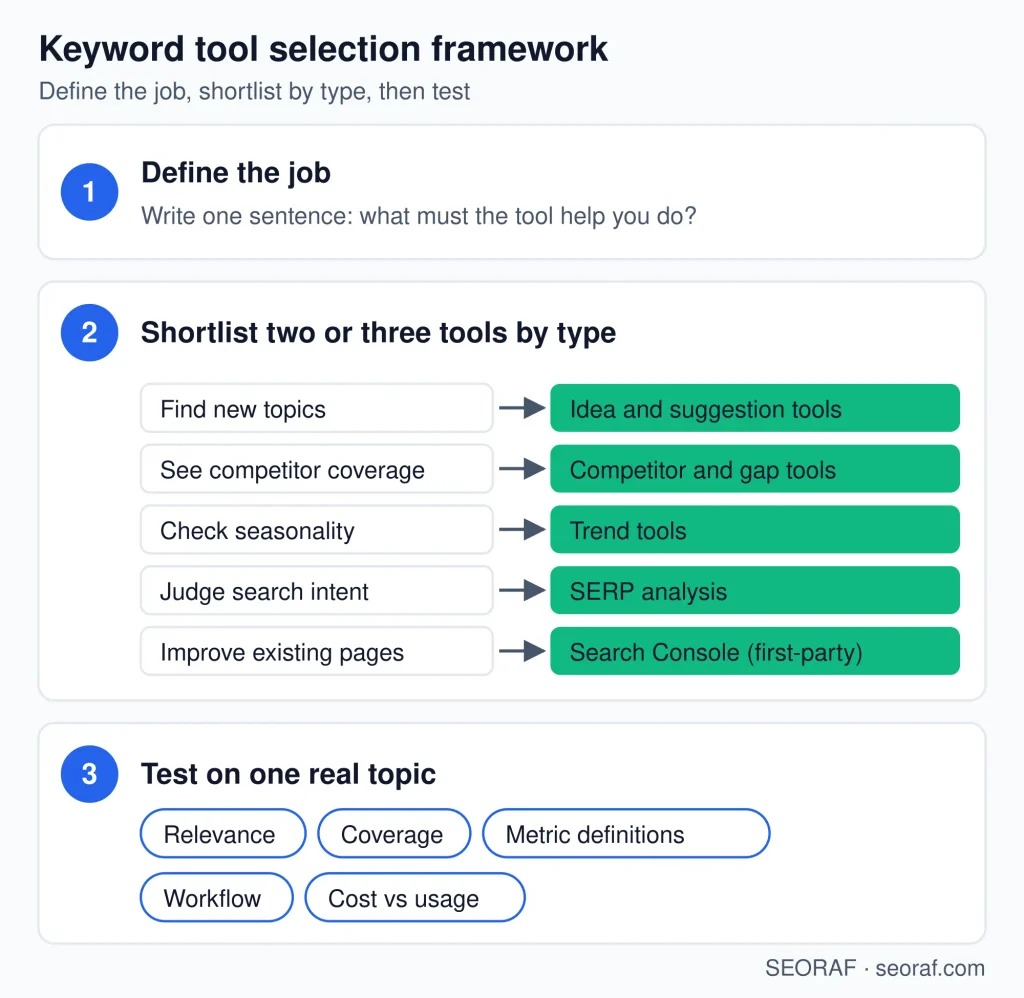
- Define the goal. Write one sentence, such as “find new topics for a site with no data.”
- Pick the tool type. Shortlist two or three types from the table above, not specific products yet.
- List the constraints: country and language, usage limits, pricing, exports, and methodology.
- Test on a real topic. Run the same seed through each candidate.
- Compare the output for relevance, clarity, and coverage.
- Choose by workflow fit, not the largest feature list.
Where to start by situation
| User situation | Start with | Add later |
|---|---|---|
| New website | A suggestion or question tool plus a trend tool. | Search Console once queries appear. |
| Established website | Search Console to see what already appears. | A suggestion tool to find gaps. |
| Competitor research | A competitor or gap tool, checked against live results. | A platform module if you need ongoing tracking. |
| Local SEO | Location-aware results and a trend tool. | A tool that reports at your city or region level. |
| Ecommerce | A suggestion tool for product and modifier queries. | Competitor data for category gaps. |
| International SEO | A tool with confirmed country and language coverage. | Local review of terms in each market. |
| Content team | Shared lists with exports and enough users. | Clustering support as volume grows. |
| Agency or in-house team | A workspace with project and user limits that fit. | Specialist tools only where a gap appears. |
Most people do not need an expensive platform to begin.
Test before you commit
Run the same seed keyword through each tool and compare:
- Are the suggestions relevant to your audience?
- How many are duplicates or near-duplicates?
- Does the tool cover your country and language?
- Are the metrics clearly labeled and explained?
- Does the interface fit how you plan work?
- What are the export limits?
- What are the project, keyword, and user limits?
- Could you complete a real task with it?
This is a practical comparison, not scientific proof. One topic and one afternoon cannot show which tool is more accurate. It shows which one is clearer and easier for your work.
As a rough sanity check, compare a tool’s estimate for a query with your Search Console impressions for it. Treat this as directional only. Impressions and search volume are different measures, so they should not match.
Red flags
- Guaranteed rankings or traffic.
- Claims of exact search volume.
- Unclear methodology.
- Hidden usage limits.
- Unclear pricing restrictions.
Free vs paid
Paid does not automatically mean better. It usually means different limits and scope. Free tools can be enough for learning, small sites, and occasional research.
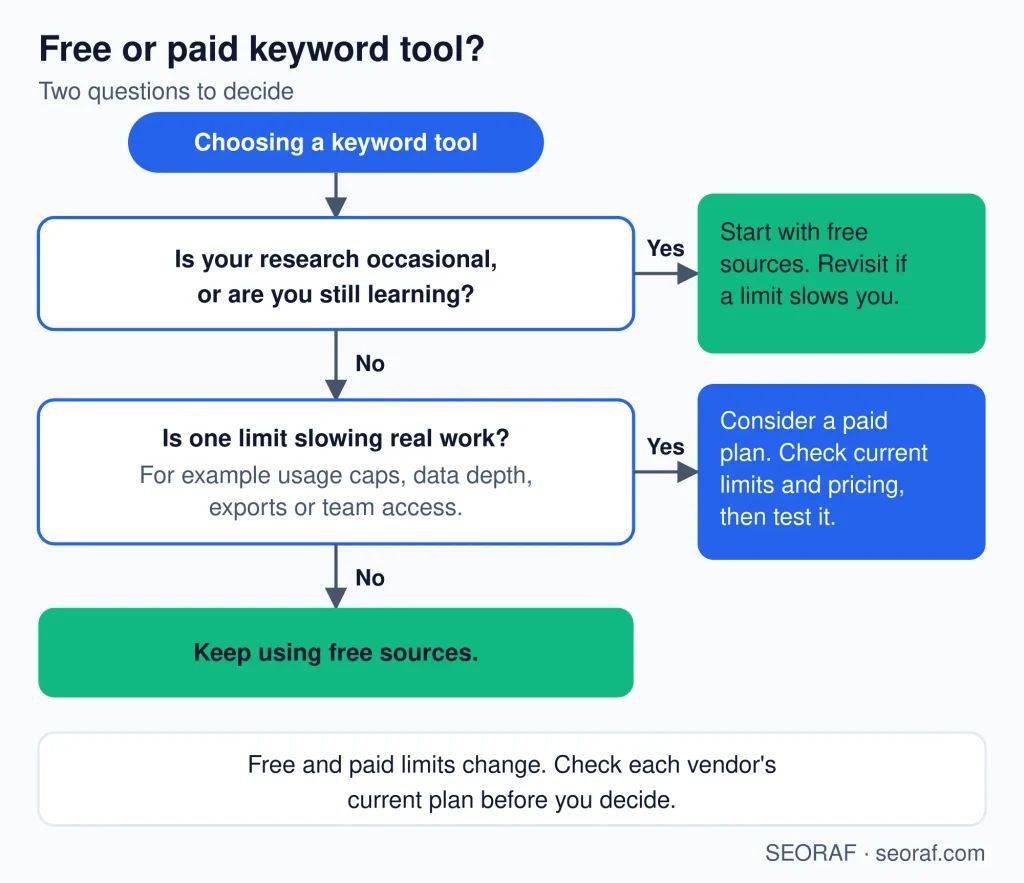
Paid tools can make sense when a specific need is not met, for example:
- Exports that free plans restrict.
- Larger databases when your topic is poorly covered.
- Multiple projects or sites that exceed free limits.
- Team access and shared workspaces.
- Recurring research where saved lists and repeat checks save time.
- Advanced competitor research that goes beyond basic gap checks.
Pay only when a specific limitation justifies the cost, and confirm the paid plan actually removes it. Verify current plans and limits on the vendor’s site before deciding.
If you are a beginner
- Start with one simple suggestion source.
- Learn the metrics so you know what each number means.
- Discover ideas around a topic you know well.
- Validate intent by reading what actually ranks.
- Review the live results manually before choosing a topic.
- Organize your keywords in a simple spreadsheet.
- Upgrade only when needed, when a specific limit blocks you.
Add Search Console as soon as your site has data, and do not rely on a single difficulty score.
Local, ecommerce, and international contexts
Local
Demand varies by location, so check that a tool can report at the city or region level you care about, and compare results from the area you serve.
Ecommerce
Product and modifier queries (size, color, brand, “near me”) matter. Marketplace search behavior can differ from web search, so a general tool may not reflect it.
International and multilingual
Confirm country and language coverage. A direct translation of a keyword may not match how people search locally, so verify terms in the target market.
Tool examples
These are illustrative examples of tool types, not rankings or endorsements, and the “primary” labels are simplifications. I have not listed pricing, and I am not claiming hands-on testing. Verify features and limits on each vendor’s site.
Example tools by primary function and primary data classification
| Tool | Primary function / classification | Primary data classification |
|---|---|---|
| Google Search Console | Site performance reporting | First-party |
| Google Trends | Trend exploration | Search-engine-provided |
| Google Keyword Planner | Ad-planning keyword ideas and estimates | Search-engine-provided |
| Ahrefs Keyword Explorer | Idea, volume, and difficulty research | Third-party |
| Semrush Keyword Magic Tool | Idea expansion and grouping | Third-party |
| Moz Keyword Explorer | Idea and difficulty research | Third-party |
| Serpstat | Platform keyword research | Third-party |
| Ubersuggest | Idea and suggestion research | Third-party |
| AnswerThePublic | Question and phrase discovery | Third-party |
Questions to ask before choosing a keyword research tool
Before starting a subscription, answer these questions:
- What exact research job do I need to accomplish? Define the outcome before choosing a product.
- Do I need first-party data, third-party estimates, or both? Your own Search Console data answers a different question from a commercial keyword database.
- Which countries and languages matter? Confirm coverage for the actual audience you target.
- Do I need competitor or SERP data? If not, you may not need a large all-in-one platform.
- How many keywords and projects do I actually research? Estimate realistic usage rather than buying based on maximum limits.
- Do I need exports? Frequent spreadsheet-based workflows can make export restrictions important.
- Which limits could affect my workflow? Check searches, projects, users, exports, reports, and other relevant restrictions.
- Can I understand the methodology? If you cannot tell what an important metric means, it becomes harder to use that metric responsibly.
These questions can reduce the temptation to choose a tool simply because it has more features than its competitors.
Related SEORAF pages
- SEO tools: explore the broader SEO tool category.
- Best SEO tools: use the dedicated category for ranked tool selections.
- Free SEO tools: explore no-cost SEO resources.
- AI SEO tools: explore tools that use AI within SEO workflows.
- SEO software: compare broader SEO platforms and software suites.
For the actual keyword research process, use the dedicated keyword research guide rather than treating this category page as a step-by-step tutorial.
Frequently asked questions
What is a keyword research tool?
A keyword research tool helps you discover search queries and evaluate information such as estimated demand, competition, related terms, trends, search results, or your own site’s search performance. Different tools specialize in different parts of this work.
Are keyword search volumes accurate?
Search volume in third-party keyword tools should generally be treated as an estimate. Providers use different data sources and methodologies, so the same keyword can show different figures across platforms.
Is keyword difficulty the same in every tool?
No. Keyword difficulty is provider-specific. Each platform can calculate or model the score differently, so a difficulty score from one provider should not be treated as directly equivalent to the same number from another.
Are Search Console impressions the same as search volume?
No. Search Console impressions describe how often your website appeared in the relevant search reporting context. Search volume estimates attempt to describe search demand for a query. They measure different things.
Do beginners need a paid keyword research tool?
Not necessarily. Beginners can start with free sources and learn the basic concepts before paying for additional features. A paid tool becomes more reasonable when a specific limitation affects real work.
Is one keyword research tool enough?
It can be. A simple project may need only one suggestion source plus first-party data. More complex workflows may benefit from combining different tool types, especially when competitor research, SERP analysis, or larger datasets are required.
What is the difference between keyword clustering and keyword mapping?
Keyword clustering groups related queries according to similarity or shared search results. Keyword mapping assigns selected keywords or topics to specific website pages. They are related but separate tasks.
Should I choose a tool with the most features?
No. Choose according to your actual workflow. A simpler tool that provides the data you need and fits your budget can be more useful than a much larger platform whose additional features you rarely use.
About the author: Mousume Akter is the Founder & Editor of SEORAF, an independent SEO knowledge resource, not an agency.
About this page: Tool names are used as examples of tool types, not endorsements. Features, limits, and pricing can change, so verify details on each vendor’s website before deciding.