
SEORAF › Technical SEO › Indexing › Index Coverage
Index Coverage: What It Means, Why It Matters, and How to Diagnose It
Quick answer: Index coverage describes the current status of a site’s URLs with respect to Google’s index — which URLs Google has indexed, which it hasn’t, and the specific, named reason reported for non-indexed URLs. Google reports this through Search Console’s Page indexing report, which replaced the older “Index Coverage” report. Index coverage isn’t a metric fixed once and forgotten — it’s an ongoing diagnostic view that helps you understand whether a site’s technical implementation, content, and architecture are producing the intended indexing outcomes. A page must be indexed before it can appear as an indexed result in Google Search.
This guide explains what index coverage measures, how it differs from indexability and crawlability, how to read what Search Console actually reports, and how to run a repeatable diagnostic process — from a single stuck URL to a pattern affecting thousands of pages.

Quick Diagnosis: Jump to Your Status
If Search Console has already identified the status, use this table to jump to the relevant diagnostic section. If you’re not sure where to start, begin with Section 5.
| If Search Console shows… | It usually means… | Go to |
|---|---|---|
| Crawled – currently not indexed | Google crawled the URL but it is not currently indexed. The status alone does not identify a single cause; content, duplication, technical processing, or other evaluation factors may be involved. | Common Reasons → Decision Framework |
| Discovered – currently not indexed | Google knows the URL but has not crawled it yet. Google says crawling may have been rescheduled, for example to avoid overloading the site. | Sitemap & Internal-Link Signals → Worked Example |
| Blocked by robots.txt | A robots.txt rule is preventing Googlebot from crawling the URL. | Noindex vs. Robots.txt |
| Excluded by ‘noindex’ tag | A meta robots or X-Robots-Tag directive is excluding the page from indexing. | Noindex vs. Robots.txt |
| Duplicate without user-selected canonical | Google detected a duplicate URL for which no user-selected canonical was identified. | Duplicate Content & Canonical Signals |
| Duplicate, Google chose different canonical than user | Google selected a different canonical than the one declared by the site. | Duplicate Content & Canonical Signals |
| Alternate page with proper canonical tag | The URL correctly signals another URL as canonical and is not independently indexed. | Generally no action needed if intentional |
| Soft 404 | The URL returns a successful response but Google’s systems judge the content to be effectively an error or not-found page. | Redirects and HTTP Status Codes |
| Server error (5xx) / Redirect error | The server returned an error, or Google could not resolve the redirect path successfully. | Redirects and HTTP Status Codes |
| Not sure, or the report looks frozen/unchanged | It may be a real site issue, a normal reporting delay, or a reporting-data problem. | Search Console Reporting Latency |
What Index Coverage Means
Index coverage is the documented relationship between the URLs Google knows about on a site and the subset it has actually stored in its index.
Every URL Google becomes aware of can move through a sequence before it can appear in search results. Index coverage provides a reported view of whether URLs are indexed or not indexed, together with reason categories for many non-indexed states.
Google’s Page indexing report is built around this framing: it reports indexed pages, non-indexed pages, and categorized reasons for pages that aren’t indexed. The reason categories are particularly useful because a raw “X pages indexed” number provides much less diagnostic information than knowing which types of URLs are excluded.
It’s worth being precise about scope. Index coverage is not:
- A ranking signal. Being indexed doesn’t mean a page will rank. Indexing makes a page eligible to be considered for serving in search.
- A traffic metric. An indexed URL can receive little or no organic traffic because of search demand, relevance, competition, or other factors.
- A one-time audit deliverable. Coverage changes as Google crawls, processes, indexes, and re-evaluates URLs.
A note on framing: this article distinguishes between what Google has documented and the diagnostic frameworks SEORAF has built on top of that documentation to make the information actionable. Where a specific Google-reported status name is described, the wording follows Google’s Search Console terminology as closely as practical. Where a workflow, priority order, or decision tree is described, that’s a SEORAF practitioner framework — useful for diagnosis, but not a Google specification.
Why Index Coverage Matters
A page that isn’t indexed cannot appear as an indexed page in Google Search. Index coverage matters because it gives you a way to identify whether important URLs have reached the index and, when they have not, which reported category describes their current state.
Three reasons coverage monitoring deserves standing attention, not a one-off check:
It can reveal problems before they become obvious in traffic data. A template-level bug that accidentally adds noindex to an important page type, or a canonical implementation that points toward the wrong URL, can affect many URLs before the resulting organic-search impact becomes obvious in analytics. Coverage data can provide an earlier technical clue.
It separates indexing problems from ranking problems. “This page isn’t ranking” has many possible explanations. “This page isn’t indexed” narrows the immediate question: first determine why the URL is not currently in the index before spending time diagnosing ranking performance.
It becomes more valuable at scale. On a five-page site, indexing problems may be easy to inspect manually. On a site with hundreds of thousands of URLs, coverage data can reveal that an entire URL pattern — a faceted navigation branch, paginated archive, migrated section, or CMS-generated URL family — is being handled differently than intended.
Important: a high non-indexed count is not automatically a problem. Intentional exclusions, redirects, duplicate URLs, and other legitimate states can all contribute to the non-indexed total.
Index Coverage vs. Indexing vs. Indexability vs. Crawlability
These four terms get used interchangeably in casual SEO conversation, and that can lead to misdiagnosis. Each describes a different thing.
| Term | What it describes | Question it answers | Where it’s assessed |
|---|---|---|---|
| Crawlability | Whether a URL can be requested and fetched by a crawler | “Can Googlebot access this URL?” | robots.txt, server response, access controls, network availability |
| Indexability | Whether a URL has technical directives or signals that permit or discourage independent indexing | “Is there an explicit technical reason not to index this URL?” | Meta robots, X-Robots-Tag, canonical signals and related implementation |
| Indexing | The process through which Google processes, evaluates, and stores content in its index | “What is Google’s system doing with this URL?” | Google’s internal systems; only some outcomes are externally observable |
| Index Coverage | The reported state of URLs in Search Console, including reason categories for non-indexed URLs | “What is the current reported status of this URL, and why?” | Search Console’s Page indexing report |
A useful way to hold these apart: crawlability and indexability describe properties or implementation conditions around a URL. Indexing is a process Google performs. Index coverage is the reporting layer that exposes selected outcomes of that process.
This distinction resolves a common confusion directly: a URL can be crawlable and have no obvious indexing directive that excludes it, yet still not be indexed. Google’s How Search Works documentation explains that crawling and processing precede indexing, while Google’s systems determine what is ultimately indexed.
To hold all four together on one URL: take a single product page. It may be crawlable because robots.txt allows it and the server responds successfully. It may be technically indexable because there is no noindex directive and its canonical implementation is appropriate. Google’s indexing systems then process and evaluate it. Search Console’s Page indexing report provides the reported outcome — for example, indexed, or a non-indexed category such as “Crawled – currently not indexed.”
Related SEORAF guides on this cluster:
- For the full mechanics of indexing itself, see Indexing.
- For the technical properties that affect whether a URL can be indexed, see Indexability.
- For the crawl-access layer, see Crawlability.
This article sits downstream of those topics: it’s specifically about interpreting the reported coverage state rather than reproducing their full technical explanations.
The SEORAF Pipeline Model: Discovery → Crawlability → Indexability → Indexing → Serving
This is a SEORAF explanatory framework, not an official Google-published pipeline. Google’s How Search Works documentation describes crawling, indexing, and serving conceptually, but it does not publish the fixed five-stage sequence shown below. SEORAF uses this model as a practical diagnostic framework.
Discovery. Google becomes aware a URL exists through mechanisms such as internal links, external links, XML sitemaps, or previously known URLs. A URL with no discovery path may never reach the point where Google can crawl and evaluate it.
Crawlability (the access gate). Googlebot requests the URL. This step is affected by robots.txt rules, server availability, access controls, and Google’s crawl scheduling. A blocked or unreachable URL cannot be processed in the same way as a successfully fetched page.
Indexability. Once Google can access the page, technical directives and signals become relevant. A noindex directive can explicitly prevent indexing when Google is allowed to crawl the page. Canonical signals can indicate which duplicate URL should represent a group of similar URLs.
Indexing and evaluation. Google processes the fetched content and other signals, including duplication and canonicalization. Rendering can be part of Google’s processing for pages whose content depends on JavaScript. Passing technical checks does not guarantee that a URL will be indexed.
Serving. URLs that are in Google’s index can be considered for serving in search results. Indexing does not guarantee a ranking position, impressions, or traffic.
The important diagnostic idea is simple: crawlability is necessary for Google to fetch a page, but it is not a guarantee of indexing. A URL can be crawlable and technically indexable yet still remain outside the index.
How to Interpret Index Coverage Data in Search Console
Google reports this information through the Page indexing report, found in the Indexing area of Search Console. The current report replaced the older “Index Coverage” report, while retaining the broader idea of categorizing indexed and non-indexed URLs.
The report’s structure includes:
A summary graph and count. The report provides a high-level view of indexed and non-indexed URLs over time.
A “Why pages aren’t indexed” table. This is the core diagnostic surface. Each row represents a reported reason category, with affected URLs that can be inspected further.
An “Improve page experience” area. Page experience issues are distinct from the exclusion reasons. A page-experience issue does not, by itself, mean that a URL cannot be indexed.
Per-URL detail via URL Inspection. URL Inspection provides information about an individual URL, including its indexed status and other available crawl/indexing details. Depending on the view and information available, it can show Google’s selected canonical and the site’s declared canonical. The live test checks the URL as currently accessible, but it does not reproduce every indexing decision or every condition used to determine canonicalization.
A practical reading discipline: treat the aggregate Page indexing report as your pattern-finding tool and URL Inspection as your individual-case confirmation tool. For large sites, the most useful question is often not “How many URLs are excluded?” but “Which URL patterns are being excluded, and is that behavior intentional?”
A Note on Search Console Reporting Latency
The Page indexing report is a reporting layer over Google’s crawling and indexing systems. Reported data is not necessarily real-time, so a change made today may not appear immediately in the aggregate report.
This distinction matters when the report appears unchanged after a recent fix. A stale-looking graph does not, by itself, prove that crawling or indexing has stopped. Check the report’s latest data date and use URL Inspection, where appropriate, to investigate individual URLs.
Server or CDN logs can provide additional evidence of actual crawler requests, although logs cannot by themselves prove whether a URL was indexed. They answer a different question: whether a crawler requested the resource.
Practical rule: never diagnose a site-wide indexing problem from a single unchanged Search Console snapshot. Compare dates, reason-code trends, individual URL evidence, and server-side request data where available.
Indexed and Non-Indexed URLs: What the Report Actually Groups
At the highest level, Search Console separates URLs into indexed and non-indexed states before showing more detailed reason categories.
| Status | What it means | Typical next step |
|---|---|---|
| Indexed | The URL is currently included in Google’s index and can be considered for serving. | Confirm that indexing is intentional; monitor important URL patterns. |
| Not indexed | The URL is not currently included in Google’s index for a reported or otherwise identified reason. | Identify the specific reason and determine whether the exclusion is intentional. |
A subtlety worth naming explicitly: “not indexed” is not synonymous with “broken.” Some non-indexed states are entirely correct and intentional — a page deliberately marked noindex, or a duplicate URL correctly deferring to its canonical. Others genuinely indicate a problem that needs investigation.
This is why a blanket goal of “get everything indexed” is the wrong operational target. The better target is:
Every important URL should have an index status that matches the site’s actual intent.
Common Reasons URLs Are Not Indexed
Google groups non-indexed URLs into named categories. The exact wording and grouping can change as Search Console evolves, so always use the live report for the property being audited.
| Reported reason | What it typically indicates | Is it usually a problem? |
|---|---|---|
| Crawled – currently not indexed | Google crawled the page but it is not currently indexed. The status alone does not establish a single cause; content, duplication, technical processing, or other evaluation factors may be relevant. | Investigate when important URLs remain in this state unexpectedly or the volume increases. |
| Discovered – currently not indexed | Google knows the URL but has not crawled it yet. Google documents crawl scheduling as one reason this can occur. | Investigate persistent cases involving important URLs or unusual patterns. |
| Blocked by robots.txt | A robots.txt rule prevents crawling. | Only a problem when the URL was intended to be crawlable. |
| Excluded by ‘noindex’ tag | A meta robots or X-Robots-Tag directive explicitly excludes the URL from indexing. | Only a problem when the directive is unintended. |
| Duplicate without user-selected canonical | Google detected a duplicate URL and no user-selected canonical was identified. | Investigate whether a canonical preference or stronger signal alignment is appropriate. |
| Duplicate, Google chose different canonical than user | Google selected a canonical different from the site’s declared canonical. | Investigate conflicting canonical, internal-link, sitemap, redirect, and content signals. |
| Alternate page with proper canonical tag | The URL points toward another canonical URL. | Generally not a problem when intentional. |
| Not found (404) | The requested URL does not exist. | Only a problem if the URL should still exist or should redirect elsewhere. |
| Soft 404 | The URL returns a successful response but the content is interpreted as effectively not found or unavailable. | Investigate whether the page should contain genuine content or return an appropriate error response. |
| Server error (5xx) | The server returned an error while Google attempted to access the URL. | Yes, when important public URLs are affected. |
| Redirect error | Google encountered a problem resolving the redirect. | Investigate redirect chains, loops, inaccessible destinations, and configuration. |
| Page with redirect | The URL redirects to another destination; the destination is generally the indexing candidate. | Not a problem when the redirect is intentional. |
| Blocked due to access forbidden (403) / unauthorized (401) / other 4xx | Access control or another client-error response prevents normal access. | Depends on whether the restriction is intentional. |
Reading this table correctly matters as much as the table itself. Several categories — “Alternate page with proper canonical tag,” “Page with redirect,” and deliberate “noindex” — can represent the system working as intended. Treating every non-indexed category as an error can lead to unnecessary or harmful changes.
Noindex and Robots.txt: The One Distinction That Matters Most
This is one of the most important distinctions in index-coverage troubleshooting.
Robots.txt controls crawling. It does not directly provide a noindex directive. Per Google’s documentation on creating robots.txt files, a URL disallowed by robots.txt can still potentially be known to Google and can sometimes appear in search without its content being crawled.
Noindex controls indexing directly — but Google must be able to crawl the page to read the directive. Google’s documentation on robots meta tags and X-Robots-Tag explains that indexing directives can be read and followed only when crawlers are allowed to access the page containing them.
This creates a common configuration mistake: blocking a URL in robots.txt while also expecting Google to obey a noindex directive on that URL. If Google cannot crawl the page, it may not be able to read the noindex directive.
| Goal | Correct mechanism | Why |
|---|---|---|
| Prevent crawling of a URL or URL pattern | Robots.txt disallow | Stops normal crawler access to the matching URL. |
| Exclude a crawlable page from the index | Noindex meta tag or X-Robots-Tag | Google needs to access the page to read the directive. |
| Consolidate duplicate URLs while keeping the alternate accessible | Canonical signal | Communicates which URL should generally represent the duplicate group. |
| Permanently move content | 301/appropriate permanent redirect | Signals that the destination replaces the old URL. |
| Remove genuinely unavailable content | 404 or 410 | Communicates that the resource is unavailable. |
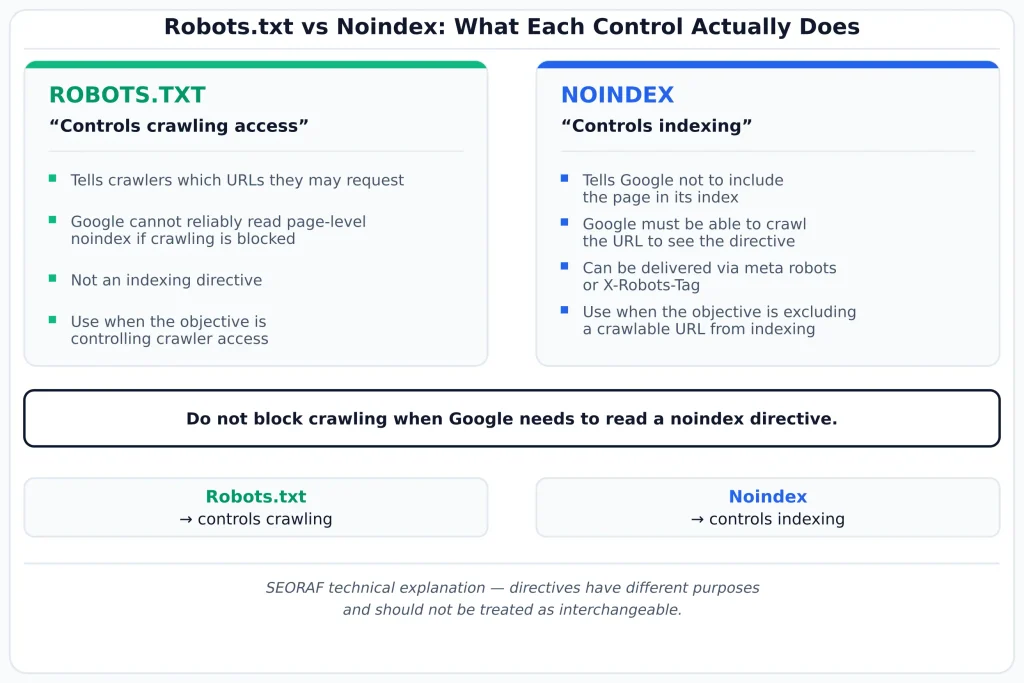
The rule to internalize: if the goal is “don’t index this page,” use a noindex directive on a page that remains crawlable. If the goal is specifically to control crawling, robots.txt serves a different purpose. Do not combine the mechanisms without understanding the resulting behavior.
Duplicate Content and Canonical Signals
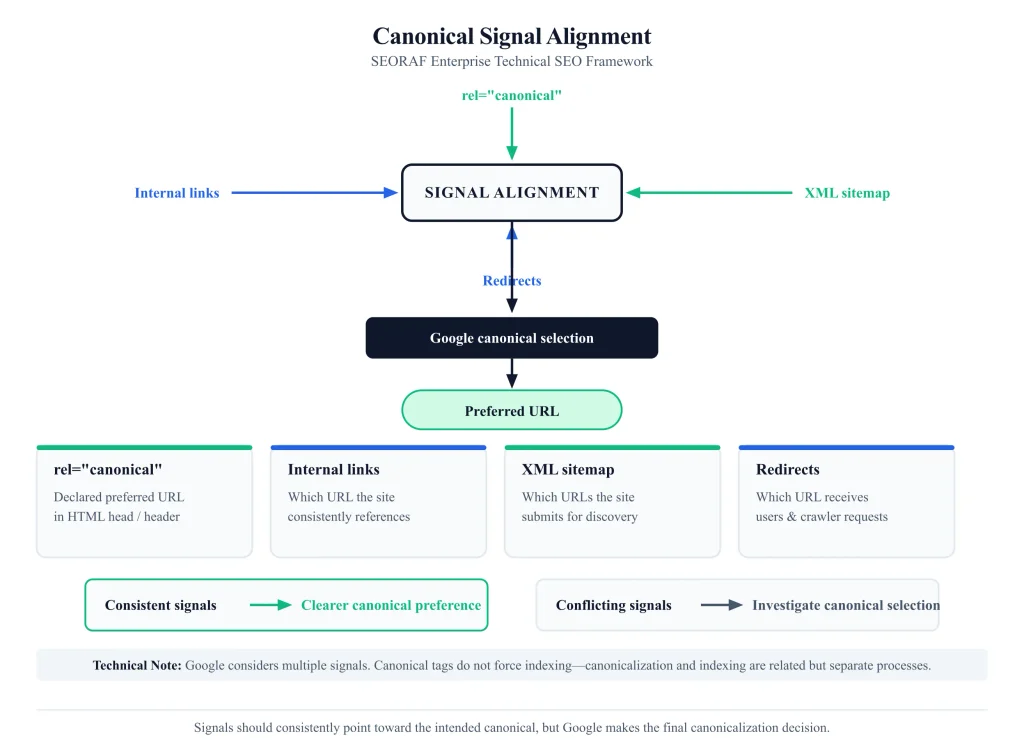
Duplicate URLs are a major source of canonicalization and non-indexing states, especially on sites that generate multiple URL variants. Google’s canonicalization documentation explains how Google selects a canonical URL from duplicate or substantially similar URLs.
How Google evaluates duplicates. When multiple URLs contain substantially the same content, Google’s systems can group them and select a canonical URL. Other members of the duplicate group may not be independently indexed.
Canonical tags are signals, not directives. A rel="canonical" declaration communicates a preferred URL, but Google can consider it alongside other signals, including redirects, sitemap inclusion, internal links, and content similarity. Google may select a different canonical when its systems determine that another URL is a better representative.
The practical fix is signal alignment. If Google selects a different canonical, don’t simply repeat the same canonical tag and assume it will override every other signal. Check whether internal links, sitemap entries, redirects, canonical tags, and the actual content all consistently support the intended canonical.
Common duplicate sources worth auditing specifically:
- URL parameters such as tracking, sorting, filtering, and session identifiers
- HTTP versus HTTPS variants
- www versus non-www variants
- Trailing-slash and case variants where the server treats them differently
- Paginated or faceted navigation variants
- Printer-friendly or syndicated content variants
Redirects and HTTP Status Codes
HTTP status codes tell Google what happened when it requested a URL. They are therefore important evidence when diagnosing coverage, but a status code alone does not guarantee indexing.
| Code | Documented coverage effect |
|---|---|
| 200 | A successful response generally allows Google to process the returned content. A 200 response does not guarantee indexing. |
| 301 (moved permanently) | Google follows the redirect and treats a permanent redirect as a strong signal that the destination should be canonical. |
| 302 (found) | Google follows the redirect, but a temporary redirect generally provides a weaker canonicalization signal than a permanent redirect. |
| 404 (not found) | The requested resource does not exist. A URL returning 404 is not eligible for indexing as a normal content page. |
| 410 (gone) | Communicates that the resource is intentionally gone. For practical SEO diagnosis, treat 404 and 410 as removal responses rather than relying on a supposed guaranteed speed advantage for one over the other. |
| 429 / 5xx | Indicates request throttling or server-side failure. Persistent errors can affect Google’s ability to crawl and process affected URLs. |
| Soft 404 | A URL returns a successful response but Google’s systems determine that the content effectively represents a missing or unavailable page. |
Redirect chains have a documented finite limit. Google states that Googlebot follows up to 10 redirects. However, treating 10 as an implementation target is poor practice. Keep redirects direct wherever possible and avoid unnecessary chains and loops.
A specific high-impact mistake: using a temporary redirect for a change that is genuinely permanent. Google documents permanent redirects as stronger signals than temporary redirects. For a permanent URL migration, use an appropriate permanent redirect and update internal links and sitemap entries to the final destination.
For detailed documentation, see Google’s guidance on HTTP status codes, network errors, and Search.
Sitemap and Internal-Link Signals
Discovery and coverage are related but distinct. Google needs to know a URL exists before it can crawl and evaluate it. XML sitemaps and internal links are two important ways of supporting discovery.
XML sitemaps are a discovery aid, not an indexing directive. Submitting a URL in a sitemap can help Google discover it, but sitemap inclusion does not guarantee crawling or indexing.
Sitemap hygiene improves the quality of the signal you provide. For normal SEO purposes, keep XML sitemaps focused on URLs you want search engines to consider: canonical, indexable URLs that return successful responses. Avoid deliberately listing redirected, noindexed, or duplicate alternate URLs unless there is a specific documented reason.
Internal linking supports both discovery and site architecture. Important pages should normally be reachable through relevant internal links rather than depending entirely on an XML sitemap. Strong internal architecture helps search engines understand how pages relate to one another.
However, avoid claiming that internal links guarantee faster crawling. Google controls crawl scheduling. A URL with weak internal support may be harder to discover or understand, but the exact timing of crawling cannot be predicted from link depth alone.
Practical implication for coverage diagnosis: when a URL remains in “Discovered – currently not indexed,” check whether it is present in the relevant sitemap, whether important pages link to it, whether the URL is generated by a large parameter/facet space, and whether the site is producing excessive URLs that compete for crawl attention.
Step-by-Step Index Coverage Diagnosis
This is a repeatable SEORAF sequence for diagnosing a specific coverage problem, whether it’s a single URL or a pattern affecting many pages. It is a practitioner framework built on Google’s documented mechanics, not a Google-published procedure.
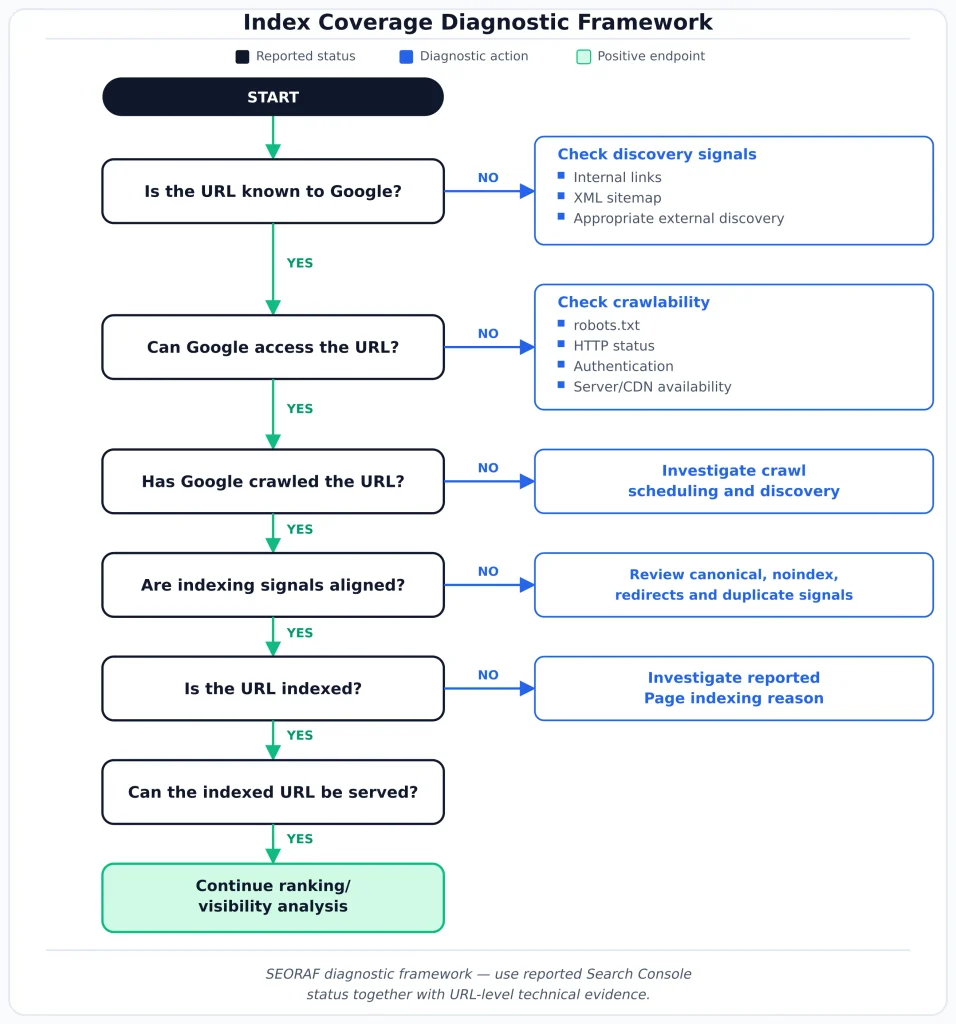
Step 1 — Confirm the actual reported status. Use URL Inspection for an individual URL and check the aggregate report for the broader pattern. Don’t rely on memory or an old screenshot.
Step 2 — Identify the reason category. Match the status against the current Search Console report. Determine whether the status is expected or requires investigation.
Step 3 — Determine which layer needs investigation. Ask in order: Is the URL discoverable? Can Google crawl it? Is there an indexing directive or canonical signal affecting it? Has Google crawled it? Is there evidence of duplication, technical processing problems, or content/evaluation concerns? The exact diagnosis depends on the evidence available.
Step 4 — Check for pattern versus isolated occurrence. Review the URLs sharing the same reason category and look for a shared prefix, template, parameter, content type, or deployment window. A shared pattern often points toward a configuration or template-level cause.
Step 5 — Cross-reference signals. For canonical and duplicate issues, compare canonical tags, internal links, sitemap inclusion, redirects, and actual content. Look for contradictions rather than focusing on a single signal.
Step 6 — Apply the fix at the source. Correct the robots.txt rule, directive, canonical implementation, server response, redirect, template, or content — whichever the evidence identifies. Pattern-level problems should normally be fixed at the template or configuration level.
Step 7 — Request re-crawling or wait for natural recrawl, depending on urgency. URL Inspection can be used to request indexing for individual URLs. This is not a substitute for fixing the underlying site-wide cause.
Step 8 — Verify resolution and log the fix. Re-check after Google has had time to process the change. Record the cause, fix, affected URL pattern, and verification date so the same issue does not have to be rediscovered later.
A Worked Diagnostic Example
To make the framework concrete: suppose a site’s blog has a category archive page — a “Guides” listing page — showing “Discovered – currently not indexed” in the Page indexing report, and it has remained there for several weeks.
Step 1 (confirm status). Running the URL through URL Inspection confirms the available indexed-state information and helps determine whether Google has crawled the URL. The aggregate report may be older than the live test, so the two views should not be treated as identical snapshots.
Step 2 (identify the reason category). “Discovered – currently not indexed” means Google knows about the URL but has not crawled it yet. Google documents crawl scheduling as one reason for this state.
Step 3 (which layer is failing). Working through the SEORAF model: the URL is known to Google, but there is no evidence of a completed crawl. Therefore, prioritize discovery, crawl access, and crawl scheduling questions before diagnosing page-content quality. You cannot conclude that canonical or content quality caused the status when Google has not yet crawled the URL.
Step 4 (pattern or isolated). Checking other URLs with the same status reveals several archive-type pages sharing the /guides/category/ prefix. This suggests a pattern rather than an isolated page.
Step 5 (cross-reference signals). Internal-link analysis shows these archive pages are only linked from a low-visibility footer area and are several clicks deep. They are also absent from the XML sitemap. These are discovery-support weaknesses worth correcting, although they do not prove why Google scheduled the crawl when it did.
Step 6 (fix at the source). The architectural response is to improve the site’s discovery paths: add appropriate URLs to the XML sitemap and create useful contextual internal links. Apply the change at the template/navigation level if the pattern affects the entire archive system.
Step 7–8 (recrawl and verify). After making the changes, monitor the URLs and use URL Inspection where appropriate. The aggregate report may take additional time to reflect the new state. Record the change and its rationale.
This example illustrates why diagnosis should follow evidence: “not indexed” does not automatically mean “bad content,” and “discovered but not crawled” does not establish a content-quality problem.
A Practical Decision Framework
When staring at a specific non-indexed URL and needing to decide what to do, this sequence of questions cuts through much of the ambiguity. As with Section 12, this is a SEORAF framework for applying Google’s documented behavior, not a Google-published decision tree.
Is this exclusion intentional?
→ If yes — for example, a deliberate noindex, deliberate redirect, or intentional duplicate deferral — confirm that the implementation matches the site’s intent and move on.
→ If no, or uncertain: continue.
Was the URL crawled?
→ If no: prioritize discovery, crawl access, sitemap/internal-link support, and crawl scheduling evidence.
→ If yes: continue.
Does a directive or canonical signal explain the exclusion?
→ If yes and it is unintentional: correct the directive or align the canonical signals.
→ If no explicit directive explains it: continue.
Is Google reporting “Crawled – currently not indexed”?
→ This status requires evidence-based investigation. Review content uniqueness and usefulness, duplication, rendering/processing, canonicalization, and other technical factors. Do not assume that the label proves a single “quality” cause.
Is the affected volume large and pattern-based?
→ Escalate to a template-level or architectural diagnosis. Individual remediation does not scale and may not prevent recurrence.
Common Mistakes in Index Coverage Diagnosis
| Mistake | Why it causes problems | Better approach |
|---|---|---|
| Treating every “not indexed” row as an error | Some exclusions are intentional and expected. | Confirm intent before changing anything. |
| Combining robots.txt blocking with an intended noindex | Google may be unable to crawl the page and therefore unable to read the noindex directive. | Choose the mechanism according to the actual goal. |
| Fixing canonical tags without checking other signals | Google considers multiple canonicalization signals. | Audit canonical tags, links, sitemaps, redirects, and content together. |
| Using 302 for a genuinely permanent URL move | A temporary redirect is a weaker permanent-canonical signal. | Use an appropriate permanent redirect for permanent changes. |
| Diagnosing individual URLs on a pattern-affected large site | The same underlying issue may affect thousands of URLs. | Segment by template, path, parameter, and deployment first. |
| Assuming an unchanged aggregate report means nothing changed | Search Console reporting is not real-time. | Check data freshness and use URL-level evidence where appropriate. |
| Including redirected or noindexed URLs in XML sitemaps | It sends mixed signals about which URLs are intended for indexing. | Keep ordinary SEO sitemaps focused on canonical, indexable URLs. |
| Assuming a fixed number of days will resolve “Crawled – currently not indexed” | Google does not publish a guaranteed re-evaluation timeline. | Monitor the state and investigate technical, duplicate, and content factors. |
| Reacting to one snapshot instead of a trend | Coverage changes as Google recrawls and reprocesses URLs. | Track reason-code trends over time. |
Large-Site and Enterprise Considerations: Pattern-Level Diagnosis in Practice
Coverage diagnosis changes substantially once a site moves from hundreds of pages to hundreds of thousands. The core tools remain similar; the methodology becomes more pattern-oriented.
Segment before you diagnose, not after. On a large site, the Page indexing report’s reason-code URL lists are a starting point for segmentation. Group affected URLs by shared path prefix, query parameter, template type, content type, or recent deployment window before inspecting individual pages.
Distinguish template-level causes from content-level causes within the same reason code. Two URLs can both show “Crawled – currently not indexed” while requiring different investigations. One may have genuinely weak or duplicative content; another may share a technical template problem. Segmenting by URL pattern and template helps separate these cases.
Crawl prioritization interacts with coverage at scale. Large sites can generate enormous numbers of faceted, parameterized, or otherwise low-value URLs. This can complicate crawling and make it harder to ensure that important URL families receive appropriate discovery and processing. The solution is URL governance: sensible architecture, controlled parameter generation, useful internal linking, and appropriate crawling controls.
Segmented XML sitemaps support diagnosis. Splitting sitemaps by content type or site section can make it easier to compare submitted URLs and indexed outcomes within meaningful groups.
Governance matters more than any individual fix. Enterprise coverage failures are often systemic: a new facet dimension, a CMS template change, a migration, an altered canonical rule, or a redirect implementation can affect entire URL families. A technical review gate for changes that affect URL generation, directives, canonical logic, or redirects can reduce the chance of large-scale regressions.
Index bloat should be evaluated as a URL-governance problem, not simply a coverage number. A site can also have too many low-value, near-duplicate, or thin URLs being indexed. Rather than treating a large indexed count as inherently positive, review whether the indexed URL set matches the site’s search-intent and content strategy.
Validation and Ongoing Monitoring
Index coverage is not a fix-once problem. A monitoring discipline, scaled to a site’s actual size and change velocity, helps small issues from becoming systemic.
Establish a baseline. Record current indexed counts and the distribution of major non-indexed reason categories.
Monitor trends, not snapshots. A single day’s numbers can shift because of normal recrawling and processing. A sustained directional change in an important reason category is more useful than a single number.
Confirm the report is current. Before treating a sudden plateau or unchanged graph as evidence of a technical failure, check the latest available report date.
Integrate coverage checks into publishing and deployment workflows. Catching an accidental noindex, broken canonical, incorrect redirect, or URL-generation problem before or immediately after deployment is generally easier than finding it after thousands of URLs are affected.
Cross-reference with log files where feasible. Search Console provides aggregated reporting. Server or CDN logs can show actual crawler requests at URL level. Logs are useful evidence of crawl behavior, but they do not independently prove that a URL is indexed.
Re-verify after every migration or major structural change. URL structure changes, CMS migrations, canonical changes, and redirect implementations are high-risk events for large-scale coverage disruption. Treat post-change validation as part of the migration checklist.
Index Coverage Audit Checklist
Baseline and setup
- Confirm current indexed and non-indexed counts in the Page indexing report.
- Check the latest available report data date.
- Record major reason-code categories and counts for comparison.
- Confirm XML sitemaps primarily contain canonical, indexable URLs that return successful responses.
Directive hygiene
- Audit robots.txt for unintended blocking of important crawlable content.
- Audit for unintended
noindextags, especially on templated page types. - Confirm URLs intended to use noindex remain crawlable enough for Google to read the directive.
Canonical and duplicate signals
- Confirm canonical tags are implemented appropriately for duplicate-prone URL sets.
- Check whether internal links, sitemap entries, redirects, and canonical declarations support the same preferred URL.
- Spot-check Google’s selected canonical versus the declared canonical for important URL patterns.
Status codes and redirects
- Confirm permanent URL changes use an appropriate permanent redirect.
- Confirm redirect chains are short and do not approach unnecessary complexity.
- Confirm no redirect loops are present.
- Audit soft 404s specifically — successful responses whose content effectively represents a missing page.
- Investigate persistent 5xx/429 responses affecting important URLs.
Discovery and architecture
- Confirm high-priority pages are reachable through relevant internal links, not sitemap alone.
- Check persistent “Discovered – currently not indexed” URLs for discovery and crawl-scheduling factors.
- Confirm important pages are not orphaned.
- Review parameter and faceted URL generation for unnecessary URL expansion.
Pattern-level review for large sites
- Segment coverage data by URL prefix, parameter, content type, or template.
- Distinguish template-level causes from content-level causes within the same reason category.
- Review whether excessive URL generation is consuming crawl attention.
- Confirm recent template or CMS changes haven’t introduced systemic directive, canonical, redirect, or URL-generation errors.
Ongoing governance
- Establish a recurring review cadence appropriate to site size and change velocity.
- Require technical review before deploying changes to URL structure, directives, canonical logic, or redirects.
- Re-validate coverage after migrations, redirect batches, and major structural changes.
Frequently Asked Questions
Is index coverage the same as the old “Index Coverage report” in Search Console?
The underlying concept is similar: Search Console provides categorized information about indexed and non-indexed URLs. Google now presents this information through the Page indexing report rather than a report literally titled “Index Coverage.” Interface labels can change, so use Google’s current Search Console documentation when navigating the interface.
Does a “not indexed” status always mean something is wrong?
No. Several states can be intentional, including a correctly canonicalized duplicate, a deliberate noindex, or a URL that intentionally redirects elsewhere. Confirm the site’s intent before treating the status as an error.
How long should I wait before treating “Discovered – currently not indexed” as an issue?
Google does not publish a universal fixed timeline that guarantees when a discovered URL will be crawled. If an important URL remains in that state unexpectedly, investigate internal linking, sitemap inclusion, crawl accessibility, URL-generation patterns, and other site-level factors rather than relying on an arbitrary day count.
Can I force a page to be indexed?
No indexing request can guarantee inclusion. URL Inspection can be used to request indexing for an individual URL, but Google still determines whether and how the URL is indexed after processing and evaluation.
Does removing a robots.txt block instantly fix a “Blocked by robots.txt” status?
Removing the block allows Googlebot to access the URL on a subsequent crawl, assuming no other access problem exists. It does not guarantee indexing. Google still has to crawl and process the page and determine its indexing outcome.
Why does Search Console show a different canonical than the one I declared?
Google treats the declared canonical as a signal rather than an absolute command. Internal links, sitemap inclusion, redirects, content similarity, and other signals can affect the canonical Google selects. If the selected canonical is unexpected, audit the complete signal set rather than relying only on the canonical tag.
Is 410 actually faster than 404 at removing a page from the index?
Both 404 and 410 communicate that a resource is unavailable. There is no need to treat a supposed speed difference as a primary SEO strategy. Choose the response that accurately represents the resource’s state and focus on removing or redirecting references appropriately.
Is the Page indexing report ever unreliable or out of date?
The report is not a real-time representation of every crawl and indexing event. Data can take time to update. If the report appears inconsistent with a recent change, check its latest data date and use URL Inspection or server-side crawl evidence as additional evidence.
Is a high non-indexed count automatically bad?
No. A high non-indexed count can be completely normal when it consists largely of intentional exclusions, duplicate alternates, redirects, or other URLs that should not be independently indexed. The reason-code distribution matters more than the raw total.
Should every page on my site be indexed?
No. Many legitimate URL types — internal search results, duplicate parameter variants, utility pages, and other low-value URLs — may appropriately remain outside the index. The objective is intentional, useful coverage rather than maximum coverage.
Conclusion
Index coverage is the reporting layer that helps you understand what happened to the URLs Google knows about — whether important pages are currently indexed and, when they are not, which reported category describes their state.
Reading that report correctly means resisting the urge to treat every non-indexed row as a problem. Instead, ask a narrower and more useful question: does this URL’s reported status match what the site actually intends?
The workflow in this article — confirm the status, identify the reason category, determine which layer needs investigation, segment by pattern, align conflicting signals, fix the source rather than the symptom, and verify the result — works for both individual URLs and large URL sets. The scale changes; the diagnostic discipline does not.
Treat coverage monitoring as a standing practice rather than a one-time audit. Technical implementations drift, templates change, migrations happen, URL-generation systems evolve, and Search Console data is not real-time. A site that monitors its coverage patterns and understands the difference between an intentional exclusion, a technical problem, a crawl-scheduling state, and a reporting delay is better positioned to catch indexing issues before they become difficult to diagnose.
Related reading: Indexing · Indexability · Crawlability
Primary Google sources referenced:
- Google Search Console — Page indexing report
- Google Search Console — URL Inspection tool
- Google Search — How Search Works
- Google Search — robots.txt
- Google Search — Robots meta tag and X-Robots-Tag
- Google Search — Canonicalization
- Google Search — Consolidate duplicate URLs
- Google Search — HTTP status codes, network errors, and Search
Editorial note: Google documentation describes the underlying search systems and Search Console reporting. The diagnostic sequences, decision frameworks, and lifecycle diagrams in this article are SEORAF’s explanatory models and should not be interpreted as official Google processes.