
Technical SEO • Indexing • Indexability
Technical SEO Indexability: How to Audit, Diagnose & Fix Indexing Issues
A page can return 200 OK, load normally in a browser, appear in an XML sitemap, and still remain outside Google’s index. The reason is simple: crawlability, indexability, indexing, and ranking are different concepts.
SEORAF takeaway: Do not start with “Why isn’t this page ranking?” Start with “What is the URL’s intended state, what does the technical evidence show, and which stage is actually failing?”
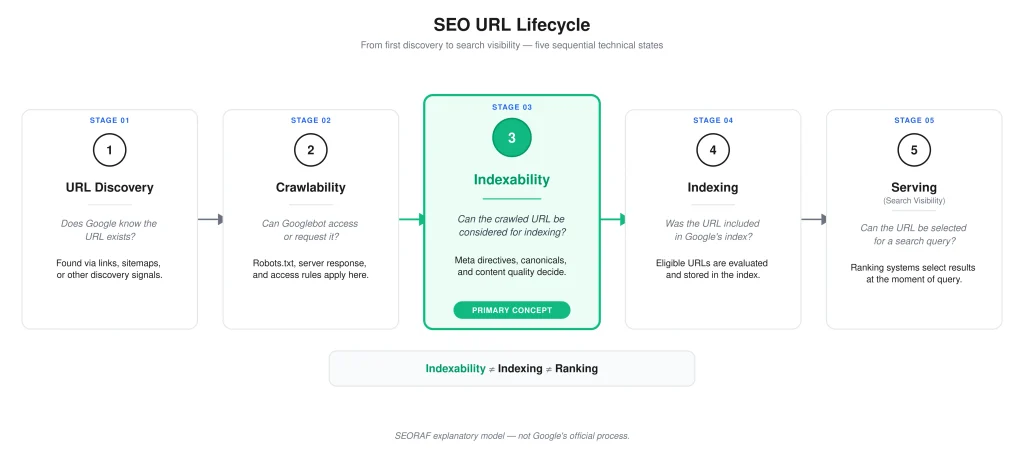
What Is Indexability in SEO?
Indexability is a URL’s technical ability to be considered for inclusion in a search engine’s index after the URL has been crawled and processed. It is a diagnostic concept rather than a single HTML setting or switch.
That distinction matters because several different things can happen to the same URL. A search engine can discover a URL without immediately crawling it, crawl it without indexing it, or index it without ranking it prominently for a particular query. Treating all of these outcomes as “indexing problems” makes diagnosis slower and less precise.
What “Indexable” Actually Means
When an SEO practitioner calls a URL “indexable,” the useful meaning is that there is no known technical directive or structural condition intentionally preventing that URL from being considered for indexing.
That does not mean Google must index it. Google uses multiple systems to process, canonicalize, select, and index URLs. Search Console also makes clear that not every known URL is necessarily indexed, and that a URL being outside the index is not automatically an error.
For practical auditing, separate these questions:
- Should this URL be indexed?
- Can a crawler access and request it?
- Does the response allow normal processing?
- Is an indexing directive excluding it?
- Is another URL being preferred as the canonical representative?
- Is the intended content available after rendering?
- What does Google Search Console report?
Indexable Does Not Mean Indexed
This is one of the most important distinctions in technical SEO.
A URL may have a successful HTTP response, no accidental noindex, an appropriate canonical, and useful discovery signals while still not appearing in the index. Removing a specific technical barrier improves the URL’s technical state; it does not create a guarantee of indexing.
Indexability is an eligibility question. Indexing is an outcome.
Crawlability vs. Indexability vs. Indexing
These terms are often used interchangeably, but they describe different parts of the search process.
| Concept | Core question | What it tells you | What it does not guarantee |
|---|---|---|---|
| Discovery | Does the search system know the URL exists? | The URL has been learned through a discovery source. | That it will be crawled immediately. |
| Crawlability | Can the crawler discover and request the URL? | The crawler can potentially obtain the resource. | That the URL will be indexed. |
| Rendering | Can the search system process the page and its required resources? | Rendered content and links may become available for evaluation. | That the URL will be indexed. |
| Indexability | Is the crawled URL technically eligible to be considered for indexing? | There is no known technical exclusion preventing consideration. | That Google will actually index it. |
| Indexing | Was the content included in the search index? | The URL can be considered for relevant searches. | That it will rank prominently. |
| Serving/ranking | Will the URL be selected for a particular query? | The URL may appear in search results. | Stable rankings or guaranteed visibility. |
SEORAF’s broader crawling guidance uses the same practical separation: discovery, crawling, rendering, indexing, and ranking are connected but should not be treated as interchangeable stages.
URL Discovery
Discovery is the point at which a search engine learns that a URL exists. Internal links, XML sitemaps, external references, and other systems can contribute to URL discovery.
Discovery is not the same as crawling. Google Search Console’s “Discovered – currently not indexed” status is a useful example: Google knows about the URL but has not yet crawled it.
Crawlability
Crawlability concerns access and discovery. It asks whether a crawler can reach and request the URL under the site’s current technical configuration.
Robots.txt rules, server availability, internal links, URL discovery, HTTP responses, and other access conditions can influence crawlability. For a deeper treatment, see crawlability fundamentals.
Indexability
Indexability begins with a different question: once the URL has been crawled and processed, is there a technical reason it should not be considered for the index?
Common issues include unintended noindex directives, unsuitable HTTP responses, redirects, canonicalization problems, duplicate URL relationships, and rendering problems that prevent the intended content or signals from being processed correctly.
Indexing
Indexing is the actual inclusion of processed content in a search engine’s index. A technically indexable URL can still remain unindexed.
Why These Concepts Get Confused
The confusion usually comes from using “not indexed” as a catch-all diagnosis. But a page can be absent from search because it was never crawled, because crawling was blocked, because it has an indexing directive, because another URL is selected as canonical, because it is treated as a duplicate, because it returns an unsuitable response, or because Google simply has not selected it for indexing.
The correct response is therefore not “fix indexing.” The correct response is to identify the failed or intended stage first.
How Google Evaluates Indexability Signals
There Is No Single “Indexability Switch”
Indexability is not controlled by one universal setting. It is better understood as the combined technical state of a URL and the signals surrounding it.
For example, a page can have:
- a
200 OKresponse; - no
noindexdirective; - a self-referencing canonical;
- an XML sitemap entry; and
- internal links.
That is generally a healthier technical state than the opposite configuration, but it is still not a guarantee that Google will index the URL.
Direct Indexing Directives
The clearest direct indexing control is noindex. Google documents noindex as a rule that can be supplied through an HTML robots meta tag or an HTTP response header such as X-Robots-Tag. The crawler must be able to access the page or response well enough to read the directive.
Crawl-Access Controls
Robots.txt is different. It controls crawler access to paths; it is not a direct substitute for noindex.
If a URL is blocked in robots.txt, the crawler may be unable to retrieve the page and therefore may be unable to read a page-level noindex directive. A blocked URL can still be known through other discovery sources, so robots.txt should not be described as a guaranteed deindexing mechanism.
URL and Response Signals
HTTP status codes provide important technical context. A normal HTML page intended for indexing will usually return a successful response rather than a redirect, client error, or server error.
But HTTP success alone is not enough. A 200 OK response confirms a successful HTTP response; it does not prove that Google will index the URL.
Supporting Signals
Canonical declarations, sitemap inclusion, internal links, URL structure, duplication, rendered content, and Search Console evidence can all help diagnose the URL’s state.
These signals should not be treated as a simple mathematical score. The useful approach is to determine whether they agree with the site’s intended indexing state.
The Technical Signals That Affect Indexability
HTTP Status Codes
The server response is one of the first things to inspect because it tells you what happened at the HTTP layer.
200 OK
A 200 OK response indicates that the server successfully handled the request. It does not mean “Google indexed this page” or even “Google will index this page.”
3xx Redirects
A redirect tells the client that the requested URL should be resolved through another URL. Permanent redirects such as 301 and 308 are commonly used when a URL has permanently moved; temporary redirects communicate a different intent.
For SEO diagnosis, inspect the entire redirect path: source URL → redirect → destination URL. Check for unexpected chains, loops, incorrect targets, and destinations that themselves return redirects or errors.
4xx Responses
4xx responses indicate a client-side request problem at the HTTP protocol level. A genuine 404 or 410 can be appropriate when content has been permanently removed and no replacement exists.
Do not “fix” every 404 by redirecting it to the homepage. A redirect should have a relevant destination and should reflect the site’s actual URL strategy.
5xx Responses
5xx responses indicate server-side failures. Persistent server failures can prevent reliable crawling and processing, so they deserve prompt technical investigation for URLs that should remain accessible.
Noindex Directives
A noindex directive tells search engines not to include the page in their index. It can be delivered in HTML through a robots meta tag or through an HTTP response header such as X-Robots-Tag.
When an important page unexpectedly carries noindex, investigate where it was introduced. Common sources include CMS settings, SEO plugins, templates, staging configurations, deployment rules, or HTTP-server configuration.
Robots.txt
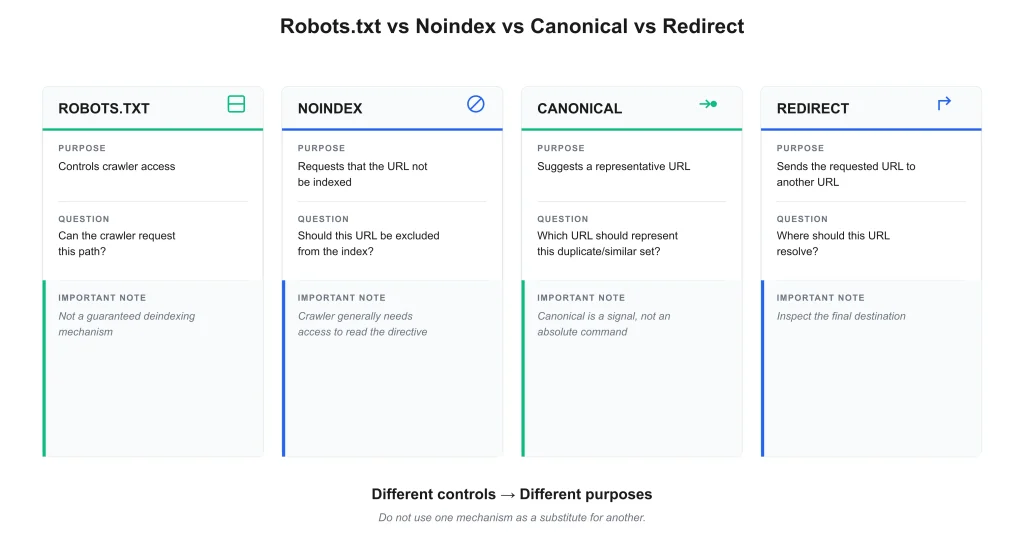
Robots.txt and noindex solve different problems.
| Signal | Primary purpose | Common misunderstanding |
|---|---|---|
robots.txt | Controls crawler access to matching paths. | It is not a guaranteed deindexing mechanism. |
noindex | Requests that the URL not be included in the index. | It cannot be reliably read if the crawler is prevented from accessing the page. |
rel="canonical" | Suggests a representative URL among duplicate or similar URLs. | It is not an absolute indexing command. |
| XML sitemap | Provides URL discovery and supporting canonical signals. | It does not guarantee indexing. |
Canonical Signals
Canonicalization is the process of identifying a representative URL among duplicate or substantially similar URLs. Google can consider multiple signals, including redirects, canonical declarations, and sitemap information, and can select a canonical different from the site’s declared preference.
Therefore, a canonical tag should be treated as a signal, not a guaranteed command.
Rendering and Accessible Content
Modern websites can depend heavily on JavaScript. A page may return successful HTML while important content, links, or signals become available only after rendering.
Rendering problems therefore belong in an indexability diagnosis when they affect the content or technical signals that a search engine needs to process. Successful rendering still does not guarantee indexing.
Noindex: The Most Direct Indexing Control
What Noindex Does
noindex communicates that the URL should not be included in the search index. For an important page, an accidental noindex is therefore one of the highest-priority indexability problems to investigate.
HTML Robots Meta vs. X-Robots-Tag
An HTML document can use a robots meta tag, while other resources or HTTP responses can use the X-Robots-Tag response header. Both mechanisms can communicate indexing directives.
When diagnosing an unexpected exclusion, check both the rendered/source HTML and the HTTP response headers.
How Noindex Gets Introduced
- CMS visibility settings;
- SEO plugin configuration;
- page-level settings;
- template logic;
- staging-to-production configuration;
- server response headers; or
- automation that changes metadata during deployment.
Noindex vs. Robots.txt
If your intention is to prevent a page from being indexed, do not assume that blocking it in robots.txt accomplishes the same thing as noindex. The crawler generally needs access to the page to read a page-level noindex instruction.
Diagnosing Unexpected Noindex
- Confirm that the URL should actually be indexed.
- Inspect the HTML for a robots meta directive.
- Inspect HTTP response headers for
X-Robots-Tag. - Check the CMS and SEO plugin settings.
- Check template or deployment logic.
- Use Search Console URL Inspection to compare Google’s reported state.
- After correcting the source, validate the live URL again.
Canonicalization and Indexability
What Canonicalization Does
Canonicalization helps search engines identify the preferred representative among duplicate or substantially similar URLs. This is particularly important when multiple URLs expose the same or near-identical content.
User-Declared vs. Google-Selected Canonical
Your rel="canonical" declaration is a user-declared canonical. Google may select a different URL as the Google-selected canonical after evaluating available signals. Google’s canonicalization documentation explicitly treats canonical hints as signals rather than absolute rules.
Self-Referencing Canonical
For a preferred standalone page, a self-referencing canonical can reinforce which URL should represent that page. It should point to the correct canonical URL and should not conflict with redirects, robots directives, or the site’s URL architecture.
Cross-URL Canonical
A cross-URL canonical can be appropriate when multiple URLs represent substantially similar content and another URL is intended to be the representative version. It should not be used as a substitute for fixing a fundamentally different page relationship.
Common Canonical Problems
Canonical to a Redirect
If a canonical points to a URL that redirects, the canonical chain becomes less direct. The preferred canonical should normally resolve cleanly to the intended representative URL.
Canonical to a Non-Indexable URL
A canonical pointing to a URL that is itself excluded, inaccessible, redirected, or otherwise unsuitable creates a contradictory configuration. Always inspect the canonical target, not just the canonical tag.
Canonical to a 404
A canonical pointing to a missing URL is a clear technical inconsistency. Correct the canonical to the intended valid representative or reconsider the duplicate relationship.
Conflicting Canonicals
Conflicts can arise when HTML, HTTP headers, redirects, sitemaps, templates, or CMS logic communicate different preferred URLs. The goal is not to create more canonical signals; it is to create a consistent URL architecture.
Canonical vs. Noindex
Canonical and noindex have different purposes.
- Canonical: “Among related URLs, this is the representative URL I prefer.”
- Noindex: “Do not include this URL in the index.”
Do not automatically combine them. First determine the intended URL relationship.
Canonical vs. Redirect
A redirect changes where the requested URL resolves. A canonical declaration leaves the URL accessible while suggesting which URL should represent a duplicate or similar set.
Canonical vs. Sitemap
A sitemap can reinforce URL discovery and provide supporting canonicalization information, but sitemap inclusion does not override stronger technical conditions or guarantee indexing.
HTTP Status Codes, Redirects & Soft 404s
Why HTTP Responses Matter
HTTP status codes tell crawlers what happened when they requested the resource. They are therefore foundational evidence in an indexability audit.
| Status | Typical meaning | Indexability implication |
|---|---|---|
| 200 | Successful response | Can be processed, but does not guarantee indexing. |
| 301/308 | Permanent redirect | Inspect the destination rather than treating the source as the representative page. |
| 302/other temporary redirects | Temporary redirection | Confirm that temporary behavior is actually intended. |
| 404 | Resource not found | Appropriate for genuinely removed pages with no replacement. |
| 410 | Resource permanently gone | Useful when permanent removal is intentional. |
| 5xx | Server-side failure | Can prevent reliable crawling and processing. |
200 Does Not Guarantee Indexing
This is worth repeating because it is one of the most common technical SEO misconceptions.
200 OK means the HTTP request succeeded. It does not mean the URL is indexed, selected as canonical, or guaranteed to rank.
Redirects
For redirect diagnosis, follow the complete path:
Look for redirect chains, loops, incorrect destinations, and redirects to pages that are themselves unavailable or inappropriate.
404 and 410
Not every 404 is a technical error. A URL that has genuinely been removed and has no relevant replacement can appropriately return 404 or 410.
The mistake is not “having 404s.” The mistake is having unexpected 404s for URLs that should still exist, or redirecting every removed URL to an unrelated destination.
Soft 404
A soft 404 occurs when a URL appears successful at the HTTP layer but the content effectively communicates that the requested page does not exist or is unavailable.
Examples can include an error template that returns 200 OK, an empty product page, or a page that renders a “not found” experience while maintaining a successful response.
When a page is genuinely gone and has no suitable replacement, use an appropriate not-found response rather than manufacturing a successful response that behaves like an error page.
Duplicate URLs and Indexability
Exact and Near Duplicates
Duplicate content is not automatically a penalty. The practical issue is that multiple URLs can represent the same or substantially similar resource, creating a canonicalization and URL-selection problem.
URL Variants
Common examples include:
- tracking parameters;
- sorting and filtering parameters;
- print versions;
- HTTP/HTTPS variants;
- www/non-www variants;
- trailing-slash inconsistencies;
- case variations where the server treats them separately; and
- CMS-generated alternative URLs.
Duplicate Clustering
Google can group duplicate or substantially similar URLs and select a representative canonical. The audit goal is therefore not to eliminate every technically duplicate URL at all costs. It is to make the intended URL relationship clear and consistent.
Canonical Selection
When multiple URLs exist, compare:
- canonical declarations;
- redirects;
- internal links;
- sitemap inclusion;
- HTTP/HTTPS configuration;
- content similarity; and
- Google’s selected canonical in Search Console where available.
Duplicate Content Is Not Automatically a Penalty
The presence of duplicate or similar URLs should be diagnosed as a URL-selection and consolidation issue where appropriate, not automatically described as a penalty.
JavaScript, Rendering & Indexability
When JavaScript Affects Indexability
JavaScript can affect indexability when important content, links, metadata, or other signals depend on rendering and are not available or correctly processed.
A successful initial HTTP response does not necessarily prove that the rendered representation contains everything intended for search engines.
HTML vs. Rendered Content
Compare the initial HTML with the rendered page when troubleshooting JavaScript-heavy sites.
Ask:
- Is the main content present?
- Are important links available?
- Are metadata and indexing directives consistent?
- Are canonical signals correct?
- Do required JavaScript resources load successfully?
- Does the rendered result represent the intended page?
JS-Generated Directives
Do not rely on JavaScript to repair a fundamentally broken indexing configuration without testing the rendered result. If an important indexing directive or canonical relationship is generated dynamically, verify what a search engine can actually process.
Diagnosing Rendering Problems
- Inspect the initial HTML response.
- Inspect the rendered representation.
- Check browser-console and resource-loading errors where relevant.
- Verify important content and links after rendering.
- Compare the rendered result with Search Console evidence.
SEORAF’s broader crawling guidance also distinguishes successful crawling from rendering and indexing; a fetched page can still require additional processing before all intended content and links are available for evaluation.
XML Sitemaps & Internal Links
Sitemaps and Discovery
XML sitemaps are useful for communicating important URLs to search engines. They are particularly valuable for large sites, newly published content, and URL sets that may be harder to discover through normal navigation.
Sitemap/Indexability Consistency
A useful sitemap should generally contain URLs that the site actually wants search engines to consider. Review sitemap entries for:
- redirecting URLs;
- 404 URLs;
- blocked URLs;
- unintended
noindexURLs; - duplicate URLs;
- incorrect canonical variants; and
- URLs that are not part of the site’s intended searchable content.
What Sitemaps Cannot Guarantee
A sitemap is not an indexing command. Adding a URL to a sitemap does not guarantee crawling, indexing, or rankings.
Think of sitemap inclusion as one part of a consistent discovery and URL-selection strategy.
Internal Links and Discovery
Internal links provide navigational paths that help search engines discover and understand relationships among URLs. Important indexable pages should have sensible internal-link pathways rather than existing only inside an XML sitemap.
Orphan URLs
An orphan URL is a page with no useful internal link path from the site’s accessible architecture. An XML sitemap may still expose it, but relying solely on sitemap discovery can make the site’s architecture less informative and harder to maintain.
How to Diagnose Indexability Problems
Do not begin by changing everything at once. A good audit records evidence first, identifies the strongest signal, applies the smallest appropriate fix, and then validates the result.
Establish the Intended Indexing State
Before diagnosing a URL as “not indexed,” answer the most important question:
Should this URL actually be indexed?
Not every URL should be searchable. Some pages are intentionally excluded because they are administrative, transactional, duplicate, filtered, internal, or otherwise not intended to serve search users.
Check the HTTP Response
Verify the actual server response rather than relying on what a browser appears to show.
- Expected status?
- Unexpected redirect?
- Redirect chain?
- 404/410?
- 5xx?
- Soft-404 behavior?
Check Robots.txt
Determine whether robots.txt is preventing the crawler from requesting the URL. If access is blocked, recognize that page-level directives may not be available for the crawler to read.
Check Noindex and X-Robots-Tag
Inspect both HTML and HTTP headers. Do not assume that the CMS editor’s visible SEO setting is the complete source of truth.
Check Canonical
Confirm:
- the canonical exists where appropriate;
- it points to the intended URL;
- the target resolves successfully;
- the target is not accidentally noindexed;
- the target is not a 404;
- redirects are not creating unnecessary chains; and
- other signals do not strongly contradict the declared canonical.
Check Redirects
Follow the complete redirect chain and inspect the final destination.
Check Duplicates
Search for other URLs containing substantially the same content. Determine whether the URL is intended to be the representative page or whether another URL should own the canonical relationship.
Check Sitemap and Internal Links
Confirm that the URL has appropriate discovery paths and that the sitemap is consistent with the intended canonical URL.
Check Rendering
For JavaScript-dependent pages, verify that the rendered representation contains the intended content, links, metadata, and indexing signals.
Compare With Search Console
Use Search Console as evidence rather than as a substitute for technical inspection.
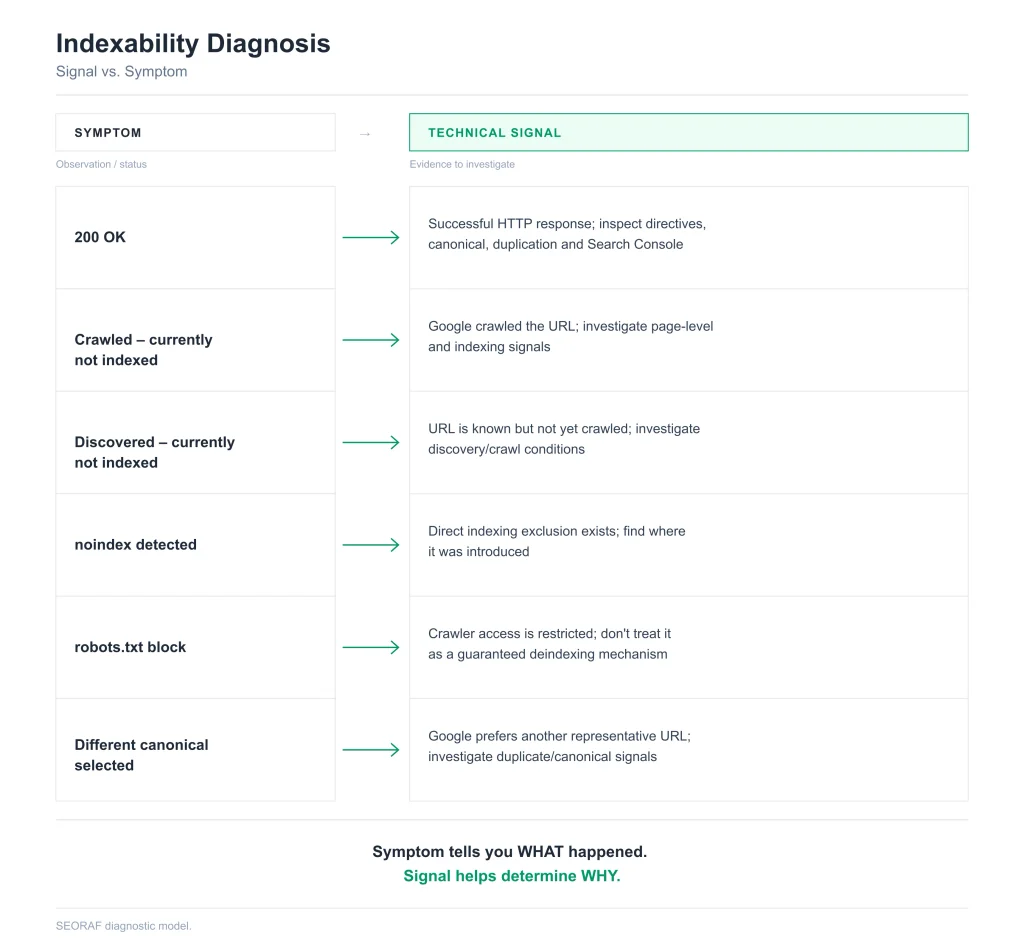
Signal vs. Symptom: A Better Indexability Diagnosis
One of the most useful distinctions in an SEO audit is the difference between an observed symptom and a technical signal.
| Observation | What it tells you | What it does not prove | Check next |
|---|---|---|---|
200 OK | The HTTP request succeeded. | That Google indexed the page. | Directives, canonical, duplicates, GSC. |
noindex | An indexing exclusion is present. | Why the directive was introduced. | CMS, plugin, template, headers. |
| Robots block | Crawler access is restricted. | That the URL cannot be known or appear in every circumstance. | Robots rules and discovery sources. |
| Different canonical selected | Google prefers another representative. | That the site’s canonical declaration is necessarily broken. | Duplicate relationship and conflicting signals. |
| Crawled – currently not indexed | Google crawled the URL but it is currently not indexed. | A single root cause. | URL-level technical and content signals. |
| Discovered – currently not indexed | Google knows the URL but has not crawled it. | That the page was crawled and rejected. | Discovery and crawl conditions. |
This prevents a common auditing mistake: treating a Search Console status as the diagnosis itself.
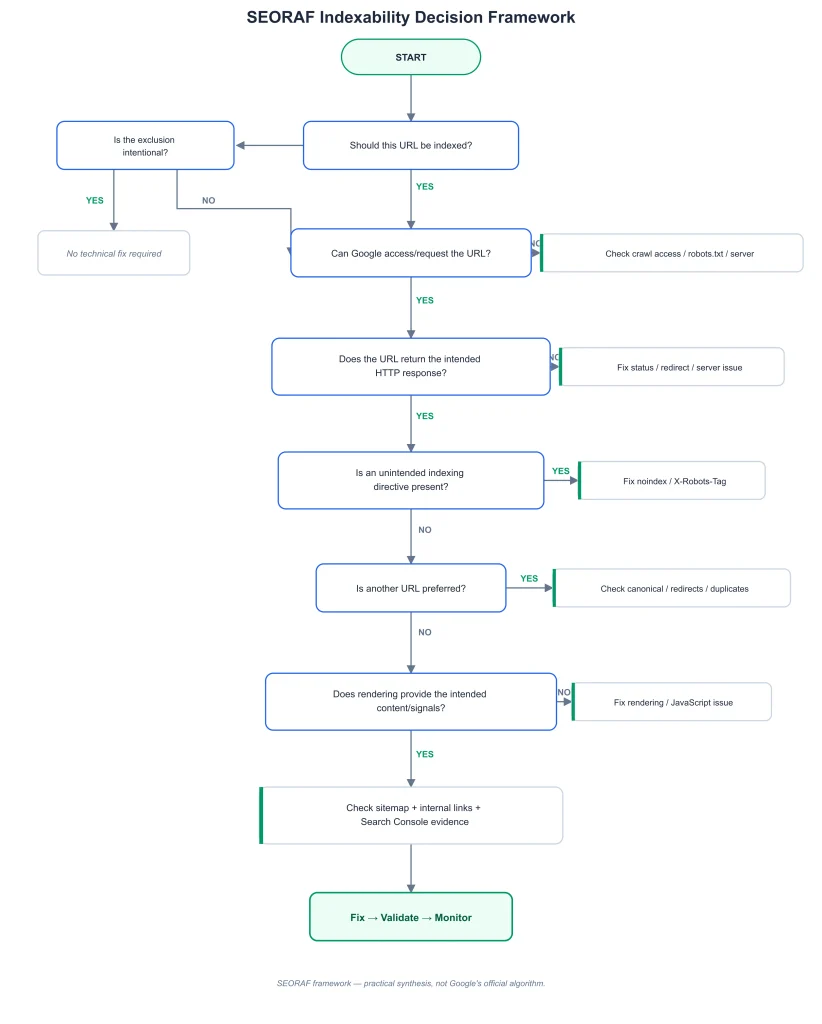
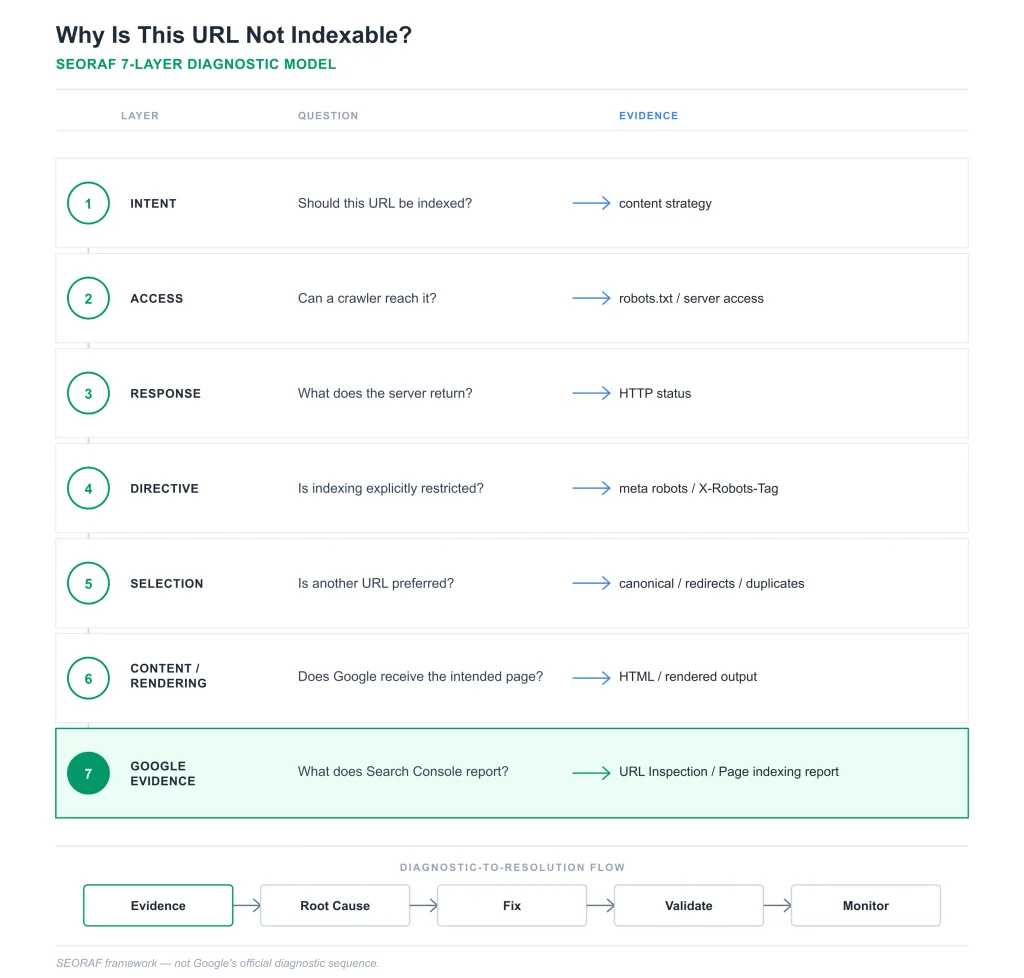
Why This URL Is Not Indexable? — The Seven-Layer Troubleshooting Framework
SEORAF Seven-Layer Indexability Model
| Layer | Core question | Evidence |
|---|---|---|
| 1. Intent | Should this URL be indexed? | Site/content strategy |
| 2. Access | Can a crawler reach it? | Robots.txt, server access |
| 3. Response | What does the server return? | HTTP status and headers |
| 4. Directive | Is indexing explicitly restricted? | Meta robots, X-Robots-Tag |
| 5. Selection | Is another URL preferred? | Canonical, redirects, duplication |
| 6. Content/Rendering | Does the processed page represent the intended content? | HTML, rendered output, resources |
| 7. Google Evidence | What does Google report? | URL Inspection, Page indexing report |
Work from the top down. Do not jump to content rewriting when the actual problem is a redirect, noindex, blocked access, or incorrect canonical.
Google Search Console: How to Verify Indexability
URL Inspection
URL Inspection is the primary Google Search Console tool for investigating an individual URL. It can show Google’s indexed view and provide a live test for the URL. Google’s documentation also makes clear that requesting indexing does not guarantee inclusion in the index.
Live Test
The live test helps verify the URL as Google can currently access it. It is valuable after a technical fix, but it should not be interpreted as a guarantee of the eventual indexing outcome.
Page Indexing Report
The Page indexing report is useful for site-level patterns. It can reveal groups of URLs with statuses such as redirects, noindex, soft 404s, crawled but currently not indexed, or discovered but currently not indexed.
Sitemaps Report
Use the Sitemaps report to monitor sitemap submissions and processing. Remember that sitemap processing is not equivalent to an indexing guarantee.
Request Indexing
Request indexing only after correcting the underlying technical issue. Repeatedly submitting the same technically broken URL does not replace diagnosis.
Common Indexability Problems & How to Fix Them
Unexpected Noindex
Symptom: An important page is excluded because of a noindex directive.
Fix: Remove the unintended directive at its actual source, then verify both HTML and HTTP headers and re-test the URL.
Robots.txt Blockage
Symptom: The URL is disallowed by robots.txt.
Fix: If the page should be crawled, correct the relevant robots rule. Do not assume that replacing the block with a noindex is possible without allowing the crawler to access the page.
Wrong Canonical
Symptom: The declared canonical points to a different URL than intended.
Fix: Correct the canonical and align internal links, sitemap entries, redirects, and duplicate relationships.
Non-Indexable Canonical
Symptom: The canonical target redirects, returns an error, is blocked, or carries an exclusion.
Fix: Select a valid representative URL and ensure the complete canonical path resolves cleanly.
Redirect
Symptom: The requested URL redirects instead of serving the intended page.
Fix: Confirm that the redirect is intentional and that the destination is the correct final URL.
4xx or 5xx Response
Symptom: An important URL returns an error response.
Fix: Restore the resource if it should exist, or intentionally retire it with the appropriate status if it should not.
Soft 404
Symptom: A page appears unavailable while returning a successful-looking response.
Fix: Return the appropriate not-found response for genuinely removed content or provide the intended content if the URL should remain active.
Duplicate URL
Symptom: Multiple URLs represent substantially similar content.
Fix: Establish the intended representative URL and align canonical, redirects, internal links, and sitemap signals.
Crawled – Currently Not Indexed
Symptom: Google has crawled the URL but it is currently not indexed.
Fix: Do not assume a single cause. Review directives, canonicalization, duplication, page content, rendering, internal links, and the broader URL pattern.
Discovered – Currently Not Indexed
Symptom: Google knows about the URL but has not crawled it.
Fix: Investigate discovery and crawl conditions rather than treating it as a post-crawl indexing rejection.
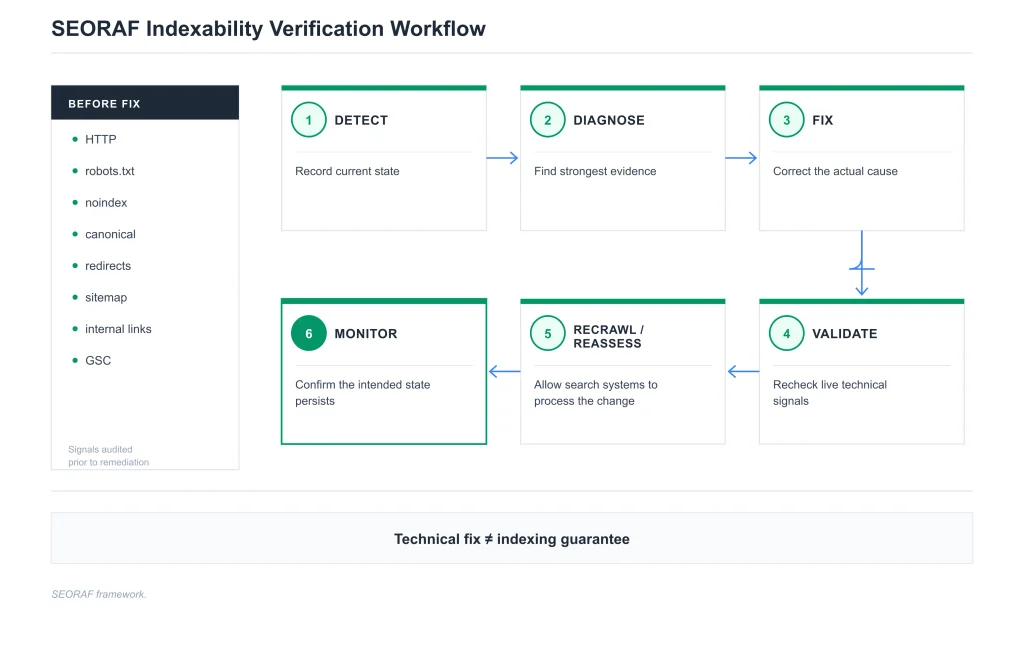
Indexability Verification Workflow
After the Fix
Do not assume the change worked simply because the CMS now displays the desired setting. Verify the live output.
- Check HTTP status.
- Check redirects.
- Check robots.txt.
- Check meta robots.
- Check X-Robots-Tag.
- Check canonical.
- Check rendered content.
- Check sitemap consistency.
- Check internal links.
- Reinspect the URL in Search Console.
Recrawl and Reassessment
Search engines need to recrawl and reassess changes. A technically correct fix does not necessarily produce an immediate indexing-state change.
Monitoring
Monitor important URL groups after migrations, CMS changes, template changes, plugin changes, and large-scale URL modifications. A successful audit today does not guarantee that a future deployment will preserve the same technical state.
Technical Issue Prioritization Framework
Not every non-indexed URL deserves the same level of urgency. Prioritize the problem based on Impact × Scope × Intent × Evidence.
| Priority | Typical situation | Recommended response |
|---|---|---|
| P0 — Critical | Important URLs are accidentally excluded sitewide. | Investigate and correct immediately. |
| P1 — High | A major template or section has an incorrect indexing configuration. | Fix at the template/system level. |
| P2 — Medium | A limited but genuine technical issue affects valuable URLs. | Correct and validate systematically. |
| P3 — Low | Low-value URLs have minor inconsistencies. | Fix during normal maintenance. |
| P4 — Monitor | No confirmed technical defect; indexing outcome requires observation. | Monitor rather than making unnecessary changes. |
Important: “Not indexed” is not automatically a P0 problem. First determine whether the URL should be indexed.
Advanced Indexability Considerations
Large Websites
Large sites can generate enormous numbers of URLs through filters, parameters, archives, faceted navigation, and CMS systems. The objective is not to force every URL into the index. The objective is to make the intended searchable URL set clear and technically consistent.
Faceted Navigation
Filters can create many URL combinations. Determine which combinations have genuine search value and which should remain outside the intended indexable set. Avoid creating thousands of indexable variations without a clear content and search purpose.
Parameter URLs
Parameters used for tracking, sorting, filtering, personalization, or other functions can create duplicate or low-value URL variants. Establish a consistent URL strategy and make sure canonical, internal links, sitemap entries, and indexing directives support that strategy.
Ecommerce
Ecommerce sites should carefully distinguish indexable product and category URLs from internal search, temporary filter, cart, checkout, account, and tracking URLs.
CMS-Generated URLs
CMS templates can accidentally generate duplicate URLs, archive pages, tag pages, pagination variants, or indexing directives at scale. When many URLs share the same defect, fix the generating system rather than manually editing every page.
Site Migrations
During migrations, establish a URL baseline before launch. Validate redirects, canonical URLs, robots.txt, sitemaps, HTTP responses, and important page templates after deployment.
Staging Environments
Staging sites commonly use access restrictions or indexing controls that should not be copied accidentally into production. After deployment, explicitly verify production indexing directives and robots configuration.
Conflicting Signals at Scale
A template that generates conflicting canonical tags or unintended noindex directives can affect hundreds or thousands of URLs. Pattern-level diagnosis is therefore more valuable than fixing isolated symptoms one URL at a time.
Technical SEO Indexability Checklist
Use this checklist when auditing an important URL or URL group.
1. Intent
2. Access
3. HTTP
4. Directives
5. Canonicalization
6. Duplication
7. Discovery
8. Rendering
9. Verification
Frequently Asked Questions About Indexability
Indexability describes whether a crawled URL is technically eligible to be considered for inclusion in a search engine’s index. It is different from crawlability and does not guarantee that the URL will actually be indexed.
Crawlability asks whether a crawler can discover and request a URL. Indexability asks whether the crawled URL has technical conditions that allow it to be considered for indexing. A URL can therefore be crawlable without being indexed.
Robots.txt primarily controls crawler access. It should not be treated as a guaranteed method for preventing a URL from appearing in search. If the crawler cannot access the page, it may also be unable to read a page-level noindex directive.
No. A noindex directive is an indexing instruction, not a crawl-access rule. The crawler generally needs to access the URL to read and process the directive.
Yes. Removing technical exclusion does not guarantee indexing. Google can crawl and process a URL without ultimately including it in the index.
No. A canonical is a signal about the preferred representative URL among duplicate or similar URLs. Google can select a different canonical after evaluating the available signals.
Yes. A 200 OK response only describes the HTTP response. A page can still have a noindex directive, canonicalization issue, duplicate relationship, rendering problem, or other reason for not appearing in the index.
It means Google has crawled the URL but it is currently not indexed. The status does not identify one universal cause. Investigate the page’s technical signals, canonicalization, duplication, content, rendering, and broader site context.
It means Google knows about the URL but has not yet crawled it. This is different from a page that has already been crawled and then remains outside the index.
How to Maintain Indexability Over Time
Indexability should be treated as ongoing technical maintenance rather than a one-time checklist.
CMS and Plugin Changes
New plugins, theme changes, template updates, and CMS configuration changes can alter canonical tags, robots directives, internal links, or HTTP behavior.
URL Migrations
Maintain a redirect map and verify important URLs before and after migrations. Recheck canonicalization, sitemap entries, internal links, and Search Console indexing patterns.
Template Checks
When many URLs share the same template, audit representative URLs from each template. A single template-level error can affect a large URL group.
Search Console Monitoring
Use Search Console to identify changes in indexing patterns, but investigate the underlying technical state rather than reacting to every fluctuation as an error.
Recurring Crawls
Periodic technical crawls can identify accidental noindex directives, broken canonicals, redirect chains, orphaned URLs, HTTP errors, and sitemap inconsistencies before they become larger site-wide problems.
SEORAF Indexability Audit: The Practical Workflow
When a valuable URL is not appearing in Google, use this sequence instead of changing multiple technical settings simultaneously.
- Define the intended state. Decide whether the URL should actually be indexed.
- Check access. Verify robots.txt, server availability, and crawl access.
- Inspect the response. Confirm HTTP status, redirects, and headers.
- Inspect indexing directives. Check meta robots and X-Robots-Tag.
- Inspect canonicalization. Compare declared and selected canonical signals.
- Investigate duplication. Determine whether another URL represents substantially similar content.
- Inspect rendering. Confirm that important content and signals survive the rendering process.
- Check discovery. Review internal links and sitemap consistency.
- Use Search Console evidence. Compare URL Inspection with the broader Page indexing report.
- Fix the actual cause. Avoid unrelated technical changes.
- Validate. Recheck the live technical state.
- Monitor. Confirm that the intended state persists after recrawling.
Related Technical SEO Resources
Indexability sits between crawl access and the broader indexing process. Continue with the resource that matches the problem you are actually diagnosing:
- Learn how Google indexing works for the broader indexing process.
- Learn the difference between crawlability and indexability when the problem begins with crawler access.
- Use the crawlability audit workflow when access and discovery need a deeper audit.
- Review HTTP crawl-error diagnosis when the server response is the primary problem.
- Return to the Technical SEO hub for the broader technical SEO system.
Next Steps
If a page is not indexed, do not immediately rewrite the content or repeatedly request indexing. First determine what stage is actually failing.
Start with the intended indexing state. Then check access, HTTP response, directives, canonicalization, duplication, rendering, discovery, and Search Console evidence. Once the strongest technical cause is identified, fix that cause and validate the live URL.
Final Indexability Checklist
| Check | Pass condition |
|---|---|
| Intent | The URL is intentionally included or excluded. |
| Crawl access | The crawler can access the URL when access is intended. |
| HTTP | The URL returns the appropriate response. |
| Redirects | Redirect behavior is intentional and resolves to the correct destination. |
| Robots.txt | No unintended crawl block exists. |
| Noindex | No unintended indexing directive exists. |
| Canonical | The preferred representative URL is clear and valid. |
| Duplicates | Duplicate relationships are intentional and understandable. |
| Rendering | Important content and signals are available after required processing. |
| Sitemap | The sitemap contains the intended canonical URL set. |
| Internal links | Important URLs have useful discovery paths. |
| Search Console | URL Inspection and Page indexing evidence have been reviewed. |
| Validation | The technical fix has been verified on the live URL. |
| Monitoring | The desired indexing state is monitored over time. |
Evidence note: Technical explanations in this guide are aligned with Google Search documentation and standard HTTP semantics. SEORAF’s diagnostic frameworks are practical editorial syntheses and are not presented as Google’s internal algorithm or official workflow.