
SEORAF › Technical SEO › Indexing
Technical SEO Indexing: How Google Decides What Gets Stored in the Index
By Mousume Akter, Founder & Editor, SEORAF
Quick answer: Indexing is the stage at which Google evaluates a crawled, rendered page and decides whether to store it in the Search index. Being crawlable, and even being crawled, does not automatically result in indexing — Google evaluates each URL individually and can exclude it for technical, duplication, or quality reasons. Indexing itself does not guarantee ranking; it only makes a page eligible to appear in results at all.
Most explanations of indexing stop at a one-line definition: “indexing is when Google adds your page to its database.” That’s not wrong, but it’s not useful either — it doesn’t tell you why a specific page on your site was crawled last week and still isn’t indexed, or why Search Console shows one URL as indexed while a near-identical one isn’t.
This guide treats indexing as what it actually is: a multi-stage evaluation system with its own logic, its own failure points, and its own diagnostic path. It covers how the process works, what determines whether a URL is even eligible, why pages get excluded, and how to diagnose and fix the most common problems — from a single missing page to a site-wide indexing gap. If you’re new to technical SEO generally, start with SEORAF’s Technical SEO Basics guide before using this page as an indexing reference.
This page focuses specifically on indexing. Crawling mechanics are covered in SEORAF’s guide to how Googlebot crawls a site, and ranking-stage factors are outside this page’s scope entirely — the two are related but distinct, and conflating them is one of the most common diagnostic mistakes in technical SEO.
What Is Indexing?
Indexing is the process by which Google analyzes a crawled, rendered page and decides whether to store it in the Search index — the dataset Google actually retrieves from when answering a query. Indexing is not guaranteed simply because a page has been crawled; Google may choose not to index a URL for a variety of documented reasons, including duplication, directives, or other indexing considerations.
This is the detail most content skips: indexing is a decision, not a formality. Google’s own documentation on how Search works confirms this three-stage structure — crawling, indexing, and serving — and states directly that Search Console can report a page as indexed even when it doesn’t appear in search results.
Why does this matter practically? Because it reframes “why isn’t my page indexed” from a technical malfunction to diagnose, into a decision to understand. Somewhere in the pipeline — discovery, crawling, rendering, or the indexing evaluation itself — something about the URL didn’t meet the bar for inclusion. The rest of this guide is about finding out where.
One more foundational point, addressed in full in the next section but worth stating early: a page being indexed does not mean it will rank for any particular query. Indexing determines whether a page is eligible to appear in results at all. What happens after that is a separate evaluation this page does not cover.
How Google’s Indexing Pipeline Works
Google publicly describes Search as a three-stage process: Crawling, Indexing, and Serving (Google’s “How Search Works” documentation). Within the indexing stage, Google has confirmed it evaluates whether a page duplicates other content, clusters similar pages together, and selects the most representative page as canonical, before deciding whether to store the page in the index.
The breakdown below organizes those documented mechanics into a more granular, diagnostic sequence — this is SEORAF’s own structuring of that process, not a stage list Google itself publishes. The stage names “Duplicate Detection,” “Canonical Selection,” and “Quality Evaluation” are SEORAF’s descriptive labels for genuinely documented Google behavior; they are not Google’s official terminology. Understanding this sequence is what makes the rest of this guide’s diagnostics work — the sequence gives a practical diagnostic map for common indexing problems.
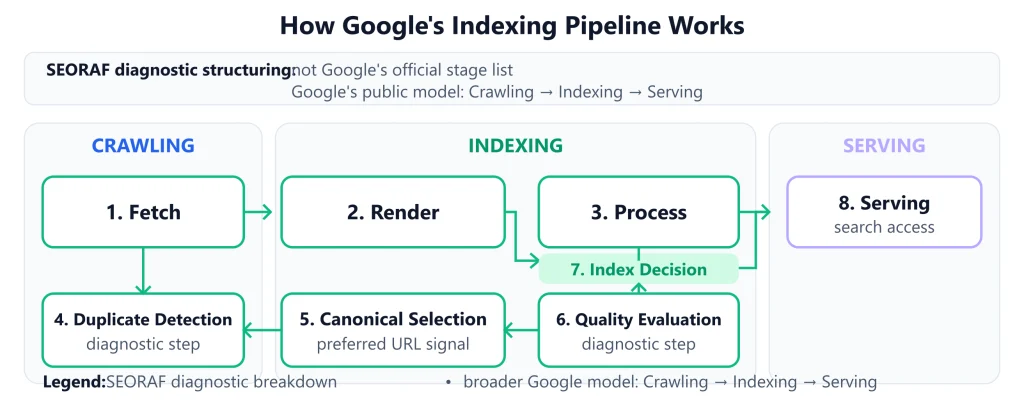
SEORAF diagnostic breakdown of the indexing pipeline within Google’s broader Crawling → Indexing → Serving model.
The pipeline stages, in order
- Fetch. Googlebot requests the URL and receives a response (status code, headers, HTML). This is the crawling stage, covered in depth in SEORAF’s Crawling — this page picks up from the point a fetch has already succeeded. A URL that Google cannot successfully fetch cannot be evaluated from that fetch, which is why URL discovery and crawlability matter before indexing diagnosis.
- Render. Google executes JavaScript and builds the final DOM, the version of the page content that gets evaluated downstream. If content only appears after client-side rendering and that step fails or is skipped, it’s effectively invisible to the stages that follow — not because Google penalizes JavaScript, but because there’s simply nothing there yet for the later stages to read. This stage often runs on a delay relative to the initial fetch, since rendering is a separate, additional processing step.
- Process. The rendered content is parsed and analyzed — text, structured data, links, and other signals are extracted for use in the following stages. This is also where entities, topics, and internal link relationships get identified, which is part of why link context and clear on-page structure matter beyond simple readability.
- Duplicate Detection. Google checks whether this URL’s content matches or closely resembles content already known from other URLs, on this site or elsewhere. This runs regardless of whether a canonical tag is present — Duplicate Detection is what identifies the cluster of similar URLs in the first place; Canonical Selection resolves it.
- Canonical Selection. Where duplication is detected, Google’s systems select one URL to represent the group in the index. A declared canonical tag is a strong signal into this decision — it is not the decision itself. Other signals feeding this stage include internal linking patterns, sitemap inclusion, and redirect history across the cluster.
- Quality Evaluation. The selected URL is assessed for whether it offers sufficient unique value to justify inclusion — this is where thin, low-value, or policy-violating content is filtered out. This stage is applied to the winning URL from Canonical Selection, not to every URL in a duplicate cluster individually.
- Index Decision. Based on the outcomes above, the URL is either stored in the index or excluded, with a reason recorded — this is the record that later shows up in Search Console’s exclusion reporting.
- Serving. For indexed URLs, this is the separate, later stage where Google determines whether and where the page appears for specific queries — the ranking stage, outside this guide’s scope.
Two things follow from this sequence. First, problems at an earlier step can prevent later processing from using the intended page content; the exact processing path is not publicly documented as a rigid waterfall for every URL. Second, indexing is genuinely the second-to-last stage, not the last one: Serving is a distinct evaluation layered on top of an index decision that has already been made.
Illustrative walkthrough: a new blog post is published and linked from the site’s homepage. Googlebot fetches it within a few days (Fetch), executes its client-side scripts to reveal a comments widget and related-posts block (Render), and extracts its heading structure and body text (Process). Because the post covers a topic already published elsewhere on the site with substantially similar wording, Duplicate Detection flags it as part of a small cluster; the post’s own rel="canonical" pointing to itself, combined with unique internal links to it, leads Canonical Selection to treat it as its own distinct entry rather than folding it into the older post. Quality Evaluation finds enough unique value to proceed, and the URL is indexed. This is an illustrative example to explain the pipeline’s logic, not a documented case study or a claim about any specific tested site.
The indexing lifecycle: why indexed pages can disappear
Indexing status is not permanent. Google periodically revisits indexed content, and a URL’s status can change without any new crawl request being visible in your logs.
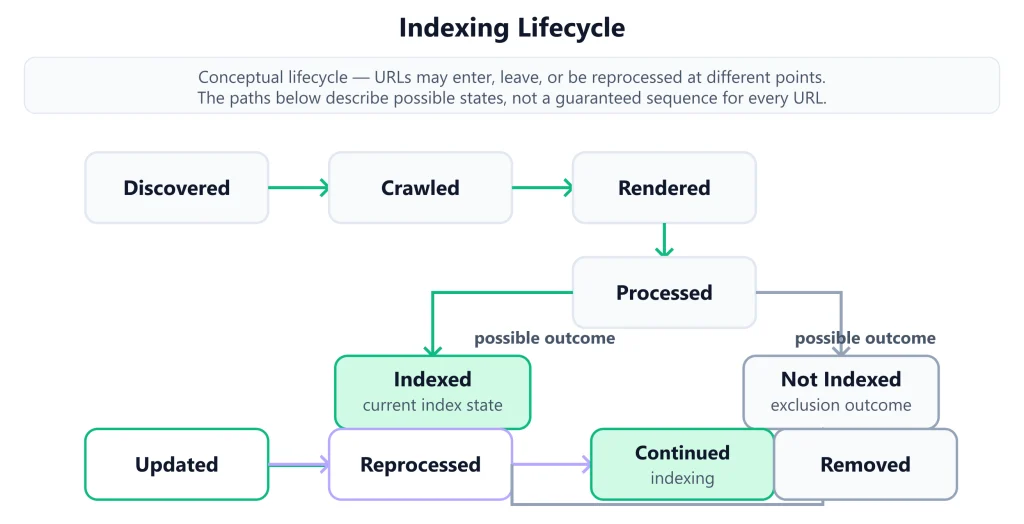
Conceptual indexing lifecycle showing how URLs can move through processing, indexing, updating, reprocessing, or removal.
In sequence, a URL moves from Discovered (Google knows the URL exists) to Crawled (Fetch has succeeded) to Rendered and Processed (the pipeline stages covered above), to an Indexed or Not Indexed outcome. From there, an indexed URL isn’t finished — it can later be Updated (content changes trigger reprocessing), Reprocessed (Google re-runs the evaluation), or eventually Removed from the index if a later evaluation no longer supports keeping it. This is why indexing status is better understood as an ongoing state than a one-time outcome.
This stateful view explains a specific, common source of confusion: a page that was indexed for months can drop out of the index following a content edit, a site-wide quality shift, or a change to directives elsewhere on the site — without a corresponding change to that specific URL. Reprocessing is triggered by freshness signals, not only by a fresh crawl of the exact page in question.
Practical implication: if a previously-indexed page disappears, the right first question isn’t “what changed on this URL,” but “what changed on this URL, or nearby, or site-wide, since it was last confirmed indexed.”
How Crawling, Rendering, Indexability, and Ranking Relate to Indexing
This is the single most useful disambiguation in technical SEO, and one of the most poorly explained. The terms below sound similar and get used interchangeably in casual conversation, but each describes a different, specific thing.
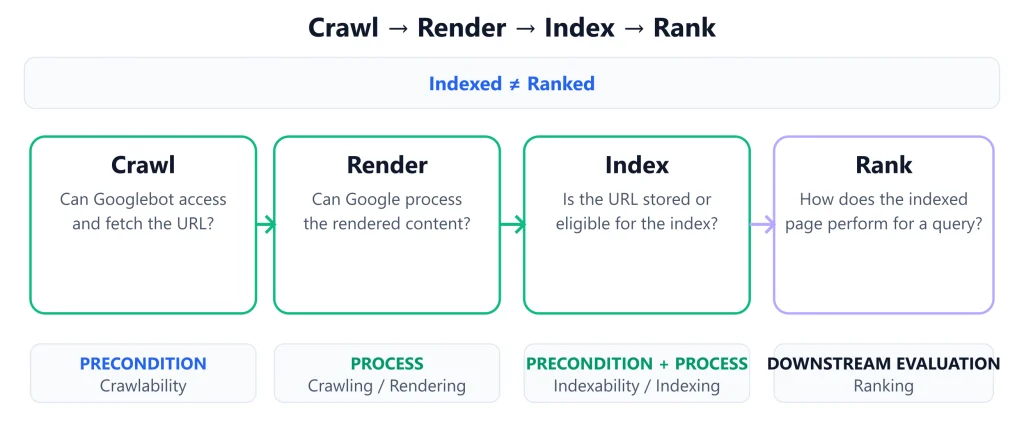
Precondition and process pairs across the pipeline
| Precondition | Process it enables | What it answers |
|---|---|---|
| Crawlability — can a crawler technically reach and read this URL? | Crawling — the discovery and fetch process | “Can this page be visited at all?” |
| Indexability — is anything blocking this specific page from being stored, given directives, quality, and duplication? | Indexing — the evaluation and storage decision | “Should this page be kept in the index?” |
Crawlability and indexability are the indexing-stage equivalent of each other, one pipeline stage apart. A page can be crawlable and still not be indexed — for example, when Google selects another URL as the canonical representative of substantially duplicate content.
Ranking sits entirely outside this pairing. A page can be indexed and still not appear in results for a specific query — indexing is a binary, page-level decision; ranking is a graded, query-specific evaluation that happens after a page is already in the index.
Practically, this means “my page isn’t ranking” and “my page isn’t indexed” are different problems requiring different diagnostics. Google’s own “How Search Works” documentation states directly that Search Console can report a page as indexed even when it doesn’t turn up in search results — commonly because the content simply isn’t relevant to the query in question. If a URL Inspection check confirms a page is indexed, further indexing-focused troubleshooting won’t help a ranking problem — that’s a separate evaluation this page doesn’t cover.
What Makes a URL Indexable: The Preconditions
Before diagnosing quality, duplication, or other indexing outcomes, check the basic technical conditions that can prevent Google from accessing or indexing the intended URL. Getting any of these wrong is one of the most common — and most avoidable — reasons a page never gets a fair evaluation at all.
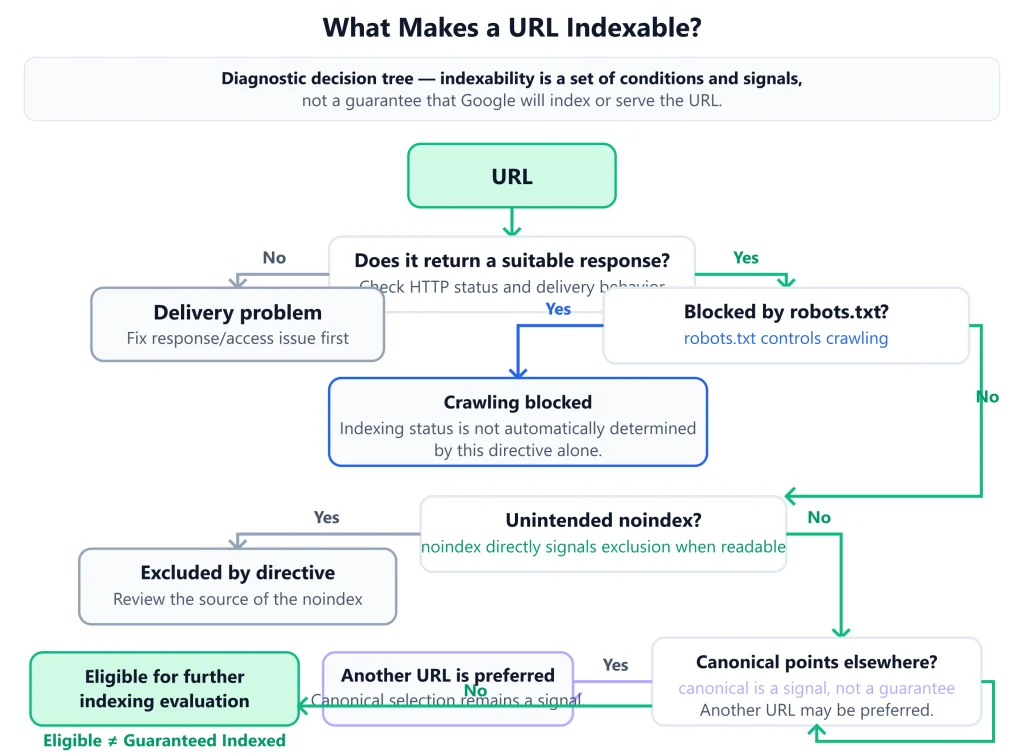
Worked in sequence, the check runs: does the URL return a response that makes the intended resource available? A 4xx/5xx response, redirect, or other delivery problem can prevent the intended URL from being indexed. If it returns a successful response, is it disallowed in robots.txt? If so, crawling is blocked, but — per the table below — that alone doesn’t confirm the page is excluded from the index; its status is independently uncertain. If it’s crawlable, is a noindex directive present (meta tag or header)? If so, it’s deliberately excluded. If not, does its canonical tag point elsewhere? If so, this specific URL isn’t the intended index target — the canonical target is. Clearing all four checks makes a URL eligible; it does not yet confirm indexing, which depends on the additional signals covered later in this guide.
What controls crawling vs. what controls indexing
| Mechanism | Controls | Effect |
|---|---|---|
robots.txt Disallow | Crawling | Prevents Googlebot from fetching the URL. This does not directly control indexing — a disallowed URL can still be indexed without its content having been read, if it’s referenced or linked elsewhere. Its indexing status in that case is independently uncertain, not guaranteed one way or the other. |
<meta name="robots" content="noindex"> | Indexing (directly) | Deliberately excludes the URL from the index, provided the tag is actually read — which requires the page to be crawlable and renderable in the first place. |
X-Robots-Tag: noindex HTTP header | Indexing (directly) | Same function as the meta tag, applied at the HTTP response level — the standard approach for non-HTML resources such as PDFs. |
| HTTP status code | Pipeline progression | A non-200 response (404, 410, 5xx) generally halts progression before indexing is evaluated at all; a soft 404 (a 200 response recognized as effectively empty) is excluded at the Quality Evaluation stage instead. |
rel="canonical" | Indexing (as a signal, not a directive) | Declares a preferred URL for Canonical Selection to weigh — it influences, but does not unilaterally determine, which URL from a duplicate cluster is indexed. |
The single most common mistake this table corrects: assuming robots.txt controls indexing. It doesn’t — it controls whether Googlebot can fetch a URL at all. A blocked URL’s indexing status is a separate, genuinely uncertain question, not an automatic “excluded” outcome. This is confirmed directly in Google’s own documentation: robots.txt is described as a mechanism for managing crawl traffic, not a way to keep a page out of Google’s index, while Google’s noindex documentation states explicitly that a robots.txt-blocked page’s noindex rule will never be seen by the crawler, and the page can still appear in search results if it’s linked elsewhere.
Diagnosing and Fixing Indexing Problems
Reading the Search Console Pages report
Start at the pattern level. The Pages report groups excluded URLs by reason, which reveals whether a problem affects a single page or an entire URL template — a distinction that changes how you fix it. A spike in one exclusion category across hundreds of URLs sharing a template points to a systemic cause (a faulty canonical rule, a template-level thin-content pattern); a single affected URL points to a page-specific issue.
Illustrative example: a Pages report shows 40 URLs grouped under “Crawled – currently not indexed,” and nearly all of them share the same /blog/tag/ URL pattern. That clustering is itself the diagnostic signal — it points to a template-level cause (likely thin, auto-generated tag-archive pages) rather than 40 unrelated, individually-broken pages. This is a hypothetical figure used to illustrate how to read a pattern in the report, not a statistic from any real site.
Using the URL Inspection tool
For a single URL, URL Inspection provides the current indexing status, the specific exclusion reason if applicable, and a live test that shows how Google currently renders the page. Comparing the live-tested rendered HTML against the page’s raw source is the fastest way to confirm or rule out a rendering-stage cause.
- Check the reported status and reason for the URL.
- If flagged as an exclusion, match the reason against the causal families in the previous section.
- Run the live test and compare rendered content to raw HTML if a rendering-related cause is suspected.
- For a pattern-level issue, sample three to five affected URLs individually before applying a template-wide fix, to confirm the shared root cause actually applies across the sample.
Diagnosing without Search Console access
Without a verified Search Console property — a common situation for a new site, or when auditing a site you don’t yet have access to — the same preconditions covered earlier in this guide can still be checked manually. Request the URL directly (or use a browser’s network tab) to confirm the status code; fetch /robots.txt and check whether the path is disallowed; view the page source for a noindex meta tag, and check response headers for an X-Robots-Tag; and check the canonical tag’s target. This mirrors the eligibility checklist above and gets you to the same starting point Search Console would, just without the reported exclusion reason to confirm it against.
Fixing directive-based exclusions
Remove or correct an unintended noindex tag or X-Robots-Tag header. If robots.txt is blocking a URL that should be crawlable, narrow the Disallow rule rather than removing it entirely, to avoid unblocking unrelated paths.
Fixing duplication and canonical-based exclusions
Bring internal links, the XML sitemap, and the canonical tag into agreement on the same target URL — disagreement among these three is one of the most common causes of Google selecting a different canonical than intended. SEORAF’s XML sitemap guidance covers keeping sitemap entries consistent with canonical targets in more depth. Where a genuine duplicate-prone URL pattern exists without a declared canonical, adding one gives Canonical Selection a clear signal to weigh.
Fixing quality and content-based exclusions
There’s no directive that overrides a genuine quality evaluation. The realistic options are improving the page’s actual uniqueness and depth, consolidating multiple thin pages into one substantive one, or — where a page genuinely has nothing to offer beyond what’s already indexed elsewhere — accepting that it may not be a good candidate for indexing at all. For a soft 404 specifically, the fix depends on intent: if the page should still exist, add genuine content to it; if it shouldn’t, replace the misleading 200 response with an accurate 404 or 410 so the status code itself reflects reality.
For programmatically generated pages at scale, the fix is rarely page-by-page — it usually means revisiting the template itself to ensure each generated page has a genuine reason to exist independently, rather than trying to manually improve individual instances of a pattern affecting thousands of URLs.
Fixing technical and rendering-based exclusions
Resolve the underlying delivery issue directly: fix server errors at the source, flatten redirect chains into single-hop redirects, and remove blocks on resources (CSS, JavaScript) required for the page to render its actual content. After a fix, use Search Console’s Validation feature to track whether the fix is confirmed following re-crawl, rather than assuming it worked immediately.
Worked example: a product page shows “Duplicate, Google chose different canonical than user” in Search Console. Checking reveals the XML sitemap lists a URL with tracking parameters, while the canonical tag on the page points to the clean, parameter-free version — and internal links across the site inconsistently point to both. Removing the parameterized URL from the sitemap and updating internal links to consistently use the clean URL removes the disagreement; it doesn’t force Google’s decision, but it removes the conflicting signal that likely caused it. This is an illustrative example to explain the diagnostic logic, not a documented case study or a claim about any specific client or tested site.
Auditing Indexing Systematically
Single-URL diagnosis doesn’t scale to a site with thousands of pages. A systematic audit works from patterns down to specifics, not the other way around.
SEORAF note: the sequence below reflects how SEORAF approaches indexing audits directly on this site — Mousume built and maintains SEORAF, including its own indexing controls, ongoing Search Console monitoring, internal linking structure, and technical troubleshooting. This paragraph is a statement of SEORAF’s own operational practice, separate from the Google-documented facts cited elsewhere on this page — it’s not a claim about any third-party client, test, or measured result.
- Establish a baseline. Compare the total number of indexed URLs against the number of URLs you’d actually expect to be indexable — a large, unexplained gap is the audit’s starting signal. This comparison is most useful when the “expected” figure comes from an actual crawl of the site’s publishable URLs, not a rough guess, since the gap itself is what determines how urgent the audit is.
- Segment by URL pattern or template, rather than reviewing URLs individually. Most real-world indexing problems affect a template or content type, not a single isolated page — product pages, category pages, and blog posts each tend to have their own distinct indexing behavior, and lumping them into one undifferentiated review usually obscures the actual pattern.
- Classify each segment’s exclusion reason into the causal families covered earlier — discovery/access, duplication, quality, or technical/delivery. A segment showing a mix of reasons across many URLs often points to more than one underlying cause, which is worth confirming before applying a single fix across the whole segment.
- Prioritize remediation. Not every gap deserves equal urgency: a directive error affecting high-value pages warrants immediate attention; a low-value URL pattern with a minor duplication issue may not be worth remediation effort at all.
- Re-baseline after fixes, using Search Console’s Validation feature to confirm resolution rather than assuming a fix worked. Because reprocessing takes time, a meaningful re-baseline usually needs to wait beyond the immediate days following a fix.
Prioritizing multiple issues
Prioritization by scope and value
| Scope | High business value | Low business value |
|---|---|---|
| Affects many URLs (template-level) | Fix immediately — site-wide directive or canonical errors on important content | Fix soon, batch-process across the affected segment |
| Affects one URL | Fix immediately, individually | May not warrant remediation effort at all |
This matrix intentionally includes a legitimate “don’t fix” quadrant. Not every unindexed low-value page is a problem worth solving — treating every indexing gap as equally urgent is a common way audits lose focus on what actually matters.
For a full enterprise-scale indexability audit workflow, see SEORAF’s dedicated audit guide a dedicated indexability audit supporting page (planned); the sequence above covers the condensed, pillar-level version.
Advanced Indexing Considerations
Index bloat and index hygiene
The goal of indexing management isn’t maximizing the number of indexed pages — it’s ensuring that the pages you want represented in Search are useful, canonical, and technically accessible. Large numbers of low-value or duplicate URL variants can create unnecessary crawling and indexing complexity, so ongoing index hygiene is useful on sites that generate many such URLs. In practice, this means revisiting indexed-URL counts on a regular cadence, not only when a problem is already suspected, and treating a steadily climbing indexed count as a prompt to check what’s actually driving the growth rather than an unambiguous positive signal.
Faceted navigation and parameter URLs at scale
Faceted navigation and URL parameters can generate a combinatorial number of near-duplicate URLs, which stresses the Duplicate Detection and Quality Evaluation stages at a scale far beyond typical content duplication. On ecommerce and large content sites, a category with several independent filters can generate many URL variants that differ only by parameter combinations; when those variants add little unique value, they are often poor candidates for indexing. Full parameter-handling strategy is covered in more depth in SEORAF’s site architecture content a dedicated site-architecture/faceted-navigation supporting page (planned).
Rendering budget vs. crawl budget
For JavaScript-heavy sites, crawling and rendering are distinct parts of Google’s processing. A URL can be fetched successfully while important content still depends on successful rendering, so rendering should be tested separately when diagnosing missing content. On large JavaScript-heavy sites, this distinction can matter when server logs show successful fetching but the content Google needs is not available in the rendered result. Full treatment of this topic belongs with SEORAF’s JavaScript SEO content a dedicated JavaScript SEO supporting page (planned).
Programmatic SEO and indexing risk
Sites built around large-scale, template-generated pages — a common pattern for directories, marketplaces, and location-based content — face a compounding version of the quality and duplication risks covered earlier. When thousands of pages share the same structure and differ only in a data field or two, Google may treat large sets of near-duplicate generated URLs differently from genuinely differentiated pages; the practical SEO question is whether each generated URL has a clear, useful reason to exist. Sites pursuing this approach generally see better indexing outcomes by ensuring each generated page adds a genuine, non-trivial layer of unique content beyond the templated data itself.
Indexing and AI Search
This section covers a genuinely evolving area — treat it as directional, not settled, and expect it to be revisited as platforms publish more about their own systems. It’s also worth distinguishing from a related but separate topic: whether AI crawlers can access your site at all, covered in SEORAF’s AI crawler access guide — access and indexing/retrieval are different questions.
Classic Google indexing and AI-generated search experiences are related but not identical systems. Google’s own documentation on AI features in Search confirms that to appear as a supporting link in AI Overviews or AI Mode, a page must be indexed and eligible to appear in regular Google Search results — there is no separate AI-specific index sitting apart from Google’s main Search index. That’s a meaningfully different, and more clearly documented, relationship than platforms such as ChatGPT Search or Perplexity, which don’t publish comparably detailed documentation of their own retrieval mechanics and shouldn’t be assumed to work the same way. Specifics for those platforms should be checked directly against their own current documentation, since this is a fast-moving area.
AI Search surfaces and their relationship to classic indexing
| Surface | Relationship to classic Google indexing | Confidence |
|---|---|---|
| Google AI Overviews / AI Mode | Requires the page to be indexed and eligible in regular Google Search; no separate AI-specific index | Confirmed (Google Search Central documentation) |
| ChatGPT Search | Retrieval and indexing approach not published in comparable detail; should not be assumed equivalent to Google’s index | Not publicly documented in comparable detail |
| Perplexity | Retrieval pipeline not published in comparable detail; should not be assumed equivalent to Google’s index | Not publicly documented in comparable detail |
The practical implication: a page failing to appear in a specific AI-generated answer is not necessarily an indexing problem in the sense this guide covers, and shouldn’t automatically be diagnosed using the frameworks above — it may reflect that platform’s own retrieval behavior instead.
There is also a structural difference worth understanding at a high level. Where classic Google indexing evaluates and stores whole pages for later retrieval, AI-powered search systems can use retrieval and ranking mechanisms that differ from classic web-search indexing, so classic indexing success does not by itself establish visibility in every AI-generated answer. This means a page can be well-optimized for classic indexing and still be a weak candidate for AI-generated retrieval if its content isn’t structured into clear, self-contained passages that answer a specific question directly — a separate consideration from anything this guide’s pipeline model covers, and one SEORAF treats in more depth in its dedicated AI Search content a dedicated AI Search Optimization supporting page (planned).
AI-generated answers can also reflect system-specific retrieval and freshness behavior, so an update to a live page may not immediately appear in every AI-generated response. This is a separate mechanism from classic Google reprocessing, covered earlier in this guide’s lifecycle discussion, though both share the same underlying lesson — an update to a page doesn’t instantly propagate everywhere that page’s content might be surfaced.
FAQ
Indexing Audit Checklist
A condensed, practical checklist combining this guide’s eligibility and audit priorities — a starting point for a real diagnostic pass, not a substitute for the fuller enterprise audit sequence above.
- Confirm the site’s total indexed-page count against the expected count of genuinely indexable URLs
- Check for unintended
noindextags orX-Robots-Tagheaders, especially following a recent launch or migration - Confirm robots.txt isn’t blocking URLs that should be crawlable
- Check that internal links, XML sitemap entries, and canonical tags agree on the same target URL for any duplicate-prone template
- Review the Search Console Pages report for exclusion-reason patterns affecting more than a handful of URLs
- Spot-check three to five URLs from any flagged template using URL Inspection before applying a template-wide fix
- Confirm rendered content matches expectations for any page relying on client-side JavaScript
- Identify low-value indexed URL patterns (filtered/sorted variants, thin archives) as index-hygiene candidates
- Check for orphan pages with no internal links pointing to them
- After remediation, use Search Console Validation to confirm fixes rather than assuming they resolved the issue
Key Takeaways
- Indexing is a decision made by a multi-stage pipeline, not an automatic result of crawling.
- Crawlability enables crawling; indexability enables indexing — the same precondition/process pattern, one stage apart.
- Being indexed does not mean a page will rank; that’s a separate, later evaluation.
- Robots.txt controls crawling, not indexing directly —
noindexandX-Robots-Tagare the direct indexing-exclusion mechanisms. - Diagnose by matching the specific exclusion reason to its causal family (discovery, duplication, quality, or technical) before attempting a fix.
- No single action — including submitting a sitemap — guarantees indexing. The goal is removing known blockers and giving the pipeline a clean, consistent set of signals to evaluate.
Indexing problems often have an upstream cause. If a URL is difficult for Google to discover or crawl, start with SEORAF’s Crawl Budget and Crawl Errors resources.
Mousume
Founder, SEORAF — independent technical SEO knowledge base.
SEORAF is an independent, evidence-led technical SEO resource. Claims involving Google’s current documentation, tools, or product behavior are verified against primary sources at time of publication and are subject to change as platforms update their systems.