
Home → Technical SEO → Crawling → Robots.txt
Robots.txt: The Complete Guide to Crawl Directives & AI Crawler Control
How robots.txt actually works, full directive syntax, Google’s documented status-code handling, and how to configure it for Googlebot, Bingbot, and today’s AI crawlers — with every technical claim sourced to RFC 9309 or the crawler operator’s own documentation.

Mousume Akter
Founder, SEORAF
Published August 25, 2026
Robots.txt is a plain-text file, located at a website’s root, that tells crawlers which parts of a site they may or may not request. It is the first and most direct control point in the Crawling stage of technical SEO: before a compliant crawler requests any other URL on a site, it requests /robots.txt and applies whatever rules it finds there.
What Robots.txt Actually Controls
Robots.txt controls exactly one thing: crawler access to specific paths on a site. It does this through simple rules, grouped by which crawler (“user agent”) they apply to, that either permit or block a URL pattern from being requested.
It does not control whether a URL can appear in search results, whether a URL gets indexed, who can view a page in a browser, or what happens to a page after it’s already been crawled and cached. That last point trips up a lot of site owners: robots.txt is a pre-request gate with no influence over anything that happens after a crawler decides whether to make the request.
Robots.txt is one determinant of a page’s crawlability — whether a URL can be accessed by a crawler at all — and one of several levers for managing crawl budget, the resource allocation a search engine applies to a given site, since disallowing low-value paths reduces the crawl requests spent on them.
Where Robots.txt Lives
A robots.txt file must sit at the top-level root of the host it governs, and its rules apply only to that exact host, protocol, and port.
https://example.com/robots.txtThis file governs https://example.com/ and everything beneath it. It does not govern https://www.example.com/ (a different host), http://example.com/ (a different protocol), or https://shop.example.com/ (a different subdomain). Each subdomain needs its own robots.txt file to control crawling on it.
Robots.txt vs. Robots Meta Tag vs. X-Robots-Tag
Getting this distinction right before anything else is the single highest-leverage thing this guide can do, because getting it wrong is the source of the most common robots.txt mistake in technical SEO.
Crawling is the act of a bot requesting and downloading a URL. Robots.txt governs this stage, and only this stage. Indexing/serving is a separate, later decision made after content has been crawled, and it’s governed by a completely different mechanism: the robots meta tag (in the HTML <head>) or the X-Robots-Tag (an HTTP response header, used primarily for non-HTML resources like PDFs or images where a meta tag isn’t possible).
A URL blocked by robots.txt can still appear in search results. If other sites link to a disallowed URL, a search engine can still know that URL exists and list it — typically without a title or description, since the crawler was never permitted to fetch and read the content.
If the goal is to prevent indexing, that requires the robots meta tag or X-Robots-Tag applied at the page level — and that mechanism only works if the crawler is allowed to crawl the page and read the directive. Disallowing a page in robots.txt while also relying on a noindex tag on that same page is a contradiction: the crawler that would need to read the noindex instruction is the same crawler robots.txt just told to stay away.
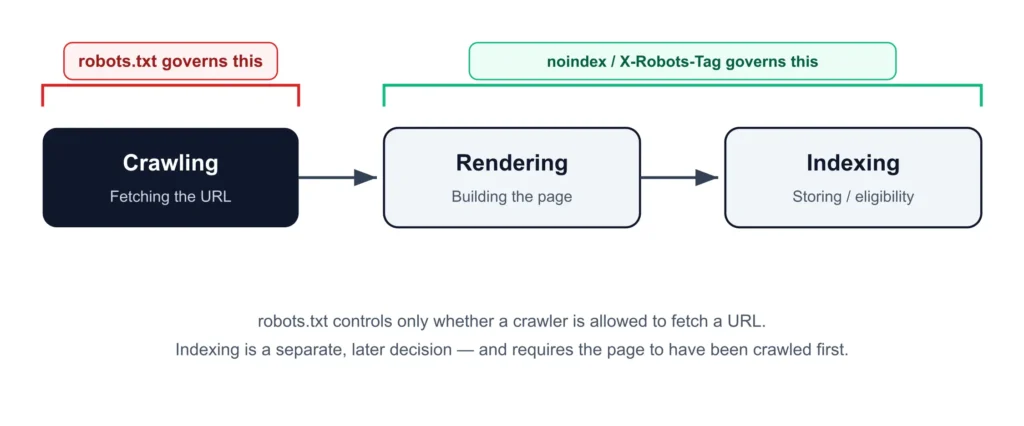
Robots.txt controls only the Crawling stage. Rendering and Indexing are separate, later stages governed by different mechanisms.
Robots.txt vs Robots Meta Tag vs X-Robots-Tag
| Mechanism | Controls | Location | Typical use |
|---|---|---|---|
| Robots.txt | Crawling | Site root file | Blocking crawler access to paths |
| Robots meta tag | Indexing / serving | HTML <head> | Preventing an HTML page from being indexed |
| X-Robots-Tag | Indexing / serving | HTTP response header | Preventing non-HTML files (PDFs, images) from being indexed |
How Robots.txt Works
Discovery, Fetching, and Caching
- Fetch first. A compliant crawler requests
/robots.txtbefore requesting any other path on the site. - Cache the result. Crawlers cache the file rather than re-fetching on every visit, so a change won’t necessarily take effect on the very next crawl.
- Parse the rules top to bottom, grouped by
User-agent. - Apply before requesting — disallowed paths are never fetched in the first place.
If no robots.txt file exists, the documented default is unrestricted crawling — not a default block. A missing file is not the same as a Disallow: / rule.
RFC 9309: The Standard Behind the File
Robots.txt implements the Robots Exclusion Protocol (REP), an informal convention dating to 1994 that the IETF formally standardized as RFC 9309 in September 2022.[1] It’s worth separating what the standard requires from what Google specifically does, since the two are often blended together — and they don’t always say exactly the same thing.
Caching: RFC 9309 states that crawlers may cache a fetched robots.txt file and should not rely on that cached copy for more than 24 hours, unless the file is unreachable.[1] Google’s own documentation matches this closely: it generally caches robots.txt for up to 24 hours, though it may cache longer when a refresh isn’t possible.[2]
Size limit: RFC 9309 requires crawlers to enforce a parsing limit of at least 500 kibibytes (KiB).[1] Google enforces exactly this figure — anything beyond 500 KiB is ignored.[2] That’s not a coincidence: 500 KiB is the RFC’s stated floor, and Google’s implementation sits right at it.
| Behavior | RFC 9309 (the standard) | Google’s implementation |
|---|---|---|
| Cache duration | Should not exceed 24 hours unless unreachable | Generally up to 24 hours; may extend if refresh fails |
| File size limit | Must be at least 500 KiB | 500 KiB — matches the RFC’s floor exactly |
| Security scope | Explicitly not a substitute for access control | Same position; robots.txt is publicly readable |
Not a security mechanism, by the standard’s own admission. RFC 9309 explicitly states the Robots Exclusion Protocol is not a substitute for valid content-security measures — listing a path in robots.txt makes it publicly discoverable, not protected.[1] See Robots.txt Is Not a Security Mechanism below.
Robots.txt Syntax and Directives
A robots.txt file is built from simple rule groups. Each group starts with one or more User-agent lines and is followed by the directives that apply to that user agent
User-agent: [crawler name]
Disallow: [path]
Allow: [path]

Sitemap: [absolute URL]
Field names are not case-sensitive (User-agent and user-agent are treated the same); path values generally are case-sensitive. Lines beginning with # are comments and are ignored during parsing.
User-agent
User-agent: *The * wildcard means “any crawler not more specifically addressed elsewhere in the file.” You can also target a specific crawler by name, e.g. User-agent: Googlebot.
Disallow
User-agent: *
Disallow: /private/
This blocks any path beginning with /private/. An empty Disallow: line means “disallow nothing.”
Allow
User-agent: *
Disallow: /private/
Allow: /private/public-info.html
Everything under /private/ is blocked except the one file explicitly allowed.
Sitemap
Sitemap: https://example.com/sitemap.xmlUnlike Disallow and Allow, this directive isn’t scoped to a specific user agent — it applies globally, can appear anywhere in the file, and doesn’t need to be on the same host as the robots.txt file itself. Multiple Sitemap lines are valid, which is common for sitemap-index structures or separate sitemaps per content type.
Important: declaring a sitemap tells crawlers where to find it — it does not override a Disallow rule. A URL listed in the sitemap but blocked in robots.txt is still not crawlable; the two systems are never automatically reconciled. Publishing a sitemap containing URLs the same robots.txt file disallows is a real, recurring implementation error.
| Directive | Purpose | Bingbot | Anthropic bots | Standard (RFC 9309)? | |
|---|---|---|---|---|---|
User-agent | Targets a crawler or group | Supported | Supported | Supported | Yes |
Disallow | Blocks a path | Supported | Supported | Supported | Yes |
Allow | Permits a path | Supported | Supported | Supported | Yes |
Sitemap | Declares sitemap location | Supported | Supported | Supported | Yes |
Crawl-delay | Requests reduced crawl rate | Not supported | Supported | Supported | No — non-standard extension |
Wildcards, Pattern Matching, and Rule Precedence
Robots.txt supports two special characters in path patterns. It is not a full regular-expression engine — only these two are supported:
Supported Wildcards
| Wildcard | Meaning |
|---|---|
* | Matches any sequence of characters (zero or more) |
$ | Matches only at the exact end of the URL path |
User-agent: *
Disallow: /*.pdf$
This blocks any URL ending in .pdf — /reports/annual.pdf is blocked, but /reports/annual.pdf?download=true is not, because $ anchors to the literal end of the path.
How Precedence Is Decided
The rule that wins a conflict between Allow and Disallow is decided by specificity of the matched path, not the order the rules appear in the file. Where specificity ties exactly, the less restrictive rule (Allow) wins.
Worked Precedence Examples
| URL requested | Competing rules | Rule applied | Why |
|---|---|---|---|
/page | Allow: /p / Disallow: / | Allow: /p | Longer, more specific match |
/folder/page | Allow: /folder / Disallow: /folder | Allow: /folder | Equal specificity — least restrictive wins |
/page.htm | Allow: /page / Disallow: /*.htm | Disallow: /*.htm | The wildcard match is more specific here |
/ | Allow: /$ / Disallow: / | Allow: /$ | /$ matches only the exact root, and is more specific |
/page.htm | Allow: /$ / Disallow: / | Disallow: / | /$ only matches the root itself — it doesn’t cover this URL |
How Google Handles Robots.txt Status Codes
What a crawler does when /robots.txt itself returns something other than a clean 200 OK is one of the most under-documented parts of robots.txt behavior. Google’s own documentation is explicit about each range:[2]
| Status code | Google’s documented behavior |
|---|---|
| 2xx (Success) | File is processed as provided — the only range where rules are read and applied as written |
| 3xx (Redirect) | Google follows up to five redirect hops looking for a robots.txt file; beyond that, or if not found, treated as a 404. Logical redirects (frames, JS, meta refresh) are not followed |
| 4xx (Client error), except 429 | Treated as if no robots.txt exists — no crawl restrictions apply. Google explicitly warns against using 401/403 to try to limit crawl rate, since these have no effect on that |
| 5xx (Server error) | Google pauses crawling for roughly the first 12 hours while retrying. If errors persist, it falls back to the last known-good cached version for up to 30 days; past that, treats the site as having no robots.txt (if otherwise reachable) or stops crawling (if broader availability problems exist) |
The 4xx behavior is a common source of confusion — a missing robots.txt file removes restrictions rather than blocking crawling. And the 5xx fallback timeline means an intermittent server error specifically on /robots.txt can produce crawling inconsistency that looks unrelated to its actual cause.
Robots.txt and Search Engine Crawlers
Googlebot, Googlebot Smartphone, and Googlebot Desktop
Googlebot Smartphone and Googlebot Desktop both operate under the same Googlebot product token in robots.txt — you cannot write a rule that targets one and not the other by user-agent alone.
User-agent: Googlebot
Disallow: /legacy-desktop-only/
This blocks the path for both Googlebot Smartphone and Googlebot Desktop — there is no way to write this rule for one sub-type only.
Google-Extended: A Control Token, Not a Crawler
Google-Extended is a separate control token, not a crawler in its own right — it governs whether content may be used for Google’s generative AI products (training and grounding), independent of standard Search crawling and indexing.
User-agent: Google-Extended
Disallow: /
This opts out of AI training/grounding use. It does not affect Googlebot’s normal Search crawling, indexing, or ranking in any way.
Bingbot and Crawl-Delay
Bingbot, Microsoft’s primary crawler, supports the non-standard Crawl-delay directive, with documented values from 1 to 30 — a real point of divergence from Google, which does not support it at all.
User-agent: Bingbot
Crawl-delay: 10
Robots.txt and AI Crawlers
One principle applies across every AI crawler discussed here: robots.txt is a voluntary access request for all of them, not an enforcement mechanism — every governance pattern below assumes the crawler in question chooses to comply.
The Three-Tier Pattern
The major AI vendors document a consistent structural pattern: a separate agent for training, a separate agent for search-index crawling, and a separate agent for user-triggered live fetches. Each is independently controllable.
OpenAI — GPTBot, OAI-SearchBot, ChatGPT-User
OpenAI documents that each setting is independent — a site can allow OAI-SearchBot to appear in ChatGPT Search while disallowing GPTBot so crawled content isn’t used for training.
User-agent: GPTBot
Disallow: /

User-agent: OAI-SearchBot
Allow: /

User-agent: ChatGPT-User
Allow: /
Anthropic — ClaudeBot, Claude-User, Claude-SearchBot
Anthropic documents the same three-agent structure. Per Anthropic’s own crawler documentation, all three bots — including the user-triggered Claude-User — are stated to honor robots.txt, and Anthropic’s crawlers additionally support the non-standard Crawl-delay directive.[5]
User-agent: Claude-SearchBot
Allow: /

User-agent: Claude-User
Allow: /

User-agent: ClaudeBot
Disallow: /
Perplexity — PerplexityBot, Perplexity-User, and the Undeclared-Crawler Problem
Perplexity’s own Help Center, last updated July 16, 2026, states that PerplexityBot will not index the full or partial text of any site disallowing it via robots.txt, though a blocked page’s domain, headline, and a brief factual summary may still be indexed.[3] The same source directly addresses Perplexity’s earlier reputation for ignoring robots.txt: a previous feature let users prompt Perplexity to summarize a specific blocked URL as if they’d copied the content themselves, and that feature has since been disabled — Perplexity states PerplexityBot now only crawls in compliance with robots.txt.[3]
User-agent: PerplexityBot
Allow: /Documented AI and Search Crawler Compliance
| Crawler / agent | Operator | Role | Documented robots.txt compliance |
|---|---|---|---|
| Googlebot (Smartphone + Desktop) | Search crawling/indexing | Yes — shared product token across sub-types | |
| Google-Extended | AI training/grounding control token | Yes — independent of Googlebot | |
| GPTBot | OpenAI | Training data collection | Yes |
| OAI-SearchBot | OpenAI | ChatGPT Search indexing | Yes |
| ChatGPT-User | OpenAI | User-triggered live fetch | Yes — independently verified by Cloudflare’s testing |
| ClaudeBot | Anthropic | Training data collection | Yes — supports Crawl-delay |
| Claude-User | Anthropic | User-triggered live fetch | Yes, per Anthropic’s own documentation |
| Claude-SearchBot | Anthropic | Search-result quality | Yes |
| PerplexityBot | Perplexity | Search indexing | Yes, per Perplexity’s current documentation |
| Perplexity-User / undeclared agents | Perplexity | User-triggered live fetch | Declared agent documented as compliant; independent research has found undeclared traffic bypassing blocks |
Robots.txt Is Not a Security Mechanism
Robots.txt is a publicly readable file. Anyone — a search engine, a competitor, a malicious actor — can open https://example.com/robots.txt in a browser and read every rule in it.
Listing a sensitive path in robots.txt to “hide” it has the opposite effect: it publishes the existence and location of that path to anyone who looks. Robots.txt asks compliant crawlers not to request a path; it does nothing to prevent a request from succeeding if one is made. If a path genuinely needs to stay private, password protection, authentication, or server-level access control are the correct tools — not robots.txt.
Robots.txt on WordPress
WordPress generates a virtual robots.txt file by default — one that doesn’t exist as a physical file on the server but is produced dynamically when requested. The moment a physical robots.txt file is created in the site’s root, it completely replaces the virtual one; WordPress does not merge the two or fall back to its default rules once a physical file exists.
User-agent: *
Disallow: /wp-admin/
Allow: /wp-admin/admin-ajax.php

Sitemap: https://example.com/wp-sitemap.xml
Two details matter here. admin-ajax.php must stay explicitly allowed even while the rest of /wp-admin/ is blocked, since many front-end WordPress features call this file from the public-facing site. And the sitemap must be explicitly re-declared — WordPress’s default virtual robots.txt automatically includes a sitemap reference; a physical file does not inherit that behavior.
Do not block /wp-content/ wholesale. This is where WordPress stores theme CSS, JavaScript, and uploaded images — the resources needed to render the page correctly. Blocking this path risks an incomplete or broken rendered version of every page on the site.
Technical Examples & Troubleshooting
An Overly Broad Disallow Rule Restricting Important URLs
This is a pattern worth watching for specifically, not just as a hypothetical: in a technical SEO review of a WordPress site, an overly broad Disallow rule was found restricting crawler access to a URL path that was still important for search visibility — the restriction wasn’t an intentional SEO decision, it was scope creep in a rule written for a different purpose. The fix followed the same process outlined below: the affected URL pattern was checked against the site’s actual, intended crawl structure, and the rule was narrowed so the necessary URLs were no longer caught by it.
The lesson: a Disallow rule should always be checked against what it actually matches — not what it was written to match — against the site’s real URL architecture, before it’s trusted to restrict crawling correctly. An over-broad rule doesn’t announce itself as a problem; it just quietly narrows what gets crawled until someone checks.
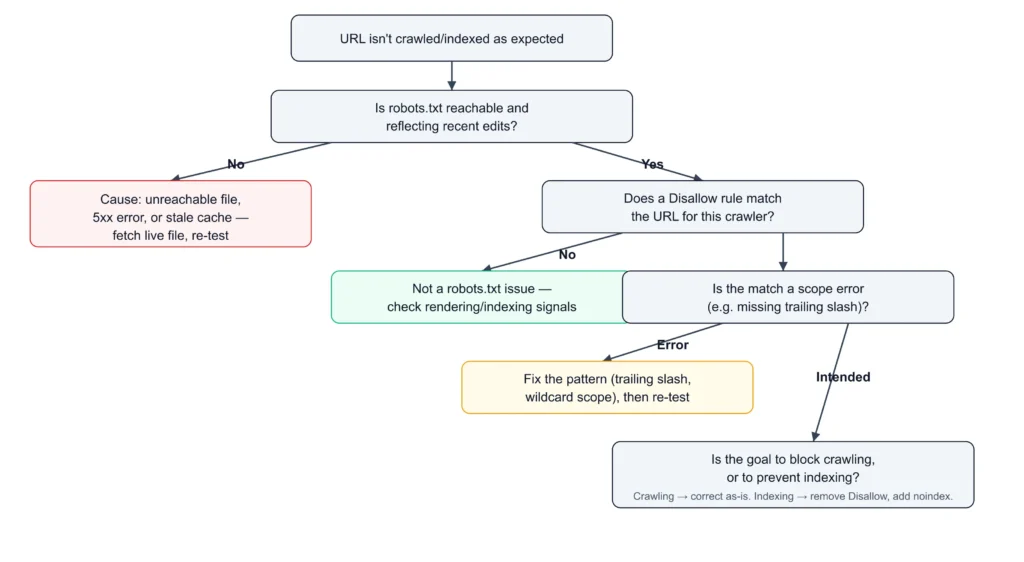
Decision tree for diagnosing robots.txt problems: check file reachability first, identify the matching rule, distinguish scope errors from intended rules, then confirm whether the actual goal is blocking crawling or preventing indexing.
- Confirm the URL is actually the one affected (check redirects, parameter variants, trailing-slash differences).
- Fetch the live robots.txt file directly, not a cached or CMS-editor version.
- Identify which
User-agentgroup applies to the crawler in question. - Determine which rule matches the URL, applying precedence logic.
- If a match is unexpected, check for scope errors (missing trailing slash, wildcard reach) before assuming the wrong intent.
- If the rule is correct and intentional, confirm the actual goal: stopping crawling, or preventing indexing? If indexing, robots.txt is the wrong tool — the page needs to stay crawlable so a
noindexdirective can be read. - If the rule looks correct and behavior still doesn’t match, allow for caching lag before concluding there’s a deeper problem.
- Check for conflicting signals elsewhere (noindex tags, canonicalization) that could produce behavior that looks like a robots.txt problem but isn’t one.
How to Verify a Rule Is Actually Working
| Method | Confirms | Limitation |
|---|---|---|
| Search Console’s robots.txt report | Which file Google has found/cached, and any warnings | Reflects Google’s cached view, not necessarily the live state |
Manually requesting /robots.txt | The file currently being served | Doesn’t confirm how a specific crawler interprets it |
| URL-specific rule testing | Whether a given URL is allowed/disallowed, and which rule matches | Only as accurate as the robots.txt version being evaluated |
| Server log analysis | Whether the crawler is actually requesting or avoiding target paths | Requires log access; shows crawling only, not indexing |
| Indexing status check | Whether a URL is actually indexed | Doesn’t explain why — can’t distinguish a robots.txt block from noindex or canonicalization on its own |
Frequently Asked Questions
Sources
- RFC 9309, IETF — rfc-editor.org/rfc/rfc9309.html
- Google Search Central, “How Google Interprets robots.txt” — developers.google.com/crawling/docs/robots-txt/robots-txt-spec
- Perplexity Help Center, “How does Perplexity follow robots.txt?” (updated July 16, 2026) — perplexity.ai/help-center
- Cloudflare Blog, “Perplexity is using stealth, undeclared crawlers to evade website no-crawl directives” (Aug 4, 2025) — blog.cloudflare.com
- Anthropic Help Center, crawler documentation — support.anthropic.com/en/articles/8896518
Part of SEORAF’s Technical SEO content on Crawling. This article is reviewed and updated as crawler behavior and standards evolve — see the last-updated date above.